---
title: "Email Deliverability Tools: 6 Categories, 1 Diagnostic"
description: "Compare email deliverability tools by the question each one answers, not by price. Six categories, the free ones first, and the bounce math nobody ranks."
canonical: "https://derrick-app.com/cold-email/deliverability-tools"
category: "B2B Marketing"
updated: "2026-09-09"
---
# Email deliverability tools: which one answers which symptom
> Email deliverability tools split into six categories: provider dashboards, authentication checkers, inbox placement testing, list quality and verification, warm-up services, and reputation monitoring. Each answers a different question, so comparing their prices to one another tells you nothing. The free provider dashboards are the authoritative source and answer most questions before any purchase. The category that decides the outcome for outbound teams is the one most rankings skip: list quality, because the bounce rate is the single input a sender can move before pressing send.
*Canonical: https://derrick-app.com/cold-email/deliverability-tools* · *B2B Marketing*
---
## Email deliverability tools: the six categories and the question each answers
**Email deliverability tools** are not one product category. They are six, and each one answers a different question about a different part of the chain between your send button and someone's inbox. Buying the wrong one is the normal outcome of reading a ranked list, because a ranked list compares prices across instruments that do not measure the same thing.
Here is the map. Read it as a set of questions first, and only then as a shopping list.
| Category | The question it answers | What it cannot tell you |
| --- | --- | --- |
| Provider dashboards | What Gmail and Microsoft think of your domain | Anything about a domain with low volume |
| Authentication checkers | Are SPF, DKIM and DMARC published and valid | Whether you reach an inbox |
| Inbox placement testing | Where a given message lands on a seed panel | Where it lands for your real recipients |
| List quality and verification | How many addresses will bounce before you send | Whether the person still works there tomorrow |
| Warm-up services | Is the mailbox accumulating positive engagement | Whether the list you send to is any good |
| Reputation and blocklist monitoring | Has something already gone wrong | Why it went wrong |
We opened the three pages holding the top of this search in September 2026 and each of them maps the stack to four of those six families. The two that get skipped are the two that decide the outcome for outbound teams, and we will spend the most time on them. The first is [verification before the send](https://derrick-app.com/features/email-verification), and it is the only instrument here that acts before the damage rather than reporting it. This page sits inside our wider [cold email cluster](https://derrick-app.com/cold-email).
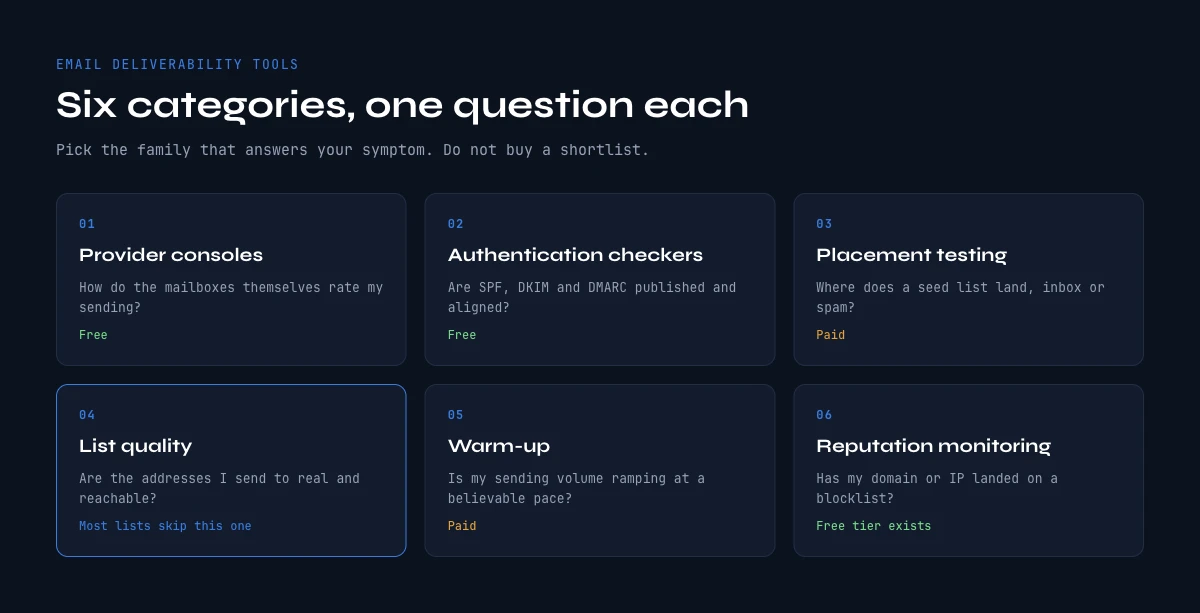The six categories of email deliverability tools, and the one question each of them answers.
## Start with the free instruments the mailbox providers already give you
Before any purchase, three dashboards published by the companies that actually decide your fate are free, authoritative and chronically underused.
- **Google Postmaster Tools.** Domain reputation, IP reputation, spam complaint rate, authentication pass rates and delivery errors, straight from the receiver. Nothing you buy can contradict it.
- **Microsoft Smart Network Data Services, usually shortened to SNDS.** The equivalent view for Outlook and Hotmail traffic, which behaves differently enough from Gmail that treating the two as one number hides most problems. One condition matters: SNDS reports on sending IP ranges you own or have delegated to you, so a team sending through a shared provider sees nothing there and has to read Microsoft's postmaster documentation and its own per-provider bounce logs instead.
- **Yahoo Sender Hub.** Smaller share of a B2B list, but it is the third opinion, and it is free.
Two caveats matter more than the setup instructions. First, these dashboards need volume. Google does not publish the threshold, and says only that reputation data appears once a domain sends enough traffic, but in practice the panels stay empty on a domain sending a few dozen messages a day, which is exactly the situation most outbound domains are in. Second, they are lagging. They tell you a reputation has already moved, not that it is about to. That combination is why paid instruments exist at all.
Add DMARC aggregate reports to the same free tier. Publishing a DMARC record on the monitoring policy costs nothing and turns silent authentication failures into a daily XML report. Our [SPF record check guide](https://derrick-app.com/cold-email/spf-record-check) covers the record itself and the lookup ceiling that quietly invalidates it.
## Authentication checkers: what they prove, and where they stop
This is the cheapest and most commoditised layer. A checker reads your DNS, parses SPF, DKIM and DMARC, and returns a verdict. MXToolbox, EasyDMARC, PowerDMARC and dmarcian all publish a free version, and the differences between them come down to how the result is presented rather than to what is measured.
What they prove is narrow and worth stating plainly: the records exist, they parse, and this server is on the list. What they do not prove is that any message reaches an inbox. Authentication is a gate you pass once. Passing it buys you the right to be judged on your sending behaviour, and nothing else.
Three failures a basic checker will miss, and which decide whether the layer is actually done:
1. **The ten DNS lookup ceiling on SPF.** Past ten, receivers return a permanent error and treat your record as absent. No bounce, no warning. Outreach stacks reach it faster than corporate ones because each tool adds its own include.
2. **DMARC alignment on the wrong domain.** Your sending tool often controls the return path, so SPF can pass on a domain the recipient never sees while alignment fails.
3. **Subdomains that inherit nothing.** A record on the root does not cover a sending subdomain. Each one publishes its own.
Budget for this layer: zero. Pay for it only when a monitoring product bundles it with something you actually needed.
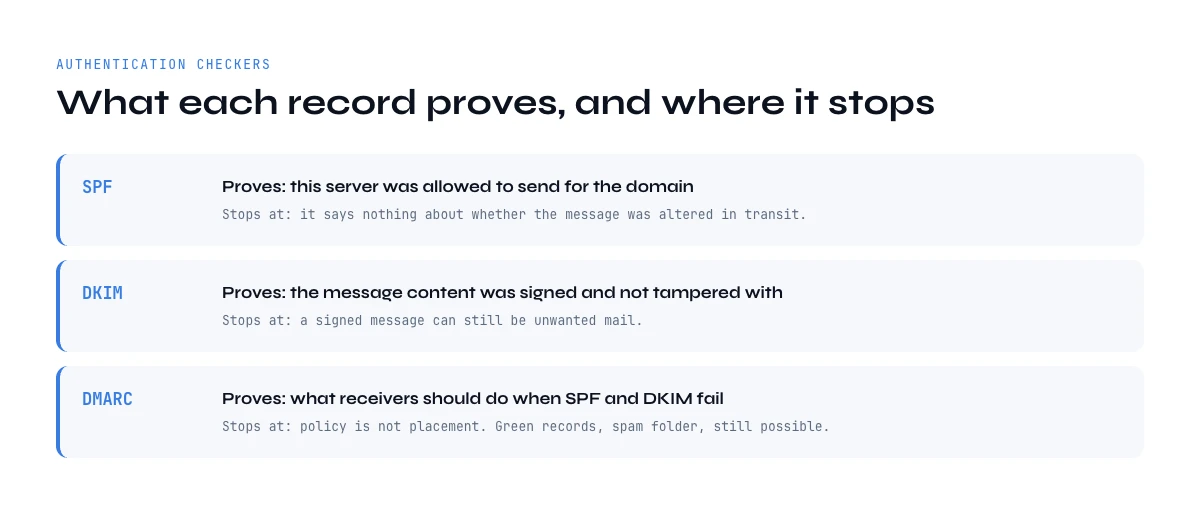What each authentication record proves, and the question it leaves open.
## Inbox placement testing: what a seed list actually measures
Seed testing sends your message to a panel of mailboxes the vendor controls, then reports the split across inbox, tabs and spam. GlockApps and Mailtrap are the names you will meet most often in this family, and every tool in it works the same way. The number looks like a fact. It is a sample, and understanding what it samples is the difference between a useful instrument and an expensive comfort blanket.
A seed panel has no engagement history with you. Nobody on it has ever opened, replied to or archived one of your emails. Neither Gmail nor Microsoft publishes the weight it gives engagement, but both name it in their sender guidance, and a seed test measures the part of the decision that comes from your content, your authentication and your domain reputation, with the recipient-specific part removed. That makes it excellent at detecting a content or configuration regression, and poor at predicting what a real list will do.
Use it accordingly. Run the same message before and after a change and compare the two results. Treat the absolute percentage as a relative signal, never as your inbox rate. And run it on the exact template you will send, not a sanitised version, because the URL, the tracking domain and the attachment are usually what moves the number.
**Related guide**
[Email deliverability checklist: 15 controls, sorted by cadence](https://derrick-app.com/cold-email/deliverability-checklist)
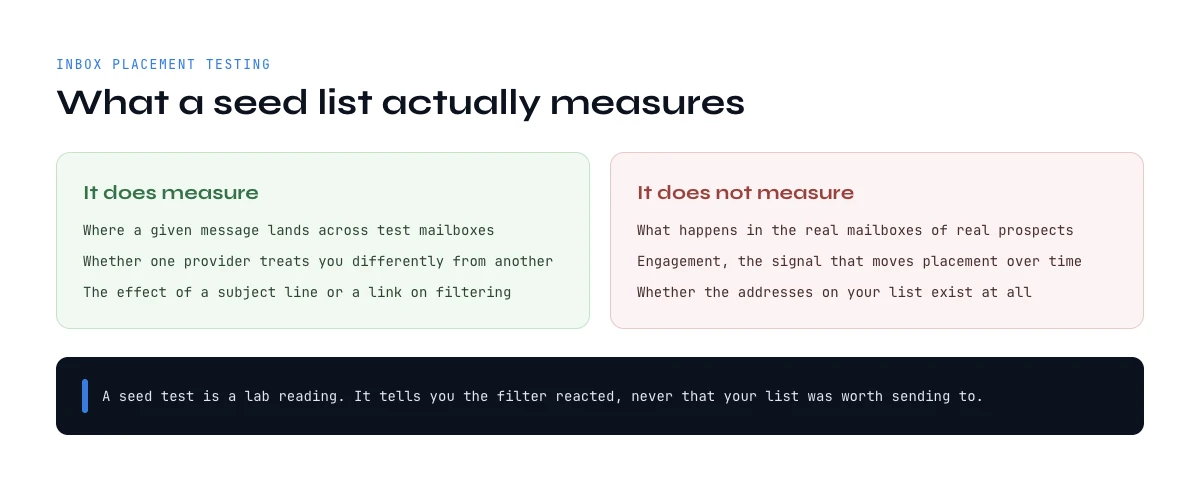A seed test reads the filter, not the quality of the list you send to.
## The category most email deliverability tools lists leave out: list quality
Read the ranked lists in this category and count how many treat verification as a deliverability instrument. In the three top-ranking guides we opened, none does. They map the stack to warm-up, placement testing, DNS and reputation monitoring, and mention bad data once, in passing, as a cause of bounces.
That omission is strange, because bounce rate is the most mechanical trigger in the entire system. Reputation at the major providers is not a mood. It is computed from a handful of ratios, and the hard bounce ratio is the one you can move before you send anything, with certainty, at a known cost. Everything else on this page measures a state you are already in.
The arithmetic is unforgiving and rarely written down, so here it is. A list where one address in ten is dead does not cost you ten percent of your results. It hands you a ten percent bounce rate on the first send, before a single reply arrives. Neither Gmail nor Microsoft publishes a bounce threshold, which is precisely why the number teams work to is one they set themselves, usually two percent. Ten against a self-imposed two is five times over, on day one, on a variable that was entirely knowable beforehand. For comparison, the one ratio Google does publish is the spam complaint rate: its sender guidelines tell bulk senders to stay under 0.1 percent and never to reach 0.3. The calculator below runs your own figures.
Free calculator
### Bounce budget: how many bad addresses your reputation can absorb
Enter your list and your sending plan. Nothing leaves your browser.
Addresses in the list you are about to send
Share you believe is dead or wrong, in %
Messages sent per mailbox per day
Mailboxes sending this campaign
Bounce rate you consider acceptable, in %
Fill the fields and press Calculate.
The dead share is the input teams guess and get wrong. Take it from your last campaign: hard bounces, plus everyone who replied from a company they had already left. The calculator assumes every dead address bounces hard, which is the pessimistic reading; catch-all domains hide some of them and delay the damage instead of preventing it. The last line prices the alternative in credits so you can set it against what a monitoring subscription costs you per month.
Run it with your real figures, then compare the euro figure on the last line to what a monitoring subscription costs you every month. If the credits are cheaper, the least expensive instrument in your stack is the one nobody ranked. Derrick verifies addresses where your list already lives, in the Google Sheets sidebar, in an AI assistant through MCP or through the REST API, with [Email Verification](https://derrick-app.com/features/email-verification) at 1 credit per email, billed only when a result comes back. When an address is missing rather than wrong, [Email Finder](https://derrick-app.com/features/email-finder) resolves it at 5 credits per email found, at any list size. Both sit on the paid plans, which start at 9 euros a month for 4000 credits, and unused credits roll over. [Clean the list you are about to send](https://derrick-app.com/?utm_source=seo&utm_medium=cocon&utm_campaign=ce-deliverability-tools&utm_content=cta-verify).
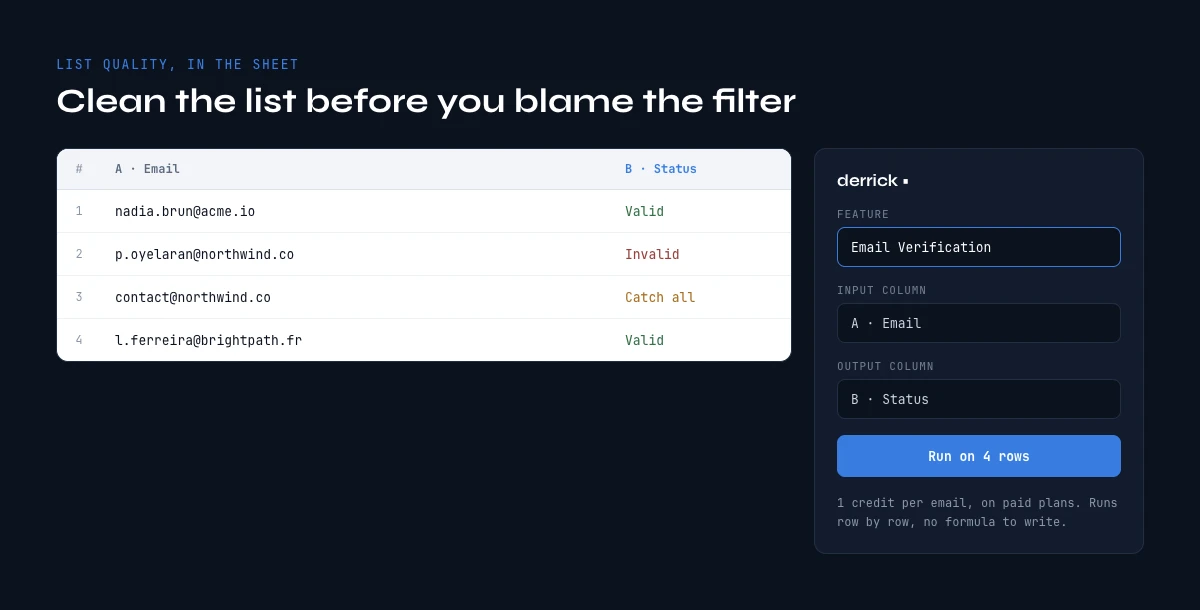List quality checked row by row in the sheet, before the first send.
## Warm-up tools: what they repair and what they cannot
Warm-up services such as InboxAlly, Warmup Inbox, MailReach or TrulyInbox put your mailbox into a private network of accounts that email each other, open the messages, reply to some and rescue whatever lands in spam. The effect is real: it manufactures the engagement history a new mailbox has none of, and it does shorten the ramp.
Two limits are worth understanding before you subscribe. The engagement is synthetic, and it comes from a pool of accounts that behaves nothing like your real recipients, so the marginal value of an extra month of it is small. And warm-up operates on the mailbox, never on the list. A perfectly warmed domain sending to a file that is one tenth dead still posts the bounce rate of a file that is one tenth dead. Warm-up cannot see your recipients.
Where it earns its price is the first four to six weeks of a new sending domain, alongside a slow volume ramp. Where it becomes a subscription nobody questions is month nine, on a domain that is struggling for reasons the warm-up cannot touch. If placement is falling on an established domain, the answer is almost never more warm-up. Check the list, the copy and the sending pattern first, in that order. Our guides on [the six template formats](https://derrick-app.com/cold-email/cold-email-template), [subject line formats](https://derrick-app.com/cold-email/cold-email-subject-lines) and [send timing](https://derrick-app.com/cold-email/best-time-to-send-cold-emails) cover the last two.
## Reputation and blocklist monitoring: the slow signals
This layer watches things that change on the scale of days: public and private blocklists, sender scores, and the reputation panels described earlier, polled and alerted on so you do not have to remember to look.
The honest assessment is that most public blocklists matter far less to B2B outbound than their alerting suggests. A listing at Spamhaus, whose lists the large receivers actually consult, is serious. A listing on one of the dozens of small lists nobody queries is a notification, not an incident. A monitoring product that alerts equally on both trains you to ignore it.
What genuinely justifies this layer is a single alert: your domain reputation at Gmail moving from high to medium, or your spam complaint rate crossing 0.3 percent, which Google's sender guidelines tell bulk senders never to reach, with 0.1 percent as the level to stay under. Both are visible free in Google Postmaster Tools. You are paying for someone to watch them for you and tell you the same day. That is a real service if you send every day, and an unnecessary line item if you do not.
**Related guide**
[Cold email software: the 4 layers behind the seat price](https://derrick-app.com/cold-email/cold-email-software)
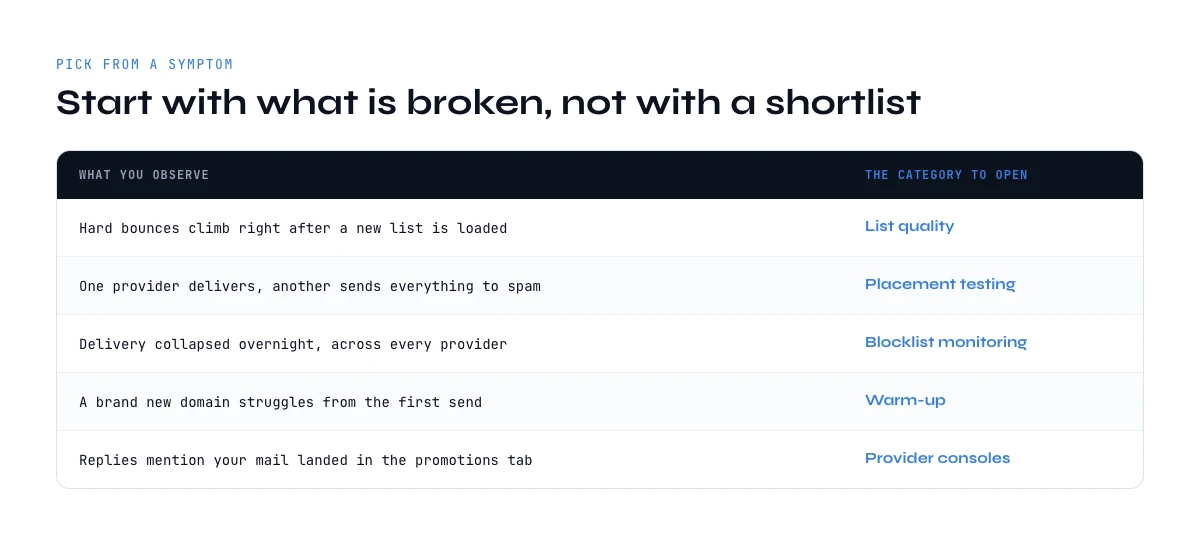Route each symptom to the category of tool that answers it.
## How to pick email deliverability tools from a symptom, not a shortlist
Almost every wasted purchase in this category comes from buying by category name instead of by symptom. Start from what you are actually seeing.
| What you observe | The instrument that answers it | What to do before buying anything |
| --- | --- | --- |
| High bounce rate on the first send | An email verification pass, run before the send | Verify a sample of 200 addresses and extrapolate |
| Opens collapsed overnight | Google Postmaster Tools, then an SPF and DMARC check | Check whether one provider or all of them moved |
| Steady slow decline over weeks | Reputation monitoring, plus the age of the list itself | Look at how old the list is, not at the copy |
| New domain, nothing lands | MXToolbox or EasyDMARC first, then a warm-up service | Confirm SPF, DKIM and DMARC before subscribing |
| Landing in Promotions, not spam | A seed panel test on the real template | Strip images, tracking links and signatures one at a time |
| Fine at Gmail, dead at Outlook | Microsoft SNDS if you own the sending IPs, your own per-provider bounce logs otherwise | Split your reporting by provider first |
Two rules follow from the table. Never change two things at once, because you will not learn which one worked. And never buy an instrument for a symptom you have not yet measured with the free ones, because a free dashboard frequently names the cause outright and closes the question before any purchase.
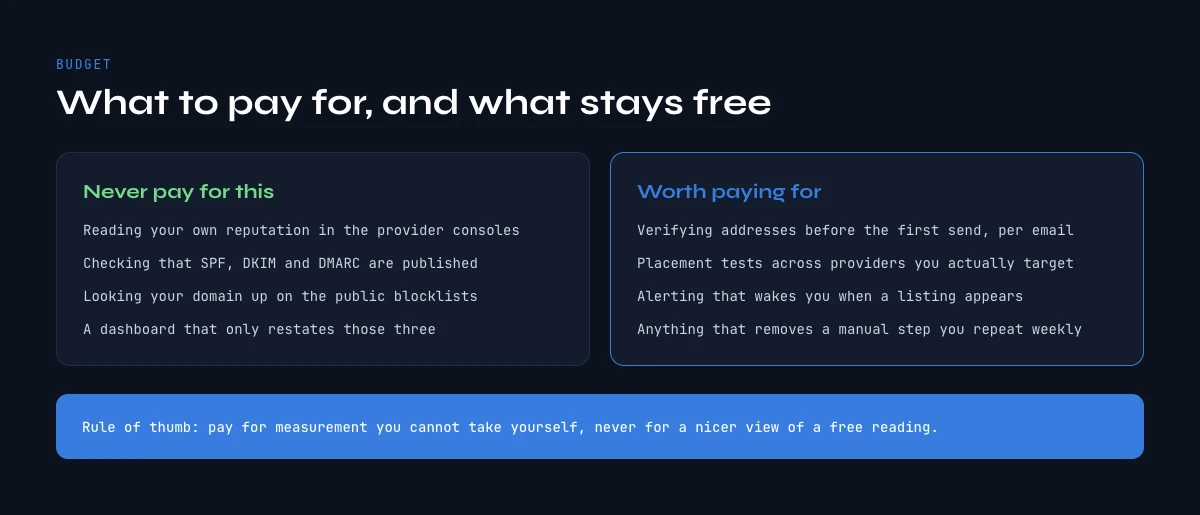Pay for a measurement you cannot take yourself, never for a nicer view of a free one.
## What to pay for, and what you should never pay for
A defensible stack for a team running outbound at ordinary volume is smaller than the ranked lists imply. Pay for verification, because it acts before the damage and its cost per unit is known. Pay for placement testing if you ship template changes often, because it is the only way to attribute a regression to a change. Pay for warm-up during a domain ramp, and put a date in the calendar to review it.
| Instrument | Family | Free tier | What it settles |
| --- | --- | --- | --- |
| **Derrick** | List quality and verification | Paid, from 9 euros a month, credits with rollover | How many addresses bounce, answered before the send, from Sheets, MCP or the API |
| Google Postmaster Tools | Provider dashboard | Free | Domain and IP reputation, spam complaint rate, authentication pass rate at Gmail |
| Microsoft SNDS | Provider dashboard | Free, sending IPs you own | The same picture on Outlook and Hotmail traffic |
| MXToolbox | Authentication and blocklist | Free tier, paid monitoring | Whether SPF, DKIM, DMARC and MX resolve, and whether you are listed |
| EasyDMARC, PowerDMARC, dmarcian | Authentication and DMARC reporting | Free checks, paid reporting | What your DMARC reports contain once the record is live |
| GlockApps, Mailtrap | Inbox placement testing | Limited free tests | Where a given template lands on a seed panel, before and after a change |
| InboxAlly, Warmup Inbox, MailReach, TrulyInbox | Warm-up | Paid, per mailbox | Whether a new mailbox is building engagement history |
| Spamhaus | Blocklist | Free lookup | Whether the receivers that consult it are already refusing you |
Read that table as a division of labour rather than a ranking: only the first row acts before you send, and the rest report on a state you are already in.
Do not pay for an authentication checker. Do not pay for a dashboard that repackages Google Postmaster Tools without adding an alert you would act on. Do not pay for a blocklist monitor that treats every list as equal. And be careful with anything sold as a single score, because a composite number that mixes authentication, reputation and content tells you something is wrong without telling you which layer to open.
One structural note on cost. Verification and finding are priced per unit, so they scale with the list rather than with a seat, which is what makes them workable on a batch of fifty and on a batch of fifty thousand. Derrick prices on credits with no seat minimum: Email Verification and Email Finder open at 9 euros a month for 4000 credits, with rollover on unused credits, and the API and the MCP server come with the higher plans (the [pricing page](https://derrick-app.com/pricing) carries the current thresholds). The free plan and its 100 credits per month cover the LinkedIn and company enrichment side rather than verification, so use it to see how the sidebar behaves on a real batch, not to clean a list. For the wider selection question, our guide on [the four layers behind a cold email seat price](https://derrick-app.com/cold-email/cold-email-software) covers where these instruments sit in the rest of the stack.
## Email deliverability tools: key takeaways
- There are six categories, not one. Each answers a different question, and comparing their prices to each other is meaningless.
- The free provider dashboards are the authoritative source. Start there, and buy only what they cannot tell you.
- Authentication checkers prove a permission, never an inbox. Budget zero for them.
- A seed panel measures your content and configuration with the recipient removed. Use it as a before and after, never as your inbox rate.
- List quality is the one lever you can pull before you send, and it is missing from most comparisons. Bounce rate is arithmetic, not luck.
- Warm-up works on the mailbox and never on the list. It is a ramp instrument with an expiry date.
- Buy from a symptom, change one thing at a time, and re-measure with the same instrument.
The single check that pays for itself before any subscription is the one you run on the list itself. Derrick finds and verifies addresses from the Google Sheets sidebar, from an AI assistant through MCP or through the REST API, with Email Verification at 1 credit per email and Email Finder at 5 credits per email found, both billed only when a result comes back. Those two sit on the paid plans, from 9 euros a month, and the credits you do not spend roll over. A web app is arriving soon for teams who prefer to work outside a spreadsheet. [See what it costs on your own list size](https://derrick-app.com/?utm_source=seo&utm_medium=cocon&utm_campaign=ce-deliverability-tools&utm_content=cta-primary), or read the rest of the [cold email cluster](https://derrick-app.com/cold-email).
We also publish one email every 2 weeks with what we are measuring on cold outreach and data quality. [Subscribe from the homepage](https://derrick-app.com/?utm_source=seo&utm_medium=cocon&utm_campaign=ce-deliverability-tools&utm_content=newsletter).
## Use Derrick in Claude (MCP) or via API
Derrick isn't only a Google Sheets add-on. The same B2B data enrichment runs as an MCP server (use it directly inside Claude and other AI agents) and as a REST API:
- **Claude / AI agents (MCP)**: connect the Derrick MCP server, then enrich from chat. Setup: /mcp
- **REST API**: call the same enrichment endpoints from your own stack (PLUS plan and up). Docs: https://app1.derrick-app.com/api/v1/docs/
## FAQ
### What are email deliverability tools?
They are six distinct categories of instrument, not one product. Provider dashboards report what Gmail and Microsoft think of your domain. Authentication checkers validate SPF, DKIM and DMARC. Inbox placement tests send to a seed panel. Verification tools measure how many addresses will bounce. Warm-up services build engagement history on a new mailbox. Reputation monitors watch blocklists and sender scores. Each answers a different question about a different part of the chain.
### Which email deliverability tools are free?
The authoritative ones. Google Postmaster Tools, Microsoft SNDS and Yahoo Sender Hub are published by the companies that decide your placement, and they cost nothing. DMARC aggregate reporting is free once the record is published. Most authentication checkers are free too. Between them they answer the majority of deliverability questions, which is why buying before you have read them is usually wasted money.
### Does an inbox placement test predict my real inbox rate?
No. A seed panel has no engagement history with you, and engagement is a dominant input to placement at Gmail and Microsoft. The test measures your content, your authentication and your domain reputation with the recipient-specific part removed. That makes it a reliable before-and-after detector for template changes, and an unreliable prediction of what your actual list will do.
### Do email warm-up tools fix bad deliverability?
They fix one cause of it. Warm-up builds engagement history on a mailbox, which shortens the ramp on a new sending domain over roughly four to six weeks. It has no visibility on your recipients, so it cannot change your bounce rate. If placement is falling on an established domain, more warm-up is rarely the answer: check the list, then the copy, then the sending pattern.
### How much does a bad list actually cost in deliverability terms?
More than the arithmetic suggests. A list where one address in ten is dead hands you a ten percent bounce rate on the first send. Neither Gmail nor Microsoft publishes a bounce threshold, so the number teams work to is the one they set themselves, usually two percent: ten against two is five times over, on day one, on a variable that was knowable beforehand. Verification acts before the damage, which is what separates it from every other instrument on this page.
### What should I buy first for cold email deliverability?
Nothing, until you have looked at Google Postmaster Tools and confirmed SPF, DKIM and DMARC with a free checker such as MXToolbox or EasyDMARC. After that, verification pays first because it acts before the send and its unit cost is known. Add placement testing if you change templates often, and warm-up only during a domain ramp, with a review date in the calendar.
### Can Derrick verify a list before I send?
Yes. Derrick runs Email Verification at 1 credit per email, billed only when a result comes back, and Email Finder at 5 credits per email found. Both work from the Google Sheets sidebar, from an AI assistant through MCP, or through the REST API, on a batch of fifty as on a batch of fifty thousand. Both sit on the paid plans, which start at 9 euros a month for 4000 credits with rollover; the API and the MCP server come with the higher plans. The free plan and its 100 credits per month cover the LinkedIn and company enrichment side rather than verification.
## Related
- [Cold Email Templates That Work in 2026, and the Data Behind Them](https://derrick-app.com/cold-email/cold-email-template)
- [Cold Email Subject Lines That Earn the Open, and the Data Behind Them](https://derrick-app.com/cold-email/cold-email-subject-lines)
- [The email deliverability checklist, sorted by when each control actually happens](https://derrick-app.com/cold-email/deliverability-checklist)
- [Best time to send cold emails, and the data problem underneath it](https://derrick-app.com/cold-email/best-time-to-send-cold-emails)
- [SPF record check: how to read yours, and the ceiling that breaks it](https://derrick-app.com/cold-email/spf-record-check)
- [Cold email software: the seat price hides where campaigns actually fail](https://derrick-app.com/cold-email/cold-email-software)