Import a list or paste LinkedIn URLs
Open the web app, nothing to install. Drop a CSV, paste LinkedIn profile URLs or import a Sales Navigator search.
Getting started
Import a list or paste LinkedIn URLs, run an action, get emails, phones and company data. Nothing to install, 100 free credits every month.
Install the add-on and enrich your lists without leaving your spreadsheet.
Install in Google Sheets →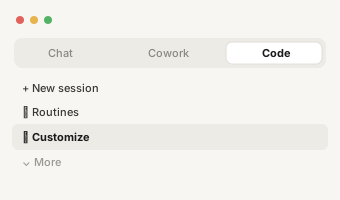
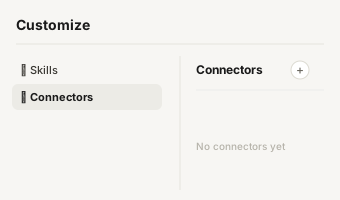
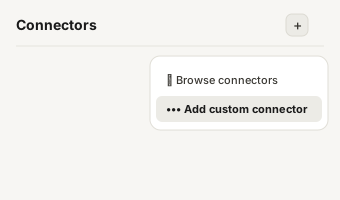
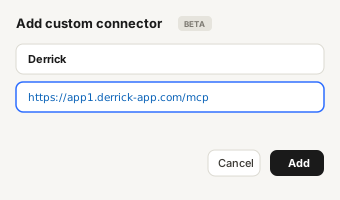
https://app1.derrick-app.com/mcp Call the same enrichment endpoints straight from your own stack or workflow.
Read the API docs →No credit card · 100 free credits / month · Same credits on every surface
The same three moves for every list you will build.
Open the web app, nothing to install. Drop a CSV, paste LinkedIn profile URLs or import a Sales Navigator search.
Find emails, phones, enrich profiles or companies. Choose the input column, the cost shows before you run.
Rows fill in as results arrive. Export a CSV or push the list to your outreach tool. No result on a finder, no charge.
Install the add-on and enrich your lists without leaving your spreadsheet.
Install in Google Sheets → https://app1.derrick-app.com/mcp Call the same enrichment endpoints straight from your own stack or workflow.
Read the API docs →No credit card · 100 free credits every month
First workflows01 / 04
Each one chains a few actions on the same list. Run it in the app, or watch it play step by step first.
Credits, simply02 / 04
Every action costs a few credits, shown before you click Run. Finders only charge when they find something: an email that is not found costs nothing.
The free plan gives you 100 credits every month, enough for up to 20 emails found. A phone costs 200 credits, so phone lookups start with a paid plan. On a paid plan, unused credits carry over from month to month.
See every plan →Other surfaces03 / 04
Same engine, same actions, same credits. Pick the surface that fits the job.
Install the Google Sheets module, then copy our starter sheet with sample LinkedIn URLs. Derrick opens as a sidebar next to your rows.
Ask in plain English, your assistant calls Derrick through MCP and answers in the chat. From the PLUS plan.
Call the same actions from your code, your CRM or Zapier, Make and n8n. JSON in, JSON out. From the PLUS plan.
Help04 / 04
Two minutes on enriching LinkedIn profiles in the Google Sheets module.
Step-by-step guides for each action, and the tutorials we publish on the blog.
A question about a result, your plan or your credits? Write to us, a person answers.