---
title: "How to See If Someone Has LinkedIn Premium (2 Real Tells)"
description: "Check if someone has LinkedIn Premium: the gold badge is opt-in, Open Profile is the second tell, and why no badge never means a free account."
canonical: "https://derrick-app.com/linkedin/profile/who-has-linkedin-premium"
category: "LinkedIn Profile"
updated: "2026-09-01"
---
# How to See If Someone Has LinkedIn Premium
> You can see if someone has LinkedIn Premium by looking for the gold Premium badge next to their name, but that badge is an opt-in toggle the member controls, so its absence proves nothing. The second tell is Open Profile: if you can message someone outside your network without spending an InMail credit, they hold Premium with profile visibility enabled. Seats bought through a sales contract default to a basic profile display, which means the heaviest platform users are the least likely to show a badge. No public field, API property or bulk method returns a subscription status, so at list scale you enrich the role, company and verified contact channel instead.
*Canonical: https://derrick-app.com/linkedin/profile/who-has-linkedin-premium* · *LinkedIn Profile*
---
Every guide on this question tells you to look for the gold badge and stops there. The badge is a setting the member can switch off, which makes the popular answer right half the time and silently wrong the rest. This guide covers the two tells that hold up, what Premium actually changes for the person you are looking at, and what to do when the real job is four hundred profiles rather than one.
## How to see if someone has LinkedIn Premium: the short answer
To **see if someone has LinkedIn Premium**, look for the gold Premium badge next to their name on their profile and in search results. That is the only public signal LinkedIn exposes, and the important part is what almost nobody tells you: the badge is a toggle the member controls. In their profile settings there is a switch called Profile Premium Badge, and it can be off. A profile with no badge is not proof of a basic account.
There is a second, weaker tell. If you can send a direct message to someone outside your network without spending an InMail credit, that person has Open Profile turned on, and Open Profile is only available to members whose Premium profile visibility is enabled. When you can see it, you have your answer. When you cannot, you have learned nothing at all.
Everything else circulating on this question is folklore. There is no public field, no API property and no reliable visual cue beyond those two. If you need certainty, you will not get it, and the useful move is to stop trying to detect the subscription and start working with the thing you actually wanted it for. This guide covers both: the tells that hold up, and what to do at list scale when a single profile check is not the real job.
## The gold badge, and why it proves less than you think
LinkedIn's own Help Center, checked on 1 September 2026, describes the badge as an opt-in display setting. A Premium member opens their profile, edits the introduction card, and finds a Profile Premium Badge toggle under Premium settings. Switch it on and the gold badge appears on the profile and beside the name in search results. Switch it off and the subscription is invisible to everyone.
That single fact breaks the two conclusions people usually draw.
| What you observe | What people conclude | What it actually means |
| --- | --- | --- |
| Gold badge present | They pay for Premium | Correct. The badge cannot be displayed without an eligible subscription. |
| No badge | They are on a free account | Unknown. They may have Premium with the badge switched off. |
| Badge on a recruiter profile | They have Recruiter | Not necessarily. Recruiter and Sales Navigator subscribers are eligible for the same badge, and the badge does not name the product. |
| No badge on an obvious power user | They are bluffing | Often the opposite. Seats bought through a sales contract default to a basic profile display. |
So the badge is sufficient but not necessary. Present, it is a reliable positive. Absent, it carries no information at all. Any workflow that treats "no badge" as "free account" is wrong on an unknown share of rows, and you cannot measure that share because the thing you would measure it against is hidden by design.
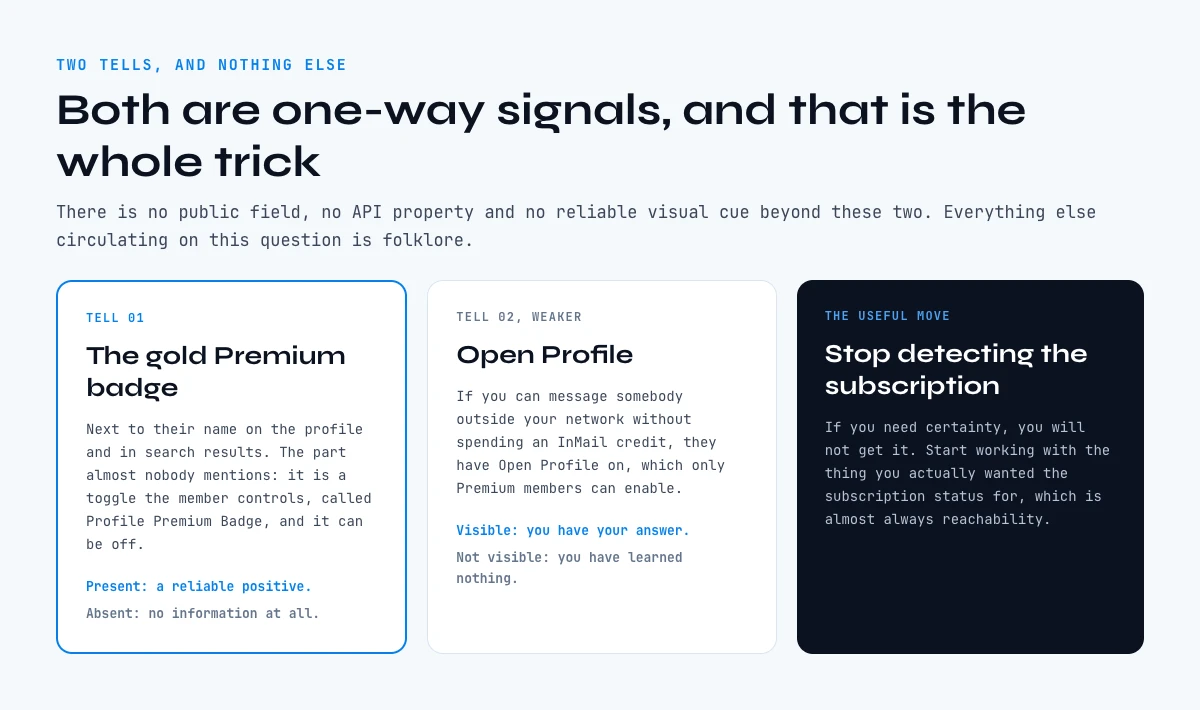The only two public signals, and why each one works in a single direction.
## Open Profile: how to see if someone has LinkedIn Premium without the badge
Open Profile lets any member send a message to the profile owner without using an InMail credit, even with no connection. It is not available on free accounts. Turning on Premium profile visibility is what gives a member the option to receive Open Profile messages, which is why the two signals travel together.
Reading it is straightforward. Open the profile of somebody outside your network and look at the primary action. If a plain message option is available without a prompt to spend an InMail or upgrade, the person is a Premium member who chose to be reachable. If the interface pushes you toward an InMail, you have learned nothing, because Open Profile is an option many Premium members never turn on.
The practical value of this tell is not the subscription. It is the reachability. A prospect with Open Profile on has told the platform they want unsolicited messages, which is a better qualifier for your outreach than the billing status you were originally chasing. If your reason for asking was "can I message this person", the answer is on the profile already and does not require you to guess at their plan.
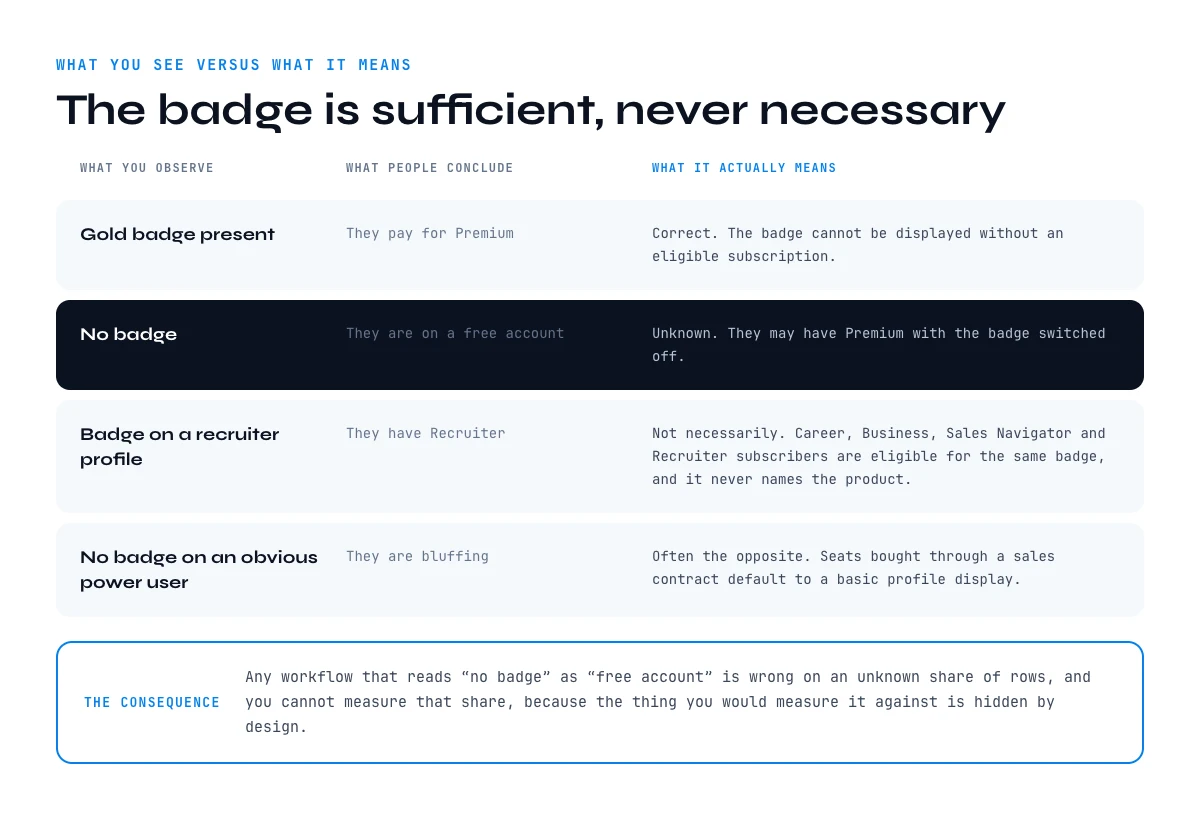What you observe, what people conclude from it, and what it actually means.
## What Premium actually changes for the person you are looking at
Premium changes one thing that matters to a prospector: how long the person can see that you viewed their profile. A basic account shows the three most recent viewers from the last 90 days, a Premium account shows the full viewer list for up to 365 days with filters and trends. Everything else Premium adds is secondary to that.
| Who viewed your profile | Basic account | Premium account |
| --- | --- | --- |
| Viewers shown | The 3 most recent | The full list |
| History window | 90 days | Up to 365 days |
| Filtering | None | Date range, company, industry, demographics |
| Sorting | None | Most recent, most relevant |
| Trend analysis | None | Weekly viewer trend graph |
| Viewer breakdowns | Counts only | Top locations, industries, companies |
| InMail credits | None | Monthly allowance, varies by tier |
Figures taken from the LinkedIn Help Center pages on profile view differences and Premium profile visibility, checked on 1 September 2026.
The consequence for prospecting is concrete. If your target has Premium, viewing their profile before you message them is a signal they will see, with your name attached, for up to a year. If they are on a basic account, your view is invisible within a few days unless you were one of the last three. That is a real tactical difference, and it is the only reason the original question is worth asking at all.
What each tier costs, and what that works out to per InMail actually sent, is broken down in our guide to [how much LinkedIn Premium costs](https://derrick-app.com/linkedin/profile/linkedin-premium-cost).
## Sales Navigator and Recruiter: the seats the badge hides
Sales Navigator and Recruiter subscribers are eligible for the same gold Premium badge, but seats bought through a sales contract keep a basic profile display by default. That single default is why the heaviest prospectors on the platform are the least likely to show a badge, and it is where most guides on the subject are silently wrong.
Members who purchase online are automatically upgraded to a Premium profile, so the badge is available and often on. Members whose seat comes through a sales contract, which is how most larger teams buy, remain on a basic profile display by default unless they deliberately choose to show as Premium. In other words: the population most likely to be running heavy prospecting is also the population least likely to show a badge.
Two operational conclusions follow. First, a badge sweep across a target list systematically under-counts exactly the accounts you care about. Second, the badge tells you nothing about which product somebody holds, so you cannot use it to separate a jobseeker on a career plan from a sales team on Navigator seats. If that distinction matters to your offer, you need a different signal entirely: the role, the team size and the hiring pattern of the company, none of which are hidden.
Our guide on [what LinkedIn API access really costs](https://derrick-app.com/linkedin/profile/linkedin-api-pricing) covers what no tier of any of these products exposes programmatically, which is the other half of the same misunderstanding.
## Check a profile in thirty seconds
Answer the three questions below in order and stop at the first one that resolves. The tool applies the rules from the sections above rather than guessing.
Free checker
### LinkedIn Premium tell checker
Three observations, one verdict, including the honest verdict that you cannot tell.
1. Is there a gold Premium badge next to the name?
2. Can you message them without spending an InMail, outside your network?
3. Does their company buy seats through a contract? (large sales or recruiting team)
Answer the three questions to get a verdict.
There is no public field that states a subscription. This checker converts the two real tells into a confidence level, and says so plainly when the honest answer is that it cannot be determined.
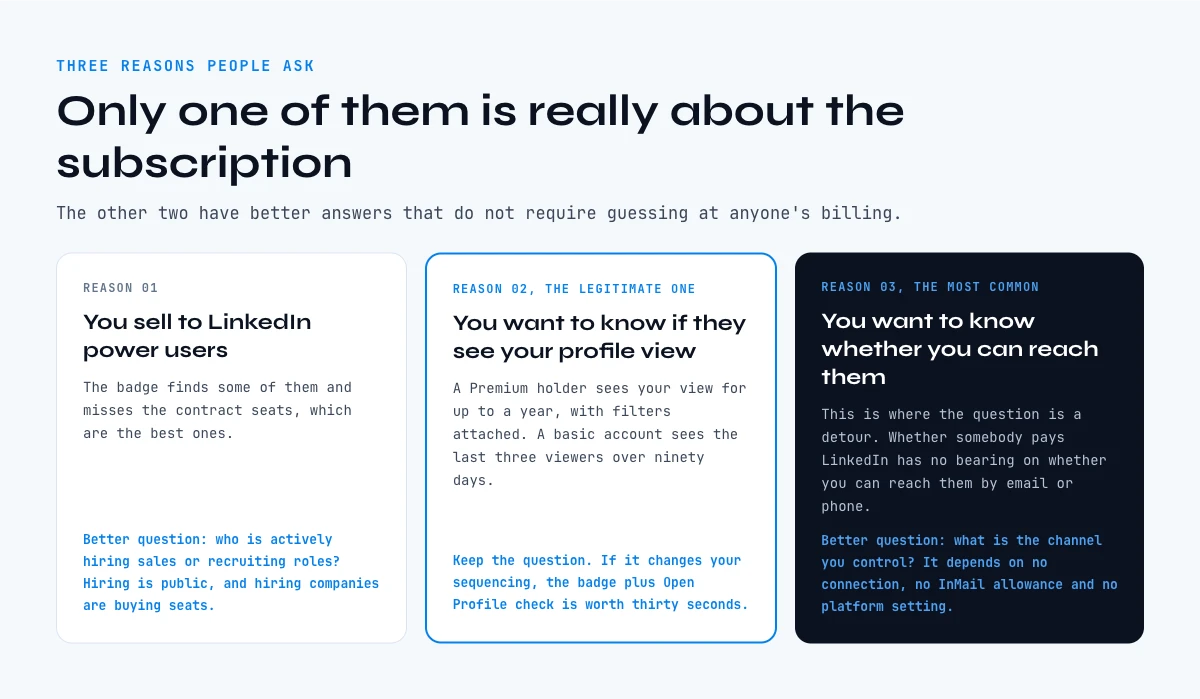Three reasons people ask, and the better question behind two of them.
## Why you are really asking, and the better question in each case
There are three reasons people ask whether somebody has LinkedIn Premium, and only one of them is genuinely about the subscription. The other two have better answers that do not require guessing at anyone's billing.
**You sell to LinkedIn power users.** If your product serves people who live on the platform, you want Premium holders as a segment. The badge will find some of them and miss the contract seats, which are the best ones. A better proxy is behavioral: companies actively hiring sales or recruiting roles are companies buying seats, and hiring is public. Our note on [reading a Social Selling Index score](https://derrick-app.com/linkedin/profile/social-selling-index) covers the other visible marker of platform intensity.
**You want to know if they will see your profile view.** This is the legitimate version. A Premium holder sees your view for up to a year with filters attached. A basic account sees the last three viewers over 90 days. If the answer changes your sequencing, the badge plus Open Profile check is worth the thirty seconds.
**You want to know whether you can reach them.** This is the most common reason and the one where the question is a detour. Whether somebody pays LinkedIn has no bearing on whether you can reach them by email or phone, and those channels do not depend on a connection, an InMail allowance or a platform setting at all.
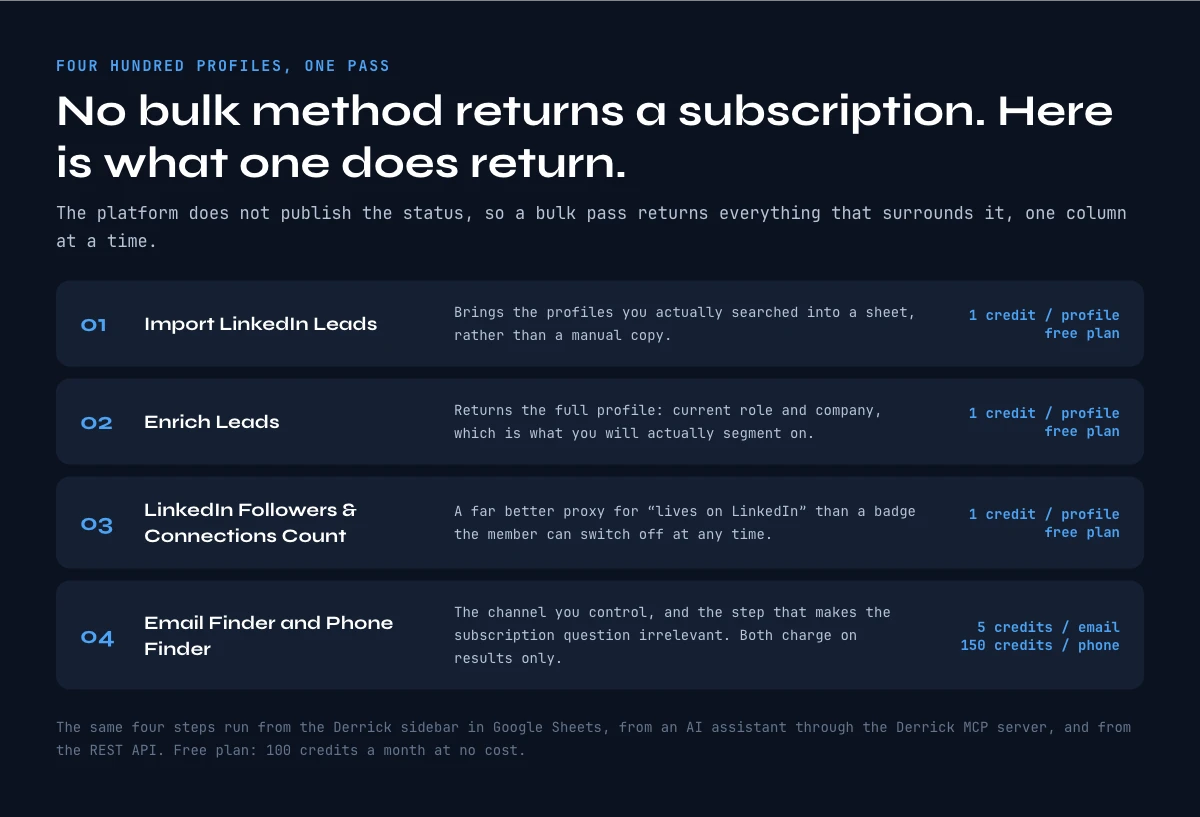What a bulk pass actually returns, in four steps with the credit cost of each.
## How to see if someone has LinkedIn Premium across a whole list
Checking one profile is a thirty second job. Checking four hundred is a different problem, and it is usually the real one hiding behind the question.
The honest starting point is that no bulk method returns a subscription status, because the platform does not publish one. What a bulk pass can return is everything that surrounds it: current role, current company, headcount, follower count, and the verified contact details that make the subscription question irrelevant. In practice the sheet has one row per profile and the columns fill one at a time.
- **Import the profiles.** [Import LinkedIn Leads](https://derrick-app.com/features/import-linkedin-leads?utm_source=seo&utm_medium=article&utm_campaign=lp-who-has-linkedin-premium&utm_content=feature_import-linkedin-leads) brings Sales Navigator leads into a sheet at 1 credit per profile, and the [regular LinkedIn version](https://derrick-app.com/features/import-linkedin-leads-regular?utm_source=seo&utm_medium=article&utm_campaign=lp-who-has-linkedin-premium&utm_content=feature_import-linkedin-leads-regular) does the same from a standard search. Both run on the free plan, so the list starts from what you actually searched rather than a manual copy.
- **Enrich the profile.** Enrich Leads returns the full profile data for 1 credit per profile, on the free plan too, which gives you the role and company you will segment on.
- **Add platform intensity.** [LinkedIn Followers and Connections Count](https://derrick-app.com/features/linkedin-followers-connections-count?utm_source=seo&utm_medium=article&utm_campaign=lp-who-has-linkedin-premium&utm_content=feature_linkedin-followers-connections-count) costs 1 credit per profile and is a far better proxy for "lives on LinkedIn" than a badge the member can switch off at any time.
- **Resolve the channel.** Email Finder at 5 credits per found email, and [Phone Finder](https://derrick-app.com/features/phone-finder?utm_source=seo&utm_medium=article&utm_campaign=lp-who-has-linkedin-premium&utm_content=feature_phone-finder) at 150 credits per found number, both on the paid plans and both charged on results only.
The same steps run from the Derrick sidebar in Google Sheets, from an AI assistant through the Derrick MCP when the question is conversational, and from the REST API when the list is produced upstream by your CRM. The surface changes, the credit cost does not. Extracting the rest of the profile fields is covered in our guide on [how to extract a job title from a profile URL](https://derrick-app.com/linkedin/profile/find-job-title).
**One email every two weeks.** Fill Down covers go-to-market and sales data tactics, including what LinkedIn does and does not expose to prospectors. [Subscribe to the Fill Down newsletter →](https://www.linkedin.com/newsletters/fill-down-gtm-sales-news-7480639838598184961/)
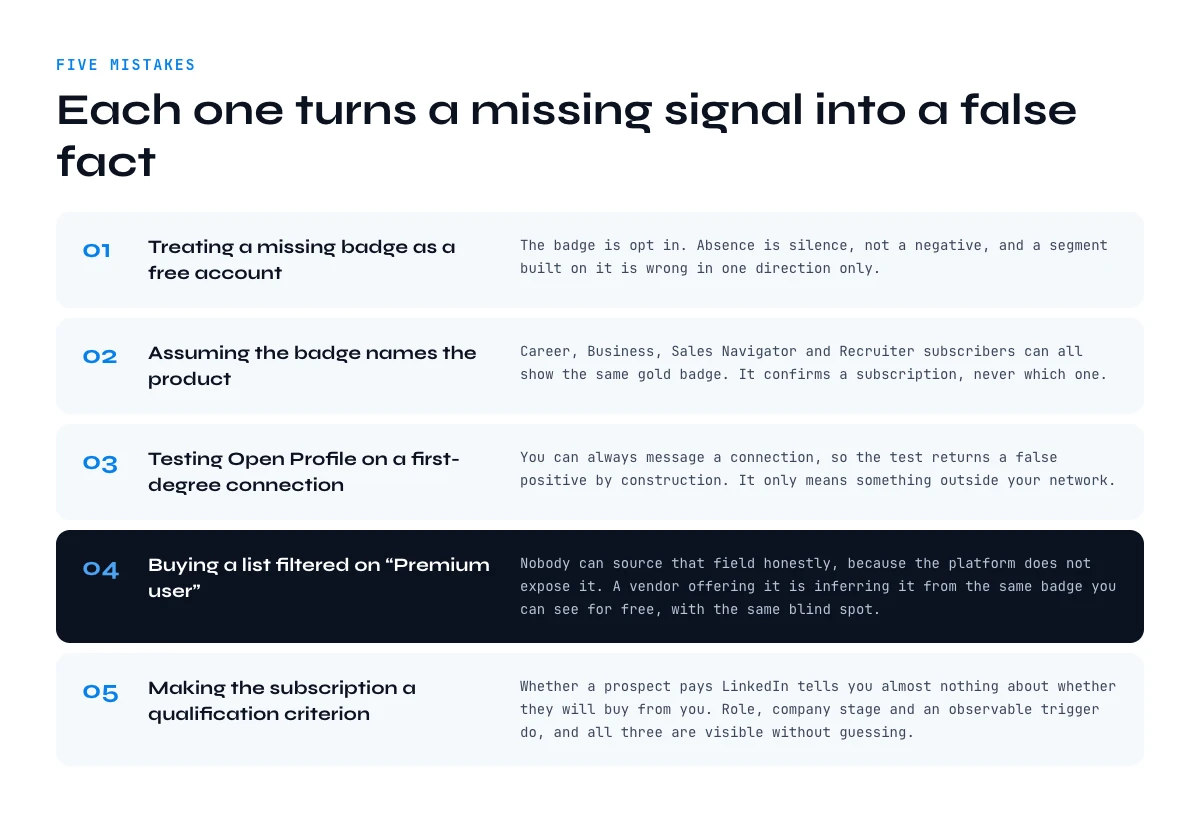Five ways a missing signal gets turned into a false fact.
## Five mistakes when you try to see if someone has LinkedIn Premium
### Treating a missing badge as a free account
The badge is opt in. Absence is silence, not a negative, and building a segment on it produces a list that is wrong in one direction only.
### Assuming the badge names the product
Career, Business, Sales Navigator and Recruiter subscribers can all show the same gold badge. It confirms a subscription, never which one.
### Testing Open Profile on a first degree connection
You can always message a connection, so the test returns a false positive by construction. It only means something outside your network.
### Buying a list filtered on "Premium user"
Nobody can source that field honestly, because the platform does not expose it. A vendor offering it is inferring it from the same badge you can see for free, with the same blind spot.
### Making the subscription a qualification criterion
Whether a prospect pays LinkedIn tells you almost nothing about whether they will buy from you. Role, company stage and an observable trigger do, and all three are visible without any guessing. Our guide on [finding someone's current company from a profile](https://derrick-app.com/linkedin/profile/find-company) covers the field that actually drives segmentation.
## Key takeaways
- The gold Premium badge is the only public signal, and it is an opt-in toggle the member controls.
- A badge proves Premium. No badge proves nothing, so never read absence as a free account.
- Open Profile messaging is the second tell: positive when present, silent when absent.
- Seats bought through a sales contract default to a basic profile display, so heavy users are the least likely to show a badge.
- Premium changes who viewed your profile from three viewers over 90 days to a full year with filters, which is the one difference that should change your sequencing.
- At list scale, no method returns a subscription status, so enrich the role, the company and the verified contact channel instead.
## Use Derrick in Claude (MCP) or via API
Derrick isn't only a Google Sheets add-on. The same B2B data enrichment runs as an MCP server (use it directly inside Claude and other AI agents) and as a REST API:
- **Claude / AI agents (MCP)**: connect the Derrick MCP server, then enrich from chat. Setup: /mcp
- **REST API**: call the same enrichment endpoints from your own stack (PLUS plan and up). Docs: https://app1.derrick-app.com/api/v1/docs/
## FAQ
### How can you tell if someone has LinkedIn Premium?
Look for the gold Premium badge next to their name on the profile and in search results. If it is there, they hold an eligible subscription. If it is not, you have learned nothing, because the badge is an opt-in toggle in the member's own profile settings. The only other public tell is Open Profile: being able to message someone outside your network without spending an InMail credit confirms Premium.
### Does no badge mean a free LinkedIn account?
No. The Profile Premium Badge is a display setting the member controls, so a Premium subscriber can be completely invisible as one. Absence of a badge is silence rather than a negative, and any segmentation built on it under-counts by an amount you cannot measure.
### Can you tell whether someone has Sales Navigator or Recruiter?
Not from the badge. Recruiter and Sales Navigator subscribers are eligible for the same gold Premium badge, and it never names the product. Worse, members whose seat comes through a sales contract keep a basic profile display by default, so large sales and recruiting teams are the group least likely to show any badge at all.
### Is there an API or a tool that returns LinkedIn Premium status?
No, because the platform does not publish a subscription field. Any tool or list claiming to filter on Premium users is inferring it from the same visible badge you can check yourself, and it inherits the same blind spot on members who switched the badge off.
### What does LinkedIn Premium actually change for that person?
Mostly profile view visibility. A basic account sees the three most recent viewers from the last 90 days. A Premium account sees the full viewer list for up to 365 days, with filtering by date range, company, industry and demographics, a weekly trend graph and sorting options. Premium tiers also include a monthly InMail allowance.
### Should I visit a prospect's profile before messaging them?
It depends on what they can see. If they hold Premium, your visit stays visible to them with your name attached for up to a year, which makes viewing before messaging a deliberate warm-up. If they are on a basic account, the visit disappears within days unless you were one of the last three viewers.
### How do you check Premium status across a whole list?
You cannot, and the useful reframing is that you do not need to. No bulk method returns a subscription status. What a bulk pass does return is the role, the current company, the follower count and the verified email or phone, which are the fields that actually drive segmentation and outreach.
### Is checking whether a profile has Premium against LinkedIn's rules?
Looking at what a profile publicly displays is ordinary use of the site. The badge and the messaging options are shown to you by the platform itself. What does not exist is any sanctioned way to query a subscription status in bulk, which is why the honest answer to the list-scale version of this question is to segment on something else.
## Related
- [LinkedIn Profile Data Decay Report 2026: How Fast B2B Profile Data Goes Stale](https://derrick-app.com/linkedin/profile/linkedin-profile-data-decay-2026)
- [How to Find a LinkedIn URL: Complete Guide for Professionals and Prospectors](https://derrick-app.com/linkedin/profile/find-url)
- [LinkedIn Headline 2026: Character Limit + Examples That Work](https://derrick-app.com/linkedin/profile/headline)
- [LinkedIn Profile Location Extraction: Get the Country from a Profile URL](https://derrick-app.com/linkedin/profile/find-country)
- [How to Find City from LinkedIn Profile URL: Complete 2026 Guide](https://derrick-app.com/linkedin/profile/find-city)
- [How to Find Someone's LinkedIn Skills: Complete Guide 2026](https://derrick-app.com/linkedin/profile/find-skills)
- [How to Find Languages Spoken on LinkedIn Profiles: Complete Guide 2026](https://derrick-app.com/linkedin/profile/find-languages)
- [How to Find Someone's Current Company from a LinkedIn Profile](https://derrick-app.com/linkedin/profile/find-company)
- [How to Extract Job Title from a LinkedIn Profile URL](https://derrick-app.com/linkedin/profile/find-job-title)
- [How to Validate a LinkedIn Profile URL (Format Rules and Bulk Cleanup)](https://derrick-app.com/linkedin/profile/valid-linkedin-url)
- [How much is LinkedIn Premium in 2026? Every plan, priced and compared](https://derrick-app.com/linkedin/profile/linkedin-premium-cost)
- [Is LinkedIn Premium worth it? Run the numbers before you pay](https://derrick-app.com/linkedin/profile/is-linkedin-premium-worth-it)
- [Social Selling Index (SSI): the diagnostic guide to your LinkedIn score](https://derrick-app.com/linkedin/profile/social-selling-index)
- [LinkedIn API pricing in 2026: what access costs, and what it never buys you](https://derrick-app.com/linkedin/profile/linkedin-api-pricing)
- [LinkedIn Premium Connection Request Limit: What Paying Actually Changes](https://derrick-app.com/linkedin/profile/premium-connection-limit)