Email Bounce Checker: Verify Every Address Before You Hit Send
Use an email bounce checker to validate addresses before sending, keep bounces under 2% and protect your sender reputation. Free estimator inside.


An email bounce checker tests every address on your list against the receiving mail server before you press send, so undeliverable addresses get removed instead of being counted against your domain. This guide covers how the check runs, what each result status means, the bounce thresholds that trigger spam filtering, the SMTP codes behind a bounce message, and a Google Sheets playbook you can run on a list of any size.
Last updated: 2026-04-28
You've carefully crafted your email campaign, but 5% of your messages bounce. The result? Your sender reputation tanks, legitimate emails land in spam, and future campaigns are compromised. The solution: verify your emails BEFORE sending with a bounce email checker.
This guide explains how email verification works, why it's essential for deliverability, and how to implement an effective validation workflow that keeps your bounce rate below 2%.
What is a bounce email checker and why you need one
A bounce email checker is an email verification tool that analyzes an address's validity before you send your campaign. It verifies that the address actually exists, that the mailbox can receive messages, and that the mail server accepts the connection.
For an SDR prospecting 500 leads per week, a bounce email checker is non-negotiable. Roughly 30% of emails sitting in a CRM are invalid (Twilio, 2025) - that's 150 bounces every week, eroding your sender reputation campaign after campaign.
The real impact on your prospecting
Gmail and Outlook constantly monitor your bounce rate. Per HubSpot's 2026 deliverability data, anything above 5% triggers automatic penalties: legitimate emails land in spam, even for engaged prospects.
Take Sarah, Head of Sales at a SaaS startup. She sends 2,000 emails per month with no upfront verification. With an 8% bounce rate, she loses 160 opportunities monthly. After 3 months, Gmail flags 40% of her sends as spam - even those going to engaged prospects. With a bounce email checker, Sarah would have stripped the invalid addresses before sending and held her bounce rate under 1%.
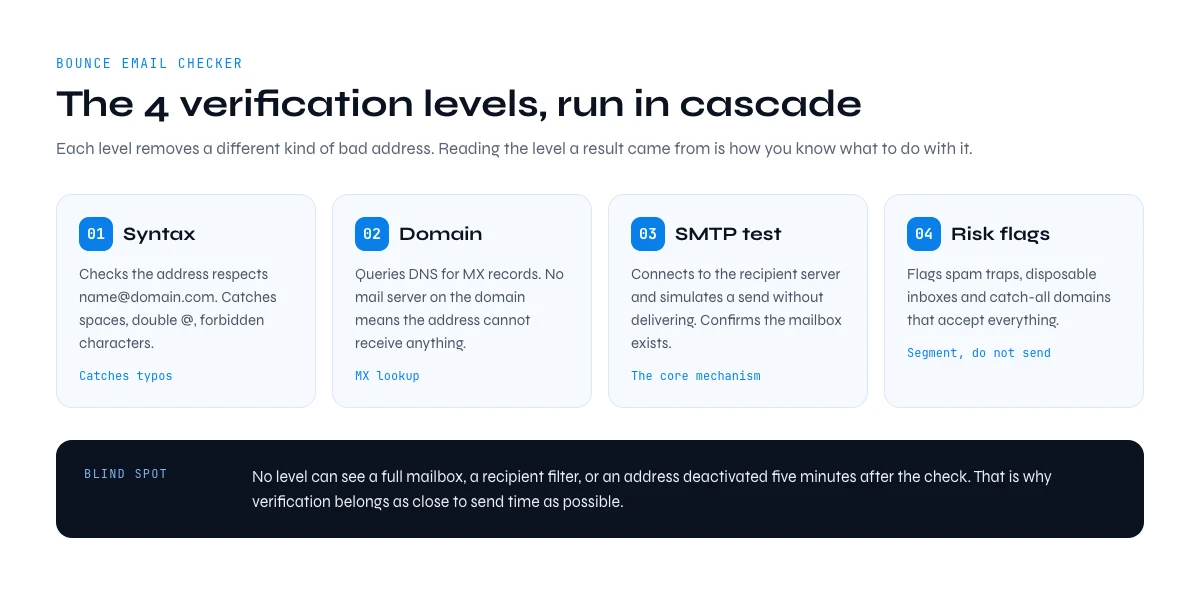
How a bounce email checker works: the 4 verification levels
A solid bounce email checker runs cascade verifications. Understanding the steps helps you read results correctly and pick the right tool.
1. Syntax validation. Confirms the address respects the standard format name@domain.com and catches typos (spaces, double @, forbidden characters). Eliminates ~15% of errors.
2. Domain verification. Queries DNS servers to confirm the domain exists and can receive mail. Checks MX records. If the domain doesn't resolve or has no mail server, the address is invalid.
3. SMTP connection test. The checker connects to the recipient's mail server and simulates a send without delivering anything. This is the core mechanism - it confirms the mailbox exists and accepts messages.
4. Trap and risk detection. Advanced tools flag spam traps, disposable inboxes, and catch-all addresses (which accept everything but might not point to a real mailbox).
What no bounce checker can detect
Even the best tool has blind spots. It can't know if a mailbox is full (temporary soft bounce), if the recipient has set up a filter, or if the address gets deactivated five minutes after your check. That's why verification belongs as close to send time as possible.
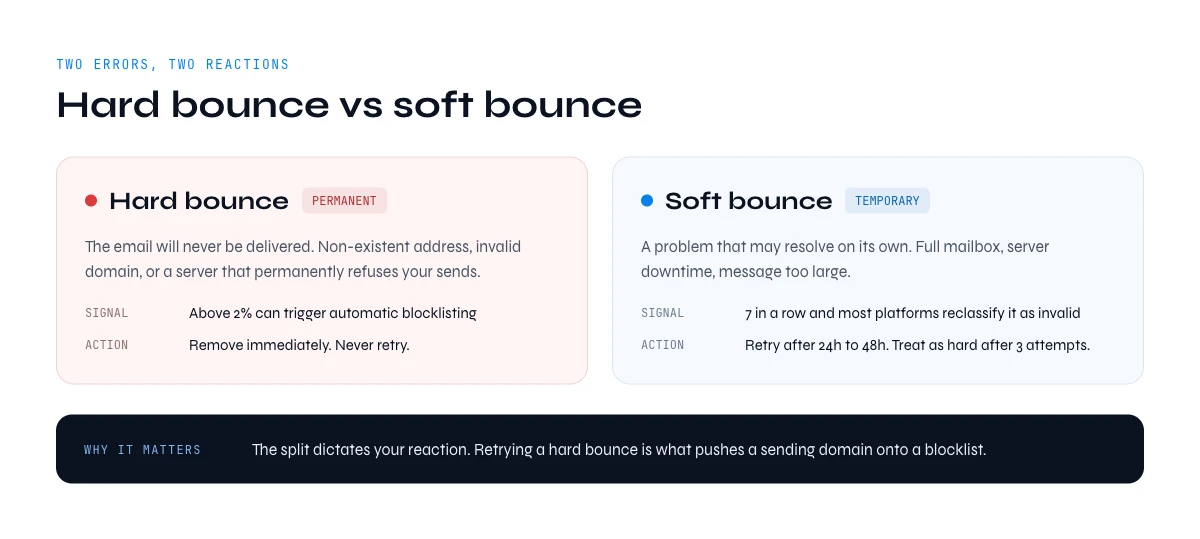
Hard bounce vs soft bounce: the critical difference
The split between hard and soft bounce dictates how you react and how much damage is done to your sender reputation.
Hard bounce: the permanent error
A hard bounce means the email will NEVER be delivered. Causes: non-existent address, invalid domain, mail server permanently rejecting your sends. Each hard bounce is a red flag - anything above 2% can trigger automatic blacklisting. Action: remove these addresses immediately. Never retry.
Soft bounce: the temporary error
A soft bounce is a temporary issue that may resolve: full mailbox, server downtime, message too large. Less damaging - but if an address generates 7 consecutive soft bounces, most platforms reclassify it as invalid. Action: retry after 24-48h, treat as a hard bounce after 3 attempts.
Bounce email checker comparison: Derrick vs ZeroBounce vs NeverBounce vs Bouncer
The four most common bounce checkers used by B2B sales teams in 2026, side by side. Pricing pulled from each vendor's public pricing page on 2026-04-28; subject to change - verify on the vendor site before signup.
| Tool | Entry price | Where it runs | Credits roll over | Free tier |
|---|---|---|---|---|
| ZeroBounce | $18/2K | SaaS dashboard | No (monthly reset) | 100 credits/mo |
| NeverBounce | $10/1K | SaaS dashboard | No | 1,000 credits trial |
| Bouncer | $8/1K | SaaS dashboard + API | No | 100 credits trial |
| ✦ Derrick | €20/10K | ✓ Native Google Sheets | ✓ Roll over forever | ✓ 100 free credits, no card |
How to verify your emails: 6-step playbook in Google Sheets
Verify and clean a 1,000-email list in under 15 minutes, in the web app or in Google Sheets with Derrick Email Verifier.
Step 1: Prepare your email list in Google Sheets
Open Google Sheets and create a new tab. Paste your email addresses in column A, one email per row. No empty rows, one address per cell. If your emails are mixed with other data, use =SPLIT() to isolate them.
Step 2: Install the Derrick add-on in Google Sheets
In Google Sheets, click Extensions > Add-ons > Get add-ons. Search "Derrick" and install. The Derrick menu appears in your menu bar. On first launch, authorize access to your spreadsheets.
Step 3: Launch email verification
Select the column with your email addresses. Click Derrick > Email Verifier. Pick the source column and the output column (adjacent recommended). Click Verify Emails. For 1,000 emails, allow ~3-5 minutes.
Step 4: Read the results
Derrick adds three columns: Status (valid / invalid / risky / unknown), Reason (e.g., "mailbox does not exist"), and Score (0-100). Sort by status. invalid = certain hard bounces. risky = catch-all and suspicious addresses. unknown = case-by-case decisions.
Step 5: Clean the list
Delete all invalid - these are guaranteed hard bounces. For risky: delete if doing cold email; keep if they're existing customers. For unknown: send to a small test segment first; if they bounce, delete permanently. Expected outcome: clean list with bounce rate < 1%.
Step 6: Export or send directly
Export to CSV for an external platform (Lemlist, Instantly), or send directly from Sheets via Zapier or Make. Pro tip: log the verification date in a separate column. If you don't use the list within 30 days, reverify before send.
Common email verification mistakes (and how to fix them)
Mistake 1: Verifying an old list once and never again. Symptom: you verified six months ago, your bounce rate is back up. Why: ~30% of B2B email addresses turn invalid every year. A six-month-old list has roughly 15% invalids that weren't there at last check. Fix: reverify every 3 months for active lists.
Mistake 2: Auto-deleting all catch-all addresses. Symptom: you deleted 30% of your list because they were catch-alls. Why: catch-alls (like contact@company.com) are often valid in SMBs where everything lands in a central inbox. Fix: isolate catch-alls in their own segment and test with a small volume.
Mistake 3: Sending 10K emails the same day you verified them, with no warm-up. Symptom: all addresses verified, but deliverability is poor. Why: Gmail and Outlook detect a sudden volume spike from your domain and filter preemptively. Fix: warm up over 14 days. Day 1: 50 emails. Day 2: 100. Increase gradually.
Mistake 4: Treating all "valid" addresses the same. Symptom: your 95%-valid list still soft-bounces. Why: some "valid" addresses score 60/100 (rarely-used, slow servers); others score 98/100. Fix: segment by score. Score > 90 = priority. Score 70-90 = secondary, monitor metrics. Score < 70 = test segment or excluded.
In the web app or Google Sheets
Check the list, not the bounce report
A bounce report tells you what already happened. Derrick verifies each address in your list before the send and returns a status per row, so the risky addresses are removed while the campaign is still a column.
- Feature
- Email Verification
- Credit cost
- 1 credit per verified
The first button opens the web app (nothing to install): 1 credit per verified, available from the STANDARD plan. The second details the feature and its cost per plan.
Best practices from high-performing sales teams
Teams holding bounce rate under 1% systematically apply these principles.
1. Verify at the source. Plug a verifier into contact forms, landing pages, and prospecting tools. Auto-validate every new contact via API.
2. Clean imported lists before they touch the CRM. Bought a list at a conference? Scraped from Sales Nav? NEVER add directly. Purchased lists average ~40% problematic addresses. Workflow: Sheets → Derrick → delete invalids → import only valids.
3. Monitor deliverability weekly. Track overall bounce rate (target < 2%), hard bounce rate (< 0.5%), spam complaints (< 0.1%), deliverability (> 95%). Use Google Postmaster Tools for Gmail visibility.
4. Configure SPF, DKIM, DMARC before you scale. Gmail and Outlook require all three for senders above 5,000/day. Even 100% valid addresses land in spam without authentication. Test with MXToolbox; minimum DMARC policy = quarantine.
5. Test with small volumes first. Even with a fully verified list, send 100-200 emails as a test before the full campaign. Spam-classified content or temporarily blocked servers are caught here, before they hit your reputation.
6. Automate monthly cleaning. Make / Zapier workflow: trigger 1st of each month, export new contacts, send to Derrick API, tag invalids in CRM, email summary to the sales team. Two hours of setup saves four hours/month.
Why Derrick Email Verifier wins for list workflows
If your workflow lives in Google Sheets - true for ~60% of sales teams in startups and SMBs - Derrick has decisive advantages: a web app with nothing to install plus a native Sheets integration (no export/import dance), rollover credits (unused credits never expire while you stay on a paid plan), 95%+ accuracy with multi-level verification (syntax + DNS + SMTP + spam-trap detection), and no Sales Navigator required (no Sales Navigator subscription to pay for on top).
Derrick is used by 34,000+ B2B sales and growth teams. Free plan = 100 credits, no credit card.
Email bounce checker results: the 7 statuses and what to do with each
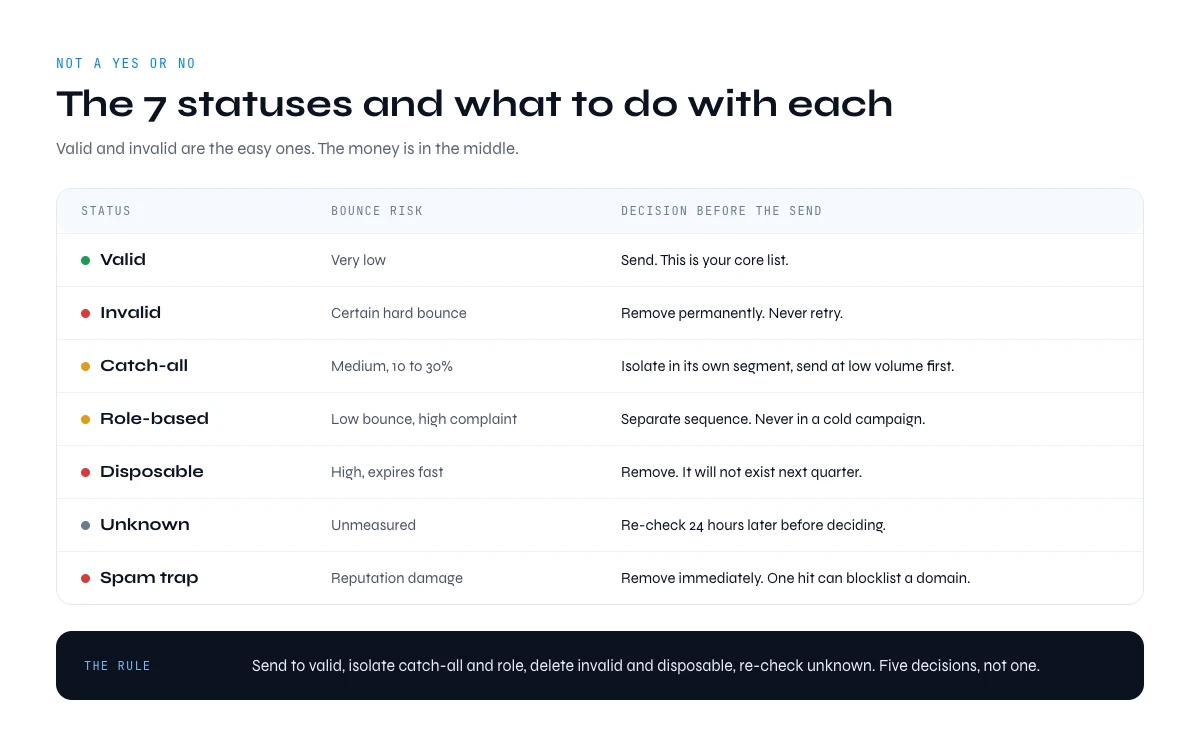
Every email bounce checker returns a status, not a yes or no. Valid and invalid are the easy ones. The money is in the middle: catch-all, role, disposable and unknown addresses each carry a different risk, and each deserves a different decision before your campaign goes out.
| Status | What the server told the checker | Bounce risk | What to do |
|---|---|---|---|
| Valid | The mailbox exists and accepts mail | Very low | Send. This is your core list. |
| Invalid | The mailbox or the domain does not exist | Certain hard bounce | Remove permanently. Never retry. |
| Catch-all (accept-all) | The domain accepts every address, so nothing can be confirmed | Medium, 10 to 30% | Isolate in a separate segment and send at low volume first. See how catch-all domains work. |
| Role-based | Generic inbox: contact@, sales@, info@, support@ | Low bounce, high complaint | Route to a separate sequence. Never in a cold campaign. |
| Disposable | Temporary or burner domain | High, expires fast | Remove. It will not exist next quarter. |
| Unknown | The server timed out, greylisted or refused to answer | Unmeasured | Re-check 24 hours later before deciding. |
| Spam trap suspicion | Address matches recycled or honeypot patterns | Reputation damage | Remove immediately. One hit can blocklist a domain. |
The practical rule: send to valid, isolate catch-all and role, delete invalid and disposable, and re-check unknown. A list that goes out with those five decisions applied behaves very differently from a list that only had the invalid addresses stripped out.
The app runs the search row by row on your list: 1 credit per verified.
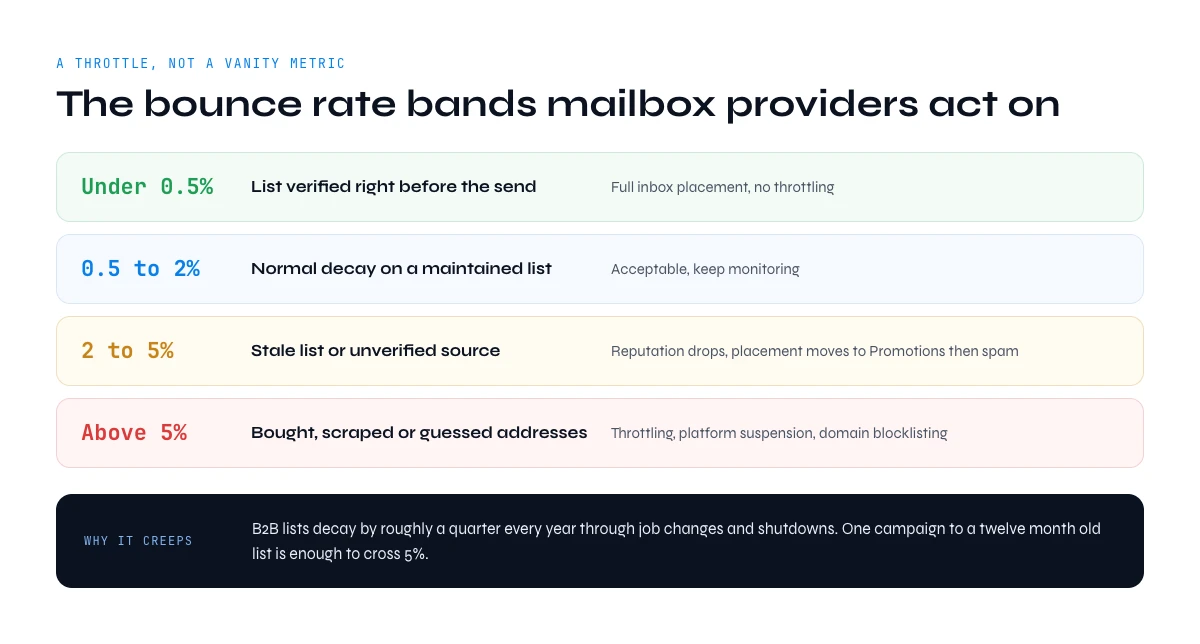
Bounce rate thresholds an email bounce checker keeps you inside
A bounce rate is not a vanity metric, it is a throttle. Mailbox providers read it as a signal that you do not know your own audience, and they act on it long before they tell you. These are the operational bands used by senders who never get filtered.
| Bounce rate | What it signals | Consequence |
|---|---|---|
| Under 0.5% | List verified right before the send | Full inbox placement, no throttling |
| 0.5% to 2% | Normal decay on a maintained list | Acceptable, keep monitoring |
| 2% to 5% | Stale list or unverified source | Reputation drops, placement moves to Promotions then spam |
| Above 5% | Bought, scraped or guessed addresses | Throttling, sending platform suspension, domain blocklisting |
Two numbers explain why this creeps up on people. B2B lists decay by roughly a quarter every year through job changes and company shutdowns, and a single campaign to a twelve month old list is enough to cross 5%. That is the entire argument for running an email bounce checker as a step in the workflow rather than as a rescue operation.
How to read a bounce message: the SMTP codes an email bounce checker predicts
When a message fails, the receiving server answers with a numeric code. Codes starting with 5 are permanent, codes starting with 4 are temporary. Reading them tells you whether an address is dead or simply unavailable, which is exactly the call an email bounce checker makes for you before the send.
| Code | Meaning | Bounce type | Action |
|---|---|---|---|
| 550 5.1.1 | Mailbox unavailable, user unknown | Hard | Suppress permanently |
| 550 5.4.1 | Recipient address rejected by policy | Hard | Suppress permanently |
| 553 | Address syntactically invalid or relaying denied | Hard | Fix or suppress |
| 552 | Mailbox full, quota exceeded | Soft | Retry, suppress after 3 attempts |
| 451 4.7.1 | Greylisting, try again later | Soft | Automatic retry, no action needed |
| 421 | Service unavailable, connection throttled | Soft | Slow your sending rate |
| 554 | Transaction failed, often reputation or content | Policy | Check authentication and content, not the address |
A 554 is the one people misread. It is not the recipient telling you the address is wrong, it is the receiving server telling you it does not trust the sender. No amount of list cleaning fixes that one: check SPF, DKIM and DMARC first.
Does an email bounce checker send a test email?
No. It opens a conversation with the mail server and stops before delivery, so nothing lands in the recipient inbox and nothing is logged as a message.
The sequence is always the same, and understanding it explains why some answers are certain and others are not:
- Syntax check: the address is tested against RFC 5321 formatting. Free, instant, and catches typos like a missing top level domain.
- Domain and MX lookup: DNS is queried for mail exchange records. No MX record means no mailbox can exist on that domain, whatever the address says.
- SMTP connection: the checker connects to the mail server on port 25 and identifies itself.
- Recipient probe: the checker announces the recipient and reads the server answer. Accepted means the mailbox exists, rejected means it does not.
- Catch-all detection: a random address on the same domain is probed. If the server accepts that one too, the domain accepts everything and no individual answer can be trusted.
- Reputation flags: the address is matched against disposable domain lists and known trap patterns.
What no email bounce checker can see: a mailbox that is technically alive but abandoned, a strict corporate firewall that rejects unknown senders at delivery, or a full inbox that fills up between the check and the send. Verification removes the certain failures, it does not guarantee a read. For continuous checks inside a product or a CRM, the same logic runs through an email verification API instead of a manual pass.
Email bounce checker estimator: your bounce risk and what verification costs
Before you clean anything, it helps to see the size of the problem. Pick the age and the origin of your list, enter how many addresses it holds, and the estimator returns the bounce band you should expect, how many addresses are likely to be dead, and what a full verification pass costs in Derrick credits.
Bounce risk and verification cost
An estimate based on list age and origin. Verification itself always returns the real answer, address by address.
Answer the three questions to see your estimated bounce band.
Two things usually surprise people running this for the first time. The undeliverable count on a year-old list is far higher than expected, and the cost of checking it is far lower than the cost of one throttled domain. Verification is the cheapest line in the entire outbound budget.
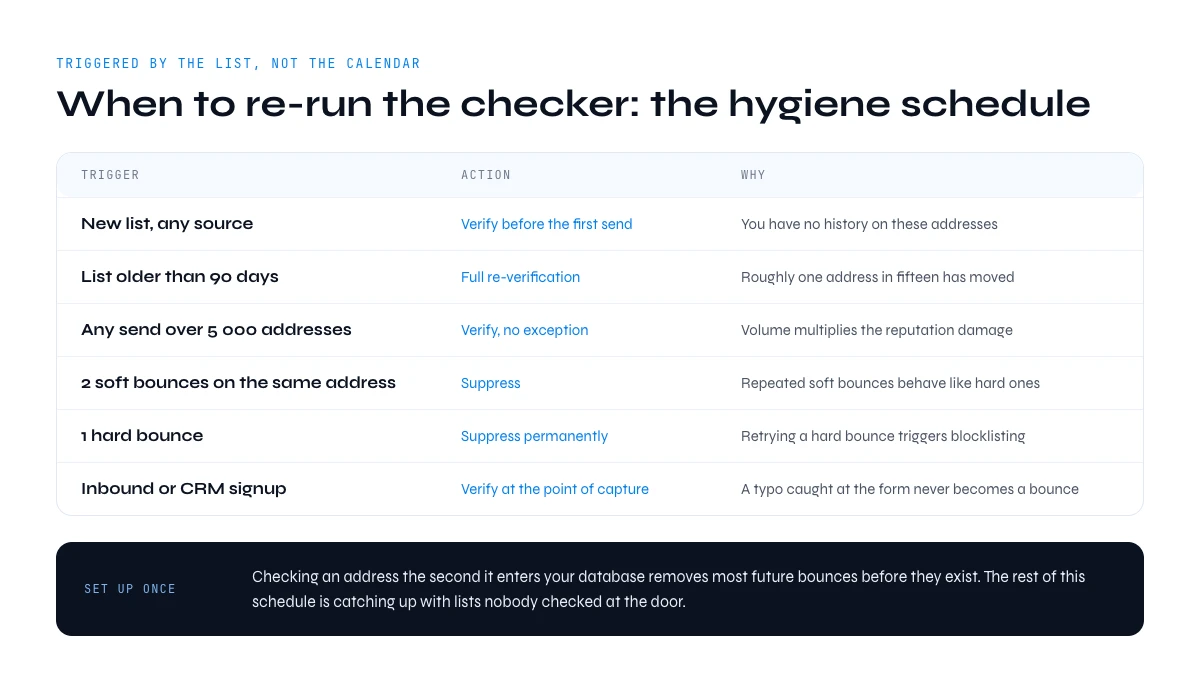
When to re-run your email bounce checker: the list hygiene schedule
Verification is not a one-off cleanup, it is a recurring step with a predictable cadence. This is the schedule used by teams that never see a bounce spike, mapped to the moment the list changes rather than to a calendar reminder.
| Trigger | Action | Why |
|---|---|---|
| New list, any source | Verify before the first send | You have no history on these addresses |
| List older than 90 days | Full re-verification | Roughly one address in fifteen has moved by then |
| Before any send over 5 000 addresses | Verify, no exception | Volume multiplies the reputation damage |
| After 2 soft bounces on the same address | Suppress | Repeated soft bounces behave like hard ones |
| After 1 hard bounce | Suppress permanently | Retrying a hard bounce is what triggers blocklisting |
| Continuous inbound or CRM signup | Verify at the point of capture | A typo caught at the form never becomes a bounce |
The capture-time case is worth setting up once. Checking an address the second it enters your database, through real-time email verification, removes the majority of future bounces before they exist. Everything else in this schedule is catching up with lists that were never checked at the door.
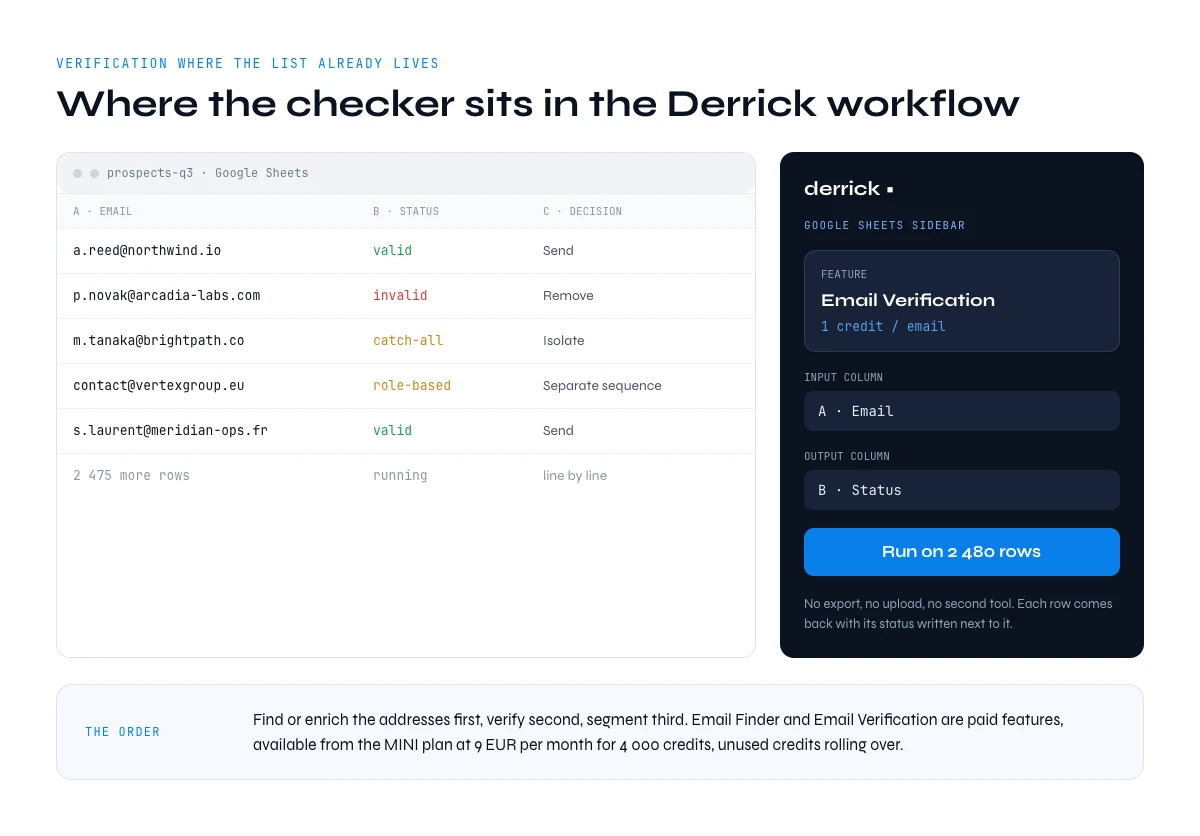
Where an email bounce checker sits in the Derrick workflow
Derrick runs in its web app, and also as a Google Sheets sidebar, so verification happens on the sheet your list already lives in. You map the column that holds the addresses, run Email Verification at 1 credit per address, and each row comes back with its status written next to it. No export, no upload, no second tool.
The order that works: find or enrich the addresses first, verify second, segment third. If you are still building the list, the valid email address workflow covers the finding step, and Email Verification closes it. Email Finder and Email Verification are both paid features, available from the STANDARD plan at 20 EUR per month for 10,000 credits, with unused credits rolling over.
Key takeaways
- A bounce email checker verifies validity BEFORE you hit send, protecting your sender reputation with Gmail, Outlook, and the rest.
- Hard bounces (invalid addresses) get deleted immediately. Soft bounces (temporary errors) get retried after 24-48h.
- Bounce rate above 2% is problematic. Above 5%, blacklisting risk. High performers stay below 1%.
- Verify before any new list import, before important campaigns, and at minimum every 3 months for active lists.
- Derrick Email Verifier runs in the web app, and natively in Google Sheets with 95%+ accuracy, rollover credits, and 100 free credits to start.
Conclusion: protect your reputation before it's too late
Every bouncing email erodes your sender reputation. A 6% bounce rate today becomes 40% of your sends in spam three months from now. Preventive verification with a bounce email checker isn't optional - it's the price of admission for any team that depends on email.
FAQ: your questions about bounce email checkers
How can I check if an email will bounce before sending it?
Use a bounce email checker like Derrick Email Verifier that runs real-time SMTP verification. The tool connects to the recipient's mail server and confirms the address exists without delivering anything. Result: valid / invalid / risky in seconds.
What's an acceptable bounce rate for an email campaign?
Below 2% is acceptable. Between 2-5%, your reputation starts degrading. Above 5%, you risk blacklisting. High performers stay below 1% through systematic pre-send verification.
What's the difference between hard bounce and soft bounce?
A hard bounce is permanent (non-existent address, invalid domain) and requires immediate removal. A soft bounce is temporary (full mailbox, server downtime) and may resolve. Hard bounces severely damage sender reputation; soft bounces have moderate impact unless they repeat.
How much does email verification cost?
Market rates run from 0.002 EUR to 0.008 EUR per verified email depending on the tool and the volume. With Derrick, Email Verification costs 1 credit per address on the STANDARD plan at 20 EUR per month for 10,000 credits, which works out at 0.002 EUR per address, and unused credits roll over.
Can I verify emails for free?
Not with Derrick: Email Verification is a paid feature, available from the STANDARD plan at 20 EUR per month. The free plan gives 100 credits per month for the features it includes, such as LinkedIn enrichment and Sales Navigator import. Standalone free checkers exist for one-off lookups, but they cap out well before a real campaign list.
Should I verify emails before every campaign?
Not if your list was verified in the last month. Yes if it's older than 3 months or comes from an external source. Practical rule: always verify a fresh list, reverify active lists every 3 months minimum.
Can a bounce email checker detect spam traps?
The best tools yes, but not all. Derrick and premium tools like ZeroBounce flag known spam traps via specialized databases. Basic spam traps (recycled addresses) get caught at ~90% rate; recent honeypots remain harder to identify.
What's the impact of bounces on Gmail deliverability specifically?
Gmail penalizes senders with high bounce rates aggressively. Per their 2026 sender guidelines, anything above 3% can trigger automatic spam filtering. Gmail represents 40-50% of B2B addresses, so protecting your reputation with them is the single highest-leverage decision in B2B emailing.
Can email verification be automated in a CRM?
Yes, via API and automation tools like Zapier or Make. Build a workflow that auto-verifies each new contact in HubSpot, Salesforce, or Pipedrive. Derrick exposes a REST API at https://app.derrick-app.com/api-docs.
Frequently asked questions
How can I check if an email will bounce before sending it?
What is an acceptable bounce rate for an email campaign?
What's the difference between a hard bounce and a soft bounce?
How much does email verification cost?
Should I verify my email list before every campaign?
What does a catch-all result from an email bounce checker mean?
Does an email bounce checker send a test email to the address?
Keep reading
Continue exploring this cluster


Lead Email Finder: The Complete Guide to Finding Your Prospects' Emails
Read →

How to Find a Company Website: Complete 2026 Guide
Read →

Find Company Name & Website from Email: 4 Methods (2026, Tested)
Read →

Valid Email Finder: How to Find and Verify Valid Professional Emails
Read →