
Company and Lead Data Enrichment by Derrick
Find how to enrich the data you need with the data you have.


Find by data
What do you need to find?
Pick the value you are missing. Each guide covers every way to get it, from whatever you already have.
email addresses
Work addresses, checked before they land in your sequence.
From a lead email, a LinkedIn profile URL, a full name … 6 ways See the guide → I want to findphone numbers
Direct dials and company lines, not a switchboard.
From a LinkedIn profile URL, a full name, a lead email … 10 ways See the guide → I want to findLinkedIn profile data
The right profile, plus what it says: title, tenure, skills.
From a LinkedIn profile URL, a lead email, a full name … 27 ways See the guide → I want to findcompany data
Name, headcount, location, website, funding.
From a company name, a LinkedIn company URL, a company website … 68 ways See the guide → I want to findLinkedIn company data
A company page read in full: industry, size, followers.
From a LinkedIn profile URL, a LinkedIn company URL, a lead email … 46 ways See the guide → I want to findwebsite technology
The CMS, the CRM, the analytics a site runs on.
From a company contact email, a company website, a LinkedIn company URL … 22 ways See the guide →
Knowledge base
The data enrichment knowledge base
Concepts, techniques, sources and pitfalls. For teams who want to master enrichment, not just run a workflow.
Data enrichment basics
Six core guides that establish what enrichment is, why it matters, and how a process works end-to-end - plus the 5 misconceptions that kill most projects in their third month.
- What is data enrichment?
- A short history of B2B enrichment
- The 4 types of enrichment data
- Enrichment glossary
- Anatomy of an enrichment process
- Top use cases by team
Enrichment pipeline architecture
Seven deep-dives into the engineering choices that separate a hobby script from a system your team can actually depend on - including the architecture patterns nobody documents.
- Build a reliable enrichment pipeline
- Batch vs real-time
- Synchronous vs asynchronous calls
- Predictive enrichment with AI
- Waterfall logic explained
- Measure pipeline velocity
- Multimedia enrichment
B2B data providers compared
Eight concrete plays - webform inbound, anonymous web traffic, business card OCR, LinkedIn URLs - each with the provider stack that actually works for it, and the costs spelled out.
- Enrich inbound web forms
- Clean up event & webinar lists
- Resolve anonymous web traffic
- Pull social media signals
- Tap public B2B databases
- OCR business cards into rows
- Enrich a CSV or Excel file
- Start from a LinkedIn URL
Data enrichment mistakes
Five honest reads on what goes wrong - plus the 12 anti-patterns that have torpedoed real enrichment projects, with the fix for each one.
- Common enrichment mistakes
- Manual vs automated: real ROI
- Enrichment vs data cleansing
- Enrichment vs scraping
- Apps Script automation

All workflows
All Data Enrichment Workflows
Pick what you already have, then what you want to find.
I have…
…I can get
I have… Full name (20)
Person
Company
- Company name Company
- Company website Company
- Company phone number Company
- LinkedIn company URL Company
- Headcount Firmographics
- Founding year Firmographics
- City Firmographics
- Country Firmographics
- Postal code Firmographics
- Funding rounds Funding
- Last amount raised Funding
- Last funding announcement Funding
I have… Lead email (30)
Person
- Email validity Contact
- Bounce risk Contact
- Phone number Contact
- LinkedIn profile URL Profile
- LinkedIn profile ID Profile
- Full name Profile
- Headline Profile
- Job title Profile
- Previous job title Profile
- Tenure Profile
- Profile description Profile
- Skills Profile
- Languages Profile
- Region Profile
- LinkedIn Premium status Profile
Company
- Company name Company
- Company phone number Company
- LinkedIn company URL Company
- Headcount Firmographics
- City Firmographics
- Country Firmographics
- Postal code Firmographics
- Company description Firmographics
- Company tagline Firmographics
- Company specialities Firmographics
- Company hashtags Firmographics
- Follower count Firmographics
- Funding rounds Funding
- Last amount raised Funding
- Last funding announcement Funding
I have… LinkedIn profile URL (29)
Person
Company
- Company website Company
- Company phone number Company
- LinkedIn company URL Company
- LinkedIn company ID Company
- Industry Firmographics
- Headcount Firmographics
- Founding year Firmographics
- City Firmographics
- Country Firmographics
- Postal code Firmographics
- Company description Firmographics
- Company tagline Firmographics
- Company specialities Firmographics
- Company hashtags Firmographics
- Follower count Firmographics
- Funding rounds Funding
- Last amount raised Funding
- Last funding announcement Funding
I have… Company name (27)
- Company website Company
- Company contact email Company
- Company phone number Company
- LinkedIn company URL Company
- LinkedIn company ID Company
- Industry Firmographics
- Headcount Firmographics
- Founding year Firmographics
- City Firmographics
- Country Firmographics
- Postal code Firmographics
- Company description Firmographics
- Company tagline Firmographics
- Company specialities Firmographics
- Company hashtags Firmographics
- Follower count Firmographics
- Funding rounds Funding
- Last amount raised Funding
- Last funding announcement Funding
- Website technologies Web & tech
- CRM in use Web & tech
- CMS in use Web & tech
- Website traffic Web & tech
- Traffic by country Web & tech
- Website content Web & tech
- Product rating Web & tech
- Product reviews Web & tech
I have… Company website (25)
- Company contact email Company
- Company phone number Company
- LinkedIn company URL Company
- LinkedIn company ID Company
- Industry Firmographics
- Headcount Firmographics
- Founding year Firmographics
- City Firmographics
- Country Firmographics
- Postal code Firmographics
- Company description Firmographics
- Company tagline Firmographics
- Company specialities Firmographics
- Company hashtags Firmographics
- Follower count Firmographics
- Funding rounds Funding
- Last amount raised Funding
- Website technologies Web & tech
- CRM in use Web & tech
- CMS in use Web & tech
- Website traffic Web & tech
- Traffic by country Web & tech
- Website content Web & tech
- Product rating Web & tech
- Product reviews Web & tech
I have… Company contact email (23)
- Company name Company
- Company website Company
- Company phone number Company
- LinkedIn company URL Company
- LinkedIn company ID Company
- Industry Firmographics
- Headcount Firmographics
- Founding year Firmographics
- City Firmographics
- Country Firmographics
- Company description Firmographics
- Company tagline Firmographics
- Company specialities Firmographics
- Company hashtags Firmographics
- Follower count Firmographics
- Funding rounds Funding
- Last amount raised Funding
- Website technologies Web & tech
- Website traffic Web & tech
- Traffic by country Web & tech
- Website content Web & tech
- Product rating Web & tech
- Product reviews Web & tech
I have… LinkedIn company URL (25)
- Company website Company
- Company phone number Company
- LinkedIn company ID Company
- Industry Firmographics
- Headcount Firmographics
- Founding year Firmographics
- City Firmographics
- Country Firmographics
- Postal code Firmographics
- Company description Firmographics
- Company tagline Firmographics
- Company specialities Firmographics
- Company hashtags Firmographics
- Follower count Firmographics
- Funding rounds Funding
- Last amount raised Funding
- Last funding announcement Funding
- Website technologies Web & tech
- CRM in use Web & tech
- CMS in use Web & tech
- Website traffic Web & tech
- Traffic by country Web & tech
- Website content Web & tech
- Product rating Web & tech
- Product reviews Web & tech
What is B2B data enrichment?
B2B data enrichment is the process of taking incomplete prospect or account records - usually a name, an email or a LinkedIn URL - and resolving the missing fields by querying one or more data providers. The enriched record then feeds personalised outreach, ICP scoring, CRM hygiene and reporting workflows that would be too slow to run manually at scale.
A modern enrichment stack covers four data classes: contact data (work email, mobile, direct dial), firmographic data (company name, headcount, industry, country), technographic data (the SaaS the account runs on its public site), and intent data (signals that the account is actively researching a solution). Together these classes turn a 1-field record into a 30-50-field buyer profile that a sales rep can act on immediately.
For B2B teams operating at 1 000+ accounts, manual enrichment is simply not viable. An SDR Googling each prospect's email + LinkedIn + phone burns 30-60% of their day on a task that automates cleanly. The economic case for enrichment isn't subtle: at $50 per SDR-hour, an enrichment subscription paying for itself after the first month is the norm, not the exception.
Where Derrick differs from other enrichment platforms is that it meets your team where the list already is: the Derrick web app (nothing to install), Google Sheets, your AI assistant through the MCP server (Claude / ChatGPT), or the REST API. Same engine and same credits everywhere. No new tool to learn, no integration overhead, no waiting on RevOps to build the pipeline.

Why Derrick
Why 34,000+ teams choose Derrick for data enrichment
Four concrete differences that show up on the credit bill, not just on the marketing page.
Nothing to install
Create a free account in the Derrick web app and start a list in 30 seconds. If your list already lives in Google Sheets, Derrick runs there too, from a sidebar. No learning curve.
REST API + MCP server
The same enrichment is available via REST API and MCP from the PLUS plan (€47.50/month), so Claude and ChatGPT can drive enrichment for you in a chat. One credit pool, four surfaces.
10-source lookup
Broader coverage than single-source tools because Derrick runs a multi-source lookup across 10+ data providers. The first source that returns a confident match wins, and finders only charge when they find.
3-10× cheaper than enterprise databases
100 free credits every month, paid plans from €20/month for 10,000 credits. Unused credits never expire while you stay on a paid plan. No annual contract, no per-seat pricing, no minimum.

How it works
How it Works
Get started in 3 simple steps.
The web app, a spreadsheet, your AI assistant, or your own code. Pick the surface that fits the job - the engine behind them is the same.
Email, phone, company, a prompt: the same actions are available on all four, priced the same way.
Rows fill in the app or your sheet, your assistant answers in the chat, the API returns JSON. And it says when it found nothing, instead of guessing.
Data Enrichment
Start enriching your list in 30 seconds
Free for 100 credits/month. No credit card.
Install the add-on and enrich your lists without leaving your spreadsheet.
Install in Google Sheets →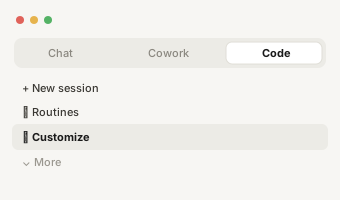
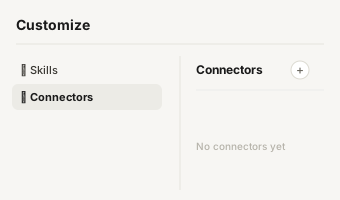
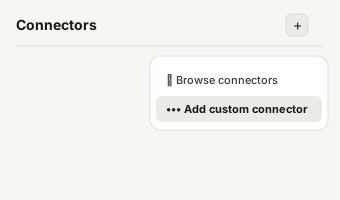
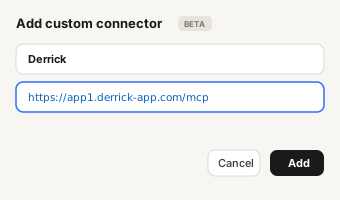
https://app1.derrick-app.com/mcp Call the same enrichment endpoints straight from your own stack or workflow.
Read the API docs →FAQs about data enrichment
What is B2B data enrichment?
B2B data enrichment is the process of taking incomplete prospect or account records - usually a name, an email or a LinkedIn URL - and resolving the missing fields (phone numbers, job titles, firmographics, intent signals, tech stack) by querying one or more data providers. The enriched record then feeds personalised outreach, ICP scoring, CRM hygiene and reporting workflows that would be too slow to run manually.
Why do sales teams need data enrichment?
Without enrichment, an SDR spends 30-60% of their day Googling "[name] [company] email" patterns, hand-resolving LinkedIn URLs, and verifying phone numbers row by row. Enrichment automates the field-resolution step so reps spend their time on outreach + qualification instead of data-entry. Teams that automate enrichment ship 3-10× more pipeline per rep at the same headcount.
How does Derrick's data enrichment work?
Create a free account in the Derrick web app: there is nothing to install. The same actions also run from a sidebar in Google Sheets, from Claude or ChatGPT through the MCP server, and from the REST API. You pick the column with your input data - names, emails, LinkedIn URLs, company names, websites - and Derrick runs a multi-source lookup across 10+ public-data sources. The output is written back into your list in seconds. Finders only charge for what they find: an email costs 5 credits, a phone number 200 credits.
Is Derrick's data enrichment GDPR-compliant?
Yes. Derrick only enriches public data, never stores personal records beyond the duration of the lookup, and supports full deletion on request. Your lists stay private to your account, in the web app as in Google Sheets, where Derrick runs inside Google's OAuth-protected environment. The data sources Derrick aggregates are themselves GDPR-compliant providers.
How much does data enrichment cost with Derrick?
The free plan gives you 100 credits every month, no credit card required. Paid plans go from €20/month (10,000 credits) to €320/month, and API + MCP access starts on the PLUS plan at €47.50/month. Unused credits never expire as long as your account stays on a paid plan. Finding an email costs 5 credits per email found, a phone number 200 credits per number found.
What can I enrich with Derrick?
179 distinct enrichment workflows covering 47 unique output fields: phone numbers (direct + mobile + company), email addresses (lead + company), LinkedIn URLs (profile + company), full names, job titles, headcount, industry, country, founded year, funding rounds, tech stack, and 30+ more. Inputs supported: full name, lead email, company contact email, LinkedIn profile URL, LinkedIn company URL, company name, company website. See all 179 workflows below.