
Data Quality Management: The Complete B2B Guide
Data quality management is the ongoing program that keeps business data accurate, complete, consistent, timely, unique and valid. For B2B teams it applies to contacts and accounts, which decay at roughly 22% per year. It runs in six steps (profile, deduplicate, verify, enrich, standardize, monitor), repeated every month rather than done once.

Why this cluster matters
What you'll learn
Dirty data wastes 27 to 35% of a sales rep's time and quietly drains marketing budgets through bounced emails and bad routing. The teams that win in 2026 aren't the ones with the most records - they're the ones with the cleanest. Quality is now a competitive moat, not a back-office concern.
For who · Data Engineers, RevOps, Marketing Ops, CRM Admins
Try Derrick's free data cleaning tools →- How to measure data quality (the 5 KPIs that matter : completeness, freshness, accuracy, uniqueness, consistency)
- Dedup strategies that don't break your CRM relationships
- Email verification : SMTP vs syntax vs MX vs catch-all detection
- Phone validation rules across regions (mobile vs landline vs VoIP)
- Refresh cadence : when to re-enrich, when to leave records alone
- Common pitfalls : silent decay, format drift, vendor silos
All guides · 14
All 14 guides in this cluster
Metrics6


The B2B Data Decay Benchmark 2026: How Fast Your Data Goes Stale
Free report: the canonical decay rate (2.1%/month), rates by data type, the drivers, the cost, and the refresh cadence. Read the guide →

How to Measure the Quality of Your Enriched Data: The Complete Guide
Define accuracy, completeness and validity for B2B data. Pick the right sample size and the formulas you actually use in production. Read the guide →

Data Freshness: How Often Should You Refresh Your B2B Data?
Refresh cadence by data type (firmographic, contact, behavioral). The cost of stale data and when monthly beats quarterly. Read the guide →

Coverage Rate vs Accuracy Rate: Understanding B2B Enrichment Metrics
The two metrics most teams confuse. When to optimize for coverage, when for accuracy, and why the tradeoff is rarely 50/50. Read the guide →

Confidence Scoring: How to Evaluate and Weight the Reliability of Your B2B Data
Build a confidence score per row. Source weight, age decay, multi-source consensus - the formula that survives sales QA. Read the guide →

Data Hygiene: The 7 Metrics and Their Pass/Fail Thresholds
Most guides name the data hygiene metrics and never say at what number your database is fine. Here are the seven measures with healthy, watch and stop-and-fix bands, the refresh cadence per field, and the prevention versus repair arithmetic. Read the guide →Problems4


False Positives in Data Enrichment: How to Detect and Fix Them
Why providers ship false positives, how to spot them in a sample, and 3 patterns to filter them at the workflow level. Read the guide →

Handling Errors and Missing Data in Google Sheets Data Enrichment
Practical patterns for IFERROR, fallback sources, and waterfall enrichment when your primary source returns null. Read the guide →

Error Handling and Retry Logic: how to make your B2B enrichment workflows bulletproof
Retry strategies by error type (429, 500, timeout), exponential backoff in Apps Script, and dead-letter queues for the records that just won't enrich. Read the guide →

B2B Data Cleansing: The 6-Step Loop That Keeps Records Usable
Cleansing that only deletes shrinks your file. The four defects, the merge rule that keeps the good half, which fields deserve paid verification, and what a full pass costs on 1,000 rows. Read the guide →Business4


B2B Data Audit: The 20-Point Checklist (2026)
The 20-point audit any sales ops can run on their CRM in 1 day. Duplicates, missing fields, format issues, stale records - with thresholds. Read the guide →

The Real Cost of Missing B2B Data (And How to Fix It)
How a 30% null rate on phone numbers crushes pipeline velocity. The math, with examples from outbound SDR teams. Read the guide →

Data Enrichment Rate by Industry: B2B Benchmarks to Know in 2026
What enrichment rate to expect by industry (SaaS, manufacturing, healthcare, finance). When your numbers signal a provider problem. Read the guide →

B2B Data Quality Benchmarks 2026: Decay, Cost & the Numbers
The canonical 2026 numbers on B2B data decay (~2.1%/month), the cost of bad data ($12.9M/year), and a quality scorecard. Read the guide →The feature on video
Find Duplicates
Quickly clean your lists and remove duplicates.
Try Derrick's free data cleaning tools →Data quality management is the set of practices a team uses to keep its data accurate, complete, consistent, fresh, unique and valid, and to keep it that way over time. For a B2B sales or marketing team, that data is mostly contacts and companies: the CRM, the prospect lists, the spreadsheet an SDR works from every morning.
Why does it matter? Your SDR just spent 40 minutes crafting a perfectly personalized cold email, only to hit a bounce. The phone number dialed rings to a disconnected line. The "VP of Marketing" you targeted moved to a new company six months ago.
This isn't bad luck. It's the silent tax of poor data quality. And according to Gartner, it costs the average organization $12.9 million per year.
In this guide, you'll learn what data quality management means in a B2B context, how it differs from data quality itself, why your database decays faster than you think, and how to run a repeatable process that fixes it with the tools you already use.
What Is Data Quality Management? A Clear Definition for B2B Teams
Data quality refers to how well a dataset serves its intended purpose. For sales and marketing teams, that purpose is simple: reaching the right person, with the right message, at the right time.
Data quality management is the discipline that protects that purpose. It covers profiling the data you hold, cleansing what is broken, standardizing formats, removing duplicates, enriching what is missing, and monitoring the result so it does not slide back. In short: data quality is a state, data quality management is the work that produces it.
Most data professionals measure quality across six core dimensions: accuracy, completeness, consistency, timeliness, uniqueness and validity. We detail each one, with the metric to track on contact data, in the dimensions section below.
Data accuracy is the most critical of these six. It's the measure of how closely your data matches the real world. If your CRM says a contact is Head of Growth at a SaaS company, and she actually left that role three months ago, your record is inaccurate, and your outreach will miss. Our guide on how to measure the accuracy of enriched data goes deeper on that dimension.
Now that the definition is clear, let's separate it from the neighbouring disciplines, then look at why accuracy degrades so quickly and what it really costs you.
Data Quality vs Data Quality Management (and Where Governance Fits)
The two terms are often used as synonyms. They are not the same thing, and the difference explains why so many cleanups fail.
| Term | What it is | B2B example |
|---|---|---|
| Data quality | The condition of your data at a given moment, measured against a standard | "91% of our contacts have a deliverable email today" |
| Data quality management | The ongoing program (process, owners, tools, checks) that keeps that condition high | "Every import is deduplicated and verified before it reaches the CRM, and we re-verify every 90 days" |
| Data governance | The rules: who owns which data, which standards apply, what is allowed | "Sales Ops owns the contact object; job titles follow our title list" |
| Master data management | One authoritative record per key entity (customer, account, product) | "One account record per company domain, shared by CRM and billing" |
Governance sets the rules, master data management keeps one golden record per entity, and data quality management does the daily work of checking and repairing records against those rules. A one-off cleanup is not data quality management: without the continuous part, quality drops back within months, as the next section shows.
Why B2B Data Decays Faster Than You Think
Here's an uncomfortable truth: your database is going stale right now, even if you haven't touched it.
B2B contact data decays at approximately 2.1% per month, which compounds to roughly 22.5% annually. That means 23-30% of email addresses and 18% of phone numbers become obsolete every single year. The figures and their sources are gathered in our B2B data quality benchmarks for 2026.
Think about what that means at scale. If you have 10,000 contacts in your CRM today, roughly 2,250 of those records will be out of date within 12 months, without any mistakes on your team's part.
Why does data decay so rapidly?
People change jobs. Companies get acquired. Roles get restructured. Domains change. Phone numbers get reassigned. Every time any of these events happens, the data you hold becomes a fraction less accurate. The 2026 data decay benchmark breaks this down field by field.
The main data quality challenges include data decay (business details change often), inaccuracy from old or incomplete information, duplication (multiple records for the same contact), and volume overload that makes manual cleaning impossible.
The problem compounds further when data flows across multiple systems. An inaccuracy introduced in a form fill can propagate downstream into your CRM, your email tool, and your reporting, silently corrupting all three.
The Real Cost of Poor Data Quality in B2B Sales
Bad data isn't just an inconvenience. It has direct, measurable financial consequences.
Gartner puts the average cost of poor data quality at $12.9 million a year per organization, a combination of direct costs like wasted marketing spend and inefficient operations, and opportunity costs from lost deals and reduced market share.
But the damage goes beyond the budget:
Lost productivity. Every minute a rep spends checking whether a title is current or a number still works is a minute not spent selling. Run the math on your own team: 15 minutes a day of manual checking, over 220 working days, is 55 hours a year per rep. On a team of eight SDRs, that is 440 hours, close to three months of one full-time person, spent validating data instead of booking meetings.
Damaged sender reputation. Email campaigns using non-validated contact data typically experience bounce rates of 5-7%, which significantly damages sender reputation and triggers spam filters affecting deliverability across entire domains.
Lost revenue. In a 2025 survey of 602 CRM users, 37% reported losing revenue as a direct consequence of poor data quality, and 76% said less than half of their organization's CRM data is accurate and complete.
The real cost of missing data is usually larger than teams expect, because the deals you never reached do not show up in any report. The financial case for investing in data quality management is clear. So what does "good" data quality actually look like, and how do you measure it?
The 6 Dimensions of Data Quality, Measured on Contact Data
Data quality refers to the condition of your data based on factors like accuracy, completeness, reliability, and relevance. For Marketing Ops professionals, it's about ensuring the lead and customer data you rely on every day is fit for purpose: ready to drive segmentation, scoring, personalization, and reporting.
The six standard data quality dimensions look like this on a B2B contact database:
| Dimension | What It Means | B2B Example |
|---|---|---|
| Accuracy | Does the data reflect reality? | The job title stored is the contact's current title |
| Completeness | Are all required fields populated? | Every lead has an email AND a phone number |
| Consistency | Is the same data formatted the same way across systems? | "United States" vs "US" vs "USA" all mean the same thing |
| Timeliness | How fresh is the data? | A contact record was last verified less than 90 days ago |
| Uniqueness | No duplicate records? | One contact = one record, not three with slight variations |
| Validity | Does the data conform to the correct format? | Emails follow the format name@company.com |
Rather than managing "data quality" as a vague concept, attach one metric to each dimension and track it:
1. Completeness: completeness rate
What percentage of your records have all required fields filled in? A lead missing an email address can't be emailed. A contact without a phone number can't be called. Aim for 90%+ completeness on your critical fields (email, company name, job title).
2. Validity: email validity rate
What share of your email addresses are deliverable? Track your hard bounce rate after each campaign send. Quality targets for email: maintain bounce rates below 1%, since 2% triggers Gmail and Outlook deliverability penalties.
3. Accuracy: phone connect rate
If you're running phone outreach, track what percentage of stored numbers actually connect to the right person. Target phone connect rates above 20% for mobile numbers. Lower than that is a signal that your phone data needs enrichment.
4. Uniqueness: duplicate rate
How many records in your database are duplicates? Target duplicate rates below 2%. Deduplication is often the single highest-ROI data hygiene action: it directly improves targeting precision and reduces wasted outreach.
5. Timeliness: data freshness score
When was each record last verified? A contact record older than 90-180 days should be flagged for re-verification, given the pace of job changes in B2B. Our guide on how often to refresh B2B data sets the cadence field by field.
6. Consistency: field consistency score
Are fields normalized across your database? "VP Marketing", "VP of Marketing", and "Vice President, Marketing" all refer to the same thing, but inconsistent formatting breaks segmentation and reporting.
These metrics aren't just numbers for their own sake. They give you a clear picture of where to invest your data quality management effort first. For pass/fail thresholds on each one, see the 7 data hygiene metrics.
The Data Quality Management Process: 6 Steps for B2B Data
Understanding the problem is one thing. Fixing it is another. Here's a repeatable data quality management process B2B teams can implement without a data engineering team. Think of it as a lightweight data quality framework: six steps in a fixed order (profile, deduplicate, verify, enrich, standardize, monitor), each with an owner and an expected result.
Step 1: Profile and audit your current database
Before you can improve data quality, you need to know where you stand. Run a data quality audit that answers:
- What is my current email deliverability rate (based on last campaign data)?
- What percentage of records have a valid email, phone, AND job title?
- How many duplicate records exist?
- When was each contact last verified or enriched?
Most CRMs (HubSpot, Salesforce, Pipedrive) have native reporting that can help you answer these questions. Export your data to a spreadsheet to get a clear, unified view, or work through our 20-point B2B data audit checklist.
Expected result: A prioritized list of data gaps: which contacts need email verification, which need phone enrichment, and which are duplicates to merge.
Step 2: Remove duplicates
Duplicates are among the most damaging data quality issues. A single prospect with three records means three times the outreach, three times the confusion, and a deeply annoying experience for the person on the receiving end.
The challenge: duplicates aren't always obvious. "J. Smith at Acme Inc." and "John Smith at acme.com" are the same person, but a simple string match won't catch it.
Use a tool that can identify fuzzy-match duplicates based on a combination of fields (name, company, email domain) rather than just exact matches. In the Google Sheets sidebar, Derrick's Find Duplicates flags duplicate records across your lead lists, for free, so you can clean them before they cause outreach conflicts.
Expected result: A cleaner, leaner database where each contact has exactly one record.
Step 3: Verify and validate emails
Email validation is the most immediately impactful step you can take for campaign performance. It separates deliverable addresses from invalid ones, before you send.
There are two levels of email validation:
- Syntax check: Does the address follow the correct format (name@domain.com)?
- SMTP validation: Does the mail server accept delivery to this specific address?
Syntax checks are easy but insufficient. SMTP validation is what actually tells you whether an email will bounce. Look for tools that verify at this level and flag catch-all domains (domains that accept all emails regardless of whether the mailbox exists, a common source of soft bounces).
Derrick's Email Verification checks each address in the web app or in Google Sheets, and flags invalid, risky or catch-all addresses so you can clean your list before any send. It is available on paid plans at 1 credit per email; the email verification tutorial walks through a full list.
Expected result: Your bounce rate drops from the industry average of 5-7% to well under 2%.
Step 4: Enrich missing and outdated data
Once you've cleaned what you have, fill the gaps. Data enrichment is the process of appending missing or outdated information to your existing records, from external, verified sources.
For a B2B contact database, enrichment typically means:
- Adding verified professional emails where none exist
- Appending mobile or direct-dial phone numbers
- Updating job titles, company names, and firmographic data
- Adding company-level attributes like employee count, industry, or tech stack
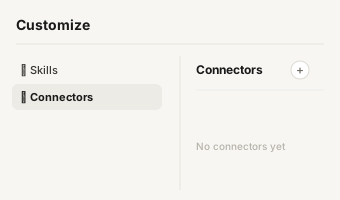
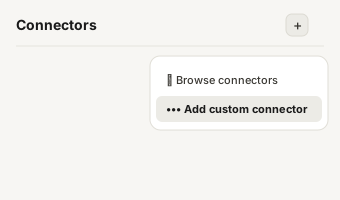
A typical workflow: import a list into the Derrick web app (or open it in Google Sheets), run Enrich Leads to refresh titles and companies at 1 credit per profile (it reads LinkedIn, so connect your LinkedIn account through the Derrick Chrome extension first), then add emails with the Email Finder at 5 credits per email found. If your team works from Claude or ChatGPT, the same lookups run through the Derrick MCP server (PLUS plan and up), and the data enrichment API plugs them into your CRM workflows.
For phone enrichment specifically, Derrick's Phone Finder retrieves contact numbers from LinkedIn profiles, so you can reach decision-makers via direct dial, not switchboard. It runs on paid plans and costs 200 credits per number found.
Expected result: 30-50% more complete records, with verified contact details ready for outreach. When an enrichment returns an answer that looks right but is not, our guide on false positives in data enrichment shows how to catch it.
Step 5: Normalize and standardize your data
Even accurate, complete data can cause problems if it's inconsistent. Normalization means enforcing uniform formatting across all fields:
- Job titles: standardize casing and abbreviations ("VP" vs "Vice President")
- Phone numbers: use a consistent format (ideally E.164 international standard: +1XXXXXXXXXX)
- Company names: remove legal suffixes ("Inc.", "LLC") for cleaner segmentation
- Countries: use ISO country codes rather than free-text entries
Do this before you enrich: split full name fields into first and last names, fix formatting inconsistencies, and standardize common field types. When you only have an email address, Derrick's free Find Names & Domains by Email Addresses splits it into first name, last name and domain.
Expected result: Segmentation, personalization, and reporting work reliably, because the underlying data is consistent.
Step 6: Monitor and close the loop
The last step is the one that turns a cleanup into data quality management: measure the six dimensions again every month, compare them with your baseline, and send any record that slipped back into steps 2 to 5. The next section details how to make that loop routine. For the full cleansing cycle applied record by record, see the 6-step B2B data cleansing loop.
Data Quality Tools: What Each Category Does
"Data quality tools" covers very different products. Choosing well starts with knowing which job each category does, and which step of the process above it serves.
| Category | What it does | Process step |
|---|---|---|
| Profiling | Scans a dataset and reports fill rates, formats, outliers | Step 1 |
| Deduplication / matching | Finds records that describe the same person or company | Step 2 |
| Verification | Checks that an email or phone actually works today | Step 3 |
| Enrichment | Fills missing fields and refreshes outdated ones from external sources | Step 4 |
| Cleansing / standardization | Rewrites values into one format (titles, countries, phones) | Step 5 |
| Monitoring | Tracks quality metrics over time and alerts on drops | Step 6 |
Enterprise data quality tools are built for data warehouses and engineering teams. A sales or marketing team rarely needs that weight: its data lives in a CRM and a few lists, and the work is mostly deduplication, verification and enrichment on contacts and accounts.
That is the part Derrick covers. In the web app you verify emails (1 credit per email on paid plans), enrich leads and companies (1 credit per row) and find missing emails; in Google Sheets you also get the free Find Duplicates; through Claude, ChatGPT or any MCP client and the REST API (both from the PLUS plan), the same checks run from a chat or inside your workflows. Profiling and monitoring stay in your CRM reports or a simple monthly dashboard, which is enough for most B2B teams.
Whatever tool you pick, check how it behaves when it does not find an answer: a tool that returns a blank is easier to manage than one that returns a confident guess. Our guide on confidence scores for B2B data explains how to weigh each result.
How to Maintain Data Quality Over Time (Not Just Once)
The most common mistake in data quality management is treating it as a one-time project. Clean your database once, feel good about it, and watch it slowly degrade again over the next 12 months.
The better approach: embed data quality into your ongoing workflows.
Validate at the point of entry
Every time a new contact enters your database, whether via form fill, CSV import, or LinkedIn scrape, run automatic email validation before it touches your CRM. Stopping bad data at the door is far more efficient than cleaning it later.
Set a re-verification schedule
Flag any contact record older than 90 days for re-verification. Given that data decays at 2.1% per month, a 90-day cycle keeps your decay rate manageable.
Monitor your key metrics monthly
Set up a monthly dashboard that tracks your six data quality metrics: completeness, email validity, phone connect rate, duplicate rate, freshness, and consistency. When a metric dips, you'll know exactly where to focus.
Use campaign data as feedback
Every email campaign produces bounce data that tells you exactly which addresses are dead. Feed that back into your CRM as a quality signal. An email that bounced today should be flagged for re-enrichment tomorrow.
Data Quality Management and AI: Why Accuracy Is Now Non-Negotiable
AI-powered sales tools, from email personalization engines to lead scoring models, are only as good as the data they're trained on. Feed a scoring model dirty data, and it will score the wrong leads as your best opportunities.
AI can help on the repair side too: it is good at spotting inconsistent formats, suspicious values and likely duplicates that a human scanning thousands of rows would miss.
But the relationship runs both ways: AI tools amplify the impact of bad data just as powerfully as they amplify good data. An AI personalization engine that references a contact's "former role" (because your CRM wasn't updated) produces outreach that feels robotic and careless, exactly the opposite of personalized.
When AI agents reference someone's old job title or mention a company they left months ago, the outreach feels obviously automated and damages credibility.
As AI becomes standard in B2B sales workflows, data accuracy becomes a competitive differentiator. Teams with clean, enriched, regularly-verified data will get dramatically better results from AI tools than teams treating data quality as an afterthought.
Common Data Quality Management Mistakes (and How to Avoid Them)
Problem 1: Treating data quality as a one-time project
Impact: Your database looks clean for three months, then slowly returns to its previous state as data decays. Solution: Build a continuous verification cycle: validate at ingestion, re-verify quarterly, monitor metrics monthly.
Problem 2: Validating syntax but not deliverability
Impact: Your email list passes a format check but still generates 6% bounce rates because addresses are syntactically valid but don't exist. Solution: Use an SMTP-level email verifier, not just a regex check. Flag catch-all domains as risky.
Problem 3: Ignoring duplicates until they become a crisis
Impact: The same contact gets 3 outreach sequences simultaneously. They unsubscribe from all future communication. Solution: Run a deduplication check every time you import new data, not just when you notice the problem.
Problem 4: Not normalizing before segmentation
Impact: Your segmentation by "Country" returns empty results because half your contacts have "US", the other half have "United States." Solution: Standardize field formats immediately after enrichment, before the data enters your CRM.
Problem 5: Buying static lead lists and assuming they're accurate
Impact: A list purchased today is already partially out of date. One purchased six months ago can have 10%+ inaccurate records. Solution: Treat purchased lists as raw material, not finished data. Run verification and enrichment before any outreach.
Problem 6: Having no owner
Impact: Everyone complains about the CRM, nobody fixes it, and each team builds its own side spreadsheet. Solution: Name one owner for data quality management (often Sales Ops or RevOps), with the six metrics above as their monthly scorecard.
Key takeaways
- Data quality management is the ongoing program that keeps data accurate, complete, consistent, timely, unique and valid. Data quality is the state; management is the work.
- B2B contact data decays at 2.1% per month, 22.5% annually. A database of 10,000 contacts loses ~2,250 accurate records per year with no action taken.
- Poor data quality costs the average organization $12.9M/year, and manual checking quietly eats hundreds of hours on a sales team.
- The process runs in six steps: profile and audit → deduplicate → verify emails → enrich missing data → normalize formatting → monitor.
- Pick data quality tools by category and by step; for contact data, deduplication, verification and enrichment do most of the work.
- As AI tools become standard in B2B sales, data accuracy is a prerequisite for getting value from them, not just a nice-to-have.
Conclusion: Data Quality Management Is a Revenue Strategy
Data quality and accuracy aren't IT concerns. They're revenue concerns. Every bounced email, every disconnected number, and every outdated job title is a prospecting opportunity that never happened.
The good news: unlike many sales challenges, data quality is fixable, and the ROI is fast. A single campaign send to a clean, verified, enriched list will outperform three campaigns to a degraded database.
The teams winning in B2B today aren't the ones with the biggest contact databases. They're the ones with the most accurate ones, and they got there with data quality management that runs every month, not a cleanup that ran once. To get every new guide of this series, subscribe to our newsletter below: one email every 2 weeks.
Data Quality
Start enriching your list in 30 seconds
Free for 100 credits/month. No credit card.
Install the add-on and enrich your lists without leaving your spreadsheet.
Install in Google Sheets →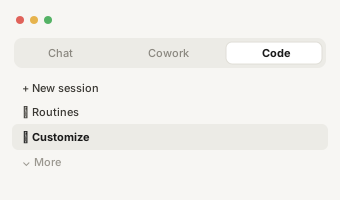
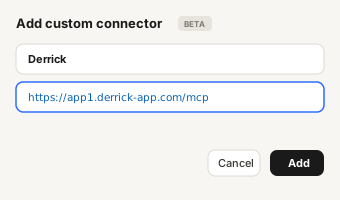
https://app1.derrick-app.com/mcp Call the same enrichment endpoints straight from your own stack or workflow.
Read the API docs →