



Describe your ideal lead
Write it in one sentence, for example: CTOs in companies with 100-500 employees in Spain.
Describe your ideal lead in plain language and import the matching Sales Navigator profiles.
Try it for free →Install the add-on and enrich your lists without leaving your spreadsheet.
Install in Google Sheets →
Leads found, no Sales Navigator URL needed.
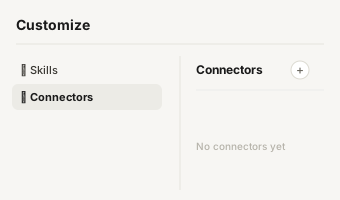
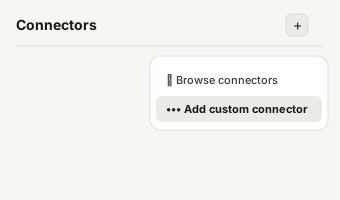
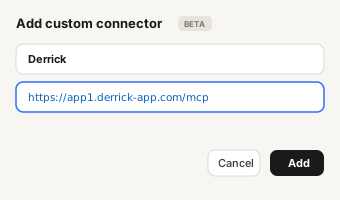
https://app1.derrick-app.com/mcp Call the same enrichment endpoints straight from your own stack or workflow.
Read the API docs →You give
A plain-English brief
You get back
+5 companyIndustry, geoRegion, tenureAtCompany, linkedinUrl, summary
Demo finished
Import your list into the Derrick app and enrich your own leads. Free to start, no credit card.
Try the app free →Try it
The output
8 fields, with a real example of each. You pay when the answer comes back, and never when it does not.
| Field Name | Description | Example |
|---|---|---|
| fullName | Full name of the lead | Viktoria Otero del Val |
| title | Current job title | Chief Revenue Growth Officer, UK&US |
| companyName | Company the lead currently works at | Pluxee |
| companyIndustry | Industry of that company | Consumer Services |
| geoRegion | Where the lead is based | Greater Paris Metropolitan Region |
| tenureAtCompany | How long the lead has been at the company | 2 years 2 months |
| linkedinUrl | Link to the LinkedIn profile | https://www.linkedin.com/in/ACwAAACd… |
| summary | The lead's About section, useful for personalisation | I am a global revenue and go-to-market leader… |
Step by step
Get started in 3 simple steps.
Write it in one sentence, for example: CTOs in companies with 100-500 employees in Spain.
Derrick turns your sentence into a Sales Navigator search and runs it on your own LinkedIn session.
A new sheet fills with each lead: name, title, company, industry, tenure, location and LinkedIn URL.
When to reach for it
Describe your ideal lead in one sentence and Derrick turns it into a Sales Navigator search, then imports the matching profiles into Google Sheets - name, title, company, industry, tenure, location and LinkedIn URL. No filter menus to click through.
Fast list building
go from an idea of your ICP to a real lead list without touching a filter menu.
Testing a new segment
rewrite the sentence, run again, compare the two lists.
Territory expansion
the same persona in a new country, in a single edit.
Recruiting
describe the profile you want to hire and get the shortlist.
For your stack
Import Leads from a Prompt isn't tied to one surface. Every Derrick enrichment - this one included - runs in the web app and in Google Sheets, and is also exposed through the REST API and the MCP server, so you can run it from your CRM, your data pipeline, an AI assistant, or any no-code tool (Zapier, Make, n8n). Same credit cost everywhere, same data. API access is included from the PLUS plan up.
Customer stories
See what our customers say about Derrick.

"This app saved me so much time and effort. Great for anyone looking to build a contact list or network at scale quickly. As a start-up it's been invaluable."
Director | SaaS GTM Leader

"Working pretty nifty compared to Snov.Io. Price wise it does give a fair shake, and IMO better interface since it's google sheets."
Mortgage Broker at Zero Point Mortgage
"Derrick is a very simple and user-friendly app to enrich your contacts database. Best thing: you can test it for free. And then the price is so low, it's a no brainer."
CEO Form'actions

"I have been using other expensive apps or freemium like phantombuster, but Derrick has replaced them all. I love the simplicity of the Google sheet add-in, but what is best is the efficiency it delivers."
CEO & Co-founder @ Diffly | B2B Sales Advisor

"Super easy to enrich linkedin urls using this tool. Both personal and company url data can be easily enriched with a click of a button."
RevOps Professional
"Amazing Tool, I would like to advocate this to my colleagues. So that you can get more users. Keep it Up. 5 Stars!"
Lead Generation Specialist at IdeaPeel
"The LinkedIn scraping and email finder combo is incredibly powerful. I can build a complete prospect list with contact info in under an hour. Absolute must-have for outbound."
SDR Team Lead at CloudScale
"This app is fantastic. Brilliantly created to help small and mid sized businesses."
Founder/CEO, AlmanacIO
"Have tested over 10+ LI scraper apps, Derrick beats them all. Simple to use, accurate data, and affordable price."
Opportunity Prospector
A Sales Navigator search is a dozen filter menus, and you only find out you got it wrong once the results load. Derrick removes that step: you write who you are looking for in one sentence, "CTOs in companies with 100-500 employees in Spain", and it builds the search for you, runs it on your own LinkedIn session, and writes every matching profile into a new list in the Derrick web app, or a new tab of your Google Sheet. Name, job title, company, industry, tenure, location, connection degree and LinkedIn URL, one lead per row.
Because the target is a sentence, iterating costs nothing: rewrite it, run it again, compare the two lists. From there, enrich the imported profiles with verified emails and mobiles, and push the qualified rows straight to your outreach tool. A connected LinkedIn account with a Sales Navigator seat is required. 1 credit per lead, and the free plan gives you 100 credits every month, no card. See the Derrick pricing page.
Related : enrich the leads you imported, find their professional email, then push them to your sequencer. Already built your search ? Import it from its URL.
Describe your target once and let Derrick build the list. Free to start, 100 credits every month.
Install the add-on and enrich your lists without leaving your spreadsheet.
Install in Google Sheets → https://app1.derrick-app.com/mcp Call the same enrichment endpoints straight from your own stack or workflow.
Read the API docs →No. Create a free account in the Derrick web app and Import Leads from a Prompt is there, nothing to install. Prefer Google Sheets? The add-on installs in one click and Import Leads from a Prompt appears in the Derrick sidebar. The same feature is also available via REST API and via the Derrick MCP server for Claude / ChatGPT.
Yes - Import Leads from a Prompt runs as a batch job in the web app or in Google Sheets, with progress tracking and per-row credit accounting. The workflow scales linearly: 10 rows or 10,000 rows, the steps are identical and you can step away while it runs.
Derrick aggregates 10+ public-data sources (LinkedIn graph, company websites, registry data, web crawl, third-party providers) and runs a multi-source lookup for Import Leads from a Prompt. The first source that returns a confident match wins; if no source is confident enough, the cell is left blank rather than guessed.
Yes. Derrick only enriches public data, doesn't store personal records beyond the duration of the lookup, and supports full deletion on request. The Sheets add-on runs inside Google's OAuth-protected environment so your data stays private to your account.
Yes - set up a Google Sheets onEdit trigger (Apps Script, takes 2 minutes) so a new row in column A automatically runs Import Leads from a Prompt into column B. Pair with Zapier / Make / n8n to push CRM contacts directly into the sheet for hands-free enrichment.