
Website technology lookup: see what any site actually runs
The CMS, the CRM, the analytics, the hosting: a site tells you which tools a company already pays for. That is a qualification signal, and a reason to write. Here is how to read it, on one site or on a list.

Find website technology from what you already have
Why this cluster matters
What you'll learn
Firmographics tell you whether a company fits your profile. Its tech stack tells you what it has already paid for, which predicts the next purchase far better and points at who owns the decision. It is also the fastest way to disqualify: spotting a competing tool already in place saves an entire sequence.
For who · SDRs, Growth Engineers, Partnerships, RevOps, Product Marketers
- What technographic data is, and what it adds on top of firmographics
- How detection actually works: scripts, headers, cookies and the markers each tool leaves
- What CMS, CRM and analytics each signal about a company's maturity and budget
- Why a negative result is unknown, not proof of absence
- Reading traffic and site content alongside the stack
- Checking a list of domains instead of one site at a time
What website technology data tells you
Technographic data is the list of software a company runs, read from the outside. Where firmographics describe what a company is (headcount, industry, location, age), technographics describe what it uses. The two answer different questions, and the second one is closer to a buying decision.
Put a number on it before going further: detecting the stack of one site costs 2 credits, and the free plan carries 100 credits a month. Qualifying a list of fifty accounts on their technology therefore costs 100 credits, which is the whole free monthly allowance and nothing else.
The reason is simple: a tool in production is a budget line, an internal owner, and a set of habits. Knowing that a company runs a given CRM tells you it has already decided that this category is worth paying for. That is a far stronger signal than an industry code, which tells you nothing about willingness to buy. The firmographic side of the picture lives in the company data guide, and the full matrix of starting points in the enrichment index.
How website technology detection actually works
What the page ships to the browser
Most detection happens on what a page sends to anyone who opens it. A tag manager loads from a recognisable path. An analytics library declares itself in a global variable. A chat widget pulls a script from its vendor's domain. A form embeds a hidden field with a workspace identifier. None of this is hidden: it is what the browser needs in order to render the page.
Headers, cookies and paths
Below the visible page, the response headers often name the server, the CDN and sometimes the framework. Cookies carry prefixes specific to a platform. URL patterns give away a CMS: a specific admin path, a media directory, a versioned asset naming scheme. Each of these on its own is weak evidence; several together are strong.
What stays invisible
Everything that runs server-side, or internally, leaves no public trace. A data warehouse, an ERP, an internal ticketing system, a CRM used purely by a sales team with no public form: none of it can be detected from outside, and no tool that claims otherwise is reading your prospect's website. This is the honest boundary of the method: it sees the public surface, and companies differ in how much of their stack touches that surface.
What each layer of the stack signals
The CMS is the best proxy for how the company treats its website. A site on a developer-oriented stack usually means an engineering team owns it; a site on a no-code builder usually means marketing owns it. That difference tells you who to talk to before you know anything else about the org.
The CRM and marketing automation tell you the maturity of the revenue org, and the presence of a tracking script tells you they care about attribution. A company running neither is either very early or running sales out of a spreadsheet: both are useful things to know before a first message.
The analytics and the CDN tell you about traffic ambition and technical care. Read alongside actual traffic figures, they separate a site that gets attention from a brochure nobody visits.
Where website technology data comes from, and how often it moves
A stack reading is a snapshot of a page as it is served today. That matters because the two halves of a stack move at very different speeds. The infrastructure layer, hosting, CDN, framework, changes rarely: a migration is a project, and a company that moved last year is unlikely to move again this quarter. The marketing layer changes constantly: tags get added for a campaign and forgotten, a chat widget is trialled for a month, an analytics tool is doubled up during a switch.
The practical consequence is that you should read a detection with its layer in mind. Finding two analytics tools on the same page usually means a migration in progress, which is a timing signal worth more than either tool on its own. Finding a tag from a tool the company no longer uses is common and is not an error in the reading: the tag is genuinely still there. This is why a stack reading dates quickly on the marketing layer and holds for a long time on the infrastructure one.
It also explains why re-checking matters more for some segments than others. A list of software companies is worth re-running before each campaign; a list of industrial firms with a static brochure site will return the same answer for years.
Turning a detection into a first line that holds
A detection is a fact, and a fact is not yet a message. What turns one into the other is the pairing: the tool you found plus the problem that tool creates or leaves open. A company running a marketing automation platform has a lead-routing problem the day its list grows. A company running an analytics stack but no CRM form has an attribution gap between traffic and pipeline. In both cases the observation is checkable and the implication is specific, which is what makes the sentence survive a reply.
The failure mode to avoid is the one that reads as automated: naming the tool and stopping there. "I saw you use X" is true, adds nothing, and signals that a script wrote the line. Naming the tool and what it implies for the person you are writing to is the same amount of work for a completely different response rate, because it proves someone looked rather than matched.
Reading a negative result
This is where most technographic work goes wrong. Not detecting a tool means no public signal was found. It does not mean the tool is absent. Treat a hit as evidence and a miss as unknown, and never write a message whose premise is that a prospect does not use something: you will eventually be wrong in front of the one person who knows.
The practical rule: build your filters on positive detections. "Companies running X" is a sound segment. "Companies not running X" is a segment made of two very different populations, those who genuinely do not and those whose stack is simply not visible, and it will behave unpredictably.
Beyond the stack: traffic and content
The same domain answers two other useful questions. Traffic, and its split by country, tells you whether a company is worth the effort and where its market actually is: an obvious qualifier that is often skipped because it lives in a different tool. Site content gives you the wording the company uses about itself, which is the raw material for a first line that sounds like it was written by someone who looked.
Read together, the three layers make a qualification pass that takes seconds per account: does this company matter (traffic), what have they already bought (stack), and what do they say about themselves (content).
Running a website technology lookup on a list
Checking one site is a browser extension, and it is fine. Checking two thousand is a column, and it is a different exercise: the same detection applied per row, with a predictable cost and an explicit answer when nothing is found.
Derrick runs it in Google Sheets as a column next to your accounts, from an AI assistant through the MCP server when the question comes up mid-conversation, and through the REST API when it belongs inside a workflow. Same engine, same credits, whichever way you ask.
What it costs
Detecting the technologies of a site costs 2 credits. The free plan includes 100 credits a month, enough to run detection on a real target list and see the coverage you get on your own market before deciding anything. Coverage varies a lot by segment: companies selling online expose far more of their stack than industrial firms with a five-page site.
Three mistakes worth avoiding
Building a segment on an absence. Covered above, and it is the expensive one, because the segment looks fine until the messages land.
Treating a detection as an inventory. A stack reading is a set of clues about the public surface, not the company's software list. Say "I noticed you run X" and you are on solid ground; say "your stack is X, Y, Z" and you are one conversation away from being corrected.
Checking the stack and stopping there. A tool in place is a fact, not a reason to buy. It becomes a reason when you pair it with what the company is trying to do: which is what traffic and site content are for.
Every way to find website technology
Pick the value you already have on the left, and the one you need on the right.
Website technology lookup
Start enriching your list in 30 seconds
Free for 100 credits/month. No credit card.
Install the add-on and enrich your lists without leaving your spreadsheet.
Install in Google Sheets →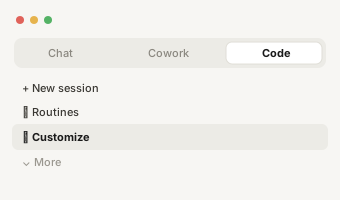
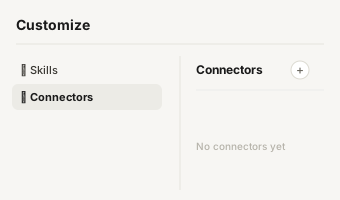
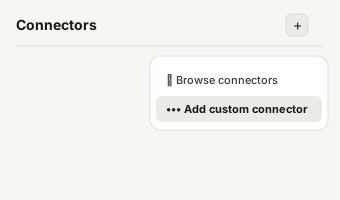
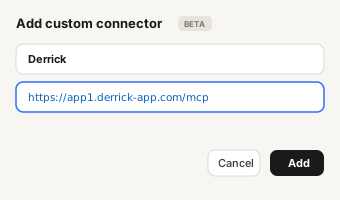
https://app1.derrick-app.com/mcp Call the same enrichment endpoints straight from your own stack or workflow.
Read the API docs →Frequently asked questions
How is a website's technology detected?
By reading what the page sends to the browser: script sources, HTTP headers, cookies and the specific markers each tool leaves behind. It is observation of public output, not access to anything private.
Can it detect the CRM a company uses?
Often yes, when the CRM leaves a trace on the public site: an embedded form, a tracking script, a chat widget. A CRM used purely internally, with no public surface, leaves nothing to read.
Is a negative result reliable?
No, and that matters. Not detecting a tool means no public signal was found, not that the tool is absent. Treat a hit as evidence and a miss as unknown, and never build a segment on an absence.
What else can I get from a website?
Traffic, traffic split by country, the page content itself, and the public emails and social profiles on it. Each has its own page in the list below.
Why does coverage vary so much between lists?
Because it depends on how much of a company's stack touches its public site. Companies selling online expose a lot; industrial firms with a small brochure site expose almost nothing. Measure coverage on your own segment rather than on an average.
How much does it cost?
2 credits per site for technologies. The free plan includes 100 credits a month, enough to test detection on your own target list first.