
CRM Data Enrichment: How to Choose and Integrate It (2026 Guide)
CRM data enrichment fills the fields nobody typed into a record you already own: industry, headcount, country, headquarters, legal identity. Match rate is mostly a property of the key you hand over, not of the provider, so a database of typed company names disappoints every vendor on the market while the same database with a resolved identifier makes an ordinary one look excellent. Enrich the account layer first, because one credit per company lifts every contact attached to it. To choose a tool, test it on 100 of your own records against six criteria: match rate, freshness, field coverage, write back, cost per useful record and compliance. A free export of twenty enriched company records is available further down this page.

Why this cluster matters
What you'll learn
A CRM without enrichment is just a contact list with extra friction. The teams that close more deals aren't using fancier CRMs - they're feeding theirs the right data at the right moment. This cluster covers the patterns to enrich Salesforce, HubSpot, Pipedrive without breaking your existing automations or sync logic.
For who · CRM Admins, RevOps, Sales Operations, Marketing Operations
See what Derrick pushes into your CRM →- When to enrich on form submit vs nightly batch vs on-demand
- HubSpot workflows : the enrichment recipes that don't blow up your daily API limits
- Salesforce custom objects vs standard fields - mapping enrichment cleanly
- Pipedrive + Zapier + Derrick : the small-team stack that scales to 50k contacts
- Field mapping pitfalls : conflicts, overwrites, audit trails
- Compliance trace : keeping the enrichment source on every record for GDPR
All guides · 15
All 15 guides in this cluster
Compare8


CRM Enrichment: How to Enrich Your HubSpot or Salesforce Data (Complete Guide)
HubSpot vs Pipedrive vs Salesforce - enrichment workflow per CRM, with pros/cons. Read the guide →

HubSpot Data Enrichment: How to Automate It With Workflows
Build native HubSpot workflows that enrich contacts on create, on form submit, and on a schedule. Read the guide →

CRM Data Quality Report 2026: Decay, Cost & the Enrichment Gap
Up to 91% of CRM data goes inaccurate within a year, 10-30% are duplicates: the 2026 numbers and how to close the enrichment gap. Read the guide →

Revenue Intelligence Platform: What It Scores and What to Fix First
What a revenue intelligence platform does, who uses it, how it differs from CRM reporting, sales and conversation intelligence, the three data sources it scores, a map of platform types, five demo questions and a readiness check. Read the guide →

Enterprise CRM Software: 9 Platforms Compared and a Data Test
Nine enterprise CRM platforms in alphabetical order with their public list prices and what their docs say about import, duplicates and account hierarchies, a weighted scorecard, the test to run on your own accounts before you sign, a 7-step migration and a three-year cost table. Read the guide → CompareManufacturing CRM: 8 Options and the Account Data They Need
What a manufacturing CRM is, why industrial sales break a generic CRM, what lives in the CRM vs the ERP, the features to require, eight CRM options A to Z with public list prices, the account record each one needs and how to fill it, and five questions to choose. Read the guide → CompareExamples of CRM by Use, and the Record Every One Needs
Examples of CRM grouped by what the team does (pipeline, marketing, service, enterprise, industry), what each vendor's documentation says about duplicates, the same account record in three CRMs, whether a spreadsheet is a CRM, and how to keep the records complete. Read the guide → CompareSocial Media CRM: What It Is and 8 Platforms by Use Case
What a social media CRM is, how it differs from a traditional CRM, 8 platforms grouped by use case with the networks they connect and their public prices, what it really costs, and how to turn LinkedIn engagement into complete CRM contacts. Read the guide →Strategy7


CRM Data Strategy: The 5-Layer Playbook (2026)
A CRM data strategy decides which fields your CRM must hold, where each one comes from, how often it is refreshed and who owns it. The five layers, the audit, the refresh cadence and what a cycle actually costs. Read the guide →

HubSpot Lead Scoring: The Data Layer Underneath the Model
Engagement scores work out of the box. Fit scores read CRM properties, and an empty field scores exactly like a bad fit. Audit fill rate before you write a criterion. Read the guide →

Who Uses HubSpot? How to Build the List Yourself (2026)
299,458 paying customers and no public roster. Detect the stack yourself, tell CMS Hub from analytics only, know what the signal cannot see, and price the segment per company. Read the guide →

CRM Contact Management: Fields, Decay and a 1-Hour Audit
What a contact record must hold, how fast it decays, and the one-hour audit that turns CRM contact management into a metric. Read the guide →

Lead Scoring Software: Judge It by What You Can Feed It
The four criterion types, the data each one requires, what your score becomes when the field is empty, and what it costs to fill. Read the guide →

HubSpot Prospecting Agent: Setup, Cost per Lead and Data
How the HubSpot prospecting agent picks and writes to leads, the editions and credits it needs, a step-by-step play setup, the properties it reads on a record, what a recommendation costs at $1 per lead, and how to complete records before you enroll them. Read the guide → StrategyTypes of CRM: The 4 Kinds, and the Data Each One Needs
The four types of CRM (operational, analytical, collaborative, strategic), what each one automates, and the data each needs to work; plus B2B vs B2C CRM, the 7 components of a CRM, what type Salesforce or HubSpot is, and how to choose. Read the guide →CRM data enrichment is the operation that takes a record your CRM already holds and fills the fields nobody typed in: industry, headcount, country, headquarters, founding year, the LinkedIn page, the legal identity. It is the least glamorous line in a revenue operations backlog and the one that quietly decides whether your routing rules, your territory splits and your scoring model rank anything real.
Most guides on the subject stop at the definition and a five step diagram. This one starts where the work actually breaks. You will find the matching key that decides your hit rate, the arithmetic that makes account level enrichment ten to fifty times cheaper than contact level for the same lift, a decay table per field family, and the write back policy that nobody writes down until the day a provider overwrites a value a rep had corrected by hand. There is also a real export at the bottom of the page, twenty company records enriched in one call, so you can see the exact shape of what comes back before you commit to anything.
It also gives you a way to choose without reading ten listicles: six criteria you can test on a hundred of your own records, and three types of option described by what they actually write into a CRM record.
Your CRM is the engine of your sales operation - but a poorly maintained CRM is worse than an empty one. Bad data costs businesses an average of $12.9 million per year, according to Gartner. Yet most sales teams keep prospecting from contact records full of gaps: no verified email, no direct dial, no up-to-date firmographic info.
CRM enrichment solves exactly this problem. It's the process of automatically completing missing data on your contacts and companies - professional emails, phone numbers, headcount, industry, tech stack - directly inside your customer relationship management tool. In this guide, you'll learn how to integrate data enrichment into your CRM, regardless of which platform you use.
What CRM data enrichment is: definition and core principles
CRM data enrichment is the process of adding verified external attributes, such as industry, headcount, country, job title or a professional email, to records your CRM already holds. It fills empty columns on rows you own. It does not repair wrong values, and it does not bring in new records.
The line with its neighbours is operational. Data cleansing repairs what is already in the field, and lead generation brings in records you did not have. Cleansing works on the values, generation works on the row count, enrichment works on the columns.
A CRM record is born incomplete by design. A web form asks for an email and a company name because every extra field costs you conversions. A conference list arrives as three columns. A rep types an account name from memory. What you end up with is a database where the identity of the company is present in some human readable form and almost nothing else is. Enrichment is the step that turns that name into a record your automation can reason about.
Why the incompleteness is not random
Here is the part that changes how you prioritise. Missing fields are not spread evenly across your database. They concentrate on the newest records, because the older ones have had more human contact, and on the smallest companies, because there is less public material about them. So a scoring or routing rule that depends on a field which is blank on a third of your rows does not degrade gracefully. It systematically deprioritises your newest and smallest accounts, which in most pipelines is exactly the segment you were trying to reach.
The two layers of enriched data
CRM enrichment works on two layers, and the rest of this guide keeps them apart because they neither cost nor age the same way:
Contact data (individual level):
- Verified professional email address
- Direct or mobile phone number
- Job title and department
- LinkedIn profile
- Geographic location
Firmographic data (company level):
- Industry sector
- Company size (number of employees)
- Estimated revenue
- Technologies in use (tech stack)
- Headquarters location
By filling in these fields, you turn a hollow contact record into an actionable profile - one you can use for segmentation, scoring, and personalizing your outreach.
How to choose CRM data enrichment tools: the criteria that matter
Most comparison posts rank vendors, and a ranking tells you more about who wrote it than about what will land in your CRM. A more useful test is to judge any option on six criteria, in this order, measured on a sample of your own records rather than on a demo database.
| Criterion | What it measures | How to test it on 100 of your records |
|---|---|---|
| Match rate | The share of records that come back with at least one usable field | Send 100 rows keyed exactly the way your CRM holds them, typed names included. Count rows with a result, not fields returned |
| Freshness | How recent the returned values are | Pick 20 accounts you know well, with a recent hire, a move or a headcount change, and check whether the result reflects it |
| Field coverage | Which of the fields you need actually come back | List the three to five fields your routing and scoring read, then measure the fill rate field by field. An overall fill rate hides the one field you needed |
| Write back to the CRM | How the result reaches the record: direct sync, API, workflow or CSV import | Check that it can follow your write back policy (fill blanks only, overwrite, or shadow fields) and that it stores a date next to each value |
| Cost per useful record | What you pay divided by the records that came back usable | Divide the bill by usable rows, not by rows sent. Billing per request on unresolved names quietly doubles this number |
| Compliance | Whether the source and purpose of each field are documented | One line in your vendor checklist: where each field comes from, and why any personal field is needed |
The fifth criterion settles more decisions than the other five together. A low price per request on weak keys can cost more per usable record than a higher price on clean identifiers, which is why the matching key, covered further down, matters as much as the tool you pick.
Three types of option, and what each one writes into your CRM
Behind the vendor names, the market splits into three types of option. They are not ranked here: they do different things to a record, and most teams end up combining two of them.
| Type of option | Example | What it changes on a CRM record | Where it stops |
|---|---|---|---|
| Enrichment built into the CRM | The native data features of HubSpot, Salesforce or Pipedrive | Fills a set of company fields on records already inside that CRM, usually from the web domain, on the vendor's schedule, with no export | The fields, the sources and the refresh cadence are the vendor's choice, and a record without a domain often stays blank |
| Multi-source enrichment platform | Derrick | Fills company and contact fields on a list you control, from the web app, Google Sheets, an MCP client or the REST API, at 1 credit per company or per profile, with the cost shown before the run | You choose the matching key and the write back policy yourself, which is work as well as control |
| Script, API and orchestration | Your own code, or Zapier, Make and n8n calling an enrichment API | Enriches a record automatically when it is created or updated, and writes the result back through the CRM's own API | Someone has to own the workflow, its error handling and its monitoring, or it fails silently |
A common split is a platform for the backlog and a script for the flow: the existing base is enriched once as a list, new records are enriched on creation. If you need a broader view of data enrichment tools beyond the CRM use case, that comparison has its own guide.
Native CRM data enrichment vs a dedicated tool
Native enrichment is the right answer more often than vendors of dedicated tools admit, and the wrong one more often than CRM vendors admit. The line between the two is easy to draw once you know what the CRM does on its own.
What the CRM does on its own
The major CRMs, HubSpot, Salesforce and Pipedrive included, offer some form of built-in or marketplace enrichment, and its scope depends on your plan. In practice it looks a company up from its web domain when the record is created and fills a handful of company properties: name, industry, a headcount range, country, sometimes a description and social links. It runs inside the CRM, needs no export, and costs nothing extra on the plans that include it. For a small team whose records all carry a clean domain, that can be enough.
What it does not do
- It keys on what it chose. Most native enrichment starts from the domain. A record that only carries a typed company name or a free mail address stays blank, and you cannot hand it a LinkedIn URL or a legal number instead.
- It fills the fields the vendor exposes. If your scoring needs a field outside that set, a hiring signal, a technology or a legal identity, native enrichment has no answer.
- It works on records already in the CRM. A conference list, a prospect file or a territory you are sizing has to be imported first and enriched second, which is the wrong order for anything you might not keep.
- It rarely shows a source or a date per field. Without them you cannot apply a write back policy with any confidence, or explain six months later why a value changed.
- Its data stays in that CRM. The same enriched account is not available to your sheet, your outreach tool or your assistant unless you sync it out again.
The practical rule: keep native enrichment on if your plan includes it, and treat it as a first pass on records that carry a domain. Use a dedicated tool for the records it leaves blank, for the fields it does not cover, and for lists that have not entered the CRM yet.
Why CRM Data Enrichment Is Not Optional: How a CRM Degrades
Every year, 25% to 30% of B2B data becomes inaccurate. People change jobs, companies, and phone numbers. Businesses merge, rebrand, or shut down. According to HubSpot, sales reps spend an average of 27% of their time searching for or correcting information - time that isn't spent selling.
In practice, an un-enriched CRM creates several compounding problems:
- High email bounce rates: an unverified email in your CRM ends up as a hard bounce and damages your sender reputation.
- Missed calls: a switchboard number instead of a direct dial, and your SDR wastes 10 minutes going nowhere.
- Impossible segmentation: without complete firmographic data (industry, headcount, location), precise targeting is out of reach.
- Biased lead scoring: a scoring model built on empty fields doesn't reflect the real potential of a prospect, which is why lead scoring software is judged by what you can feed it.
Database enrichment is therefore a maintenance practice just as critical as backing up your data.
The matching key decides whether CRM data enrichment works
Every enrichment provider on earth is judged on the same number: match rate. Almost nobody explains that match rate is mostly a property of your input, not of the provider's database. What you hand over is a key, and keys are not equal.
| What your CRM holds | How resolvable it is | What typically goes wrong | What to do first |
|---|---|---|---|
| Company name typed by a human | Weakest key | Legal name, trading name, subsidiary, abbreviation and misspelling all compete. "Acme", "Acme Inc." and "ACME Group SAS" are three different things to a matcher | Resolve the name to an identifier before enriching anything |
| Web domain | Strong key | Free mail domains, parked domains, and groups that run many brands on one domain | Strip free mail domains, then enrich directly |
| LinkedIn company URL | Strongest key for firmographics | Regional pages and showcase pages that split one company into several entities | Prefer the main page, keep the identifier on the record |
| Legal number (SIREN, SIRET, company number) | Strongest key for identity and legal data | Establishment versus headquarters confusion, dormant entities | Use the headquarters number, keep the establishment one separately |
The operational consequence is a single sentence: if your records only carry a typed name, your first enrichment step is not enrichment, it is resolution. Search Companies turns a company name into its LinkedIn URL at 1 credit per company, and that identifier is what every subsequent enrichment run will key on. Teams who skip this step blame the provider for a match rate they built themselves.
The same logic applies on the contact side. If what you hold is an email address, the name and the domain are already inside it, and Find Names and Domains by Email Addresses splits them out at no credit cost at all. Free structure beats paid guessing.
If part of your base is French, the public SIREN and SIRET registry gives you an even stronger key, resolved at 1 credit per company with SIRET and SIREN enrichment, and the French version of this guide covers that registry layer in detail.
What Data to Enrich First in Your CRM
Not all data has the same impact on your pipeline. A CRM data enrichment pass that fills everything at once costs a lot for a diffuse pipeline gain. Here's a priority order based on operational value:
| Priority | Data field | Direct impact |
|---|---|---|
| Critical | Verified professional email | Campaign deliverability, bounce rate |
| Critical | Up-to-date job title | ICP qualification, personalization |
| High | Direct phone number | Pick-up rate, outbound calls |
| High | Company size | Segmentation, pricing, approach |
| Medium | Tech stack | Buying triggers, technical personalization |
| Medium | LinkedIn data | Social selling, pre-call context |
| Standard | Location, industry | Geographic and sector segmentation |
Pro tip: start with critical fields on active contacts (open pipeline, target accounts) before doing a bulk historical enrichment.
Enrich accounts before contacts, and the arithmetic shows why
This is the single decision that changes the cost of a CRM data enrichment programme by an order of magnitude, and it is almost never stated plainly.
In a typical B2B database, contacts outnumber companies by somewhere between five and fifty to one. Every firmographic field you care about for routing and scoring, industry, headcount, country, headquarters, founding year, sector, belongs to the company, not to the person. Enrich at the account level and one credit lifts every contact attached to that account. Enrich at the contact level and you pay for the same firmographic attributes once per person.
Run the numbers on a small database. Twelve thousand contacts across one thousand accounts. Filling the company layer with Enrich Companies costs 1 credit per company, so one thousand credits, and every one of the twelve thousand contacts inherits an industry, a headcount band and a country. Doing the equivalent contact by contact would cost twelve times more for attributes that were never personal to begin with.
Person level enrichment still has its place, and it is a narrow one: seniority, function, tenure and the profile URL are genuinely individual. Enrich Leads covers that at 1 credit per profile. The rule of thumb that survives contact with reality: enrich every account, enrich only the contacts you intend to work this quarter.
The four field families, and how fast each one decays
Enrichment is not a project with an end date, because the fields do not age at the same speed. Our 2026 CRM data quality report puts numbers on that decay across a full base. Treating the whole record as one refresh cycle means you either pay too often for the stable half or run stale on the volatile half.
| Field family | Examples | Half life in practice | Sensible refresh |
|---|---|---|---|
| Legal identity | Legal name, registration number, incorporation date, registered address | Years. It changes on a corporate event, not on a Tuesday | Once, then on a merger or a move |
| Firmographics | Industry, headcount band, country, city, website | Twelve to eighteen months for headcount, much longer for industry | Annual, or quarterly on your named accounts |
| Person attributes | Job title, seniority, function, profile URL | Twelve to twenty four months. People change roles | Before any campaign that keys on title |
| Signals | Hiring, funding, technology change, news | Weeks. A signal that is three months old is history, not timing | Continuous, or not at all |
The practical reading of that table is that you should never buy a single refresh cadence. Legal identity is a one off. Firmographics are an annual line item. Signals are either monitored continuously or they should not be in your CRM at all, because a stale signal is worse than an empty field: it looks actionable. If you want the timing layer without the noise, Company Hiring Signal costs 1 credit per company and answers a question with a date attached to it.
How to Integrate CRM Data Enrichment: Step-by-Step Guide
There's no single way to enrich a CRM - but there's one method that works for nearly every team, including those with no technical background: enrich outside the CRM, in the Derrick web app or in Google Sheets, then sync the result back.
The sheet is the most common starting point, not the only one. The same CRM data enrichment operations run from the REST API when the refresh belongs inside a workflow, from an MCP client when you would rather ask Claude or another assistant to resolve a handful of accounts, and from the Derrick web app, with nothing to install, for teams who do not want a spreadsheet at all. Pick the door that matches how the work reaches you; the catalogue and the credit cost are identical behind all of them.
Step 1: Audit Your Existing Data
Before enriching, you need to know what's missing. Export your contacts from your CRM as a CSV file, then analyze the completion rate for each field:
- What percentage of contacts have an email? A verified email?
- How many records have no phone number?
- What share of your accounts is missing company size?
Expected output: a data quality matrix showing completion rates by field. This becomes your baseline to measure the impact of enrichment.
Step 2: Define Your Enrichment Priorities
From your audit, identify the two or three fields with the highest impact on your commercial performance. A simple rule: enrich the data that feeds your ICP qualification criteria first.
Emma, Sales Ops at a 50-person SaaS scale-up, found that 40% of her CRM accounts had no company size data. Without that field, HubSpot's automatic scoring wasn't working. She prioritized firmographic enrichment before anything else.
Expected output: a list of 3 to 5 priority fields to enrich, with a clear execution order.
Step 3: Enrich Your Data in the Web App or Google Sheets
The smoothest method is to export your contacts into the Derrick web app or Google Sheets, enrich them there, and then re-import the data into your CRM. This avoids complex API integrations and gives you full control over data quality before the import.
With a tool like Derrick, you can enrich in the web app or in Google Sheets:
- Missing email → use the Lead Email Finder (input: first name, last name, domain)
- Email to verify → use the Email Verifier to remove invalid addresses
- Phone number → use the Phone Finder from the contact's LinkedIn URL
- Company data → use the LinkedIn Company Scraper (headcount, industry, location)
- Tech stack → use the Website Tech Lookup (input: domain)
You can run these enrichments in batch across hundreds of rows simultaneously, in the web app or without leaving Google Sheets.
Expected output: an enriched Google Sheet with all missing fields filled in, ready to import into your CRM.
Step 4: Clean Before You Import
Effective enrichment also requires cleaning your data before it goes into the CRM. Before importing, remove duplicates and normalize your data to avoid polluting your database.
Key actions at this stage:
- Deduplication: remove duplicate rows (same email or same LinkedIn profile). Derrick's Remove Duplicates feature handles this automatically in Google Sheets.
- Normalization: standardize formats (name casing, phone numbers in international format, consistent company names).
- Email validation: never import an unverified email - a single poorly managed catch-all domain can compromise your deliverability.
Expected output: a clean, duplicate-free data sheet ready for CRM import.
Step 5: Import the Enriched Data Into Your CRM
Once your data is clean and enriched, you have several options for pushing it into your CRM:
Option A - Manual CSV import: the simplest method. Export your Google Sheet as CSV, then import it into your CRM by mapping columns to the corresponding fields. Compatible with HubSpot, Salesforce, Pipedrive, and Airtable.
Option B - Automation via Zapier or Make: connect Google Sheets to your CRM to automatically sync each newly enriched row. Ideal if you enrich new leads on a regular basis. Derrick connects to Zapier, Make and n8n through its API for this type of workflow.
Option C - Direct CRM API: for technical teams, it's possible to write directly to CRM endpoints via API. Reserved for teams with developer resources.
Expected output: CRM contacts updated with enriched data, with no history loss and no duplicate records.
Step 6: Set Up Continuous Enrichment
Enrichment isn't a one-time task. To maintain CRM quality over time, set up a recurring enrichment cycle:
- At entry: enrich every new lead as soon as it's added to the CRM (before the first contact)
- Quarterly: re-run enrichment on active accounts to catch job changes
- Before campaigns: verify emails and phone numbers across any list before sending or calling
Mark, Head of Growth at a lead gen agency, automated entry-level enrichment via a Make scenario: every completed form triggers a Derrick enrichment (in the web app or in Google Sheets), then a contact update in HubSpot - zero manual work required.
Automating enrichment in your CRM
Once the backlog is clean, what keeps it clean is a trigger. When a record is created, by a form, an import or a rep, a workflow sends its key to an enrichment API, waits for the result and writes it back under your write back policy. The record reaches the CRM already enriched, before anyone works it.
- From your own code. A CRM webhook or workflow calls the Derrick REST API with the domain or LinkedIn URL of the new record, then writes the returned fields through the CRM's own API. API access is included from the PLUS plan, at 47.50 EUR per month.
- Without code, through Zapier, Make or n8n. The scenario has three steps: a "new record" trigger in the CRM, a call to the Derrick API, and an "update record" action. This is how Derrick reaches 3000+ apps, through its API and these platforms rather than through native connectors.
Three guardrails keep the automation honest. Only enrich on creation when a usable key exists, and route the rest to a resolution step. Write a date and an outcome flag next to every field the workflow fills. And have one person watch the weekly count of enriched records, because an automation that stops looks exactly like a quiet week.
Your write back policy is the decision nobody documents
This is one layer of a wider plan; the CRM data strategy playbook sets out the other four.
Every CRM data enrichment run eventually meets a record where the CRM already holds a value and the provider returns a different one. There are exactly three defensible answers, and choosing none of them is the same as choosing the first one by accident.
- Fill blanks only. The provider writes where the field is empty and never touches a populated field. Safest, and the right default for any team where reps correct data by hand. The cost is that a wrong value entered in 2023 stays wrong forever.
- Overwrite on higher confidence. The provider wins when it returns a value with better provenance than what is stored. Correct in theory, and it requires that you actually store provenance, which most CRMs do not do out of the box.
- Shadow fields. Enrichment writes to its own set of fields, and your automation reads a formula that prefers the human value when it exists. The most work to set up, the only one where you can audit what enrichment changed, and the only one where you can roll a provider back.
Pick one, write it down, and make it the same across every field family. The failure mode here is not a bad choice, it is an unstated one: half your fields on fill blanks, half on overwrite, and no way six months later to explain why a territory changed. The same reasoning drives how you structure the record in the first place, which is the subject of your CRM data strategy.
Dedupe before CRM data enrichment, never after
Enrichment does not create duplicates, it multiplies their cost. If the run is automated, the same rule applies inside HubSpot enrichment workflows. Three records for the same company become three enrichment calls, three sets of fields that can disagree, and three accounts that each look moderately engaged instead of one that looks very engaged.
The ordering is therefore fixed: deduplicate, resolve to an identifier, enrich. Not the other way round, and not in parallel. Find Duplicates is unlimited on every plan including the free one, so there is no budget argument for skipping it.
One subtlety worth knowing. Deduplicating on company name alone will merge companies that should stay separate and miss duplicates that should merge, for exactly the reason set out in the matching key section. Deduplicate on the resolved identifier where you have one, and treat name based dedupe as a first pass that a human reviews. The practice of keeping one clean record per entity is the whole subject of contact management, and enrichment inherits every weakness in it.
What an empty return actually means
A blank result is information, and most teams read it as a failure. There are four distinct causes and they call for four different reactions.
- The key did not resolve. The name was ambiguous or the domain was a free mail provider. The company exists and is findable; your input was not good enough. Fix the input, not the provider.
- The entity is real but has no public footprint. Very small companies, recent incorporations, and firms that deliberately keep no presence. No provider will fill this, and paying more will not change it.
- The field genuinely does not exist for that entity. A sole trader has no headcount band. A holding company has no industry that means anything. Blank is the correct answer.
- The entity does not exist. A typo, a defunct company, a test record. This is a data quality finding, and it is worth acting on.
Storing which of the four you hit is worth more than the enriched value itself, because it tells you whether your next run should target the input, the provider or the record. At minimum, write an enrichment timestamp and an outcome flag next to every field you fill. Without them, a blank six months from now is indistinguishable from a field you never tried.
CRM Enrichment for HubSpot, Salesforce and Pipedrive
The field-by-field differences between two of them are laid out in HubSpot vs Pipedrive for enrichment.
The Google Sheets + CSV export approach works across all CRMs. Here are the key specifics for the three most widely used platforms.
HubSpot
HubSpot supports CSV import for contacts, companies, and deals. Key points:
- Map custom properties carefully before import to avoid creating duplicate fields
- Use email as the deduplication key
- The free HubSpot plan supports unlimited CSV imports
For teams running HubSpot or Pipedrive, Zapier automation is the most popular and accessible approach for non-technical teams.
Salesforce
Salesforce uses the Data Import Wizard for standard volumes and Data Loader for large batches (50,000+ records). Both standard and custom fields are accessible. Make sure to configure Duplicate Rules in advance to prevent creating duplicate records on import.
Pipedrive
Pipedrive offers a clean, intuitive native CSV import. The tool lets you map columns to Pipedrive fields and choose a merge strategy in case of duplicates (overwrite, skip, or create). Ideal for mid-sized sales teams looking for simplicity.
What CRM data enrichment costs, in credits rather than in brochures
Enrichment pricing is usually quoted per seat, per contract or on request, which makes it impossible to compare against the work you actually intend to do. Credits make the arithmetic visible. Here is the cost of each operation in this article, verified against the feature catalogue rather than from memory.
| Operation | Cost | Billed | Available on the free plan |
|---|---|---|---|
| Resolve a company name to its LinkedIn URL | 1 credit per company | Per request | Yes |
| Enrich a company record | 1 credit per company | Per request | Yes |
| Enrich a person record | 1 credit per profile | Per request | Yes |
| French legal identity from a SIRET, SIREN or name | 1 credit per company | Per request | Yes |
| Hiring signal on an account | 1 credit per company | Per request | Yes |
| Find duplicates | Unlimited | Not metered | Yes |
| Verify an email address | 1 credit per email | Per result found | No, paid plans only |
Two readings of that table matter. First, the billing column: an operation billed per request is charged whether or not it finds something, so a run on unresolved names costs the same as a run on clean identifiers and returns far less. That is the financial version of the matching key problem. Second, the availability column: the free plan is 100 credits a month at zero euros, and it covers every operation in this article except email verification, which starts on the paid plans. A free plan budget that assumes email verification is a budget that will not spend.
At the other end, the per credit price falls as volume rises, down to 0.0016 euro per credit on the largest plan. A million contact database is not a different product, it is the same operations at a lower unit price, which is the point of measuring your match rate on a hundred rows before you size anything.
CRM data enrichment with Derrick is priced for the common case: you already own the list, you want specific fields on it, and you want to know what each field costs before the run. The free plan is 100 credits per month at no charge and no card. Paid plans start at 20 EUR per month for 10,000 credits, then 47.50 EUR for 25,000 with API and MCP access included, 175 EUR for 100,000, and 320 EUR for 200,000 credits, which works out to 0.0016 EUR per credit. Unused credits roll over on the paid plans. Those are the whole prices, published on the pricing page, not a starting point that a sales call revises upward.
We are not publishing the other vendors' prices here, and that is deliberate rather than coy. Their public pages are rendered in a way that makes an honest, dated reading unreliable, and several of them quote per seat with an annual commitment, so a monthly figure in a table would be wrong the week after it is written. Read them at the source and compare them to the numbers above, which are the ones we are accountable for.
Estimate your own CRM data enrichment run
The simulator below turns the decisions above into a number. It asks what your records actually carry, because that is what sets your match rate, and it separates the account layer from the contact layer, because that is what sets your cost.
What will your enrichment run cost, and where will it break?
Pick what your records carry today and what you intend to fill. The verdict names the weak link before it names a number.
Select what your records carry, then what you want to fill.
Multi-select on both rows: click an option again to remove it. Costs come from the Derrick feature catalogue, one credit per company or per profile unless stated.
Where the enrichment runs: a sheet, an assistant, or your own code
The same enrichment reaches you through four surfaces, and the right one depends on the shape of the work rather than on your technical level.
The web app or a spreadsheet suits a list you are going to look at. Build the list in the web app, nothing to install, from LinkedIn, Sales Navigator or a prompt, or open the Derrick sidebar next to your sheet: you point it at a column of identifiers and the enriched columns are written back in place. This is the surface for a one off import, a conference list, a territory review, anything where you want to see the result before it reaches the CRM.
An AI assistant suits a question. With Derrick MCP, available from 47.50 euros a month on the PLUS plan, the same enrichment runs inside Claude, ChatGPT or any assistant that speaks the protocol. You ask in plain language, the tool call runs, and the record comes back in the conversation. This is the surface for account research, for a one off check before a call, for the moment when you do not want to open a spreadsheet at all.
The REST API suits a workflow that has to run without you. Every operation in this article is exposed as an endpoint, so enrichment can sit inside your CRM automation, fire when a record is created, and write the result back through your own integration. This is the surface for continuous enrichment, and it is the one that makes the write back policy described above a piece of code rather than a habit.
All four surfaces cover the same catalogue at the same credit prices, and nothing stops you using the web app or a sheet for the backlog and the API for the flow.
Common Mistakes to Avoid When Integrating CRM Enrichment
Problem 1: Importing unverified emails
Impact: Sending a campaign to unverified emails can push your bounce rate above 5%, triggering penalties from ESPs (Gmail, Outlook). Your domain ends up on a blacklist.
Solution: Always run your email column through an email verification tool before import. Invalid addresses, catch-all domains, and spam traps must be excluded.
Problem 2: Overwriting existing data without a backup
Impact: If your CRM import uses an "overwrite" logic, data manually entered by your sales reps can be permanently lost.
Solution: Always export a full CRM backup before any bulk import. Configure the import strategy to "enrich if empty" rather than "overwrite", when the option is available.
Problem 3: Enriching without defining field mapping rules
Impact: Incorrectly mapped fields push data into the wrong CRM properties. A phone number in the "LinkedIn URL" field, for example, is nearly impossible to detect and fix at scale.
Solution: Define a mapping schema before each import (Google Sheets column → CRM field) and document it in a reusable reference file.
Problem 4: Enriching personal fields when a company field would do
Impact: Personal fields carry obligations that company fields do not, and teams reach for them out of habit rather than need. A scoring model that only needed headcount and industry ends up holding direct dials nobody will ever call.
Solution: Enrich the account layer first and stop there whenever the use case allows it. When a person level field is genuinely required, write down why it is required next to the field itself, so the reason survives the person who asked for it.
Problem 5: Enriching once and never revisiting
Impact: Without ongoing maintenance, data quality drops back to its original level within 12 to 18 months. Your enrichment investment is wasted.
Solution: Set up a quarterly enrichment cycle and a systematic verification at lead entry (see Step 6 above).
Who Owns CRM Enrichment, and Why That Question Decides Everything
Most enrichment projects are designed technically and fail organisationally. The pipeline works, the fields fill, and six months later the CRM is dirty again because nobody was accountable for keeping it clean.
Three ownership questions settle before any tooling decision.
Who decides what a field means? If "company size" is headcount for one team and revenue band for another, enrichment will keep overwriting one definition with the other and both teams will conclude the data is wrong. A one-line definition per enriched field, written down where the field lives, prevents an argument that otherwise recurs quarterly.
Who arbitrates when the CRM and the enrichment disagree? A rep typed a job title after a call; the enrichment returns a different one. One of them has to win by rule rather than by whoever wrote last. The usual answer is that human-entered fields win and enrichment fills only what is empty, but the answer matters less than having one.
Who notices when it stops? An enrichment workflow that silently fails looks identical to a period with no new records. Somebody has to own the number of records enriched per week and see it drop. Without that, the failure is discovered by a rep dialling a wrong number, months later.
None of this is technical, and all of it determines whether the enrichment you set up this quarter is still working next year.
Key Takeaways
- Without regular enrichment, 25 to 30% of your CRM data becomes outdated every year - your database decays faster than you build it.
- Prioritize high-impact fields first: verified email and job title, then firmographics.
- The most accessible method: enrich in the Derrick web app or in Google Sheets, then import via CSV or sync through Zapier / Make into your CRM. The same CRM data enrichment runs from the REST API, from an MCP client, and from the Derrick web app.
- Always verify emails before import to protect your deliverability and sender reputation.
- CRM enrichment is a continuous process, not a one-time task - set up at minimum a quarterly refresh cycle.
- Prefer company level fields whenever they answer the question, and record why any person level field was needed.
- Choose an option on six criteria tested on your own records: match rate, freshness, field coverage, write back, cost per useful record and compliance.
Conclusion: Start Enriching Your CRM Today
An enriched CRM is a real competitive advantage: emails that land in inboxes, calls that reach the right person, precise segments for your campaigns. Getting started doesn't require a big budget or technical expertise - just a clear method and the right tools.
Start small: export 200 active contacts from your CRM, enrich them in the Derrick web app or in Google Sheets, re-import them. You'll see the impact in under an hour.
CRM Enrichment
Start enriching your list in 30 seconds
Free for 100 credits/month. No credit card.
Install the add-on and enrich your lists without leaving your spreadsheet.
Install in Google Sheets →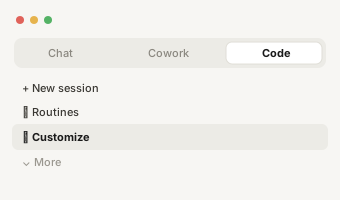
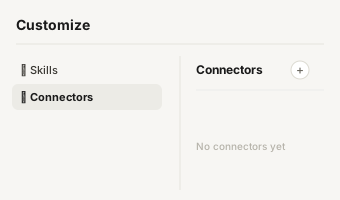
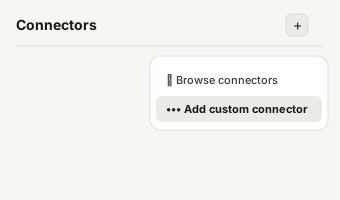
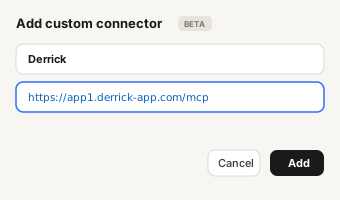
https://app1.derrick-app.com/mcp Call the same enrichment endpoints straight from your own stack or workflow.
Read the API docs →