Lead enrichment tools: 51 tools mapped by the job you need done
Compare 51 lead enrichment and data enrichment tools: real free plans, published prices, the job each one does, and how to automate enrichment in your CRM.


Most articles about lead enrichment tools hand you a ranked list of about ten platforms and call it a market. We counted. Across the four most visible round-ups on this query, the largest list covers eleven tools, and almost every one of them sits in the same category: the all-in-one platform. That is roughly a quarter of what is actually out there, drawn from the single category with the worst price transparency and the fewest free plans.
This page takes the opposite approach. Lead enrichment is not one product category, it is 12 distinct jobs, and a tool that is built for one of them is usually absent from the others. Below are 51 tools sorted by the job they do, with the two facts nobody publishes: whether you can actually test them for free, and whether they publish a price at all.
Lead enrichment tools: the short answer
Updated October 2026. How this list was built: every tool had to be a commercially available lead enrichment product, we checked the public pricing page for a published entry price, we tested whether the free tier is a real free plan or a time-limited trial, we recorded the geography the vendor claims as its strongest coverage, and we sorted by the job the tool was built to do rather than by a score we invented.
Lead enrichment tools at a glance. Eleven of the 51 tools, one per job family, with the two facts that decide whether you can even try them.
| Tool | Built for | Free plan | Entry price |
|---|---|---|---|
| Derrick | Enriching a list you already have, from the web app, a Google Sheets sidebar, an MCP client or the REST API | Yes, 100 credits per month | From 20 euros per month |
| Apollo | All-in-one contact database | Free plan | 49 dollars per month |
| Clay | Chaining several providers inside one table | Free plan | 149 dollars per month |
| RocketReach | Contact lookup on United States and Asia Pacific records | Trial only | 39 dollars per month |
| UpLead | United States contact database | Trial only | 99 dollars per month |
| Lead411 | United States contact database | Trial only | 99 dollars per month |
| Seamless.AI | United States contact database | Trial only | 147 dollars per month |
| ZoomInfo | United States enterprise database | None | Not published |
| Cognism | Europe and United Kingdom coverage | None | Not published |
| NeverBounce | Email verification | Free plan | 8 to 18 dollars per month |
| LeadMagic | Phone-first enrichment | Trial only | 99 dollars per month |
Two families are deliberately left out of that shortlist because they are decided as a group rather than tool by tool. Email discovery holds 7 tools, 5 of them with a free plan, priced between 14 and 49 dollars per month, and it is the most price-transparent category in the dataset. LinkedIn-native enrichment holds 7 tools, 5 with a free plan, priced between 29 and 99 dollars per month. Both are compared in full further down. Derrick sits in the first table because it covers several of these jobs on one credit balance instead of one subscription per job, and because the free plan is a real one: 100 credits per month, no card.
The practical consequence, and the reason ranked lists mislead, is that these tools are rarely substitutes for each other. An email verification service and an intent data platform both appear under the label "lead enrichment", and they solve problems that have nothing in common. Comparing them on one scale produces a ranking that cannot be acted on.
Here is how the 51 tools in this guide distribute across the jobs they were built for.
| Job | Tools | With a free plan | Publish a price |
|---|---|---|---|
| All-in-one platforms | 12 | 3 | 8 |
| Email discovery | 7 | 5 | 7 |
| Email verification | 3 | 3 | 3 |
| LinkedIn-native data | 7 | 5 | 7 |
| Company and European data | 5 | 1 | 1 |
| Public registries | 3 | 2 | 2 |
| Data APIs | 3 | 1 | 0 |
| Intent data | 3 | 0 | 0 |
| Signals and funding | 2 | 0 | 1 |
| Technographics | 3 | 1 | 2 |
| Local and map data | 2 | 1 | 1 |
| Phone-first | 1 | 0 | 1 |
Two numbers from that table are worth carrying with you. Of 51 tools, 22 offer a genuine free plan, 18 offer a trial only, and 11 offer neither. And 19 of the 51 publish no entry price whatsoever: you have to book a call to learn what it costs.
What is a lead enrichment tool?
A lead enrichment tool takes a partial record (a name, a domain, a LinkedIn URL, an email) and returns the fields you did not have: professional email, phone number, job title, company size, industry, technology stack or a buying signal. Lead enrichment is the act of filling those gaps. The category exists because no single source holds all of that data.
You will also see the same products sold as data enrichment tools or data enrichment software. Same market, different label. "Lead" puts the person first, "data" puts the record first, and the jobs behind both labels are the 12 listed further down. The one thing they are not is data cleansing: cleansing removes or corrects what is wrong in a record, enrichment adds what is missing.
How lead enrichment works, step by step
- A partial input. One or two fields per row: a name and a company, a domain, a LinkedIn URL or an email.
- A multi-source lookup. The tool queries several sources for each requested field, instead of trusting a single database.
- Matching, field by field. Each answer is tied back to the right person or company, so a namesake does not end up in your row.
- Verification. Emails are checked before they come back, and fields that disagree between sources are resolved or left empty.
- Write-back. The new fields land in your list, your CRM or the next step of a workflow, ready for outreach or routing.
Steps 2 to 4 are where tools differ, and they are invisible from a pricing page. Step 5 decides how much manual work is left for you, which is why the automation section below matters as much as the tool list.
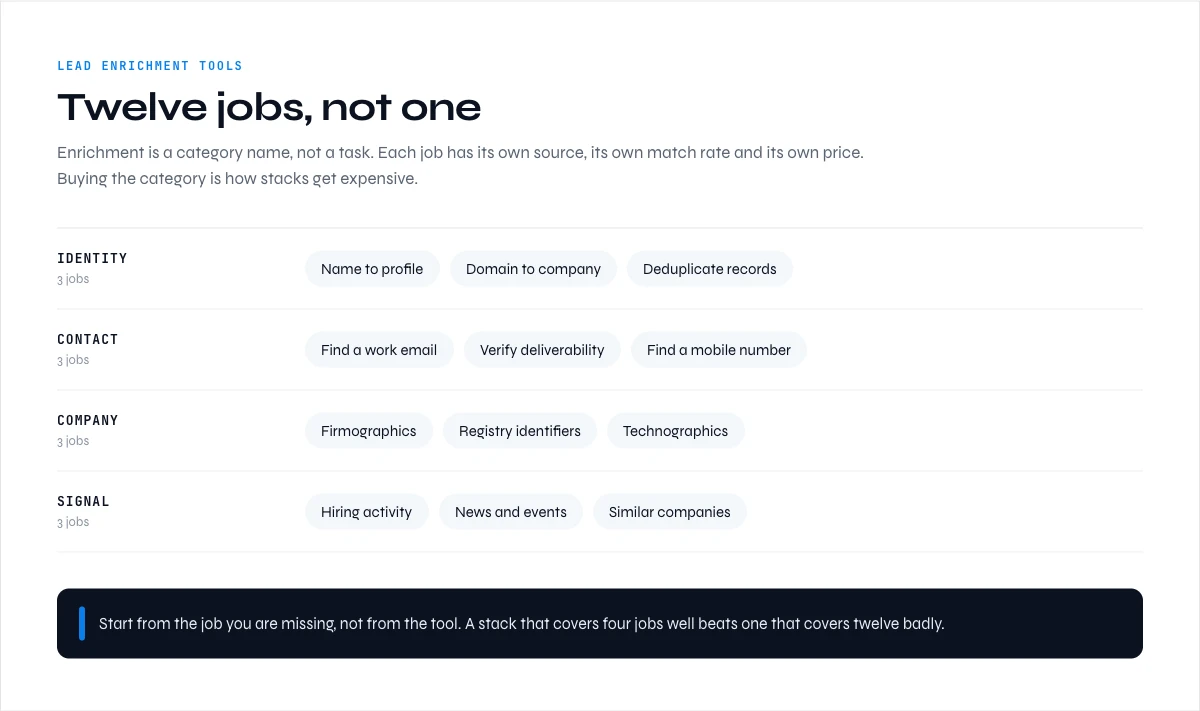
What lead enrichment tools actually do: 12 jobs, not one
Before comparing anything, it helps to name the jobs. Each of these is a real, separable piece of work, and most teams need three or four of them rather than all twelve.
- All-in-one platforms. A single database covering contacts and companies, sold as one subscription.
- Email discovery. Finding a professional email address from a name and a domain, or from a LinkedIn profile.
- Email verification. Testing whether an address will accept mail before you send to it. A separate discipline from finding it.
- Phone data. Mobile and direct dial numbers, the hardest and most expensive field in B2B data.
- LinkedIn-native data. Reading profile and company fields from LinkedIn itself rather than from a static database.
- Company and European data. Firmographics with real depth outside the United States.
- Public registries. Official government sources: company numbers, legal filings, registered addresses.
- Data APIs. Raw access to a dataset, sold to engineering teams rather than to sales teams.
- Intent data. Signals that an account is researching a topic right now.
- Signals and funding. Events like a funding round, a hiring surge, a new office.
- Technographics. Which software a company runs on its website or in its stack.
- Local and map data. Business listings, reviews and addresses from mapping platforms.
If you are still deciding which of these your team genuinely needs, the sister guide on B2B data sources and how they differ works through the same territory from the supply side: where each type of data originates and why that determines its freshness.
All-in-one lead enrichment tools (12 platforms)
This is the category every round-up covers, and the one where the standard advice is least useful. Twelve platforms in our dataset sell a single subscription covering both contact and company data.
| Tool | Free offer | Published entry price | Strongest coverage |
|---|---|---|---|
| Derrick | Free plan | From 20 euros per month | Global |
| Apollo | Free plan | 49 dollars per month | United States, global |
| Clay | Free plan | 149 dollars per month | Global |
| RocketReach | Trial only | 39 dollars per month | United States, Asia Pacific |
| UpLead | Trial only | 99 dollars per month | United States, global |
| Lead411 | Trial only | 99 dollars per month | United States |
| Seamless.AI | Trial only | 147 dollars per month | United States |
| Adapt | Trial only | Not published | United States, Asia Pacific |
| ZoomInfo | None | Not published | United States |
| Cognism | None | Not published | Europe, United Kingdom |
| Clearbit | None | Not published | United States, global |
| Dun & Bradstreet | None | Not published | United States, global |
Read that table as a shape rather than a ranking. Three of the twelve have a free plan. Four publish no price. If your evaluation process is "try a few and see", this is the category where that process stalls fastest, which is precisely why lists built only from it feel so unhelpful once you sit down to test.
Coverage is the other axis worth reading. Platforms built around United States data behave very differently on European records, and the reverse is equally true. Our guide to geographic coverage and why match rates vary by region goes through that in detail, because a match rate quoted without a geography attached tells you almost nothing.
In the web app or Google Sheets
Try the enrichment before comparing plans
Comparison tables tell you what a tool claims, not what it returns on your rows. Derrick's profile enrichment runs from the web app or the Google Sheets sidebar on the free plan, so the comparison can start with an actual result rather than a feature list.
- Feature
- LinkedIn Leads Profile Enrichment
- Credit cost
- 1 credit per lead enriched
The first button opens the web app (nothing to install): 1 credit per lead enriched, 100 free credits every month. The second details the feature and its cost per plan.
Email discovery and verification tools (10)
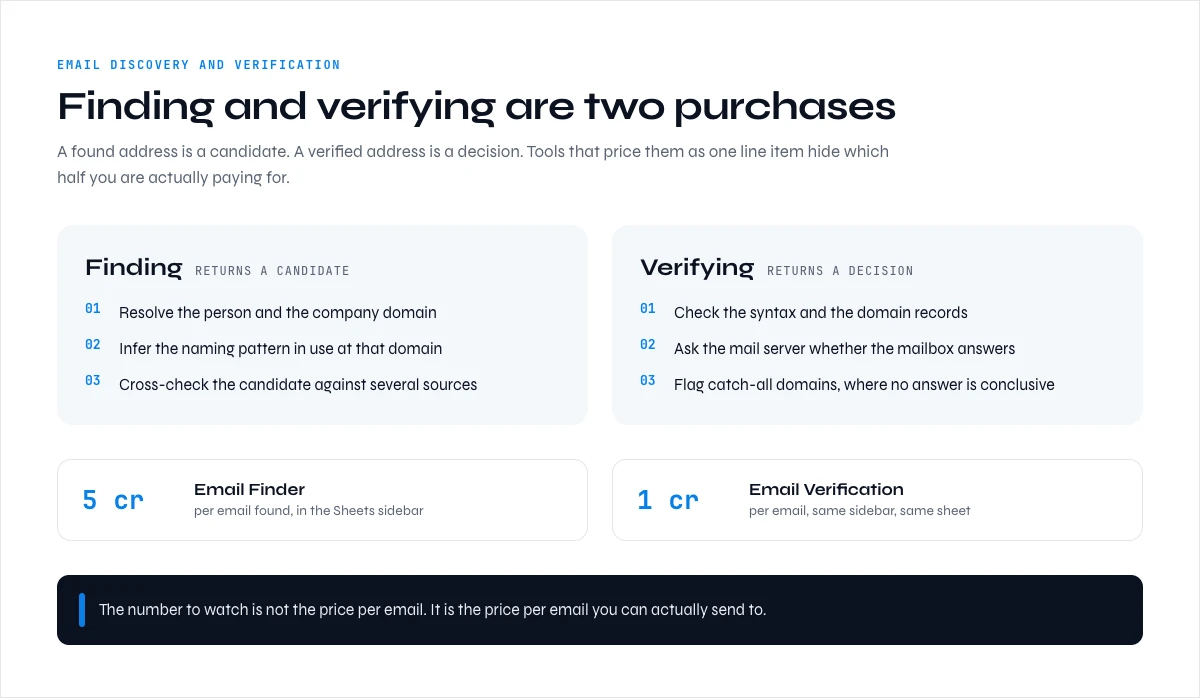
These are two jobs, not one, and conflating them is a common and expensive mistake. Discovery finds an address. Verification decides whether sending to it will damage your domain reputation.
Email discovery (7 tools). Hunter, Findymail, Datagma, Dropcontact, Prospeo, Anymail Finder and Snov.io. Five of the seven have a free plan, and all seven publish an entry price, between 14 and 49 dollars per month. This is the most price-transparent category in the entire dataset. Dropcontact and Datagma carry European coverage; the rest are positioned globally.
Email verification (3 tools). NeverBounce, ZeroBounce and Bouncer. All three have a free plan, all three publish a price, and entry sits between 8 and 18 dollars per month. It is the cheapest category here and the one most often skipped.
Skipping it is a mistake with a measurable cost. A discovery tool returns addresses at varying confidence, and sending to unverified addresses is how a domain reputation degrades. If you want the mechanics of that, our guide on accuracy, coverage and the real cost of B2B data covers what a match rate does and does not promise.
Derrick handles both jobs in the same list, in the web app or in a Google Sheet. Email Finder costs 5 credits per email found, on paid plans from STANDARD (20 euros per month), and bills only when an address is actually found, so a row that returns nothing costs nothing. An email found this way already arrives verified, so there is nothing to pay twice. Email Verification is for lists that come from somewhere else (an old CRM export, a purchased file, an event list): 1 credit per verified email, also on paid plans from STANDARD.
LinkedIn and phone enrichment tools (8)
LinkedIn is where B2B identity actually lives, and a whole category of tools exists to read it. Seven tools in the dataset are LinkedIn-native: Kaspr, Lusha, Surfe, Wiza, PhantomBuster, LeadIQ and LinkedIn Sales Navigator itself. Five of the seven have a free plan and all seven publish an entry price, from 29 to 99 dollars per month. Kaspr and Surfe are European-focused; Lusha and LeadIQ straddle United States and Europe.
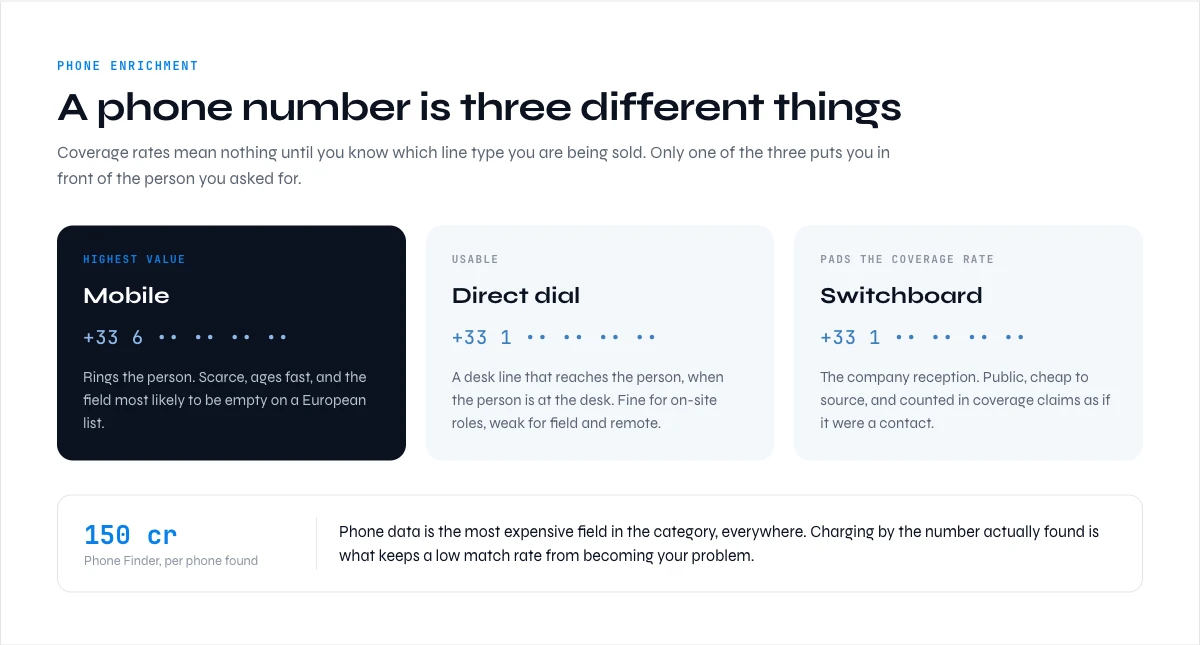
Phone is the thinnest category in the entire dataset. Exactly one tool, LeadMagic, is positioned phone-first, with a trial rather than a free plan and an entry price of 99 dollars per month. Everything else treats phone as a field inside a broader product.
That thinness is not an accident. Direct dials and mobiles are the hardest B2B field to source and to keep current, which is why they are also the most expensive line on almost every price list. Derrick's Phone Finder costs 200 credits per phone found, on paid plans from STANDARD, and like Email Finder it only charges when a number is actually returned. The 100 free credits do not cover a single phone lookup, so phone testing starts on a paid plan.
For profile-level fields rather than contact details, Enrich Leads returns the full professional profile at 1 credit per profile and is available on the free plan.
Company data, registries and European coverage (10)
Contact data gets the attention, but a large share of enrichment work is company-level: legal identity, size, sector, address, financial health. This is the side of B2B data enrichment that most round-ups skip, and it is also where pricing is hardest to find.
European and company-focused (5 tools). Pappers, Creditsafe, Ocean.io, Dealfront and Bureau van Dijk. This is the least transparent group in the dataset: one free plan out of five, and only one published entry price. Four of the five require a conversation before you learn what it costs.
Public registries (3 sources). SIRENE from INSEE in France, Companies House in the United Kingdom, and OpenCorporates. The first two are free and official. They are not enrichment products and they will not scale into a spreadsheet workflow on their own, but for legal identity in their jurisdiction they are the source everything else copies from.
Data APIs (3). People Data Labs, Coresignal and Datarade. None publishes an entry price. These are sold to engineering teams building their own data layer rather than to a sales team enriching a list this afternoon. If that is the shape of your problem, the sister guide on third-party API enrichment and how to make it work is the more useful read.
For French company identity specifically, Derrick's SIRET and SIREN enrichment returns official company identifiers at 1 credit per company and is available on the free plan, which means you can reconcile a French list against the registry without leaving the sheet.
Intent, signal and technographic tools (8)
These tools answer a different question. Not "who is this person" but "is this account worth contacting this week".
Intent data (3 tools). Bombora, 6sense and G2 Buyer Intent. None has a free plan, none publishes a price. This is the least accessible category in the dataset by both measures, and it is the one where a small team is least likely to find an entry point.
Signals and funding (2). PredictLeads and Crunchbase. Crunchbase publishes an entry price of 49 dollars per month with a trial; PredictLeads publishes neither.
Technographics (3). BuiltWith, HG Insights and Wappalyzer. Entry prices where published are high for this list, 250 dollars per month and above, reflecting that this is usually an account-selection input rather than a per-record enrichment.
If buying signals are the part you care about, our guide to B2B intent data covers how those signals are built, and this page is not a substitute for it. What matters here is structural: this is the corner of the market where free evaluation is essentially unavailable, so budget for a procurement conversation rather than a trial.
Two per-record signals are cheaper to test. Derrick's Company Hiring Signal tells you whether a company is hiring, at 1 credit per company on the free plan, and Website Technologies reads the stack a website runs on, at 2 credits per website on paid plans from STANDARD. Change alerts (Signal) are a subscription available in Google Sheets, also from the STANDARD plan.
Which lead enrichment tools are actually free (22 of 51)
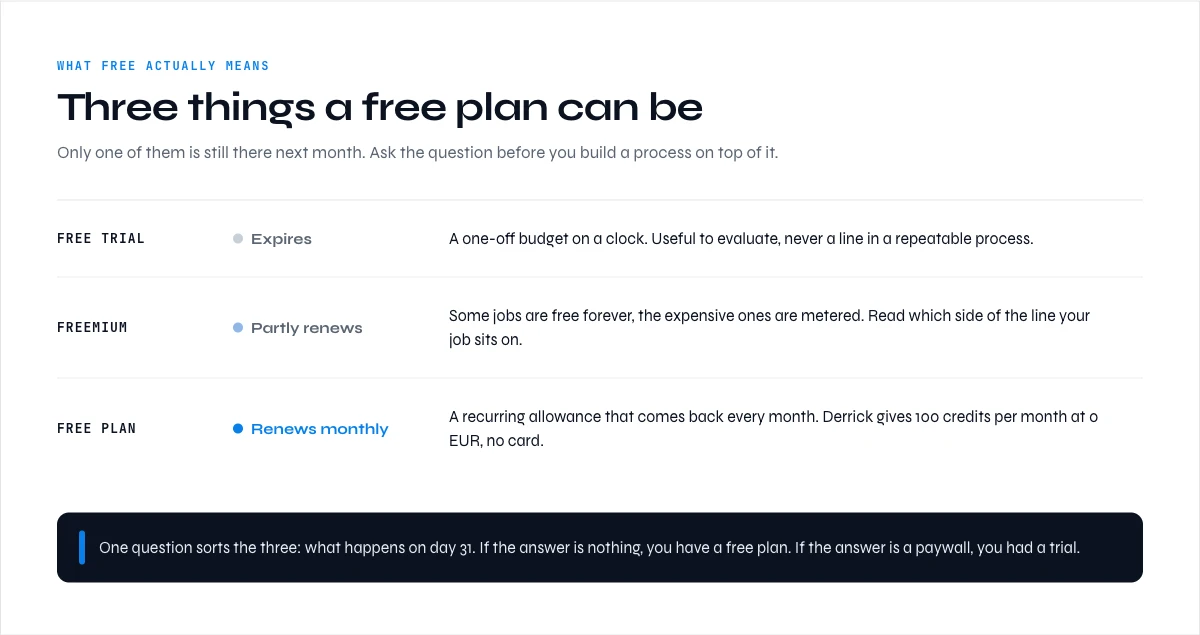
This is the fact the round-ups leave out, and it changes how you plan an evaluation. Free data enrichment tools are less common than the word "free" on landing pages suggests. Across all 51 tools:
- 22 have a genuine free plan that persists without a card and without a countdown.
- 18 offer a trial only. You get access for a window, then it stops.
- 11 offer neither. Evaluation starts with a sales conversation.
The distribution is not even, and that is the actionable part. Free plans cluster in email discovery, verification and LinkedIn-native tools, the categories where the unit of work is small and easy to sample. They are close to absent in intent data, European company data and data APIs, where the product is a dataset licence rather than a per-row action.
Practical reading: build your evaluation shortlist from the categories where free plans exist, prove the workflow end to end there, and only enter a procurement process for the one or two categories that genuinely require it. Running it the other way around, starting with the quote-only vendors, is how three months disappear.
A note on comparing free plans honestly: a free plan with no export is a demo, and a trial that requires a card is a purchase with a cancellation deadline. Check both before you count a tool as testable.
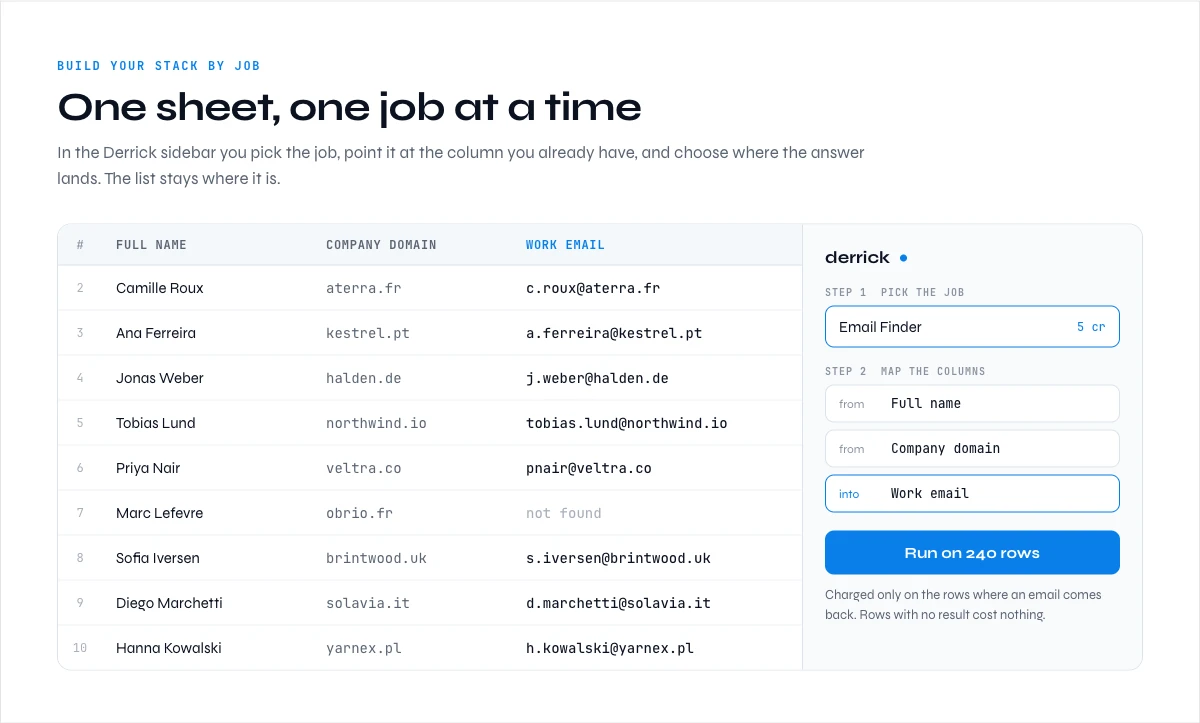
Build your stack by job
Before you open any tool, five checks decide whether a lead enrichment tool fits your pipeline:
- Accuracy and freshness. How the tool verifies a field, and how often a record is refreshed.
- Coverage in your market. A match rate measured on United States records says little about France or Germany.
- Depth. How many of the fields you need come back on one row, not how many fields exist in the brochure.
- Integration without an engineer. Whether results land in your list, your CRM or your workflow without a custom script.
- Billing per result or per call. Whether a row that returns nothing still costs you.
The full version, eight criteria with the questions to ask a vendor, lives in our guide on choosing a data enrichment provider.
Rather than picking a winner, work out which jobs you need and see what that implies. The tool below maps your selection onto the 51-tool dataset and shows what the same work costs as a single credit balance.
Build your enrichment stack by job
Pick the jobs you actually need and your monthly volume. You get the number of tool categories that spans, how many of the 51 tools sit in them, and what the same work costs at most in Derrick credits, with the plan it needs.
Pick at least one job and a volume to see your stack.
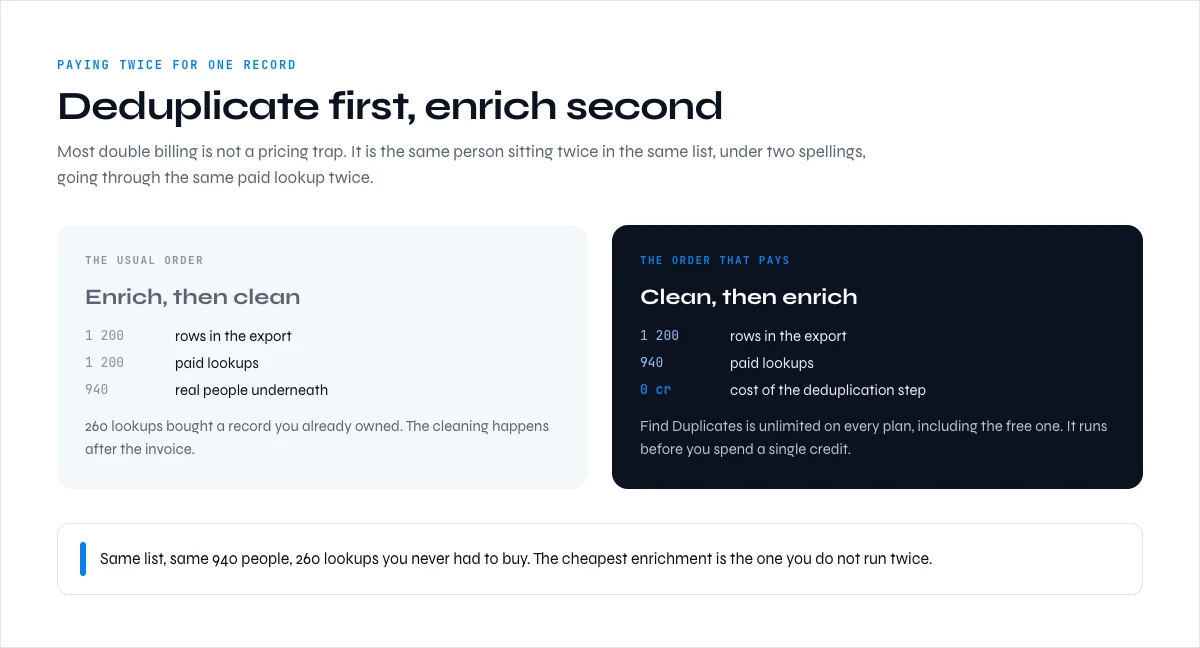
How to avoid paying twice for the same record
The failure mode of a multi-tool stack is not cost per se, it is overlap. Three subscriptions that each claim to return an email will each charge you for attempting the same row, and the second and third attempts add nothing if the first succeeded.
Four habits keep that under control:
- Order your enrichment by cost, cheapest first. Company-level fields are typically 1 credit or equivalent; a mobile number can be a hundred times that. Resolve the cheap fields first and only escalate on rows that still matter.
- Only pay on success. Per-result billing means an empty row costs nothing. Per-call billing means you pay for the miss too. This distinction dominates your real cost at volume, far more than the headline price per credit.
- Deduplicate before you enrich, not after. Enriching the same company twice under two spellings is the most common invisible waste in a list. In Derrick, Find Duplicates does this in the Google Sheets sidebar, unlimited.
- Keep one field per source of truth. When two tools disagree about a job title, an undocumented precedence rule is worse than either tool.
Headline price per credit still matters once billing is per result. Here is what one Derrick credit costs on each paid plan, taken from the public pricing:
| Plan | Price per month | Credits per month | Cost per credit |
|---|---|---|---|
| FREE | 0 euros, no card | 100 | 0 euros |
| STANDARD | 20 euros | 10,000 | 0.002 euros |
| PLUS | 47.50 euros | 25,000 | 0.0019 euros |
| PRO | 175 euros | 100,000 | 0.00175 euros |
| SCALE | 320 euros | 200,000 | 0.0016 euros |
Combine the two and an email found on SCALE costs 5 credits, about 0.008 euros, while an email that is not found costs nothing. Unused credits carry over as long as the account stays on a paid plan.
If you are consolidating an existing stack rather than building a new one, the sister guide on switching data enrichment providers covers the sequencing, and what you actually pay for B2B enrichment breaks down the five pricing models you will meet.
Derrick is built for the consolidated version of this: one web app (also available as a Google Sheets sidebar), one credit balance across every field, and a multi-source lookup behind each one so you are not the person maintaining the fallback order. Enrich Companies returns firmographics at 1 credit per company on the free plan, and the same operations are available through an MCP server and a REST API when the work belongs in a pipeline rather than a spreadsheet.
How to automate lead enrichment in your CRM and workflows
A list enriched once goes stale. The teams that get the most out of lead enrichment tools stop running them by hand and let enrichment fire on its own, every time a record enters the system.
What your CRM already does. Several CRMs now ship their own data enrichment software on their paid tiers: company size, industry, sometimes a few contact fields. Check that first, it costs nothing extra. It usually stops at firmographics on well-known companies. Verified emails, mobile numbers, LinkedIn fields and smaller or non-US companies are where dedicated data enrichment tools earn their place, and where B2B data enrichment actually changes what your reps can do.
The four steps of an automated flow.
- Trigger. A form is submitted, a contact is created in the CRM, a row is added to a sheet, a deal changes stage.
- Enrich. The record is sent to the enrichment tool with the fields you want back.
- Write back. The new fields are written to the record, with a rule for what to do when a field is already filled: overwrite, keep, or only fill if empty.
- Route. The enriched record goes to the right owner, sequence or segment, based on the fields you just added.
Three ways to run it with Derrick, one per use case.
- No human in the loop: the REST API. Your back end, your CRM or a scheduled job calls the lead enrichment API directly, or you wire it through Zapier, Make or N8N, which opens 3000+ integrations. Our data enrichment API guide covers the build, and third-party API enrichment covers the trade-offs of plugging an outside provider into your stack.
- A question in a chat: the MCP server. In Claude, ChatGPT or any MCP client, you ask for a company profile or a contact and Derrick answers inside the conversation. Useful for research before a call, not for bulk.
- A list to work by hand: the web app or Google Sheets. Import or paste a list in the Derrick web app, pick the columns, export. Or do the same from the Google Sheets sidebar when the list already lives there.
API and MCP access start on the PLUS plan (47.50 euros per month). For the CRM side in detail, read how CRM data enrichment works, and for one concrete set-up, HubSpot enrichment workflows walks through triggers and field rules.
Lead enrichment tools vs lead scoring: which one you actually need
The two get shopped together and they answer different questions. Enrichment answers what do I know about this record. Scoring answers which of these records do I work first. Buying a scoring layer on top of thin data produces a ranked list of guesses, which is why the order matters.
| Question | Lead enrichment | Lead scoring |
|---|---|---|
| What it produces | Missing fields: email, phone, title, headcount, sector, stack | A number or a grade attached to a record |
| What it needs as input | A partial record: a name, a domain, a LinkedIn URL | Fields that already exist, plus behaviour |
| Where it breaks | Coverage gaps and stale records | Scores built on fields nobody filled in |
| How it is billed | Per record or per credit consumed | Per seat, or bundled inside a CRM tier |
| When to buy it | Before outreach, on every list you touch | Once your records are complete enough to rank |
The practical rule is that scoring is downstream of enrichment. A model that ranks on headcount, sector and technology stack cannot rank anything if those three fields are empty on 60 percent of your rows. Fill the fields first, then decide whether you need a score at all: many teams find that a sorted list on two enriched fields does the job a scoring product was going to charge them for.
If your rows are missing the fields the score would have used, that is an enrichment problem. Enrich Leads returns the full professional profile at 1 credit per profile and runs on the free plan, which is enough to check how much of your list is actually scoreable before you buy anything on top of it.
Key takeaways on lead enrichment tools
- Lead enrichment is 12 distinct jobs, not one product category. The most visible round-ups cover about 11 tools, nearly all from the all-in-one category.
- Of 51 tools, 22 have a genuine free plan, 18 are trial only, and 11 offer neither.
- 19 of 51 publish no entry price. Quote-only pricing concentrates in intent data, European company data and data APIs.
- Email discovery and verification are separate jobs. Verification is the cheapest category in the dataset and the most frequently skipped.
- Phone is the thinnest category: one phone-first tool out of 51, because direct dials are the hardest field to source.
- Build your evaluation where free plans exist, and reserve procurement for the categories that genuinely require it.
- At volume, per-result billing matters more than headline credit price, because you stop paying for misses.
- Company-level B2B data enrichment (registries, European firmographics, data APIs) is the least transparent group on price: plan for a sales call there.
- Data enrichment tools pay off when a trigger in your CRM or workflow runs them on every new record, not when someone remembers to run a list.
The useful question is not which of these lead enrichment tools is best. It is which jobs your pipeline actually depends on, and whether you want to run them as four subscriptions or as one balance. Derrick exists for teams who picked the second answer, and the free plan gives you 100 credits per month to test that claim on your own list.
Frequently asked questions
How do you enrich leads?
Are data enrichment tools and lead enrichment tools the same thing?
Which lead enrichment tools have a free plan?
What is the difference between email discovery and email verification?
Can you automate lead enrichment?
Does my CRM enrich data on its own?
Do I need more than one lead enrichment tool?
How do you avoid paying twice for the same record?
Keep reading
Continue exploring this cluster


B2B Data Sources: Primary, Secondary, and Aggregated
Read →

How to Choose a B2B Data Enrichment Provider: 8 Key Criteria
Read →

Switching Data Enrichment Providers: A Complete Guide
Read →

B2B Data Enrichment Tools Pricing: What You Actually Pay in 2026
Read →