Company contact database: build your own instead of renting one
What a company contact database is, what renting one costs against building your own, and the credit cost of 320 verified contacts, layer by layer.


Every outbound team eventually hits the same wall: a clean list of target accounts, and no way to reach a single human inside them. The reflex is to shop for a company contact database, pay for access to a few hundred million records, and hope the people you need are in there and still reachable. There is a second option that almost nobody writes about, because nobody sells it: assemble the database yourself, account by account, at the moment you actually need it. This guide covers what a company contact database is, what renting one really costs compared to building one, and the exact five layer workflow to assemble your own in a spreadsheet.
What is a company contact database?
A company contact database is a structured set of records that links companies to the people inside them, with a verified way to reach each person. Three objects, joined: the account, the contact, and the reachable detail. Everything else is a spreadsheet.
The commercial versions of this advertise their size first. Indexes on the market quote anywhere from 200 million to 500 million contact records, and that number is the whole pitch: pay for access, search the index, export what matches. The number is also the trap, because you are not going to email 500 million people. You are going to email a few hundred, in a few dozen accounts, and the only question that matters is whether those specific records are right today.
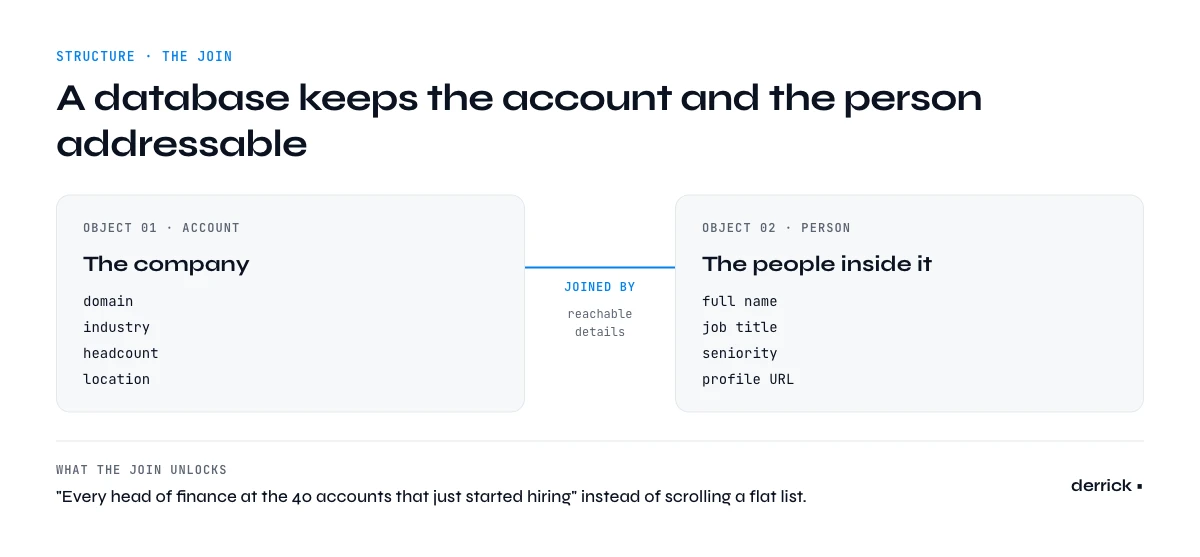
A company contact database is a structured set of records that links organisations to the people inside them: the company on one side (domain, industry, headcount, location), the person on the other (name, role, seniority), and the reachable details that connect the two (professional email, phone, profile URL). What separates a real database from a spreadsheet export is the join. A flat list of names is a list. A database keeps the account and the person addressable as two related objects, so you can ask questions like "every head of finance at the 40 accounts that just started hiring" instead of scrolling.
It's also not a CRM. A CRM is a system of record for relationships you already have: deals, notes, owners, stages. A company contact database sits upstream of that. It's the raw material you feed into the CRM once a contact is worth tracking. Confuse the two and you end up with 40,000 rows nobody has ever emailed, which is expensive in seat licences and poisonous for reporting.
The third distinction is provenance. A usable record carries where the data came from and when it was last confirmed. Without that you can't tell a verified email from a guessed pattern, and you'll find out the difference when your campaign bounces. Independent testing of B2B providers puts real accuracy in a 63% to 91% range and coverage anywhere from 26% to 92% depending on the field and the region, as our 2026 provider benchmark documents. No vendor sits at the top of both. That gap is the single most important fact to hold in mind before you spend anything.
Buy a company contact database, or build one?
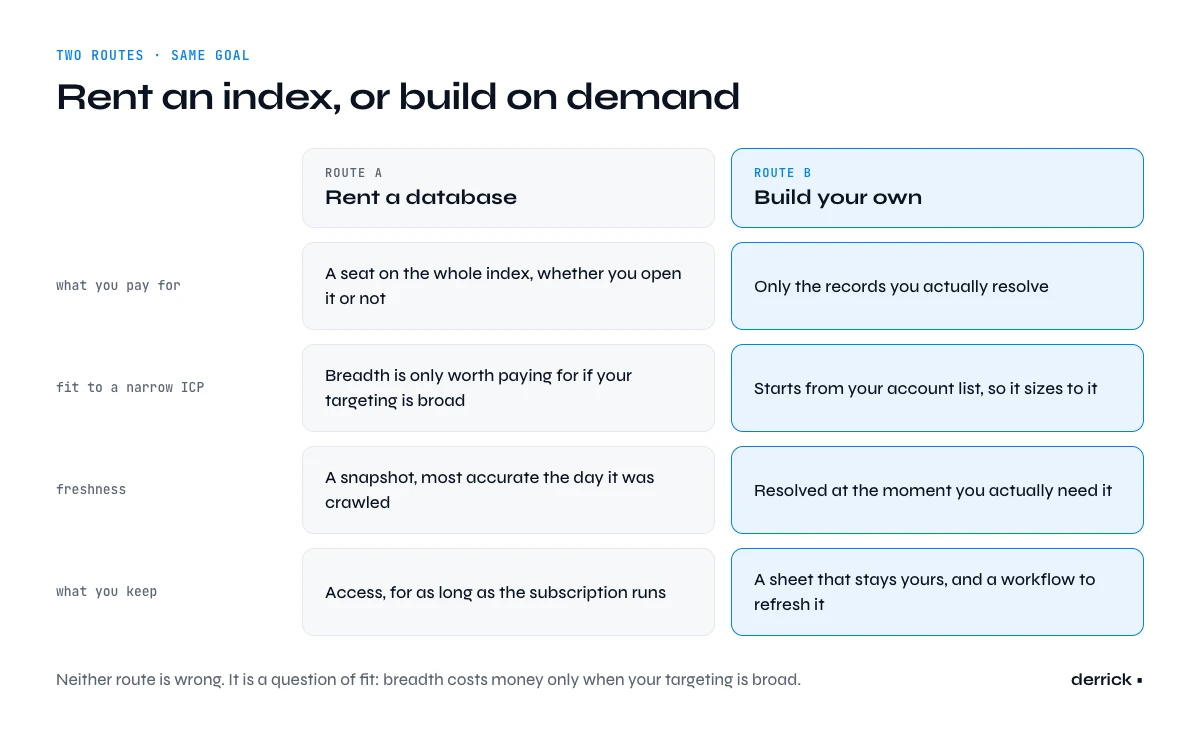
Renting means paying for a seat on somebody else's index. You get instant scale, a search interface, and the comfort of a big number on the pricing page. You also get a bill sized to the whole index rather than to your use of it. If your ideal customer profile is 300 companies in three countries, a 500 million record subscription means you're financing 499,999,700 records you will never open. That's not a criticism of large databases. It's a question of fit: breadth is only worth paying for if your targeting is broad.
Building means starting from your account list and resolving contacts on demand. You accept that it takes a workflow instead of a search box, and in exchange every record you pay for is a record you asked for, freshly resolved on the day you asked. It also sidesteps the coverage lottery. A global index is rarely global in practice, and match rates swing hard by market, which we break down in our guide to geographic coverage and match rates. Resolving on demand lets you see the miss immediately on the account that matters, rather than discovering it as a silent hole in a bulk export.
| Approach | Best when | What you actually pay for |
|---|---|---|
| Rent a prebuilt index | Broad targeting, high volume, exploratory search across many segments | Access to the whole index, whether you touch 200 records or 200,000 |
| Build on demand | A defined ICP, named accounts, teams that value freshness over raw breadth | Only the companies and people you explicitly resolve |
| Both, layered | Established teams with a broad top of funnel and a tight named account list | A subscription for discovery plus per record spend where accuracy matters |
Most mature teams end up layered, and there's nothing wrong with that. The mistake is defaulting to a subscription before you know how many records you actually touch in a month. If you've never counted, count first. The criteria worth weighing before signing anything are laid out in our guide on how to choose a data enrichment provider.
| What you are paying | Rent a prebuilt index | Build on demand |
|---|---|---|
| Pricing model | Subscription for access, usually per seat, often with an annual commitment | Per record resolved, from a shared credit balance |
| Published entry price | Self-serve tiers in this category publish roughly 39 to 149 dollars per month. The large enterprise indexes publish nothing and quote after a call. | From 20 euros per month, and a free plan with 100 credits per month |
| What 320 reachable contacts cost | Bundled into the subscription, whether you use 320 records or 32 000 | 2 200 credits, computed line by line further down this page |
| What you pay for records you never touch | Everything. The index is priced whole | Nothing. An unresolved company costs zero |
| Who owns the freshness problem | The vendor, on their refresh cycle, which you cannot see | You, on the day you run it, which is the point |
| What happens when you stop paying | Access ends. The exports you already made are what you keep | Nothing changes. The data is in your sheet and it is yours |
The honest reading of that table is that renting wins on one axis and one only: exploring a market you cannot yet name. If you do not know which 200 companies you want, an index lets you browse until you do. The moment you can name them, you are paying subscription money for a search you no longer need to run.
The decay problem every contact database inherits
Whichever route you take, the data starts dying the moment it is written. Roughly 30% of B2B records become unusable every year: people change jobs, companies rebrand, domains move, teams reorganise. That figure is not a vendor problem, it is a property of the world the data describes, and we cover the mechanics of fighting it in our page on database enrichment.
For a rented index that's uncomfortable: what you're buying is a snapshot, and its accuracy peaks on the day the vendor crawled it, not the day you export it. For a self built database it's simpler but not free: whatever you assemble in January is materially worse by December unless you refresh it. The difference is that a build on demand workflow makes refreshing cheap and targeted, because you already know which accounts matter this quarter.
One practical rule falls out of this. Never treat contact data as an asset you own. Treat it as a perishable input you resolve close to the moment of use. A verified email pulled the week you send beats ten records that have been sitting in a sheet since last spring, and it costs less, because you're not paying to store and clean the nine you'll never use.
In the web app or Google Sheets
Build the base you keep
A rented database stops working the day the contract ends. Describe your segment in a sentence and Derrick imports the companies into your own list, in the web app or in Google Sheets, with domain, LinkedIn page and firmographics that remain yours afterwards.
- Feature
- Import Companies from a Prompt
- Credit cost
- 1 credit per company imported
The first button opens the web app (nothing to install): 1 credit per company imported, 100 free credits every month. The second details the feature and its cost per plan.
The five layers of a usable contact database
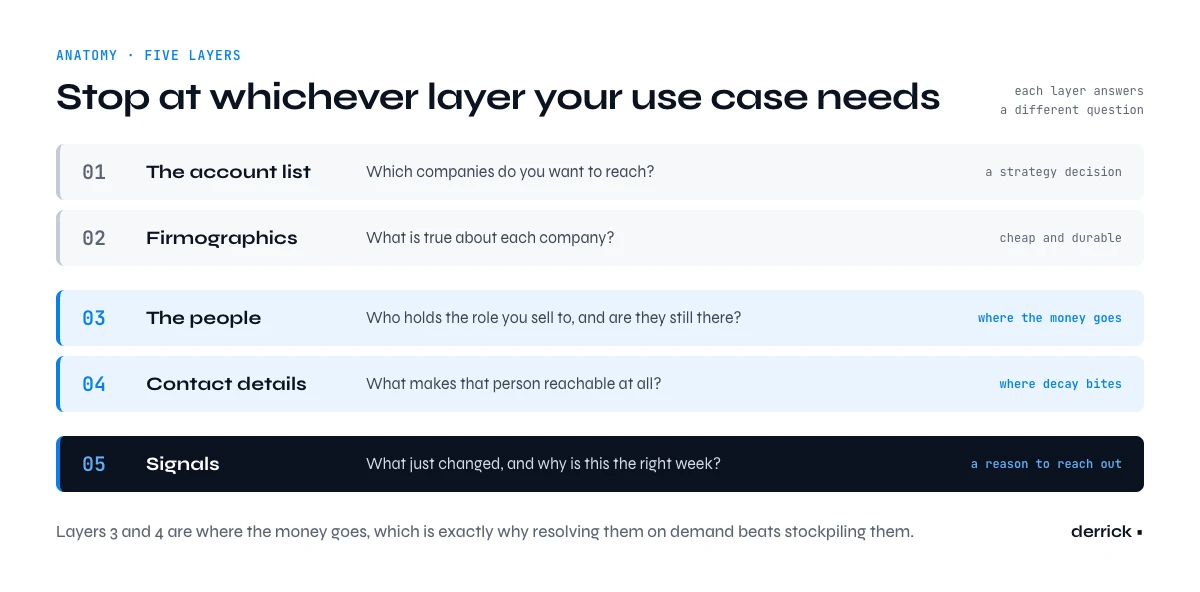
Assembling your own sounds vague until you break it into layers. Each one answers a different question, and each has a distinct cost, so you can stop at whichever layer your use case needs.
Layer 1, the account list. Which companies do you want to reach? This is a strategy decision, not a data one. It can come from a CRM export, a market map, a conference attendee list, or a single well fitting customer expanded into lookalikes. Layer 2, firmographics. What is true about each company: size, industry, location, domain, tech in use. This is what makes segmentation possible later. Layer 3, the people. Who inside each account holds the role you sell to, and are they still there. Layer 4, contact details. The verified email or phone that makes the person reachable at all. Layer 5, signals. What just changed at the account that makes this the right week rather than some week.
Layers 1 and 2 are cheap and durable. Layers 3 and 4 are where the money goes and where decay bites hardest, which is exactly why resolving them on demand beats stockpiling them. Layer 5 is what turns a static list into a reason to reach out. Where each of these layers can legitimately come from, and the tradeoffs between primary, secondary and aggregated inputs, is the subject of our page on B2B data sources.
| Layer | What it answers | Where it comes from | Cost in Derrick credits |
|---|---|---|---|
| 1. Account list | Which companies do I want to reach | A CRM export, a market map, an event list, or lookalikes of a customer that fits | 0, or 1 credit per company for lookalikes |
| 2. Firmographics | What is true about each company | Company enrichment on the domain: headcount, industry, location | 1 credit per company |
| 2b. Technographics | What software the company runs | Detection on the company website | 2 credits per website |
| 3. The people | Who holds the role I sell to, and are they still there | The company's staff list, filtered by job function | 1 credit per person |
| 4. Contact details | How do I actually reach them | Email discovery, then verification. Phone where it is worth it | 5 credits per email found, 200 credits per phone |
| 5. Signals | Why this week rather than some week | Hiring activity, recent news on the account | 1 credit per company, per signal |
Costs above come from the live catalogue, and the pattern they show is the reason on-demand building works: layers 1 and 2 are almost free and they age slowly, while layer 4 carries nearly the entire bill and ages fastest. Every euro you spend stocking layer 4 in advance is a euro spent on records that start decaying the same day. Resolve it when you are about to use it and the same budget covers several times more usable contacts. You can price your own version of the table above on the Enrich Companies and Email Finder pages. Enrich Companies needs your LinkedIn account connected through the Derrick Chrome extension, and Email Finder runs on paid plans, from Standard at €20/month for 10,000 credits.
The app works through your list row by row: 1 credit per company imported.
Build a company contact database in the web app or in Google Sheets
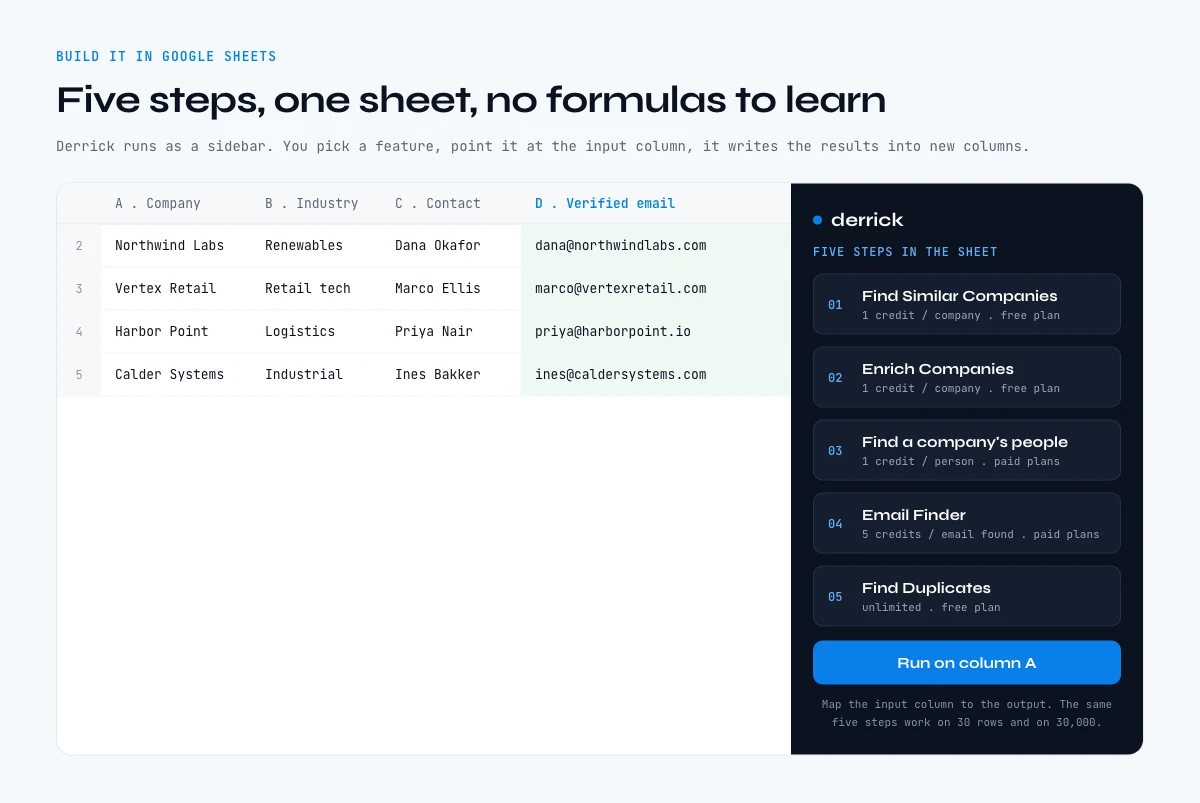
The whole thing fits in a list. That surprises people more than it should. Derrick runs in its web app, and also as a sidebar inside Google Sheets, not as a wall of formulas you have to learn. You pick a feature, point it at the column that holds your input, and it runs down the rows and writes the results into new columns. The sheet stays a sheet, so the person who owns the list doesn't need engineering help to maintain it.
Start with your accounts. Paste company names or domains into column A. If your list is thin, Find Similar Companies turns one good customer into a whole lookalike set at 1 credit per company, and it is available from the free plan.
Fill in the firmographics. Enrich Companies appends the available company information at 1 credit per company, billed per row processed. It is available from the free plan, so you can build and segment layer 2 of your database before spending anything on people.
Resolve the people. Find a company's people lists current and former staff for each account, optionally filtered by job function, at 1 credit per person. This is the step that most spreadsheets never get past, and it is the one that turns an account list into a contact database. It is available on paid plans.
Make them reachable. Email Finder returns a verified professional email at 5 credits per email, billed only when an address is actually found, so unsuccessful lookups cost nothing. It's a paid plan feature. Verification happens before the address comes back, so you're not pouring guessed patterns into a sequence and discovering the truth through your bounce rate.
Clean before you use. Find Duplicates is unlimited and available from the free plan, which matters more than it sounds: the fastest way to burn goodwill is to email the same person twice from two rows that were never reconciled.
The same five steps work on 30 rows and on 30,000. Nothing about the workflow changes with volume, which is the point. You shouldn't have to graduate to a different tool because your list grew.
What a company contact database actually costs to build
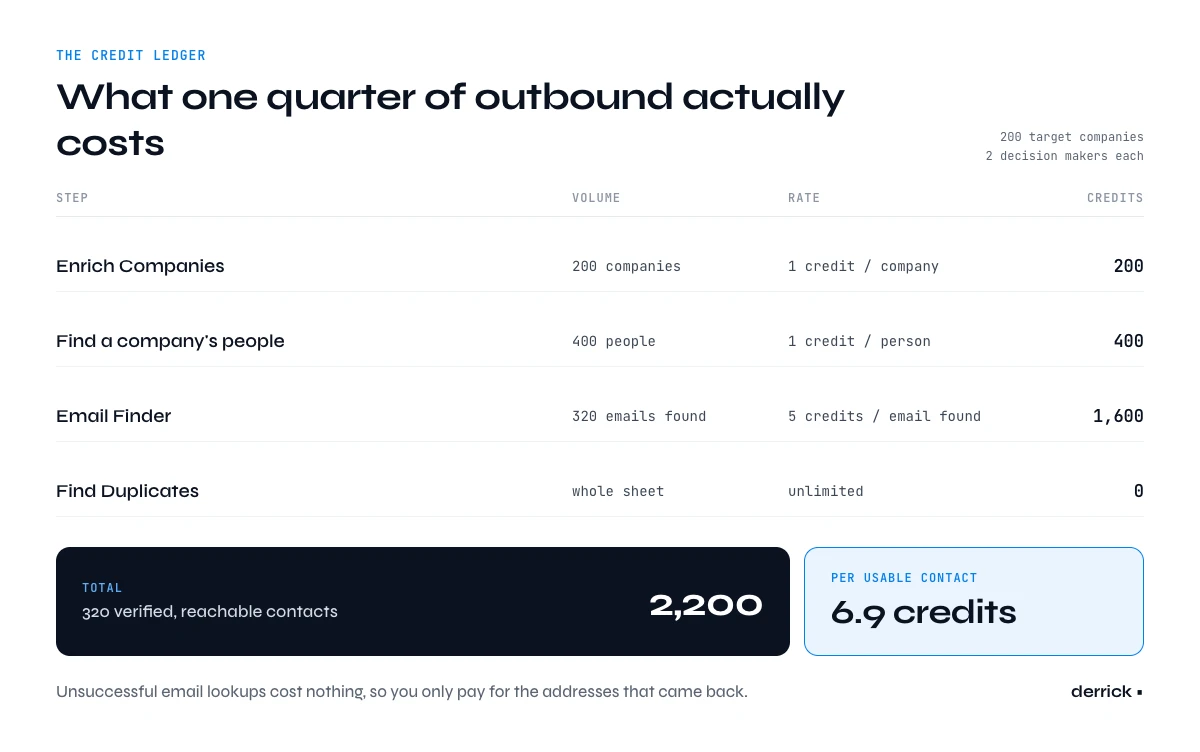
Nobody publishes this number, so here it is with real prices. Take a realistic quarter of outbound: 200 target companies, two decision makers to reach at each, so 400 people. Run the five layer workflow above and the credit ledger looks like this.
| Step | Volume | Cost | Credits |
|---|---|---|---|
| Enrich Companies | 200 companies | 1 credit per company | 200 |
| Find a company's people | 400 people | 1 credit per person | 400 |
| Email Finder | 320 emails found from 400 attempts | 5 credits per email found | 1,600 |
| Find Duplicates | whole sheet | unlimited | 0 |
| Total | 320 reachable contacts | 2,200 |
2,200 credits for 320 verified, reachable contacts. That is about 6.9 credits per usable contact. On the Standard plan at 20 EUR per month for 10,000 credits, the whole quarter of list building costs about 4.40 EUR and leaves you 7,800 credits of headroom. On the Pro plan at 175 EUR per month for 100,000 credits, the per credit floor is lower still, and unused credits roll over on paid plans rather than expiring. The free plan gives you 100 credits per month at no cost, enough to run the workflow end to end on a handful of accounts and see the output before committing to anything.
The number worth keeping isn't the total. It's the ratio. You paid for 320 contacts because you wanted 320 contacts. Compare that against any per seat subscription by dividing its annual price by the number of records your team genuinely opened last year. Teams that do this arithmetic honestly are usually surprised, and our breakdown of what enrichment tools actually cost walks through the pricing models that hide the real figure.
Keeping the database fresh after you build it
A built database is not a finished database. Given the 30% annual decay figure, a sensible cadence is to re verify the contact layer on any account before you touch it, and to refresh firmographics quarterly on the accounts still in play. Everything else can wait. Refreshing a record you won't use this quarter is spend without a return.
Signals change the shape of this work. Rather than refreshing on a calendar, you refresh on an event. Signal tracks leads and accounts for job changes, funding rounds, hiring sprees and tech stack moves, and fires an alert the moment something happens. It is available from the Standard plan at 20 EUR per month, and it is billed per signal that actually fires, so a quiet month is a cheap month. For a lighter touch, Company Hiring Signal shows which companies are hiring and for which roles, at 1 credit per company, and it is available from the free plan.
Your database stops being a static asset that rots and becomes a queue that reorders itself. A contact whose job just changed is both the record most likely to be wrong and the person most worth contacting this week. Handling that as one workflow rather than two is what separates a maintained database from an archived one.
API, MCP and automation for a database that maintains itself
The web app and the spreadsheet are the default surfaces, not the only ones. Derrick exposes the same enrichment engine through a REST API, available from the Plus plan at 47.50 EUR per month, so the resolution steps above can run inside your own product, a nightly job, or a CRM sync without anyone opening a sheet. That is how a contact database moves from something a person maintains to something a schedule maintains.
For AI driven work, Derrick MCP lets Claude, ChatGPT and any MCP compatible assistant call the same enrichment tools directly, from 47.50 EUR per month on the Plus plan. An agent researching an account can resolve the right person and their verified email mid task, instead of handing the job back to a human. And because there is a REST API underneath, Derrick connects to Zapier, Make and n8n alongside 3,000 or more other applications, so enrichment can be triggered by a form submission, a CRM stage change, or a webhook from anywhere in your stack.
Five ways in, one engine: the web app and the sidebar for the person who owns the list, the API for the pipeline, MCP for the assistant, and no code automation for everything in between. A contact resolved by a nightly job and a contact resolved by a rep in a spreadsheet come back identical, which is what keeps a database coherent as more of your team starts feeding it.
Five mistakes that ruin a contact database
Building before defining the account list. Enriching a vague list produces a large, expensive, unusable file. Layer 1 is a strategy decision and it deserves an hour of thought before a single credit is spent.
Treating unverified addresses as contacts. A pattern guessed from a name and a domain looks like an email and behaves like a bounce. Bounces damage sending reputation across every future campaign, so the cost lands long after the mistake.
Hoarding. Storing 40,000 records against 300 you will contact is not thoroughness, it is a maintenance bill you signed without reading. Resolve close to the moment of use.
Refreshing on a calendar instead of on events. Quarterly refreshes spend evenly across records that matter and records that do not. Signals concentrate the spend where something actually changed.
Skipping deduplication. The same person arrives twice through two spellings of a company name, and both rows get emailed. Deduplication is unlimited and free on Derrick, so there is no excuse for this one.
Get those five right and a self built company contact database beats a rented one on the metric that matters, which is not record count but the percentage of your outreach that reaches a real person in a role you actually sell to. Start free with 100 credits per month and build the first layer of yours today.
Frequently asked questions
What is a company contact database?
Should I buy a company contact database or build my own?
How much does it cost to build a company contact database?
How fast does contact data go out of date?
Can I build a contact database without any code?
Can the database be kept up to date automatically?
Keep reading
Continue exploring this cluster


B2B Data Sources: Primary, Secondary, and Aggregated
Read →

How to Choose a B2B Data Enrichment Provider: 8 Key Criteria
Read →

Switching Data Enrichment Providers: A Complete Guide
Read →

B2B Data Enrichment Tools Pricing: What You Actually Pay in 2026
Read →