B2B data marketing: which fields each play actually needs
Map every marketing play to the B2B data fields it needs, price each field per record, and use the decay maths to set your refresh cadence.


Most teams do not have a b2b data marketing problem. They have a field problem. The database is full, the contact count looks healthy, and yet the segment that was supposed to hold 4,000 accounts returns 380, the lead score fires on nothing, and half the routing rules fall through to the default owner. The fields the plays depend on were never collected, or were collected once and never refreshed.
This guide takes the opposite route from the usual overview. Instead of listing data categories, it starts from the play you are trying to run, names the fields that play cannot work without, puts a published unit cost against each one, and shows what happens to the numbers when nobody refreshes them.
B2B data marketing in one screen
Three sentences cover the whole discipline. Every marketing play depends on a small, specific set of fields. Those fields have a unit cost and a decay rate. Your campaign performance is capped by whichever of them is missing or stale, not by the total size of your database.
Here is the shape of the thing, with real unit costs attached. Derrick prices per credit and publishes the rate: the FREE plan gives 100 credits a month at no cost, and the SCALE plan runs 200,000 credits for 320 euros, which works out at 0.0016 euros per credit. So a company record enriched with firmographics costs 1 credit, and at the SCALE rate that is 0.0016 euros per account.
| Field family | What it decides | Unit | Typical cost | How fast it rots |
|---|---|---|---|---|
| Firmographic | Who is in the segment at all | Per company | 1 credit | Slowly, months |
| Contact identity | Whether you can address a human | Per profile | 1 credit | Fast, people move |
| Reachability | Whether the message arrives | Per email or phone | 1 to 200 credits | Fast, tied to the job |
| Technographic | Whether the pitch is relevant | Per website | 2 credits | Medium, quarterly |
| Signal and timing | Whether now is the moment | Per account, monitored | From 20 euros a month | Instantly, it is an event |
Read that last column carefully, because it is the one every database strategy gets wrong. Firmographics you can buy once. Reachability you have to keep buying.
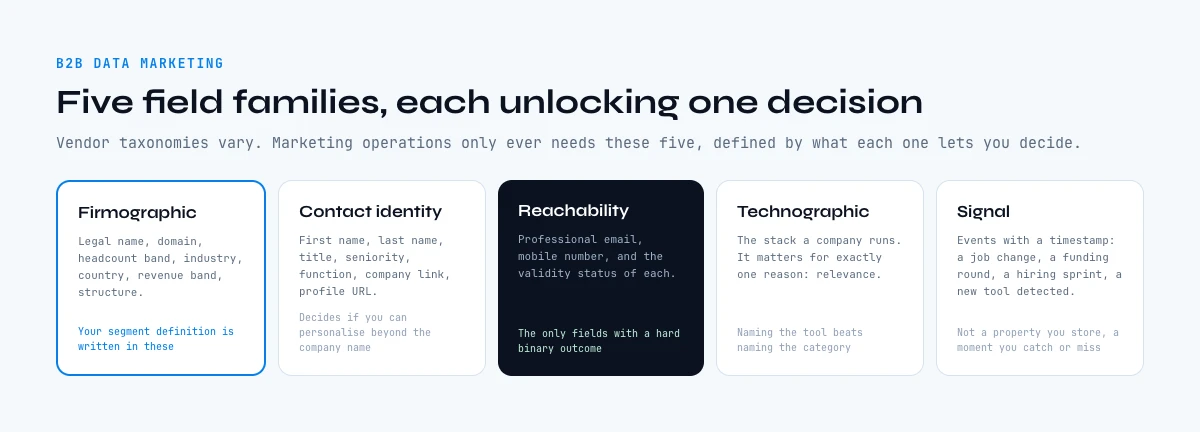
The five field families behind every campaign
Vendor taxonomies vary, but marketing operations only ever needs five groups, defined by the decision each one unlocks.
Firmographic fields describe the company: legal name, domain, headcount band, industry code, country, revenue band, corporate structure. These are the fields your segment definition is written in. If headcount is missing on 40 per cent of your accounts, your mid-market segment is wrong by 40 per cent and no amount of creative fixes it.
Contact identity fields describe the person: first name, last name, job title, seniority, function, company link, profile URL. This is the layer that decides whether a campaign can be personalised beyond the company name.
Reachability fields are the channel addresses: professional email, mobile number, and the validity status of each. They are the only fields in the whole model that carry a hard binary outcome. Either the message lands or it does not.
Technographic fields describe the stack a company runs. They matter for exactly one reason in marketing: relevance. A message that names the tool the reader uses every day outperforms one that names a category.
Signal fields are events with a timestamp: a job change, a funding round, a hiring sprint, a new tool detected. Unlike the other four families, a signal is not a property you store. It is a moment you either catch or miss.
Which fields each marketing play actually needs
This is the table that does not exist in the guides currently ranking for this topic, and it is the one worth keeping. Each row is a real marketing play, with the minimum field set it cannot run without and the cost of assembling that set for a single record.
| Marketing play | Minimum fields required | Cost per record | Fails silently when |
|---|---|---|---|
| ABM target list build | Domain, headcount, industry, country | 1 credit per account | Headcount band is missing, so the segment silently shrinks |
| ABM contact coverage | Above, plus title, function, seniority | 1 credit per lead | Titles are non standardised, so seniority filters drop real buyers |
| Lead scoring | Firmographics, plus technographics, plus engagement | 1 plus 2 credits | Scores fire on records where the inputs are null and default to zero |
| Lead routing | Country, headcount, industry | 1 credit per account | Nulls fall to the default owner and nobody notices for a quarter |
| Progressive profiling | Domain to firmographic lookup at submit time | 1 credit per submission | The form asks for what the domain could have answered, so it converts worse |
| Nurture segmentation | Industry, function, technographics | 1 plus 2 credits | Everyone lands in the generic track |
| Event and webinar follow up | Title, function, company, email validity | 1 plus 1 credit | Registrant emails were personal addresses, so the company is unknown |
| Timing plays | Signal, plus a monitored account list | From 20 euros a month | The signal fires and the alert reaches nobody |
Notice the pattern in the last column. Missing data almost never announces itself as an error. It shows up as a segment that is quietly too small, a score that is quietly always zero, a nurture track that quietly contains everybody. That is why the audit question is never "how many contacts do we have" but "what percentage of the records in this segment have every field the play reads".
Segmentation: the three fields that carry it
Segmentation eats more fields than any other play, and almost all of the useful work is done by three of them: headcount band, industry, and country.
Headcount is the field that decides tone and offer. A 40 person company and a 4,000 person company are not the same buyer, do not have the same approval chain, and do not respond to the same proof. Industry decides vocabulary and reference set. Country decides language, channel norms and, in practice, which regulations you operate under.
Everything else is refinement. Revenue band is useful when you have it and rarely reliable enough to gate on. Corporate structure matters if you sell into groups. Job function matters at the contact layer, not the account layer.
The practical move is to make those three fields non negotiable and enforce them at intake. A record without headcount, industry and country is not a record in a segment. It is a row waiting to be enriched, and it should be held in a staging list rather than allowed to dilute the numbers in a live segment.
Two of our sister guides go deeper on the mechanics here: geographic coverage explains why match rates vary by country and how to read a coverage claim, and database enrichment covers the process of filling those fields on a database you already own.
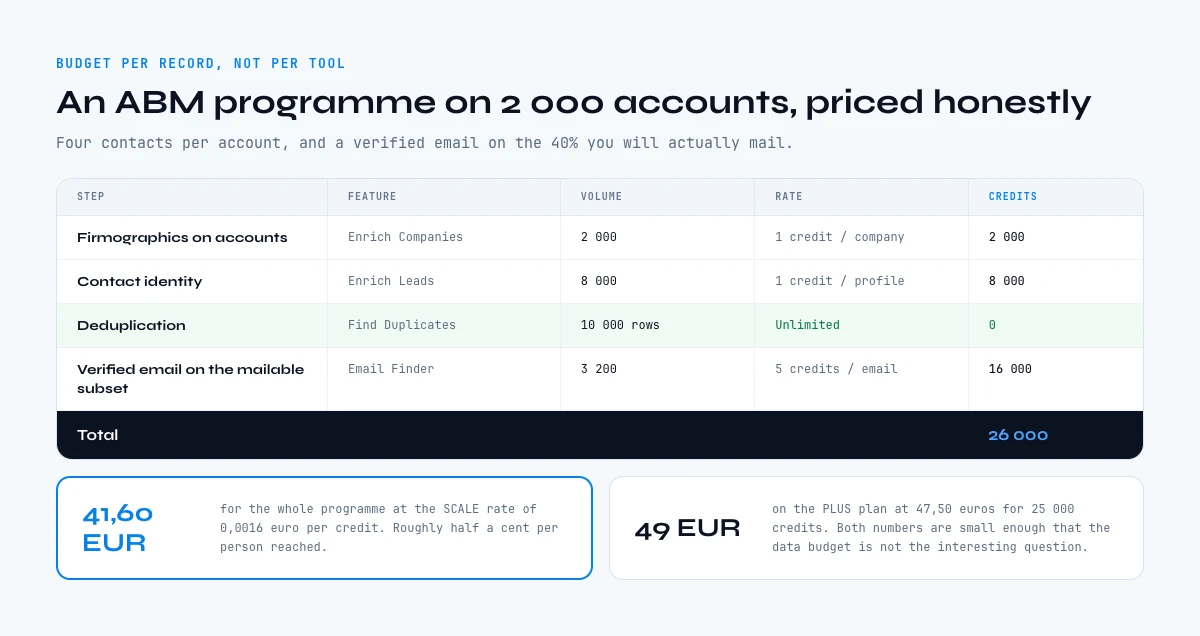
What B2B data marketing costs per record
Budgeting this work at the tool level is a trap, because the tool price tells you nothing about whether the spend was proportionate. Budget it per record instead, and the arithmetic becomes honest.
Take a concrete case. You want to run an ABM programme against 2,000 accounts, with an average of four contacts per account, so 8,000 people. You need firmographics on the accounts, identity on the contacts, and a verified email on the subset you will actually mail, say 40 per cent of them.
| Step | Feature | Volume | Rate | Credits |
|---|---|---|---|---|
| Firmographics on accounts | Enrich Companies | 2,000 companies | 1 credit per company | 2,000 |
| Contact identity | Enrich Leads | 8,000 profiles | 1 credit per profile | 8,000 |
| Deduplication | Find Duplicates | 10,000 rows | Unlimited | 0 |
| Verified email on the mailable subset | Email Finder | 3,200 emails | 5 credits per email | 16,000 |
| Total | 26,000 | |||
At the SCALE rate of 0.0016 euros per credit, 26,000 credits is 41.60 euros for the whole programme, or roughly half a cent per person reached. On the PLUS plan at 47.50 euros for 25,000 credits the same programme costs about 49 euros. Both numbers are small enough that the interesting question is not the data budget. It is whether the play was worth running at all.
That is the real value of the per record view. It moves the argument off the data line, where the amounts are trivial, and onto the campaign, where they are not. Our pricing comparison guide works through how to read a provider quote and convert it to this same unit.
Two details change the total more than the rate does. Deduplicating before you enrich, not after, because Find Duplicates is unlimited and every duplicate you enrich is paid for twice. And enriching the mailable subset rather than the whole list, because Email Finder at 5 credits per email is the single most expensive line in most programmes.
The app works through your list row by row. 100 free credits every month.
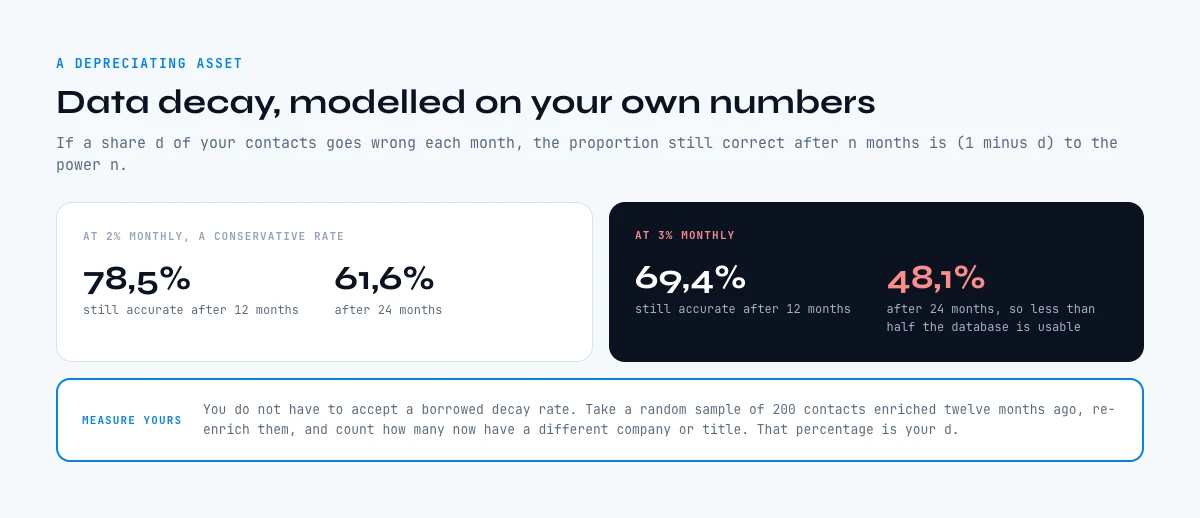
Data decay: the arithmetic that breaks a marketing database
Every marketing database is a depreciating asset, and the depreciation is easy to model even without an industry benchmark to lean on.
Run the arithmetic on your own numbers. If a share d of your contacts becomes wrong each month, the proportion still correct after n months is (1 minus d) to the power n. Pick a conservative 2 per cent monthly and the fraction still accurate is 0.98 to the power 12, which is 78.5 per cent after a year and 61.6 per cent after two. At 3 per cent monthly it is 69.4 per cent after a year and 48.1 per cent after two, meaning less than half the database is usable.
You do not have to accept a borrowed decay rate. Measure your own: take a random sample of 200 contacts enriched twelve months ago, re-enrich them, and count how many now have a different company or title. That percentage is your real annual decay, it is specific to your market, and it costs 200 credits to find out.
Two consequences follow, and they are the whole of a refresh policy.
First, refresh is a recurring line, not a project. A 20,000 contact database at 2 per cent monthly decay generates about 400 wrong records every month. Re-enriching 400 records is 400 credits, which is well inside a STANDARD plan at 20 euros for 10,000 credits.
Second, some decay should not be waited for. A contact changing job is the single most valuable event in B2B marketing, because your champion has just arrived somewhere new with budget and a mandate. Catching that as an event beats discovering it at the next quarterly refresh, which is what Signal is for: it monitors leads and accounts for job changes, funding rounds, hiring sprints and stack moves, from 20 euros a month.
Where B2B data for marketing comes from
Four origins, and each one has a characteristic failure mode worth knowing before you rely on it.
Your own systems. Form fills, product usage, CRM history, support tickets. The most valuable data you have and the least complete, because you only hold it for people who already came to you. Its failure mode is survivorship: it describes your existing customers well and your market badly.
Public registries. Company identity, legal form, activity codes, registered address, directors. Authoritative and free of charge in many countries. In France the SIRENE registry underpins this, and SIRET/SIREN enrichment reads it at 1 credit per company from the FREE plan. Its failure mode is that it knows legal entities, not commercial reality: the registered address is often not where anybody works.
Professional networks and the open web. Titles, functions, company links, stack. This is where the contact layer really comes from. Its failure mode is freshness, because a profile is only as current as the last time its owner updated it.
Derived and inferred fields. Seniority bands from titles, segment labels from headcount, scores from combinations. Cheap, useful, and the failure mode is that an inference presented as a fact will eventually be wrong in a way nobody can trace. Label them.
Our guide on B2B data sources goes through the mix in more detail, including how to weight them by market.
Assembling the list: web app, spreadsheet, AI chat or API
The surface you work on should follow the shape of the task, not a company standard. Derrick runs on four, and the right one is usually obvious once you name the job.
A list that needs fields filled in. This is most marketing work: a file of accounts or registrants with holes in it. If it already lives in a spreadsheet, the Google Sheets sidebar enriches the rows where they are, which means no export, no re-import, and no version of the list living in two places. If you build it from LinkedIn, Sales Navigator or a prompt, the Derrick web app fills it with nothing to install.
A question asked while thinking. "Which of these 30 accounts is hiring salespeople right now." Here the work belongs in the conversation, and the Derrick MCP server answers it inside Claude, ChatGPT or any MCP compatible client, available from the PLUS plan at 47.50 euros a month.
A step inside an automated flow. Enrich on form submit, refresh on a schedule, sync to the CRM. That is a REST API job, with no human in the loop by design.
For the ABM case specifically, Import Leads from Target Companies crosses a list of target accounts with your criteria and returns the matching people at 1 credit per lead, which collapses the two step account-then-contact build into one pass. If the account list itself is what you are missing, Find Similar Companies turns one reference customer into an ICP matched list at 1 credit per company.
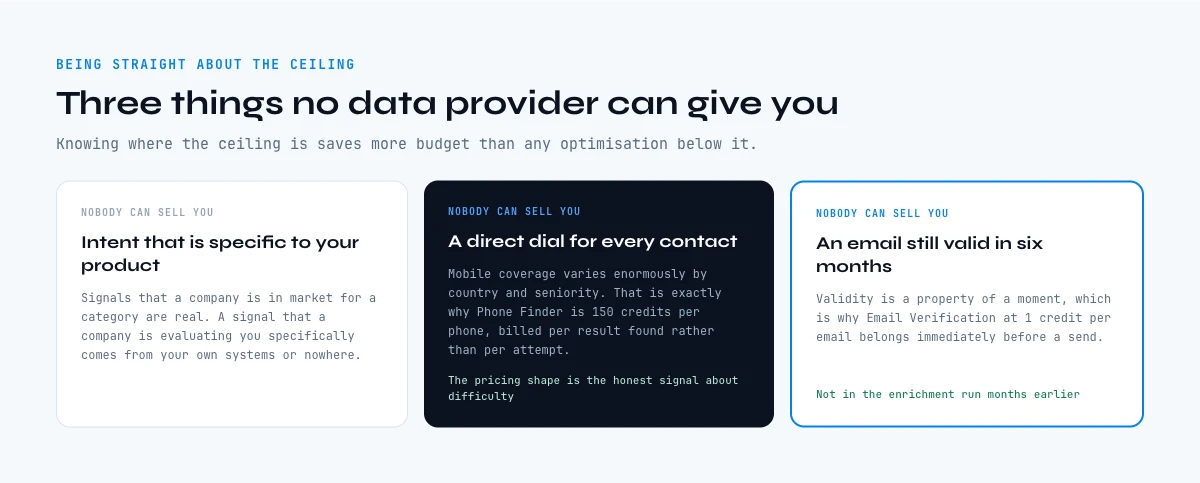
The fields no data provider can give you
Being straight about the ceiling saves more budget than any optimisation.
Nobody can sell you intent that is specific to your product. Signals that a company is in market for a category are real; a signal that a company is evaluating you specifically comes from your own systems or nowhere.
Nobody can sell you a reliable direct dial for every contact in a list. Mobile coverage varies enormously by country and seniority, which is exactly why Phone Finder is priced at 200 credits per phone and billed per result found rather than per attempt. That pricing shape is the honest signal about difficulty.
Nobody can sell you an email that will still be valid in six months. Validity is a property of a moment, which is why Email Verification at 1 credit per email belongs immediately before a send, not in the quarterly refresh.
And nobody can sell you the field you have not defined. If two people in the team mean different things by "enterprise", no provider fixes that. Write the definitions down first.
Mistakes that quietly ruin a marketing database
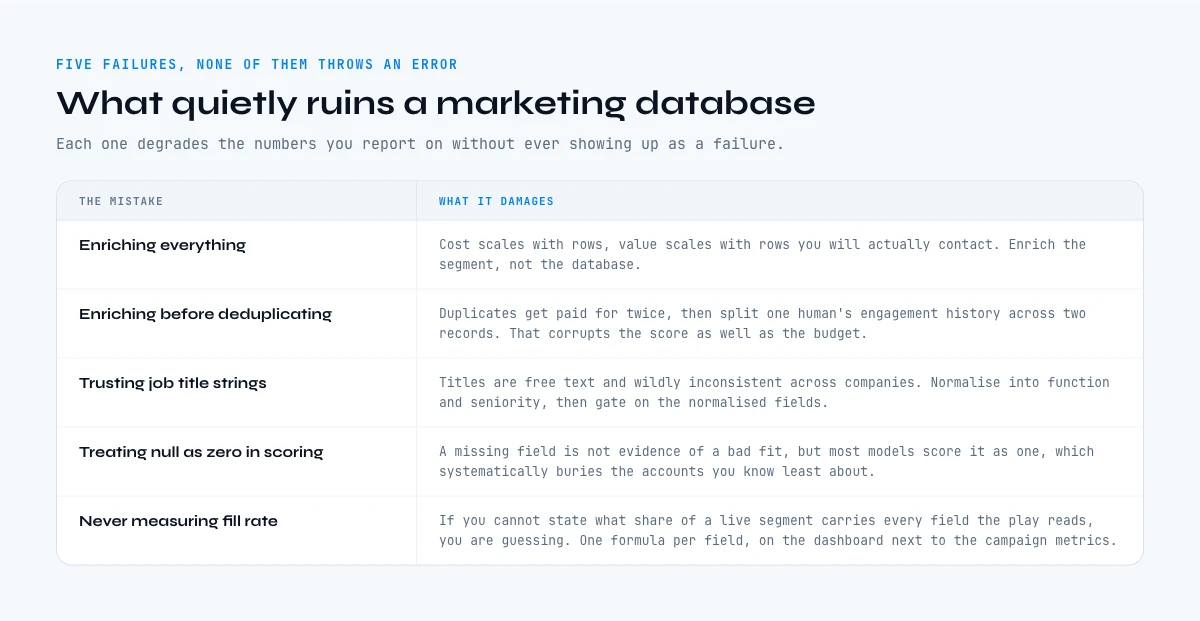
Five failures account for most of the damage, and none of them throws an error.
Enriching everything. Cost scales with rows, value scales with rows you will actually contact. Enrich the segment, not the database.
Enriching before deduplicating. Duplicates get paid for twice and then split the engagement history of one human across two records, which corrupts the score as well as the budget.
Trusting job title strings. Titles are free text and wildly inconsistent across companies. Normalise into function and seniority, and gate on the normalised fields.
Treating null as zero in scoring. A missing technographic field is not evidence of a bad fit, but most scoring models score it as one, which systematically buries the accounts you know least about.
Never measuring fill rate. If you cannot state what percentage of a live segment has every field the play reads, you are guessing. It is one formula per field and it belongs on the dashboard next to the campaign metrics.
Ready to put a number on your own fill rate? Start on the FREE plan, 100 credits a month at no cost, enrich a sample of 100 accounts, and compare the result against what your segment definition assumes.
We publish one email every two weeks on B2B data and prospecting, including teardowns like this one. You can subscribe from the Derrick home page.
Key takeaways on B2B data marketing
Marketing performance is capped by the least complete field a play depends on, not by the size of the database. Audit fill rate per field per segment, never total contact count.
Five field families cover everything: firmographic, contact identity, reachability, technographic, and signal. The first four are properties you store. The fifth is an event you either catch or miss.
Per record costs are small and knowable. A 2,000 account ABM programme with 8,000 contacts and 3,200 verified emails comes to 26,000 credits, which is 41.60 euros at the SCALE rate of 0.0016 euros per credit.
Decay is arithmetic, not an opinion. At 2 per cent monthly, 78.5 per cent of your contacts are still accurate after a year and 61.6 per cent after two. Measure your own rate on a 200 contact sample rather than borrowing a benchmark, then budget refresh as a recurring line.
Frequently asked questions
What is B2B data marketing?
Which B2B data fields do I actually need for an ABM campaign?
How much does B2B data cost per record?
How fast does a B2B marketing database go stale?
Should I enrich my whole database or just a segment?
What B2B data can no provider sell me?
Where should the enrichment actually run: spreadsheet, AI chat or API?
How do I audit the data quality of a marketing segment?
Keep reading
Continue exploring this cluster


B2B Data Sources: Primary, Secondary, and Aggregated
Read →

How to Choose a B2B Data Enrichment Provider: 8 Key Criteria
Read →

Switching Data Enrichment Providers: A Complete Guide
Read →

B2B Data Enrichment Tools Pricing: What You Actually Pay in 2026
Read →