Database enrichment: tools, best practices, mechanism
Do you want to develop database enrichment and exploit it in the best way? Discover all our tips and tricks to optimize it to the maximum.


Database enrichment fills the gaps in the records you already hold: job titles, company sizes, industries, professional emails, direct phone numbers. This guide covers what it actually does, which tools do the work, and how to keep a prospect file usable month after month.
Database enrichment: what is it?
Database enrichment is the process of completing and updating records you already own. You start from a partial row (a first and last name, a company, a domain name) and you add the fields that are missing: job title, company size, industry, professional email, direct phone number. The record exists before the enrichment; what changes is how complete and how fresh it is.
It is not the same thing as lead capture. A contact form or a white paper download creates a record. Enrichment works on the records you already have, wherever they came from: a form, a CRM export, a trade show list, a LinkedIn search. In practice the two go together, since you ask for two or three fields at capture time and complete the rest afterwards.
Tips: By creating simple forms (between 2 and 4 fields) on your website, the prospect will be more inclined to fill it out than if it contains a dozen fields. Data enrichment will allow you to retrieve the missing information later
Enrichment is also what makes a campaign land. Once you know the sector, the headcount and the exact role of the person you are writing to, the message can answer a problem that person actually has instead of staying generic. That is the difference between a sequence that gets replies and one that gets deleted.
Data enrichment tools
Many tools are available to help you enrich your data. They are equipped with many features that will meet your needs. Here is what the main ones add to a record, and where each falls short.
Derrick-app
Derrick is an application that offers many features to retrieve data from LinkedIn. It's an ideal tool to build a very accurate prospecting file
The advantages
- Derrick is a free application;
- You don't know anything about code? Don't panic! Derrick is very easy to use and no code knowledge is required
- It runs in its web app, with nothing to install, and integrates directly into Google Sheet (an application that works like Excel);
- It retrieves all the current data on LinkedIn. LinkedIn is part of one of the largest databases of leads maintained by the users themselves. There is little chance of having outdated data;
- There are many features available: scraping, data enrichment and search.
Drawbacks
- Email and phone enrichment are paid features, so they are not covered by the free plan's 100 monthly credits.
Lagrowthmachine
Lagrowthmachine is a tool that automates and customizes multi-channel prospecting campaigns with a simple drag&drop
Benefits
- Easy to use thanks to the drag&drop functionality;
- Simple and intuitive interface;
- Ability to import a contact database or link sales accounts;
- Email enrichment with contact automation.
Drawbacks
- Price.
VoilaNorbert
VoilaNorbert helps you find emails from many professionals with only the first and last name of your prospect, and the domain name.
What it does
- General use and quick setup;
- Pattern-based email discovery;
- Browser extension available
- Email verification for better deliverability.
Drawbacks
- Email databases are not always up to date in real time.
ZoomInfo
ZoomInfo is a software with a B2B database that provides detailed business information about people and companies.
What it does
- A large database with advanced segmentation;
- Real-time purchase intent analysis tools;
- Lead analysis and reporting;
- Integration across multiple CRMs.
The disadvantages
- Data is not always up to date with LinkedIn
- There is no on-demand search functionality.
Clearbit
Clearbit is a marketing data engine that provides hundreds of contact information.
What it does
- Many integrations are possible to enrich CRMs;
- Extension on web browsers;
- Automatic update of your databases;
Disadvantages
- Sometimes incorrect and old data.
- Expensive software if you have a lot of contacts to enrich.
- Large database mostly based in the US and less accurate on European SMEs.
Pharow
Pharow is a software that gathers data on companies, organizational charts and events to obtain prospect data.
Benefits
- Real-time updated data
- Precise targeting of prospects;
- Integration on available CRMs.
Drawbacks
- High price depending on the package chosen.
Dropcontact
Dropcontact is a tool that connects to your CRM and keeps your contact information up to date
Advantages
- It enriches, updates and cleans up your databases;
- Creation of a landing page and a web form
- Uses a real-time connected algorithm.
Drawbacks
- It is not the best on phone number reliability;
- Business data is sometimes not very accurate.
- it remains an expensive tool
Enrichment tools for leads: what you add to a person
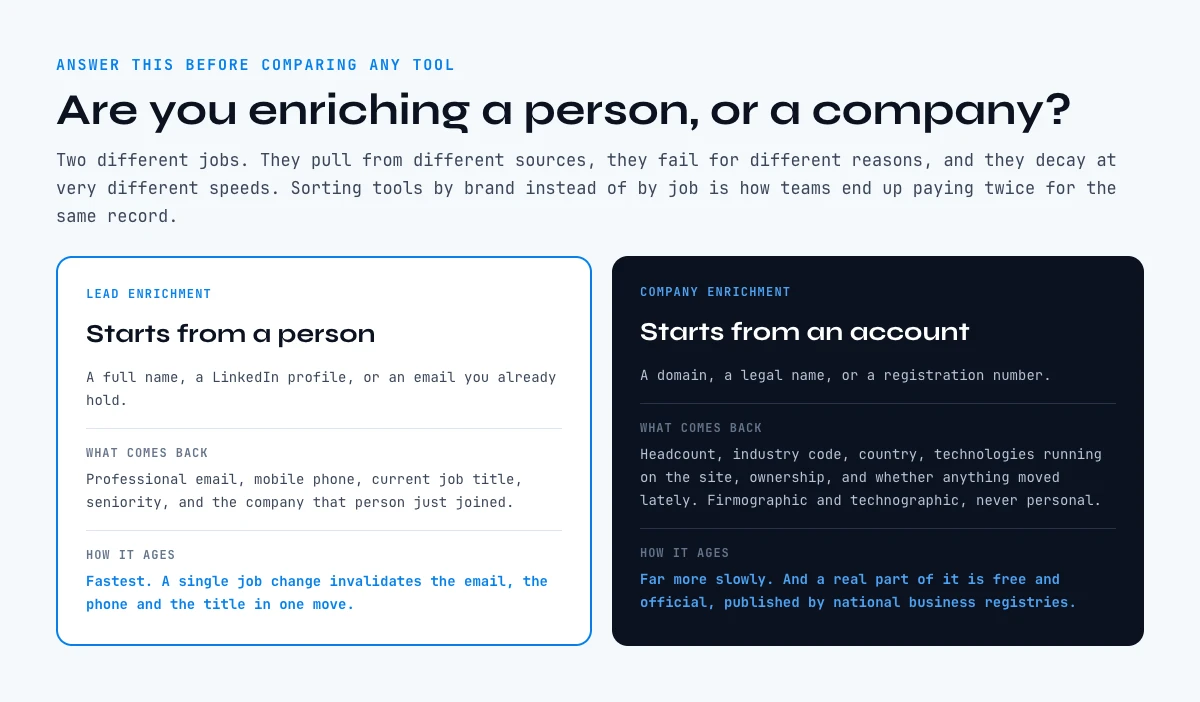
Before you compare a single vendor, answer one question: are you enriching a person or a company? Those are two different jobs. They pull from different sources, they fail for different reasons, and they decay at different speeds. Most tool round-ups skip the distinction and sort vendors by brand instead, which is how teams end up paying twice for the same record.
Lead enrichment starts from a person: a full name, a LinkedIn profile, or an email you already hold. What comes back is contact data and job context, so professional email, mobile phone, current job title, seniority, and the company that person just joined. The sources behind it are mostly LinkedIn-derived profile data, email pattern discovery and mailbox-level verification. That is also why this side ages fastest: a job change invalidates the email, the phone and the title in one move.
Here is an extract of the lead side of our provider matrix, sorted by the job each tool does rather than by vendor name. It is a sample, not the full list.
| Tool | What it adds to the record | Where the data comes from | Free plan |
|---|---|---|---|
| Derrick | Email, mobile, LinkedIn profile, job title | Multi-source lookup, in a web app or inside Google Sheets | Yes |
| Hunter | Professional email | Domain email patterns | Yes |
| Dropcontact | Professional email, cleaned identity fields | Pattern discovery, no contact database | Trial |
| NeverBounce | Deliverability status of an email you already have | Mailbox-level verification | Yes |
| Lusha | Email and phone from a profile | LinkedIn-derived contact data | Yes |
| LeadMagic | Mobile number | Phone-first sourcing | Trial |
Two things this table is meant to make obvious. First, email discovery and email verification are not the same job: a finder guesses and confirms a pattern, a verifier tells you whether a mailbox you already hold still accepts mail. Running one without the other is how a clean-looking list bounces. Second, the billing unit matters more than the sticker price. A tool billed per verified match costs you nothing on a miss; a tool billed per row processed charges you for the miss too. On a 5 000-row file with a 70% match rate, that gap is 1 500 rows of pure waste. We break the arithmetic down in the comparison of B2B data provider pricing models.
In the web app or Google Sheets
Enrich the base you already own
Most of the mechanism described here happens on a list you exported. Derrick runs on that list and refills the company fields row by row: industry, headcount band, location, LinkedIn page, before anything goes back into the system of record.
- Feature
- LinkedIn Companies Profile Enrichment
- Credit cost
- 1 credit per company enriched
The first button opens the web app (nothing to install): 1 credit per company enriched, 100 free credits every month. The second details the feature and its cost per plan.
Enrichment tools for companies: what you add to an account
Company enrichment starts from a domain, a legal name or a registration number, and it answers a different set of questions: how many employees, which industry code, which country, which technologies are running on the website, who owns the entity, and has anything moved lately. The record you get back is firmographic and technographic, not personal.
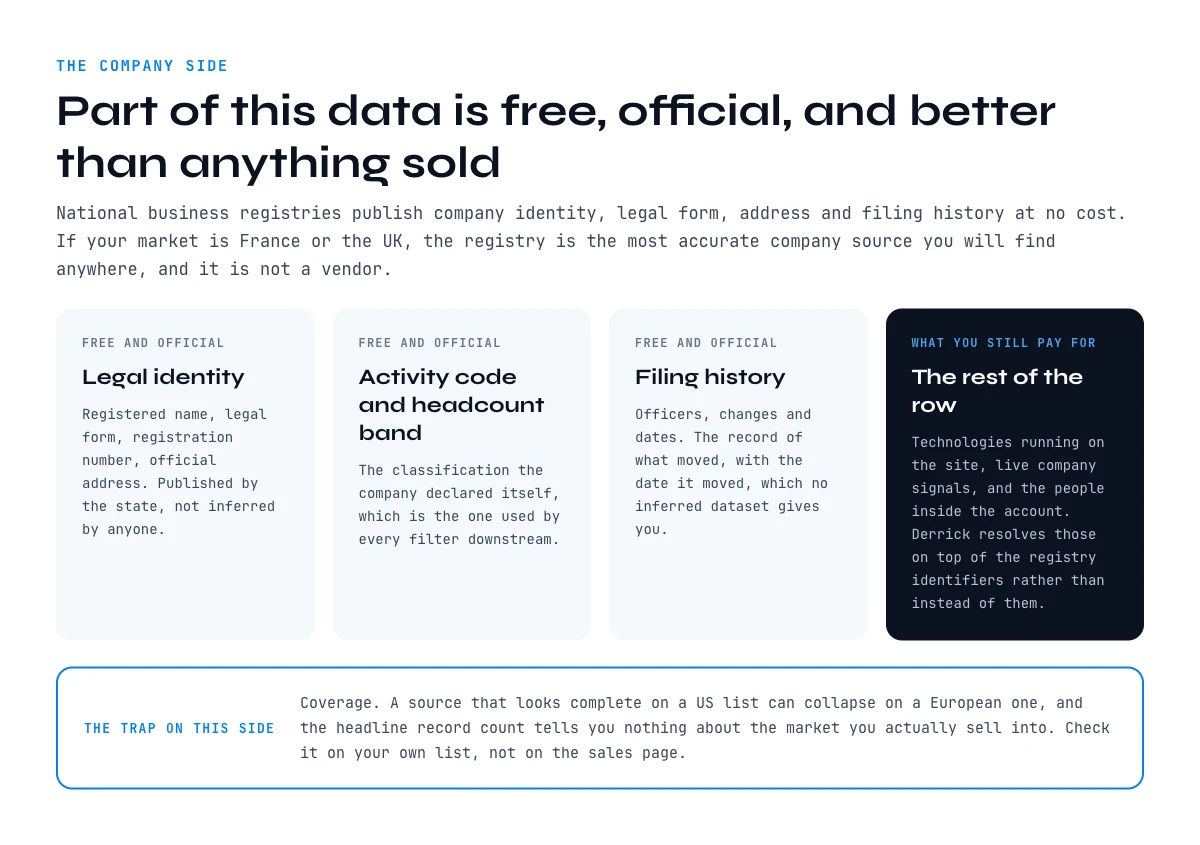
The good news is that this side decays far more slowly than the lead side, and a real part of it is free and official. National business registries publish company identity, legal form, address and filing history at no cost. If your market is France or the UK, the registry is the most accurate company source you will find anywhere, and it is not a vendor. That is why our matrix keeps public registries as a category of their own rather than burying them under "data providers".
| Tool | What it adds to the record | Where the data comes from | Free plan |
|---|---|---|---|
| Derrick | Firmographics, French registry identifiers, company signals | Multi-source lookup plus SIRENE and NAF/APE | Yes |
| SIRENE (INSEE) | Legal identity, SIRET/SIREN, NAF code, headcount band | French official registry | Yes |
| Companies House | Legal identity, officers, filing history | UK official registry | Yes |
| Pappers | French filings, financials, ownership | Registry filings, repackaged | Yes |
| BuiltWith | Technologies detected on a domain | Website crawl | Trial |
| Crunchbase | Funding rounds, investors, headcount trend | Declared and editorial data | Trial |
Coverage is the trap on this side. A provider that looks complete on a US list can collapse on a European one, and the headline record count tells you nothing about the market you actually sell into. Check it per region before you commit, using the method in geographic coverage in B2B data enrichment, and pick your mix of sources with the map of B2B data sources. When you are ready to shortlist, the criteria are in how to choose a B2B data provider.
Why do database enrichment?
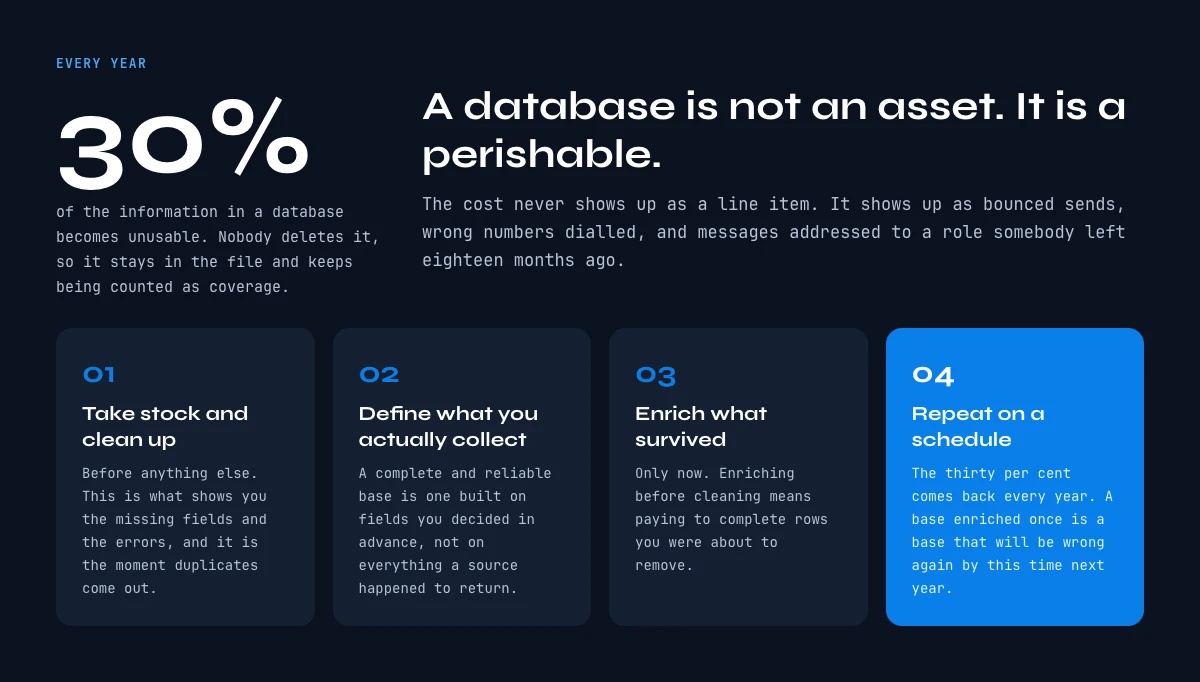
An up-to-date database is essential to optimize your marketing and sales processes. According to statistics provided by ALTARES, databases have 30% of unusable information every year. This can have a negative impact on your turnover
Define the information you want to collect in order to build a complete and reliable database. This qualified database will ensure the sustainability of your communication actions by sending messages and offers adapted to your target
Before anything else, you need to take stock of your current database and clean it up. This allows you to see the missing information and errors. It is also an opportunity to remove duplicates. Once done, you have a good basis to start enriching the database.
The next objective is to carry out your prospecting and loyalty campaigns. Thanks to the updated information of your contacts, your messages can be targeted and personalized to activate new prospects and convert them into leads. It will be necessary to regularly enrich your database to remain up to date on the data of your prospects
Different types of database enrichment
There are two types of data enrichment
#1: Enrichment of company contact data
You have made your list of companies to contact, but you are missing the contact data of the personnel for your prospection? With Derrick's tool you can generate this information and target specific positions for your prospecting by going to LinkedIn Sales Navigator. In France, LinkedIn has more than 23 million members with more than 840,000 companies present on the platform. It's a treasure trove of information for building an optimal prospecting list
#2: Enriching and updating company data
It is very common for company data to become obsolete every year. It is essential to keep it up to date to avoid wasting time in data processing by sales teams
Updating this data on a regular basis takes time, which is not always easy for your teams who have many things to do. That's where Derrick comes in to save you time in just a few minutes by retrieving all the data from LinkedIn
By applying good practices, a regularly updated file allows you and your teams to generate more leads
Data Enrichment: Best Practices
Enriching a customer database is not trivial, especially if you have to process a large amount of information. Take the time to list the most important points that will constitute your lead data
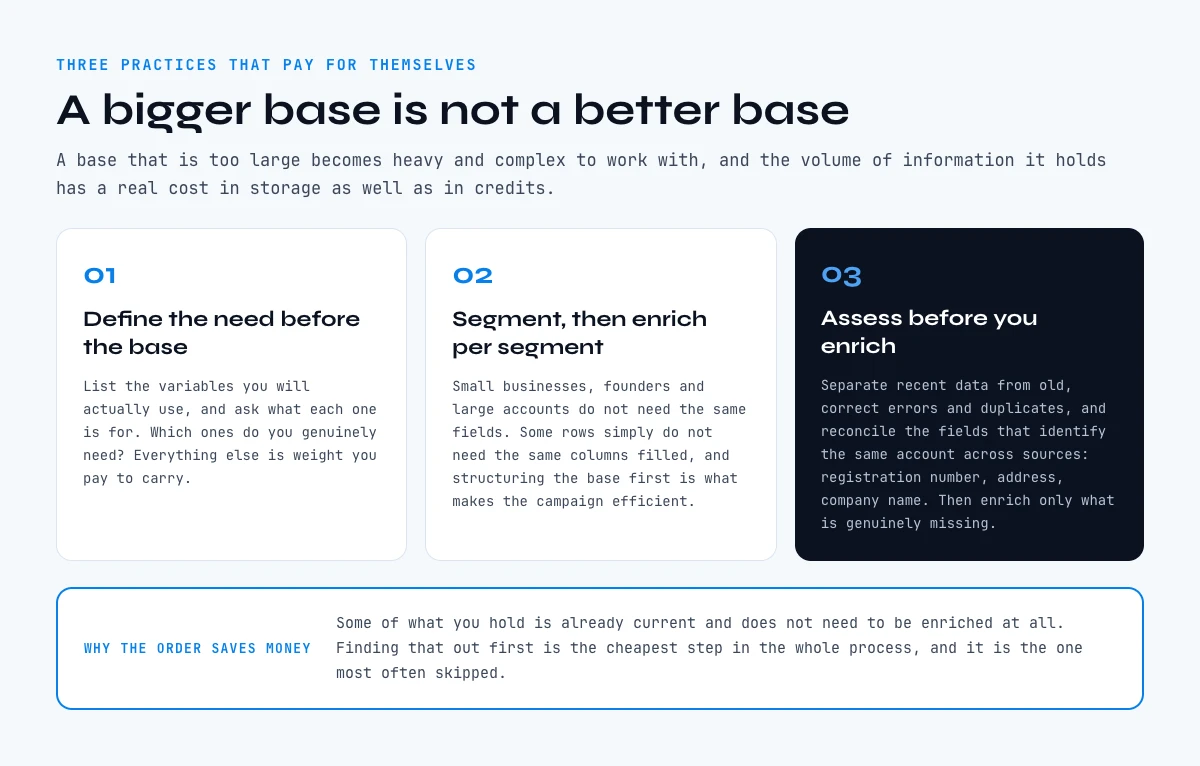
#1: Define your needs
Before establishing your database, ask yourself the questions of how you will use it. Which ones do you really need? Define and list the variables you need to build your lead enrichment.
Why do all this work?
A database that is too large can become cumbersome and complex to process. The amount of information it contains has a cost, depending on whether you use servers or clouds to store it. From a legal point of view, the RGPD regulates the data recovered by companies. After a certain period of time, certain information must be deleted.
#2: Segment the database
Enriching your database allows you to segment it. Depending on your needs, it is possible that certain lines do not need the same information depending on your objectives. Are you targeting SMEs, entrepreneurs or large companies? The need for information will not be the same according to these variables. Structuring your database allows you to be more efficient and to maximize your prospecting campaigns.
#3: Update the database
Before starting the data enrichment work, evaluate the information you already have and work on your file
- Some information may already be current and not need to be enriched;
- Separate the recent data from the old. This will save you time by enriching only what you need;
- Correct errors and duplicates;
- Reconcile common data: SIREN, address, company name..

How much does data enrichment cost?
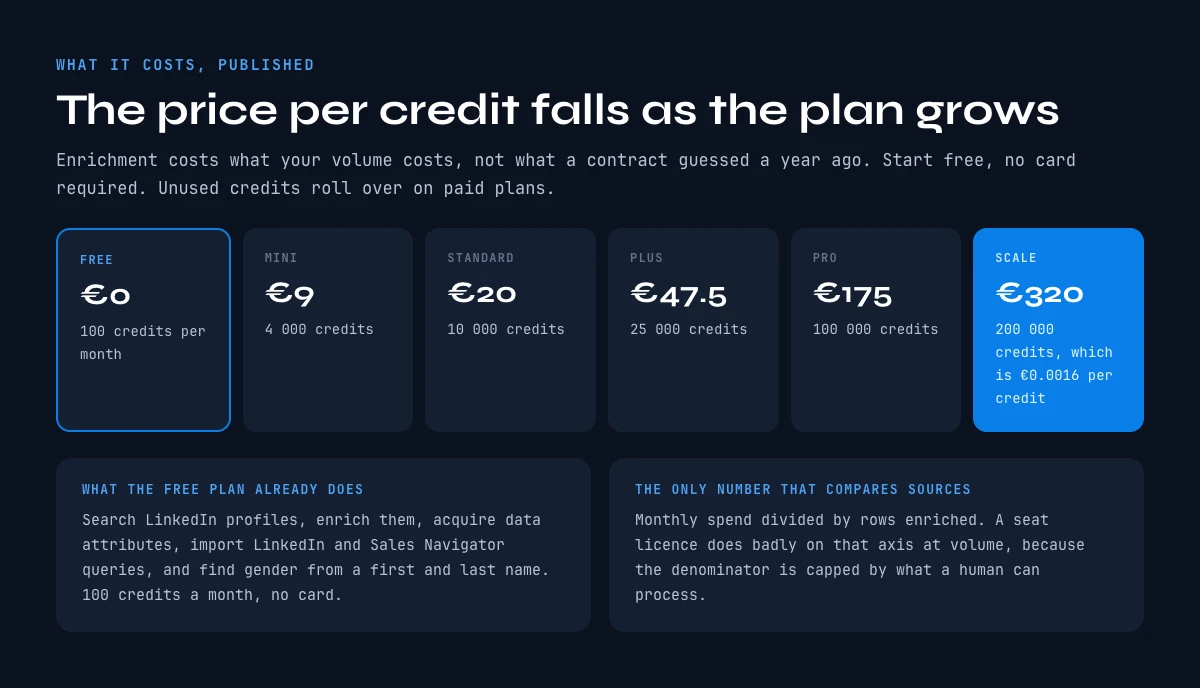
Enriching a database can have different costs depending on the number of lines you have to process.
At Derrick you can start for free, and no credit card is required. The FREE plan gives you 100 credits per month to search LinkedIn profiles, enrich them and acquire data attributes. It also allows you to import LinkedIn queries via the Sales Navigator and find gender via first and last name. For heavier database work, the STANDARD plan is 20 EUR per month with 10 000 credits, and credits you do not spend roll over to the next month.
Try Derrick free in the web app
Who is data enrichment for?
Data Enrichment is mainly aimed at digital marketing/Growth hacking and sales teams, either directly in companies or in marketing agencies
In order for them to work efficiently with the CRM at their disposal, a clean database is the key to optimize their communication campaigns
Data enrichment allows the following campaigns to be conducted
- Prospecting emails : these are targeted messages that you will send to your prospect base to present them your services or products
- Email retargeting: its objective is to retarget a prospect who has visited your website;
- Email reactivation by matching: it allows you to reactivate prospects who have not opened your messages. You cross a dormant email file with an opener base
- Email Appending: this is a form of data enrichment that collects email addresses by crossing a company database with opt-in email files from advertisers or providers.
Examples of data enrichment with Derrick
Our Derrick tool runs in its web app, with nothing to install, and as an extension that installs directly on Google Sheet, where it allows you to import, clean and enrich leads and companies in a document.
- Leads: the method of scraping leads from LinkedIn is a great way to build your database with valuable information. With the lead retrieval feature, all you have to do is enter the first and last name of a contact in your document:
It is possible to retrieve leads and company information from a list on LinkedIn Sales Navigator. You can then import it into your Google Sheet document
- Companies: building an access database on company information? Derrick imports the company names from LinkedIn Sales Navigator directly into the Google Sheet document:
Frequently asked questions
What is database enrichment?
Why is enriching a database important?
Which tools can I use for database enrichment?
What are the best practices for database enrichment?
Who is database enrichment for?
Keep reading
Continue exploring this cluster


B2B Data Sources: Primary, Secondary, and Aggregated
Read →

How to Choose a B2B Data Enrichment Provider: 8 Key Criteria
Read →

Switching Data Enrichment Providers: A Complete Guide
Read →

B2B Data Enrichment Tools Pricing: What You Actually Pay in 2026
Read →