B2B Data Enrichment Tools Pricing: What You Actually Pay in 2026
B2B data enrichment pricing in 2026: the 5 billing models compared, the hidden costs to check, and why rollover credits win for variable-volume teams.


You're shopping for a data enrichment tool, and the pricing pages are making your head spin. "Contact us for a quote." "Credits starting at X." "Per seat, per month." And somewhere buried in the fine print: credits that expire at the end of the month.
Picking the wrong pricing model can cost your team thousands of euros a year, not because the tool is bad, but because the structure doesn't match how you actually work.
In this guide, we break down the 5 pricing models that dominate the B2B enrichment market, the hidden costs most vendors won't mention upfront, and how to compare what tools really charge in 2026, including the ones that don't publish their prices.
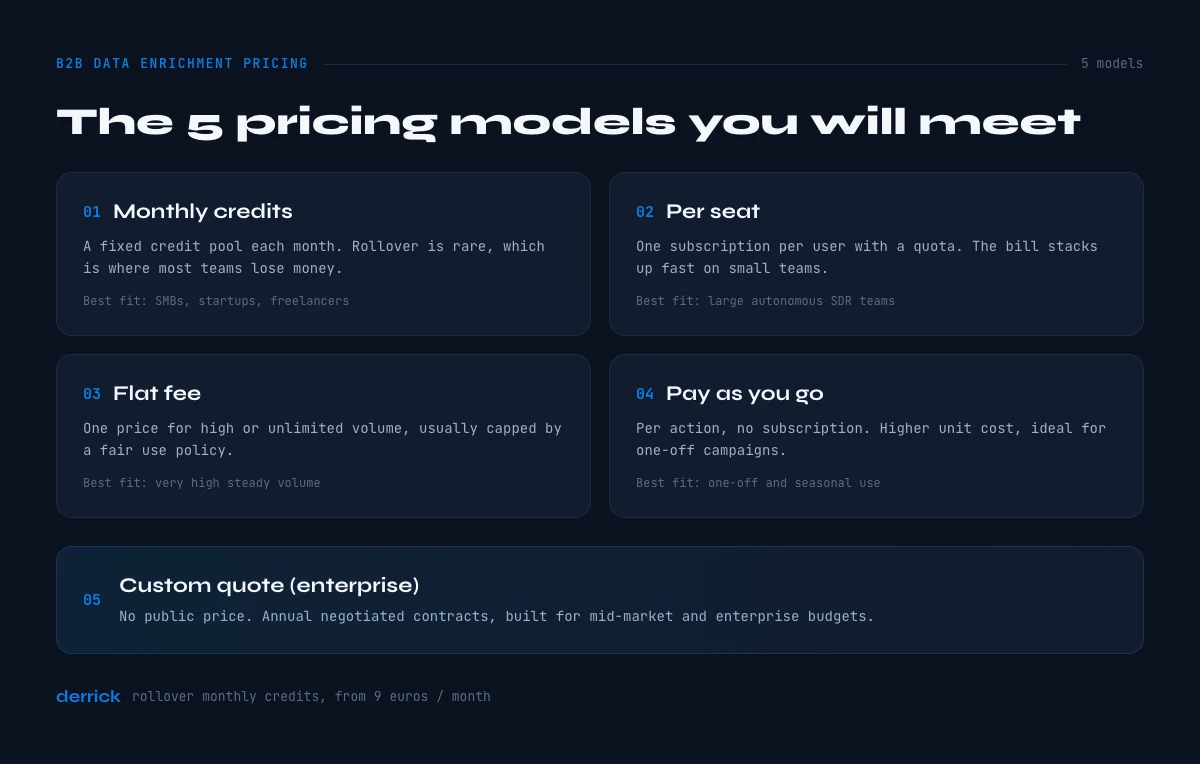
The 5 Pricing Models You'll Encounter in B2B Data Enrichment
Before comparing sticker prices, you need to understand that enrichment tools don't bill the same way. The wrong model for your team means paying for credits you'll never use, or running out mid-campaign.
Here are the 5 structures you'll see in the market.
1. Monthly Credits (With or Without Rollover)
This is the most common model. Each action, finding an email, enriching a LinkedIn profile, verifying a phone number, costs one or more credits. You buy a monthly volume.
The classic trap: At most tools, unused credits expire at the end of the month. If you enrich 200 leads in January and 800 in March, you're systematically paying for capacity you don't reach.
The smarter variant: Some tools, including Derrick, offer rollover credits. Unused credits carry over from one month to the next. For teams with variable volumes (product launches, trade shows, quiet periods), this is a real financial advantage.
| Billing model | How you pay | Rollover common? | Best fit |
|---|---|---|---|
| Monthly credits | Fixed credit pool per month | Rare (Derrick is an exception) | SMBs, startups, freelancers |
| Per seat | Subscription per user + quota | No | Large autonomous SDR teams |
| Flat fee | One price, high or "unlimited" volume | N/A | Very high steady volume |
| Pay-as-you-go | Per action, no subscription | N/A | One-off and seasonal use |
| Custom quote | Annual negotiated contract | N/A | Mid-market and enterprise |
2. Per Seat (Seat-Based)
Here, you pay a subscription per user, with a credit or export quota per person. It's the model preferred by tools that want to maximize revenue from larger teams.
The upside: Each sales rep has their own access and quota. Works well for teams of 10+ SDRs operating independently.
The problem: The bill scales fast. With 5 users at a per-seat monthly fee each, you're paying for five subscriptions before a single lead is enriched. And if a rep isn't prospecting that month, their seat gets charged anyway. Tools that lean on a per-seat logic, such as LinkedIn Sales Navigator and certain ZoomInfo or Kaspr tiers, can become expensive for small teams.
For a startup or small team, this model is often a poor fit. If you're weighing vendors on structure rather than headline price, our guide on how to choose a B2B data provider walks through the trade-offs.
3. Flat Fee (Unlimited or High-Volume)
A handful of tools offer very high volume or "unlimited" access for a fixed monthly price. Attractive in theory, but most enforce a fair use policy that limits heavy usage.
Who actually benefits: Teams enriching massive volumes (10,000+ leads per month) consistently. For standard usage, you're paying for capacity you never hit.
4. Pay-As-You-Go (Pure Consumption)
You pay only for what you use, with no monthly subscription. The ideal model for one-off use cases: enriching a tradeshow attendee list, a quarterly campaign, or testing a tool before committing to a plan.
The trade-off: the per-action cost is usually higher than on a subscription plan. And without a commitment, API partner rates can be higher for the vendor, which gets passed along. If your need is occasional rather than continuous, compare this against using a third-party enrichment API on demand.
5. Custom Quote (Enterprise Pricing)
The market leaders, ZoomInfo, Cognism, Clearbit, don't publish prices. You request a quote, sit through a demo, and negotiate.
Why? These tools are built for mid-market and enterprise companies with large annual budgets. According to Autobound's 2025 analysis, real-world contracts for tools like ZoomInfo or Clearbit range from roughly 12,000 to 80,000 euros annually.
For a startup or SMB, this model is simply out of reach, and usually overkill for the actual data volume consumed.
Now that you understand the structures, let's look at what pricing pages don't tell you.
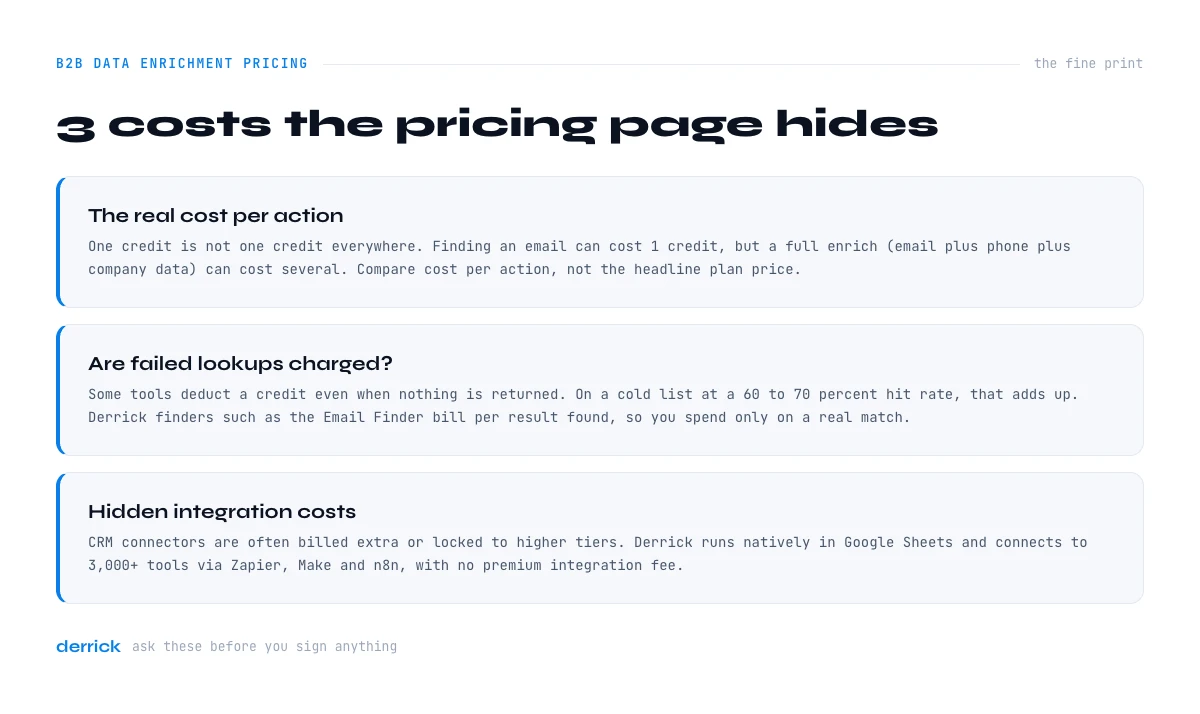
What Pricing Pages Don't Tell You
Comparing B2B enrichment tool prices at face value is like comparing car prices without factoring in insurance, fuel, and maintenance. Real costs almost always exceed the base subscription.
The Real Cost Per Action
One "credit" doesn't mean the same thing across tools.
At some platforms, finding an email costs 1 credit. But enriching a full profile, email plus phone plus company data, can cost several credits. If your standard workflow involves multi-layer enrichment, multiply your estimates accordingly.
Here's a concrete example: Mike, a Sales Ops manager at a B2B SaaS company, enriches 500 prospects per month with email, phone number, and LinkedIn job title. With a tool that counts 3 credits per contact, he needs 1,500 credits monthly. On an entry plan capped at 1,000 credits, he has to upgrade from day one. This is why cost per action, not the headline plan price, is the number that actually matters.
Are Failed Lookups Charged?
Some tools deduct a credit even when no data is returned (email not found, empty profile). Others only charge on success. This is a major difference when your hit rate on a cold list is 60 to 70 percent.
Derrick's finders, such as the Email Finder, bill per result found, so you spend credits only when an email is actually returned. Always ask this question before committing to any plan.
Hidden Integration Costs
Using Salesforce or HubSpot? Some tools charge extra for CRM integrations, or reserve them for higher-tier plans. Others require Zapier or Make (with their own subscription costs) to sync data.
Derrick runs in its web app and natively in Google Sheets, and connects to 3,000+ tools via Zapier, Make, and n8n. For teams that don't have a dedicated CRM, or want to keep their CRM as a source of truth without paying for a premium integration, that's a concrete cost saving. If you're moving off an existing vendor, our guide on how to migrate between B2B data providers covers the switching cost too.
In the web app or Google Sheets
What a hard-to-find datapoint actually costs
Price comparisons collapse when a plan charges for attempts. Derrick prices per result: the phone finder is the most expensive item in the catalogue and it still bills only when a number comes back. The rate is published, per feature.
- Feature
- Lead Phone Finder
- Credit cost
- 200 credits per phone found
The first button opens the web app (nothing to install): 200 credits per phone found, available from the STANDARD plan. The second details the feature and its cost per plan.
Comparing Tools by Pricing Model in 2026
Published self-serve prices change often and vary by region, currency, and promotion, so the reliable way to compare tools is by their billing structure rather than a single headline figure that may be stale by the time you read it. Here is how the main categories of tools line up.
| Tool | Pricing model | Self-serve entry? | Credit rollover | Best for |
|---|---|---|---|---|
| Derrick | Monthly credits | Yes, from 20 euros per month (10,000 credits) | Yes, on every plan | SMBs, startups, freelancers |
| Apollo.io | Credits + seat | Yes | No | High-volume outbound teams |
| Lusha | Credits | Yes | No | Individuals / small teams |
| Hunter.io | Credits | Yes | No | Email-first workflows |
| Kaspr | Per seat | Yes | No | LinkedIn-focused teams |
| Dropcontact | Credits | Yes | No | French CRM cleaning |
| Cognism | Custom quote | No | N/A | Enterprise |
| ZoomInfo | Custom quote | No | N/A | Enterprise |
| LinkedIn Sales Nav. | Per seat | Yes | N/A | LinkedIn prospecting |
Quick read: Derrick is the only tool here that combines systematic rollover, a web app plus native Google Sheets integration, and no-commitment self-serve pricing from 20 euros per month. For the exact list of where each provider's data comes from, see our breakdown of B2B data sources.
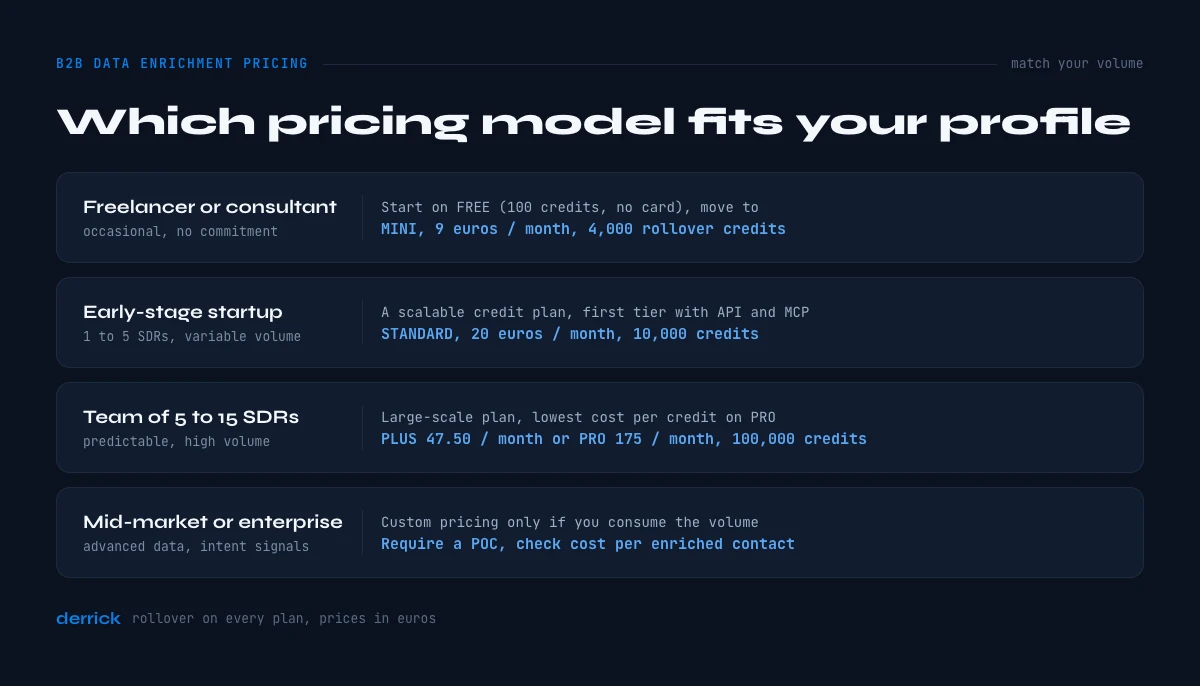
Which Pricing Model Should You Choose?
The right model isn't the cheapest one, it's the one that matches your actual volume and the regularity of your campaigns. Here's how to decide.
You're a Freelancer or Consultant
You need to enrich lists occasionally, without long-term commitment. A rollover credit model is built for you. Accumulate credits during slow months, burn through them on big projects.
Recommendation: Start on Derrick's FREE plan (100 credits, no credit card required) to test, then move to STANDARD at 20 euros per month (10,000 credits) when you need more.
You're an Early-Stage Startup (1 to 5 SDRs)
Your volumes are still variable. You prospect hard during growth pushes, less between them. Avoid per-seat models that stack up fast.
Recommendation: A scalable credit model. The Derrick STANDARD plan at 20 euros per month (10,000 credits) easily covers 2 to 3 active SDRs, with rollover for quieter months. API and MCP access start one tier up, on PLUS at 47.50 euros per month.
You Have a Team of 5 to 15 SDRs
Your volumes are more predictable and high. A large-scale credit plan or a custom arrangement may make sense, if you verify the real per-action cost first.
Recommendation: Compare Derrick's PLUS (47.50 euros per month, 25,000 credits) and PRO (175 euros per month, 100,000 credits, the lowest cost per credit) against advanced Apollo tiers. Calculate the real cost per enriched contact, not just the monthly plan, and add integration fees if you're on Salesforce or HubSpot.
You're a Mid-Market or Enterprise Company
You need advanced firmographic data, intent signals, and international coverage. Enterprise custom pricing can be justified, if and only if you actually consume the volume you're buying.
Recommendation: Require a proof of concept (POC) with your own data before signing. Ask for the cost per enriched contact on your specific ICP, and check the provider's geographic coverage against your target markets.
4 Questions to Ask Before Committing to a Pricing Plan
Ask these directly to the sales team before signing anything. The answers reveal what the pricing page is hiding.
1. "What happens to unused credits at the end of the month?"
If the answer is "they expire," calculate your average utilization rate. If you consistently don't hit your quota, you're losing money every single month.
2. "Is a credit deducted even if no data is found?"
This determines your real cost on lists with a hit rate below 80 percent. A list of small European companies typically has a lower match rate than a list of large US enterprises.
3. "Are CRM integrations included in my plan?"
Salesforce, HubSpot, Pipedrive, check whether native connections are included or billed separately. Some tools charge a separate monthly fee for CRM integrations.
4. "What's your annual renewal policy?"
Some enterprise contracts auto-increase by 10 to 20 percent at renewal. Negotiate a cap at signing if you're going for an annual commitment.
These four questions let you compare offers on equal footing and avoid costly surprises after month one.
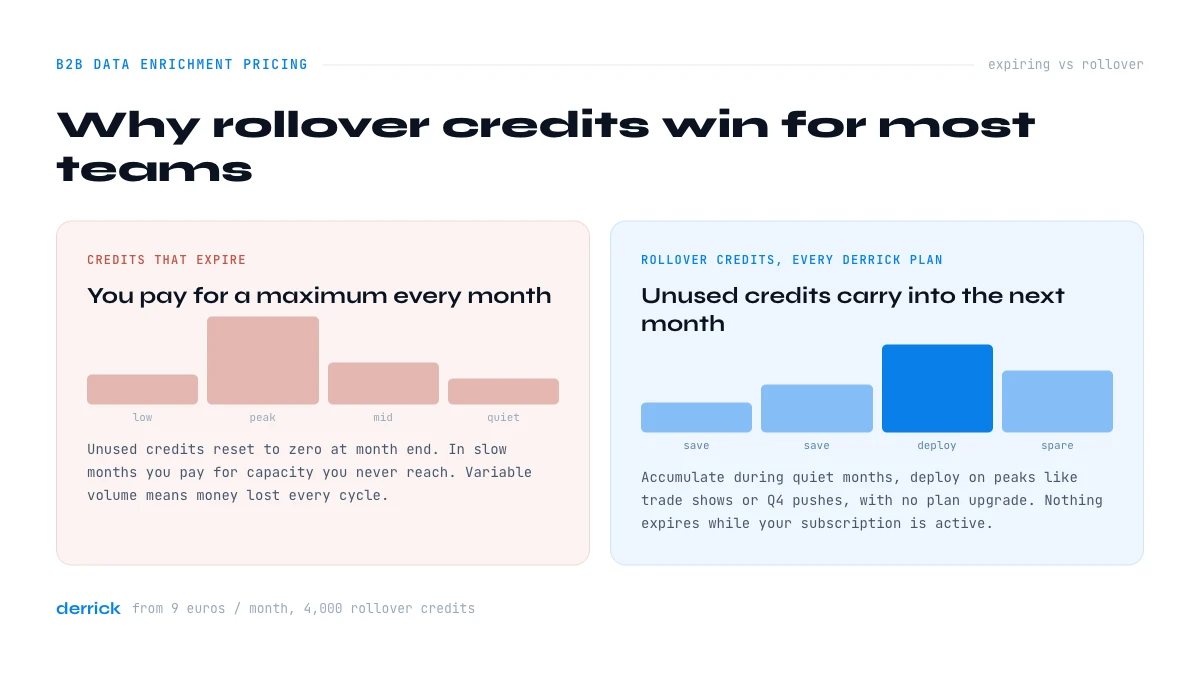
Why Rollover Credits Win for Most B2B Teams
Available market data consistently shows that most sales teams have variable prospecting volumes. According to Salesforce's State of Sales report, reps spend roughly 20 percent of their time searching for or correcting data, and that work is rarely linear. It intensifies before events, end-of-quarter pushes, and product launches.
A fixed monthly credit subscription with no rollover structurally penalizes these teams: they pay for a maximum volume every month, even when activity is low.
Rollover fundamentally changes the equation. Sarah, a Growth Manager at a B2B SaaS company, enriches an average of 2,000 contacts per month, but spikes to 6,000 around key events like trade shows or Q4 campaigns. With a rollover plan, she accumulates credits during slow months and deploys them during peaks without upgrading her plan.
That's exactly the model Derrick has chosen across all plans: no credit expires at month end. Unused credits accumulate and remain available as long as your subscription is active. The same logic scales both ways, a freelancer on FREE and a 15-person sales team on PRO both benefit from the same rollover mechanics.
For more on enrichment capabilities, see Derrick's Email Finder and Enrich Leads feature pages.
Key Takeaways
- There are 5 pricing models: monthly credits, per seat, flat fee, pay-as-you-go, and enterprise custom quote, each suited to a different profile.
- Credits that expire monthly are the most common trap: calculate your real utilization rate before choosing a plan.
- Cost per action, not the plan price, is the metric to compare across tools.
- CRM integration fees, per-seat costs, and auto-renewals can double your real budget.
- For SMBs and teams with variable volumes, rollover credits are the most cost-effective structure.
Conclusion: Choose a Pricing Model That Matches Your Pace
The best enrichment tool isn't the one with the largest database or the longest feature list. It's the one whose pricing model matches your actual volume, without charging you for credits you'll never use.
For the majority of B2B teams, startups, SMBs, freelancers, independent SDRs, rollover credits offer the best flexibility-to-cost ratio. Derrick starts at 20 euros per month with 10,000 rollover credits, runs in its web app and natively in Google Sheets, and requires zero complex setup. You can also try Derrick for free with 100 credits and no credit card.
If you're evaluating specific alternatives to the main market players, also check out our pages on Apollo alternatives and Lusha alternatives.
Frequently asked questions
How much does B2B data enrichment cost?
Is it better to pay by credit or by seat?
Do unused credits always expire?
Can I enrich data without a monthly subscription?
How do I calculate the right credit volume to buy?
Keep reading
Continue exploring this cluster


B2B Data Sources: Primary, Secondary, and Aggregated
Read →

How to Choose a B2B Data Enrichment Provider: 8 Key Criteria
Read →

Switching Data Enrichment Providers: A Complete Guide
Read →
Third-Party API Enrichment: How It Works (and How to Make It Work for You)
Read →