CRM Data Strategy
A CRM data strategy in five layers: field contract, audit, enrichment at entry, refresh cadence and ownership. With the real cost of a cycle in credits.


Most teams do not have a CRM data problem. They have a CRM data strategy problem. The records are wrong, the fill rates are embarrassing, half the phone numbers ring nowhere, and the response is almost always the same: buy a cleanup, run it once, feel better for a quarter, watch it decay. Twelve months later the spreadsheet of complaints looks identical.
The fix is not a bigger cleanup. It is a written plan that treats CRM fields the way engineering treats a schema: each one has a definition, a source, a refresh interval and an owner. That is what this guide lays out, in five layers you can implement in order, with the audit that tells you where you actually stand and the arithmetic that tells you what a cycle costs before you commit to it.
What is a CRM data strategy?
A CRM data strategy is the documented set of decisions about the data inside your CRM: which fields exist, what each one means, where it comes from, how fresh it has to be, and who is accountable when it goes wrong. It is deliberately narrower than a company-wide data strategy. It does not try to govern your product analytics or your finance warehouse. It governs the records your revenue team touches every day.
The distinction that matters most is between a CRM strategy and a CRM data strategy. A CRM strategy answers how you use the tool: pipeline stages, automation, reporting, adoption. A CRM data strategy answers whether the tool is holding anything worth reporting on. You can have a beautifully designed pipeline sitting on top of records where 40 percent of the job titles are two roles out of date, and every forecast built on it will be confidently wrong.
Written down, a CRM data strategy usually fits on two pages. It is not a platform, not a vendor, and not a migration. It is a contract between the people who create records and the people who depend on them.
Why CRM records go bad within a year
CRM data does not degrade because people are careless. It degrades because the world underneath it keeps moving while the record stands still. Someone gets promoted and the title is stale. The company gets acquired and the domain redirects. A rep leaves and the accounts they owned stop being touched. None of these are data-entry mistakes. They are the normal behaviour of a database that describes a moving reality and is only written once.
The rate most often reported across industry studies for B2B contact decay is 25 to 30 percent a year, and that figure covers contacts alone: the share of whole CRM records that drift out of accuracy without maintenance runs higher still. Take that seriously for a moment. On a base of 20,000 contacts, that is roughly 5,000 records a year drifting out of accuracy, or about 100 every week, quietly, without a single alert firing. If your last enrichment run was fourteen months ago, a third of what you are looking at is fiction.
There is a second, less discussed cause: nobody ever defined what a complete record is. If the definition of done is unwritten, every rep invents their own. One fills the industry field from the website, another from LinkedIn, a third leaves it blank because it is not required to save. Three months later the segment you built on that field returns nonsense, and the conclusion drawn is that the CRM is bad. The CRM is fine. The contract was missing. The figures we compiled in our CRM data quality report put the share of CRM records that turn inaccurate within a year as high as 91 percent, and the gap between fields teams think are filled and fields that actually are is consistently the widest part of the problem.
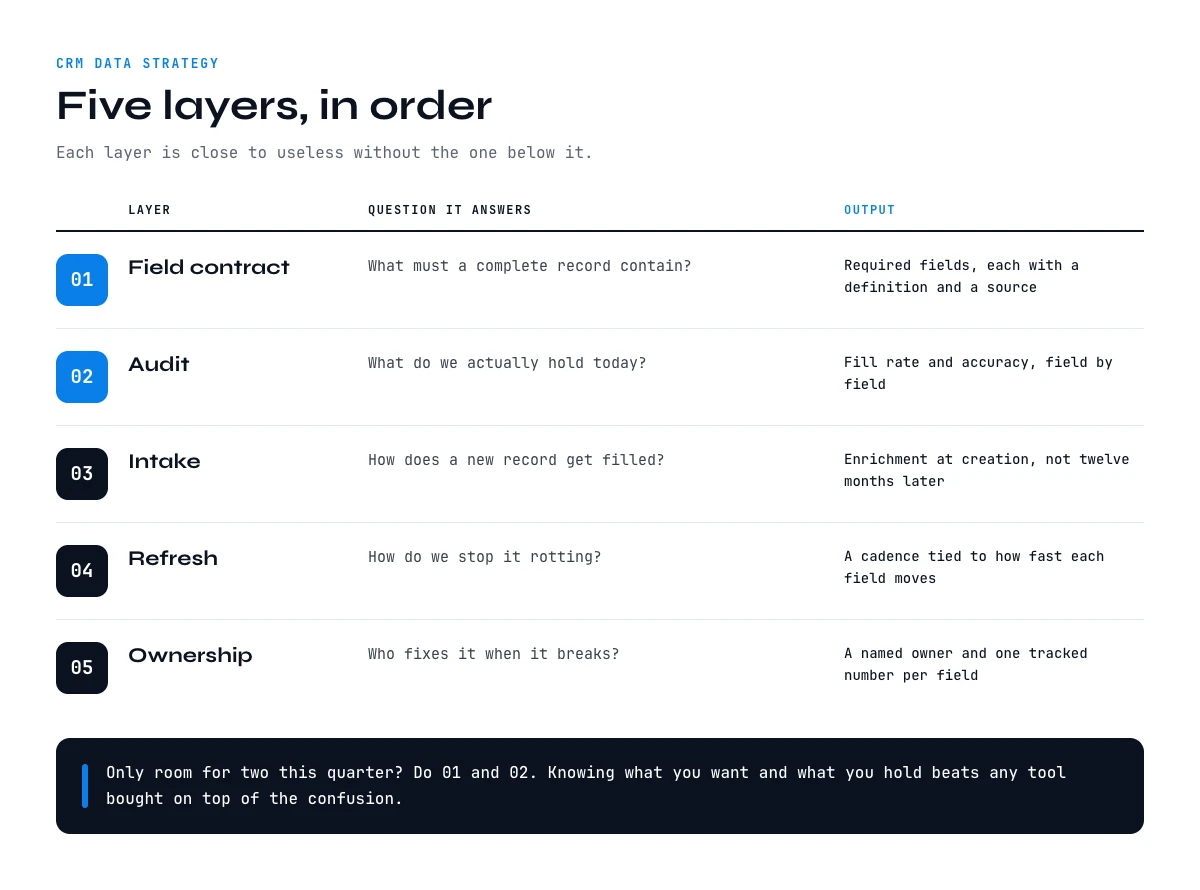
The five layers of a CRM data strategy
The layers stack. Each one is close to useless without the one below it, which is why teams that jump straight to enrichment tools end up with expensive, well-filled fields that nobody trusts or maintains.
| Layer | Question it answers | Output |
|---|---|---|
| 1. Field contract | What must a complete record contain? | A list of required fields with definitions and sources |
| 2. Audit | What do we actually hold today? | Fill rate and accuracy per field |
| 3. Intake | How does a new record get filled? | Enrichment at creation, not later |
| 4. Refresh | How do we stop it rotting? | A cadence tied to each field's decay rate |
| 5. Ownership | Who fixes it when it breaks? | A named owner and a tracked metric per field |
Read them in order. If you can only do two this quarter, do layers one and two: knowing what you want and knowing what you have is worth more than any tool you could buy on top of the confusion.
Through the Derrick API
The enrichment layer of the five, in practice
A data strategy is only as real as the job that keeps the fields populated. The Derrick API is the call your stack makes for that layer: send an identifier, get the structured fields back, write them where your model says they belong.
- Feature
- Derrick API
- Credit cost
- Included
The first button opens the web app, where your account and key live. API and MCP access starts on the PLUS plan. The second details the surface.
Layer 1: define the record before you fill it
Start by writing the field contract. For every field on the contact and account objects, record four things: the definition in one sentence, the source of truth, whether it is required, and how stale it is allowed to get. Most teams discover during this exercise that they have somewhere between 40 and 120 fields and that fewer than fifteen are used in any report, segment or sequence.
That discovery is the first win. Fields nobody uses are not neutral. They dilute attention, they invite inconsistent entry, and they make the fill-rate number look worse than the situation actually is. Mark them as deprecated, stop requiring them, and focus the contract on the fifteen that drive routing, segmentation and outreach.
For the fields that survive, be specific about definitions. Headcount means what the company reports on LinkedIn, not the number a rep guessed on a call. Industry means one value from a fixed list, not free text. Seniority means a mapped tier, not the raw title. A field with a loose definition cannot be audited, because there is no way to say whether a given value is right. If your CRM cannot store the contract cleanly, that is worth knowing before you write it, which is part of what our comparison of HubSpot and Pipedrive looks at.
Layer 2: audit what you actually hold
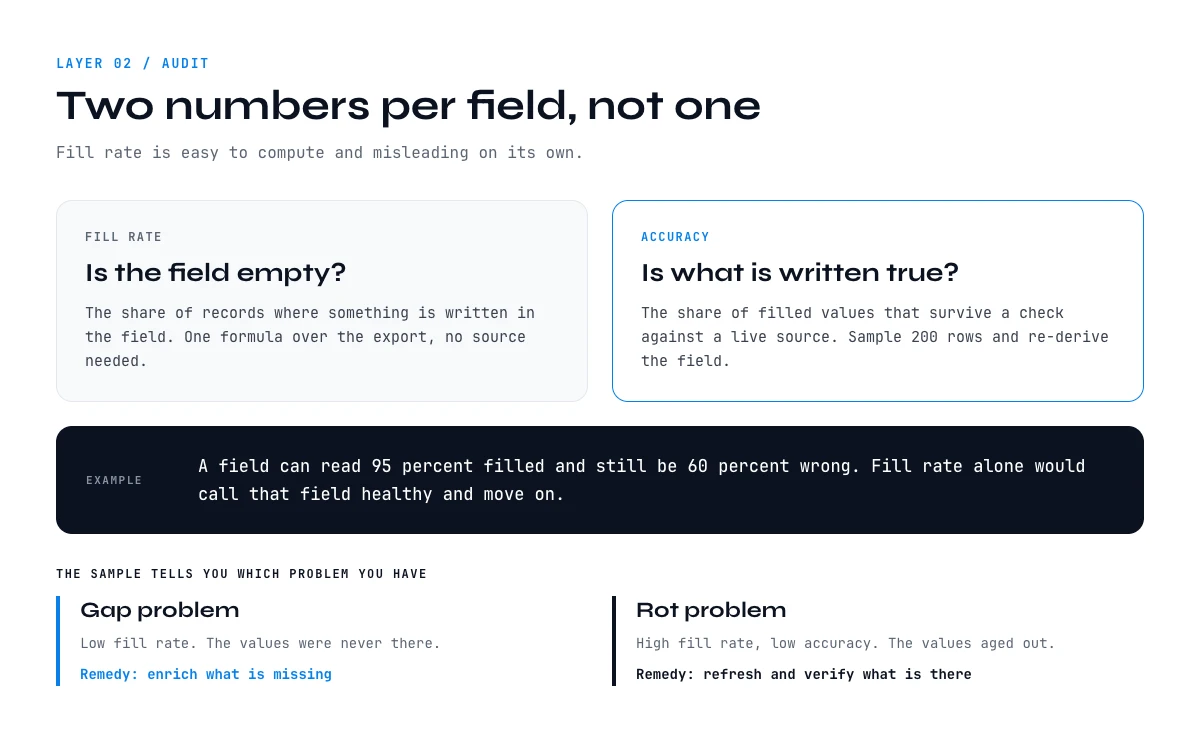
Now measure. Export the objects, and for each contracted field compute two numbers: fill rate, meaning the share of records where the field is not empty, and accuracy, meaning the share of filled values that survive a check against a live source.
Fill rate is easy and misleading on its own. A field can be 95 percent filled and 60 percent wrong. Accuracy is the harder number, and you do not need to check every record to get it: pull a random sample of 200 rows, re-derive the field from its source of truth, and compare. That sample is enough to tell you whether you are dealing with a gap problem or a rot problem, and the two have completely different remedies.
Do the same for the two fields that carry the most operational weight, email and phone. A bounce test on a sample tells you more about your outbound performance next quarter than any messaging workshop. If deliverability is already suffering, run verification across the base rather than sampling it, using Email Verification, available on paid plans at 1 credit per email, and treat the result as the baseline you will re-measure against later.
Deduplication belongs in the audit too. Duplicates inflate fill rates, split activity history and make every per-account metric wrong. Find Duplicates is unlimited on every plan, so there is no reason to carry them into the next layer.
Layer 3: enrich at the point of entry
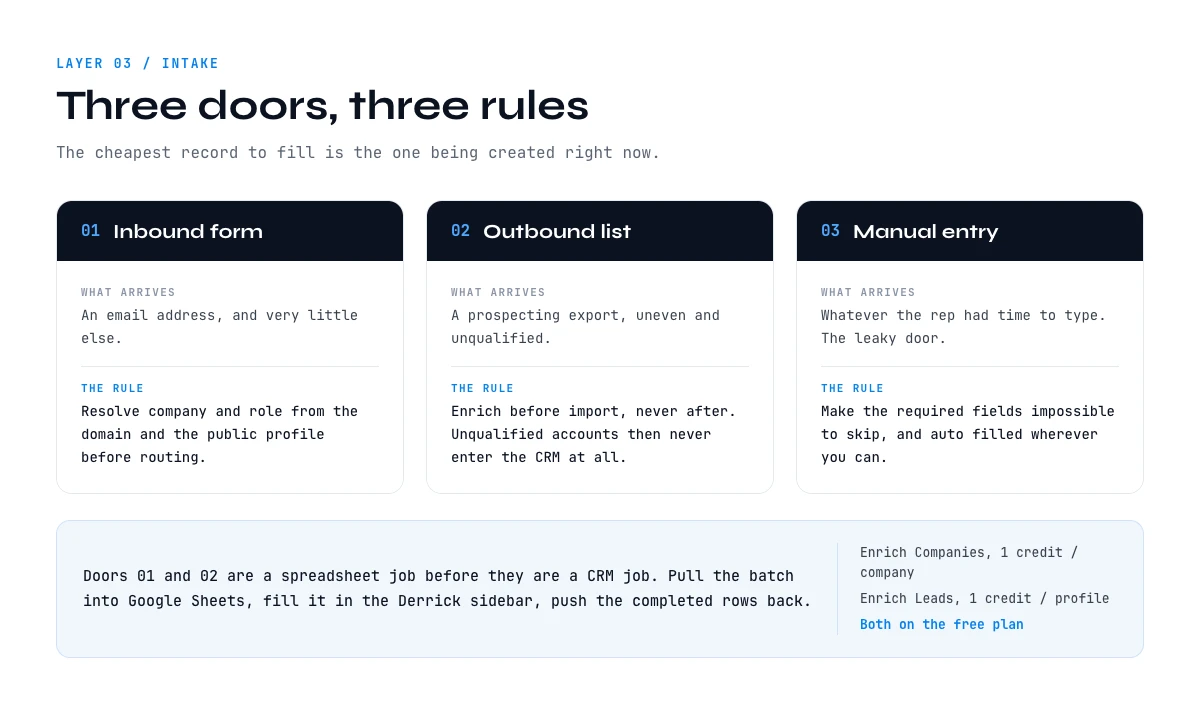
The cheapest record to fill is the one being created right now. Enrichment applied at intake costs one operation and keeps the record correct from birth. Enrichment applied twelve months later costs the same operation plus the compounded damage of a year of decisions taken on a thin record.
Intake has three doors, and each needs its own rule. Inbound form fills arrive with an email and little else, so the rule is to resolve company and role from the email domain and the person's public profile before routing. Outbound lists arrive from prospecting, so the rule is to enrich before import rather than after, which also stops unqualified accounts entering the CRM at all. Manual creation by reps is the leaky one, and the only rule that holds is to make the required fields impossible to skip and auto-filled wherever possible.
In practice this is a spreadsheet job before it is a CRM job. Pull the batch into Google Sheets, fill it there, push the completed rows back. Enrich Companies costs 1 credit per company and Enrich Leads costs 1 credit per profile, both available on the free plan, which means you can prove the workflow on a few hundred rows before anyone signs anything. The step-by-step version for one CRM is in our guide to HubSpot enrichment workflows, and the same shape applies to any CRM that exports a CSV.
Layer 4: set a refresh cadence that matches decay
Not every field rots at the same speed, and refreshing everything on the same schedule wastes money on the stable fields while leaving the volatile ones stale. Tie the interval to the field, not to the calendar.
| Field | Typical volatility | Suggested refresh |
|---|---|---|
| Company name, domain | Very low | Annually, or on a merger signal |
| Industry, country | Low | Annually |
| Headcount, funding stage | Medium | Quarterly |
| Job title, seniority | High | Quarterly on active accounts |
| Email deliverability | High | Before every send |
| Direct phone | High | On demand, before calling |
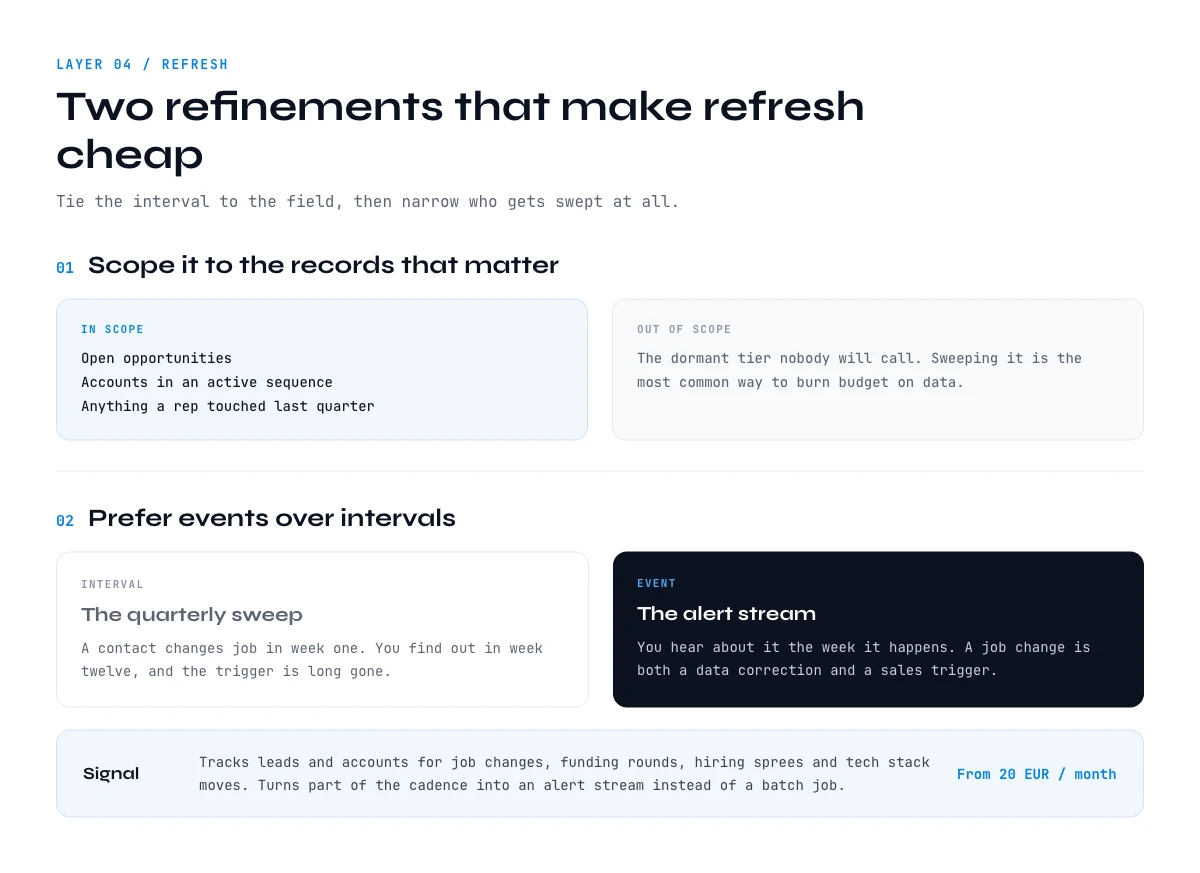
Two refinements make this much cheaper. First, scope the refresh to the records that matter: open opportunities, accounts in an active sequence, and anything a rep touched in the last quarter. Refreshing a dormant tier of 15,000 contacts nobody will call is the single most common way to burn budget on data.
Second, prefer events over intervals where you can get them. A job change on a key contact is worth knowing the week it happens, not at the next quarterly sweep, because it is both a data correction and a sales trigger. Signal tracks leads and accounts for job changes, funding rounds, hiring sprees and tech-stack moves, from €20 per month, and turns part of your refresh cadence into an alert stream instead of a batch job.
Layer 5: give every field an owner
A field without an owner has no one to notice when it breaks. Assign each contracted field to a named person, usually in RevOps, and give that person one number to report each month: fill rate, accuracy, or bounce rate depending on the field. Three numbers reviewed monthly beat a thirty-metric dashboard nobody opens.
Ownership also settles the arguments that otherwise recur forever. When marketing and sales disagree about what counts as a qualified account, the answer is not a meeting, it is the field contract and the person who owns it. When a rep wants a new custom property, the request goes through the owner, who asks the only question that matters: which report, segment or sequence will use it, and what is its source of truth?
Write the review into an existing ritual rather than creating a new one. A five-minute slot in the monthly pipeline review is enough. What kills data governance is never the work, it is the ceremony invented around it.
What a CRM data strategy costs to run
The arithmetic is simpler than most vendors make it look, and worth doing before you commit. Take a mid-size base: 5,000 accounts and 12,000 contacts, of which 3,000 are in the active tier that gets refreshed quarterly.
| Operation | Volume | Unit cost | Credits |
|---|---|---|---|
| Initial company enrichment | 5,000 companies | 1 credit / company | 5,000 |
| Initial contact enrichment | 12,000 profiles | 1 credit / profile | 12,000 |
| Email verification before send | 12,000 emails | 1 credit / email | 12,000 |
| Quarterly refresh, active tier | 3,000 profiles | 1 credit / profile | 3,000 per quarter |
| Deduplication | All records | Unlimited | 0 |
Two things fall out of that table. The one-time cost of getting current is large relative to the recurring cost of staying current, which is the argument for doing it once properly rather than in nervous half-batches. And the recurring line is dominated by how wide you draw the active tier, which is a strategy decision, not a tooling one.
The free plan gives you 100 credits per month, which is not a base migration but is plenty to run the layer-two fill-rate check on a sample and prove the numbers to whoever signs off. The pilot you run this week is the process you keep, at 200 rows or at 200,000.
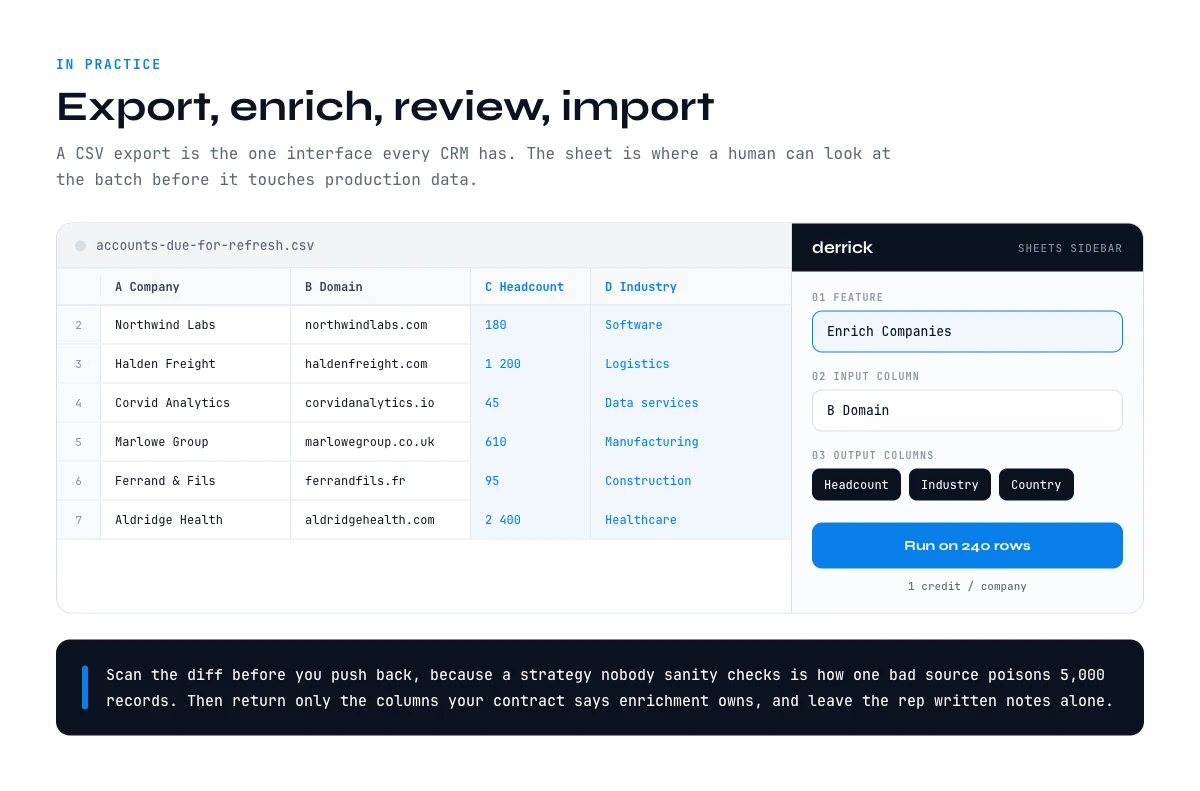
Running your CRM data strategy from Google Sheets
The reason a spreadsheet sits at the centre of this is not nostalgia. It is that a CSV export is the one interface every CRM has, and a sheet is where you can inspect a batch before it touches production data. With the Derrick sidebar in Google Sheets, the loop is export, enrich, review, import, with a human looking at the rows in the middle. Derrick also runs in its web app, with nothing to install.
A typical cycle looks like this. Export the accounts due for refresh. Enrich company fields in one pass. Verify the emails you are about to use. Scan the diff for anything that looks wrong, because a strategy that never gets sanity-checked by a person is how one bad source poisons 5,000 records. Then push back only the columns your contract says are owned by enrichment, leaving rep-owned notes untouched.
If you would rather drive the same operations from an assistant instead of a sheet, Derrick MCP exposes them to Claude Desktop, ChatGPT and any MCP-compatible tool, from the PLUS plan at €47.50 per month. The strategy does not change, only the surface you run it from.
Five mistakes that undo the work
- Treating enrichment as a project with an end date. It is a cadence. A one-off cleanup with no refresh layer is a receipt, not a strategy.
- Enriching everything. Filling 40 fields on 20,000 dormant records is expensive and produces nothing anyone reads. Contract the fields down and scope the active tier up front.
- Skipping verification before send. Enriched does not mean deliverable, and a bounce rate above 2 percent damages the sending domain that every later campaign depends on.
- Letting the CRM be the source of truth for fields it cannot maintain. Headcount, funding stage and job title live outside your CRM and are copied into it. Write that down, or someone will eventually defend a stale value because it was in the CRM.
- Measuring nothing. If you cannot state your fill rate on the five fields that drive routing, you do not have a strategy yet, only a set of opinions about your CRM.
Start with the audit, and the rest of the plan will write itself from what you find.
Frequently asked questions
What is a CRM data strategy?
How is a CRM data strategy different from a CRM strategy?
How fast does CRM data decay?
Which fields should a CRM data strategy cover?
How often should CRM data be refreshed?
How much does it cost to keep a CRM enriched?
Where should enrichment happen, in the CRM or in a spreadsheet?
What is the first step if our CRM data is already bad?
Keep reading
Continue exploring this cluster


CRM Enrichment: How to Enrich Your HubSpot or Salesforce Data (Complete Guide)
Read →

HubSpot Data Enrichment: How to Automate It With Workflows
Read →

CRM Data Quality Report 2026: Decay, Cost & the Enrichment Gap
Read →

HubSpot Lead Scoring: The Data Layer Underneath the Model
Read →