Social Media CRM: What It Is and 8 Platforms by Use Case (2026)
Learn what a social media CRM does, compare 8 social CRM platforms by use case and price, and turn LinkedIn engagement into complete CRM contacts.
What is a social media CRM?
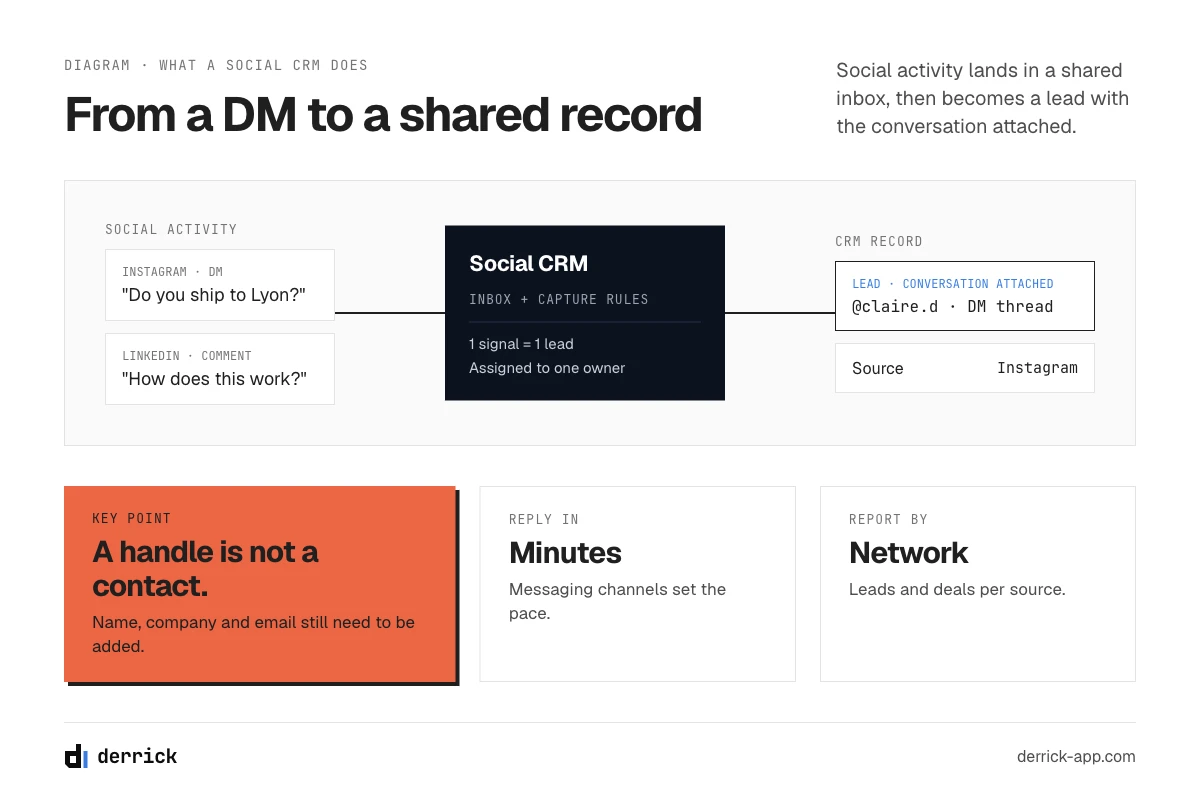
A social media CRM (or social CRM) is a customer relationship management system that also captures what happens on social networks: comments, direct messages, mentions, lead forms and ad responses are attached to the contact record, next to emails, calls and deals. The goal is to stop treating a conversation on Instagram, a reply on X or a reaction to a LinkedIn post as something that lives in a separate tool, and to turn it into a lead, a case or a step in a deal that the whole team can see.
In practice, a social CRM does four things a classic CRM does not do on its own:
- Connects social accounts (a Facebook page, an Instagram business account, an X account, a WhatsApp Business number, sometimes LinkedIn) to the CRM.
- Brings messages and mentions into an inbox where the team can answer them and link each one to a contact.
- Creates or updates records from social activity: a person who sends a DM, fills in a lead form or comments on an ad becomes a lead with the conversation attached.
- Reports on social as a source: how many leads, deals or tickets came from each network.
Two neighbors are often confused with a social CRM. A social media management tool publishes posts, schedules content and monitors engagement, but it does not run a sales pipeline. A traditional CRM runs the pipeline but treats social networks as, at best, a link on the contact record. A social CRM sits between the two, and depending on the product, it starts from one side or the other. Part 05 groups the platforms by where they start.
One limit to know before you shop: networks do not open the same data to CRM software. Facebook, Instagram and WhatsApp messages can flow into a CRM through the platforms' business tools. LinkedIn is more closed: on the platforms in this guide, the LinkedIn integration is usually a separate LinkedIn Sales Navigator license connected to the CRM, not a social inbox. For a B2B team, that gap matters more than any feature list, and part 07 deals with it.
Social CRM vs traditional CRM
A traditional CRM records what your team does: the calls they log, the emails they send, the deals they move. A social CRM also records what your customers and prospects do in public or in private messages on social networks, often before they ever fill in a form.
| Dimension | Traditional CRM | Social CRM |
|---|---|---|
| Where the data comes from | Forms, email, calls, manual entry, imports | All of these, plus DMs, comments, mentions, social lead forms and ad responses |
| Who starts the conversation | Mostly your team (outbound, follow-up) | Often the customer, in public or in a DM |
| Main record | Contact with an email address | Contact with one or more social handles, sometimes without an email |
| Speed expected | Hours to days | Minutes to hours on messaging channels |
| Typical users | Sales, account management | Sales, marketing, customer service, community |
| What it measures | Pipeline, win rate, revenue | The same, plus response time, engagement and leads by network |
The third row is the one that causes trouble later. A traditional CRM is organized around an email address: that is how it recognizes a person, sends sequences and avoids duplicates. A record created from an Instagram DM or an X mention may have a handle and a display name, and nothing else. It is a lead in name only until someone adds a real name, a company and a way to reach them outside the network.
CRM with social media integration vs dedicated social CRM
Vendors use both labels, and they do not mean quite the same thing. A CRM with social media integration is a regular CRM that connects to one or more networks through an integration: leads from Facebook Lead Ads land in the CRM, a WhatsApp chat is linked to a deal, a LinkedIn profile is shown on a contact. A dedicated social CRM puts social conversations at the center: the inbox, the routing and the reporting are built around messages and mentions. For a sales team, a CRM with social media integration is usually enough; for a team that answers hundreds of social messages a week, a dedicated social CRM, or a social inbox tool connected to the CRM, is the better fit. In both cases, the social CRM record still needs the same fields as any other record before sales can use it.
Can a social CRM replace a traditional CRM?
It depends on where the product starts. A CRM with social features built in (several platforms in part 05) is a full CRM, so yes, it replaces a traditional one. A social media management tool with CRM features does not: it keeps a history of conversations and notes, but it has no real pipeline, forecast or deal management, and it usually connects to a CRM rather than replacing it. If your sales team needs a pipeline, keep or choose a CRM, and treat social as one more source feeding it.
Benefits and challenges of a social CRM
A social CRM keeps every social conversation, its history and its source on the customer record; its main limits are incomplete records, duplicates and uneven network access. The case for it is simple: your customers are already talking to you on social networks, and those conversations are lost if they stay in a phone app or in the inbox of one community manager.
Benefits
- No lost conversations. A DM that becomes a lead is assigned, followed up and closed like any other lead, instead of sitting unread over a weekend.
- Full history on the social CRM record. The sales rep sees the complaint the customer posted last month; the support agent sees the deal that is about to close.
- Faster response. Messaging channels set an expectation of minutes, not days. Routing rules and shared inboxes make that possible without one person watching every account.
- Social as a measurable source. You can finally answer "how many deals did Instagram or LinkedIn bring this quarter" with records rather than impressions.
- Earlier buying signals. A comment on a post, a question in a DM or a reaction from a target account often comes before the demo request.
Challenges
- Incomplete records. A social handle is not a contact. Without a real name, a company and an email, the record cannot be scored, routed by segment or added to a sequence. This is the most common problem, and part 07 is about it.
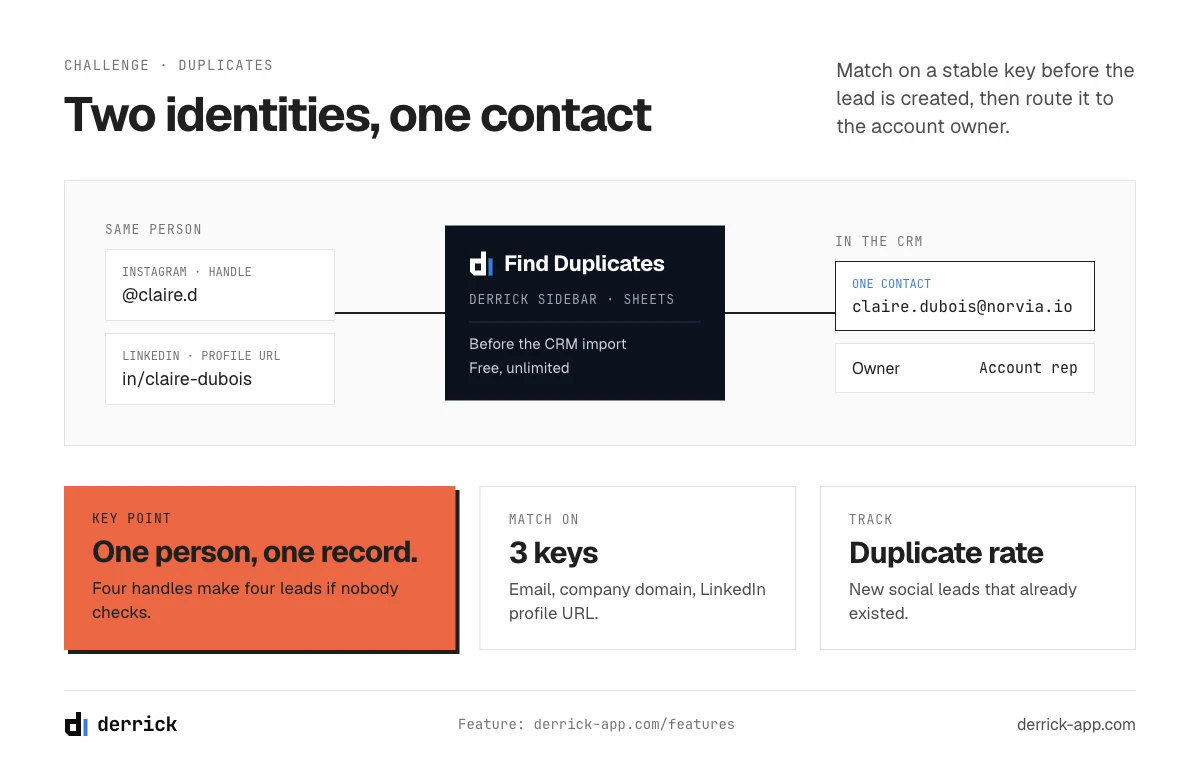
- Duplicates. The same person can appear as an Instagram handle, an X account, a LinkedIn profile and an email address, creating four records instead of one.
- Uneven network access. Each network decides what a CRM can read. Integrations change when the networks change their rules, and LinkedIn opens far less than the Meta platforms.
- Cost creep. Social features are often in the higher tiers or sold as add-ons, and messaging channels such as WhatsApp Business can carry their own per-message fees from Meta.
- Noise. Not every like is a lead. Without qualification rules, the CRM fills up with people who will never buy.
In the web app or Google Sheets
Turn a LinkedIn profile into a CRM contact
A reaction or a comment gives you a name and a LinkedIn profile, not a contact your sales team can work. Import the list into the web app and Derrick fills each person's current job title, current company and location from their LinkedIn profile URL, so you keep only the people who match your target before they enter your CRM. Your LinkedIn account connects through the Derrick Chrome extension.
- Feature
- LinkedIn Leads Profile Enrichment
- Credit cost
- 1 credit per lead enriched
The first button opens the web app (nothing to install): 1 credit per lead enriched, 100 free credits every month. The second details the feature and its cost per plan.
What a social CRM should do: 6 criteria
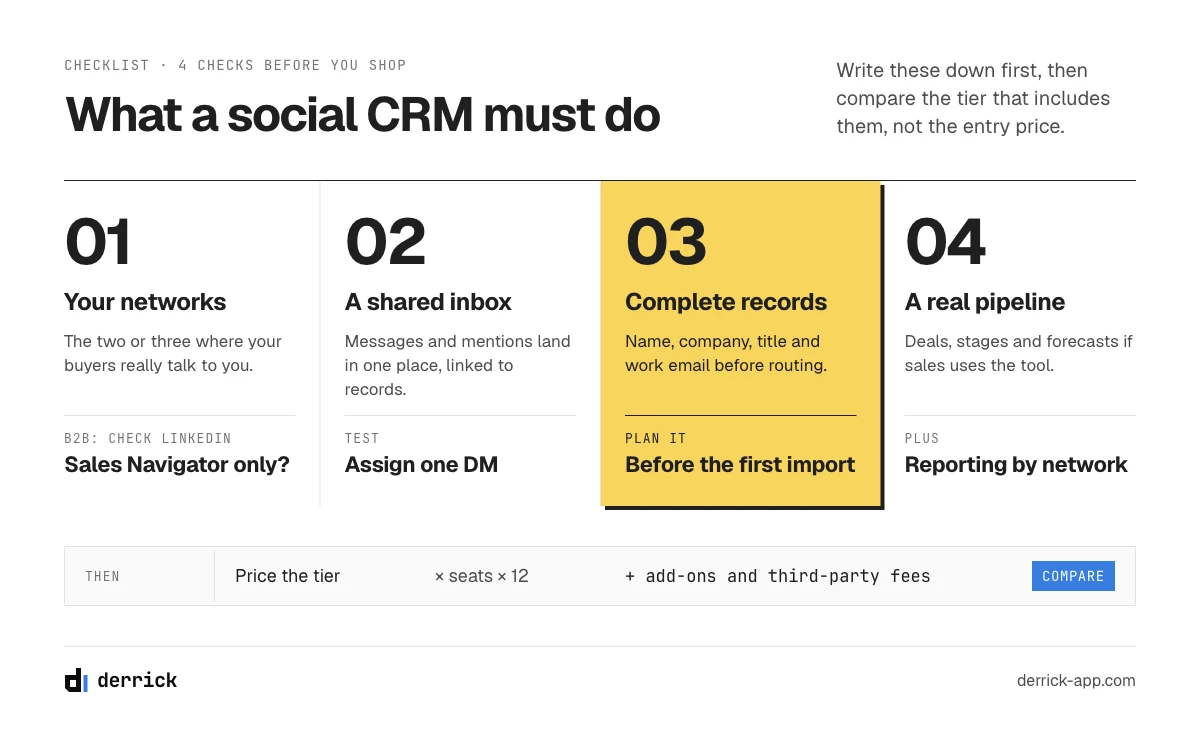
Before you compare social CRM products, write down what you need the social CRM to do. These six criteria cover what most teams end up checking, sales and service alike:
- The networks your customers actually use. A B2C brand selling on Instagram and WhatsApp needs messaging integrations. A B2B team selling to companies needs LinkedIn, and should check exactly what the LinkedIn integration does, since it is often limited to Sales Navigator.
- A shared inbox linked to records. In a good social CRM, messages and mentions should land in one place, be assignable, and attach to the right contact automatically or in one click.
- Lead capture rules. The CRM should create a lead when someone fills in a social lead form, sends a DM with buying intent or engages in a way you define, and route it to the right person.
- A real pipeline. If sales uses the tool, it needs deals, stages and forecasts, not just a conversation history.
- Reporting by source. A social CRM should split leads, deals and revenue by network, plus response time if service uses it.
- A way to complete the records. Social records start incomplete. Check how you will add names, companies, job titles and emails, whether inside the CRM or with a separate data tool, before the first import.
Then add the practical checks: the price of the tier that actually includes the social features you listed (not the entry price), the minimum commitment, and whether your team will open the tool every day. Adoption beats features.
Social CRM platforms by use case
The eight social CRM platforms below are grouped by where they start, in alphabetical order within each group, without ranking. Social features and prices come from each vendor's own product, help and pricing pages, read on October 7, 2026; prices are in US dollars as shown for the US market. Social features change often: check the vendor's page for the tier you are considering before you buy.
Social inbox first: managing conversations on social networks
These social CRM tools start from the conversation. They are built for teams that answer a high volume of messages and comments.
- Kommo is a messaging-based CRM. Its pricing page lists WhatsApp, Instagram, TikTok and Facebook Messenger in a unified chat inbox with a chatbot builder. The Base plan includes one WhatsApp number and one Instagram account; higher plans include more. Base starts at 25 US dollars per user per month, with a six-month minimum subscription and no monthly payment option.
- Sprout Social is a social media management platform with CRM features: complete conversation history, contact profiles with internal notes, and integrations with CRM and helpdesk tools such as Salesforce, HubSpot and Zendesk. Its pricing page lists Facebook, X, Instagram, LinkedIn, Threads, Pinterest and TikTok. Social listening is a paid add-on. Essentials starts at 79 US dollars per seat per month billed annually, or 99 billed monthly. It does not replace a sales CRM; it feeds one.
CRM with social built in: one tool for pipeline and social
These are full CRM systems with a social CRM module, for small and mid-size teams that want one tool.
- Agile CRM lists social monitoring for Facebook and Twitter (now X) in its feature grid. Its Starter plan is listed at 14.99 US dollars per user per month billed monthly, 9.99 billed yearly, and there is a free plan for up to 10 users.
- HubSpot has a social tool, sold with its marketing software, that publishes and monitors on LinkedIn, Facebook, Instagram, TikTok, Reddit and X and links social interactions to CRM contacts. Its sales software lists integrations with LinkedIn Sales Navigator and Facebook Messenger. HubSpot has a free CRM for up to 2 users; check which paid tier includes the social tool you need.
- Zoho CRM has a Social tab that connects X and Facebook: the team can follow likes, comments, messages and mentions, reply from the CRM, add people as leads or contacts, and set rules that create a lead when someone interacts. Its Facebook integration also saves leads from Facebook Lead Ads into the CRM. Standard starts at 14 US dollars per user per month billed annually (20 billed monthly), and there is a free edition for 3 users.
Sales pipeline first: CRM with social connectors
These CRM systems start from the deal: each one is a CRM with social media integration rather than a social CRM built around messages. Social channels come in as integrations rather than as the center of the product.
- monday CRM integrates with Facebook Ads, so leads and ad metrics can appear on CRM boards. Other social integrations are not described on its product pages.
- Pipedrive offers a WhatsApp integration that links chats to the pipeline, available from the Growth plan, described by Pipedrive as a beta not yet available to all customers. A WhatsApp Business account is required, and Meta charges for message delivery.
- Salesforce integrates with LinkedIn Sales Navigator to show LinkedIn profiles on leads, contacts, opportunities and accounts. According to Salesforce's help pages, this integration is available in the Professional, Enterprise and Unlimited editions, not in the Starter suite (25 US dollars per user per month). Salesforce also has a free suite with accounts, contacts, leads and opportunities.
Which networks each platform connects to
Based on the same vendor pages (October 2026). "Not described" means the vendor's pages we read did not say, not that the feature cannot exist.
| Platform | Facebook / Messenger | X | |||
|---|---|---|---|---|---|
| Agile CRM | Yes (monitoring) | Not described | Yes (monitoring) | Not described | Not described |
| HubSpot | Yes | Yes | Yes | Yes (social tool) and Sales Navigator | Not described |
| Kommo | Messenger | Yes | Not described | Not described | Yes |
| monday CRM | Facebook Ads | Not described | Not described | Not described | Not described |
| Pipedrive | Not described | Not described | Not described | Not described | Yes (Growth plan, beta) |
| Salesforce | Not described | Not described | Not described | Sales Navigator (Professional and up) | Not described |
| Sprout Social | Yes | Yes | Yes | Yes | Not described |
| Zoho CRM | Yes, including Lead Ads | Not described | Yes | Not described | Not described |
Which CRM is best for social media marketing?
There is no single answer, and this page does not rank vendors. Match the group to your team: a team that answers many messages on Instagram and WhatsApp will look at the social inbox group; a small team that wants pipeline and social in one place will look at the CRM-with-social group; a sales team that already has a CRM will look at what its current CRM connects to before switching. Our page of examples of CRM groups more CRM systems by use, and our guide to the types of CRM explains where a social CRM fits among operational, analytical, collaborative and strategic CRM.
What a social media CRM costs
Entry prices for the social CRM platforms in part 05 range from free plans with a few users to around 79 US dollars per seat per month for a dedicated social inbox tool, based on the vendors' pricing pages on October 7, 2026. The entry price is rarely what you pay for social features. Four things move the real cost:
- The tier that includes the feature. Social integrations often start above the entry tier: Pipedrive's WhatsApp integration starts at Growth; Salesforce's Sales Navigator integration starts at Professional.
- Add-ons. Social listening at Sprout Social is an add-on on top of the plan.
- Commitment. Kommo requires a six-month minimum; annual billing is cheaper than monthly at most vendors (for example 14 versus 20 US dollars per user per month for Zoho CRM Standard).
- Third-party fees. A LinkedIn Sales Navigator license is bought from LinkedIn, on top of the CRM. WhatsApp Business messages are billed by Meta.
A useful way to compare: write down the networks and features from part 04, find the cheapest tier that includes all of them at each vendor, multiply by the number of seats over twelve months, and add the add-ons and third-party fees. That number, not the "from" price on the pricing page, is what you are comparing.
A worked example: a team of five for one year
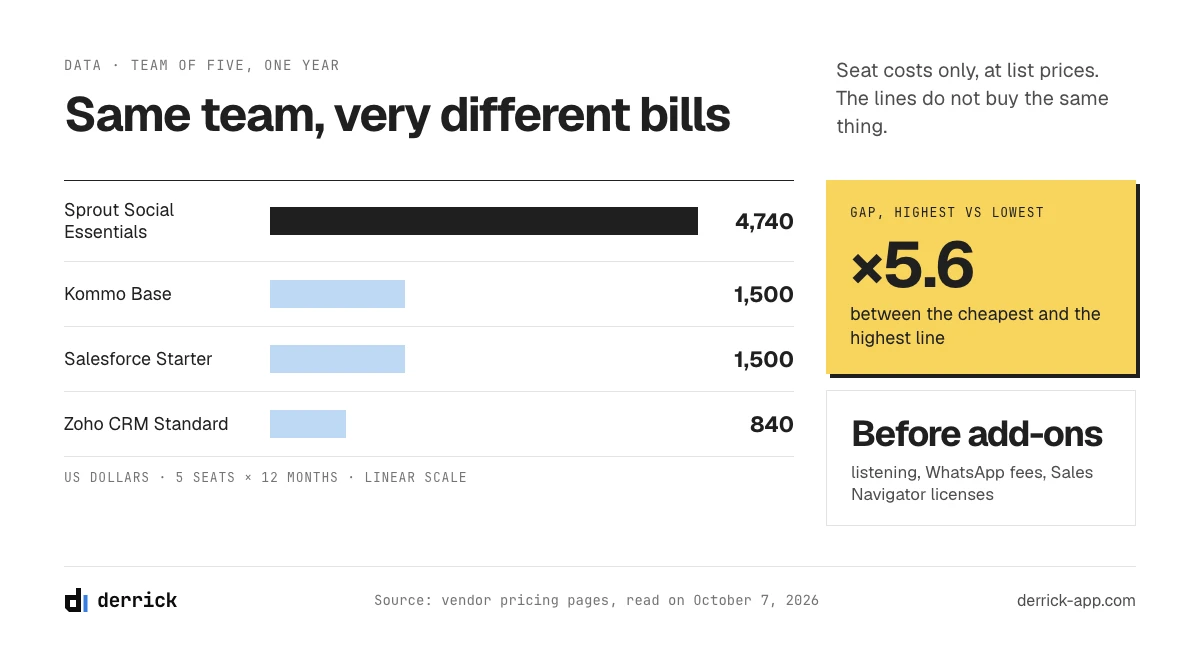
Take a team of five people who will all use the tool, billed annually, with the list prices read on the vendors' pages on October 7, 2026. These are seat costs only, before any add-on or third-party fee:
| Platform and tier | Price per seat | Five seats, twelve months | What to add on top |
|---|---|---|---|
| Zoho CRM Standard | 14 US dollars a month, billed annually | 840 US dollars | Check which edition includes the Social tab you need |
| Kommo Base | 25 US dollars a month, six-month minimum | 1,500 US dollars | Higher plan if you need more than one WhatsApp number or Instagram account |
| Salesforce Starter | 25 US dollars a month | 1,500 US dollars | The Sales Navigator integration needs the Professional edition, plus LinkedIn licenses |
| Sprout Social Essentials | 79 US dollars a month, billed annually | 4,740 US dollars | Listening add-on; a sales CRM if you need a pipeline |
The gap between the cheapest and the most expensive line is wide, but the lines do not buy the same thing: a social inbox tool and a pipeline CRM solve different problems. Search phrases like "best CRM for social media" hide that difference. Compare tools within the same group from part 05, and only once the right-hand column is filled in for your own networks and seats.
The data gap: a social profile is not a contact
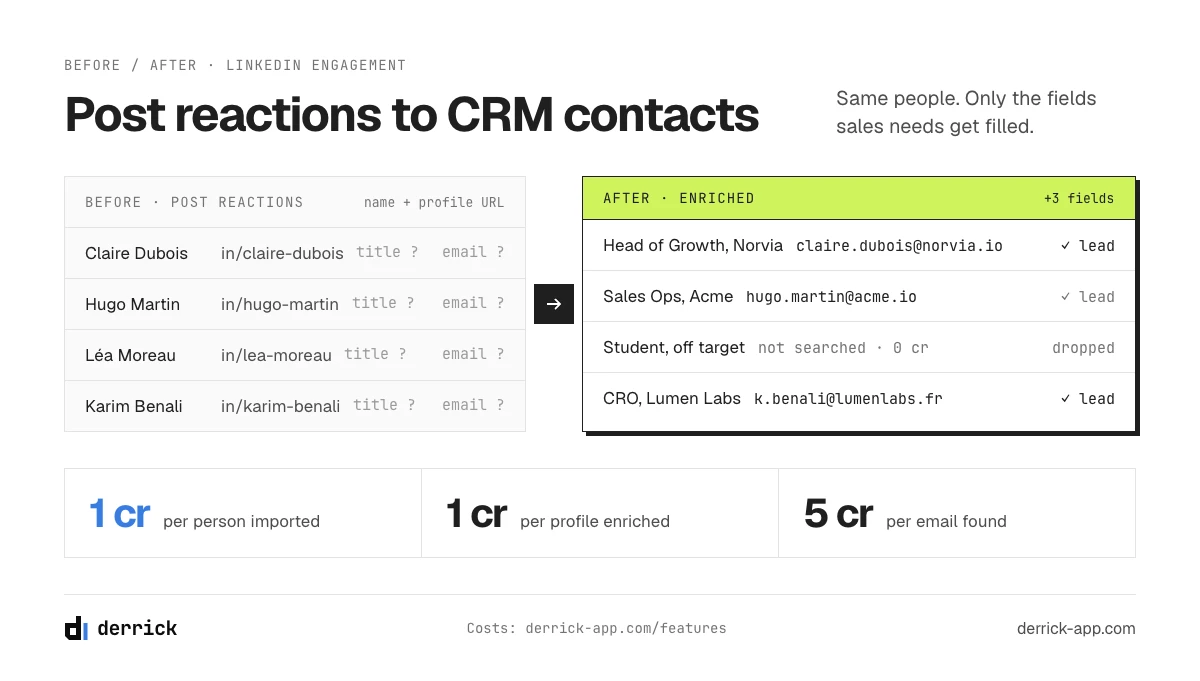
Every social CRM in part 05 can create a record from social activity. What none of them can create from a like or a DM alone is a complete B2B contact: the person's real name, current job title, current company, company size and a work email. Those are the fields your sales team needs to qualify the lead, route it to the right rep and reach the person outside the network.
Here is what a record typically looks like when it comes from each source, before anyone completes it:
| Where the lead came from | What the record usually has | What is missing for B2B sales |
|---|---|---|
| Instagram or Facebook DM | Handle, display name, the message | Real name, company, job title, work email |
| Comment or mention on X | Handle, display name, the post | The same, and often any link to a company |
| Social lead form (ad) | Name, email typed by the person, answers to the form | Job title and company size, if the form did not ask; the email may be personal |
| Reaction or comment on a LinkedIn post | Name, headline, LinkedIn profile URL | Current title and company as fields, company data, work email |
LinkedIn is the most useful source for B2B, because the profile already points to a real person and a real employer. It is also the network whose activity reaches CRM software the least: a reaction to your post does not create a lead anywhere unless someone collects it. Our guide to CRM contact management covers what a complete record should contain, and the CRM data quality report shows how quickly those fields decay once they are in.
How Derrick closes the gap for LinkedIn
Derrick is not a social CRM and does not replace one. It is the data layer that turns LinkedIn activity into complete contacts before they enter whichever CRM you use. It works on LinkedIn data only, not on Instagram, Facebook or X handles.
- Collect the people who engaged. Import LinkedIn post likes and comments brings the people who reacted to or commented on a LinkedIn post into a list, at 1 credit per person imported. Export LinkedIn Followers and Following, in the Derrick web app, does the same for the people who follow you, at 1 credit per person.
- Turn profiles into records. Enrich Leads reads each LinkedIn profile URL and fills the current job title, current company and location, at 1 credit per profile. Enrich Companies adds industry, headcount, headquarters and website from the company's LinkedIn page, at 1 credit per company.
- Add a way to reach them. Email Finder looks for the work email, at 5 credits per email found and nothing when no email is found; it needs a paid plan, from STANDARD at 20 euros a month.
The import, the followers export and the two enrichment steps read LinkedIn, so they need your LinkedIn account connected through the Derrick Chrome extension. You can enrich the list in the Derrick web app, in the Derrick sidebar for Google Sheets, or by asking Claude, ChatGPT or another AI assistant through the Derrick MCP server; the API and the MCP server are included from the PLUS plan at 47.50 euros a month. The free plan gives 100 credits a month with no card, enough to test the import and enrichment steps on the people who engaged with one small post; the email step needs STANDARD.
How to set up a social CRM workflow in 5 steps
Whatever social CRM you choose, the same five steps decide whether social becomes pipeline or noise.
- Pick the networks and the signals. Choose two or three networks where your buyers really are, and define which signals count: a DM asking about price, a lead form, a comment from someone at a target account, a reaction from a decision maker. Everything else stays in the social tool.
- Connect the accounts and set capture rules. Connect the business accounts to the social CRM and create the rules that turn a qualifying signal into a lead, with the conversation attached and the network recorded as the source.
- Complete the record before routing. A handle cannot be routed by territory or company size. Add the real name, company, job title and a work email first. For LinkedIn activity, this is where the Derrick steps in part 07 come in; for other networks, it is often a question the team asks in the conversation.
- Deduplicate. Before the lead is created, check whether the person or the company is already in the CRM, by email, by company domain or by LinkedIn profile URL. If you prepare lists in Google Sheets, Find Duplicates in the Derrick sidebar removes the duplicate rows for free before the import. Then route the lead to the owner of the account, not to whoever saw the message first.
- Follow up and measure. Assign a follow-up task with a deadline that matches the channel (minutes for a DM, a day for a post reaction), and tag every deal with its social source so the reporting in the next section works.
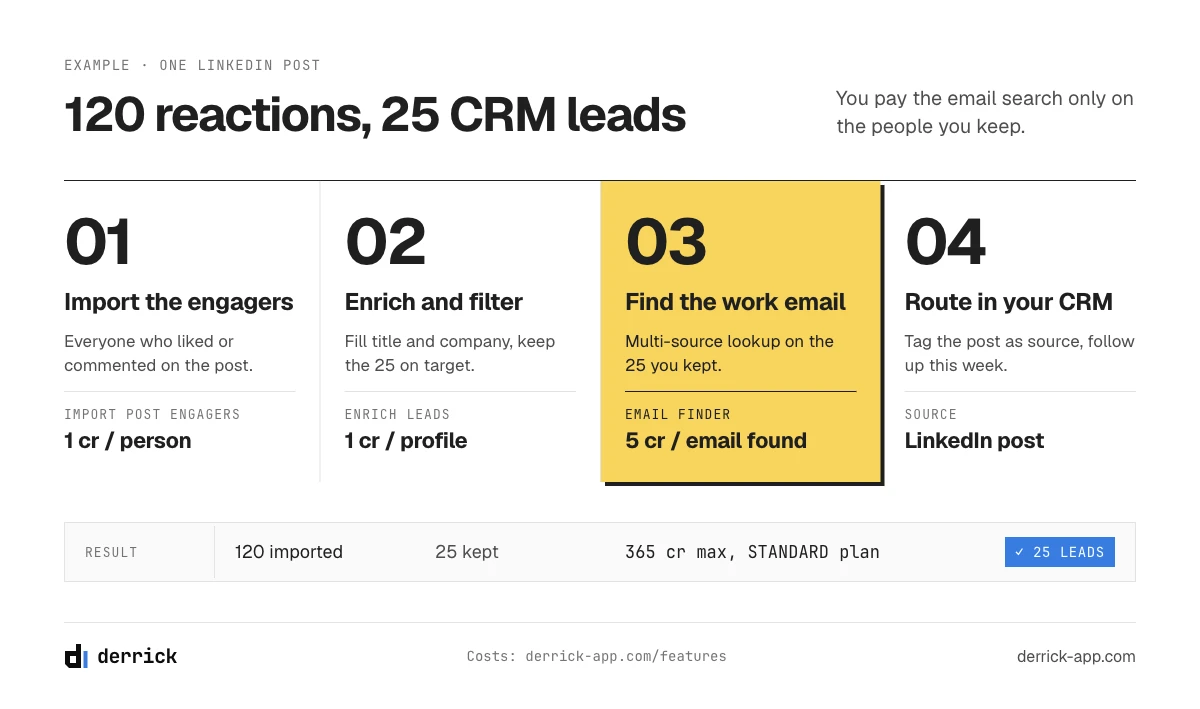
A B2B example, with illustrative figures: you publish a LinkedIn post about a problem your product solves, and 120 people react or comment. You import them, enrich their profiles, and keep the 25 who match your target titles at companies of the right size. Those 25 get a work email search and land in your CRM as leads with the post as their source; the account owners follow up the same week. The import and the profile refresh cost one credit per person each, and the email search five credits per email found, which puts this example above the 100 free credits but well within the 10,000 credits of the STANDARD plan. If you use La Growth Machine for outreach, the Derrick web app can push the list there directly. Our guide to HubSpot enrichment workflows shows the same logic inside one CRM.
Metrics to track in a social CRM
A social CRM produces a lot of activity data. These six metrics tell you whether that activity turns into revenue:
- Social CRM leads by network: how many qualified leads each network produced, not how many interactions.
- Record completeness: the share of social CRM leads with a company, a job title and a work email. Segments, routing and scoring are only as reliable as this number.
- Response time: median time from a message to the first reply, per channel.
- Social lead to opportunity rate: the share of social leads that become deals, compared with other sources.
- Revenue by social source: closed deals tagged with their first social touch.
- Duplicate rate: the share of new social leads that already existed in the CRM under another identifier.
Our guide to CRM data strategy covers how to decide which of these fields are mandatory and who owns them.
Do you need a social media CRM?
You probably need a social CRM if customers already contact you through DMs or comments, if more than one person answers your social accounts, or if you run social lead ads and the leads are retyped by hand. You probably do not need a dedicated social CRM if your buyers rarely talk to you on social networks, or if your social activity is mostly LinkedIn posts: in that case, your current CRM plus a way to collect and complete the people who engage is enough.
Either way, whether you choose a dedicated social CRM or a CRM with social media integration, start from the signals that matter, check what each network really lets a CRM read, and plan how the records will be completed before the first import. More guides on keeping CRM records complete are in the CRM data enrichment section, and every Derrick feature is listed on the features page.
Frequently asked questions
What is a social media CRM?
What is the difference between social CRM and traditional CRM?
Can a social CRM replace a traditional CRM?
Which CRM is best for social media marketing?
How much does a social CRM cost?
Does a social CRM work with LinkedIn?
How do I turn social media followers into CRM leads?
Keep reading
Continue exploring this cluster


CRM Enrichment: How to Enrich Your HubSpot or Salesforce Data (Complete Guide)
Read →

HubSpot Data Enrichment: How to Automate It With Workflows
Read →

CRM Data Quality Report 2026: Decay, Cost & the Enrichment Gap
Read →

CRM Data Strategy: The 5-Layer Playbook (2026)
Read →