HubSpot Lead Scoring: Why Your Fit Scores Are Probably Wrong
HubSpot lead scoring reads your CRM properties, and an empty field scores like a bad fit. Audit fill rate, score what you trust, add the timing signal.


A scoring model is a machine for reading properties. Point it at properties nobody filled in and it will still produce a number, confidently, every time. That is the failure mode this page is about.
HubSpot lead scoring is the built-in tool that assigns scores to contacts, companies and deals from two kinds of input: what a person did, and what a company is. HubSpot calls the first an engagement score, the second a fit score, and a model that uses both a combined score. The engagement half works out of the box because HubSpot records the behaviour itself. The fit half reads your CRM properties, and that is where most models quietly break.
The short version: setting up the tool takes an afternoon. Making the scores mean something takes a data audit first. A fit score built on job title, company size and annual revenue is worth exactly as much as the completeness of those three fields, and in most CRMs they are between a third and half empty.
What HubSpot lead scoring is today
HubSpot's Lead Scoring Tool is available on Marketing Hub and Sales Hub, Professional and Enterprise. It scores contacts and companies, and it scores deals through combined models. You can create more than one score per object, which matters more than it sounds: a single number that mixes interest and fit is almost always less useful than two numbers you can read separately.
The older HubSpot Score property, the rules-based one many teams grew up with, was retired in August 2025. Scores that lived on it stopped updating, and any workflow that branched on it stopped branching. If you inherited a HubSpot instance that has not been touched since, the first thing to check is whether anything is still reading a frozen property, before you touch the model at all.
Beyond that migration, the tool itself is straightforward. The difficulty lies in deciding what deserves points, and in having the data to award them.
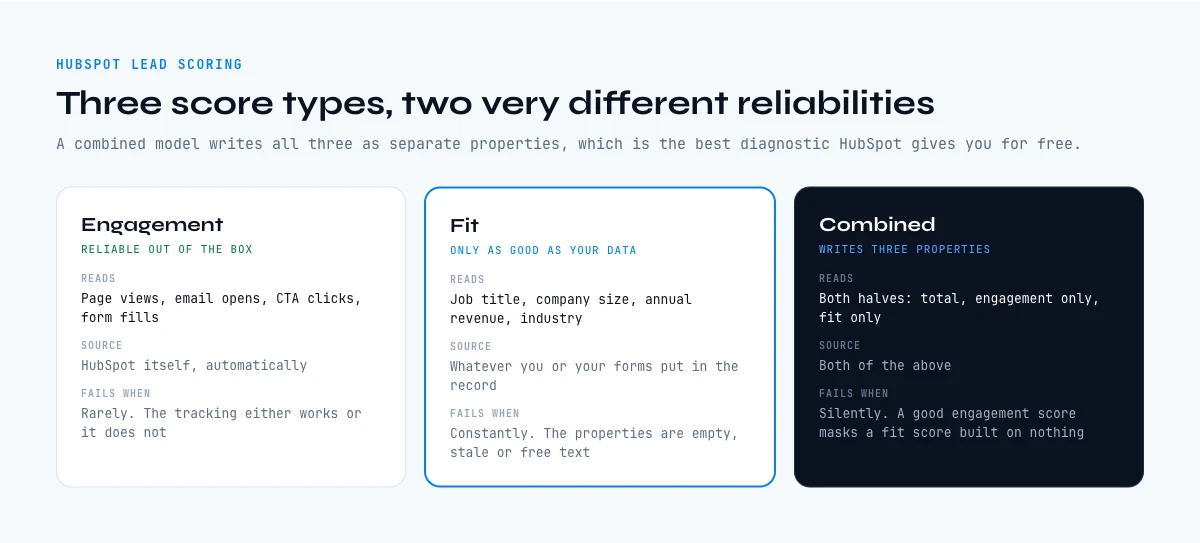
Engagement, fit and combined: the three score types
The distinction is the most useful thing in the whole tool, and it is worth being precise about.
| Score type | Reads | Where the data comes from | Fails when |
|---|---|---|---|
| Engagement | Actions and interactions: page views, email opens, CTA clicks, form fills, subscriptions | HubSpot itself, automatically | Rarely. The tracking either works or it does not |
| Fit | Property values: job title, company size, annual revenue, industry | Whatever you or your forms put in the record | Constantly. The properties are empty, stale or free text |
| Combined | Both, and it writes three properties: total, engagement only, fit only | Both of the above | Silently. A good engagement score can mask a fit score built on nothing |
Note that last row carefully. A combined score exposes its two halves as separate properties, which is the single best diagnostic HubSpot gives you for free. If your total scores look reasonable while the fit-only property clusters near zero, your model is running on behaviour alone and the fit criteria are decorative.
Why HubSpot lead scoring fails on the fit half
Fit scoring asks the CRM a question: how big is this company, what does this person do, what industry is this. It awards points on the answer. When the field is empty, no points are awarded, and here is the trap: the tool cannot distinguish "this company is too small to score" from "nobody ever recorded how big this company is".
Both produce the same output, which is a low fit score. So a well qualified enterprise account that came in through a short form ranks below a hobbyist who happened to fill in a long one. The model is not wrong; it answered the question it was asked, using the data it was given.
The second failure is subtler. Free text properties do not score reliably. "VP of Revenue Operations", "VP RevOps" and "vp, revenue ops" are three different strings, and a criterion matching one of them misses the others. Scoring rewards normalised values, and most CRM fields are not normalised because they were typed by humans and by forms.
The third is decay. Company size and job title were true when the record was created. Neither stays true, and a fit score recomputed today on a value captured eighteen months ago is a confident statement about a company that no longer exists in that shape. Our report on CRM data quality puts numbers on how fast that happens.
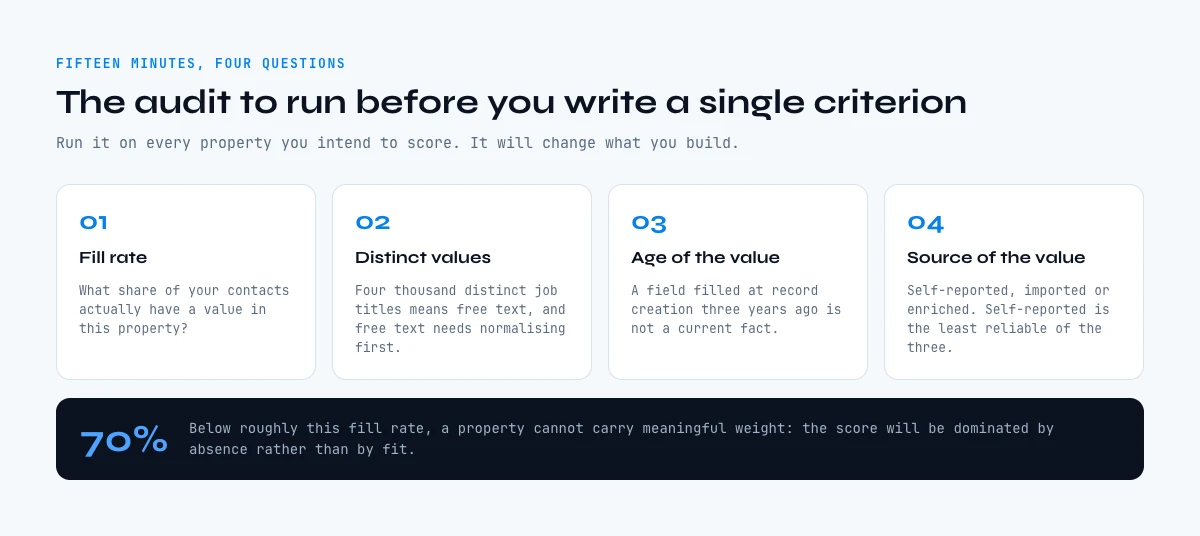
The audit to run before you build a single criterion
Fifteen minutes, four questions, and it will change what you build.
- Fill rate per property. For every property you intend to score, what percentage of your contacts actually have a value? Anything under about 70% cannot carry meaningful weight, because the score will be dominated by absence rather than by fit.
- Distinct values per property. If job title has four thousand distinct values across ten thousand contacts, it is free text and it needs normalising before it can be scored.
- Age of the value. When was the property last set? A field populated at record creation three years ago is not a current fact.
- Source of the value. Self-reported form input, imported list, or enrichment? Self-reported company size is the least reliable of the three and it is usually the most heavily weighted.
Run this and the shape of your model changes. Most teams discover they have two or three properties worth scoring, not the twelve they were about to configure, and that the missing ones are not missing because the data does not exist but because nobody ever fetched it.
Which properties actually predict a deal
Score what changes the answer, not what is easy to collect. Four families do most of the work, and their order matters.
Company fit carries the most weight, because a company that cannot buy will not buy regardless of how interested one employee is. Headcount, industry and revenue band are the workhorses here, and all three are external facts rather than things a form should be asking for.
Persona fit comes next: does this person's function and seniority match who signs or who uses. This is the one that needs normalisation most urgently, and the one most often left as free text.
Timing is the underused family. A company hiring for the function you serve, or one that just changed leadership, is materially more likely to buy this quarter than an identical company where nothing is moving. Very few HubSpot models include a timing property at all, mostly because nothing in the CRM populates one.
Reachability is the one nobody scores and everybody should. A perfect-fit contact with no verified email is not a lead you can work. Our companion page on the 100 point lead scoring model built on enrichment breaks the weights down family by family.
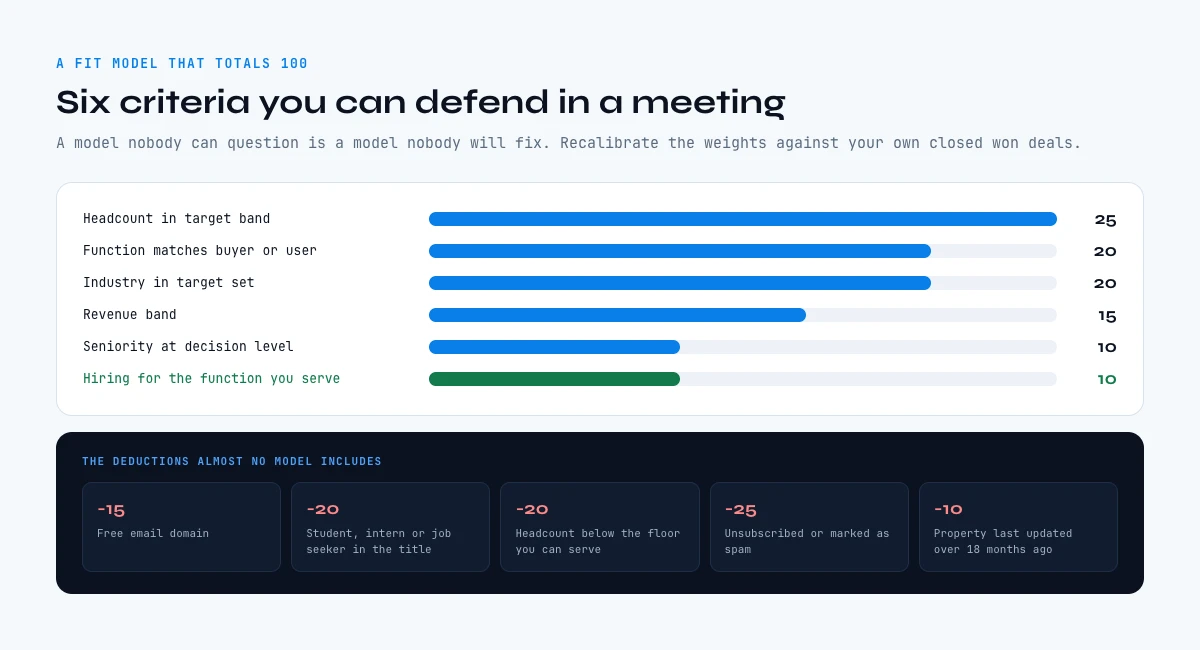
An example HubSpot lead scoring model, with the points
Here is a fit model that fits on one screen and that you can defend in a meeting. It totals 100 and it deliberately uses six criteria rather than thirty, because a model nobody can question is a model nobody will fix.
| Criterion | Property it reads | Points | Why it earns them |
|---|---|---|---|
| Headcount in target band | Number of employees | 25 | The strongest single predictor of whether a budget exists at all |
| Industry in target set | Industry | 20 | Stable, rarely changes, and cheap to enrich reliably |
| Revenue band | Annual revenue | 15 | Confirms the headcount signal, and catches the dense small company |
| Function matches buyer or user | Job function, normalised | 20 | Separates the person who signs from the person who is curious |
| Seniority at decision level | Seniority, normalised | 10 | Worth less alone than function, worth a lot combined with it |
| Hiring for the function you serve | Custom timing property | 10 | The only criterion here with a clock in it |
Then the deductions, which almost no model includes and which do more to clean a queue than any positive criterion. Negative points are what stop a well-behaved but irrelevant contact from climbing on engagement alone.
| Deduction | Points | What it catches |
|---|---|---|
| Free email domain | -15 | Personal signups and casual research rather than a company evaluating you |
| Student, intern or job seeker in the title | -20 | High engagement, zero buying authority, and usually your best performing content |
| Headcount below the floor you can serve | -20 | Companies that would churn even if they signed |
| Unsubscribed or marked as spam | -25 | An explicit no that engagement scoring will otherwise ignore |
| Property last updated over 18 months ago | -10 | A score computed on a company that has since changed shape |
Thresholds matter as much as the points. Three bands are usually enough: above 70, route to a rep the same day; 40 to 70, keep in nurture and re-score monthly; below 40, do not route at all. Set those numbers by looking at the distribution preview rather than by choosing round figures, because the only correct threshold is the one that produces a queue your team can actually work.
One caution on copying any model, including this one. The weights above are a starting point calibrated on a typical B2B SaaS shape, not a finding. Recalibrate them against your own closed won deals as soon as you have thirty of them, and our companion page on the 100 point model built on enrichment covers how to do that calibration properly.
Setting up HubSpot lead scoring without overfitting
Build two scores. An engagement score and a fit score, kept separate, and let the combined model expose all three properties. You will use the two halves independently far more often than you use the total.
Keep the criteria count low. A model with six criteria that everyone understands beats a model with thirty that nobody can question, and the thirty-criterion version is almost always overfitted to the last four deals someone remembers.
Use the distribution preview before you activate anything. The question is whether it separates your contacts into groups of usable size, and elegance has nothing to do with it. A threshold that qualifies four contacts a month has stopped being a threshold, and one that qualifies four hundred has stopped being a filter.
Then set the handover rule explicitly. A score with no agreed action attached is a number in a column. Decide what happens at the threshold, who acts, and how fast, before you turn it on.
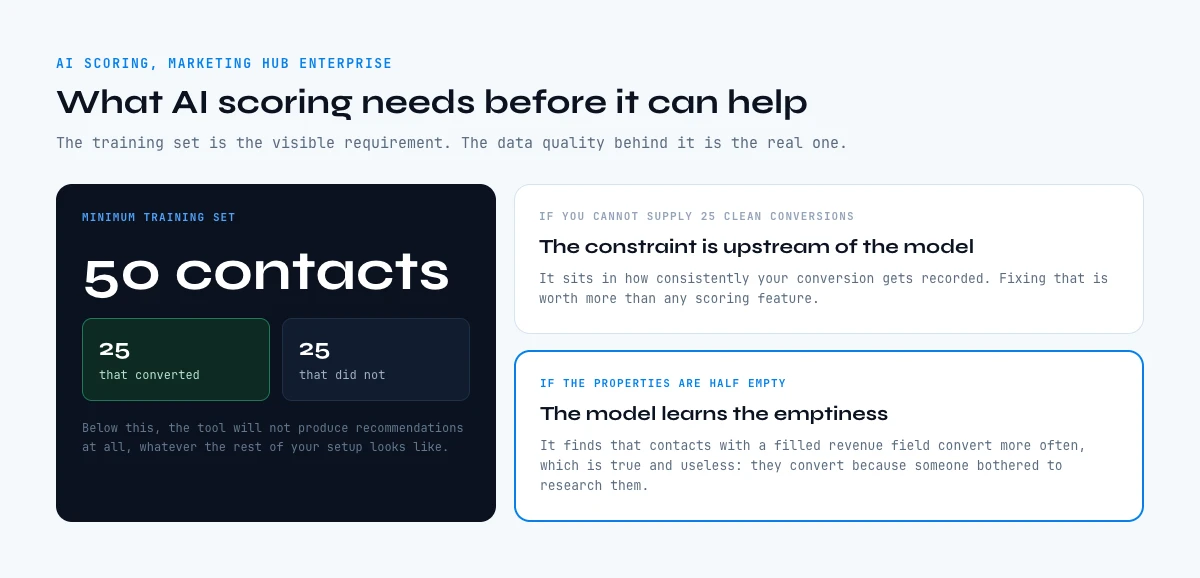
AI scoring: what it needs before it can help
HubSpot offers AI-driven scoring for contact engagement and fit, on Marketing Hub Enterprise. It needs a training set: at least 50 contacts, of which 25 converted and 25 did not, before it can produce recommendations.
Two things follow from that requirement, and both are easy to miss. First, if you cannot supply 25 clean converted examples, the constraint sits in how consistently your conversion gets recorded, well upstream of the model. Fixing that is worth more than any scoring feature.
Second, an AI model trained on properties that are half empty learns the emptiness. It will find that contacts with a filled revenue field convert more often, which is true and useless: they convert more often because someone bothered to research them, not because of the revenue figure. Garbage in produces a confident model, not an obviously broken one, which is precisely what makes it dangerous.
The order that works is unglamorous. Fill the properties, normalise them, then let a model look for patterns in data that actually describes the world.
What HubSpot lead scoring costs you when the data is thin
The cost lands on the misrouting rather than on the subscription. The calculator below turns your database size and property fill rate into the number of records your score will misjudge, which is the number worth arguing about in a planning meeting.
Scoring blind spot: how many records your fit score cannot judge
Enter how many contacts you score and how complete the properties behind the fit criteria are. The output is how much of your database the model is guessing on.
Enter a contact count and a fill rate to see the blind spot.
An empty property scores zero, exactly like a poor fit. The records below are not scored low, they are unscorable, and the model cannot tell you which is which.
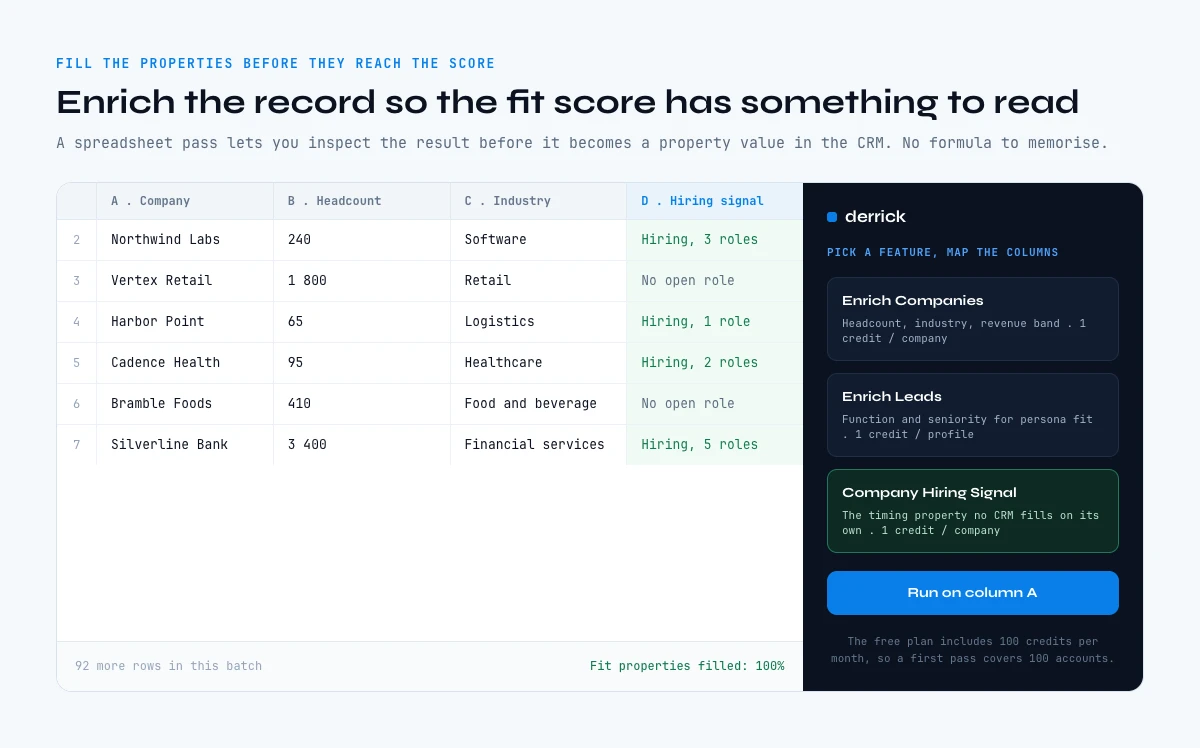
Filling the properties before they reach the score
The fix is upstream of HubSpot. Enrich the record so the score has something to read, and do it at a point where you can inspect the result before it becomes a property value.
For company fit, Enrich Companies returns the full company detail at 1 credit per company, on the free plan, billed per row whether or not the row returns anything. For persona fit, Enrich Leads does the same for a profile at 1 credit per profile. In France specifically, SIRET and SIREN enrichment returns identity, activity, directors and legal data at 1 credit per company, which is the cleanest source of a normalised industry code you will find.
For the timing family that most models lack entirely, Company Hiring Signal tells you which companies are hiring and for which roles at 1 credit per company. That is a property no CRM populates on its own, and it is the one that turns a static fit score into something with a clock in it.
Two boundaries worth stating. Reachability, meaning a verified email or a mobile number, comes from Email Finder and Phone Finder, which are paid features rather than part of the free allowance. And normalisation is a separate job from enrichment: getting a job title back is not the same as mapping it onto the six personas your score understands.
Keeping it fresh, and where the work should live
A scoring model is a standing claim about your database, so it needs a refresh cadence rather than a launch date. Company size and job title move constantly; industry and legal identity barely move at all. Refreshing everything monthly wastes credits, refreshing nothing lets the model rot, and the sensible middle is to set a cadence per property family that matches how fast each one decays, which is layer four of the five layer CRM data strategy.
Where the enrichment runs is a workflow question rather than a religious one. Inside HubSpot, workflows can enrich on record creation, on form submission and on a schedule, which our guide to automating HubSpot enrichment with workflows covers pattern by pattern. Outside it, a spreadsheet pass gives you something a workflow cannot: you see the result before it lands on the record, which matters when a bad value silently changes a score.
If the job belongs in a pipeline, the same lookups run through the REST API and the Derrick MCP from any compatible assistant, both on a paid plan. And if you are still choosing between the two, our comparison of enriching HubSpot versus Pipedrive covers what changes from one to the other. The rest of the cocon sits on the CRM data enrichment hub, and for the vocabulary itself see our definitions of lead scoring and predictive lead scoring.
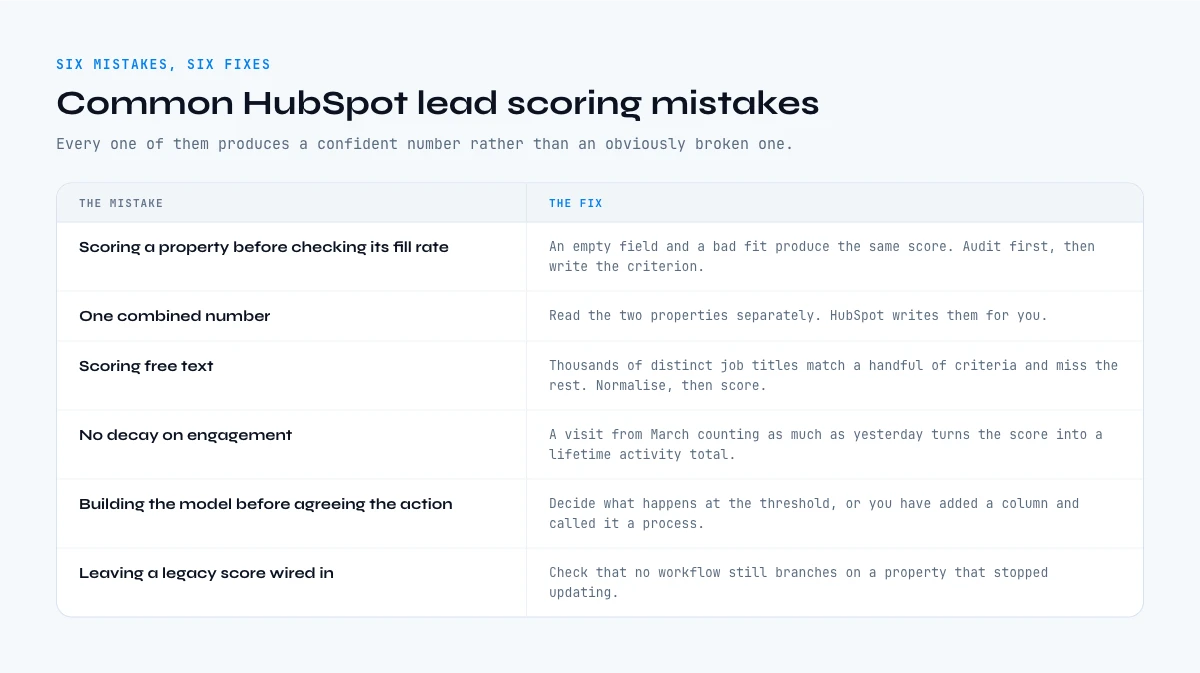
Common HubSpot lead scoring mistakes
- Scoring a property before checking its fill rate. The single most common one. An empty field and a bad fit produce the same score, and the model cannot tell you which it just saw.
- One combined number. Merging interest and fit into a single score hides the half that is broken. Read the two properties separately; HubSpot writes them for you.
- Scoring free text. Job title with thousands of distinct values will match a handful of your criteria and miss the rest. Normalise first, then score.
- No decay. A visit from March counting as much as a visit from yesterday turns the score into a lifetime activity total rather than a statement about now.
- Building the model before agreeing the action. If nobody has decided what happens at the threshold, you have added a column to a database and called it a process.
- Leaving a legacy score wired in. The old HubSpot Score stopped updating in August 2025. Anything still branching on it is branching on a frozen value.
Where this leaves you
The tool is the easy half. HubSpot gives you engagement scores, fit scores and a combined model that exposes both halves, which is more diagnostic power than most teams use.
The hard part is that a fit score is a reading of your properties, and properties are only as good as what was fetched and how recently. Audit fill rate before you write a criterion, score two or three properties you trust rather than twelve you hope for, add a timing signal that nothing in the CRM will give you, and set a refresh cadence per family.
Start with the audit, then fill the largest gap. The free plan includes 100 credits per month, and company enrichment alone costs 1 credit per row, so a first pass covers 100 accounts. Add the hiring signal and you are at 2 credits per account, so the same allowance covers fifty: enough either way to measure how much your fit score changes once the fields behind it are actually populated.
Frequently asked questions
What is HubSpot lead scoring?
Why are my HubSpot fit scores wrong?
What should you check before building a scoring model?
What point values should a HubSpot fit score use?
What does HubSpot's AI lead scoring need to work?
What happened to the old HubSpot Score property?
Which properties actually predict a deal?
Should you deduct points as well as award them?
Keep reading
Continue exploring this cluster


CRM Enrichment: How to Enrich Your HubSpot or Salesforce Data (Complete Guide)
Read →

HubSpot Data Enrichment: How to Automate It With Workflows
Read →

CRM Data Quality Report 2026: Decay, Cost & the Enrichment Gap
Read →

CRM Data Strategy: The 5-Layer Playbook (2026)
Read →