CRM Contact Management
Run a CRM contact management audit in one hour: which fields decide routing, how fast records decay, and how to dedupe and refresh them at scale.


Every revenue team says it has a CRM problem. Open the records and the problem is almost always narrower than that: the tool works fine, the fields inside it do not. Half the job titles describe a role the person left eighteen months ago, a third of the mobile numbers ring a desk nobody sits at, and the segment you built last quarter quietly stopped meaning anything.
That gap has a name. CRM contact management is the practice of deciding what a contact record must contain, where each field comes from, how often it gets refreshed and who is accountable when it breaks. It is not the same thing as buying a CRM, and it is the part almost nobody writes down. This guide covers the definition, the audit you can run in an hour, the arithmetic of what a stale base costs, and the refresh cadence that stops the rot.
What is CRM contact management?
Contact management is the practice of storing, organising and keeping current the details of the people a business works with: who they are, how to reach them and where they work. In a CRM, it is the data layer that every pipeline stage, segment and report reads.
CRM contact management is the set of decisions and routines that keep the people in your database identifiable, reachable and segmentable. Three requirements, and they are not the same job. Identifiable means the record points at one real human, not two half records and a typo. Reachable means the email still delivers and the phone still rings the right person. Segmentable means the fields you filter on hold normalised values rather than free text a rep typed at 6pm.
Most definitions stop at storage: a place to keep names, emails, companies and notes. Storage is the easy half. The hard half is that none of those values are stable. A contact record is a photograph of a person at the moment someone created it, and people move. The practice is what keeps the photograph current.
Put plainly, CRM contact management answers four questions for every field you hold:
- What does this field mean? One sentence, written down, so two people filling it produce the same value.
- Where does it come from? A named source of truth: the rep, the form, a registry, an enrichment pass.
- How stale can it get? A maximum age before the value is treated as suspect.
- Who owns it? A person, not a team, who gets told when the fill rate drops.
Key features of contact management software
Whether you call it a contact management system or the contacts module of a CRM, the tool has to do the same eight jobs. Each one maps to a failure you will otherwise fix by hand.
- One record per person. A single profile that holds identity, company, reachability and notes, so nobody keeps a private spreadsheet on the side.
- Interaction history. Emails, calls, meetings and notes attached to the record in date order, so the next person picks up the thread.
- Import with matching. CSV and form intake that checks for an existing record before creating a new one, on a key you choose.
- Deduplication and merge rules. Detection on a stable key and a merge that keeps the history, covered in part 06.
- Validated fields. Closed lists for routing fields and required fields at creation, so segments stay usable.
- Segmentation and search. Filters and saved views on any contracted field: country, seniority, headcount band, last verified date.
- Email and calendar sync. Activity logged automatically, because a history that depends on reps copying it in is a history with holes.
- Export and API access. A clean export and an API, so the data can leave for an enrichment pass and come back without a migration.
Most contact management software covers the first six well. The last two decide whether you can keep the base fresh, which is what the rest of this guide is about.
Benefits of contact management
The benefits are concrete when the records are right, and they vanish when they are not:
- Fewer wasted touches. Verified emails and current titles mean outreach reaches the person it was written for.
- Segments you can trust. Normalised industry, country and headcount fields turn a filter into a target list rather than a guess.
- Shared context. Sales, marketing and support read the same record, so a customer never has to explain themselves twice.
- Routing and scoring that hold up. Rules and models only read fields. Filled, dated fields make their output believable.
- Cheaper tool changes. A clean base migrates cleanly. A messy one carries its mess into the next CRM.
CRM contact management versus a CRM: the distinction that still matters
A CRM is a system of record for relationships: pipeline stages, activities, deals, forecasts. Contact management is the older, narrower discipline underneath it, and it survives as a separate idea because you can run a beautiful pipeline on records that are wrong. The forecast will still compute. It will just be confidently incorrect.
The practical difference shows up when something breaks. If a deal stalls, that is a CRM question: stage definitions, next steps, ownership. If a sequence bounces at nine percent and the marketing team cannot explain which accounts are mid market, that is a contact management question: the email field and the headcount field failed, and no dashboard will tell you that.
| Question | CRM layer | Contact management layer |
|---|---|---|
| Where is this deal? | Pipeline stage, activity log | Not its job |
| Who do we call first? | Scoring model output | The fields the model reads |
| Why did the send bounce? | Not its job | Email freshness and verification |
| Why are there two Acme records? | Not its job | Dedup key and merge rules |
| Can we segment by headcount? | Filter builder | Whether the field is filled and normalised |
Teams that skip this distinction buy a second CRM every three years and get the same result, because the records are migrated intact. The tool changes. The data does not improve, which is why a CRM comparison should be read through what each tool lets you store and refresh, not through its feature grid.
The limits of a contact manager without a CRM
A contact manager on its own, the address book or shared spreadsheet many small teams start with, stores people well and relationships badly. It holds names, emails and notes, but it does not track deals, does not tell you which account is moving, and rarely connects to the inbox, the calendar or the website forms that create new contacts. The usual symptom is a team that knows who a contact is and has no idea what happened with them last month. That is the point where contact management needs a CRM around it, and where the CRM still needs contact management inside it.
How to choose a contact management tool
Feature grids look alike. Five criteria separate the tools that keep a base usable from the ones that only store it:
- Data ownership and export. You can export every record and every field in one CSV, at any time, without a support ticket. If the data cannot leave, it cannot be cleaned anywhere else.
- Control over the identity key. You decide what makes two records the same person, and imports match on it. A tool that only matches on email will keep growing duplicates.
- Field validation. Closed lists, required fields and formats enforced at creation, not cleaned up afterwards.
- Automatic activity capture. Email and calendar sync that logs interactions without a rep doing it, plus integrations with the forms and tools that create contacts.
- An enrichment and refresh path. An API or a bulk update route, so missing and stale fields can be filled from outside and written back on a schedule.
Test the shortlist on your own export of 200 contacts, not on a demo base. The one-hour audit in part 05 gives you the numbers to compare.
The record rots on its own, and no alert fires
This is the single fact that reframes everything else. A contact record is not neutral when you ignore it. It degrades, silently, at a rate that is measurable and roughly predictable.
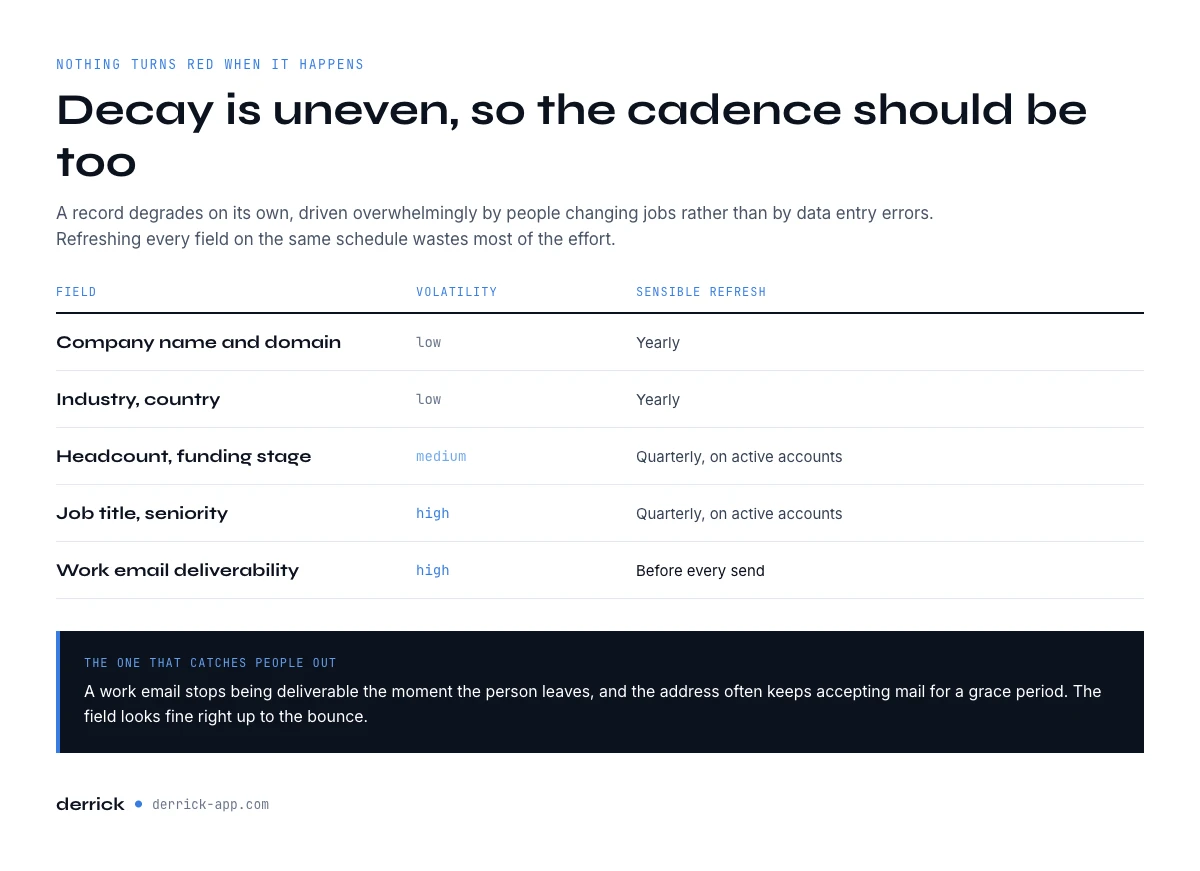
Industry measurements of B2B contact decay cluster between 22 and 30 percent a year, driven overwhelmingly by people changing jobs rather than by data entry errors. On a base of 20,000 contacts, the low end of that range is around 4,400 records a year drifting out of accuracy. Roughly 85 a week. Nothing in your CRM turns red when it happens.
Decay is uneven, and that changes the cadence
Decay is also uneven, which matters more than the headline number. Company domain is close to stable: a business keeps it for years. Job title and seniority are volatile, because promotions and reorganisations touch them constantly. Direct dial numbers sit in between, and deliverability of a work email fails the moment the person leaves, often while the address itself still accepts mail for a grace period.
| Field | Volatility | Sensible refresh |
|---|---|---|
| Company name and domain | Low | Yearly |
| Industry, country | Low | Yearly |
| Headcount, funding stage | Medium | Quarterly on active accounts |
| Job title, seniority | High | Quarterly on active accounts |
| Work email deliverability | High | Before every send |
| Direct phone | High | On demand, before calling |
Anatomy of a contact record you can route on
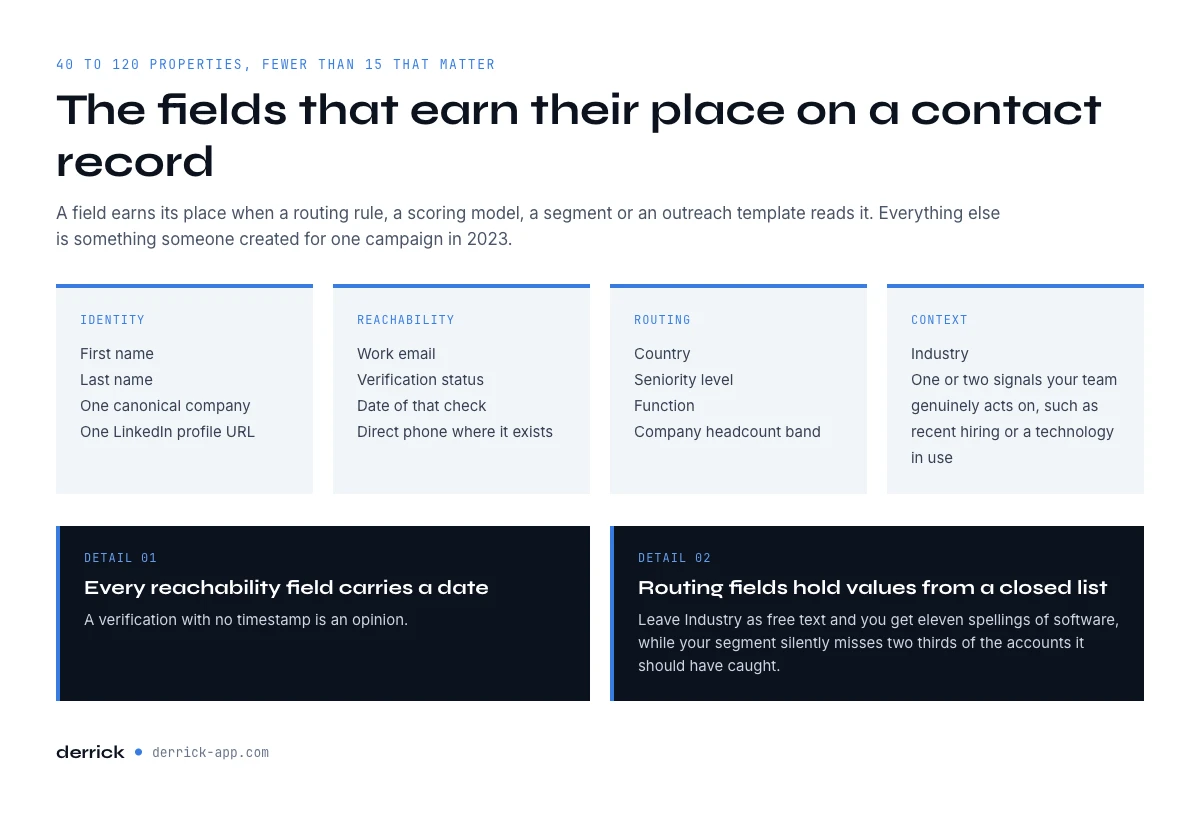
Most CRMs end up holding between 40 and 120 properties per contact. Ask the revenue team which ones actually change a decision and the honest answer is usually fewer than 15. Everything else is a field someone created for one campaign in 2023.
The fields that earn their place are the ones a routing rule, a scoring model, a segment or an outreach template reads. A workable minimum looks like this:
- Identity: first name, last name, one canonical company, one LinkedIn profile URL.
- Reachability: work email plus a verification status and the date of that check, direct phone where it exists.
- Routing: country, seniority level, function, company headcount band.
- Context: industry, and one or two signals your team genuinely acts on, such as recent hiring or a technology in use.
The two details that turn a list into a contract
Two details make the difference between a list of fields and a contract. First, every reachability field carries a date, because a verification with no timestamp is an opinion. Second, routing fields hold normalised values from a closed list. If Industry is free text you will find eleven spellings of software and your segment will silently miss two thirds of the accounts it should have caught.
Run a CRM contact management audit in one hour
Before buying anything, measure what you hold. The audit is the second layer of a wider CRM data strategy, and four of its six steps cost nothing but an hour. It also sits in the CRM enrichment hub, next to the rest of the workflow. The audit below fits in a spreadsheet and gives you a number you can defend in a meeting.
- Export a sample, not the base. 200 contacts from your active segment. A full export invites a full cleanup, and a full cleanup is how these projects die.
- Fix the columns. Keep only the 15 contracted fields. Delete the rest from the sheet so they stop distracting you.
- Compute fill rate per field. Count of non empty cells divided by 200. Write the percentage above each column. This is the only number most teams have never seen.
- Compute normalisation rate on routing fields. Count distinct values in Industry and Seniority. If 200 contacts produce 60 distinct industries, the field is decorative.
- Test reachability on a slice. Take the 50 most recently touched contacts and check whether the work emails still verify. That percentage is your realistic deliverability ceiling, before any copy work.
- Count duplicates. Sort by company domain plus last name. Anything that appears twice is a candidate.
An hour of this produces four numbers: fill rate, normalisation rate, verified rate, duplicate rate. Track them monthly and CRM contact management stops being a feeling and becomes a metric. Derrick covers the mechanical parts of that audit directly in the sheet: Find Duplicates is unlimited and costs nothing, Enrich Leads re-derives profile fields at 1 credit per profile, and Email Verification checks an address at 1 credit per email on the paid plans.
Duplicates: where they come from and which key to merge on
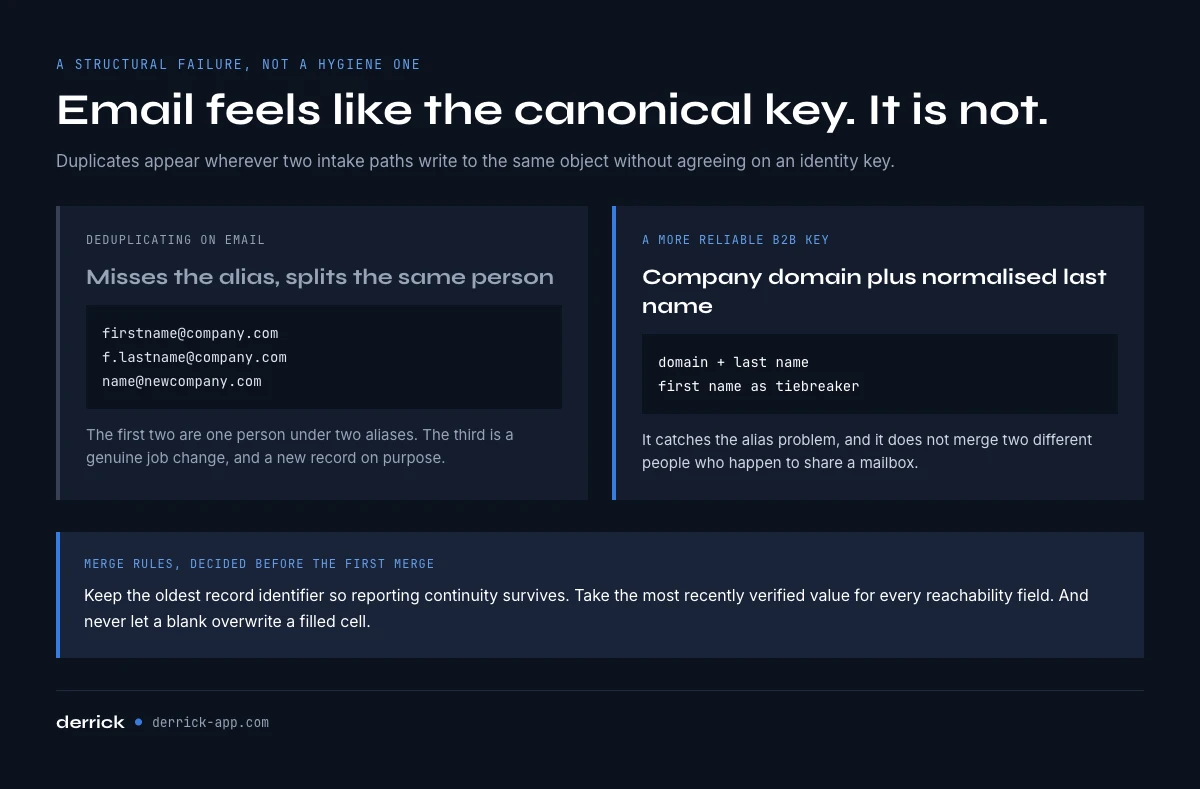
Duplicates are not a hygiene failure, they are a structural one. They appear wherever two intake paths write to the same object without agreeing on an identity key: a rep adding a contact by hand, a form submission from a personal address, a list import from an event, a sync from a support tool.
The common mistake is deduplicating on email. It feels canonical and it is not. The same person exists as firstname@company.com and f.lastname@company.com, and a genuine job change gives them a third address at a new domain, which is a new record on purpose. A more reliable key for B2B is company domain plus normalised last name, with first name used as a tiebreaker. It catches the alias problem and it does not merge two different people who happen to share a mailbox.
Merge rules, decided before the first merge
Merge rules matter as much as detection. Decide up front which record survives, which fields win when they conflict, and what happens to the activity history. The usual answer: keep the oldest record identifier so reporting continuity survives, take the most recently verified value for every reachability field, and never let a blank overwrite a filled cell.
A LinkedIn profile is not a contact record
A very large share of B2B contacts now enter the CRM from LinkedIn, and the import is where records are born incomplete. A profile gives you a name, a current company, a headline and a URL. It does not give you a work email, a direct number, a normalised industry code or a headcount you can filter on. The rep pastes what they have, the routing fields stay empty, and the record is broken from day one.
The fix is to treat import and completion as one step rather than two. When a batch of profiles arrives, the missing routing and reachability fields get derived before the records reach the CRM, not after someone notices the segment is empty. In practice that means the profiles land in a sheet, the columns get filled, and only the completed rows are pushed.
Derrick does that part in its web app or from the sidebar in Google Sheets: Enrich Leads turns a profile URL into the profile fields at 1 credit per profile, and Enrich Companies does the same for the account side at 1 credit per company. Email Finder, at 5 credits per email, and Email Verification, at 1 credit per email, sit on the paid plans. Both are billed per result, which is the right shape for this job: Email Finder charges only when it returns an address. Resolving a profile URL from a first and last name is billed too, at 1 credit per profile. Both enrichments read LinkedIn, so they run once your LinkedIn account is connected through the Derrick Chrome extension.
What a stale base costs, in numbers you can defend
The argument for contact management is usually made with adjectives. Make it with arithmetic instead, because the arithmetic is not subtle.
Take a modest base: 5,000 accounts, 12,000 contacts, a team of 6 reps. Apply a conservative 22 percent annual decay to the contact side and roughly 2,600 records go stale in a year. Suppose half of them were in an active segment. That is 1,300 outreach attempts landing on the wrong person, a bounce rate that pushes your domain reputation in the wrong direction, and a forecast built on account fields that no longer describe the account.
The cost of preventing it is countable in a way the damage is not. One condition decides the figure: whether each record already carries the LinkedIn URL that enrichment reads. A CRM export rarely does, so from names and domains you resolve the URL first, and that is a second billed step. Count steps, not features.
| Operation | Volume | Credits, URL already held | Credits, from names and domains |
|---|---|---|---|
| Complete the account side | 5,000 accounts | 5,000 | 10,000 |
| Complete the contact side | 12,000 contacts | 12,000 | 24,000 |
| Quarterly refresh, active tier | 3,000 records | 3,000 | 6,000 |
| Deduplication | Any volume | 0, unlimited | 0, unlimited |
The plans read the same way: 100 credits a month at zero euro on the free plan, then 20 euro on Standard, 47.5 euro on Plus, 175 euro on Pro and 320 euro on Scale, where the unit cost floors at 0.0016 euro per credit. The comparison teams should run is not licence against licence, it is cost per fresh record against the cost of a quarter spent selling to people who left.
Refresh cadence: from Sheets, from an AI chat, from the API
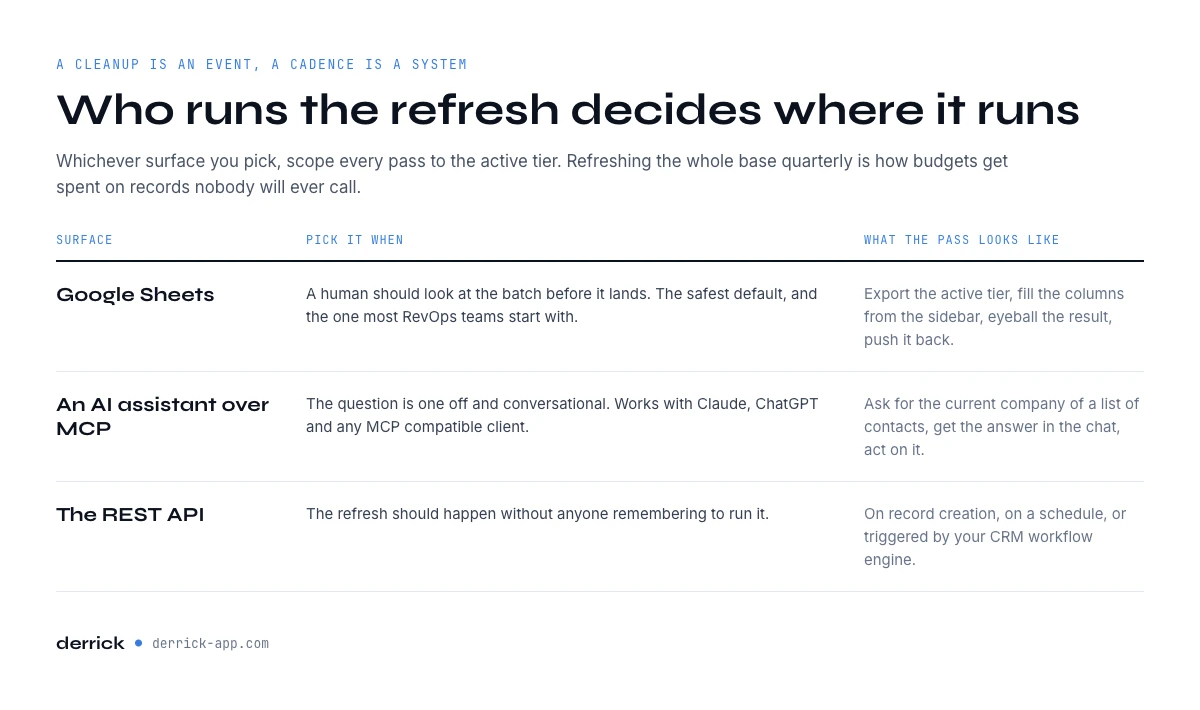
A cleanup is an event. A cadence is a system, and in HubSpot it can be wired into native workflows so it runs on record creation rather than on someone's memory. The difference decides whether your numbers hold twelve months from now, and the right surface depends on who runs it.
- The web app or Google Sheets when a human should look at the batch before it lands. Export the active tier, fill the columns from the Sheets sidebar, eyeball the result, push it back. The web app runs the same enrichments with nothing to install. This is the safest default and the one most RevOps teams start with.
- An AI assistant over MCP when the question is one off and conversational: ask for the current company of a list of contacts, get the answer in the chat, act on it. Derrick MCP works with Claude, ChatGPT and any MCP compatible client. Check the plan page for the tier it starts on.
- The REST API when the refresh should happen without anyone remembering to run it: on record creation, on a schedule, or triggered by your CRM workflow engine.
Whichever surface you pick, scope every pass to the active tier. Refreshing the whole base quarterly is how budgets get spent on records nobody will ever call.
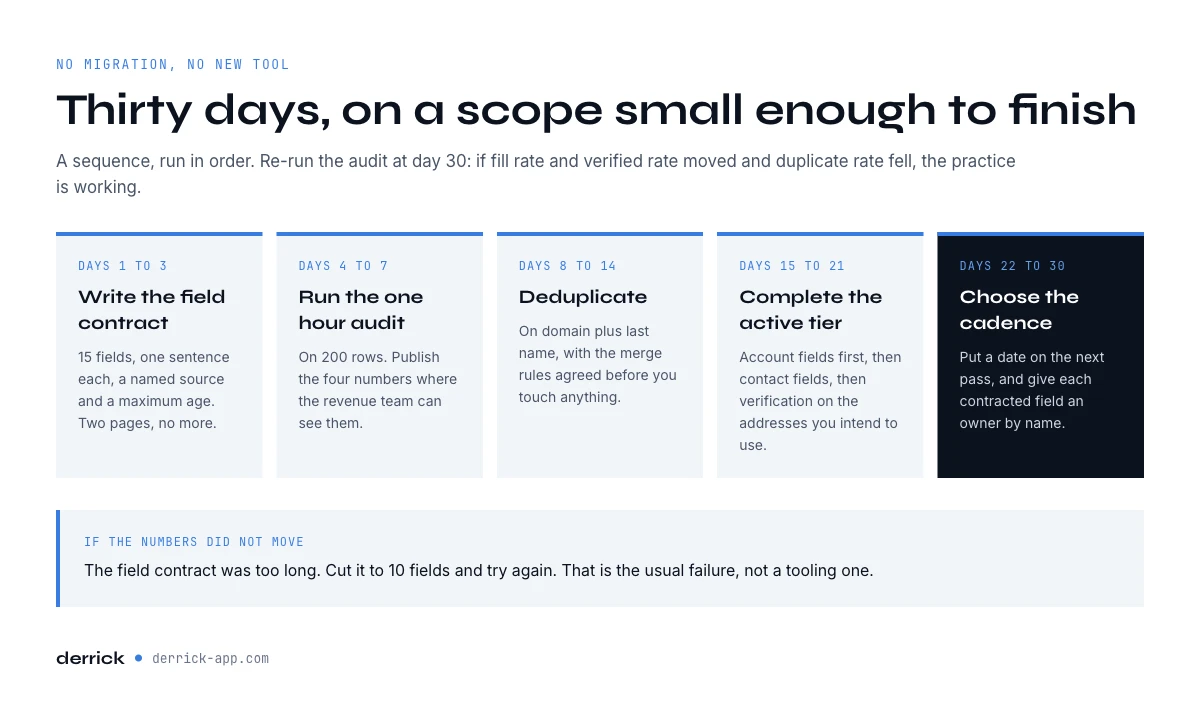
A 30-day plan to fix CRM contact management
Nothing above requires a migration or a new tool. It requires a sequence, run in order, on a scope small enough to finish.
- Days 1 to 3. Write the field contract. 15 fields, one sentence each, a named source and a maximum age. Two pages, no more.
- Days 4 to 7. Run the one hour audit on 200 rows. Publish the four numbers where the revenue team can see them.
- Days 8 to 14. Deduplicate on domain plus last name and agree the merge rules before touching anything. Free and unlimited, so there is no reason to defer it.
- Days 15 to 21. Complete the active tier: account fields first, then contact fields, then verification on the addresses you intend to use.
- Days 22 to 30. Choose the cadence and the surface, put a date on the next pass, and give each contracted field an owner by name.
Re-run the audit at day 30. If fill rate and verified rate moved and duplicate rate fell, the practice is working and the only remaining question is how often to repeat it. If they did not move, the field contract was too long. Cut it to 10 fields and try again.
Frequently asked questions
What is CRM contact management?
How is contact management different from a CRM?
What is contact management software?
What are the limitations of contact management software?
How fast does CRM contact data decay, and how often should you refresh it?
How many fields should a contact record have?
Which key should I use to deduplicate contacts?
How much does it cost to keep a CRM base complete, and where should enrichment run?
Keep reading
Continue exploring this cluster


CRM Enrichment: How to Enrich Your HubSpot or Salesforce Data (Complete Guide)
Read →

HubSpot Data Enrichment: How to Automate It With Workflows
Read →

CRM Data Quality Report 2026: Decay, Cost & the Enrichment Gap
Read →

CRM Data Strategy: The 5-Layer Playbook (2026)
Read →