HubSpot Prospecting Agent: Setup, Cost, and the Data It Needs
Set up the HubSpot prospecting agent: editions, plays, intent signals, the $1 cost per lead, and the record properties to complete before you enroll.


What the HubSpot prospecting agent does
The HubSpot prospecting agent is an AI agent built into HubSpot that finds companies showing signals you chose, picks the contacts who match your target personas, researches each account, and drafts a personalized email that you review or let it send. It is part of Breeze, HubSpot's set of AI agents, and it works on the records in your CRM plus what it researches on the web.
The loop runs in six steps:
- Signal. The agent watches for the intent signals you selected: company news such as a funding round or a product launch, research on topics you define, and your own first-party engagement (form submissions, page views, calls, meetings, notes, email opens) over the past year.
- Play. A play tells the agent who to target, what you sell and how to write. Older guides call this setup a "selling profile"; HubSpot's documentation now describes plays.
- Recommendation. The agent proposes companies and contacts that fit the play, each with a reason to reach out.
- Draft. For each lead, it researches the account and writes the email.
- Review. You approve, edit or reject the draft, or let the agent send without review.
- Send. The email goes out through a sequence or an adaptive cadence, inside the sending windows you set.
HubSpot's knowledge base describes every screen of this setup in detail. This guide follows the same order, as of HubSpot's documentation updated on September 30, 2026, and adds three things that documentation does not cover: what the agent reads on a record, what a recommendation costs when the record behind it is empty, and how to complete records before you enroll them. If the term is new to you, our glossary entry on intent data explains the signals the agent relies on, and our CRM data enrichment guide covers the wider question of keeping CRM records filled.
Before you start: editions, permissions, credits
Four things need to be in place before the HubSpot prospecting agent can run a single play.
| Requirement | What HubSpot asks for | Where to check |
|---|---|---|
| Edition | Marketing, Sales, Service, Data or Content Hub on Starter, Professional or Enterprise, or Smart CRM (per the knowledge base as of September 30, 2026) | Your account's subscription page |
| Permissions | Super Admin, or the "Access prospecting agent" permission; "Prospecting agent admin" to create and manage plays; "Prospecting agent assignment" to enroll records | Users and teams settings |
| HubSpot Credits | Credits are consumed when the agent generates the email for each lead, recommended or enrolled by hand, with additional steps depending on the play settings | Your credits balance in the account |
| AI data access | The agent must be allowed to use CRM data, customer conversation data and files in your AI settings; a connected email inbox for sending | AI settings and connected inbox |
Sources have varied on editions. HubSpot's April 2026 pricing announcement spoke of Pro and Enterprise customers; the knowledge base, updated in September, lists Starter as well. Check your own account before you plan around it. Actions that need credits do not complete in sandbox accounts, so a test there will not show you the real consumption.
How the HubSpot prospecting agent decides who to contact: intent signals
The agent does not prospect at random. Each play selects intent signals, and the agent surfaces companies where those signals fire. According to HubSpot's documentation, it can watch three kinds:
- Company news: funding, product launches and similar events.
- Research topics: companies researching subjects you define in the play.
- First-party engagement: form submissions, page views, calls, meetings, notes and email opens, looked at over the past year.
Two families of signals are missing from that list, and they matter for B2B targeting: whether the company is hiring for the team you sell to, and which technologies run on its website. Neither is a native signal of the agent, but both can become company properties in HubSpot. Once they are properties, a segment in your play can filter on them, so the agent only recommends companies that are hiring sales reps, or that run a tool your product connects to. In Derrick, Company Hiring Signal checks open roles at 1 credit per company on the free and paid plans; Website Technologies reads a website's stack at 2 credits per site on paid plans; Google News Scraper pulls recent articles at 1 credit per article on paid plans. The broader list of signals you can see on an account before first contact is in our guide to B2B buying signals.
Which signals can your team already resolve? Select them below: the scorer separates timing (a reason to write now) from qualification (a reason this company fits), because a play strong on one and empty on the other recommends the wrong accounts at the right time, or the right accounts at the wrong time.
Buying signal stack scorer
Select every signal you can currently resolve for a cold account. The verdict is about what the stack can carry, not a number out of ten.
Select the signals you can actually resolve today.
Multi-select: click a signal again to remove it. The verdict reflects two properties of a stack, its timing and its qualification, because a stack can be strong on one and empty on the other.
How to set up the HubSpot prospecting agent, step by step
The setup lives in plays. You can run several plays side by side, for example one per segment or per product. The steps below follow the tabs of a play; HubSpot's knowledge base article on the prospecting agent shows each screen.
Step 1: create a play and define its audience
- Open the prospecting agent and create a play.
- In the Audience tab, choose the target companies through segments, then the intent signals the play should watch, including your own research topics.
- Add up to three target personas per company: the roles the agent should look for inside each account.
- Decide whether the agent should source contacts for you ("Source contacts for me").
- Set the "Daily new contact suggestions limit": the maximum number of new contacts the play suggests per day. This setting is your main cost control, as part 08 shows.
Step 2: write the selling context
The Selling context tab tells the agent what you sell: let it analyze your website URL, or fill in your value proposition, products and the pain points you solve. Be specific. "We help sales teams" produces generic emails; "we fill missing company data in your CRM before your reps call" gives the agent something to match against each account.
Step 3: choose the outreach method
In the Outreach tab, pick "Sequence" (the agent's emails run inside a HubSpot sequence) or "Adaptive" (the agent adapts the cadence and the follow-ups). Smart blocks let you control which parts of the email the agent personalizes.
Step 4: set the guardrails
In the Guardrails tab, set the sender (the contact owner or a single user), the tone (a preset tone or your brand voice), the call to action, the sending windows ("Execute on business days") and the default time zone. Multi-language outreach is available with the Adaptive method only.
Step 5: choose the automation level
In the Automation tab, choose "Review before sending" or "Send automatically". Start with review; part 09 explains when to switch.
Step 6: add your exclusions
Exclude customers, partners, competitors, employees and unsubscribed contacts before the first recommendation. Every exclusion you forget is a recommendation you may pay for.
In the web app or Google Sheets
Complete the records before the agent reads them
The prospecting agent filters on company properties and is billed per recommendation, so an empty industry or headcount wastes a recommendation. Import your HubSpot export into the web app or the Google Sheets sidebar and Derrick fills industry, headcount, headquarters and website for each company from its LinkedIn page, then re-import the file into HubSpot as an update. Your LinkedIn account connects through the Derrick Chrome extension.
- Feature
- LinkedIn Companies Profile Enrichment
- Credit cost
- 1 credit per company enriched
The first button opens the web app (nothing to install): 1 credit per company enriched, 100 free credits every month. The second details the feature and its cost per plan.
What the HubSpot prospecting agent reads on a record, and what happens when a field is empty
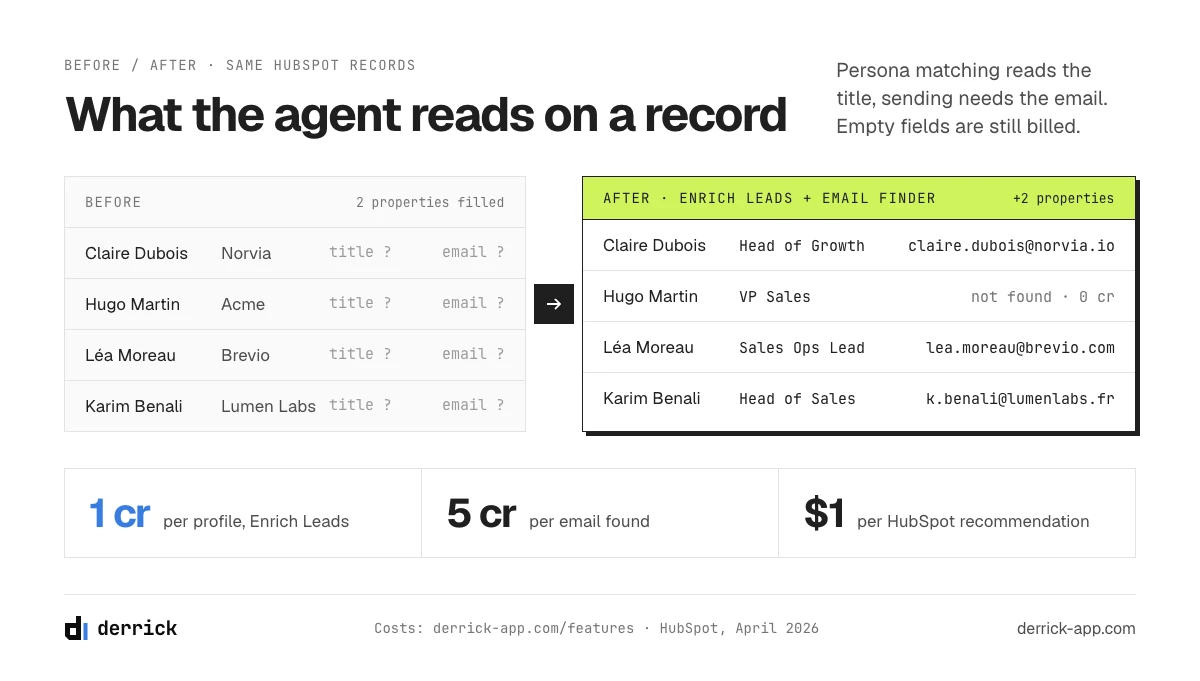
The agent researches the web, but it starts from your records. A segment filters on company properties, a persona matches on job titles, an email needs an address, and the sender can depend on the contact owner. When a property is empty, the agent does not stop: it filters the record out, matches it badly, or writes a vaguer email. The table lists the properties worth checking before you enroll anything.
| Property | What the agent does with it | If it is empty | Where it comes from |
|---|---|---|---|
| Company domain | Starting point for researching the account | Weak research, generic email, harder deduplication | Enrich Companies (from the LinkedIn company page) |
| Industry | Segment filters in the play's audience | The company falls outside any segment that filters on it | Enrich Companies |
| Headcount | Segment filters by company size | Same: filtered out, or included by mistake if the filter is loose | Enrich Companies |
| Country or headquarters | Segment filters, sending time zone | Wrong segment or wrong sending hour | Enrich Companies |
| Company LinkedIn URL | Account matching and research | More guesswork on which company this is | Search Companies (from the company name) |
| Job title and seniority | Persona matching | Contact skipped, or the wrong person recommended | Enrich Leads (from the LinkedIn profile URL) |
| Professional email | The address the agent sends to | No send, or a bounce | Email Finder (5 credits per email found, already verified) |
| Contact owner | Sender when the guardrail is "contact owner" | No sender, or a default sender the contact never met | Your own assignment rules |
| Lifecycle stage, customer or partner flag | Exclusions | A customer or partner receives a cold email | Your CRM |
The fit half of this table is the same data a lead score needs, and the choice of which properties actually predict a deal is covered in our guide to HubSpot lead scoring. Read as a checklist, the table says: before a record enters a play, it should have a domain, an industry, a headcount and a country on the company, a title and a valid email on the contact, an owner, and a status that keeps customers and partners out.
A pre-enrollment checklist for the HubSpot prospecting agent
Run it on a sample of 50 records from the list you plan to enroll, before the first play goes live. Count, for each line, how many of the 50 pass.
- The company has a domain, and only one record in HubSpot carries that domain.
- Industry, headcount and country are filled with the values your segments use.
- Each contact has a current job title that matches one of the play's personas, or clearly does not.
- Each contact has a professional email that was found or verified, not typed from a business card two years ago.
- Each contact has an owner, if the play sends from the contact owner.
- Customers, partners, competitors and unsubscribed contacts are flagged so the exclusions can catch them.
If fewer than 45 of the 50 pass a line, fix that line on the whole list before you enroll. The sample takes twenty minutes; the recommendations it saves are billed one by one.
Complete the records before you enroll them
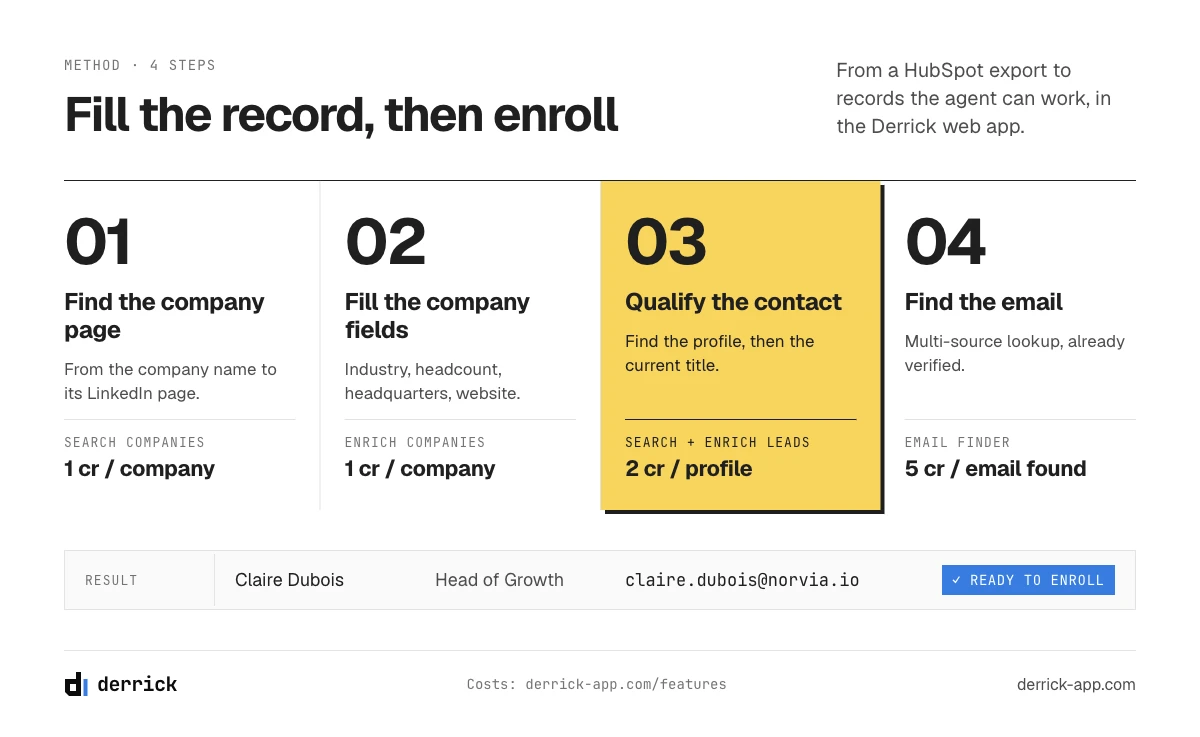
The checklist above is easier to meet in one pass on a list than one record at a time. Here is the usual way to do it with Derrick, starting from the records you plan to enroll.
In the Derrick web app
- Export the HubSpot view you want to enroll (companies, or contacts with their company) as a CSV, and import it into the Derrick web app.
- If you only have company names, add a Search Companies column to find each LinkedIn company page (1 credit per company, free and paid plans).
- Add an Enrich Companies column: industry, headcount, headquarters and website for each company (1 credit per company, free and paid plans).
- For contacts without a LinkedIn profile URL, which is common in a HubSpot export, add Search Leads to find the profile from the name and company (1 credit per profile, paid plans), then Enrich Leads for the current title and seniority (1 credit per profile, free and paid plans).
- For contacts without a usable email, add Email Finder (5 credits per email found, paid plans). Emails it finds are already verified, so there is no second verification step.
- Export the file and re-import it into HubSpot as an update, matched on the record ID or the domain, so existing records are completed rather than duplicated.
Search Companies, Enrich Companies, Search Leads and Enrich Leads read LinkedIn: they need your LinkedIn account connected through the Derrick Chrome extension. Email Finder does not.
In Google Sheets
If your team already prepares enrollment lists in a spreadsheet, the same actions run from the Derrick sidebar in Google Sheets. It is also where to dedupe: Find Duplicates, available in Google Sheets only and unlimited, adds a column that flags duplicate rows before they reach HubSpot.
Dedupe before you enroll
A company in HubSpot twice can be recommended twice, and each recommendation is billed. Match duplicates on the domain or the LinkedIn company page, never on the company name alone. Where duplicates come from, and which key to merge on, is covered in our guide to CRM contact management.
Automatically, before the agent picks records up
If enrollment is automatic (on a page view, a form or a list), completion has to be automatic too. The Derrick REST API can fill a record as it is created, called from a HubSpot workflow or through Zapier, Make or n8n; API access starts with the Plus plan. The three workflow patterns for this, on creation, on form submission and on a schedule, are in our guide to automating HubSpot data enrichment with workflows. For a single account you are about to approve, Derrick in Claude or ChatGPT through MCP (also from the Plus plan) builds a quick file on the company and the contact in one conversation.
How to enroll contacts and companies in the HubSpot prospecting agent
From HubSpot
- Manually: search and filter contacts or companies, then enroll them in bulk.
- Automatically, on a trigger: when a page is viewed, when a form is submitted, when the days since the last engagement exceed a threshold, or when a record is added to a list.
- Through Breeze Assistant: ask in plain language which records to enroll.
- From a workflow: enroll or unenroll records with workflow actions.
Automatic triggers are where incomplete data does the most damage, because nobody looks at the record before it enters the play. Put the completion step before the trigger, or make the trigger list depend on the properties from part 05 being filled.
From another data source
The agent can also enroll contacts from an external data source connected to HubSpot. Only one external source can be connected at a time; HubSpot's documentation lists the supported providers. The alternative is the path in part 06: bring the accounts and contacts into HubSpot first, completed, and enroll them from there, so they follow the same exclusions and the same checklist as every other record.
What the HubSpot prospecting agent costs, per recommendation
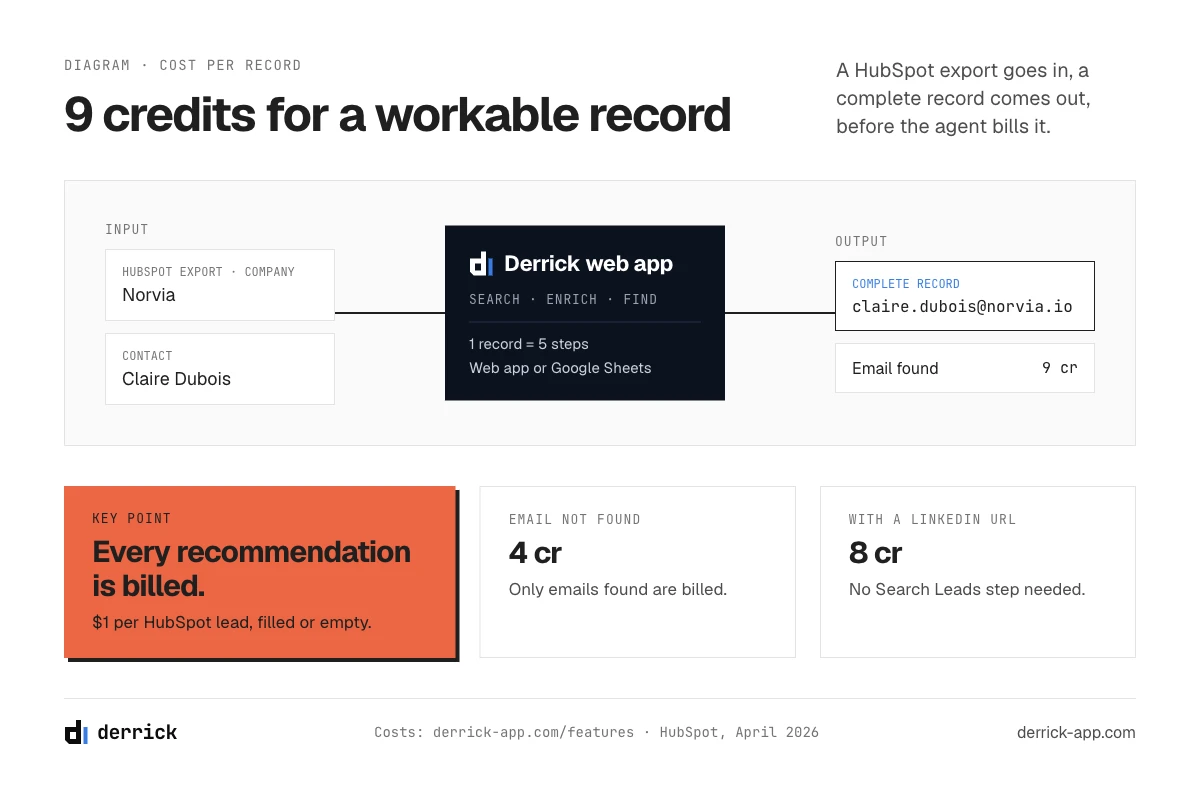
HubSpot changed the pricing of the agent in April 2026. Since April 14, 2026, it charges $1 per lead recommended for outreach, paid with 100 HubSpot Credits per recommended lead; before that, it charged a recurring monthly amount for every contact enrolled. The agent comes with a free 28-day trial. These figures are from HubSpot's announcement, updated on April 13, 2026; the knowledge base adds that further steps can consume credits depending on the play settings.
Paying per recommendation changes what a bad record costs. Under the old model, a useless contact cost a share of a monthly fee. Now, every record that passes the play's filters and gets recommended is billed the same dollar, whether it is a perfect fit or a duplicate, a customer you forgot to exclude, or a contact without a usable email.
Take an illustrative example. A play with a daily suggestion limit of 20 can recommend up to 20 leads a day, so up to $20 a day for that play. If a third of those recommendations land on records that cannot be worked (wrong persona because the title was empty, no email, duplicate company), a third of that spend buys nothing. Over 20 working days, that is up to $400 of recommendations for that play, and up to about $130 of it wasted.
| Line | Unit | Cost |
|---|---|---|
| HubSpot prospecting agent | Per lead recommended for outreach | $1, paid as 100 HubSpot Credits |
| Derrick, record completed from a HubSpot export (no contact LinkedIn URL) | Search Companies 1 + Enrich Companies 1 + Search Leads 1 + Enrich Leads 1 + Email Finder 5 (per email found) | 9 credits when the email is found (4 when it is not): under two euro cents per record on the Standard plan (0.002 euros per credit, so 1.8 cents), on Plus (0.0019) and on Scale (0.0016); illustrative |
| Derrick, record with the contact's LinkedIn URL already present | Same steps without Search Leads | 8 credits: one credit less per record |
The two lines are in different currencies and pay for different work, so they are not added together. To see what this means for your own plays, the calculator below multiplies your settings out. The order of magnitude is the point: completing a record costs a small fraction of what its recommendation costs. Completing records is not an alternative to the agent; it is the step before it, the one that makes each dollar land on a record worth contacting. Search Leads and Email Finder are paid-plan features, so a full record needs at least the Standard plan (20 euros a month, 10,000 credits).
What do empty records cost a play?
Illustrative: enter your play settings and the share of recommendations you expect to be unusable. The result updates as you type.
Enter a daily limit, a number of plays and working days of 1 or more.
HubSpot side: $1 per lead recommended for outreach (100 HubSpot Credits), as announced by HubSpot on April 13, 2026; additional play steps can add credits and are not counted. Derrick side: 9 credits to complete a record from a HubSpot export (Search Companies, Enrich Companies, Search Leads, Enrich Leads, Email Finder at 5 credits per email found); Search Leads and Email Finder are paid-plan features. The two currencies are not converted.
Review mode or autopilot: when to let the agent send
"Review before sending" puts every draft in front of a person; "Send automatically" lets the agent send within your guardrails. Three tools help you decide.
- The daily summary. Every morning at 9 a.m. in your account's time zone, the agent emails a summary of the outreach waiting for review and the companies it recommends.
- The Recommended companies view. Each company shows a "Suggested Contact Count", a "Max Recommendation Score" and a "Reason to Reach Out". Use it to sort before you approve: a weak reason or a low score on a company you would never sell to is a signal to tighten the segment, not to approve the draft.
- Your edit rate. Track how often you change a draft before approving it. While you edit most drafts, stay in review. When a batch of drafts goes out mostly unchanged, and the recommended companies match your segment, the play is a candidate for automatic sending.
Switch one play at a time, and keep review on any play that targets a new segment or a new persona. Review mode costs the same per recommendation as autopilot: what it buys you is the chance to catch a bad segment before the HubSpot prospecting agent sends to it.
Prospecting agent vs sequences
A sales sequence sends emails you wrote in advance on a schedule. The agent researches each account before writing, and can itself use a sequence as its sending method. They are not either-or, but they break in different places.
| Sequence | Prospecting agent | |
|---|---|---|
| Who writes | You, once, with personalization tokens | The agent, per account, from its research and your selling context |
| Who is contacted | Whoever you enroll | Whoever you enroll, plus the companies and contacts it recommends from signals |
| Based on | Properties used as tokens | Properties, intent signals and web research |
| Cost model | Included in your seats | $1 per recommended lead (100 HubSpot Credits) |
| What breaks it | An empty token: "Hi {first name}" or a missing company name | An empty property: wrong segment, wrong persona, no email, paid for anyway |
Mistakes that burn HubSpot Credits
- Enrolling a whole list with no fit filter. Signals tell the agent when; segments tell it who. A play without a firmographic segment recommends anyone whose news fires. Define the ideal customer profile as filters first.
- No exclusion list. Customers, partners, competitors, employees and unsubscribed contacts should never be recommended. Set the exclusions before the first play goes live.
- Duplicates. One company stored twice is two chances to pay for the same account.
- A persona that is too broad. "Anyone in sales" across three personas per company multiplies recommendations. Name the roles that sign or champion your product, the ones in your buying committee.
- Empty titles. Persona matching reads the job title. A contact without one is either skipped or matched by guesswork.
- Invalid emails. A bounced email still went through a recommendation. Find or verify addresses before enrollment.
- A daily limit set high on day one. Start low, read the recommendations for a week, then raise it.
What the agent does not do is part of the same list: it works inside HubSpot and email, not on LinkedIn; it does not clean your database; and it does not correct a wrong email address. Those are jobs for the step before it, and for a data plan that decides who owns each field and how often it is refreshed, as laid out in our CRM data strategy playbook.
How to measure the prospecting agent
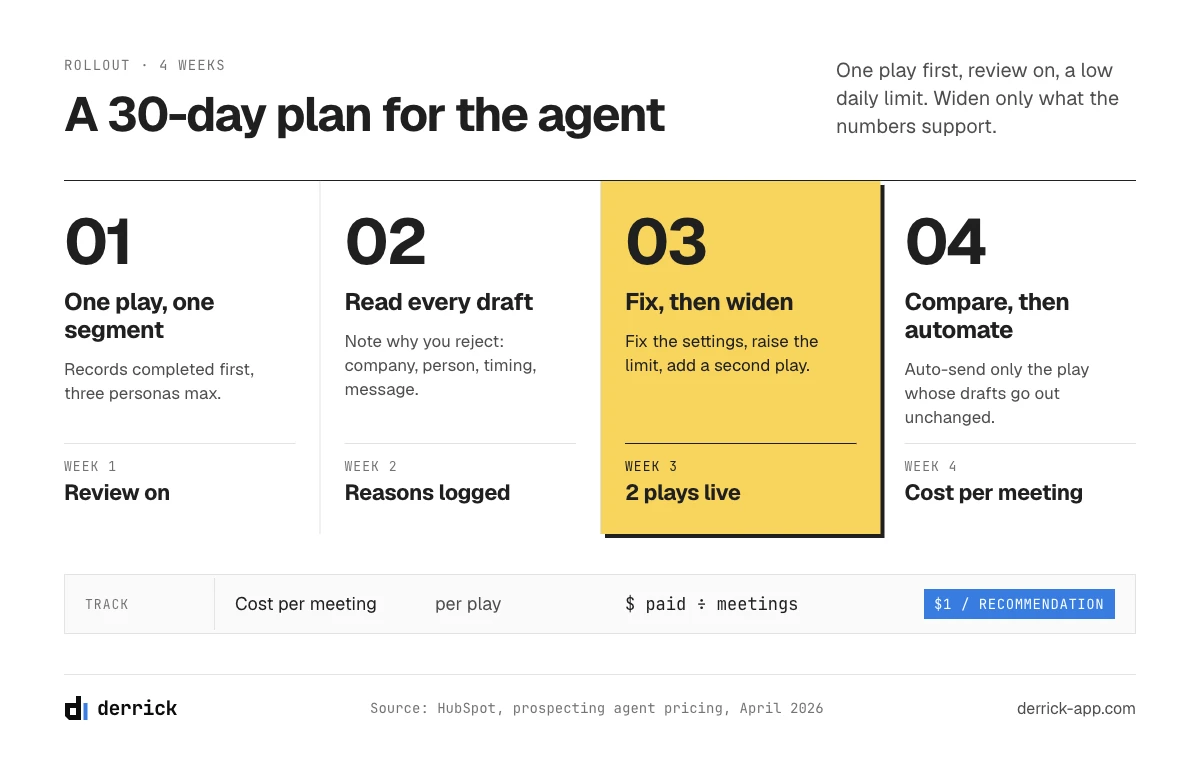
The agent's analytics show total enrollments, delivered, opened, clicked and replied emails, booked meetings, and the emails sending today. Add one number of your own: cost per meeting = recommendations paid ÷ meetings booked, in dollars at $1 per recommendation. Track it per play. A play whose cost per meeting rises while its recommendation volume stays flat is usually a play whose audience has drifted: check the segment filters and the share of recommended records with empty properties before you change the copy.
Two habits keep the number honest. Compare plays over the same weeks, since engagement signals and news cycles move together. And re-check the properties of the records you enroll every quarter: titles change, people leave, companies grow out of a segment (how fast records decay is measured in our CRM data quality report), and the agent keeps paying attention to what the record says, not to what is true today.
A 30-day rollout plan
- Week 1. One play, one segment, three personas at most, a low daily limit, review before sending. Complete the records of that segment first, with the checklist from part 05.
- Week 2. Read every recommendation and every draft. Note the reasons you reject them: wrong company, wrong person, wrong timing, wrong message. Each reason points to a setting: the segment, the persona, the signals or the selling context.
- Week 3. Fix the settings, raise the daily limit if the rejection rate fell, and add a second play on a second segment.
- Week 4. Compare cost per meeting across the two plays. Move the better one to automatic sending only if its drafts now go out mostly unchanged.
This keeps the HubSpot prospecting agent on a short leash while it learns your market, and it keeps the credits you spend tied to records you checked.
If you are still choosing between this agent and other AI prospecting tools, our comparison of AI prospecting tools sorts them by the step of prospecting they automate.
Frequently asked questions
How much does the HubSpot prospecting agent cost?
Which HubSpot editions include the prospecting agent?
What intent signals does the HubSpot prospecting agent use?
Can I review emails before the HubSpot prospecting agent sends them?
Does the HubSpot prospecting agent work with data from outside HubSpot?
Can the HubSpot prospecting agent prospect on LinkedIn?
What should a record contain before I enroll it?
Keep reading
Continue exploring this cluster


CRM Enrichment: How to Enrich Your HubSpot or Salesforce Data (Complete Guide)
Read →

HubSpot Data Enrichment: How to Automate It With Workflows
Read →

CRM Data Quality Report 2026: Decay, Cost & the Enrichment Gap
Read →

CRM Data Strategy: The 5-Layer Playbook (2026)
Read →