AI prospecting tools compared: what AI for sales prospecting costs per run
AI for sales prospecting, done right: see 12 AI prospecting tools compared by step and price, plus one real brief priced line by line in credits.


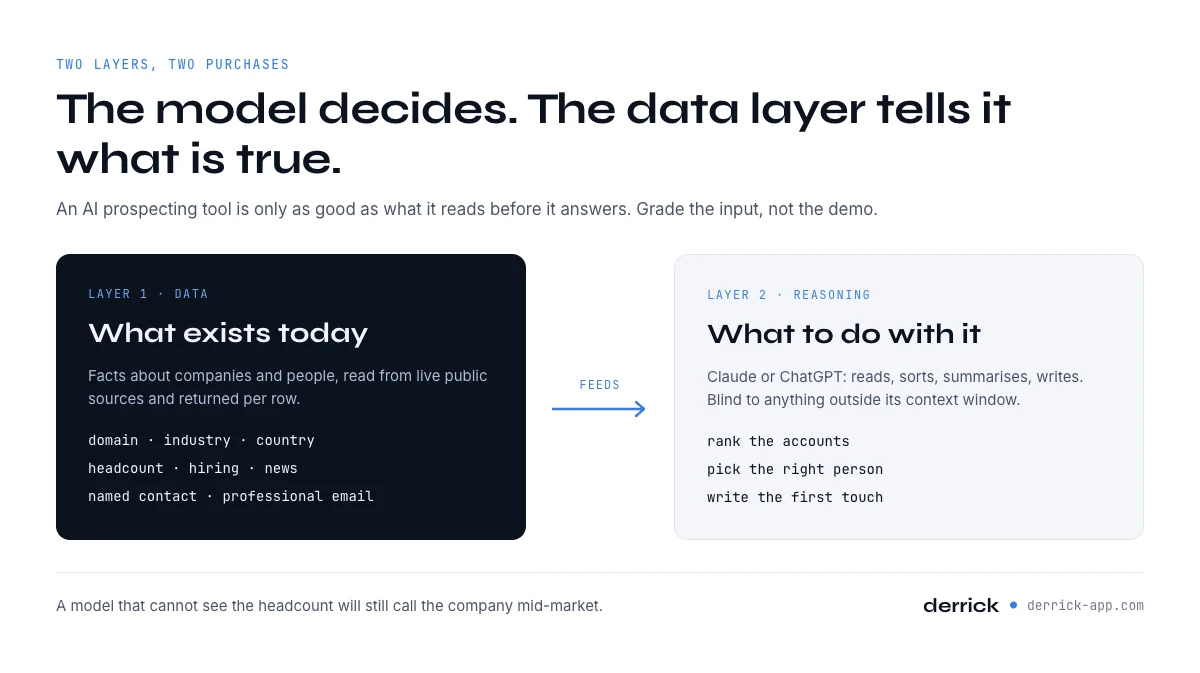
AI prospecting tools, and the variable that decides whether the output is worth anything
AI prospecting tools are software that uses a model to do one step of prospecting for you: finding accounts, finding the people inside them, reading a buying signal, writing the first touch, or running the whole loop as an agent. The label covers very different products, and the only thing they share is that the useful part is no longer a filter you set by hand but a decision the software makes.
That is also where the category gets misread. Almost every write-up grades these products on what they produce: the email that came out, the score on the account, the meeting that got booked. Very few grade them on what they read before producing it, and that is the variable that decides whether the output is worth anything. A model that cannot see a company's headcount will still tell you the company is mid-market. It will say it in the same confident sentence it uses when it is right.
So this page is organised the other way round. Every tool below is placed on one step of a five step workflow, and every entry answers the same three questions: what does it read, what does the model actually decide, and what does one usable result cost. Where we could not verify a number, we say so rather than reprint a figure from a vendor page.
One thing to set straight before the list. There is a reasoning layer and there is a data layer, and they are not the same purchase. Claude and ChatGPT are the reasoning layer: excellent at reading, sorting, summarising and writing, and blind to anything outside their context window. The data layer is what hands them facts about companies and people that exist today. Our AI ready data report covers why this split is where most projects fail, and the rest of this page assumes it.
A note on scope so nobody wastes a click. Pure contact databases and pure sending platforms are not graded here even though they are often filed under the same heading, because their value is the database or the deliverability rather than an AI capability. They are sorted by job on our lead generation tools page. A tool gets a full entry on one page or the other, never on both.
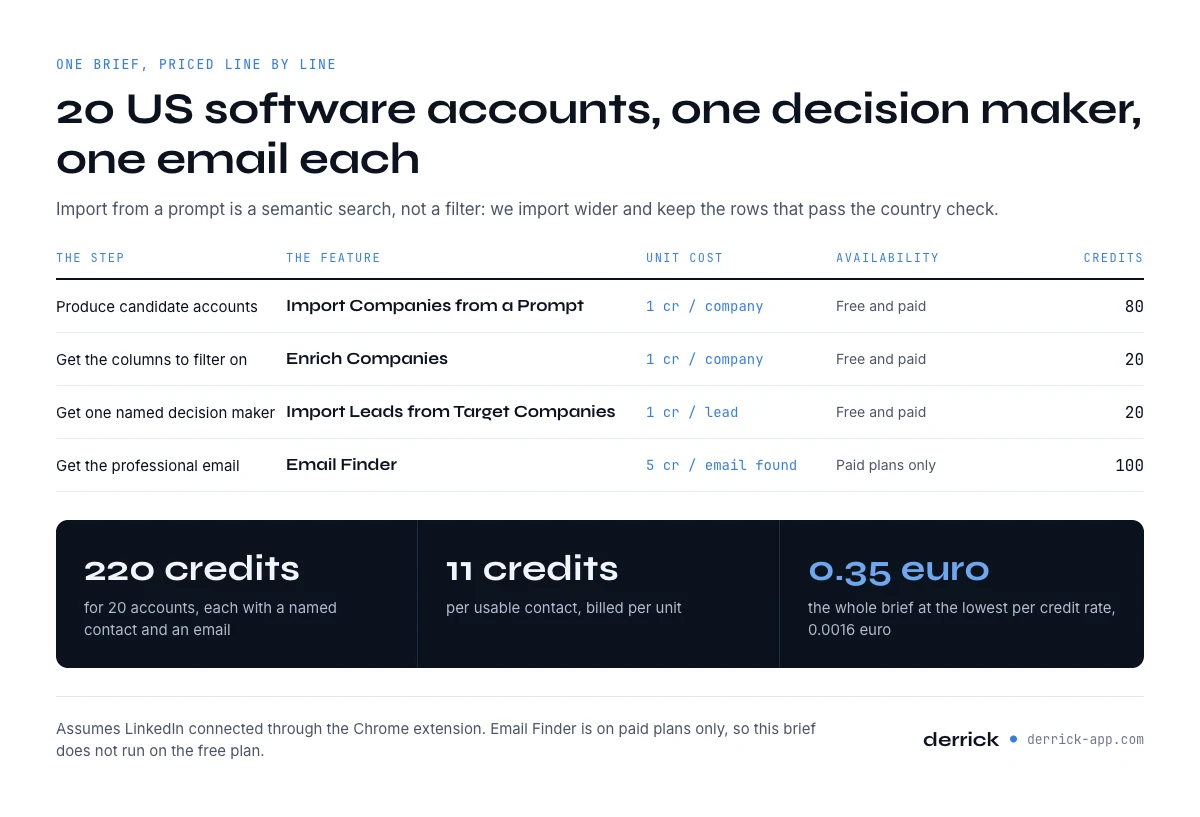
What AI prospecting tools cost: one brief, priced line by line in credits
Every article in this category tells you the tools save time. Almost none says what one concrete brief costs. So here is one, priced line by line from the published unit costs, with the availability of each step checked rather than assumed.
The brief: twenty software companies in the United States between 50 and 200 employees, one decision maker per account, a verified professional email for each. That is a normal week of list building, and it is deliberately small enough that you can rerun it yourself.
A correction before the arithmetic, because it changes the first line. Importing companies from a plain language prompt is a semantic search, not a set of filters. It reads your description and returns companies that resemble it; it does not apply headcount or country as constraints. We measured this on 18 September 2026 over three separate batches costing 80 credits in total, and in the best batch only 5 of the 20 companies returned were actually in the United States. Anyone telling you to describe your ideal customer profile in a sentence and expect twenty compliant rows is describing a product that does not exist. The step still earns its place, because it produces candidates from nothing in one call, but you budget for the yield and you filter afterwards on the enriched columns.
| Step | Feature | Unit cost | Availability | Credits for this brief |
|---|---|---|---|---|
| 1. Produce candidate accounts | Import Companies from a Prompt | 1 credit per company with LinkedIn connected, 10 without | Free and paid plans | 80 (measured yield, not 20) |
| 2. Get the columns you filter on | Enrich Companies | 1 credit per company | Free and paid plans | 20 |
| 3. Get one named decision maker | Import Leads from Target Companies | 1 credit per lead | Free and paid plans | 20 |
| 4. Get the professional email | Email Finder | 5 credits per email found | Paid plans only | 100 |
| Total for 20 accounts, each with one named contact and an email | 220 credits | |||
Two hundred and twenty credits for twenty usable contacts is eleven credits per contact. Priced against the published plans that is about forty four cents for the whole brief on the entry paid tier at EUR 20, and about thirty five cents at the lowest per credit rate the pricing page publishes, EUR 0.0016. You can check both on the pricing page. This bill assumes your LinkedIn account is connected through the Chrome extension: without that connection the import step costs 10 credits per company instead of 1, and two of the four steps, Enrich Companies and Import Leads from Target Companies, do not run at all.
What those 220 credits actually buy, said precisely. They buy twenty accounts that survived the country filter, each with a named contact and an email. The brief has a second criterion, 50 to 200 employees, and that one only becomes testable once Enrich Companies has returned the headcount column, so some of the twenty will fail it. The yield logic that applies to geography applies to headcount too: if you need twenty accounts that meet both criteria rather than twenty you can contact, import wider at step one and carry the ratio through. The arithmetic does not change, the shopping list does.
And now the part most pages skip: this brief does not run on the free plan, and not because of the count. Email Finder is available on paid plans only. So is Search Leads, the other route to a named profile. It would not matter if you had a thousand free credits sitting there. The free plan gives you 100 credits a month, which is real and enough for the first two steps: import and enrich are 2 credits a row, so 100 credits a month is 50 rows taken through both. At the prompt yield measured above, those 50 rows leave you roughly a dozen that survive a strict geography filter. That is a genuinely useful free tier for testing whether the segment exists at all. It is not a free version of this brief, and we would rather say so than let you find out on step four.
Why there is no stopwatch figure on this page. The credits are exact because they are published per unit and billed per unit. Minutes are not, because the only slow part of the sequence is the human filtering between step one and step two, and how long that takes depends on how strict your criteria are. A minute count we did not measure would be decoration, so there is not one.
Two notes on billing that change the arithmetic if you ignore them. Email Finder bills per result found, so a contact whose address cannot be found does not cost you five credits. And the enrichment steps that read professional profiles need your LinkedIn account connected through the Chrome extension; without that connection those calls come back empty and the trouble looks like a data quality problem when it is a setup problem.
AI for sales prospecting: what it is and where it pays off
AI for sales prospecting is the use of a model to make one call in finding and reaching new customers: which accounts fit, who inside them can buy, why now is the right moment, and what the first message says. The AI prospecting tools that do it well pair that model with a data layer that hands it verified facts, because a model left alone reasons well about a company it has never seen and still gets the company wrong.
The difference with classic prospecting software is where the judgement sits. A filter does exactly what you tell it. A model makes a call that you then check. That shift pays off on the steps where your criteria are hard to write as filters, and it costs you on the steps where a wrong fact goes out under your name.
Where it pays off, step by step
- Accounts. You describe a segment that filters cannot express, such as companies that run a partner programme or agencies that prospect for others, and you get candidate companies back. You then keep only the rows that the enriched columns confirm.
- People. The model crosses your account list with a role description and marks each match as an exact or an adjacent title. That is where the person with a non standard title stops slipping through.
- Signals. It watches hiring, news and post engagement on the accounts you already chose, and the list gets reordered every week by what changed.
- Writing. It drafts an opening from one fact in the enriched row and quotes the field the fact came from, so a human can check the claim in seconds.
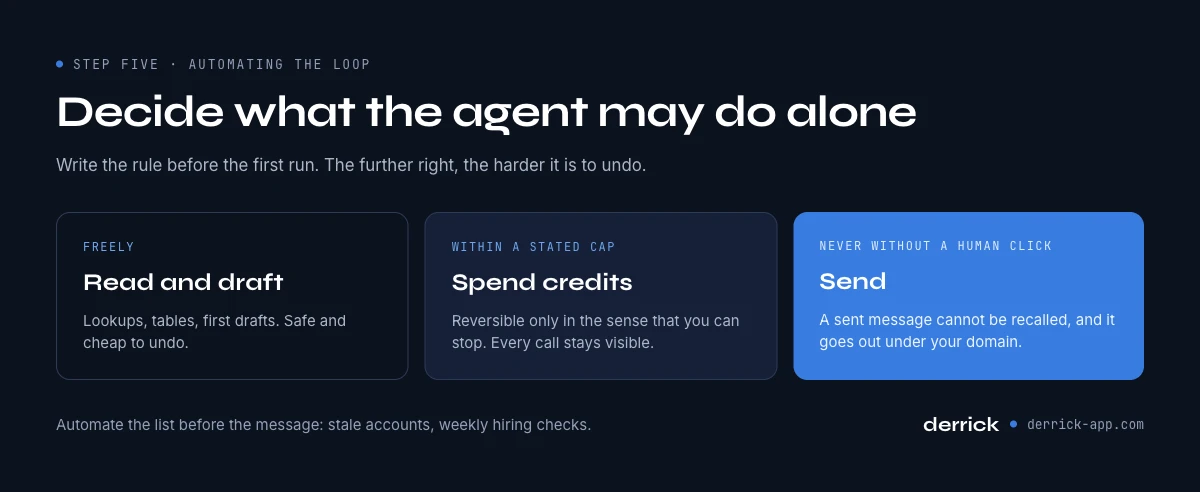
- The loop. An assistant connected through MCP chains the lookups from a single sentence. It reads and drafts freely, spends within a cap you set, and never sends without a human click.
What AI for sales prospecting saves, measured on our own run. The brief priced in the section above took twenty accounts from a sentence to a named contact with a verified email for 220 credits, eleven per usable contact, and every one of those credits maps to a lookup you can see. That is the benefit worth asking any vendor to show you: not hours saved on a slide, but a unit cost and a yield on your own segment.
Is an AI prospecting tool the same as a CRM?
No. A CRM records what already happened with accounts you know: contacts, deals, emails and stages. An AI prospecting tool works upstream of it. It finds accounts and people you do not know yet, reads signals on them and hands the result over. The two meet at the handoff, where the enriched rows should land in the CRM with their source fields intact, which is why where a tool runs matters as much as what it finds.
In Derrick that work starts in the web app, with nothing to install. The same features also run from the Google Sheets sidebar, and from Claude or ChatGPT through MCP or from the API on the Plus plan and above. The rest of this page takes the five steps one by one and places the AI prospecting tools on each of them.
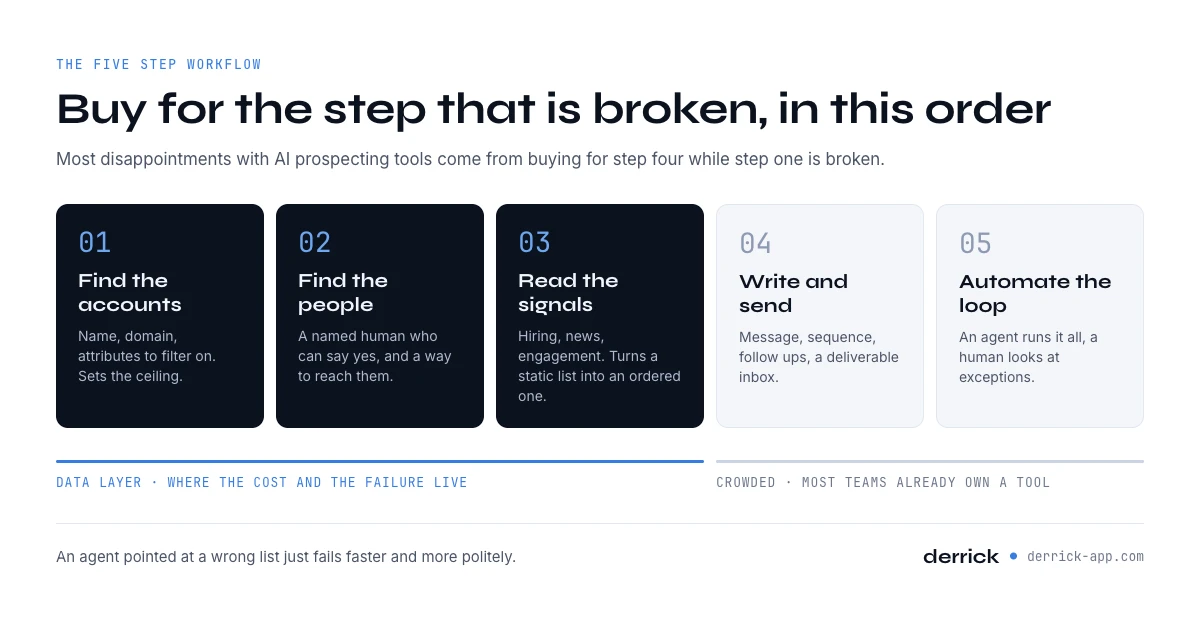
Where AI prospecting tools sit in the five step workflow
Prospecting is five steps, in this order, and almost every disappointment with this category comes from buying for step four while step one is broken.
Step one, find the accounts. You start from a description of who you sell to and you end with a list of companies that have a name, a domain and enough attributes to filter on. Nothing is personal yet. This is the step that sets the ceiling for everything after it.
Step two, find the people. For each account you need one or two named humans with a role that can say yes, and then a way to reach them. This is where the list stops being a market study and becomes a work queue.
Step three, read the signals. A correct account with no reason to talk today is a correct account you will call in eleven months. Signals are what turn a static list into an ordered one: a role opening, a funding round, a tool appearing on the website, a person moving jobs.
Step four, write and send. The message, the sequence, the follow ups, the inbox that has to stay deliverable. This is a craft of its own and it is the step with the most mature software.
Step five, automate the loop. Everything above, running on a schedule or on a trigger, with a human looking at exceptions rather than at every row. This is what people mean when they say agent, and it is the newest and least settled part of the category.
Two observations that will save you money. Steps four and five are crowded and most teams already own something there. Steps one to three are where the cost and the failure both live, because that is where the facts come from, and an agent pointed at a wrong list just fails faster and more politely. And the value of an AI layer on any of these steps is capped by the data underneath it: the model can rank, it cannot know.
AI sales prospecting tools at a glance, and how we scored them
Here is the whole map before the detail. Read it by step, not by brand. The question that matters is which row you are missing, not which vendor has the best demo. Pricing is shown as a model rather than a figure for everything except Derrick, and the section on the bill explains why. If you arrived here looking for AI tools for sales prospecting rather than for a vendor name, this is the table to read.
| Step | Tool | What the AI actually decides | Data it reads | How it is priced |
|---|---|---|---|---|
| 1. Accounts | Derrick | Turns a plain language description into a list of matching companies, then fills the attribute columns | Company records: name, domain, industry, country, headcount, LinkedIn page | Per credit, published per unit. 1 credit per company imported, 1 per company enriched |
| 1. Accounts | 6sense | Predicts which accounts are in a buying window | Aggregated third party intent, web activity, CRM history | Annual platform contract |
| 1. Accounts | Demandbase | Builds and prioritises the account list for an ABM programme | Intent, firmographics, advertising and CRM data | Annual platform contract |
| 2. People | Derrick | Crosses a target account list with a role description and returns named profiles, then finds the professional email | Public professional profiles, company staff pages, email patterns | 1 credit per profile, 5 credits per email actually found |
| 2. People | Common Room | Stitches a person across communities, repos and social activity into one identity | Community, product and social activity at person level | Seat plus volume tiers |
| 3. Signals | Derrick | Detects that an account is hiring, surfaces its recent news, and collects the people who engaged with a post | Job postings, news, LinkedIn post engagement | 1 credit per company, per news item on paid plans, or per person imported from a post |
| 3. Signals | Warmly | Identifies the companies behind anonymous website sessions and flags the warm ones | Website traffic, de anonymisation, CRM | Tiered platform subscription |
| 3. Signals | MadKudu | Scores accounts and people on likelihood to convert | Product usage, firmographics, CRM outcomes | Platform subscription |
| 3. Signals | Bombora | Reports topic level research spikes at company level | Content consumption across a publisher co-operative | Data subscription |
| 4. Write and send | Regie.ai | Generates and adapts outbound content at sequence level | Your messaging assets, CRM fields, engagement history | Platform subscription |
| 5. Agents | 11x | Runs an outbound motion end to end as a digital worker | Its own data partners plus your CRM | Per agent, annual |
| 5. Agents | Artisan | Researches, writes and sequences as an AI sales representative | Bundled contact data plus your CRM | Per agent, annual |
| 5. Agents | AiSDR | Handles outbound conversation and qualification without a human in the loop | Bundled contact data, your CRM, inbound replies | Volume of messages |
| 5. Agents | Qualified | Works inbound: talks to the visitor on your site and books the meeting | Live website session, CRM, your calendar | Platform subscription |
| 1 to 3, from a chat | Claude or ChatGPT plus Derrick MCP | You describe the outcome in a sentence, the model chooses which lookups to run and in what order | Everything in the Derrick rows above, called as tools from the conversation | Your assistant subscription, a paid Derrick plan, plus credits per lookup |
Two things jump out of that table. The agent row at the bottom is not a fourth category of vendor, it is the first three rows driven by a model instead of by your mouse. And the only rows where a unit price can be written down are the rows priced per credit, which is why the scoring just below gives full marks to a published unit price, and why the bill section above prices a whole brief in them.
That is the map. The rest of this section is the scorecard, and it is here rather than at the end on purpose: the criteria are worth more than the grades, and you should be able to disagree with a number before you read the fiches that justify it.
Scores in this category usually grade the demo. We grade the three things you can still verify a month after the demo, and we grade each tool inside its own step rather than across steps, because comparing an inbound agent to a company database produces a number that means nothing.
Axis one, depth of what it reads. How many independent facts about a company or a person does the tool actually have access to, and how recent are they. Three points for a tool that reads live public sources, two for a tool reading a refreshed database, one for a tool reading only what you already own.
Axis two, price per countable result. Can you name the unit and the price of one unit before you buy. Three points for a published per unit price you can multiply, two for a tiered subscription with a stated volume, one for an annual contract with a quote.
Axis three, where it runs. Does it meet the work where it already happens. Three points for a tool usable from a spreadsheet, an assistant and an API, two for a platform with an API, one for a closed interface.
| Step | Tool | Depth of data read | Price per countable result | Where it runs | Total |
|---|---|---|---|---|---|
| 1 to 3 | Derrick | 3, live public company and profile sources | 3, per unit price published per feature | 3, spreadsheet, assistant through MCP, and API | 9 / 9 |
| 1 | 6sense | 2, aggregated third party intent | 1, annual contract | 2, platform with API | 5 / 9 |
| 1 | Demandbase | 2, intent plus firmographics | 1, annual contract | 2, platform with API | 5 / 9 |
| 2 | Common Room | 3, live community and social activity | 2, tiers with stated volume | 2, platform with API | 7 / 9 |
| 3 | Warmly | 2, your traffic joined to resolution data | 2, tiers with stated volume | 2, platform with API | 6 / 9 |
| 3 | MadKudu | 1, mostly what you already own | 1, platform contract | 2, platform with API | 4 / 9 |
| 3 | Bombora | 2, co-operative consumption data | 2, data subscription | 2, feeds and API | 6 / 9 |
| 4 | Regie.ai | 1, your assets and CRM | 1, platform contract | 2, platform with API | 4 / 9 |
| 5 | 11x | 2, bundled data plus your CRM | 1, per agent annual | 1, closed interface | 4 / 9 |
| 5 | Artisan | 2, bundled data plus your CRM | 1, per agent annual | 1, closed interface | 4 / 9 |
| 5 | AiSDR | 2, bundled data plus your CRM | 2, priced by message volume | 1, closed interface | 5 / 9 |
| 5 | Qualified | 1, your live session and CRM | 1, platform contract | 2, platform with API | 4 / 9 |
Read that table for what it is. It measures how legible a tool is, not how much you will like it. A four out of nine can be exactly the right purchase for a company that has already fixed steps one to three and wants the loop closed without hiring; a nine out of nine on the data layer does not write a single email. The axes were chosen because they are the three answers that survive contact with an invoice, and because they are the ones a vendor cannot improve with a better demo.
Notice also what the table does not contain: a best for column. Naming a winner per category is the laziest possible output for a comparison, because the winner depends entirely on which step you are missing and what you already own. The scores tell you what you can verify; the step tells you what you need.
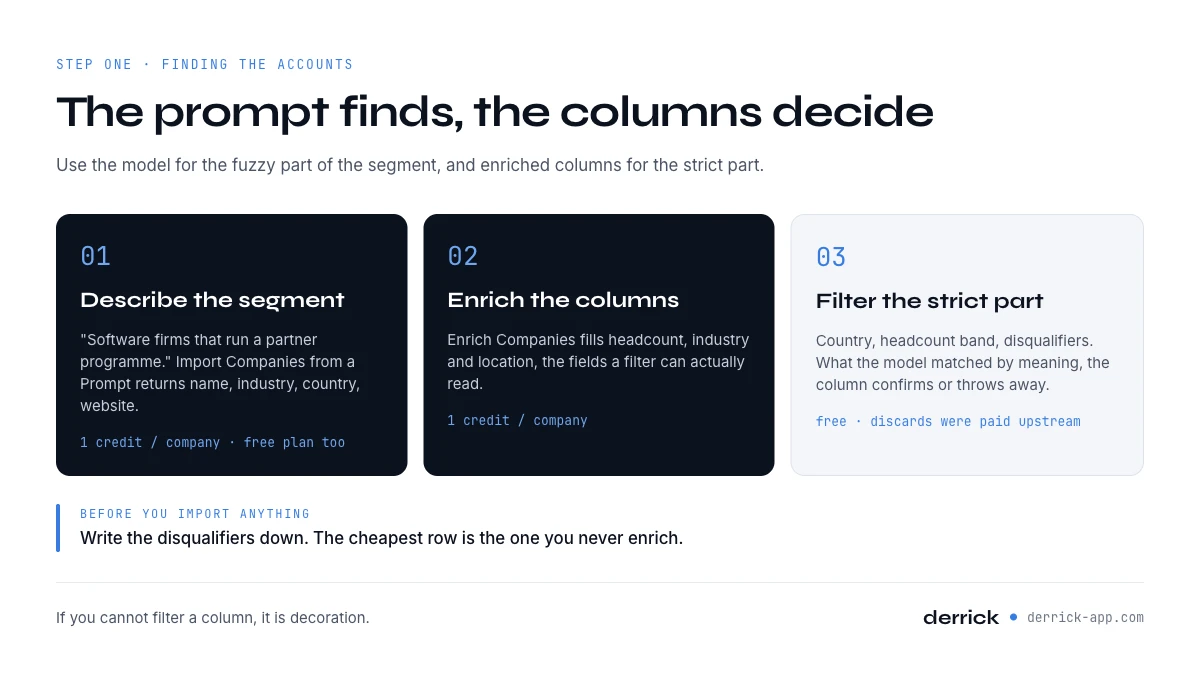
Step one: finding the accounts
This is the step that decides everything downstream, and it is the one people spend the least time on because it feels like admin. Three shapes of product compete here, and they are not substitutes.
Derrick, on the description you type. You write what you are looking for in a sentence and Import Companies from a Prompt returns matching companies with name, industry, country, website and LinkedIn URL, at 1 credit per company with LinkedIn connected (10 without), on the free plan as well as the paid ones. Then Enrich Companies fills the attribute columns at 1 credit per company so you can filter properly. Read those two in that order: the first produces candidates, the second produces the columns that let you throw candidates away. If you already have one account that fits perfectly, Find Similar Companies turns it into a list of lookalikes at 1 credit per matched company, which is usually a better starting point than a description written from memory.
What the model is really doing here. It is matching meaning, not applying a WHERE clause. That is a strength when your segment is hard to express as filters, which is most interesting segments: companies that run a partner programme, agencies that do outbound for others, software firms with a self serve motion. It is a weakness on the things a filter does perfectly, namely country and headcount. The working method is to use the prompt for the fuzzy part and the enriched columns for the strict part, and to budget credits for the rows you will discard.
Predictive account selection. 6sense and Demandbase come at the same step from the opposite direction. Instead of describing the segment, you let the platform tell you which accounts in your market are showing research activity right now. The data they read is aggregated third party consumption, so the unit is the account and the resolution is weekly rather than instant. Those platforms are annual contracts sold to marketing teams, and they answer a question that only becomes interesting once you already have a defined market and a budget to prioritise inside it. If you are still deciding who your market is, they are the wrong purchase this quarter.
What good looks like at this step. You should finish with a sheet where every row has a domain, an industry, a country and a headcount, and where you can explain in one sentence why each row is there. If you cannot filter a column, it is decoration. If your list came out of a model and nobody checked a single row against the live company page, you have a hypothesis rather than a list.
One practical rule that comes up in every audit. Put the disqualifiers in writing before you import anything. Agencies when you sell to software companies, companies under twenty people when your price needs a budget holder, subsidiaries when the decision is made at head office. Disqualifiers are the half of the profile everyone skips and the half that saves the most credits, because the cheapest row is the one you never enrich.
Step two: finding the people inside those accounts
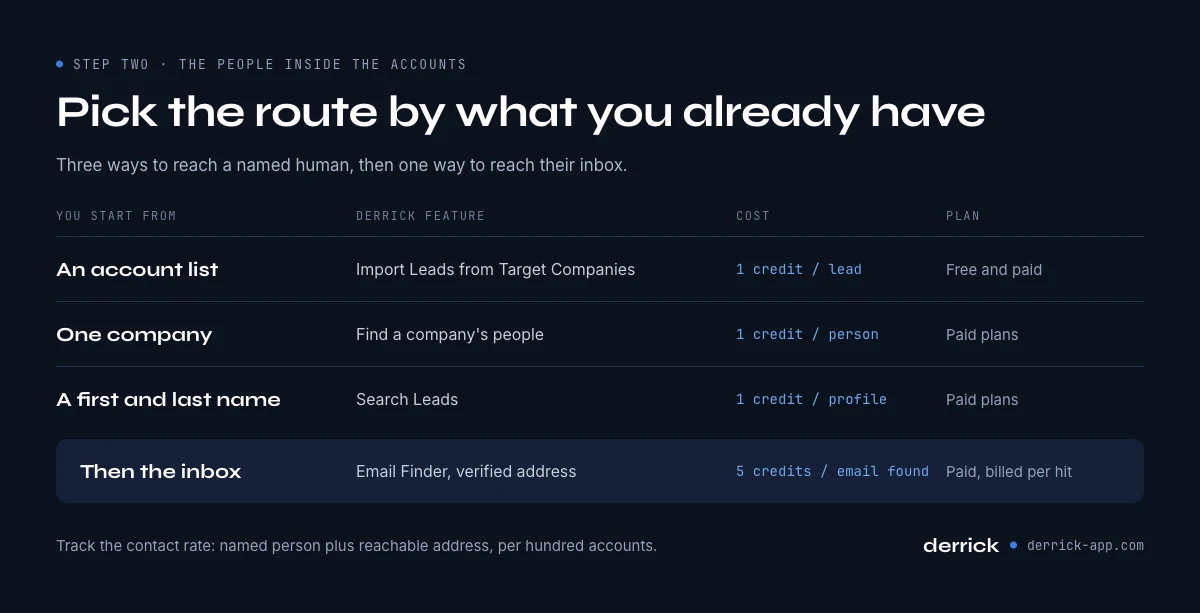
A list of companies is not a work queue. Somebody has to be called, and that somebody has a name, a role and a way of being reached. Three routes exist and they differ mostly in what you already have.
From the account list, by role. Import Leads from Target Companies crosses your account list with the role you are after and returns the matching profiles at 1 credit per lead, on the free plan as well. This is the route built for account based work, because it preserves the link between the person and the account you chose deliberately.
From the company, exhaustively. Find a company's people lists current and former staff at 1 credit per person, on paid plans only, optionally filtered by function, and it does not require a Sales Navigator seat. Useful when you do not know which title holds the budget in that particular organisation, which is more often than anyone admits: the person who owns revenue operations can sit under sales, under marketing or under finance depending on the company.
From a name you already have. Search Leads finds the profile from a first and last name at 1 credit per profile. It is on paid plans only, which matters if you were planning your first test on the free tier.
The contact detail itself. Email Finder returns a verified professional email at 5 credits per email found, on paid plans only, and it bills per result rather than per attempt. That billing detail is worth checking with any vendor you consider, because a tool that charges per lookup on a segment with poor coverage can cost several times a tool that charges per hit while producing fewer addresses.
Where an AI layer genuinely helps at this step, and where it does not. It helps with identity resolution: deciding that the person in a community, the person on the repository and the person in the CRM are one human. Common Room is built around that problem and reads community, product and social activity to do it. It does not help with the existence of the email address. No model can infer a mailbox that was never published; a tool either has a route to verify it or it is guessing at a pattern, and a guessed pattern is how a domain reputation gets damaged.
The measurable output of this step is a contact rate: out of a hundred accounts, how many ended up with a named person and a reachable address. Track it. It is the single number that tells you whether your list problem is a targeting problem or a coverage problem, and the two have completely different fixes.
Step three: reading the signals that say now
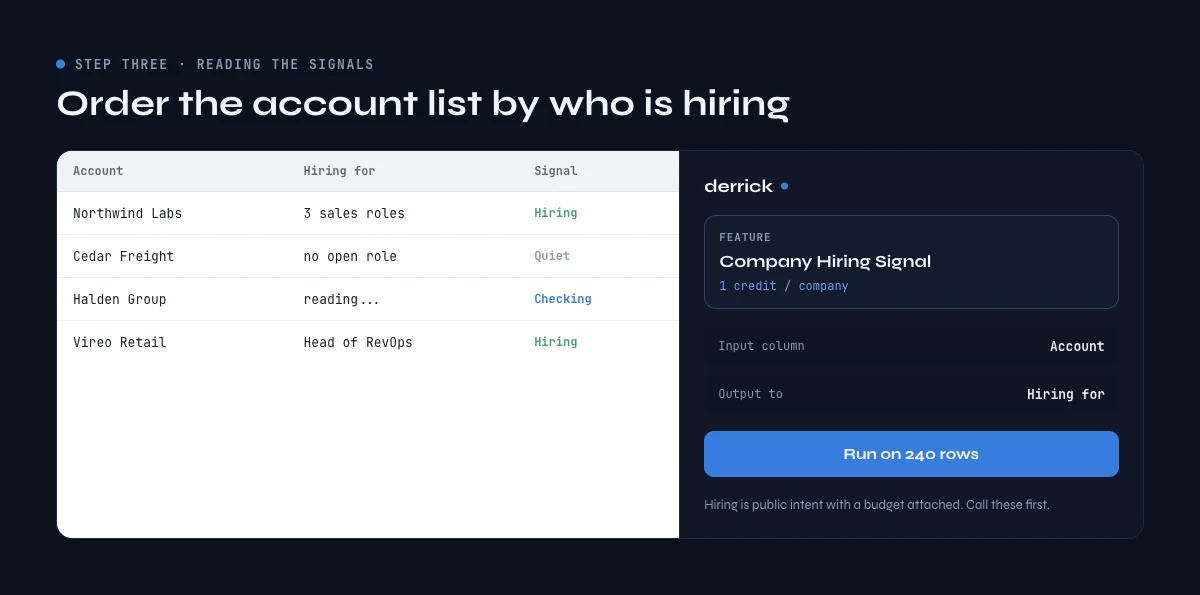
A correct account with no reason to talk this month is a correct account you will contact in eleven months. Signals are what order the list, and this is the step where an AI layer earns its money fastest, because the work is continuous monitoring rather than a one off search.
Hiring. Company Hiring Signal tells you which companies are recruiting and for which roles, at 1 credit per company. Hiring is the most underrated signal in B2B because it is a public statement of intent with a budget already attached. A company recruiting three sales people has decided to grow a motion, and the tooling decisions follow the headcount decisions by a quarter or two.
News. Google News Scraper returns the most relevant recent article per company, with title, link, publisher and date, at 1 credit per news item on paid plans. This is the raw material for an opening line that is not embarrassing, and it is also the cheapest way to avoid the opposite: pitching growth tooling to a company that announced a restructuring last week.
Engagement. Import LinkedIn post likes and comments turns any post into a prospecting list of everyone who liked or commented, with name and profile URL, at 1 credit per person imported, on the free plan as well as the paid ones. The unit matters more than it looks: a post with two hundred reactions is two hundred credits, which is twice the monthly free allowance, so you choose the posts rather than sweeping them. It is a person level signal rather than an account level one, and that distinction gets the section that follows.
Website visits. Warmly and the de anonymisation category sit here: they identify the companies behind anonymous sessions on your site and surface the ones that look warm. The data read is your own traffic joined to a resolution database, so the quality depends on your traffic volume. Below a certain number of monthly sessions there is nothing to de anonymise, and that threshold is the question to ask before the demo, not after.
Scoring. MadKudu reads product usage, firmographics and closed outcomes and returns a likelihood score. The important property of this category is that it needs your history: a model that has never seen you win cannot tell you who you win. It is a step for a company with a few hundred closed deals, not for a company with eleven.
Topic level intent. Bombora reports research spikes at company level from content consumption across a publisher co-operative. The unit is the company and the topic, never the person, and the lag is measured in days. Useful for prioritising a list you already have, useless as the only reason to add a company to it.
The honest limit on all of this: a signal tells you when, never whether. Stacking six signal sources on a badly defined segment produces a very well ordered list of the wrong companies, delivered faster. Fix step one before you buy step three.
Account level signals and person level signals are not the same thing
This distinction decides which tool you need, and it gets collapsed constantly because both get sold under the word intent.
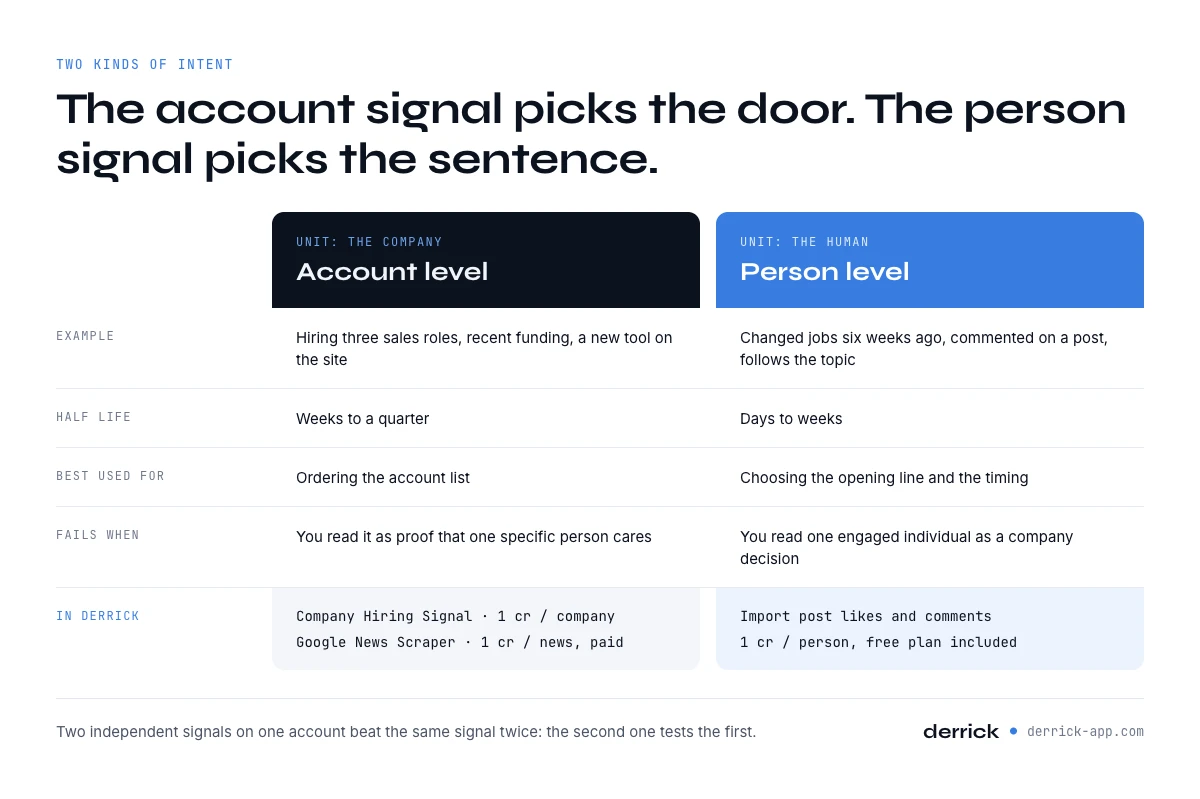
An account level signal says something about the company. It is hiring for three revenue roles. It raised. It added a tool to its website. It appeared in the news. The unit is the organisation, the signal is usually public, and it is normally durable enough to still be true next week. Account level signals answer the question of whether this company is in a moment.
A person level signal says something about a human. She changed jobs six weeks ago. He commented on a post about the exact problem you solve. She follows the topic. The unit is the individual, the signal is often short lived, and it points at a person who is already thinking about the subject today.
| Account level | Person level | |
|---|---|---|
| Example | Hiring three sales roles, recent funding, new tool on the site | Job change, engaged with a post, follows the topic |
| Half life | Weeks to a quarter | Days to weeks |
| What it tells you | The company is in a buying moment | This human is thinking about it now |
| Best used for | Ordering the account list | Choosing the opening line and the timing |
| Fails when | You treat it as proof that a specific person cares | You treat one engaged individual as a company decision |
| In Derrick | Company Hiring Signal, Google News Scraper, company enrichment | Import LinkedIn post likes and comments, profile enrichment |
The mistake that costs the most is using one where the other belongs. A funding round is not a reason to write to a specific engineer, and one thoughtful comment from a junior analyst is not a signal that the company is buying. Used together they are strong: the account level signal tells you which door, the person level signal tells you which sentence.
There is also a compounding effect worth planning for. Two independent signals on the same account are worth far more than the same signal twice, because the second one tests the first. A company that is hiring for a role and whose new head of that function just started is a very different prospect from a company that is simply hiring. Most stacks buy three sources of the same account level signal and none at person level, which is the cheapest gap in the whole category to close: post engagement import runs on the free plan, at 1 credit per person collected, so one well chosen post costs a few tens of credits rather than a contract.
Step four: writing and sending, where the data layer stops
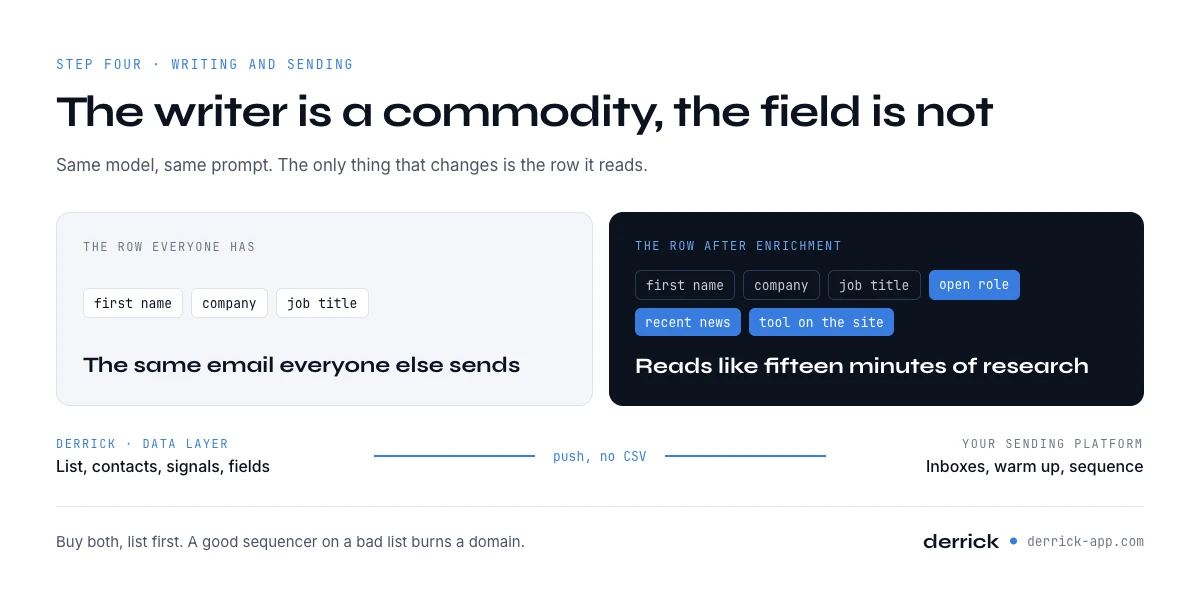
Derrick stops here, deliberately. It produces the list, the contacts, the signals and the fields, and it does none of the things that make a message arrive: it does not run your inboxes, it does not warm a domain, it does not manage a sequence. That work belongs to a sending platform, and the category is mature enough that picking one is rarely the hard part.
The sending layer, in one link. Pure sending platforms get their entry on our lead generation tools page, with what a seat costs and where deliverability is actually decided, and they are not scored a second time here. What belongs on this page is the handoff: Derrick pushes enriched rows straight into a sequencing tool, so the list does not travel through a CSV and lose half its columns on the way.
Content generation at sequence level. Regie.ai sits between the message and the sequence: it generates and adapts outbound content from your messaging assets and engagement history. The AI capability here is real and it is about variation at volume rather than about the single perfect email.
What actually makes the message land, and it is not the writer. A model writing from a row that contains a name, a company and a job title produces the same email everyone else is producing, because everyone has those three fields. A model writing from a row that also contains a job opening, a recent announcement and a tool detected on the site produces something a human would have written after fifteen minutes of research. The writing layer is a commodity; the field it reads is not. Our page on the AI sales assistant takes that argument task by task, including what an assistant invents when the field is empty.
Inside the spreadsheet. If you would rather keep the writing where the list already is, Ask Claude runs a model over each row at 2 credits per line on paid plans, and Ask Open AI does the same at 1 credit per line, on paid plans too. Score a lead, classify a list, summarise a page, rewrite a line. The detail of both, with prompts that behave, is on our Claude in Google Sheets and OpenAI in Google Sheets pages.
The complementarity is the point rather than a concession. A sending platform with an empty list has nothing to send. A perfect list with no sequencing tool sits in a tab. Buy both, and buy them in that order, because the failure mode of a good sequencer on a bad list is invisible for about six weeks and then shows up as a burned domain.
Step five: automating the loop with an agent
This is the newest and loudest part of the category, and it splits cleanly in two once you ask what the agent is allowed to touch.
Agents that own the motion. 11x, Artisan and AiSDR are sold as digital workers: they research, write, send, handle the reply and hand over a booked meeting. Qualified works the same idea on inbound, talking to the visitor already on your website and booking from there. The data these agents read is mostly bundled by the vendor plus whatever your CRM holds, which is the trade you are making: you buy the loop and the data together, and you inherit whichever coverage the vendor bought. Ask exactly which database is under the agent and what happens on a segment it covers badly, because the agent will not tell you it is guessing. It will send.
Agents you drive, on your own data. The other shape is a general assistant plus a connection to the tools you already pay for. You ask Claude or ChatGPT for an outcome in a sentence, the model decides which lookups to run and in what order, and the results come back into the conversation. Derrick MCP is that connection: every feature listed on this page becomes something the assistant can call, from Claude Desktop, ChatGPT or any MCP compatible client. Both the MCP server and the API require a paid plan, which is the availability detail people discover late; the web app and the Google Sheets sidebar are the surfaces that run on the free one. The credits are the same per unit as in the spreadsheet, and you keep the two properties that matter, which are that you can see every call and that the data layer is yours rather than rented inside a black box. The setup, step by step, is on our page about enriching B2B data from an AI agent, and the rest of this section assumes it is done.
The third route, for the people who will end up there anyway. If the loop has to live inside a product or a CRM rather than in a chat, the data enrichment API exposes the same features as endpoints, and over 3000 integrations through Zapier, Make and N8N cover the cases where you would rather not write code at all. And the Derrick web app runs the same workflow without a spreadsheet or a terminal.
What to automate first, and it is not the sending. The steps worth putting on a schedule are the boring repeatable ones: re enriching accounts that went stale, checking who started hiring this week, pulling the engagement on a post you published. Those produce a queue a human then works. Automating the message before you have automated the list is the expensive order of operations, and it is the order most teams choose because the message is the visible part.
One governance point that gets skipped. Decide up front which actions the agent may take without asking. Reading is safe and cheap to undo. Spending credits is reversible only in the sense that you can stop. Sending is not undoable at all. A sane default is that the agent reads and drafts freely, spends within a stated cap, and never sends without a human clicking.
How to choose AI prospecting tools: five questions to ask
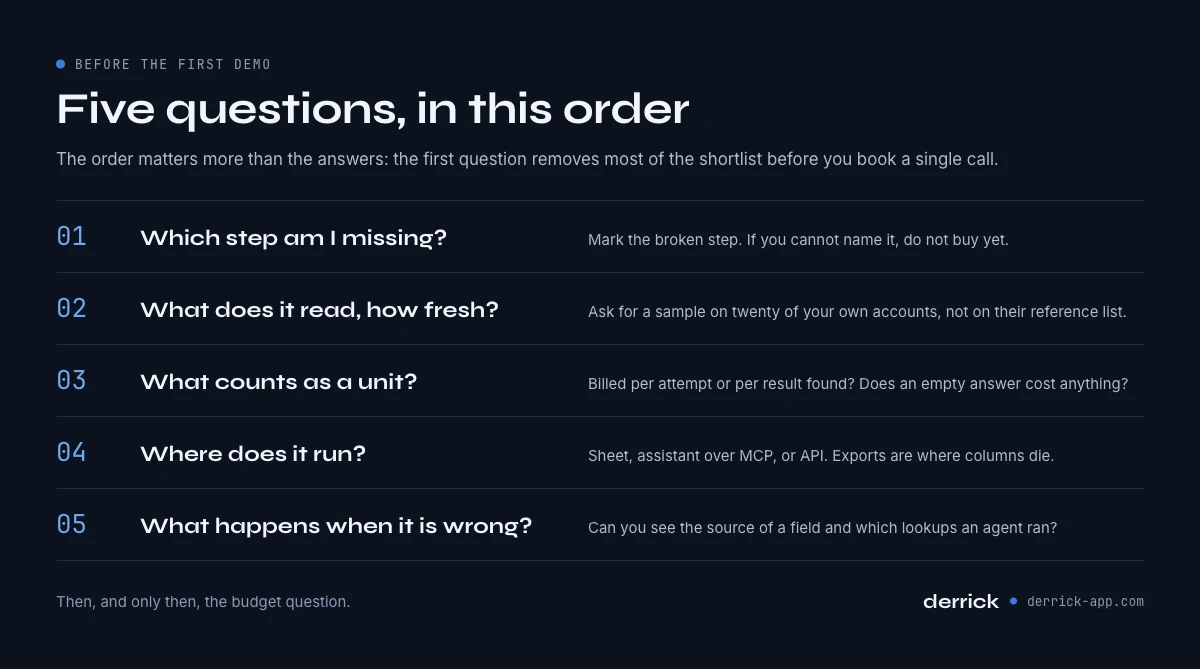
Five questions, in this order. The order matters more than the answers, because the first one removes most of the shortlist before you have booked a single call.
1. Which step am I actually missing? Write down the five steps and mark the one that is broken. Most teams discover they are shopping for step four while step one is the problem, because step four is the part that feels like selling. If you cannot name the step, you are not ready to buy anything.
2. What does it read, and how fresh is it? Ask which sources sit under the product and when a record was last refreshed. A tool that reads a live public source and a tool that reads a snapshot from last year behave identically in a demo and completely differently on your segment. Ask for a sample on twenty of your own accounts, not on their reference list.
3. What exactly counts as a unit, and what is billed when there is no result? This is the question that separates predictable spend from a surprise. Is a credit charged per attempt or per result found. Does an empty response cost anything. Is enrichment billed per row or per field. A vendor that cannot answer this in one sentence is telling you something.
4. Where does it run? The tool has to meet the work where it happens. If your list lives in a spreadsheet, a beautiful separate interface adds an export step, and export steps are where columns die. If your workflow lives in a chat with an assistant, ask whether the tool exposes itself over MCP. If it lives in your product, ask for the API and read the rate limits before the pricing.
5. What happens when the model is wrong? Every tool in this category will be confidently wrong sometimes. The question is whether you find out. Can you see the source of a field. Can you see which lookups an agent ran. Does a low confidence match look different from a high confidence one. A product that returns everything in the same tone of voice is the one that will embarrass you in front of a prospect.
Then, and only then, the budget question. The calculator below prices the data layer exactly, because those unit costs are published per feature. It cannot price the agent you put on top, since that is a seat or a contract that only your quote knows, and inventing a figure for it would make the whole thing useless.
What the calculator is really showing is the shape of the spend rather than the total. The data layer is a few tens of euros a month at the volumes most teams actually work, and it scales linearly with the number of accounts. The agent layer above it is a seat or a contract, and it does not scale with anything you control. Teams that get surprised by the bill are almost always surprised by the second line, not the first.
When not to use AI prospecting tools
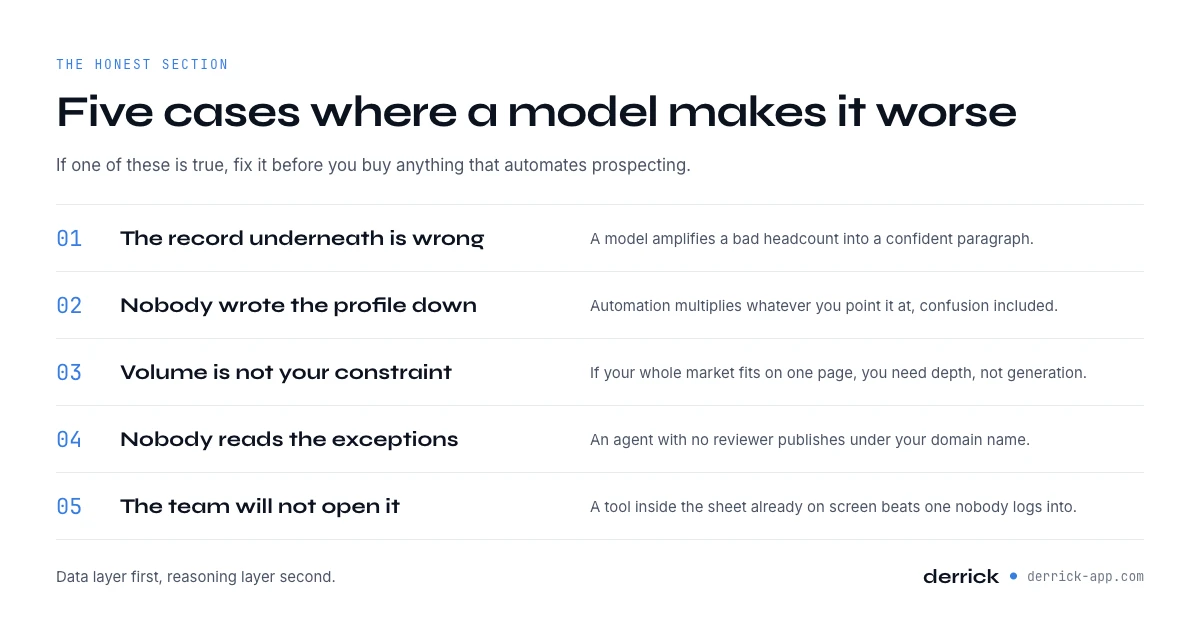
The honest section. There are situations where adding a model to prospecting makes the outcome worse, and they are common enough to be worth naming before you spend.
When the underlying data is wrong. A model does not correct a bad record, it amplifies it. Feed it a company with the wrong headcount and it will write a confident paragraph about a mid-market team that does not exist. The failure is worse than a blank field, because a blank field stops a human and a plausible sentence does not. This is the argument of our AI ready data report, and it is the reason the data layer comes before the reasoning layer in every recommendation on this page.
When you have not defined who you sell to. Automation multiplies whatever you point it at, including confusion. If three people in the company would describe the ideal customer differently, buying a tool that produces a thousand contacts a week produces a thousand arguments a week. Write the profile first, in filterable language, then automate.
When volume is not your constraint. Some businesses have forty possible customers in the world. For them the answer is research and relationships, and a tool that generates lists at scale solves a problem they do not have. The test is simple: if you can name your entire market on one page, you do not need generation, you need depth.
When nobody will read the exceptions. Every automated loop produces cases the rules did not anticipate. If no human is assigned to look at them, those cases do not disappear, they go out. An agent with no reviewer is not a productivity gain, it is an unsupervised publisher using your domain name. The same goes for the facts a model writes into a row or an opening line: a human checks a sample against the live source before anything goes out, because a generated fact reads exactly like a verified one. Asking the model to quote the field each claim came from, as the fifth prompt below does, turns that check into a ten second job.
When the compliance answer is not settled. Processing personal data has rules, and they apply whether or not a model is involved. Have the lawful basis, the retention period and the opt out worked out before the volume goes up, not after the first complaint. Derrick is compliant with the applicable regulations; that is a statement about us, not a comparison with anyone, and it does not do your own compliance work for you.
And a softer one: when the team will not use it. The best predictor of whether a tool produces anything is whether it sits inside a surface people already open. A powerful platform nobody logs into loses every time to a slightly worse capability that lives in the spreadsheet already on screen. That is an adoption fact rather than a product fact, and it is the one that quietly decides most renewals.
Five prompts that work when the agent is plugged into your data
These assume an assistant connected to a data layer, so that each instruction can trigger real lookups rather than a guess. They are short on purpose: long prompts hide which part did the work. Each one names the credit cost of what it triggers so you know what you are authorising.
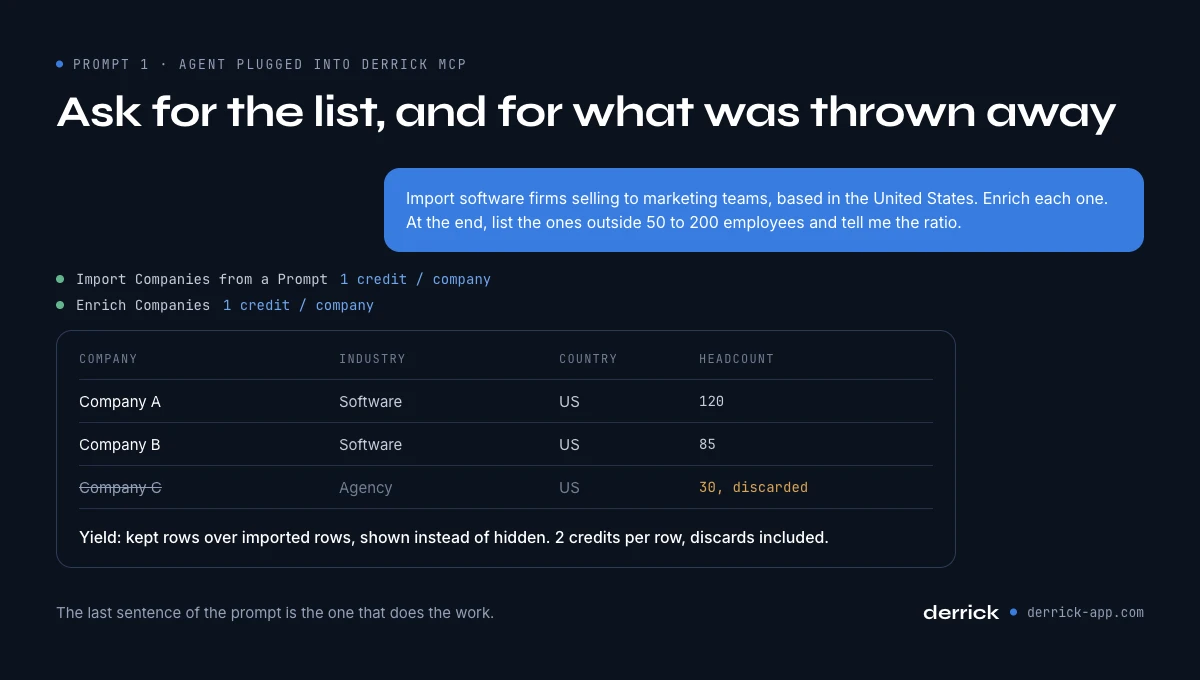
1. Build the candidate list, then tell me what you threw away.
"Import companies matching this description: software firms selling to marketing teams, based in the United States. Then enrich each one and show me a table with name, domain, industry, country and headcount. At the end, list the ones that do not match United States and 50 to 200 employees, and tell me the ratio."
Two lookups, 1 credit per company on each, so 2 credits a row. The last sentence is the important one: it makes the yield visible instead of letting the model quietly present the survivors as the whole answer.
2. Turn my best customer into a segment.
"Take this company as the seed. Find similar companies, enrich them, and group the results by industry and country. Tell me which attribute the seed and the top matches share that I did not ask for."
Lookalike matching bills per matched company, enrichment per company. The second sentence is where it earns its keep, because the common attribute is usually not the industry: it is a structural property such as the size of the sales team or the presence of a partner programme.
3. Find one person per account, and say how sure you are.
"For each company in this list, find the person who owns revenue operations, or the closest equivalent title. Give me the profile URL and mark each row as exact title, adjacent title, or not found. Do not invent a name."
Lead lookup bills per profile. The instruction to mark adjacency is what turns an unusable list into a workable one, because the interesting accounts are precisely the ones where the title is not standard.
4. Order the list by whether anything is happening.
"For each account, check whether it is hiring and for which roles, and pull its most relevant recent news item with the date. Then sort the list by how recently something happened, and explain the top five in one sentence each."
Hiring check bills per company, news bills per item retrieved. The one sentence explanation matters more than the sort: if the model cannot say in a sentence why an account is at the top, the signal is decoration.
5. Draft the opening line from the signal, and cite the field.
"For the top ten accounts, write a two sentence opening that refers to one specific fact from the enriched row. After each opening, quote the field it came from. If there is no usable fact, say nothing rather than write a generic line."
No lookup cost, this is the reasoning layer working on rows you already paid for. The instruction to quote the field is the whole trick: it makes fabrication visible, and it turns a page of plausible copy into something you can audit in ten seconds. The same discipline applied task by task is what our AI sales assistant page is about.
Run these from Derrick MCP inside Claude or ChatGPT, or the same steps from the Google Sheets sidebar if you prefer a grid, or from the API if the loop belongs inside your own product. The choice of surface is a question about where your work already happens rather than a question about the product, as long as you are on a paid plan, which is what the MCP server and the API both require. The web app and the Google Sheets sidebar run on the free plan, and the web app covers the people whose answer is none of the above.
One last thing to take away, because it is the thread through all fourteen sections. The model is not the variable any more. Reasoning has become cheap and good, and everyone has access to the same one. What separates a stack that produces meetings from a stack that produces confident paragraphs is the fill rate on four or five fields, and the honesty of the tool that fills them. Start there, price it per unit, and add the agent once the rows underneath it are worth automating.
Frequently asked questions
What are AI prospecting tools?
How do you use AI for sales prospecting?
What is an AI prospecting agent?
What should I look for in an AI prospecting tool?
What does an AI prospecting workflow cost in credits?
Are there free AI tools for sales prospecting?
Do AI sales prospecting tools replace SDRs?
Does an AI prospecting tool work for a two person team?
Keep reading
Continue exploring this cluster


Ask Claude in Google Sheets: Enrichment Workflow (2026)
Read →

Ask OpenAI in Google Sheets: AI-Powered Outreach (2026)
Read →

Enrich B2B Data From an AI Agent: The Derrick MCP Workflow
Read →

The AI-Ready Data Report 2026: Why AI Fails on Data, Not the Model
Read →