Enrich B2B Data From an AI Agent (Derrick MCP)
Connect Claude or ChatGPT to Derrick MCP and enrich your B2B emails, phones and company data right from the chat, with verified results, never guesses.


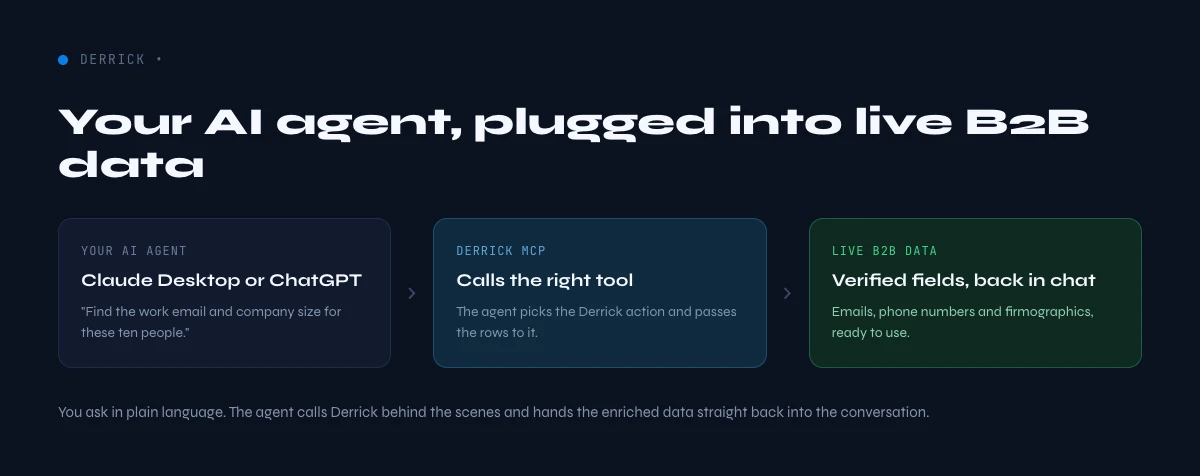
Enriching B2B data from an AI agent means asking an assistant like Claude or ChatGPT, in plain language, to fill in the missing fields on a company or a contact (email, mobile phone, company size, LinkedIn URL, tech stack) and getting back verified data instead of a guess. The agent does not invent the data: it calls a connected enrichment tool through the Model Context Protocol (MCP) and returns the real result. With Derrick MCP, your agent reaches Derrick's live B2B enrichment directly from Claude Desktop, ChatGPT, or any MCP-compatible client.
What does enriching B2B data from an AI agent mean?
A standard chatbot answers from memory. When you ask it for a prospect's email or a company's headcount, it either refuses or hallucinates a plausible value. That is useless for sales and risky for deliverability. An AI agent connected to an enrichment tool is different: it has access to a function it can call, so when you ask "find the work email for this person", it runs the lookup and hands back a verified address with a confidence signal.
The bridge that makes this possible is MCP, an open standard that lets an AI client call external tools in a structured way. Derrick exposes its enrichment actions as MCP tools. Once connected, the agent can find emails, find phone numbers, enrich a LinkedIn profile, enrich a company, or detect a website's tech stack, all from inside the chat. You stay in the conversation; the data work happens behind it.
- Input: a name, a domain, a LinkedIn URL, or a short list pasted into the chat.
- Action: the agent calls the matching Derrick MCP tool.
- Output: verified fields (email, phone, company data) returned in the conversation, ready to copy or push onward.
Why teams move enrichment into the AI agent in 2026
The center of gravity for research work is shifting toward the assistant. Gartner projects that by 2027 a large majority of research and discovery workflows will start inside an AI interface rather than a browser tab or a SaaS dashboard. Sales and growth teams feel this already: reps live in a chat window, draft outreach there, and want the supporting data to appear in the same place rather than forcing a context switch to yet another tool.
Three things make agent-driven enrichment compelling:
- One surface. Research a target account, enrich the decision makers, and draft the first touch without leaving the conversation.
- Natural language instead of column formulas. You describe the job ("get me the mobile numbers for these five people"), and the agent maps it to the right enrichment call.
- Composability. The agent can chain steps: find the company's LinkedIn URL, pull the company data, then find the best-fit contact, in a single request.
This is also a generative engine optimization (GEO) reality, not just a workflow preference. When buyers and reps ask an assistant a question, the answer that gets surfaced is the one backed by a real, callable data source. Connecting a verified enrichment tool to the agent is how you make sure the answer is grounded.
How Derrick MCP connects your AI agent to live B2B data
Derrick is a B2B data enrichment tool you use in its web app, in Google Sheets or through its API, and Derrick MCP extends that same enrichment layer to AI clients. Instead of running an action on a spreadsheet row, the agent runs it on whatever you describe in the chat. The underlying actions are the ones Derrick already provides, so the data quality and the credit model are identical to what you get in the web app or the Google Sheets sidebar.
Derrick MCP is a paid feature, available from the PLUS plan (EUR47.50 per month) and up. It is the connector; the enrichment actions it calls consume credits per result, exactly like in the web app or in Sheets. That separation matters: you are not paying twice, you are paying for the same enrichment results, just triggered from a different surface.
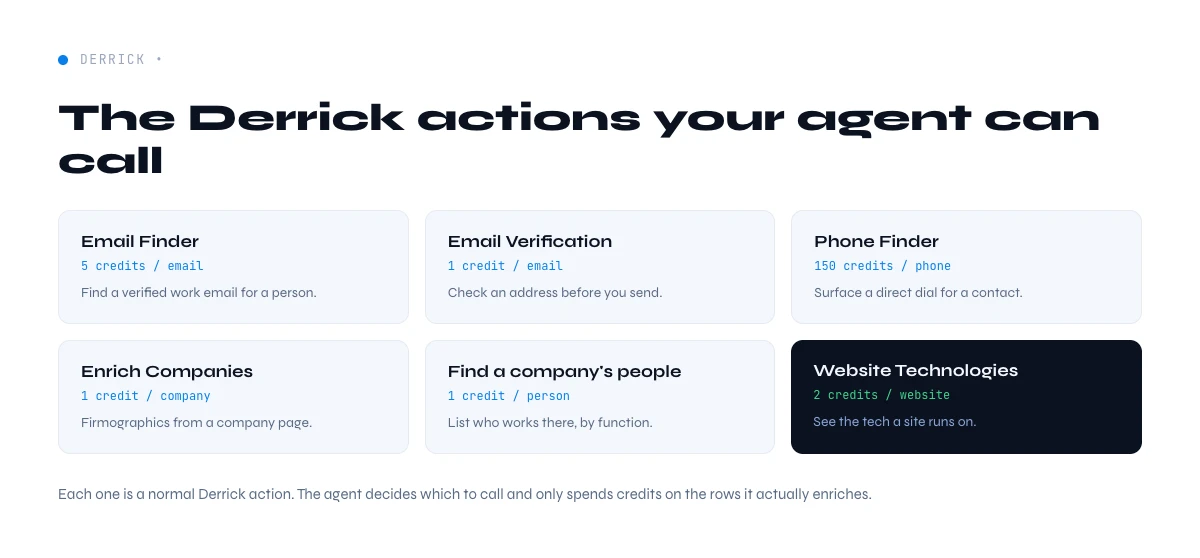
Here is what the agent can reach through the connector, with the verified cost per result:
| What you ask the agent | Derrick action | Cost |
|---|---|---|
| Find a prospect's work email | Email Finder | 5 credits / email |
| Find a mobile phone number | Phone Finder | 200 credits / phone |
| Enrich a person from a LinkedIn URL | Enrich Leads | 1 credit / profile |
| Enrich a target company | Enrich Companies | 1 credit / company |
| Verify an email before sending | Email Verification | 1 credit / email |
| Find a company's LinkedIn URL by name | Search Companies | 1 credit / company |
Because the agent only ever returns what the action actually found, you avoid the core failure mode of asking a raw model for contact data: a confident but fabricated email that bounces and burns your domain reputation.
From your AI assistant, over MCP
Give your agent a data tool, not a browser
Derrick exposes a native MCP server, so Claude, ChatGPT or any MCP client calls the enrichments directly: find a profile, enrich a company, look up an email. The agent gets structured fields back in the conversation instead of guessing from a web page.
- Feature
- Derrick MCP (Claude, ChatGPT, any agent)
- Credit cost
- Included
The first button opens the web app, where your account and key live. API and MCP access starts on the PLUS plan. The second details the surface.
Setup: connect Derrick MCP to Claude Desktop or ChatGPT
The setup is a one-time configuration. At a high level:
- Have a Derrick account on a plan that includes MCP. Derrick MCP is available from PLUS (EUR47.50 per month). The free plan (100 credits per month) lets you try the enrichment actions in the web app or in Sheets first, but the MCP connector itself is a paid capability.
- Open your AI client's connector settings. In an MCP-compatible client (Claude Desktop, ChatGPT, or another MCP host), add Derrick as an MCP server using the connection details from your Derrick workspace.
- Authenticate once. The connector authorizes against your Derrick workspace so the actions draw on your credit balance.
- Confirm the tools are available. Ask the agent what enrichment tools it can use; you should see the Derrick actions listed.
From that point on, enrichment is a sentence away. You do not script anything, and you do not leave the chat.
A worked example: enrich a short list by conversation
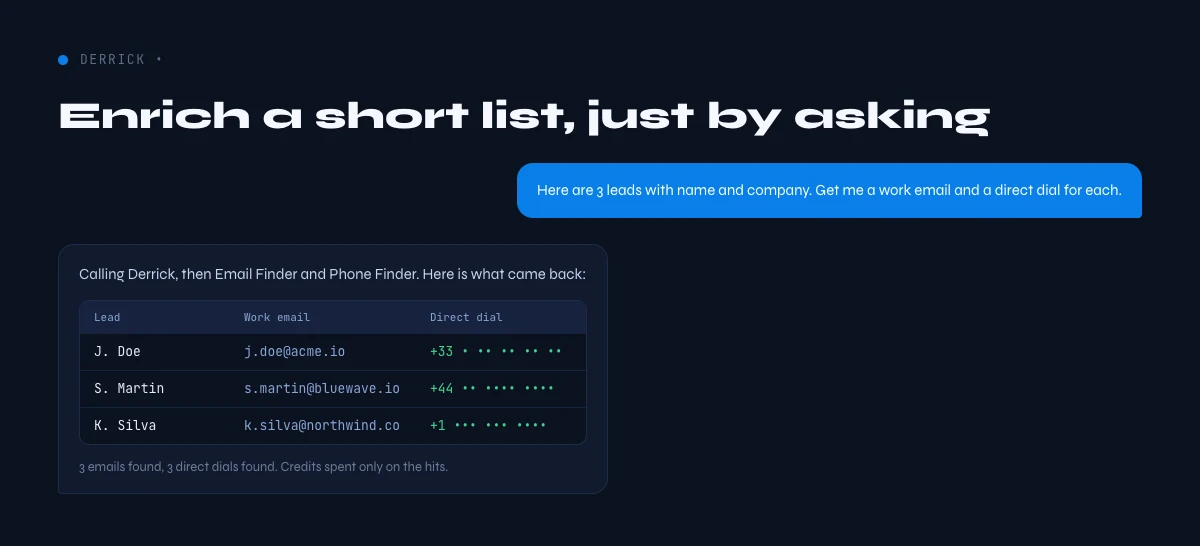
Say you copy three rows from a target-account list into the chat: a name and company for each. A useful sequence looks like this:
- "For each of these three people, find their work email and verify it." The agent calls Email Finder, then Email Verification, and returns three verified addresses with a status.
- "Now enrich the companies they work at." The agent calls Enrich Companies and adds headcount, industry, and the company LinkedIn URL.
- "Draft a one-line opener for each, referencing something specific about their company." The agent uses the enriched context it just retrieved to write grounded, non-generic openers.
The point is that the data and the writing happen in one place. The agent is not guessing the emails; it retrieved them. It is not guessing the company size; it enriched it. That grounding is what separates an agent workflow you can trust from a clever autocomplete.
The app works through your list row by row. 100 free credits every month.
What you can realistically ask for
Agent-driven enrichment shines on bounded, well-described jobs. Strong requests share three traits: a clear input, a clear field to fill, and a clear format for the output.
- Contact discovery: "Find the work email and mobile for this list of LinkedIn URLs."
- Account research: "Enrich these ten companies and tell me which ones have more than 200 employees."
- List hygiene: "Verify these 50 emails and flag the risky ones before I import them."
- Best-fit routing: "Among these contacts at the same account, which one best matches a RevOps buyer?"
What to avoid: open-ended requests with no verifiable source ("guess the revenue of this private company"). The agent is strongest when it can call a real action and return a real result.
Derrick MCP vs. Ask Claude in Sheets: which fits your workflow
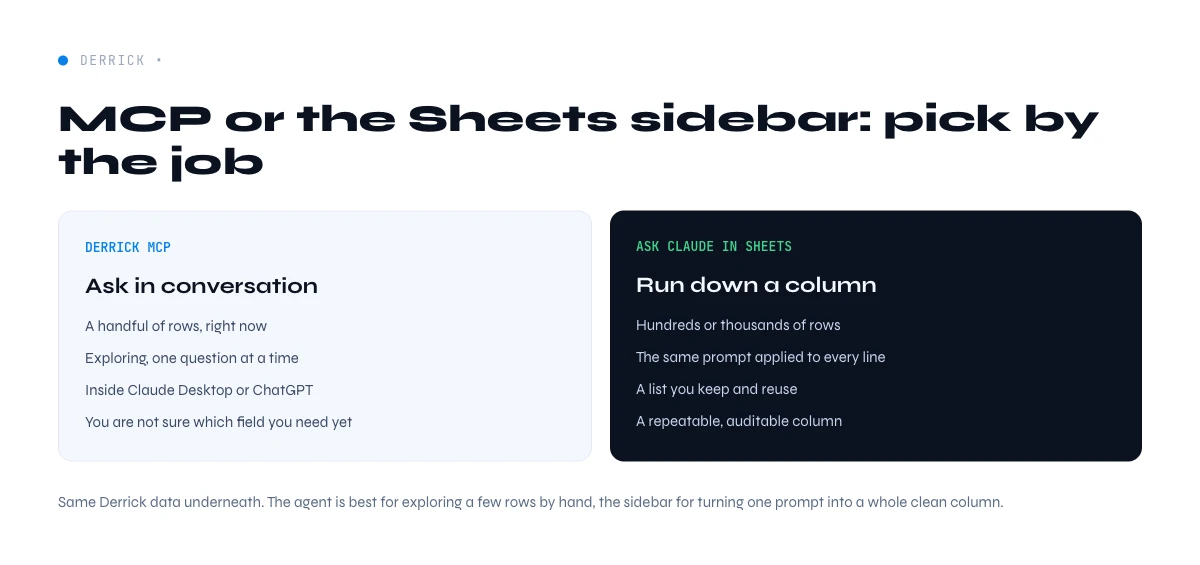
Derrick gives you two AI-native paths, and they solve different problems. The MCP route brings enrichment into your AI client. The in-spreadsheet route brings AI reasoning into your sheet.
- Use Derrick MCP when your working surface is the chat: ad hoc research, conversational enrichment, and drafting in the same window. See the AI Data Enrichment hub for the full picture.
- Use Ask Claude in Google Sheets when your working surface is the spreadsheet and you want to summarize, classify, or personalize at the row level across thousands of rows.
- Use Ask OpenAI in Google Sheets when you need strict structured extraction or scoring at scale inside the sheet.
Many teams run both: enrich and explore conversationally with the agent for a handful of accounts, then switch to the Sheets sidebar to process a full list. Derrick keeps the data layer consistent across both, so you are not reconciling two sources of truth.
Common mistakes to avoid
- Trusting a raw model for contact data. Without a connected tool, an assistant will fabricate emails. Always route contact discovery through a real action.
- Skipping verification. Found is not the same as valid. Run Email Verification before you import a list into your sending tool.
- Treating the connector as free unlimited data. The connector is a subscription; each enrichment result still consumes credits. Estimate volume with the picker below.
- Vague prompts. "Tell me about this company" is weaker than "Enrich this company and return headcount, industry, and LinkedIn URL only."
Which fields can an agent realistically fill?
The honest answer is: the fields a real enrichment action can return, and no more. That constraint is a feature, not a limitation, because it keeps your pipeline data trustworthy. Through Derrick MCP, an agent can reliably populate the columns that B2B teams actually route, score, and sequence on, and it will tell you when a value is not available rather than inventing one.
- Work email. Found from a name and company or a LinkedIn URL, then optionally verified so you only import deliverable addresses.
- Mobile phone. Retrieved for direct outreach when a number exists for the contact, returned as a real value or not at all.
- Company firmographics. Headcount, industry, location, and the company LinkedIn URL, so you can qualify and segment an account list in the same breath.
- Person-level profile data. Title, seniority, and current company pulled from a LinkedIn URL, which is what powers best-fit contact routing.
- Email validity. A clean or risky status on an existing address, so list hygiene happens before the send, not after the bounce.
What an agent should not be asked to fill is anything with no callable source: private revenue figures, subjective opinions, or fields Derrick does not enrich. When a request maps to a real action, you get a real value. When it does not, the correct answer is "no source", and a well-connected agent will say so instead of guessing.
Keeping agent enrichment clean and compliant
Moving enrichment into a chat does not change your data obligations, and treating the agent as a serious part of the stack means applying the same discipline you would in a spreadsheet. A few habits keep the workflow both clean and defensible:
- Enrich with a business purpose. Work with B2B contact data for legitimate outreach, and keep your enrichment tied to accounts that fit your ICP rather than scraping indiscriminately.
- Verify before you send. Running verification on found emails protects deliverability and sender reputation, which matters even more when an agent can assemble a list in seconds.
- Keep the source traceable. Because each field comes from a Derrick action rather than the model's imagination, you can always point to where a value came from, which is exactly what a data-governance review will ask for.
- Mind the credit budget. Set expectations on volume up front, since an agent that enriches in bulk consumes credits in bulk. The picker on this page helps you size a month of usage before you commit.
The combination of a verified data source and a transparent per-result cost is what lets you put agent enrichment in front of a RevOps lead or a data-governance stakeholder without flinching. The agent is fast, but the data underneath it is accountable.
How Derrick fits
Derrick is a B2B enrichment tool, in its web app and as a Google Sheets sidebar, that scales from a handful of lookups to large lists, and Derrick MCP brings that same engine to your AI agent. You get verified emails, mobile numbers, company data, and LinkedIn enrichment, on a transparent per-result credit model, whether you trigger it from a chat or from a spreadsheet. Start free with 100 credits per month to test the enrichment actions in the web app or in Sheets, then add the MCP connector from the PLUS plan when you want your agent to do the data work for you.
Frequently asked questions
What does it mean to enrich B2B data from an AI agent?
What is Derrick MCP?
Does the AI agent invent the data?
How much does agent-driven enrichment cost?
Can I use Derrick MCP with both Claude and ChatGPT?
Should I use Derrick MCP or Ask Claude in Google Sheets?
Can I try it for free?
Keep reading
Continue exploring this cluster


Ask Claude in Google Sheets: Enrichment Workflow (2026)
Read →

Ask OpenAI in Google Sheets: AI-Powered Outreach (2026)
Read →

AI Sales Assistant: What It Reads Before It Writes
Read →