Enterprise CRM Software: 9 Platforms Compared, and How to Test Them With Your Own Data
Compare 9 enterprise CRM software platforms by list price and data tools, then test them on your own accounts before you sign. Scorecard and cost table.


What enterprise CRM software is, and where the line with a small business CRM falls
Enterprise CRM software is a customer relationship management platform built for organizations where several teams, regions or legal entities share the same customer records: it adds the permissions, governance, data volumes, integrations and account hierarchies that a single sales team never needs. The short definition of what a CRM holds is in our glossary entry on CRM data.
Most guides to enterprise CRM software start with a list of vendors. This one starts with what the category is, gives the list and a table, then spends most of its length on what lists leave out: how to test a platform on your own accounts, and what to fix in those accounts before you load them.
The line with a small business CRM is not the number of seats. It is the number of things that have to agree. A small business CRM serves one team selling one way. An enterprise CRM has to serve sales, marketing and service at once; several business units with their own pipelines; countries with their own rules; and a parent company that wants one view of a customer who buys from three of its subsidiaries. That brings five requirements:
- Permissions and governance: who sees and edits which accounts, fields and reports, with an audit trail.
- Account hierarchies: parent companies, subsidiaries, legal entities and brands linked, so revenue and activity roll up.
- Integration: ERP, billing, marketing automation, support, data warehouse, through APIs with limits you can live with. Our glossary entry on CRM integration covers the patterns.
- Volume: hundreds of users and millions of records without slowing down.
- Configuration: custom objects, processes and approval flows, ideally without a developer for each change.
Enterprise CRM systems by type
Enterprise CRM systems also differ by type. An operational CRM runs day-to-day sales, marketing and service; an analytical CRM turns the data into insight. Most enterprise platforms do both, delivered as a cloud-based CRM, with on-premise CRM deployments now limited to specific regulated cases.
When an enterprise CRM is not the answer
A new CRM fixes problems that come from the tool: missing features, a platform that cannot scale, integrations that break. It does not fix problems that come from the data or from adoption. If reps do not log their activity in the current CRM, they will not log it in the next one. If half your accounts have no industry, no headcount and two duplicates each, migrating them copies the problem into a more expensive system.
Changing enterprise CRM software is a project measured in months for a large organization, and the data work inside it is often the part that runs late. Before you start a selection, check which kind of problem you have. If it is the data, the order of work is a data plan first, then the tool, as laid out in our CRM data strategy playbook. If it is the tool, the rest of this guide helps you choose, and test the choice on your own data before you sign.
Enterprise CRM software compared: 9 platforms at a glance
The platforms below are listed in alphabetical order. We do not rank them: we do not test CRMs, and a ranking would be an opinion without a test behind it. Positioning summarizes how each vendor describes itself on its own site. Prices are the public list prices of the top or enterprise tier, checked on October 5, 2026: on each vendor's pricing page for most, in Oracle's official global price list (no price on its website), in the price data that feeds Zoho's and Creatio's pricing pages, and none for SAP, which publishes no price. Enterprise deals are negotiated, so treat them as a starting point, not a quote. Derrick is not a CRM and is not in this list.
| Platform | Positioning (summary of the vendor's own description) | Trade-off | Top or enterprise tier list price | Import, dedupe and hierarchy (public docs) |
|---|---|---|---|---|
| Creatio | AI CRM that automates sales, marketing and service with no-code and agentic capabilities | Broad no-code configuration; a platform fee plus a product fee to budget | Enterprise: $75 per user for the platform plus $15 per user for Sales (billing period not stated), minimum $10,000 a year; Unlimited on quote | Excel import wizard with column mapping; duplicate search rules and merge; parent account field |
| Freshsales | AI-powered CRM to boost sales efficiency | Simple to adopt and priced low per user; check hierarchy depth and API limits against your volumes | Enterprise: $59 per user per month, billed annually | CSV/XLSX import; duplicate matching at import on email, ID, name or custom fields; parent accounts up to five levels |
| HubSpot Sales Hub | One AI platform built on your complete CRM data | Fast adoption and one platform for marketing, sales and service; onboarding fee and tier-gated features | Enterprise: $150 per seat per month, billed annually, plus a $3,500 one-time onboarding fee | CSV/XLSX import; contacts deduplicated by email and companies by domain; parent and child company associations |
| Microsoft Dynamics 365 Sales | Agentic CRM that helps teams close deals faster with insights, automation and collaboration tools | Deep fit with Microsoft 365 and the Power Platform; licensing across editions and add-ons takes work | Sales Premium: $150 per user per month, paid yearly; Sales Enterprise: $105 | Import wizard for Excel, CSV and XML; default duplicate detection rules for accounts and contacts; parent account hierarchies |
| Oracle Sales | Sales, quoting, buying, order management, billing and renewals on a single platform | Strong for companies already on Oracle Fusion applications; a three-year term and a 10-user minimum in the price list | Fusion Sales Enterprise: $150 per named user per month, 10 users minimum, per Oracle's global price list | CSV import management; duplicate identification during and after import (data quality license); parent account attributes on import |
| Salesforce Sales Cloud | Fully customizable sales force automation software | The broadest ecosystem and customization; cost rises with editions, add-ons and partners | Max: $550 per user per month, billed annually (Advanced: $395, Core: $195) | Data Import Wizard and Data Loader; duplicate and matching rules; Parent Account hierarchies |
| SAP Sales Cloud | CRM with AI for sales, to increase revenue and customer engagement | Natural fit with SAP ERP; no public price, so budget only after a quote | Not public: quote on request | CSV import with external keys; duplicate checks on import; native account hierarchy |
| Sugar Sell (SugarAI) | CRM that helps sellers sell by spotting issues and opportunities in CRM and ERP data | Guidance for sellers built on CRM and ERP data; the brand recently moved from SugarCRM to SugarAI | Sugar Sell Premier+: $155 per user per month, billed annually; Precision+ editions on quote | CSV import wizard; duplicate check on selected fields at import; parent account through a member-of field |
| Zoho CRM | Close more. Pay less. | Low list price and a broad suite; check API credits and admin depth at your volume | Ultimate: $52 per user per month, billed annually ($65 monthly); Enterprise: $40 | CSV/XLS/XLSX import with add or update; unique fields to block duplicates; parent account and member accounts |
The 9 enterprise CRM platforms in detail
For each platform: who it suits, the trade-off to weigh, and what its public documentation says about the three data jobs that decide a migration: importing records, catching duplicates and representing account hierarchies. Alphabetical order again. The documentation summaries come from each vendor's public help pages as we read them on the same date; editions differ, so confirm each point for the edition you are quoted.
Creatio
- Who it suits: Creatio suits companies that want to configure processes themselves, without a developer for each change, and that run sales, marketing and service on one platform.
- Trade-off: The pricing structure: a platform fee per user plus a fee per product, with a minimum annual purchase, so the cost of adding a second team is easy to underestimate.
- Data tools in the public docs: Its documentation describes an Excel import wizard where you map columns and choose which columns identify a duplicate (create or update), a find-and-merge duplicates function driven by search rules, and a parent account field that links branches and affiliates to a holding, visible on the account's connections.
Freshsales
- Who it suits: Freshsales, from Freshworks, suits mid-size companies that want a CRM their reps adopt quickly, at a list price far below most enterprise suites.
- Trade-off: Headroom: its documentation sets limits that a large group should check, such as a 5 MB import file size, one parent per account and up to five hierarchy levels, and an hourly API limit that depends on the plan.
- Data tools in the public docs: Its import detects duplicates by matching on the primary email, the record ID, the name or custom fields you choose; phone numbers match only when exact.
HubSpot Sales Hub
- Who it suits: HubSpot Sales Hub suits companies that want marketing, sales and service on one platform with fast adoption, and that value ease of use over deep customization.
- Trade-off: That several governance and customization features sit only in the top tiers, with a one-time onboarding fee on top of seat prices.
- Data tools in the public docs: HubSpot deduplicates contacts by email and companies by domain automatically, offers a duplicate management tool to review and merge records (check which tiers include it), and links companies through parent and child associations that can be created in bulk by import, once the parent exists. Its API limits for privately distributed apps on Enterprise are 190 requests per 10 seconds and 1,000,000 per day per account. How to keep HubSpot records filled automatically is covered in our guide to HubSpot enrichment workflows; if your team is smaller than the enterprise case, our HubSpot vs Pipedrive comparison asks the same data questions of two mid-market CRMs.
Microsoft Dynamics 365 Sales
- Who it suits: Dynamics 365 Sales suits organizations already standardized on Microsoft 365, Teams and the Power Platform, and those that need sales and ERP from the same vendor.
- Trade-off: Licensing complexity: editions, add-ons and Power Platform capacity have to be planned together.
- Data tools in the public docs: Microsoft's documentation describes an import wizard for Excel, CSV and XML files with downloadable templates; default duplicate detection rules for accounts and contacts, configurable custom rules (up to five published per record type) and bulk duplicate detection jobs; and accounts that reference a parent account, shown as visual hierarchies. Its Dataverse service protection limits allow, by default, 6,000 requests per user and per web server within a five-minute window.
Oracle Sales
- Who it suits: Oracle Sales, part of Oracle Fusion Cloud, suits large companies that run or plan to run Oracle's ERP and want quoting, orders and renewals on the same platform as sales.
- Trade-off: Commitment: the price list sets a minimum of 10 users and a standard three-year subscription term, and some data quality functions require a separate license.
- Data tools in the public docs: Oracle's documentation describes import management from CSV files to create, update or delete account data, duplicate identification against the database and within the import batch, post-import duplicate resolution, and account hierarchies loaded at import through parent account attributes.
Salesforce Sales Cloud
- Who it suits: Salesforce Sales Cloud suits companies that need deep customization, a large partner ecosystem and an app marketplace for every edge case.
- Trade-off: Total cost: editions, add-ons, implementation partners and administrators add up, and the list price of the top edition is the highest in this table.
- Data tools in the public docs: Its documentation describes the Data Import Wizard for standard and custom objects and Data Loader for larger volumes; native duplicate and matching rules, with a standard account matching rule active by default; and account hierarchies built through the Parent Account field.
SAP Sales Cloud
- Who it suits: SAP Sales Cloud suits companies that run SAP ERP and want customer, order and pricing data to flow between sales and back office.
- Trade-off: Transparency: SAP publishes no list price, so the cost is only known after a quote, and the edition names are not shown on the pricing page.
- Data tools in the public docs: SAP's documentation describes CSV imports where each record carries an external key and child records point to their parent's key, duplicate checks on import (documented in detail for leads, partly in documentation for an earlier version of the product), and a native account hierarchy that maps a parent company to its subsidiaries.
Sugar Sell (SugarAI)
- Who it suits: Sugar Sell, from the company now branded SugarAI (formerly SugarCRM), suits mid-size and large companies that want a configurable CRM with guidance for sellers built on CRM and ERP data.
- Trade-off: Continuity: the brand changed recently, so confirm the product roadmap, the support terms and the partner network in your region during due diligence.
- Data tools in the public docs: Its documentation describes an import wizard for CSV files with a duplicate check on the fields you select, a duplicate check in the application itself, and a member-of field that sets a parent and child relationship between accounts.
Zoho CRM
- Who it suits: Zoho CRM suits companies that want enterprise features at a list price well below the large suites, often alongside other Zoho applications.
- Trade-off: Headroom at very large scale: check the API credits of your edition against your nightly integrations, and the depth of governance features against your audit needs.
- Data tools in the public docs: Its documentation describes imports from CSV, XLS and XLSX files into any module, with a choice to add, update or both; unique fields that block duplicates on creation and import; and a parent account lookup that lists child companies as member accounts.
In the web app or Google Sheets
Complete the test extract before the vendor loads it
Hierarchies and segment reports in a new CRM depend on account fields your current data often lacks. Import a sample of your accounts into the web app and Derrick fills industry, headcount, headquarters and website for each company from its LinkedIn page, so you can measure the fill rate before and after and see what the full migration will need. Your LinkedIn account connects through the Derrick Chrome extension.
- Feature
- LinkedIn Companies Profile Enrichment
- Credit cost
- 1 credit per company enriched
The first button opens the web app (nothing to install): 1 credit per company enriched, 100 free credits every month. The second details the feature and its cost per plan.
How to score enterprise CRM software: a weighted scorecard you can copy
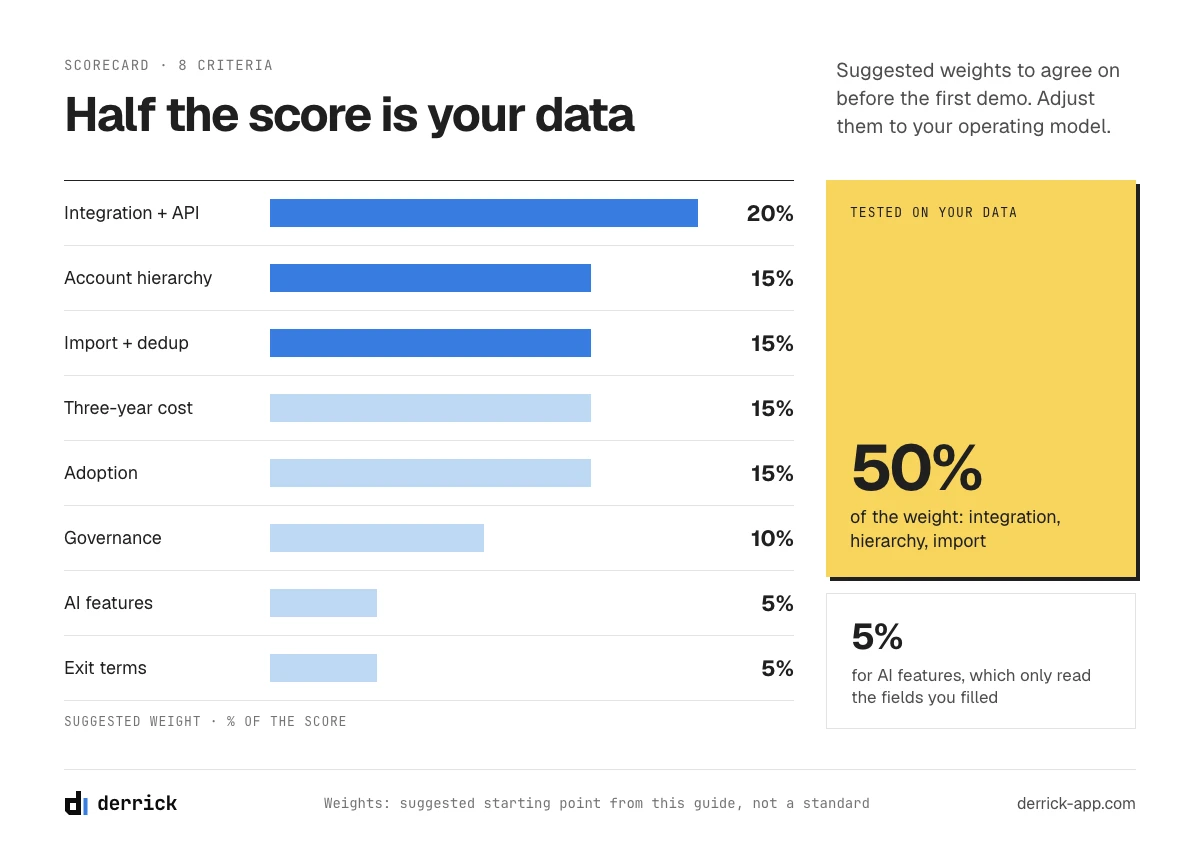
Every vendor of enterprise CRM software will score well on its own demo. A written scorecard, agreed before the first demo, keeps the decision on your criteria. The weights below are a starting point, not a standard. Adjust them to your operating model: a company that grows by acquisition will weigh hierarchies and migration higher; a single-country company with a simple process will weigh adoption higher. The third column is the part most scorecards leave out: how to test each criterion with your own data rather than with the vendor's demo.
| Criterion | Suggested weight | How to test it with your own data |
|---|---|---|
| Integration and API limits | 20% | Name your three critical integrations (ERP, billing, marketing automation) and ask the vendor to show each one running, with the API limits that apply to your edition and volume. |
| Account hierarchy | 15% | Load one real customer group (parent, subsidiaries, entities) and check that revenue and activity roll up as your finance team expects. |
| Import and deduplication tools | 15% | Load your test extract with its duplicates left in. Count how many the platform catches with its native rules, and how many it misses. |
| Governance and permissions | 10% | Recreate two real permission cases: a regional manager who must not see another region, and a partner who sees only shared accounts. |
| Three-year total cost | 15% | Fill the cost table in part 09 for each finalist, renewal included. |
| Adoption | 15% | Have five reps work the test extract for a day: log a call, move a deal, find an account. Time it. |
| AI features and what they need | 5% | For each AI feature in the demo, ask which fields it reads, then check how many of your accounts have them filled. |
| Exit terms | 5% | Ask how you export all data, history and attachments included, and in what format, if you leave. |
The test no demo shows: load your own accounts before you sign
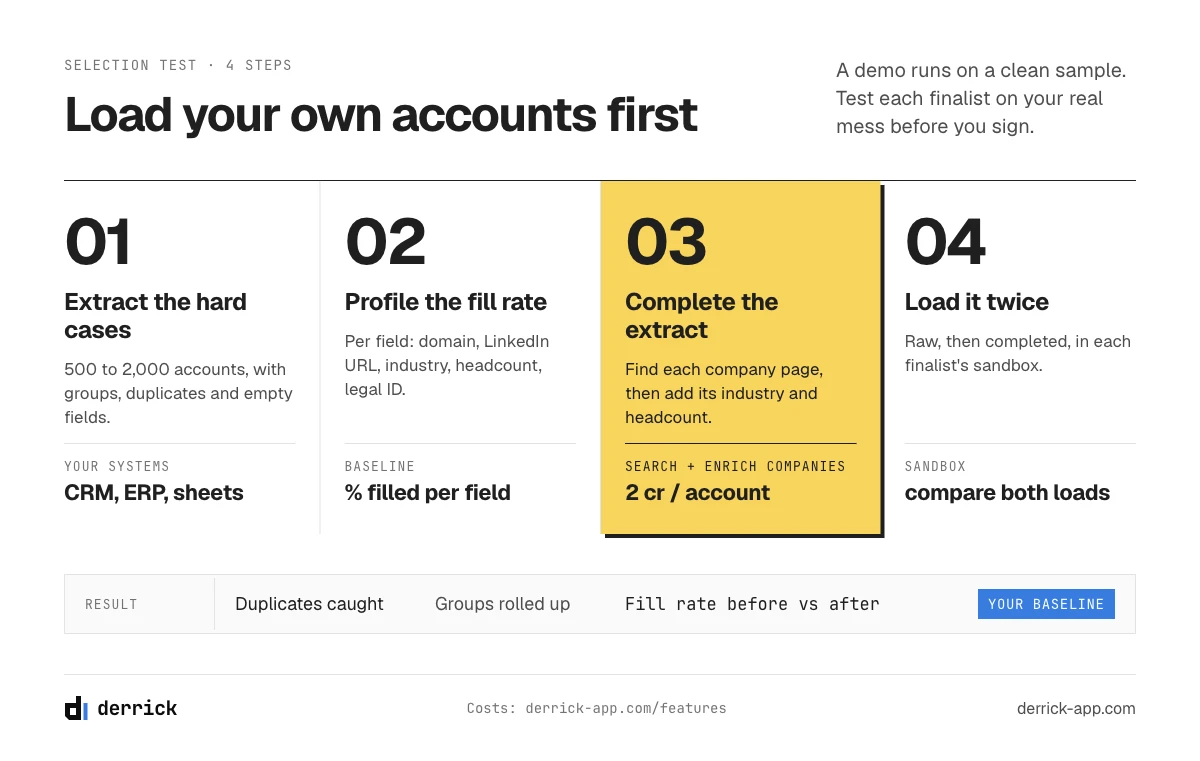
A demo runs on a clean, complete, sample account. Your data is neither, and no enterprise CRM software will look the same once it holds your real accounts. The single most useful step in an enterprise CRM selection is to load a sample of your own records into each finalist and look at what happens. Five moves:
- Extract 500 to 2,000 accounts from your current systems, with their contacts and open deals, chosen to include your hardest cases: a customer group with subsidiaries, accounts that exist twice, accounts with half their fields empty.
- Profile the extract: for each field your reports and routing need (domain, company LinkedIn URL, industry, headcount, headquarters country, legal identifier), count how many accounts have it filled. Write the fill rate down per field. It is your baseline.
- Load it as it is into each finalist's sandbox. Do not clean it first: you want to see how each platform handles your real mess.
- Look at four things: duplicates caught and missed by the native rules, the hierarchy you get for your customer groups, the reports by industry and size (and how they show accounts with empty fields), and the time an admin spends fixing the import.
- Ask the vendor three questions: which of these steps your edition supports without a paid add-on, which API limits will apply to your nightly integrations, and who on their side handles a failed migration.
Then complete the extract (part 08) and load it again. The difference between the two loads shows you how much of your future CRM's value depends on the data, not on the platform.
Account hierarchies: the enterprise data problem
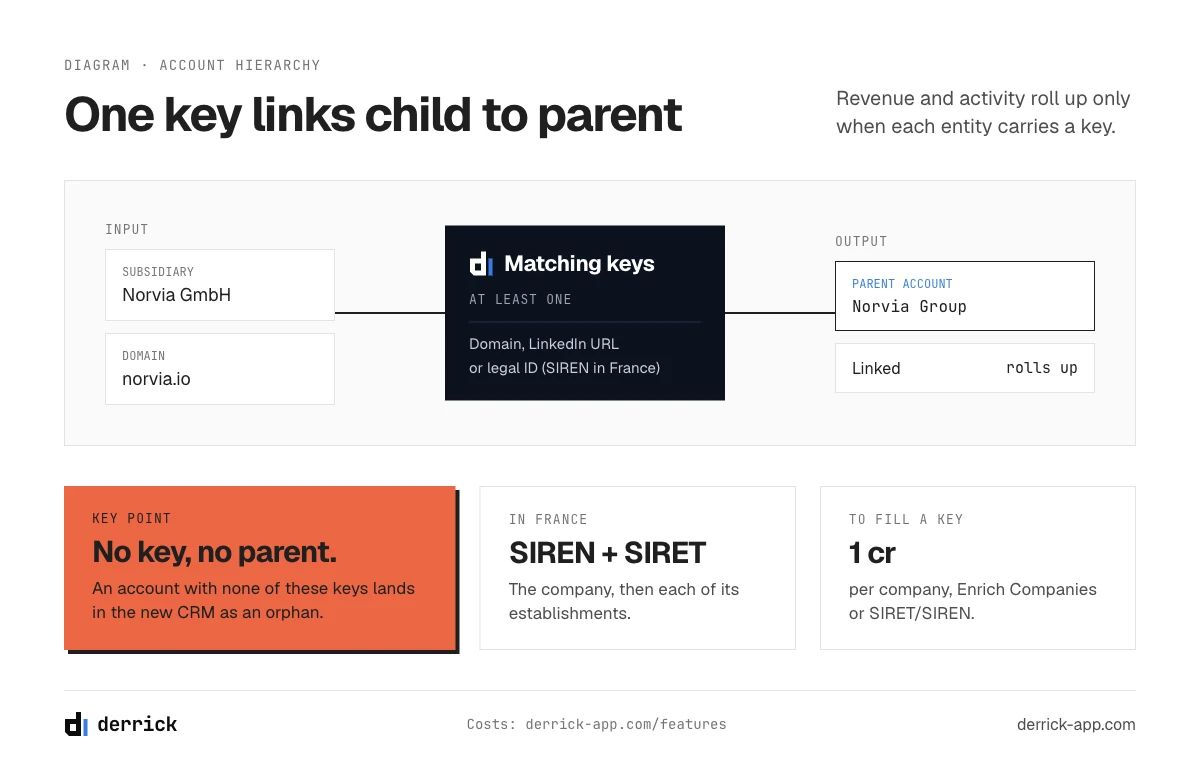
An enterprise customer is rarely one account. It is a parent company, subsidiaries in several countries, legal entities that sign contracts, and brands that buy separately. An enterprise CRM represents this with parent and child account links, and every rollup (revenue, pipeline, activity, health) depends on those links being right.
The links are built on fields, and the fields are what usually fail:
- Company domain: the most common matching key, but subsidiaries often share the parent's domain or use their own.
- Company LinkedIn URL: a stable identifier for the company page, useful to tell two companies with similar names apart.
- Legal identifier: the registration number of each entity. For French companies, the SIREN identifies the company and the SIRET each establishment, which makes them the most reliable key for entities in France.
- Headquarters country and headcount: they tell a holding from an operating subsidiary and a regional office from a head office.
In the test extract, check how many accounts of your customer groups have at least one of these keys filled. An account with none of them cannot be linked to its parent by any rule, and will land in your new CRM as an orphan.
Enterprise CRM data migration in 7 steps
- Extract every source: the current CRM, spreadsheets, the ERP's customer table, marketing automation.
- Profile each source: fill rate per field, number of duplicates, formats that disagree (country names, industries, phone formats).
- Write survivorship rules: when two sources disagree on a field, which one wins. Usually the billing system for legal names, the CRM for owners, the most recent verified source for contacts.
- Dedupe before you load, never after: match on domain, company LinkedIn URL or legal identifier rather than on name. Where duplicates come from and which key to merge on is covered in our guide to CRM contact management.
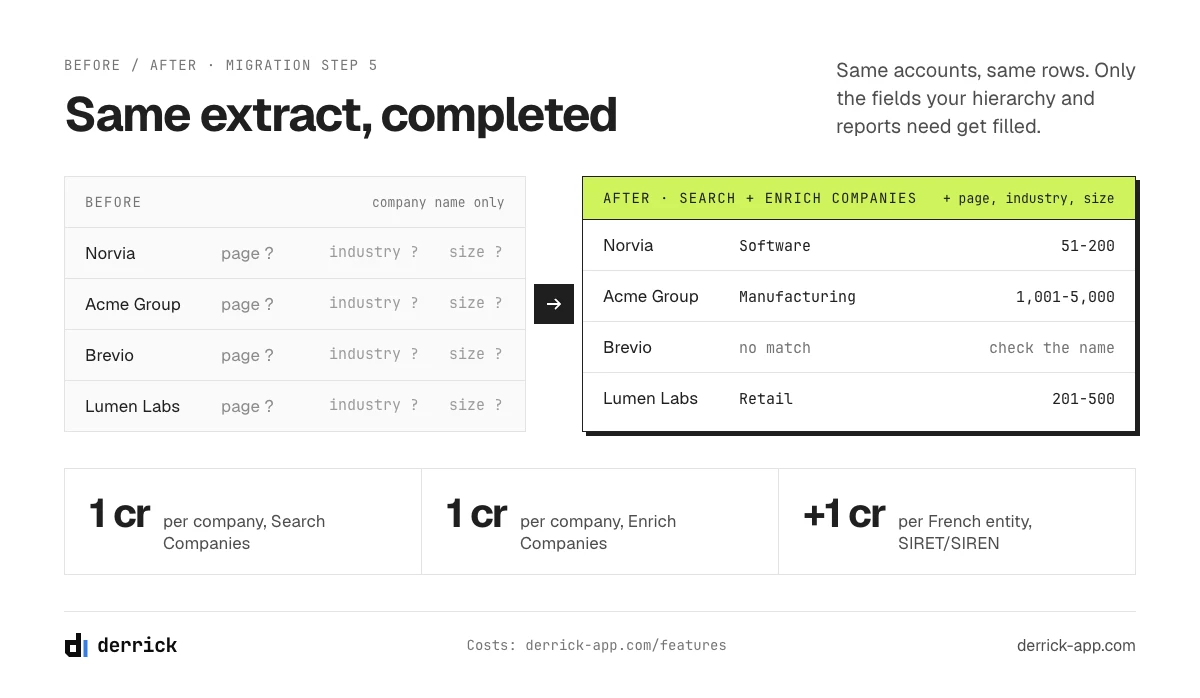
- Complete the accounts and measure the fill rate: fill the fields your reports, routing and hierarchies need, then measure the fill rate per field again against your baseline from part 06.
- Load in a sandbox, run the reports and the integrations, fix, and load again.
- Reconcile and cut over: compare record counts and totals between old and new systems, then switch.
Step 5 is where Derrick fits, and only on the test extract described in part 06; the full migration belongs to your migration team and its tools. On an extract of 500 to 2,000 accounts, the Derrick web app fills what the hierarchy and the reports need: import the extract as a CSV, find each company's LinkedIn page from its name with Search Companies (1 credit per company), then add industry, headcount, headquarters and website with Enrich Companies (1 credit per company); for French entities, SIRET/SIREN enrichment adds the legal identifiers (1 credit per company). All three are on the free and paid plans; the first two read LinkedIn and need your LinkedIn account connected through the Derrick Chrome extension. From company names, that is 2 credits per account, so an extract of up to 5,000 accounts fits in the Standard plan (20 euros a month, 10,000 credits); SIRET/SIREN adds 1 credit per French entity, so an all-French extract costs 3 credits per account and fits there up to 3,333 accounts, while a larger one needs the Plus plan (47.5 euros a month, 25,000 credits). Measure the fill rate per field before and after: that number tells you, and the vendor, what the full migration will need. How to run enrichment on a CRM at scale is covered in our CRM data enrichment guide.
A frequent question at this stage: should you migrate all historical data? Usually not. Migrate open deals, active accounts and the history your reports and contracts actually use (often two to three years), and archive the rest where it can still be queried. Every old record you load is a record you will have to keep clean.
What enterprise CRM software really costs over three years
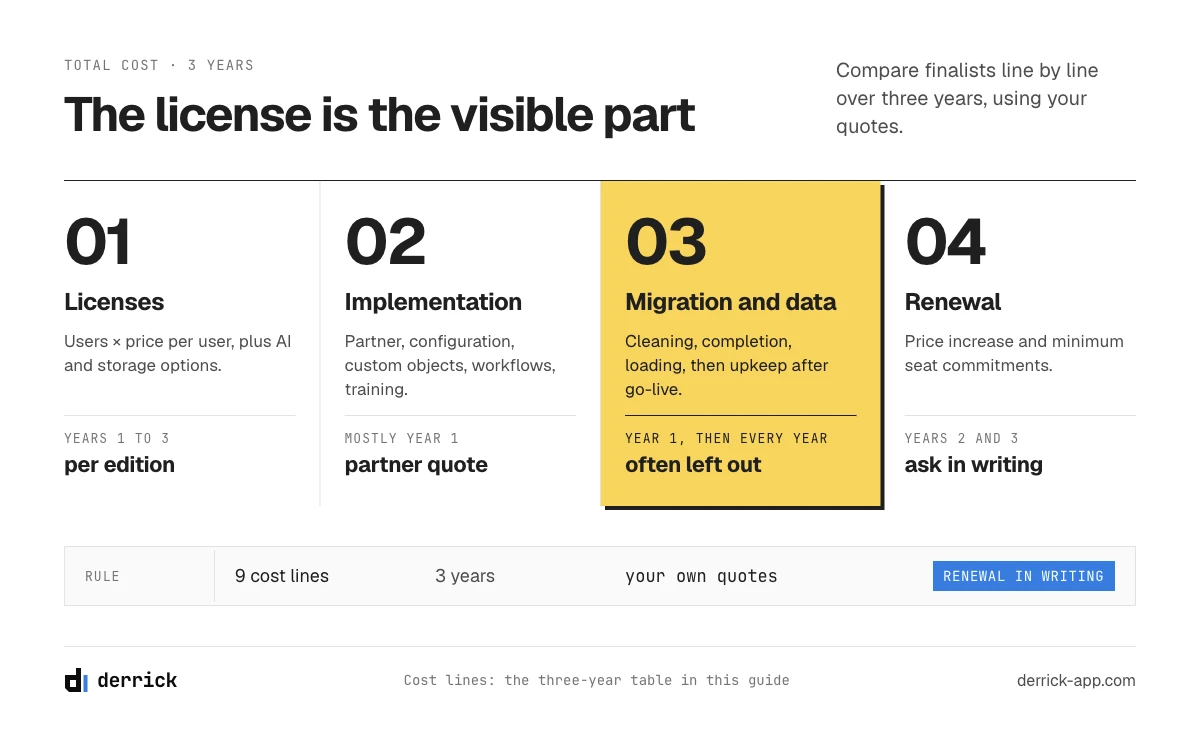
License prices are the visible part of the cost. Compare finalists on three years, line by line, and fill the table with your own quotes. The first-year discount says little about the renewal: ask for the renewal terms in writing.
| Cost line | What it covers | Year 1 | Year 2 | Year 3 |
|---|---|---|---|---|
| Licenses | Users × price per user, by edition; add-ons (AI, analytics, extra storage) | |||
| Implementation partner | Configuration, custom objects, workflows, training | |||
| Integrations | Connectors, middleware, custom development, API overage | |||
| Data migration | Extraction, cleaning, completion, loading, reconciliation | |||
| Environments | Sandboxes, test and staging environments | |||
| Premium support | Support tier, success manager, uptime commitments | |||
| Internal team | CRM administrators, RevOps, data owners | |||
| Data upkeep | Keeping accounts and contacts current after go-live | |||
| Renewal | Price increase at renewal, minimum seat commitments |
The only figures we publish on this page are the vendors' public list prices in part 03, dated. Implementation and migration costs vary too much with scope to give a fair range.
Edge cases and selection mistakes
Edge cases
- After an acquisition: two or three CRMs to merge, with overlapping customers. The hierarchy and the survivorship rules decide the outcome more than the platform.
- Regulated industries: data residency, audit trails and access controls become hard requirements; check the editions that include them.
- Global teams: languages, currencies, time zones and local rules; check how the platform separates regional data and reports.
- Fast growth: the edition that fits today's 200 users may not fit next year's 800; ask for the price and the API limits at your expected size, not your current one.
Five selection mistakes, and the data consequence of each
- Choosing on the demo. Consequence: the first load of your real data is the first time anyone sees how the platform handles it.
- Migrating everything. Consequence: years of stale records become the starting point of the new system.
- Deduping after the load. Consequence: duplicates are already attached to deals, activities and owners, and every merge breaks something.
- Ignoring hierarchies until go-live. Consequence: rollups are wrong on day one, and the finance team stops trusting CRM revenue.
- Buying AI features without checking their inputs. Consequence: scoring and recommendations run on empty fields and produce confident, wrong outputs. What such models need is explained in our guide to revenue intelligence platforms.
After go-live: keeping the accounts in your new enterprise CRM current
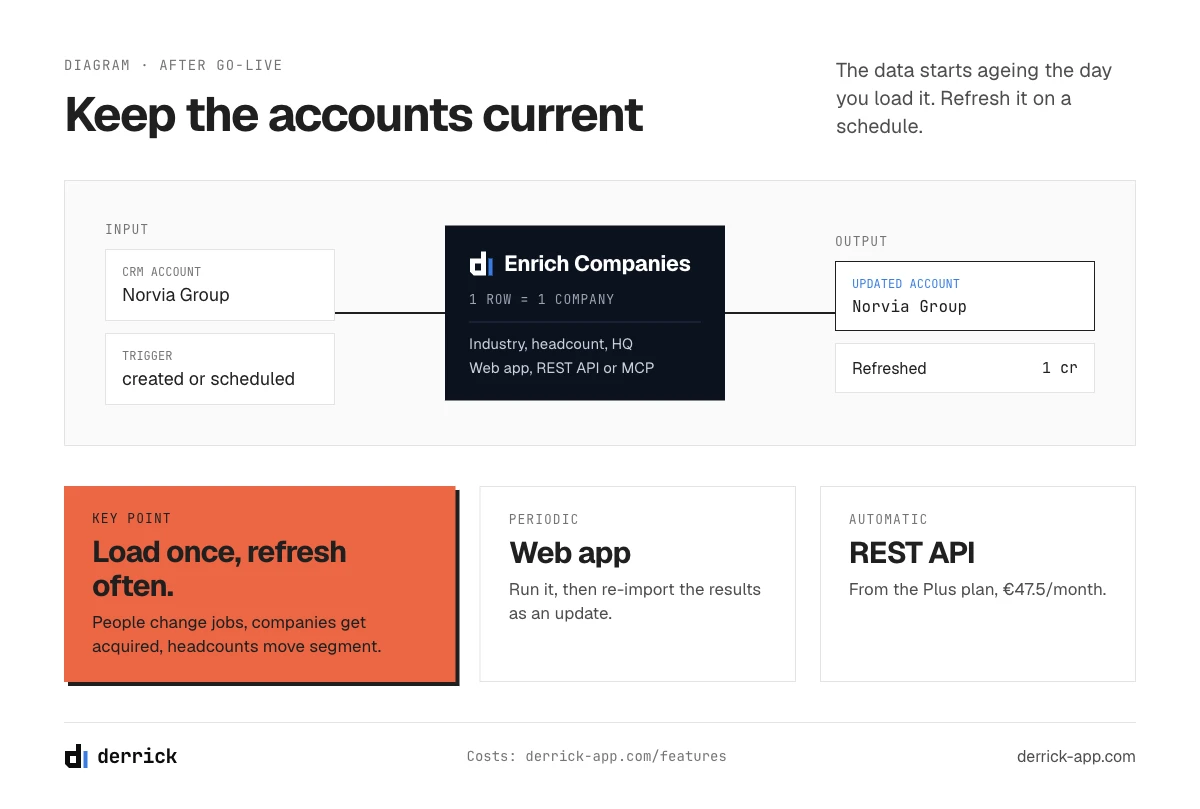
The data you load starts ageing the day you load it: people change jobs, companies get acquired, headcounts move out of a segment. How fast that happens is measured in our CRM data quality report. A new enterprise CRM filled with two-year-old data reproduces the problem you wanted to leave.
Derrick keeps account records current once the CRM is live. For a periodic refresh of a list of accounts, run Search Companies and Enrich Companies in the Derrick web app and re-import the results as an update. To refresh records automatically, call the Derrick REST API from your integration layer when an account is created or on a schedule; API and MCP access start with the Plus plan (47.5 euros a month, 25,000 credits). For a question about a single account during a deal, Derrick in Claude or any MCP client answers in the conversation. On every surface, the actions that read LinkedIn need your LinkedIn account connected through the Derrick Chrome extension. The full list of actions and costs is on the features page.
An enterprise CRM selection checklist
- Confirm the problem is the tool, not the data or adoption (part 02).
- Shortlist three to four platforms from the table in part 03.
- Score them with the weighted scorecard (part 05), weights adjusted to your model.
- Load your own extract into each finalist's sandbox, as it is (part 06).
- Check how each represents one real customer group (part 07).
- Complete the extract, measure the fill rate, and load it again (part 08).
- Fill the three-year cost table with written quotes, renewal included (part 09).
- Plan the data upkeep after go-live before you sign (part 11).
Frequently asked questions
What is enterprise CRM software?
What is the difference between an enterprise CRM and a small business CRM?
How much does enterprise CRM software cost?
How long does an enterprise CRM implementation take?
Should you migrate all historical data to a new CRM?
What are the types of CRM?
What makes enterprise CRM projects fail?
Keep reading
Continue exploring this cluster


CRM Enrichment: How to Enrich Your HubSpot or Salesforce Data (Complete Guide)
Read →

HubSpot Data Enrichment: How to Automate It With Workflows
Read →

CRM Data Quality Report 2026: Decay, Cost & the Enrichment Gap
Read →

CRM Data Strategy: The 5-Layer Playbook (2026)
Read →