Lead Scoring with Data Enrichment: The 100-Point Model, Attribute by Attribute
Lead scoring with data enrichment: a 100-point model, the weight of every attribute, the column that fills it, what a scored lead really costs. Start free.


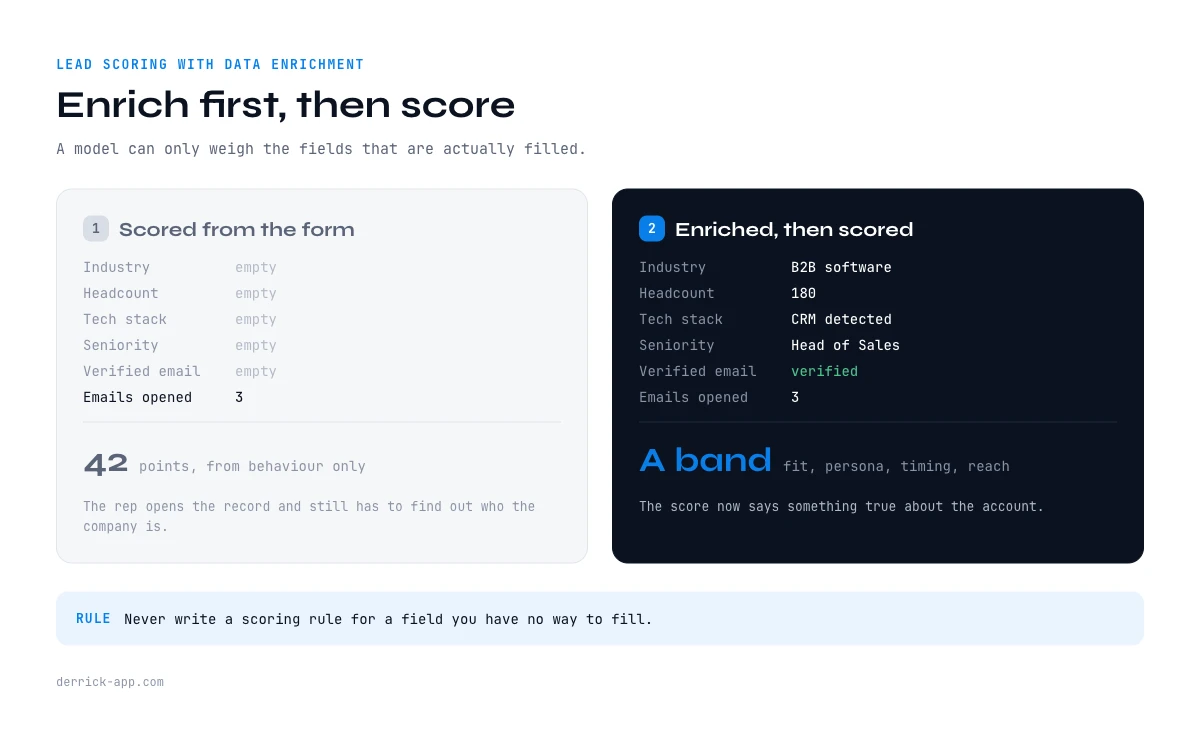
Most lead scoring models are built from what a form asked and what a marketing tool watched. Someone filled in a job title, opened three emails and downloaded a PDF, so the record gets 42 points and lands in a queue. The rep opens it and finds a Gmail address, no company size, no industry, and no idea whether this account is even in the target market.
That is not a scoring problem. It is a data problem wearing a scoring costume. A model can only weigh the fields that are actually filled, and in most CRMs the fields that would decide the ranking are the emptiest ones on the record.
Lead scoring with data enrichment flips the order. You enrich first so the fields exist, then you score, and the number finally means something. What follows is a complete 100 point model you can copy, block by block, with the weight of every attribute, the exact column that fills it, what that column costs per row, and how to calibrate the whole thing on your own closed won deals instead of trusting someone else's weights.
What lead scoring with data enrichment actually means
Lead scoring with data enrichment is the practice of appending firmographic, technographic, timing and contact attributes to a record before the scoring rules run, so that the score reflects who the account is rather than how the record happened to arrive. Enrichment is the data operation. Scoring is the ranking operation. They are two different jobs, and the second one is worthless when the first one has not happened.
The practical consequence is an ordering rule: never write a scoring rule for a field you have no way to fill. If your model gives 15 points for "headcount between 50 and 500" and headcount is blank on most of your records, that rule isn't scoring anything. It is silently pushing every incomplete record toward the bottom of the queue. The exact opposite of what a score is for.
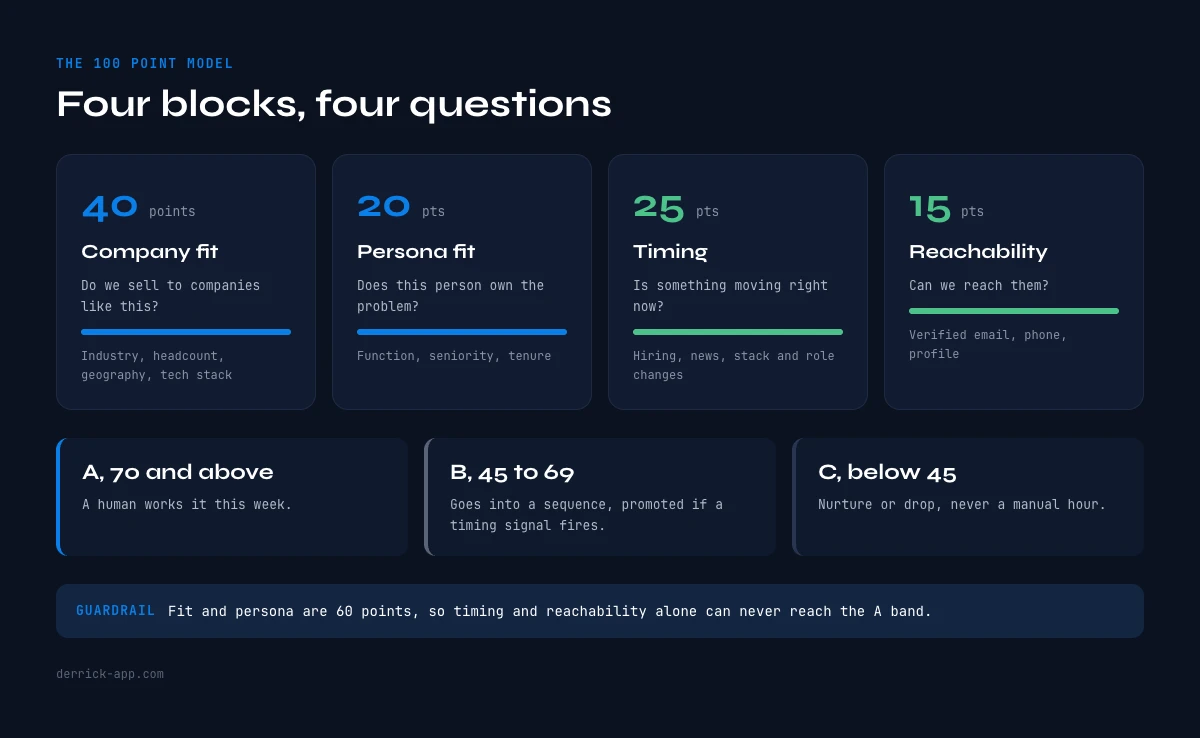
A useful model has four blocks and answers four questions in this order. Is this the kind of company we sell to? Is this the kind of person who owns the problem? Is something happening right now that makes the conversation timely? And can we actually reach them? Fit, persona, timing, reachability. Everything else is decoration.
Why most scoring models score empty fields
Three failure patterns show up again and again, and all three come from the same root.
The form is the only source. A record built from a web form contains what a stranger was willing to type into six boxes. Company name is often a nickname, headcount is a self-reported band, and industry is whatever the dropdown offered. Scoring rules written on those fields inherit their noise.
Behaviour is overweighted because it is the only thing measured. Email opens and page views are easy to count, so they end up carrying most of the score. The problem is that engagement without fit produces the worst possible outcome for a sales team: a high scoring record that a rep spends forty minutes on before discovering the company has eleven employees and no budget line. Fit should gate engagement, not compete with it.
Nobody scores reachability. A perfect fit account with no valid email and no direct number is not a lead this quarter. It is a research task. Most models score it identically to an account where the email is verified and the mobile is in the sheet, which makes the queue lie to the rep about how much work is left.
The fix in all three cases is the same. Fill the deciding fields from a real source, then weight them. That is what the model below does.
The 100 point model for lead scoring with data enrichment
Here is the whole thing on one screen. Weights are a starting template, not a law of nature: part 09 covers how to move them using your own closed won data.
| Block | What it answers | Points | Enrichment it depends on |
|---|---|---|---|
| Company fit | Do we sell to companies like this? | 40 | Firmographics, technographics |
| Persona fit | Does this person own the problem? | 20 | Profile attributes, seniority, function |
| Timing | Is something moving right now? | 25 | Hiring, news, stack and role changes |
| Reachability | Can we actually start the conversation? | 15 | Verified email, direct phone, profile URL |
The split matters more than the exact numbers. Fit and persona together are 60 points, which means an account can never reach the top band on timing and reachability alone. A funded company hiring aggressively with a verified mobile still tops out at 40 if it is the wrong kind of company, and 40 is below the action threshold. That is deliberate. It is the guardrail that stops a signal driven model from filling your week with well timed conversations you cannot win.
Three bands come out of the total. A, 70 and above: a human works it this week. B, 45 to 69: it goes into a sequence, and gets promoted if a timing signal fires later. C, below 45: nurture or drop, and never a manual hour.
In the web app or Google Sheets
Score the rows you just enriched
A scoring model needs the inputs present on every row before it means anything. Once the fields are filled, Ask Claude applies your criteria row by row, in the web app or in the sheet, and returns the score in its own column, sortable like any other.
- Feature
- Ask Claude
- Credit cost
- 2 credits per call
The first button opens the web app (nothing to install): 2 credits per call, available from the STANDARD plan. The second details the feature and its cost per plan.
Block 1, company fit: 40 points
This is the block that decides whether the rest of the record deserves any spend at all, which is why it runs first and why every attribute in it is cheap to fill.
| Attribute | Rule | Points |
|---|---|---|
| Industry | In your primary segment: 12. Adjacent segment: 6. Outside: 0 | 12 |
| Headcount | Inside your winning band: 10. One band away: 5. Two or more: 0 | 10 |
| Geography | Core market: 8. Servable market: 4. Elsewhere: 0 | 8 |
| Tech stack | Runs a tool your product complements or replaces: 10. Neutral stack: 3 | 10 |
Industry, headcount and geography come from the company record itself. The Enrich Companies feature pulls them from a LinkedIn company page at 1 credit per company, and it is available on the free plan, which matters here: fit scoring is the one block you want to run on every account, including the ones you are about to disqualify. The thirty attributes worth considering in this block are laid out in the firmographic attributes guide, and the size bands that actually separate a winning account from a time sink are covered in more depth there too.
Tech stack is the attribute most teams skip and the one that most often carries real predictive weight, because it is the closest thing to a statement of intent a company makes in public. A company that runs a specific CRM, a specific analytics stack or a specific outbound tool has already decided that the problem you solve is a problem worth paying for. Website Technologies reads it from a domain at 2 credits per website, and the technographic data guide covers what the signal does and does not tell you.
One rule earns its place here more than any bonus: a hard zero. If headcount is two bands away from your winning band, or the geography is outside anything you can serve, the record should be capped at C regardless of what the other blocks say. A disqualifier is not a negative point. It is a ceiling.
The app works through your list row by row: 2 credits per call.
Block 2, persona fit: 20 points
Company fit tells you the account is worth a conversation. Persona fit tells you whether this particular human is the one to have it with.
| Attribute | Rule | Points |
|---|---|---|
| Function | Owns the budget or the pain: 8. Adjacent team: 4. Unrelated: 0 | 8 |
| Seniority | Decision level for a deal your size: 8. One level below: 4 | 8 |
| Tenure in role | Under 18 months: 4. Over 18 months: 2 | 4 |
Function and seniority both come off the profile. Enrich Leads returns them from a LinkedIn profile URL at 1 credit per profile on the free plan, and where you only have a name and a company, Find a company's people lists the staff of an account at 1 credit per person so you can pick the right one instead of scoring whoever happened to fill in a form.
Tenure deserves its four points for a reason that is easy to test on your own history: a person who recently took a role is still choosing tools, and a person three years into the same role has already made those choices and defended them. It is the cheapest proxy for openness you can put in a column. The broader set of person level fields worth carrying is in the essential contact attributes guide.
Seniority is where the deal size calibration lives. If your average contract closes on a team lead's budget, scoring VPs highest points your reps at people who will delegate the conversation back down two levels. Score the level that signs, not the level that impresses.
Block 3, timing: 25 points
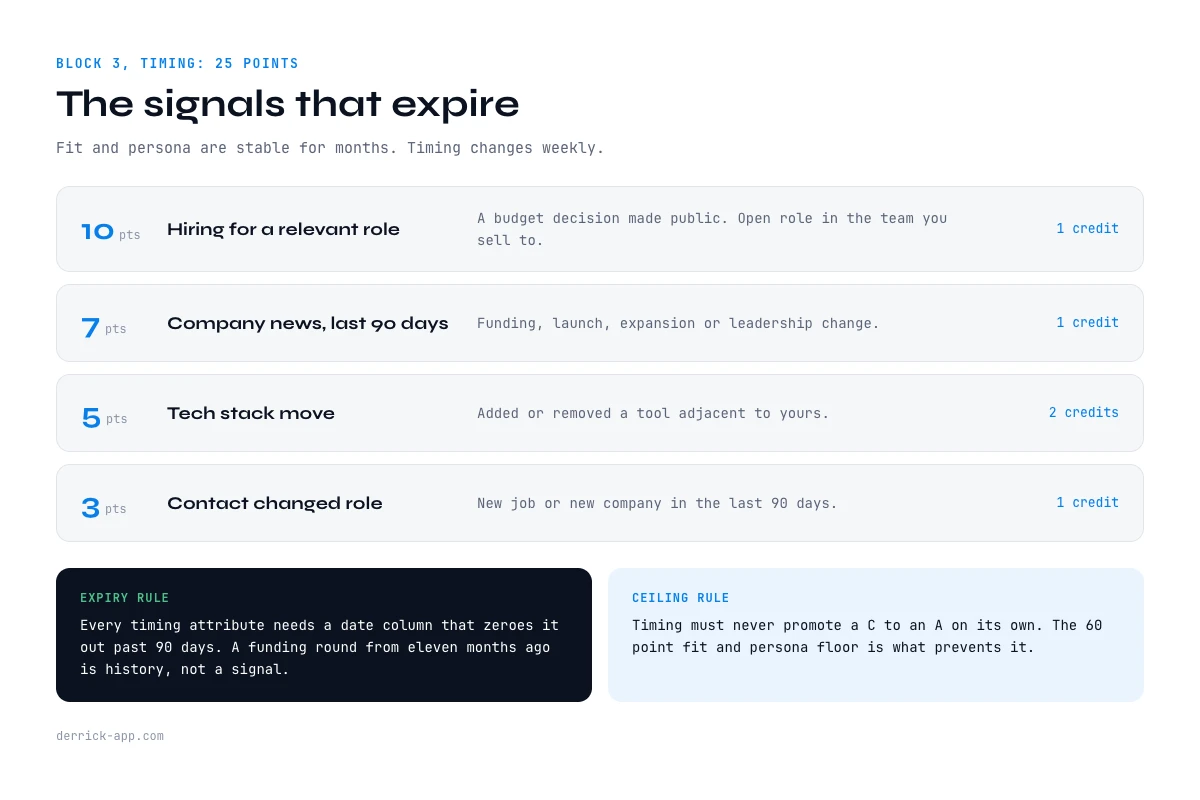
Fit and persona are stable for months. Timing is the block that changes weekly, and it is the only reason to re-run a score on a record you already qualified.
| Signal | Rule | Points |
|---|---|---|
| Hiring for a relevant role | Open role in the team you sell to: 10. Hiring elsewhere: 3 | 10 |
| Company news in the last 90 days | Funding, launch, expansion, leadership change: 7 | 7 |
| Tech stack move | Added or removed a tool adjacent to yours: 5 | 5 |
| Contact changed role in the last 90 days | New job or new company: 3 | 3 |
Hiring is the strongest of the four because it is a budget decision made public. A company opening a role on the team you sell to has already agreed internally that this area needs more capacity, and the tool conversation is a smaller version of the same conversation. Company Hiring Signal returns which companies are hiring and for which roles at 1 credit per company, on the free plan. News is the second lever: Google News Scraper pulls the most relevant recent article per company at 1 credit per news item. Enough to know whether a funding round or a launch happened, without reading anything by hand.
Two warnings apply to this whole block. Timing points must expire. A funding round from eleven months ago is history, not a signal, so every timing attribute needs a date column and a rule that zeroes it out past 90 days. And timing must never be able to promote a C to an A on its own, which is exactly what the 60 point fit and persona floor prevents. The difference between a signal and noise, and how to tell them apart, is the subject of the behavioral attributes guide, and the trigger events worth wiring in are catalogued in the timing attributes guide.
If you would rather have signals arrive than go looking for them, Signal monitors accounts and contacts for job changes, funding, hiring bursts and stack moves and fires an alert when one happens. It is available from the Standard plan at 20 euros per month, and it charges 1 credit per signal that actually fires, which means the timing block stops being something you refresh and starts being something that updates itself.
Block 4, reachability: 15 points
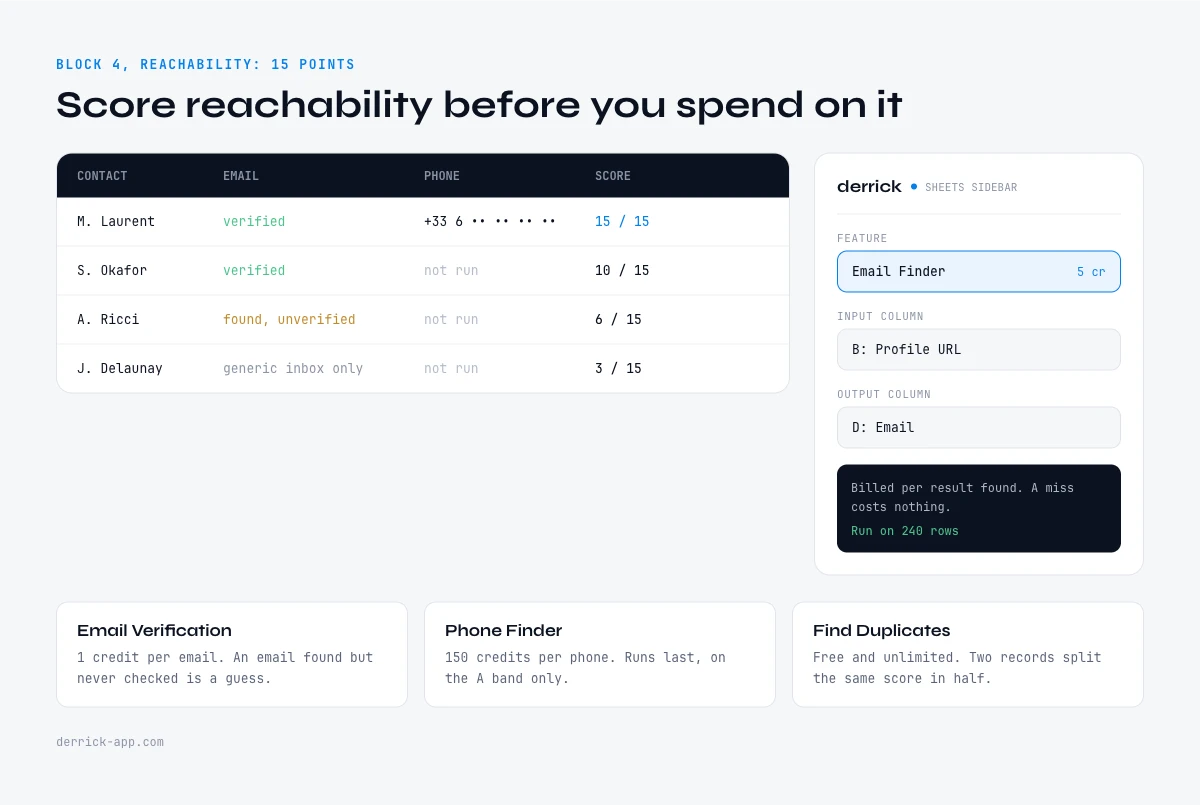
This is the block almost nobody scores, and the one that most changes what a rep's day feels like. A queue sorted without it mixes accounts that are ready to contact with accounts that still need an hour of research, and the rep pays that difference every morning.
| Attribute | Rule | Points |
|---|---|---|
| Verified professional email | Found and verified: 8. Found, unverified: 4. Generic inbox only: 1 | 8 |
| Direct phone number | Direct or mobile line on file: 5 | 5 |
| Profile URL resolved | LinkedIn profile identified: 2 | 2 |
The verification step is the part worth insisting on. An email that was found but never checked is a guess. A guess sent at volume costs deliverability, and that debt is paid by every future campaign rather than by this one. Email Finder charges 5 credits per email and bills per result found, so a miss costs nothing, and Email Verification checks it at 1 credit per email.
Phone is the expensive one and should be treated as such. Phone Finder costs 200 credits per phone number, billed per result found. That price is a feature of the model, not a problem with it: it forces the phone column to run last, on the A band only, after fit and persona have already earned it. Scoring reachability before spending on it is what keeps the expensive lookup off the part of your file that was never going to be called.
Free and unlimited on every plan, Find Duplicates belongs in this block too, for an unglamorous reason: two records for the same person split the same score in half and put both copies in the B band, where neither gets worked.
What lead scoring with data enrichment costs per lead
The arithmetic is worth doing once, because it decides how you sequence the columns rather than whether you can afford them.
| Column | Feeds | Cost | Plan |
|---|---|---|---|
| Enrich Companies | Industry, headcount, geography | 1 credit / company | Free plan and up |
| Company Hiring Signal | Hiring points | 1 credit / company | Free plan and up |
| Website Technologies | Tech stack fit and stack moves | 2 credits / website | Paid plans |
| Google News Scraper | News points | 1 credit / news | Paid plans |
| Enrich Leads | Function, seniority, tenure | 1 credit / profile | Free plan and up |
| Email Finder | Reachability | 5 credits / email found | Paid plans |
| Email Verification | Reachability | 1 credit / email | Paid plans |
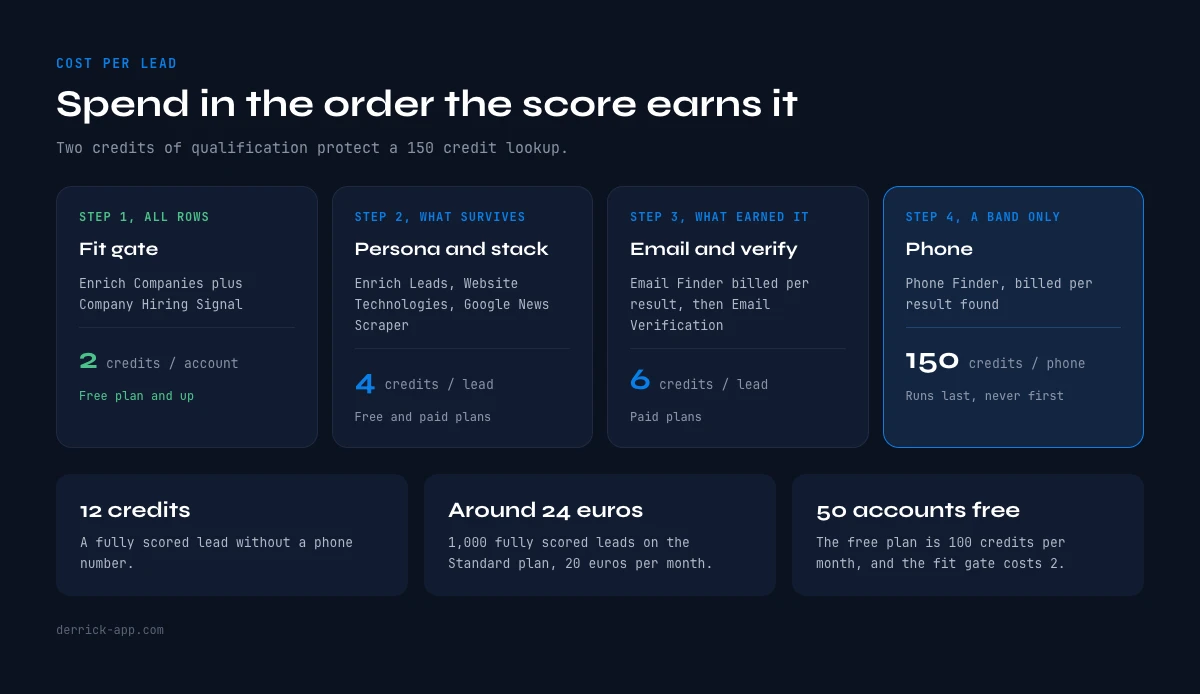
A fully scored lead without a phone number is 12 credits. On the Standard plan, which is 20 euros per month for 10,000 credits, that works out at 0.002 euros per credit, so 12 credits is 0.024 euros per lead and 1,000 fully scored leads cost around 24 euros in credits.
The more interesting number is the fit gate. Enrich Companies plus Company Hiring Signal is 2 credits per account and both run on the free plan, so the 100 free credits per month score 50 accounts on fit and hiring before you have paid anything at all. That is the correct way to sequence a file: score fit on everything, run persona on what survives, and only spend the 5 credit email lookup and the 200 credit phone lookup on records that already sit in the A band. Two credits of qualification protect a 200 credit lookup, and that ratio is the whole argument for enriching before scoring rather than after.
The same logic scales in both directions. Fifty accounts a month works on the free plan. A hundred thousand rows a month works on the larger plans at a lower cost per credit, with the same column order and the same model. What changes is the plan, not the method.
Running lead scoring with data enrichment, and the mistakes that break it
The model lives in a spreadsheet before it lives anywhere else, and that is not a limitation. Columns for each attribute, a scoring column per block, a total, a band, and a date column recording when each row was enriched. Everything is visible, everything is editable, and changing a weight means changing a number rather than filing a ticket.
Calibration is the step that turns a template into your model, and it only needs one input: your last thirty closed won deals. Score them retroactively with the weights above and look at where they land. If half of them land in B, your weights are describing someone else's business. Raise the weight of whatever those thirty deals had in common, drop the weight of whatever they did not, and rerun. Do the same with thirty closed lost deals: any attribute that scores the same in both piles is carrying zero information and should lose its points to an attribute that discriminates. Where the discriminating attribute is not a standard field at all, the custom attributes guide covers how to build and fill your own.
Four mistakes account for most broken models. Scoring a field you cannot fill, which quietly buries incomplete records. Letting scores go stale, because headcount, role and stack all change and a score computed nine months ago is describing a company that no longer exists in that form. Adding a fifth and sixth block until fifteen attributes each carry three points, at which point nothing dominates and the total stops being a ranking. Never removing points, so the model only ever inflates and the A band grows until it is the whole file.
Start with the four blocks, the twelve attributes and the three bands. Enrich the fit columns on your entire list first, since they cost 2 credits per account and settle most of the ranking. Then spend on persona, then on reachability, and only for the records that earned it. A score built that way tells a rep something true: not just who to call, but that the number to call them on is already in the row.
Frequently asked questions
What is lead scoring with data enrichment?
How many points should each block carry?
How do I calibrate the weights for my business?
Which enrichment columns feed a scoring model?
What does one fully scored lead cost?
Can I run a scoring model on the free plan?
How often should a lead score be refreshed?
Keep reading
Continue exploring this cluster


The State of B2B Data Attributes 2026: Which Fields Actually Move the Needle
Read →

The 20 Essential Contact Attributes to Nail Your B2B Prospecting
Read →

The 30 Essential Firmographic Attributes for B2B Targeting
Read →

B2B Demographic Data: Definition, Types & Complete Usage Guide
Read →