Error Handling and Retry Logic: how to make your B2B enrichment workflows bulletproof
Stop losing leads to silent failures. Set up retry logic, exponential backoff, and error alerts in Make, n8n, Zapier, and Apps Script. Full 2026 guide.


Your enrichment workflow has been running for two hours. It's processing 1,500 contacts, pulling emails and phone numbers, updating your CRM. Then an API times out. A rate limit kicks in. A poorly formatted field breaks the chain. And everything goes quiet.
Without error handling or retry logic, a failed workflow doesn't alert you. It stops - silently - halfway through your list. The damage is rarely just the missing rows: a half-run pass leaves a column where some cells are fresh, some are stale and nothing marks the boundary, which is exactly the missing-data problem you will be debugging a week later. You find out the next morning, the night before a campaign launch.
In this guide, you'll understand what error handling and retry logic are, why they're non-negotiable for any B2B automation pipeline, and how to implement them in Make, n8n, Zapier, and Google Apps Script.
Quick answer: Error handling is how an automated workflow reacts to a step that fails instead of stopping; retry logic is the part that runs the failed step again after a wait. In a B2B enrichment pipeline the two together decide whether a rate-limited API costs you a delay or a whole list. The working rule: retry the transient failures (HTTP 429, 500, 502, 503, 504 and network timeouts) with exponential backoff, typically 3 to 5 attempts with the wait doubling each time, and never retry the permanent ones (400, 401, 403, 404, 422), because a malformed request fails identically the tenth time. Route every non-retryable row to an error branch that keeps going rather than halting the run, and alert on the branch, not on the run.
| Signal | What it usually means | Retry? | What to do instead |
|---|---|---|---|
| 429 Too Many Requests | You are going faster than the quota allows | Yes, with backoff | Also lower the batch size at the source |
| 500 / 502 / 503 / 504 | The far end is briefly unhealthy | Yes, 3 to 5 attempts | Alert if it fails on the last attempt |
| Network timeout | The call never got an answer | Yes | Make the step idempotent first, or you double-write |
| 400 / 422 | The payload itself is wrong | No | Send the row to an error branch and fix the mapping |
| 401 / 403 | Credential expired or scope missing | No | Stop and rotate the key; retrying burns quota for nothing |
| 404 | The record does not exist | No | Record it as "not found", which is a result, not an error |
| Empty result | The provider has no data for this row | No | Treat as a coverage question, not a failure |
What is error handling and why every workflow needs it
Error handling refers to the set of mechanisms that allow an automated workflow to detect, process, and recover from a failure - without crashing.
In a B2B enrichment context, an "error" can take dozens of forms: an API responding with a 429 (too many requests), a server timing out after 30 seconds, an empty field breaking a formula, an expired authentication token, or a webhook that stops receiving data.
Without error handling, each of these situations has the same outcome: your workflow stops. No noise, no alert. And you lose everything that should have been enriched after the failure point.
Retry logic is the most important component of error handling. Instead of giving up after the first failure, the workflow waits a configurable delay and retries the action. If an API is temporarily overloaded at 2:23 PM, the retry at 2:25 PM has a good chance of succeeding.
For an SDR enriching 2,000 contacts a week, a workflow without retry logic can mean 200 to 300 lost contacts from a single, brief network blip.
Now that the concept is clear, let's look at exactly which types of errors you'll encounter in your enrichment pipelines.
The 5 most common errors in B2B enrichment workflows
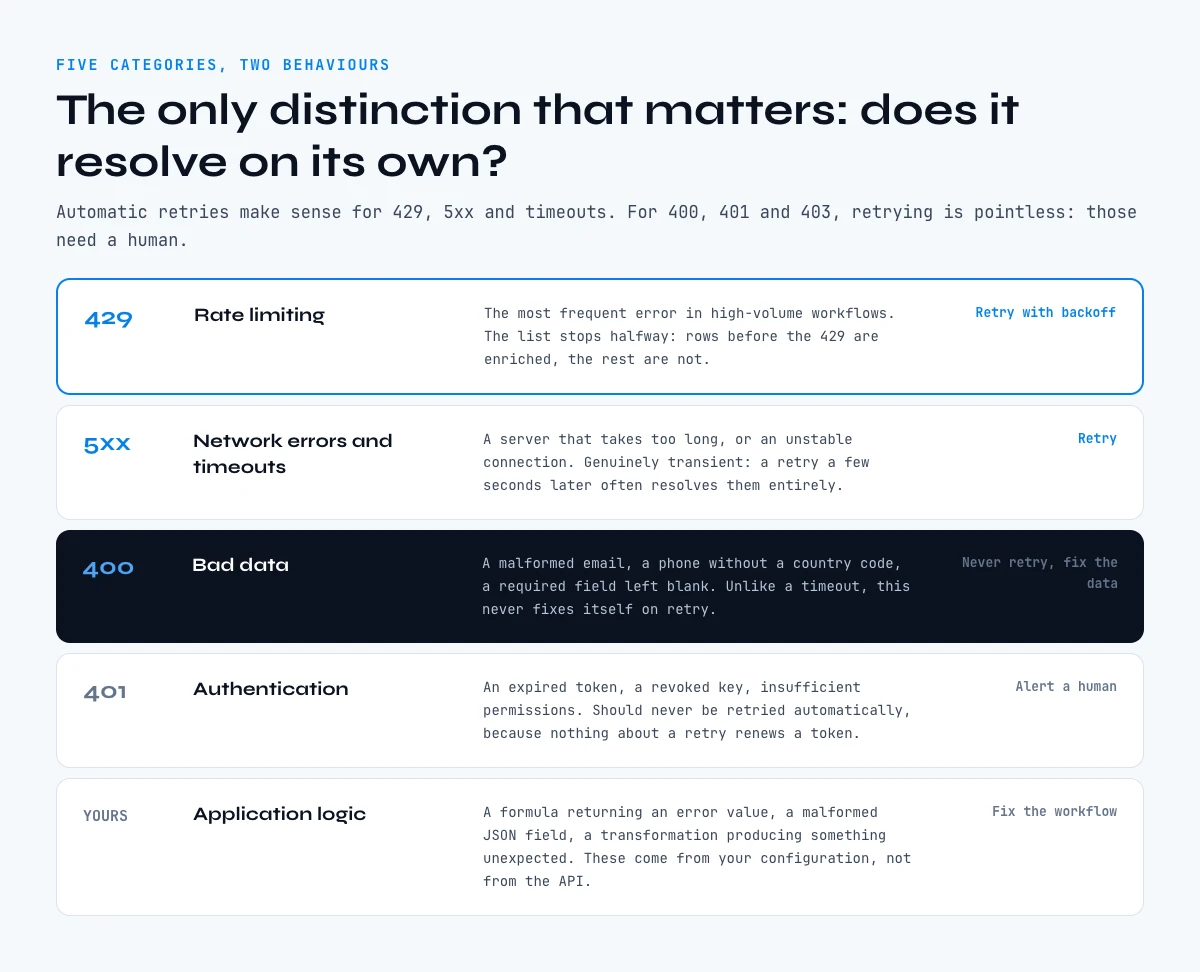
Before configuring your error handling, you need to know what you're dealing with. Errors in B2B enrichment workflows fall into five categories.
1. Rate limiting errors (429)
Enrichment APIs enforce request limits: X calls per minute, Y per hour. When you exceed them, the API responds with HTTP code 429. This is the most frequent error in high-volume workflows.
Impact: The workflow stops mid-list. Contacts processed before the 429 are enriched; the rest aren't.
Fix: Implement retry with exponential backoff (see below) and reduce the request frequency.
2. Network errors and timeouts
A server that takes too long to respond triggers a timeout. An unstable connection generates network errors. These errors are transient - a retry a few seconds later often resolves them entirely.
3. Data errors (400 Bad Request)
A malformed email, a phone number without a country code, a required field left blank: the API receives invalid data and responds with a 400. Unlike timeouts, these errors don't resolve themselves on retry - you need to fix the data first.
This is why it's critical to distinguish "transient" errors (worth retrying) from "permanent" errors (requiring human intervention).
4. Authentication errors (401/403)
An expired API token, a revoked key, insufficient permissions: the API refuses access. These require manual action (renewing the token) and should never be retried automatically.
5. Application logic errors
A Google Sheets formula returning #VALUE!, a malformed JSON field, a data transformation producing an unexpected result. These errors come from your configuration, not from the API.
Key takeaway: Automatic retries make sense for 429, 5xx, and timeout errors. For 400, 401, and 403 errors, retrying is pointless - they need to be handled manually.
Exponential backoff: the retry strategy everyone should use
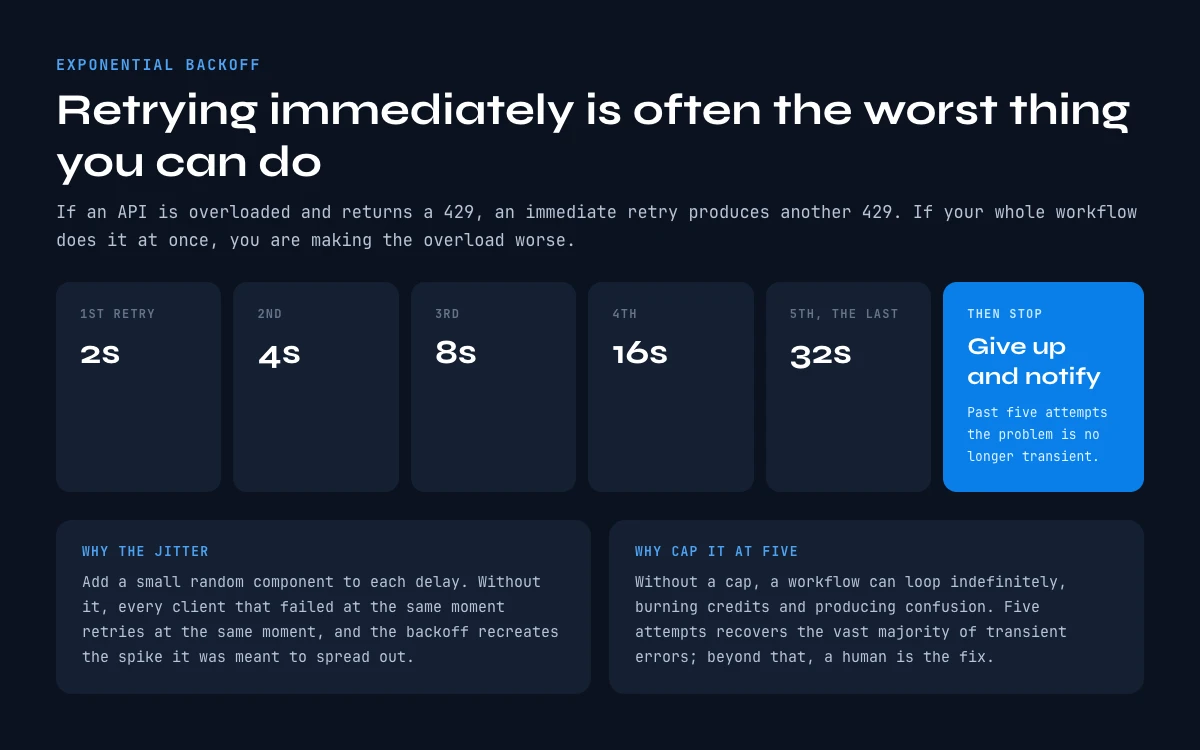
The instinctive response when a request fails is to retry it immediately. That's often the worst thing you can do.
If an API is overloaded and returns a 429, retrying immediately generates another 429. And if your entire workflow does this simultaneously, you're making the overload worse.
Exponential backoff is the approach recommended by Google in its official Sheets API documentation and by virtually every API provider.
The idea: the delay between each retry increases exponentially, with a small random component (jitter) to prevent all clients from retrying at exactly the same moment.
| Attempt | Wait time |
|---|---|
| 1st retry | 2 seconds |
| 2nd retry | 4 seconds |
| 3rd retry | 8 seconds |
| 4th retry | 16 seconds |
| 5th retry | 32 seconds |
| Give up | → Error notification |
This strategy lets you recover from the vast majority of transient errors without hammering the APIs involved.
With the theory covered, let's move on to practical implementation in the tools your team uses daily.
How to configure error handling in Make (ex-Integromat)
Make is the most widely used automation tool among B2B teams for orchestrating enrichment pipelines. Its error handling is visually intuitive.
Step 1: Add an error handler to a module
In Make, any module can receive an error handler by right-clicking it → "Add an error handler." Several handler types are available:
- Resume: The error is ignored and the scenario continues with the next record
- Rollback: All operations since the start are undone and the scenario stops
- Commit: Validates successful operations, then stops
- Break: Stores the failed execution for manual or automatic retry
- Ignore: Ignores the error entirely (not recommended for critical workflows)
Expected result: You can now define a different behavior per module, rather than a single global behavior for all failures.
Step 2: Configure automatic retry with Break
The Break handler is particularly useful for transient errors: it pauses the execution and allows it to be automatically retried after a configurable delay.
In the Break handler settings, configure:
- Maximum number of attempts: 3 to 5 for standard APIs
- Delay between attempts: At least 2-5 minutes to respect rate limits
Step 3: Add a filter on error type
Make lets you condition a handler to a specific error type. Connect a filter after your handler to distinguish HTTP codes:
statusCode = 429→ Retry with delaystatusCode >= 500→ Retry with delaystatusCode = 400→ Send a Slack notification and continuestatusCode = 401→ Stop immediately and alert
Expected result: Transient errors are handled automatically; critical errors trigger an immediate alert to your Slack channel or by email.
Through the Derrick API
Retry logic needs a predictable response
You cannot write a retry policy against an unclear failure. The Derrick API returns a structured response per call, so your workflow can tell a not-found from an error and decide which one deserves a second attempt.
- Feature
- Derrick API
- Credit cost
- Included
The first button opens the web app, where your account and key live. API and MCP access starts on the PLUS plan. The second details the surface.
How to configure error handling in n8n
n8n offers the most advanced level of control of the three platforms, at the cost of a steeper learning curve.
Step 1: Create a dedicated error workflow
n8n lets you define, for each workflow, an "error workflow" - a secondary workflow that triggers automatically when the main workflow fails.
In the workflow settings (top-right icon) → "Error workflow" → select your error management workflow.
This workflow must start with the Error Trigger node and can then send a Slack notification, create an entry in a Google Sheets log, or trigger a conditional retry.
Step 2: Enable retry on critical nodes
On every node that calls an external API, open the node's "Settings" → enable "Retry On Fail":
- Number of attempts: 3 to 5 depending on criticality
- Delay between attempts: At least 60 seconds for APIs with strict rate limits
Step 3: Use the "IF" node to route based on error type
n8n lets you capture the error code in a variable and use it in an IF node to route differently:
- Error 429 → "Wait" node (configurable delay) → Retry
- Error 5xx → Immediate retry (up to 3 times)
- Error 400 → Write to an "Errors to fix" sheet
- Error 401 → Emergency notification + workflow stop
Expected result: Each error type follows an appropriate handling path, with no manual intervention needed for common errors.
How to configure error handling in Zapier
Zapier is more limited than Make or n8n for advanced error handling, but it offers enough for most B2B use cases.
Option 1: Native automatic retry
Zapier automatically retries failed actions up to 3 times over a 4-hour window. This native retry covers most transient errors without any additional configuration.
To verify it's active: open your Zap settings → "Error handling" → confirm automatic retries are enabled.
Option 2: The "Zapier Manager - Handle Errors" action
For finer control, use the Zapier Manager app as a conditional action. It lets you:
- Capture errors from a previous step
- Send an email or Slack notification
- Log the error in a dedicated Google Sheet
Option 3: Conditional Paths
Zapier Pro includes "Paths," which let you create conditional branches. Use them to handle successes and failures of an action differently.
Known limitation: Zapier doesn't natively support exponential backoff or conditional retry by HTTP code. For these advanced cases, Make or n8n are better suited.
The app works through your list row by row. 100 free credits every month.
Error handling in Google Apps Script: the Google Sheets workflow case
If you're automating enrichments directly from Google Sheets via Apps Script, error handling is done in JavaScript using try/catch blocks.
Here's a simplified retry-with-backoff example, adapted from an enrichment use case:
// Retry function with exponential backoff
function fetchWithRetry(url, options, maxRetries) {
  var retries = 0;

  while (retries < maxRetries) {
    try {
      var response = UrlFetchApp.fetch(url, options);

      // Check if the API returns a rate limit error
      if (response.getResponseCode() === 429) {
        // Wait before retrying: 2s, 4s, 8s...
        var delay = Math.pow(2, retries) * 1000;
        Utilities.sleep(delay);
        retries++;
        continue;
      }

      // Success: return the response
      return response;

    } catch (e) {
      retries++;
      if (retries === maxRetries) {
        // Log the error in a dedicated sheet
        logError(e.message, url);
        return null;
      }
    }
  }
}
No-code alternative: Rather than writing and maintaining this code manually, use a tool like Derrick - which handles enrichment in the web app, and natively in Google Sheets - or orchestrate via Make/n8n which offer configurable retry without any code.
Apps Script has a 6-minute execution limit (Google Workspace accounts). For large lists, break enrichments into batches of 50-100 contacts (batch processing), schedule a trigger every 10-15 minutes, and save your progress index in a Google Sheets cell between each run so you can resume where you left off.
What your enrichment source absorbs, and what stays your job
Half of the error handling in a data pipeline is not code you write, it is a property of the source you call. Two things decide how much you have to build yourself: how the provider bills a failure, and how many places you can reach it from.
A failure that costs nothing is a failure you can retry cheaply
Billing mode is the single most underrated variable in retry design. On Email Finder (5 credits per email), Phone Finder (200 credits per phone) and Email Verification (1 credit per email), Derrick charges only when a result comes back. A row with no reachable contact costs zero, so a retry on a transient error is not a retry on your budget. Company-level steps such as Search Companies and Enrich Companies (1 credit each) bill per row submitted instead, which is the opposite constraint: there, an aggressive retry loop does cost credits, so cap the attempts and de-duplicate the input before the call rather than after it.
Write that distinction into your workflow explicitly. A retry that succeeds on the fifth attempt also returns data five minutes older than the one that succeeded first, which matters on fields where freshness is the whole point. A blanket "retry everything five times" is safe on result-billed steps and wasteful on row-billed ones, and most no-code builders apply one policy to the whole scenario because the difference is invisible in the interface.
Four ways in, and they fail differently
Where you call the enrichment from changes what error handling even looks like:
- The web app runs the same lookups with nothing to install, no spreadsheet and no request to write. It is the simplest door for a list you want enriched now.
- The Google Sheets extension runs the pass for you and writes the result next to the row, so a failure is visible in the sheet rather than buried in a run log. This is the shortest path when the list already exists and nobody wants to build a scenario.
- The REST API is where retry logic belongs when the lookup is one step of a larger flow. You own the backoff, but you also own idempotency, which is the part that stops a retried write from creating the same record twice.
- The MCP server lets an assistant such as Claude, Claude Code or ChatGPT run the enrichment inside a conversation. There is no scenario to babysit, which removes a whole class of orchestration failure, and it suits exploratory work rather than scheduled batches.
Pick the door by what the workflow is, not by habit: a nightly CRM sync belongs on the API, a one-off list belongs in the web app or the sheet, a question you are still shaping belongs in the assistant. Try Derrick on your own list and watch which rows come back empty before you build retry logic around them: the shape of the failures is usually not the one you assumed.
Best practices for robust error handling
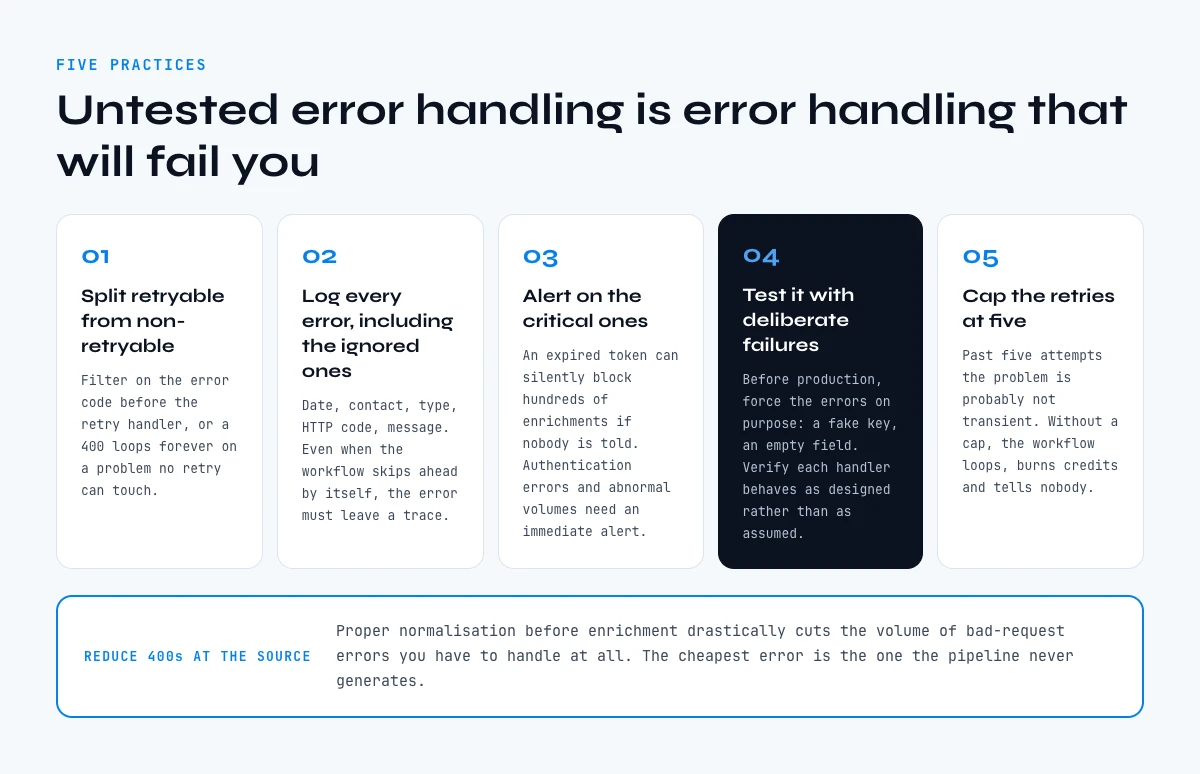
1. Distinguish retryable from non-retryable errors
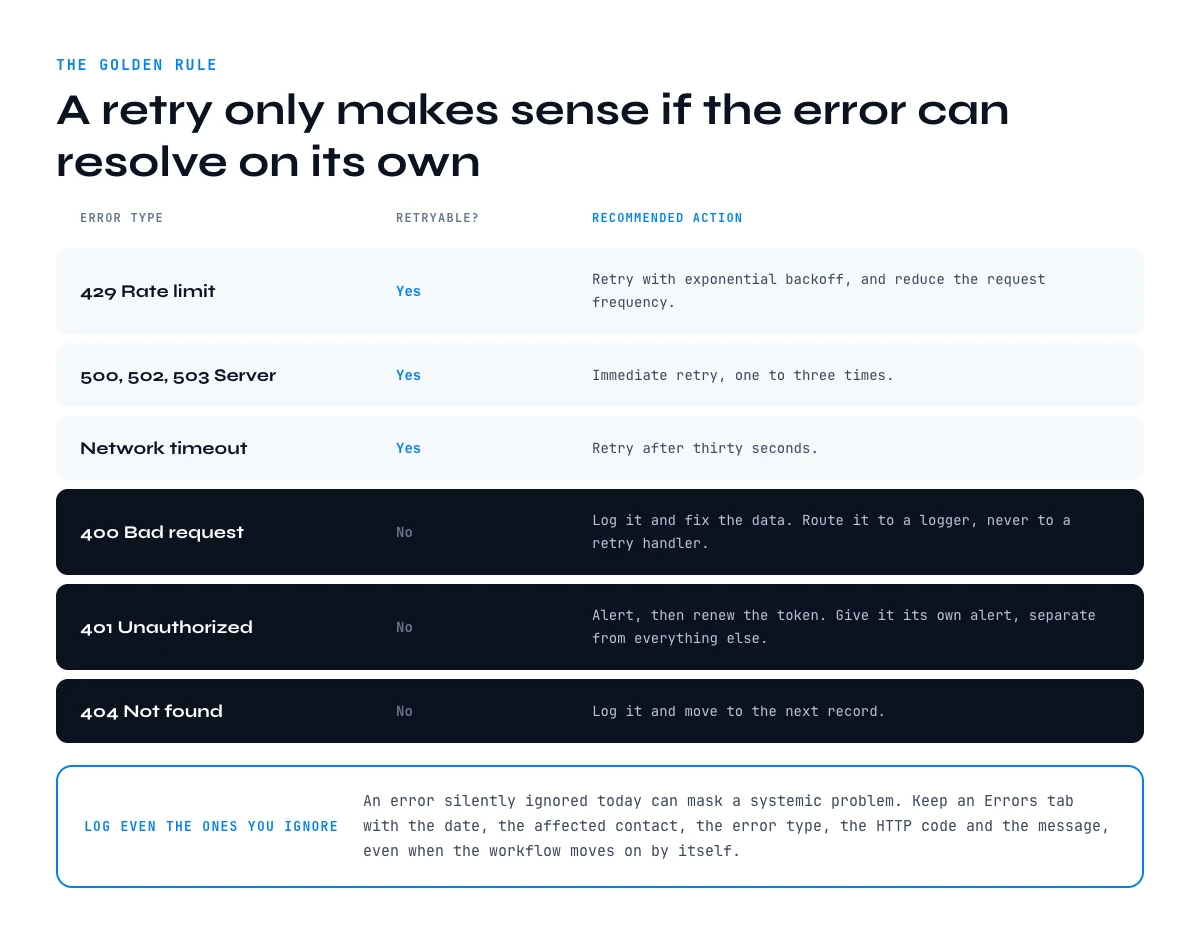
The golden rule: a retry only makes sense if the error can resolve on its own.
| Error type | Retryable? | Recommended action |
|---|---|---|
| 429 Rate limit | Yes | Retry with backoff |
| 500/502/503 Server | Yes | Immediate retry (1-3x) |
| Network timeout | Yes | Retry after 30s |
| 400 Bad request | No | Log + fix the data |
| 401 Unauthorized | No | Alert + renew token |
| 404 Not found | No | Log + skip to next |
2. Log ALL errors, even the ones you ignore
An error silently ignored today can mask a systemic problem. Create a Google Sheets "Errors" tab with columns: date, affected contact, error type, HTTP code, message. Even if you automatically move on to the next record, the error must be tracked.
3. Set up alerts for critical errors
Authentication errors (401) and abnormal error volumes must trigger an immediate alert - Slack, email, or SMS depending on criticality. An expired token can silently block hundreds of enrichments if no one is notified.
4. Test your error handling with deliberate failures
Before going to production, intentionally force errors in your workflow (fake API key, empty field, etc.) to verify that your handlers behave as expected. Untested error handling is error handling that will fail you at the worst moment.
5. Cap the number of retries to avoid infinite loops
Maximum 5 attempts for transient errors. Beyond that, the problem is likely no longer transient - human intervention is needed. Without a cap, a workflow can loop indefinitely, burning credits and causing confusion.
To reduce 400 errors at the source, check out our guide on B2B database enrichment - proper data normalization before enrichment drastically reduces the volume of bad-request errors you'll encounter.
Common errors in enrichment workflows (and how to fix them)
Before you debug a specific step, it is worth separating the two families that get confused constantly: a workflow that broke and a workflow that ran fine and returned little. The second is a coverage question, not an error, and no amount of retry logic moves it. Tracking the two separately, with a confidence score on the rows that did come back, is what stops a team from rebuilding its retry policy every quarter to fix a problem retries never caused.
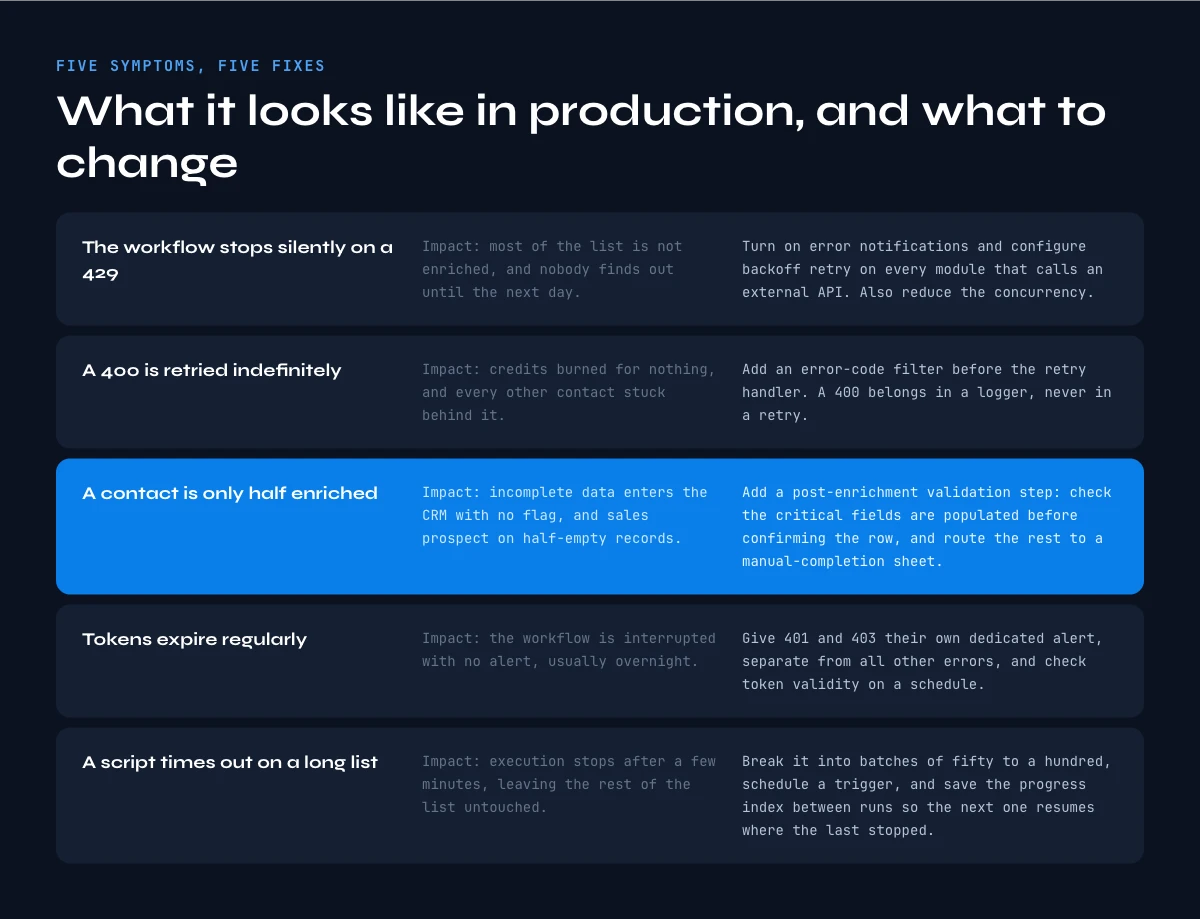
Problem 1: The workflow stops silently on a 429
Impact: 60% of your list isn't enriched and you don't find out until the next day.
Fix: Enable error notifications in Make/n8n/Zapier AND configure exponential backoff retry on all modules that call external APIs. Also reduce concurrent requests (in Make: limit parallel iterations to 1 or 2).
Problem 2: The workflow retries a 400 error indefinitely
Impact: Unnecessary API credit consumption and blocked processing for all other contacts.
Fix: Add an error code filter before the retry handler. 400 errors should be routed to a logger, not a retry.
Problem 3: A contact is partially enriched (some fields OK, others blank)
Impact: Incomplete data enters your CRM without any flag. You'll prospect with half-empty records.
Fix: Add a post-enrichment validation step: check that critical fields (email, first name, company) are populated before confirming the record. If not → route to a "Needs manual completion" sheet. Derrick's Email Verifier can also be used upstream to validate input data and reduce downstream errors.
Problem 4: Authentication tokens expire regularly
Impact: Your workflow is interrupted without any alert, often overnight.
Fix: Set up a specific alert for 401/403 errors, separate from other errors. In Make, create a standalone monitoring scenario that periodically checks token validity. In n8n, the dedicated error workflow handles this naturally.
Problem 5: Google Apps Script timeout on large lists
Impact: The script stops after 6 minutes, leaving the rest of the list untouched.
Fix: Break into batches of 50-100 contacts maximum, schedule a trigger every 10 minutes, and save the progress index in a Google Sheets cell between each execution so the next run picks up where the last one stopped.
Key takeaways
- Error handling and retry logic are essential for any high-volume B2B enrichment workflow - without them, every transient failure stops your pipeline cold.
- Distinguish retryable errors (429, 5xx, timeout) from non-retryable ones (400, 401, 404): the first group gets retried automatically, the second needs a fix.
- Exponential backoff is the recommended retry strategy: the delay between attempts doubles each time to avoid overloading APIs.
- Make handles error handling visually with its handlers (Break, Resume, Rollback); n8n offers the most flexibility with dedicated error workflows and IF nodes; Zapier works for simple cases with its native retry.
- Log all errors in a dedicated sheet, even auto-handled ones - they surface systemic issues.
- Cap retries at 5 attempts maximum to prevent infinite loops.
Conclusion: a resilient workflow is a pipeline that delivers
A B2B enrichment workflow without error handling is like a car without a seatbelt. It works perfectly - until the first crash.
Implementing solid error handling takes a few hours, but it's the work that separates a pipeline that delivers reliably from one you restart manually every week.
The right approach: start with the most frequent errors (429 and timeouts), set up a systematic error log, and progressively add alerts for critical cases. Don't aim for perfection on the first pass - build iteratively.
And if you want to simplify enrichment itself to reduce failure points at the source, Derrick runs in its web app with nothing to install, or directly in Google Sheets and handles Email Finder, Phone Finder, and email verification - no complex workflow to maintain.
Frequently asked questions
What is retry logic in an automation workflow?
What's the difference between error handling and retry logic?
Which automation tool handles error handling best for B2B enrichment?
How many retry attempts should I configure?
How do I know if my error handling is working correctly?
Keep reading
Continue exploring this cluster


How to Measure the Quality of Your Enriched Data: The Complete Guide
Read →

Data Freshness: How Often Should You Refresh Your B2B Data?
Read →

B2B Data Audit: The 20-Point Checklist (2026)
Read →

Confidence Scoring: How to Evaluate and Weight the Reliability of Your B2B Data
Read →