Data Hygiene: The 7 Metrics, Their Thresholds, and the Cadence Per Field
Data hygiene guides name the metrics but never the numbers. Get the 7 measures with healthy, watch and stop-and-fix bands, plus refresh cadence per field.


Every B2B database is dirty right now. Not because someone was careless, but because the world moved and the file did not. People change jobs, companies rebrand, a form fill creates a second version of a contact who was already there, someone types a phone number by hand. Data hygiene is the discipline that keeps that drift from reaching the person who has to act on the record.
Most guides on the subject stop at a definition and a list of good intentions. Audit regularly. Standardize your fields. Assign an owner. All true, all useless on a Monday morning, because none of it tells you the one thing you need: at what number is your database actually fine, and at what number should you stop what you are doing and fix it. This page gives you those numbers, the cadence that goes with each field, and the arithmetic that says whether prevention or repair is the cheaper move for you.
Other data hygiene guides name measures such as duplicate rate or required-field completeness and stop there, with no number attached. Here every one of the seven metrics comes with a threshold: a healthy band, a watch band and a stop-and-fix band.
What is data hygiene? A definition, and what it is not
Data hygiene is the ongoing practice of keeping records accurate, complete, consistent and current: validating them at entry, refreshing them on a schedule and measuring them against thresholds. Put simply, the meaning of data hygiene is that clean data stays clean, because rules catch problems before they spread.
Data hygiene is the set of standing rules and controls that keep records usable from the moment they enter your systems: what a valid record looks like, what gets rejected at intake, how often each field is refreshed, and which metrics tell you the rules are holding. It is preventive and continuous.
It is often used interchangeably with two neighbours it is not. Data cleansing is the corrective pass you run on records that are already broken: profile, standardize, deduplicate, verify, refill. Data quality is the measured outcome, the score you read after the fact. Hygiene is what you do so that cleansing has less to do and quality stays high without heroics.
Data hygiene sits inside a wider discipline: for the full picture of how quality is defined, measured and governed, see the data quality management guide.
The distinction is not academic. It decides where your money goes. A team with no hygiene rules runs cleansing forever and never gets ahead, because the intake keeps refilling the bucket faster than the pass empties it. If your records are already broken, start with the six-step B2B data cleansing loop, then come back here to stop the refill.
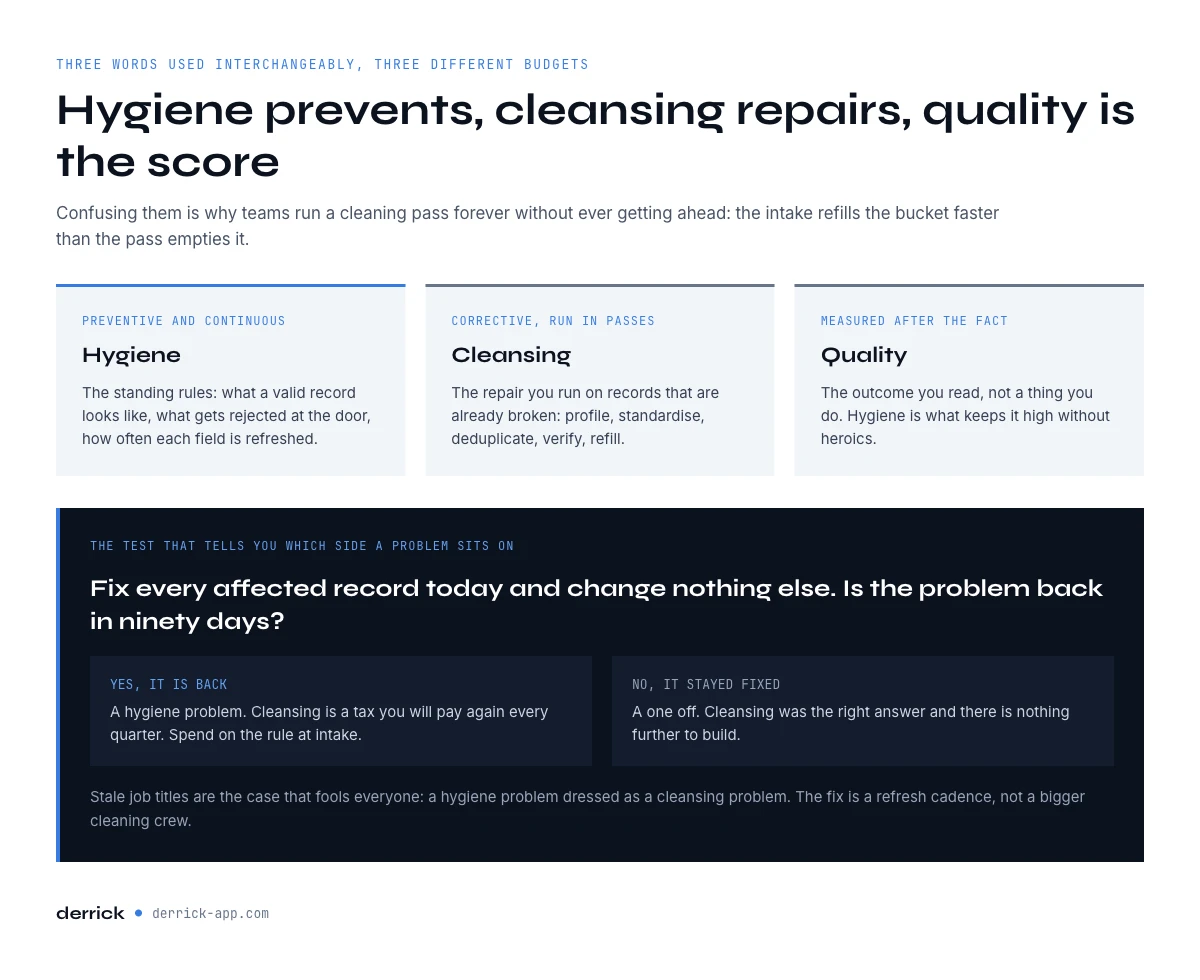
Hygiene prevents, cleansing repairs: the line that decides your budget
There is a simple test for which side of the line a given problem sits on. Ask what happens if you fix every affected record today and change nothing else. If the same problem is back in ninety days, it is a hygiene problem and cleansing is a tax you will pay again. If it does not come back, it was a one-off and cleansing was the right answer.
Duplicate contacts created by an unguarded form are a hygiene problem. A one-time import that arrived with country names in four formats is a cleansing problem. Stale job titles are a hygiene problem dressed as a cleansing problem: the fix is a refresh cadence, not a bigger cleaning crew.
The budget rule that follows: spend on prevention for anything that recurs, spend on repair for anything that does not, and measure both against the cost of the bad record actually reaching a rep. That last number is usually the largest and the one nobody calculates.
Benefits of good data hygiene
The benefits of good data hygiene show up in five places, and each one can be read on a metric from this page rather than taken on faith.
- Deliverability. A list verified before each send keeps the bounce rate inside the 2% healthy band. Above 5%, mailbox providers start to treat your domain as careless, and every campaign after that pays for it, including the sends to perfectly good addresses.
- Decisions you can trust. Duplicates double-count accounts, empty required fields drop rows out of routing, and a stale headcount puts a company in the wrong segment. When the duplicate rate and completeness sit in their healthy bands, a pipeline report means what it says.
- A lower cost per usable record. Every record that enters clean is one you never pay to repair. Validation at intake costs a rule, a cleansing pass costs a project, and a bad record that reaches a rep costs the most of the three, as the break-even further down shows.
- Sales time spent selling. Reps stop researching the same contact twice, dialling dead numbers and writing to people who left in the spring. On the 10,000-contact example below, that is the gap between 125 hours of wasted attention and close to none.
- Consent that holds. A suppression flag only works if the record carrying it is the one you contact. Good data hygiene keeps a single version of each person, so an opt-out recorded once is respected everywhere.
None of these benefits needs a large team. They need the seven numbers below, a band for each, and one person who reads them on a fixed date.
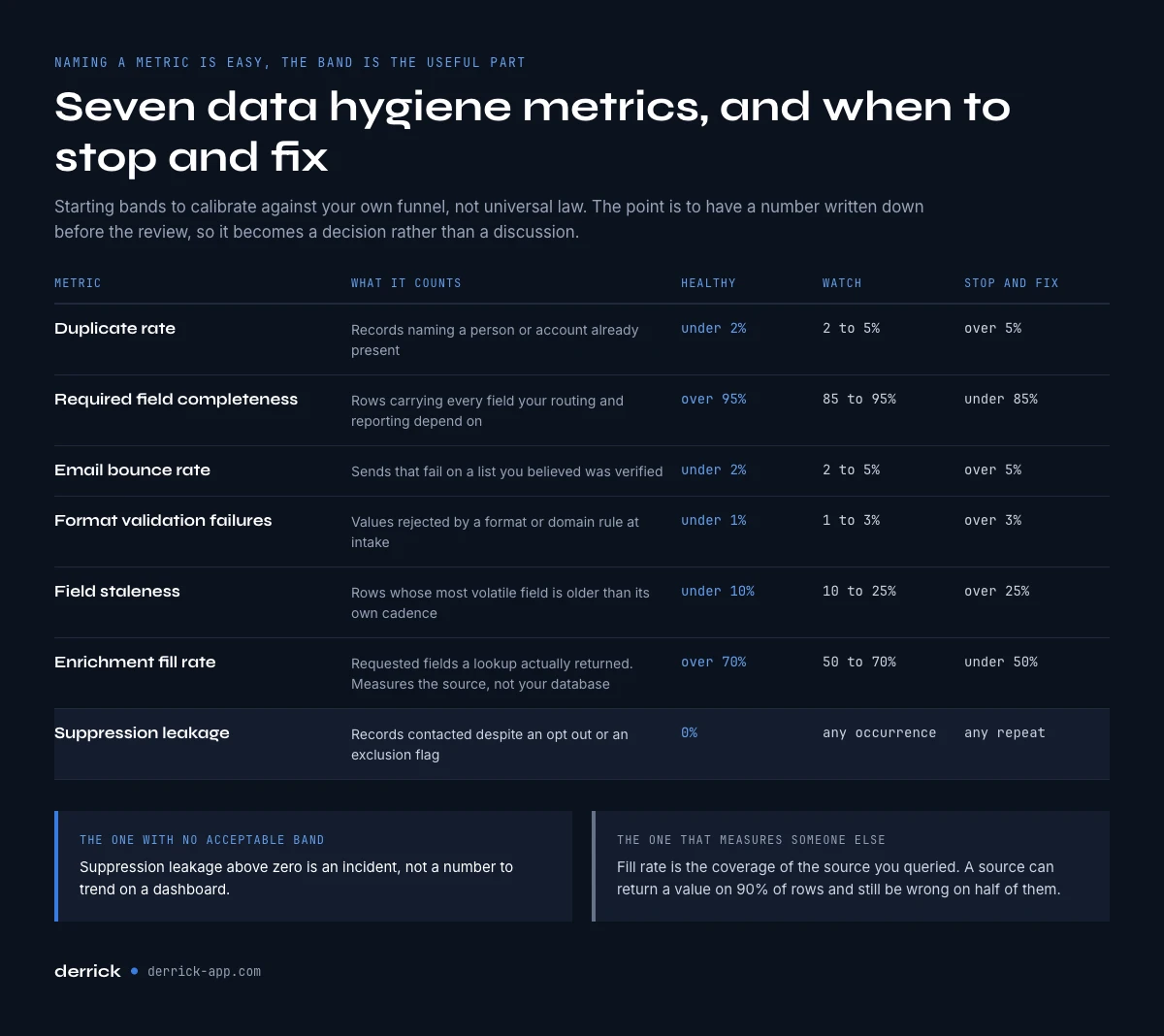
The seven data hygiene metrics, and the threshold that makes each one pass or fail
Naming metrics is the easy part, and it is where most articles stop. The useful part is the band. Below are the seven measures worth tracking on a B2B prospecting database, with the thresholds we consider healthy, worth watching, and worth stopping for. Treat them as starting bands to calibrate against your own funnel, not as universal law.
| Metric | What it counts | Healthy | Watch | Stop and fix |
|---|---|---|---|---|
| Duplicate rate | Records referring to a person or account already present | Under 2% | 2% to 5% | Over 5% |
| Required-field completeness | Rows with every field your routing and reporting depend on | Over 95% | 85% to 95% | Under 85% |
| Email bounce rate | Sends that fail on a verified list | Under 2% | 2% to 5% | Over 5% |
| Format validation failures | Values rejected by a format or domain rule at intake | Under 1% | 1% to 3% | Over 3% |
| Field staleness | Rows whose most volatile field is older than its cadence | Under 10% | 10% to 25% | Over 25% |
| Enrichment fill rate | Requested fields actually returned by a lookup | Over 70% | 50% to 70% | Under 50% |
| Suppression leakage | Records contacted despite an opt-out or exclusion flag | 0% | Any occurrence | Any repeat |
Two of these deserve a caveat. Suppression leakage has no acceptable band above zero: a single occurrence is an incident, not a metric to trend. And enrichment fill rate is not a quality measure of your database, it measures the coverage of whatever source you queried. Do not confuse the two, which is exactly the trap described in coverage rate versus accuracy rate: a source can return a value for 90% of your rows and still be wrong on half of them.
If you want to go deeper on how to weight a value you are not sure about rather than accepting or rejecting it outright, the confidence scoring method covers the arithmetic.
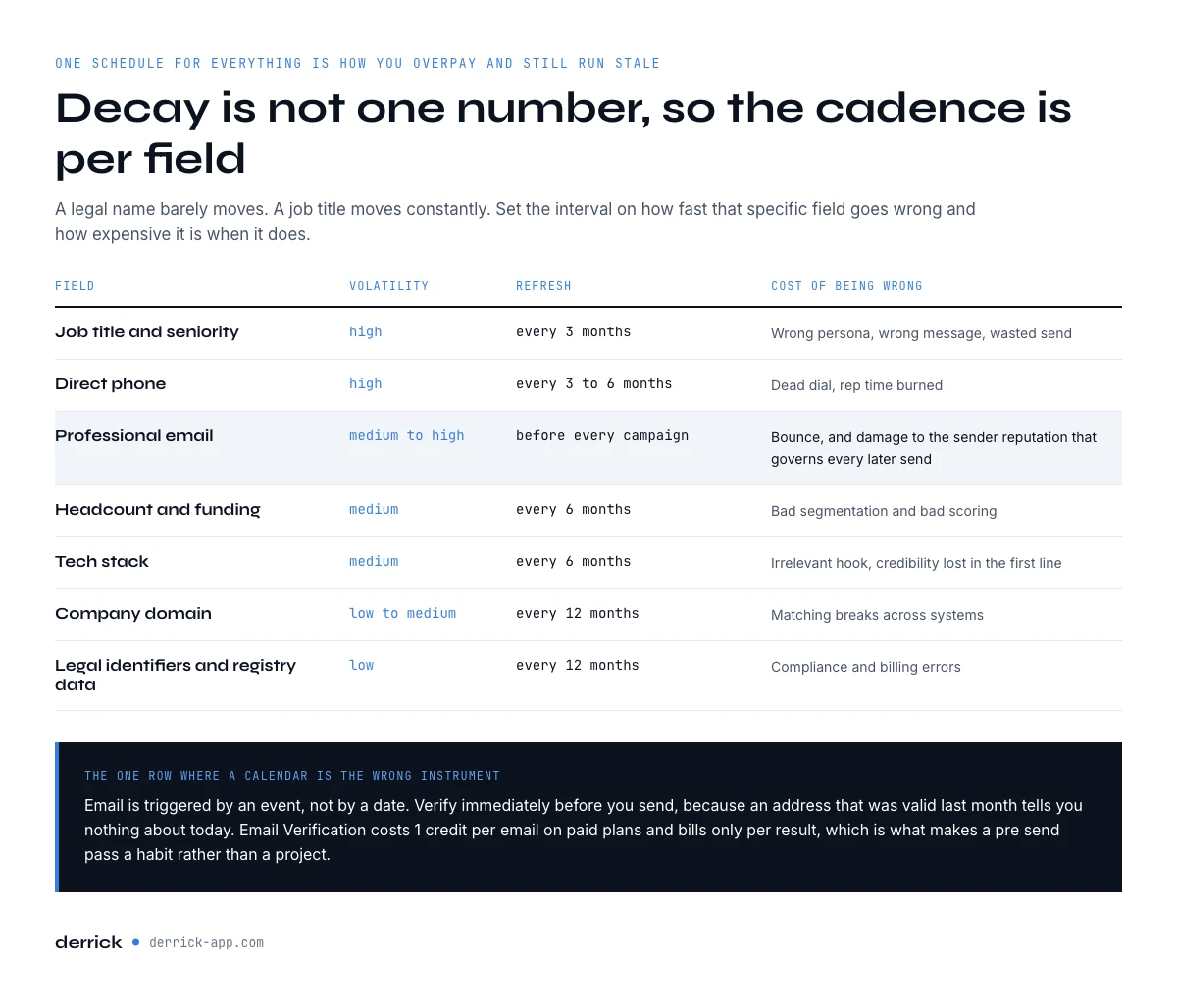
Decay is not one number: the refresh cadence per field
The most quoted figure in this field is that B2B data decays around 30% per year. It is directionally right and operationally useless, because it is a blended average across fields that behave nothing alike. A company legal name barely moves. A job title moves constantly. Refreshing everything on the same schedule means you either overpay on the stable fields or run stale on the volatile ones.
Set the cadence per field instead, based on how fast that specific field goes wrong and how expensive it is when it does.
| Field | Volatility | Suggested refresh | Cost of being wrong |
|---|---|---|---|
| Job title and seniority | High | Every 3 months | Wrong persona, wrong message, wasted send |
| Direct phone | High | Every 3 to 6 months | Dead dial, rep time burned |
| Professional email | Medium to high | Verify before every campaign | Bounce, sender reputation damage |
| Headcount and funding | Medium | Every 6 months | Bad segmentation and scoring |
| Tech stack | Medium | Every 6 months | Irrelevant hook, credibility loss |
| Company domain | Low to medium | Every 12 months | Broken matching across systems |
| Legal identifiers and registry data | Low | Every 12 months | Compliance and billing errors |
Notice that email is the one field where a calendar cadence is the wrong instrument. Its correct trigger is an event, not a date: verify immediately before you send, because an address that was valid last month tells you nothing about today. The full reasoning on cadence sits in how often you should refresh B2B data.
What causes dirty records, and what you can block at the door
Poor data hygiene rarely starts inside the database. Records almost never rot in place. They arrive broken. Four doors account for most of it: web forms with free-text fields, list imports from events and partners, manual entry by reps, and integrations that map fields differently on each side.
The cheapest fix for all four is the same, and it is not a cleaning pass. It is a rule at intake. Rejecting a malformed record at the door costs one validation. Accepting it costs a cleansing pass, a wrong send, a confused rep, and a reporting line nobody trusts. The asymmetry is enormous and it is the entire argument for hygiene over cleansing.
Practical rules that pay for themselves quickly: constrain country and state to a picklist rather than free text, reject role-based and disposable email domains at submission, normalize company names to a domain key so matching does not depend on whether someone typed the legal suffix, and make the fields your routing depends on genuinely required rather than nominally required. When a field is empty on 30% of rows, it was never required, it was suggested.
For the residue that gets through anyway, the false positives guide covers how to catch values that look valid and are not.
The app works through your list row by row. 100 free credits every month.
Data hygiene best practices, each tied to a metric
Most lists of data hygiene best practices read as good intentions. The seven below are the same practices, each attached to the metric that proves it is working, so a monthly review tells you whether the practice holds or has quietly lapsed.
- Validate at the point of entry. Reject malformed emails, impossible phone formats and free-text countries before the record is saved. Proof it works: format validation failures stay under 1%.
- Deduplicate on a stable key. Match people on email and companies on domain, never on a typed name. Proof: a duplicate rate under 2%.
- Make required fields genuinely required. If routing or reporting depends on a field, the form or the import should refuse the row without it. Proof: required-field completeness over 95%.
- Verify email before every send. Treat verification as a pre-send trigger, not a calendar task. Proof: a bounce rate under 2% on the verified list.
- Refresh each field on its own cadence. Job titles every quarter, firmographics twice a year, registry data once a year, following the cadence table above. Proof: field staleness under 10%.
- Enrich only what you will use, then check what comes back. Ask a source for the fields your routing needs, and read the fill rate separately from data accuracy. Proof: an enrichment fill rate over 70%, with spot checks on the values returned.
- Give every field family one owner and one review date. Contact identity, firmographics, consent. Proof: suppression leakage at zero, and the other six numbers read every month.
Applied together, these data hygiene best practices move the work from repair to prevention. If you can only start with two, start with the first two: they close the doors that refill the bucket fastest.
CRM data hygiene: what changes for B2B contact data
CRM data hygiene follows the same rules, with three complications. First, a CRM is fed from many doors at once: forms, imports, reps, the outreach tool, the billing system. Each door needs its own intake rule, or the strictest one is undone by the loosest. Second, B2B contacts belong to accounts, so a person who changes company is not a stale record to delete: close the old contact on the old account and open a new one where they landed, which keeps history and attribution intact. Third, a CRM record is shared by sales, marketing and customer success, which is exactly why one owner per field family matters more here than anywhere else.
In practice, good CRM data hygiene means running the seven metrics on the CRM export rather than on a marketing list, and refreshing job titles on open opportunities first, because that is where a wrong contact costs a deal rather than an email. To decide how to refill the fields themselves, the CRM data enrichment guide covers sources and workflows.
The break-even: what a bad record costs before anyone notices
Here is the arithmetic that settles most hygiene debates internally, because it converts an abstract quality argument into a number a finance team will engage with.
Take a list of 10,000 contacts with a 15% error rate, so 1,500 bad records. Suppose validating a field at intake costs you a fraction of a credit, cleaning a broken record afterwards costs a few minutes of someone's attention, and a bad record that reaches a rep burns roughly five minutes between the attempt, the note, and the correction. At 1,500 records, that last line alone is 125 hours. It dwarfs both other costs by an order of magnitude, and it is the only one that never appears on an invoice, which is precisely why it goes unmanaged.
Run the same calculation with your own numbers before you argue for budget. The pattern holds almost universally: prevention is the cheapest, repair is more expensive, and letting the record through is by far the most expensive. The detailed version of this model, including the pipeline effect, is in the cost of missing data in B2B.
Who owns data hygiene, and the three rules that survive a reorg
Ownership is where hygiene programmes quietly die. When everyone owns the database, nobody does, and the metrics drift for two quarters before anyone notices. Three arrangements survive contact with a real organisation.
First, one named owner per field family, not per system. Someone owns contact identity fields, someone owns firmographics, someone owns consent and suppression. Systems get replaced, field families do not.
Second, the rules live in the pipeline, not in a document. A standard that exists only in a wiki page is a suggestion. A standard enforced by a validation at intake is a rule. If your naming convention is not machine-checked, assume it is not being followed.
Third, the metrics get reviewed on a fixed date with the thresholds attached. A dashboard nobody reads on a schedule is decoration. Pick a monthly slot, read the seven numbers, and act only on the ones that crossed a band. That last constraint matters: reacting to every wobble is how teams burn out on data quality work.
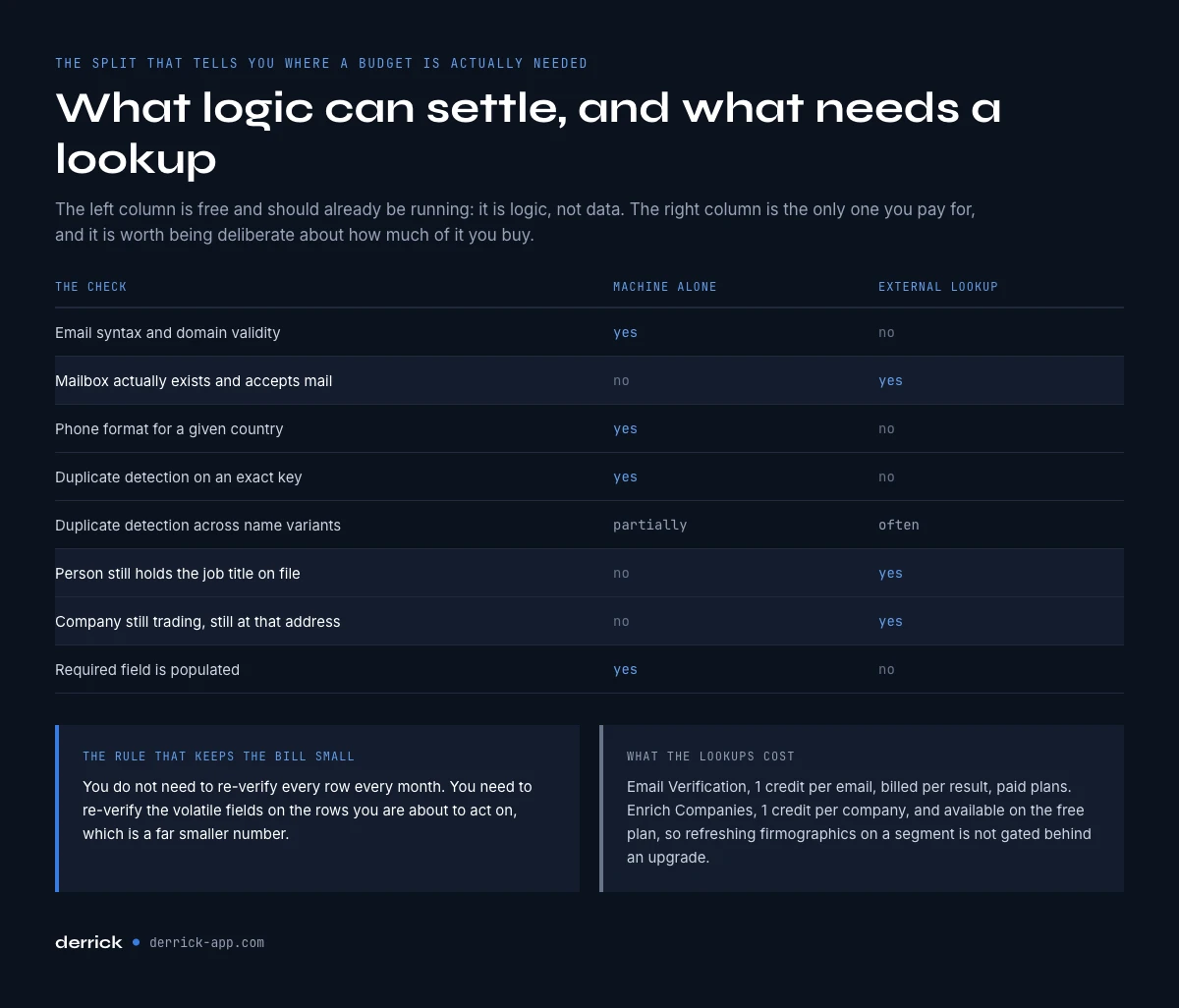
What a machine can check, and what needs a lookup
A useful mental split, because it tells you what you can automate today and what needs a data source behind it.
| Check | Machine can decide alone | Needs an external lookup |
|---|---|---|
| Email syntax and domain validity | Yes | No |
| Mailbox actually exists and accepts mail | No | Yes |
| Phone format for a given country | Yes | No |
| Duplicate detection on an exact key | Yes | No |
| Duplicate detection across name variants | Partially | Often |
| Person still holds the job title on file | No | Yes |
| Company still trading, still at that address | No | Yes |
| Required field is populated | Yes | No |
The left column is free and should be running already: it is logic, not data. The right column is where a budget is genuinely required, and it is worth being deliberate about how much of it you buy. You do not need to re-verify every row every month. You need to re-verify the volatile fields on the rows you are about to act on, which is a much smaller number.
A 30-day data hygiene plan you can actually run
Week one, measure. Run the seven metrics on your current database and write down the numbers, even the embarrassing ones. Without a baseline you cannot tell improvement from noise later.
Week two, close the doors. Add intake validation on the two fields with the worst failure rate. Convert your most important nominally-required field into a genuinely required one. This is the highest-return week of the four and it usually involves no data spend at all.
Week three, set cadences. Assign a refresh interval per field family using the table above, and move email verification from a calendar to a pre-send trigger.
Week four, assign and schedule. One owner per field family, one monthly review slot, thresholds written down next to each metric so the review is a decision meeting and not a discussion. Then repeat the week-one measurement in ninety days and compare against the baseline rather than against how you feel about the database.
How Derrick fits into the loop
Derrick covers the part of hygiene that needs an external lookup, from the surface that matches how you work: the web app or the Google Sheets sidebar for a list you already have, the MCP server when you want to ask from an AI assistant, or the API when the check belongs inside an automated workflow.
On the checks above that cannot be settled by logic alone: Email Verification costs 1 credit per email and is billed per result found, which is what makes a pre-send verification pass affordable as a habit rather than a project. Enrich Companies costs 1 credit per company, runs once your LinkedIn account is connected through the Derrick Chrome extension, and is available on the free plan as well as paid ones, so refreshing firmographics on a segment is not gated behind an upgrade. For French entities, SIRET/SIREN/Name Enrichment returns identity, activity, directors and legal data with a confidence score for 1 credit per company, which is the fastest way to keep registry fields from drifting.
For the duplicate rate, Find Duplicates is free and unlimited in the Google Sheets sidebar: it flags the rows that share a key so you can merge them before they reach the CRM. To refresh job titles on the contacts you are about to work, Enrich Leads costs 1 credit per profile and, like company enrichment, works with your LinkedIn account connected.
The free plan includes 100 credits per month, which is enough to run a real measurement pass on a segment and see where your seven numbers actually sit before deciding what to automate.
Start with the free plan and measure your seven metrics.
Key takeaways on data hygiene
Data hygiene is prevention, cleansing is repair, and quality is the score you read afterwards. Anything that comes back within ninety days of being fixed is a hygiene problem, and no amount of cleaning will get you ahead of it.
Do not track metrics without thresholds. Seven measures, each with a healthy band, a watch band and a stop-and-fix band, reviewed monthly. Suppression leakage is the exception with no acceptable band above zero.
Stop refreshing everything on one schedule. Job titles and phones move fast, registry data barely moves, and email is not a calendar problem at all: verify it before you send.
Finally, run the cost arithmetic before you argue for budget. The bad record reaching a rep is almost always the largest cost in the chain and the only one that never shows up on an invoice.
Try Derrick free, 100 credits per month, or read the guide to measuring the quality of your enriched data next.
Frequently asked questions
What is data hygiene?
What is the difference between data hygiene and data cleansing?
What is a good duplicate rate for a B2B database?
How often should B2B data be refreshed?
Which data hygiene checks can be automated without buying data?
What does a bad record actually cost?
Who should own data hygiene?
What is an example of data hygiene?
Keep reading
Continue exploring this cluster


The B2B Data Decay Benchmark 2026: How Fast Your Data Goes Stale
Read →

How to Measure the Quality of Your Enriched Data: The Complete Guide
Read →

Data Freshness: How Often Should You Refresh Your B2B Data?
Read →

Coverage Rate vs Accuracy Rate: Understanding B2B Enrichment Metrics
Read →