
Technographics (also called technographic data) are the facts about the technology a company actually runs: the CRM it logs deals in, the marketing software it sends from, the analytics and tag managers loaded on its website, the cloud and hosting behind its domain, and the tools it is publicly hiring for. Firmographics say what a company is; technographics say what it works with.
What technographics are not. They are not demographics, which describe a person. They are not firmographics, which describe headcount, revenue, industry and location. And they are not intent data: a technology detected on a domain is an observed fact, not a sign that the company is shopping for something.
- Where the facts come from: page source and tag signatures on the public website, DNS and MX records, job postings that name a tool, and public review or marketplace listings.
- What one detection returns: the technology name, its category (CRM, analytics, CMS, hosting, payment, chat, marketing automation) and the domain it was observed on.
- What it costs with Derrick: Website Technologies is 2 credits per website, on a paid plan.
- How fast it goes stale: front-end tags change every time a site is redesigned or a contract is renewed, so a detection older than one quarter is worth re-running before you put it in a pitch.
- Related attributes in this series: firmographic attributes, timing attributes, behavioral attributes and how they feed a lead scoring model.
- Four ways to collect it: the Google Sheets sidebar for a list of domains you already hold, the REST API when detection belongs inside a workflow, the MCP server when you would rather ask from Claude or another AI client, and a web app that arrives very soon.
Picture this: You've been prospecting a company for weeks, investing hours crafting the perfect pitch, only to discover during your first call that their technical infrastructure is completely incompatible with your solution. Sound familiar?
Welcome to the world of technographic data - the secret weapon of sales teams that prospect effectively. By knowing exactly which technologies a prospect uses before you even reach out, you multiply your conversion chances and save precious time.
What is Technographic Data and Why It's Crucial
Technographic data (or technographics) refers to information about the technology stack a company uses: software, tools, frameworks, cloud infrastructure, hardware, and various applications that power their daily operations.
Specifically, this includes everything a company uses to function: their CRM (Salesforce, HubSpot, Pipedrive), marketing tools (Marketo, Pardot, Mailchimp), cloud infrastructure (AWS, Azure, Google Cloud), collaboration tools (Slack, Microsoft Teams), website (WordPress, React, Angular), and much more.
For an SDR prospecting 200 leads per day, this data is a complete game-changer. Instead of sending a generic cold email, they can personalize their approach: "I noticed you're using Salesforce. Our solution integrates natively with your CRM to automate X process that currently takes your team Y hours per week."
The difference between prospecting with and without technographic data? According to a 2026 HubSpot study, sales teams using technographic data reduce their sales cycle by 27% and improve their conversion rate by 34%.
Technographics vs Firmographics vs Demographics
To fully understand the value of technographic data, you need to see how it fits into the complete B2B data ecosystem:
| Data Type | What They Reveal | Concrete Example | Primary Use |
|---|---|---|---|
| Firmographics | Size, industry, revenue, location | SaaS startup, 50 employees, Austin TX, $5M revenue | Basic segmentation |
| Demographics | Name, title, seniority, education | Sarah Johnson, Head of Sales, 5 years experience | Individual targeting |
| Technographics | Tools and technologies used | Salesforce + Intercom + AWS | Qualification + personalization |
These three data types are complementary. Firmographics tell you who to target, demographics tell you who to contact, and technographics tell you how to approach them and when to do it.
A prospect might perfectly match your firmographic criteria (right company size, right industry), but if their technographic data reveals they adopted a direct competitor just 6 months ago, it might not be the right time. Conversely, a company that's been using an outdated tool for 4 years is a prime target.
How Technographic Data Works: The Mechanism Explained
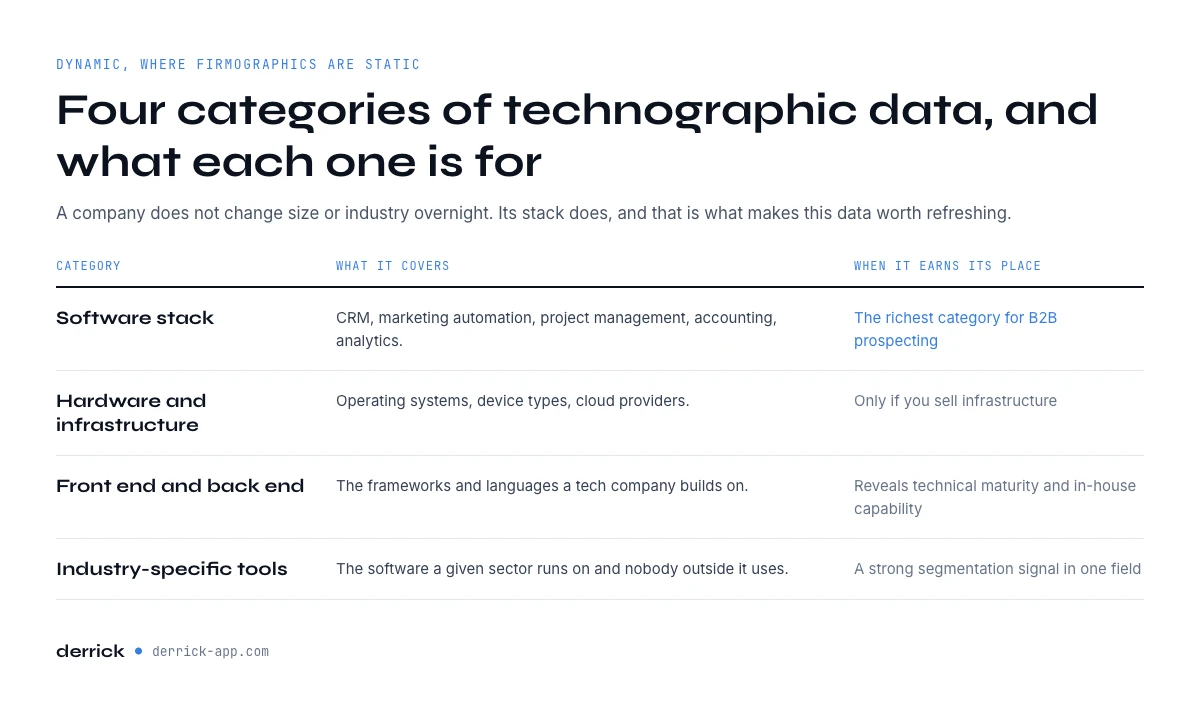
Unlike relatively static firmographic data (a company doesn't change size or industry overnight), technographic data is dynamic and evolving. Understanding how it works will help you leverage it better.
Different Types of Technographic Data
Technographic data comes in several categories, each providing specific insights:
1. Software Stack These are the applications and software the company uses: CRM, marketing automation, project management, accounting, analytics. This is typically the richest category for B2B prospecting insights.
Example for a tech scale-up: Salesforce (CRM), Marketo (marketing automation), Jira (project management), Tableau (analytics), Zendesk (customer support).
2. Hardware and Infrastructure Operating systems, device types (desktop/mobile), cloud providers. Less directly actionable for prospecting, but crucial if you're selling infrastructure solutions.
Example: Windows 10 for workstations, AWS for cloud infrastructure, iOS and Android for mobile fleet.
3. Front-end vs Back-end Tech For tech companies, knowing whether they use React or Angular on the front-end, Node.js or Python on the back-end can reveal their technical maturity and internal capabilities.
4. Industry-Specific Tools Certain industries have specific tools: Bloomberg Terminal in finance, AutoCAD in architecture, Westlaw for legal. Identifying these tools enables ultra-precise targeting.
Where Does This Data Come From?
Technographic data is collected through several sources, each with advantages and limitations:
Job Postings This is the richest and most reliable source. When a company recruits, they systematically mention the technologies candidates need to master. A "Senior Backend Developer" position mentioning "Python, Django, PostgreSQL, AWS" instantly reveals 4 stack technologies.
Advantage: Very fresh and accurate data Limitation: Only captures technologies for which the company is actively recruiting
Website Source Code Analysis By inspecting a site's HTML, CSS, and JavaScript code, you can identify front-end frameworks, analytics tools (Google Analytics, Mixpanel), tracking technologies, CDNs used, etc.
Advantage: Public and verifiable data Limitation: Only reveals client-side technologies, not back-end infrastructure
Public API Documentation Some companies publish API documentation that mentions underlying technologies or data formats used.
Public Statements Company blog, conferences, technical interviews, LinkedIn posts from employees, tech press articles. For example, if a scale-up's CTO posts on LinkedIn "Migrating from MongoDB to PostgreSQL: lessons learned," that's first-hand technographic data.
Third-Party Databases Platforms like Coresignal or TheirStack aggregate this data from multiple sources and structure it. They even assign a "confidence score" to each identified technology.
According to Coresignal, their database contains technographic information on over 7.6 million companies worldwide, with 21,000+ mapped technologies.
Why Technographic Data Transforms Your B2B Prospecting
Now that you understand what technographic data is and where it comes from, let's see concretely what it brings you day-to-day.
1. Qualify Your Leads in Seconds
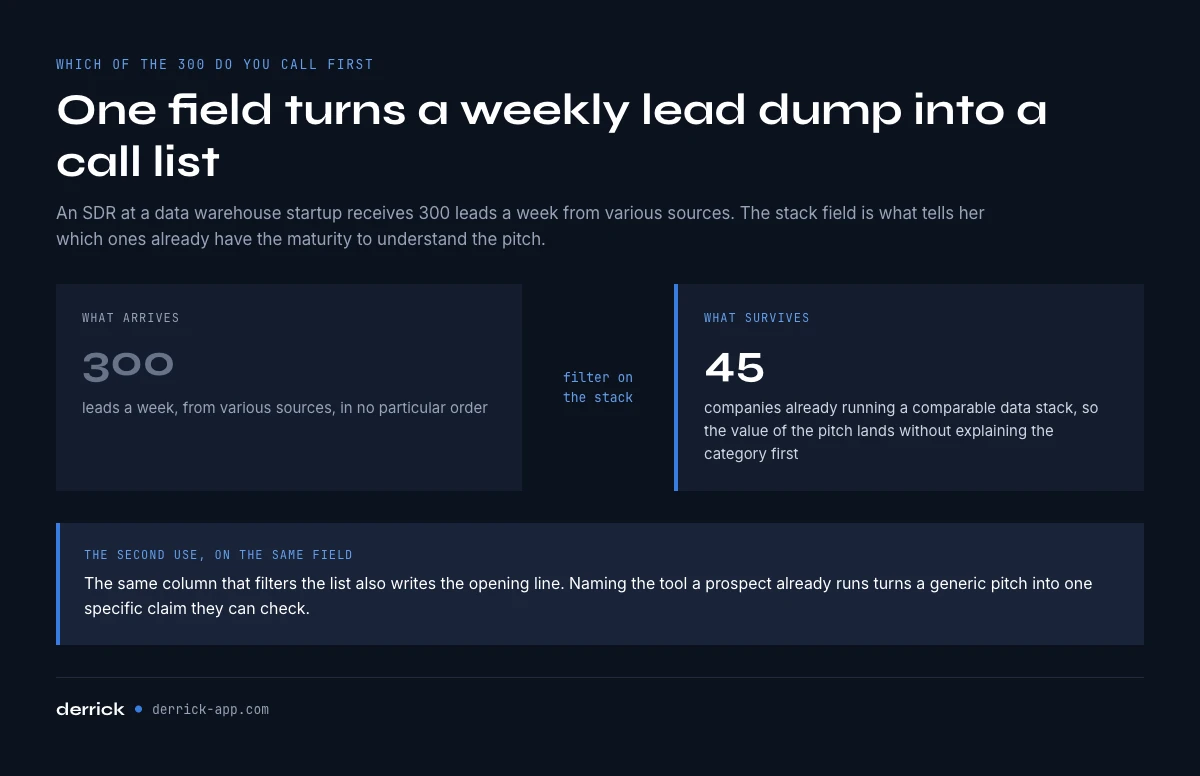
The Problem: Sarah, an SDR at a data warehouse startup, receives 300 leads per week from various sources. Which ones to prioritize? Which are truly qualified?
With Technographic Data: She instantly filters to keep only companies already using Redshift, BigQuery, or Snowflake. These companies already have sufficient data maturity to understand her solution's value. In 2 minutes, she goes from 300 leads to 45 ultra-qualified leads.
Measured Impact: According to a 2026 Mailchimp study, sales teams using technographic data to qualify leads reduce qualification time by 40%.
2. Hyper-Target Your Pitch Personalization
Generic Approach: "Hi, we help companies optimize their sales process."
Approach with Technographics: "Hi Jessica, I saw your team uses Pipedrive. Our solution natively integrates with Pipedrive to automate lead scoring and predict each deal's closing probability. The 12 SaaS companies similar to yours using it have increased their conversion rate by 23% on average."
The difference? In the first case, you're just another salesperson. In the second, you're an expert who understands their context and brings a concrete solution to a specific problem.
3. Identify Competitive Displacement Opportunities
The Scenario: You're selling a CRM and your main competitor is Salesforce. How do you identify companies using Salesforce AND might be open to a change?
The Method: Cross-reference technographic data + temporal data. A company that adopted Salesforce 3-4 years ago is potentially reaching contract renewal. If you also see in job postings they're recruiting a "Salesforce Administrator," that's a sign the current solution is complex to maintain - a perfect pain point for your pitch.
Mike, an AE at a Salesforce alternative, used this approach to identify 200 target accounts. Result: 18 demos booked in 2 months, 5 deals closed, for $180K total ARR.
4. Segment Your Audience for Targeted Campaigns
Marketing Use Case: Instead of launching a generic email campaign to 10,000 contacts, segment by tech stack:
- Segment A: HubSpot users → Message: "Boost Your HubSpot with Our Native Integration"
- Segment B: Salesforce users → Message: "Simplify Your Salesforce with Our Solution"
- Segment C: No CRM identified → Message: "Discover How a CRM Can Transform Your Sales"
Typical Result: +15% open rate, +30% click rate, +45% conversion rate compared to a generic campaign.
5. Optimize Your Outreach Timing
Technographic data doesn't just reveal which tools a company uses, but also since when - golden information for your timing.
Strong Buying Signals:
- Recent adoption of a complementary tool to yours (they're building their stack)
- Using an obsolete version for 3+ years (ready for modernization)
- Multiple tools in the same category (need for consolidation)
- Recent abandonment of a competitor (3-6 month opportunity window)
Around 71% of organizations consider closing more deals their #1 priority. Technographic data helps them identify the 20% of prospects with the highest purchase probability and focus their efforts there.
How to Identify Your Prospects' Tech Stack: Step-by-Step Guide
Let's get practical now. Here's how to concretely identify any target company's tech stack.
Step 1: Analyze Your Prospect's Website
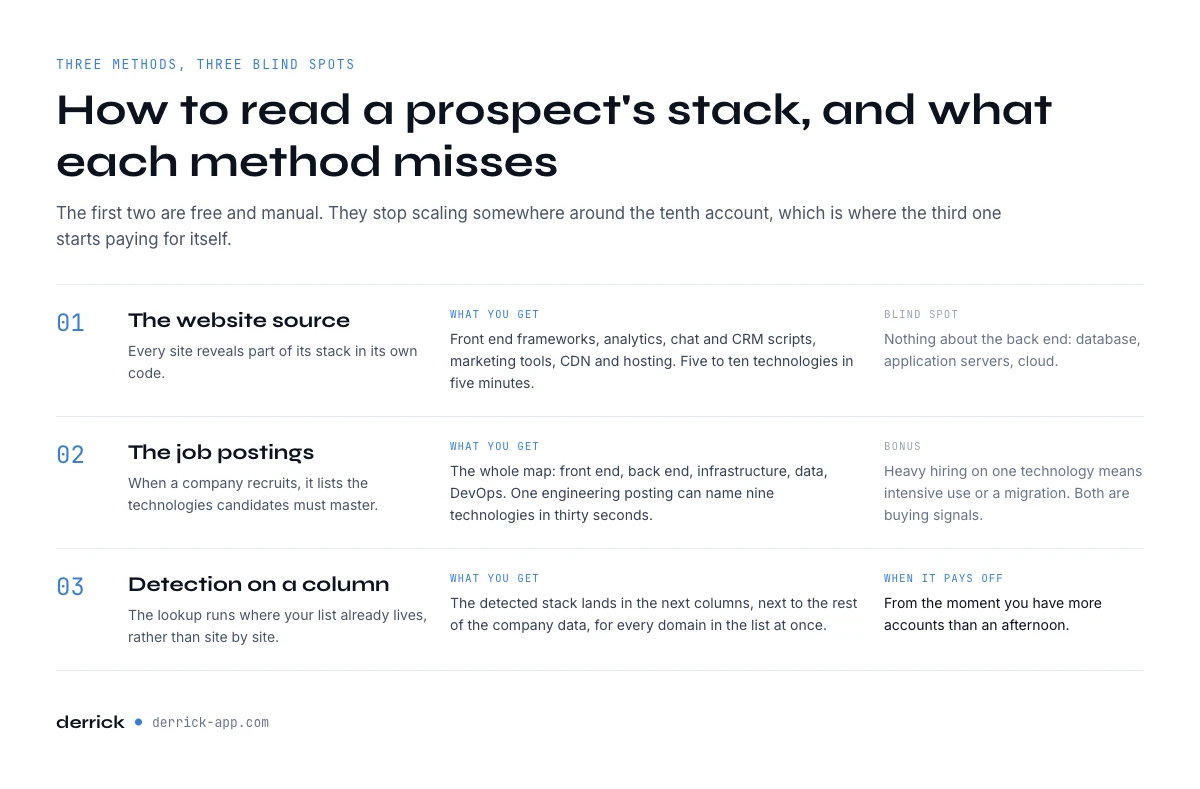
This is the simplest and most accessible method. Every website reveals part of its tech stack in its source code.
Action: Open your prospect's website, right-click > "Inspect" (or "View Source Code").
What You'll Find:
- Front-end frameworks: Look for patterns like
react,angular,vue.jsin the code - Analytics tools: Google Analytics (
gtag), Mixpanel, Amplitude - CRM/Chat: Intercom, Drift, Zendesk appear as scripts
- Marketing tools: HubSpot, Marketo, Pardot leave footprints in the code
- CDN and hosting: Cloudflare, AWS CloudFront, Fastly
Expected Result: In 5 minutes, you identify 5-10 front-end and marketing technologies.
Limitation: This method doesn't reveal back-end (database, application servers, cloud infrastructure). For that, move to step 2.
Step 2: Analyze the Company's Job Postings
Job postings are an often underexploited goldmine. When a company recruits, they explicitly list the technologies candidates need to master.
Action: Go to the company's careers page, or search their postings on LinkedIn, Indeed, or AngelList.
What You're Looking For:
- Technical positions: "Backend Developer", "DevOps Engineer", "Data Engineer"
- "Requirements" or "Tech Stack" section: Exhaustive list of technologies
Concrete Example: A "Senior Backend Engineer" posting at a fintech in San Francisco mentions:
"Stack: Python, Django, PostgreSQL, Redis, AWS (EC2, S3, RDS), Docker, Kubernetes, CI/CD with GitLab"
You just identified 9 technologies in 30 seconds.
Expected Result: You map the entire tech stack: front-end, back-end, infrastructure, data, DevOps tools.
Bonus: If the company is heavily recruiting for a specific technology, it means they're using it intensively or migrating to it - both are potential buying signals.
Step 3: Use Specialized Tech Stack Detection Tools
To move faster and cover multiple prospects simultaneously, use dedicated tools.
No-Code Tools (Browser Extensions):
- SimilarWeb: Provides traffic insights + some technologies
Complete B2B Platforms:
- Coresignal: Database of 7.6M companies with tech stack
- TheirStack: 32K tracked technologies, confidence scoring
How to Proceed with Derrick (Example):
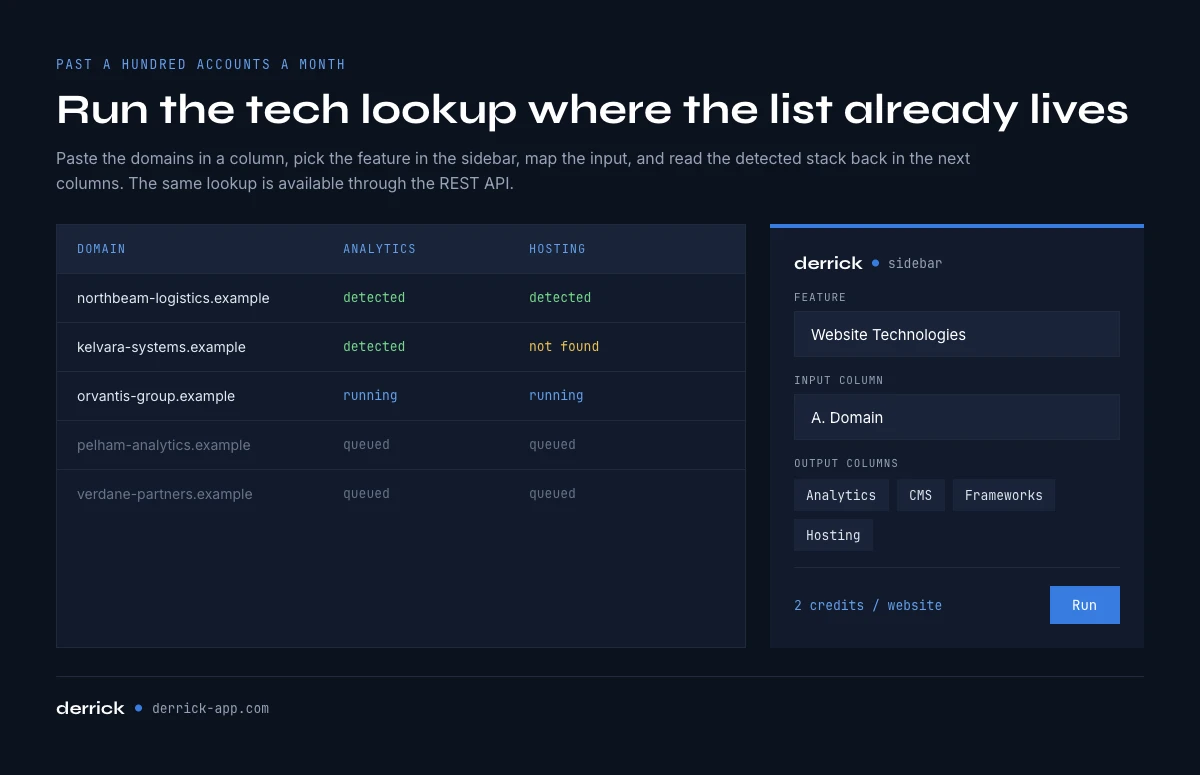
- Paste your prospects' domains into a column in Google Sheets
- Open the Derrick sidebar and pick Website Technologies
- Map the domain column as input and run it
- Read the detected stack back in the next columns: analytics, CMS, frameworks, hosting, and more
It costs 2 credits per website and runs on the whole list at once, so the 50th account takes no more effort than the first. The same lookup is available through the Derrick API and the MCP server if you would rather trigger it from your own workflow or from an AI client.
Expected Result: a structured stack for every account in your sheet, not one report per manual visit.
Step 4: Leverage LinkedIn and Social Media
Your prospects' employees regularly share information about their tech stack, sometimes without realizing it.
Where to Look:
- Technical posts on LinkedIn: "Excited to announce we've migrated to AWS!"
- Employee profiles: "Skills" section of developers
- Company tech blog: Articles like "How we scaled our infrastructure"
- GitHub: Some companies have public repos revealing their stack
Action: Search [company name] + tech stack or [company name] + migration on LinkedIn.
Example: Searching "Shopify tech stack" on LinkedIn, you find posts from engineers mentioning Ruby on Rails, MySQL, Redis, Kubernetes, etc.
Expected Result: Validation of identified technologies + discovery of recent migrations (buying signals).
Step 5: Cross-Reference and Validate Your Information
Like all data, quality trumps quantity. Cross-referencing sources is crucial.
Validation Method:
- Primary source: Job posting (90% confidence)
- Secondary source: Website analysis (80% confidence)
- Tertiary source: Third-party tool (70% confidence)
- Confirming source: Employee LinkedIn post (95% confidence)
If a technology appears in at least 2 different sources, consider it validated.
Beware of False Positives: A tool might detect a Facebook tracking pixel even if the company doesn't actively use Facebook Ads. Always contextualize.
Expected Result: A reliable list of 10-15 technologies you can confidently mention in your prospecting.
Tools and Solutions to Automate Technographic Data Collection
If you're prospecting at scale (100+ accounts per month), manually analyzing each prospect quickly becomes time-consuming. Here's how to automate the process.
Specialized SaaS Solutions
1. Coresignal
Coresignal is a B2B data platform that aggregates technographic information on over 7.6 million companies worldwide.
Strengths:
- 21,000+ tracked technologies
- Confidence score for each identified technology
- API available for CRM integration
- Continuously updated data via job postings
Use Case: A SaaS scale-up uses the Coresignal API to automatically enrich each incoming lead in their CRM with their tech stack. Their sales team saves 2 hours/day in qualification.
Pricing: Quote-based, typically suited for teams of 10+ people.
2. Derrick
Derrick runs the tech lookup where your list already lives, instead of asking you to visit sites one by one.
Strengths:
- Website Technologies on a whole column of domains, row by row
- The stack lands next to the rest of the company data, in the same sheet
- Same lookup available through the REST API and the MCP server (Claude, ChatGPT, any MCP client)
- Priced per website, not per seat
Use Case: an AE selling a Shopify-complementary solution pastes 500 store domains into a sheet, runs the lookup, and filters the rows that show Shopify plus Klaviyo but no review tool.
Pricing: 2 credits per website, on the paid plans.
No-Code Solutions: Chrome Extensions
If your budget is limited or you prospect moderate volume (<50 accounts/month), Chrome extensions are sufficient.
Ghostery (Free)
- Focus on trackers and marketing tools
- Reveals all third-party scripts loaded on a site
- Useful for identifying analytics and tag management tools
SimilarTech (Freemium)
- Analyzes technologies + gives alternatives
- Web traffic insights
- 10 free analyses/month, then $99/month
Integrations with Derrick
Derrick offers several enrichment features that complement your technographic data:
Website Technologies analyzes a domain and returns the technologies it detects (CMS, frameworks, analytics, payment, chat). It costs 2 credits per website and runs on a paid plan. Drive it from the Google Sheets sidebar for a column of domains, from the REST API when detection belongs inside a workflow, or from the MCP server when the question is asked in Claude or another AI client. A web app arrives very soon for teams who do not work in a spreadsheet.
G2 Insight retrieves customer reviews and the tooling context of a company listed on G2, at 2 credits per line on a paid plan. Useful for spotting the solutions a company is evaluating rather than the ones it already runs.
Find Similar Companies turns one account into an ICP-matched list at 1 credit per company, so a tech stack you have just qualified becomes a segment instead of a single name.
By combining these features with your technographic data, you get a 360° view of each prospect: tech stack + web performance + tools being evaluated.
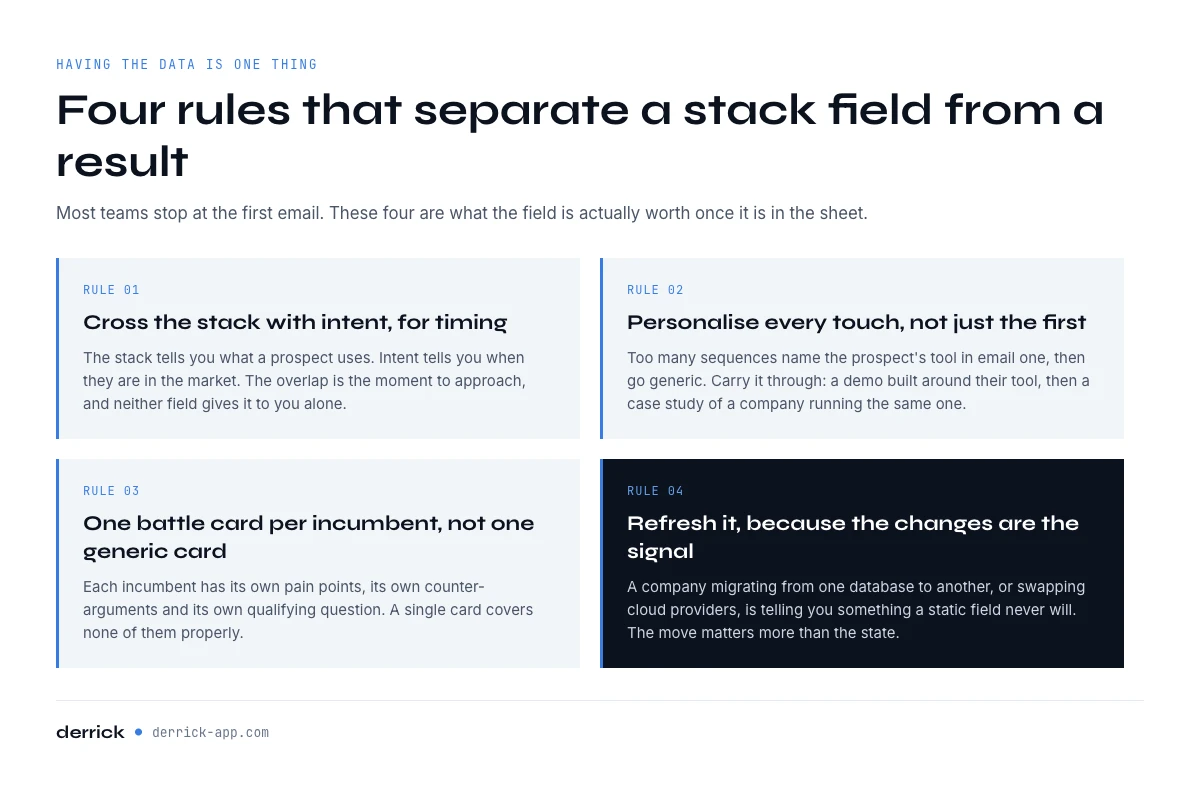
Best Practices: Golden Rules for Leveraging Technographic Data
Having access to technographic data is good. Leveraging it effectively to boost your results is better. Here are field-proven best practices.
1. Cross Technographics + Intent Data for Perfect Timing
Technographic data alone tells you what a prospect uses. Intent data tells you when they're active in the market.
Concrete Example: A prospect has been using Salesforce for 4 years (techno) + actively browsing CRM alternatives on G2 (intent) + their CTO liked 3 LinkedIn posts about "migrating from Salesforce" (social intent) = Perfect timing to approach.
Combining technographics with intent data roughly doubles engagement rate and cuts the sales cycle by around 31%.
Action: If you're using an intent-data platform, create segments that cross "uses technology X" AND "shows intent signals for category Y".
2. Personalize Every Touchpoint, Not Just the First Email
Too many sales teams only personalize their initial cold email with the prospect's technologies, then go generic mode for follow-ups.
Bad Approach:
- Email 1: "I saw you're using HubSpot…"
- Email 2 (follow-up D+3): "I wanted to make sure you saw my message…"
- Email 3 (follow-up D+7): "Last email before removing you from my list…"
Good Approach:
- Email 1: "I saw you're using HubSpot…"
- Email 2 (follow-up D+3): "I prepared a custom demo showing HubSpot integration…" [link to 2-min Loom video]
- Email 3 (follow-up D+7): "Here's a case study of a similar company using HubSpot + our solution…" [PDF link]
Result: Response rate multiplied by 2.5 on average.
3. Create Competitor-Specific Battle Cards
If you're selling a CRM and your main competitors are Salesforce, HubSpot, and Pipedrive, don't create a single generic battle card. Create three - one per competitor.
"vs Salesforce" Battle Card:
- Specific pain points: Complexity, high cost, need for dedicated admin
- Arguments: Simplicity, transparent pricing, 1-week onboarding vs 3 months
- Questions to ask: "How many hours/week does your Salesforce admin spend on the platform?"
"vs HubSpot" Battle Card:
- Pain points: Sales features limitations in free version, expensive upgrade
- Arguments: Advanced sales features from starter plan
- Questions: "Which HubSpot version are you using? What limitations are you facing?"
With specific battle cards, your sales team is armed for every situation.
4. Regularly Update Your Technographic Data
Tech stacks constantly evolve. A company can migrate from MongoDB to PostgreSQL, switch from AWS to GCP, abandon Marketo for HubSpot. These changes are major buying signals.
Recommended Update Frequency:
- Strategic accounts (top 50): Weekly
- Active pipeline (hot leads): Monthly
- Full database: Quarterly
Automation: Set up alerts on your enrichment tool to be notified when a target list account adopts a relevant new technology.
5. Segment by "Tech Stack Maturity" to Adapt Your Messaging
Not all companies have the same level of technical sophistication. Adapting your message accordingly is crucial.
"Early-Stage" Segment (Basic Stack):
- Tech stack: Google Sheets, no CRM, Gmail
- Message: Educational, focus on fundamentals, quick ROI
- Tone: "Here's how you can structure your prospecting with a simple CRM"
"Growth" Segment (Stack Under Construction):
- Tech stack: HubSpot Starter, few integrations
- Message: Optimization, automation, productivity gain
- Tone: "Here's how to automate X process you're doing manually"
"Enterprise" Segment (Mature Stack):
- Tech stack: Salesforce, Marketo, Tableau, multiple integrations
- Message: Consolidation, advanced insights, enterprise features
- Tone: "Here's how our solution integrates into your existing ecosystem"
6. Train Your Team to Interpret Data, Not Just Read It
Knowing a prospect uses "Python + PostgreSQL + AWS" is useless if your SDR doesn't understand what that implies.
Recommended Training:
- Level 1: What's a CRM, marketing automation, cloud provider (basic vocabulary)
- Level 2: What each technology implies for our pitch (logical connections)
- Level 3: Identify patterns (fast-scaling startup = modern stack, corporate = legacy stack)
Practical Exercise: Organize sessions where the team analyzes 5 tech stacks from existing customers and identifies common patterns among your best clients.
7. Respect GDPR Compliance and Ethical Best Practices
Technographic data is generally considered company data (not personal), but its use must remain ethical and compliant.
Best Practices:
- Only use public data or data purchased from GDPR-compliant providers
- Mention your sources if a prospect asks how you got the info
- Don't use technologies to "stalk" a prospect (e.g., "I saw you installed our competitor 2 days ago")
- Always provide opt-out option from your communications
Correct Phrasing: "I noticed on your website that you use HubSpot…" Incorrect Phrasing: "I analyzed your technical infrastructure and discovered…"
The first approach is transparent and respectful. The second can seem intrusive.
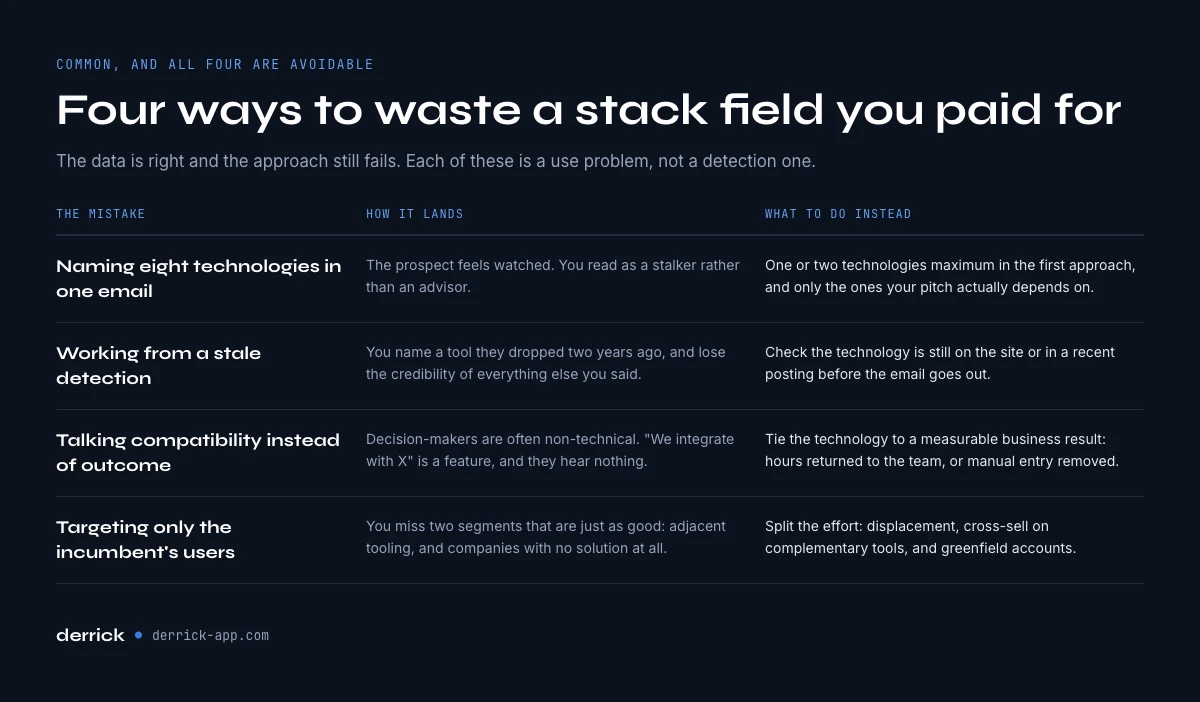
Mistakes to Avoid (And How to Fix Them)
Even with the best intentions, certain mistakes are common. Here's how to avoid them.
Problem 1: Overwhelming Your Prospect with Too Many Technical Details
Symptom: Your cold email is 300 words and mentions 8 different technologies the prospect uses.
Impact: The prospect feels surveilled, your message is indigestible, you come across as a stalker rather than an advisor.
Solution: Mention maximum 1-2 technologies in your initial approach, and only those directly relevant to your pitch.
Corrected Example: Instead of "I saw you use Salesforce, Marketo, Pardot, Google Analytics, Hotjar, Drift, Intercom, and AWS", simply say: "I noticed you use Salesforce for your CRM. Our solution natively integrates to…"
Problem 2: Relying on Outdated Data
Symptom: You mention a technology the prospect used 2 years ago but abandoned since.
Impact: You lose all credibility. The prospect thinks "They don't even know what they're talking about."
Solution: Always verify data freshness. Prioritize recent job postings (less than 6 months old) and real-time signals (current website source code).
Quick Check: Before sending an email, verify the technology is still present on the site or mentioned in a recent job posting.
Problem 3: Ignoring Business Context for Tech
Symptom: Your pitch is centered on "You use X, we're compatible with X" without mentioning any business benefit.
Impact: Decision-makers (often non-technical) don't see the value. You're talking features, not outcomes.
Solution: Always link technology to a measurable business benefit.
Bad: "Our solution integrates with your Salesforce." Good: "By integrating our solution with your Salesforce, your sales reps save 5 hours/week of manual entry, representing 20% more time for prospect calls."
Problem 4: Only Targeting Competitor Users
Symptom: You focus 100% of your prospecting on companies using your direct competitors.
Impact: You miss equally interesting opportunities: companies without a solution (greenfield) or those with adjacent solutions.
Solution: Diversify your segments:
- 40%: Competitor users (competitive displacement)
- 30%: Complementary tool users (cross-sell)
- 30%: No identified solution (greenfield)
Example: If you sell a customer success solution, target not only Gainsight users (competitor), but also companies with a mature CRM (Salesforce) but no CS tool - they have the need but not yet the solution.
Problem 5: Forgetting to Track Your Approach Results
Symptom: You prospect with tech stack-personalized messages, but don't measure if it performs better than your generic approaches.
Impact: You invest time without knowing if it's worth it. You can't optimize.
Solution: Create a simple tracking system in your CRM:
- Tag "techno-mentioned" on each prospected lead with personalization
- Compare response rate, demo rate, closing rate vs generic baseline
- Iterate based on results
Typical Baseline: With techno personalization, expect +20-30% response rate vs generic approach according to Leadspace.
Legal and Ethical Aspects: What's Allowed, What's Not
Since technographic data is often public (website source code, job postings), it raises fewer GDPR questions than personal data. But some vigilance points remain important.
What's Legal and Ethical
✅ Analyze Public Website Source Code Anything publicly accessible can be analyzed. It's like looking at a store window.
✅ Review Job Postings Employment offers are public and their review is perfectly legal.
✅ Buy Data from GDPR-Compliant Providers Reputable data platforms comply with European GDPR. Simply verify your provider has a DPO (Data Protection Officer) and compliant processing registry.
✅ Mention in Your Prospecting That You Reviewed Their Site or Postings Transparency = ethics. "I noticed on your site that you use…" is perfectly acceptable.
What's Risky or Discouraged
⚠️ Massively Scraping Websites Without Respecting robots.txt Technically possible, but may violate certain sites' ToS. Reputable tools do it legally because they respect technical limits.
⚠️ Using Data Without Verifying the Source If you buy data from a dubious broker who obtained it illegally, you're co-responsible. Prioritize known sources.
⚠️ Crossing Technographics + Sensitive Personal Data Without Legal Basis If you cross "uses Salesforce" (OK) with "HR manager's health data" (sensitive data), you enter GDPR gray zone.
Compliance Best Practices
1. Mention Your Legal Basis If a prospect asks how you got their data, answer clearly: "We analyzed the public technologies on your website and reviewed your public job postings."
2. Allow Opt-Out In each email, include a clear unsubscribe link. It's mandatory in B2B too (ePrivacy directive).
3. Document Your Data Sources Keep a processing registry mentioning where your technographic data comes from and how you use it.
4. Only Store What You Need No need to store 100 technologies per prospect if you only use 5 for prospecting. GDPR minimization principle.
According to CNIL, company technographic data (tech stack) is generally not considered personal data if it doesn't identify an individual. You're relatively safe, but always remain transparent and ethical in your approach.
Key Takeaways
- Technographic data reveals a company's complete stack (CRM, marketing tools, infrastructure) and enables ultra-targeted prospecting
- Three main collection methods: web source code analysis, job postings, and specialized tools like Derrick or Coresignal
- Cross technographics + intent data for optimal timing: identify when a prospect is active in the market
- Personalize every touchpoint by mentioning the prospect's tools, not just the first email
- Companies using technographic data reduce their sales cycle by 27% and improve conversion rate by 34% according to HubSpot
- Segment by tech stack maturity to adapt your message (early-stage, growth, enterprise)
- Update your data regularly: tech stacks evolve and these changes are major buying signals
Conclusion: Where to Start with Technographic Data
You now understand how technographic data transforms B2B prospecting. But where to start concretely?
If You're Starting Out: Begin manually. Take your 10 best existing customers and analyze their tech stack (website + job postings). Identify common patterns. Then find 50 similar prospects and approach them with a personalized message mentioning these technologies.
If You're Scaling: Invest in a tool like Derrick or Coresignal. Create tech stack segments in your CRM. Train your team to interpret data, not just read it. Measure results and iterate.
If You're Already Advanced: Cross technographics + intent data + firmographics for ultra-precise targeting. Automate enrichment via API. Create specific playbooks per tech segment.
The key to success? Don't fall into the data paralysis trap. Start simple, test, measure, and adjust progressively. Technographic data is a means, not an end. The ultimate goal remains to better serve your prospects by bringing them a solution that naturally integrates into their existing ecosystem.
In Google Sheets
Detect the stack from the domain
Technographic targeting stops being theoretical when the column exists. Derrick reads the website from the sheet and returns the technologies detected on it, so you can filter your list on the tool you integrate with or replace.
- Feature
- Website Technologies
- Credit cost
- 2 credits per call
- Availability
- From MINI
Continue exploring this cluster
 Data Attributes
 The 20 Essential Contact Attributes to Nail Your B2B Prospecting
The 20 contact data points that actually move outreach reply rates - name, role, email, phone, LinkedIn, plus the under-rated ones.
Read the guide → Data Attributes
 The 30 Essential Firmographic Attributes for B2B Targeting
30 firmographic attributes ranked by ICP-fit lift - industry, size, revenue, geography, growth stage, tech sophistication.
Read the guide → Data Attributes
 B2B Demographic Data: Definition, Types & Complete Usage Guide
Demographic data in B2B isn't age and gender - it's role seniority, function, tenure, team size. The 10 dimensions that segment ICPs.
Read the guide → Data Attributes
 How to Find Company Financial Data: Revenue, Funding and Growth Signals
Where revenue, funding rounds, EBITDA, growth signals come from - public sources, paid databases, news APIs.
Read the guide → Data Attributes
 Behavioral Attributes: Intent Data and Buying Signals in B2B
Intent data 101 - what counts as a buying signal, where Bombora-style co-ops fit, when to act on signal vs ignore noise.
Read the guide → Data Attributes
 Timing Attributes in Data Enrichment: Complete Guide (Job Change, Funding, Hiring)
The 3 timing signals (job change, funding, hiring) that 2-3x reply rate when caught in the 30-day window after the trigger.
Read the guide → Data Attributes
 Custom Attributes: Create Your Own B2B Data Enrichments
When standard attributes don't fit your ICP - how to define, build and operationalize custom enrichment fields.
Read the guide → Data Attributes
 Lead Scoring with Data Enrichment: The 100-Point Model
A copyable 100-point model: the weight of every attribute, the column that fills it, what one scored lead costs in credits, and how to calibrate on your own closed won deals.
Read the guide → Data AttributesWhat Is an SMB in Business? Thresholds, Bands and the Data
SBA, EU and INSEE give three different verdicts for the same company. Here are the thresholds, the headcount bands that segment, and the field that answers in a database.
Read the guide →Start enriching your sheet in 30 seconds
Free for 100 credits/month. No credit card.