Company Followers on LinkedIn: Find & Use Them (2026)

Your competitors have thousands of LinkedIn followers actively engaging with their content — and you can’t see who they are. Frustrating, right? These followers represent your ideal customer profile, already interested in solutions like yours, yet LinkedIn keeps this goldmine hidden behind privacy walls.

Here’s the reality: 40% of LinkedIn company page followers are decision-makers, and they’re 5x more likely to convert than cold prospects. That’s why savvy B2B teams are finding creative ways to identify and reach these high-intent leads. In this guide, you’ll discover exactly how to uncover company followers on LinkedIn and turn them into your next deals.

TL;DR

LinkedIn does not allow you to see individual follower names directly for privacy reasons. Admins can access demographic data only. Three proven methods exist: LinkedIn Analytics for your own page, Sales Navigator advanced filters, and data enrichment tools like Derrick that can identify followers from competitor pages. Followers are 5x more ready to buy than average prospects, making them strategic targets for B2B prospecting.

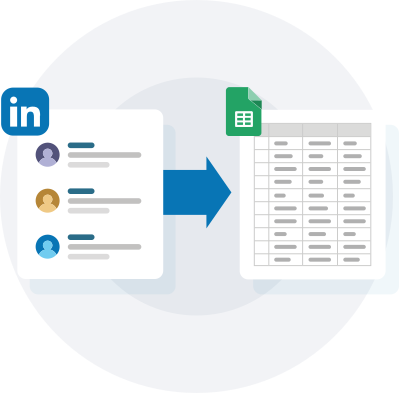
Find LinkedIn Company Followers in Google Sheets

Identify competitor followers and enrich them with verified emails and phone numbers directly in your spreadsheet.

Try for free →

Derrick Demo

What Are LinkedIn Company Followers and Why They Matter for B2B Prospecting

A LinkedIn company follower is a LinkedIn user who has clicked the “Follow” button on a company page to receive updates in their feed. Unlike connections (which require mutual acceptance), followers can follow any company page without permission. This creates a one-way relationship where the follower receives company updates but isn’t necessarily connected to company employees.

Think of it like subscribing to a newsletter — you’re expressing interest in a brand without committing to a personal relationship. For B2B prospecting, this signal is incredibly valuable because it reveals genuine interest in a specific industry, product category, or solution.

Here’s why company followers are a prospecting goldmine:

High Intent Signal: Someone who follows your competitor is actively researching solutions in your space. According to data from Email-Researcher, company page followers are 5x more ready to buy than prospects who simply match your ICP demographics.

Decision-Making Power: Approximately 40% of company page followers hold decision-making roles (director level and above). These aren’t random visitors — they’re people with purchasing authority actively evaluating options.

Reduced Cold Outreach Friction: When you reach out to someone who already follows a competitor, you’re entering a conversation with context. Your message isn’t truly “cold” — they’ve demonstrated interest in solutions like yours, making them significantly more receptive than completely cold prospects.

Competitive Intelligence: Understanding who follows your competitors reveals market segments you might have missed, helps you identify emerging accounts, and shows you which companies are actively shopping for solutions.

The difference between followers and connections matters for prospecting strategy. Connections are mutual relationships where both parties can message each other directly. Followers are one-way relationships — they see your updates but you can’t directly message them without InMail or finding their contact information through other means.

This distinction is crucial because it means you can’t simply “message all your followers” on LinkedIn. You need to export this data, enrich it with contact information like emails and phone numbers, and then reach out through appropriate channels.

Why You Can’t See All Company Followers on LinkedIn (And What LinkedIn Actually Shows)

LinkedIn’s privacy-first approach means you cannot see a complete list of individual company page followers — not even on your own page. This frustrates marketers and salespeople who understand the strategic value of this data, but LinkedIn enforces this restriction to protect user privacy and prevent unwanted solicitation.

What LinkedIn Shows to Company Page Admins

If you’re an admin of a LinkedIn company page, you get access to follower analytics through the page’s Analytics tab. However, this data is aggregated and anonymized:

  • Total Follower Count: The number of people following your page
  • Follower Demographics: Job functions (Marketing, Sales, Engineering, etc.), seniority levels (Director, VP, C-Suite), industries (Technology, Healthcare, Finance), company sizes (1-10, 11-50, 51-200 employees), and locations (countries and regions)
  • Follower Trends: Growth rate over time, follower acquisition sources (organic vs. paid)
  • Engagement Metrics: Which follower segments engage most with your content

What you will NOT see: Individual names, profile URLs, email addresses, or any personally identifiable information about specific followers.

What Non-Admins See

If you’re not an admin of the company page, you see even less — just the total follower count. That’s it. No demographics, no trends, nothing that helps with prospecting.

Why These Restrictions Exist

LinkedIn enforces these privacy measures for several reasons:

First, preventing spam and unwanted solicitation. If every company could see exactly who follows them, those individuals would be bombarded with outreach messages. LinkedIn wants to maintain a professional environment, not a Wild West of aggressive sales tactics.

Second, user consent and GDPR compliance. European privacy regulations require explicit consent before processing personal data for marketing purposes. By hiding follower identities, LinkedIn avoids potential legal issues around data collection without consent.

Third, competitive moats. LinkedIn Sales Navigator is a premium product that provides advanced search and filtering capabilities. If follower lists were freely available, fewer people would pay for Sales Navigator’s prospecting features.

The Sales Navigator Loophole

Sales Navigator does offer a workaround through its “Following your company” filter. This allows you to see leads who follow your own company page (not competitors), but you still need a Sales Navigator subscription and the data is limited to what Sales Navigator’s search returns.

This is why B2B teams turn to third-party tools and data enrichment platforms — they fill the gap between what LinkedIn shows and what prospectors actually need to build effective outreach campaigns.

3 Proven Methods to Find LinkedIn Company Followers

Since LinkedIn doesn’t provide a simple “export followers” button, you need alternative approaches. Here are the three most effective methods for identifying company followers in 2026.

Method 1: Using LinkedIn Analytics (For Company Page Admins Only)

This method only works if you’re an admin of the company page whose followers you want to analyze — typically your own company page.

Step 1: Access Your Company Page Analytics

Log into LinkedIn and navigate to your company page. In the top navigation, click the “Analytics” tab. If you don’t see this tab, you’re not an admin and need to request admin access from your page owner.

Step 2: Navigate to the Followers Tab

Within Analytics, select the “Followers” option from the dropdown menu. This section shows demographic breakdowns of your follower base.

Step 3: Analyze Follower Demographics

You’ll see charts and tables breaking down your followers by job function, seniority, industry, company size, and location. Use this data to understand who’s following you and whether they match your ideal customer profile.

Step 4: Export Demographics Data (Optional)

While you can’t export individual follower names, you can screenshot or manually record the demographic data for use in targeting decisions. For example, if 45% of your followers work in Marketing and 30% are Directors, you know to prioritize Marketing Directors in your outreach campaigns.

Expected Result: Demographic insights about your follower base, but no individual contact information. This method is useful for understanding your audience composition but doesn’t provide actionable prospect data.

Limitations: Only works for your own company page, provides aggregate data only, and doesn’t reveal individual follower identities.

Method 2: Using LinkedIn Sales Navigator Advanced Filters

Sales Navigator offers more sophisticated search capabilities, including the ability to find people who follow specific company pages.

Step 1: Open Sales Navigator Lead Search

Log into LinkedIn Sales Navigator (requires a paid subscription). Click “Search” and select “Lead Search” from the menu.

Step 2: Apply the “Following Your Company” Filter

In the filter panel on the left, scroll to the “Buyer Intent” section and select “Following your company.” This filter shows leads who follow your company page.

Important Note: This filter only works for YOUR company page, not competitors’ pages. LinkedIn doesn’t allow you to filter by “Following Competitor X” to protect user privacy.

Step 3: Refine with Additional Filters

Narrow your results using additional filters like job title (e.g., “Sales Director”), geography (e.g., “United States”), industry (e.g., “Software”), and company size (e.g., “51-200 employees”).

Step 4: Save Your Search and Export Results

Save the search in Sales Navigator for ongoing monitoring. To export the list, use a tool like Evaboot or Derrick that can extract Sales Navigator search results into a CSV file with enriched contact information.

Expected Result: A filtered list of people who follow your company page, refined by your targeting criteria. When combined with export tools, you get names, companies, job titles, and enriched contact data (emails and phone numbers).

Limitations: Only works for your own company page, requires Sales Navigator subscription (around $79-$135/month), and you still need third-party tools to export and enrich the data.

Method 3: Using Data Enrichment Tools and Workflows

This is the most powerful method for finding competitor followers and enriching them with contact information.

How It Works

Data enrichment platforms like Derrick can identify company followers through a multi-step workflow:

  1. Input company information (company name, website, or email domain)
  2. The tool searches LinkedIn’s public data to find profiles that follow the target company
  3. Results are enriched with verified business emails, phone numbers, job titles, and other B2B attributes
  4. Data is exported to Google Sheets, CSV, or your CRM for outreach

Using Derrick’s Company Followers Workflow

Derrick offers a specialized workflow for finding company followers: Find Company Followers by Company Contact Email

This workflow works by:

  • Taking a company email domain or company name as input
  • Identifying LinkedIn users who follow that company page
  • Enriching the list with 50+ attributes including verified emails and phone numbers
  • Outputting the results directly in your Google Sheets

Step-by-Step Process:

  1. Open your Google Sheets and install the Derrick add-on
  2. Create a column with company names or domains you want to research (typically competitors)
  3. Select the “Find Company Followers” workflow
  4. Run the enrichment
  5. Derrick returns a list of followers with their names, job titles, companies, emails, and phone numbers

Expected Result: A comprehensive, exportable list of company followers with full contact information, ready for outreach campaigns. This works for ANY company page, including competitors.

Other Tools for This Method:

  • PhantomBuster: LinkedIn Company Follower Collector automation
  • Evaboot: Export Sales Navigator searches with email enrichment
  • Boomerang: ExportCompetitorFollowers feature ($5.50/1000 followers)

Why This Method Is Most Effective

Unlike Methods 1 and 2, this approach works for competitor pages (not just your own), provides individual contact information (not just demographics), and automates the entire process (no manual work).

The key is choosing a tool that respects rate limits and doesn’t risk your LinkedIn account. Tools like Derrick operate outside LinkedIn to avoid detection, while tools that automate directly on LinkedIn risk account restrictions.

How to Use Company Followers for B2B Prospecting: 4 Strategic Use Cases

Now that you can identify company followers, here’s how to turn this data into revenue.

Use Case 1: Prospect Competitors’ Followers

Persona: Sarah, an SDR at a B2B SaaS company

Scenario: Sarah’s company offers project management software competing with Asana, Monday.com, and ClickUp. She wants to reach prospects already familiar with the category.

Strategy:

Using Derrick, Sarah exports followers from her top 3 competitors’ LinkedIn pages. She ends up with a list of 5,000 prospects, enriched with verified emails and job titles.

She filters this list to focus on:

  • Job titles: Product Manager, Operations Manager, Team Lead
  • Company size: 20-500 employees (her ideal customer profile)
  • Seniority: Director level and above

Sarah now has 800 highly qualified prospects who already understand the value of project management tools. Her outreach message references their competitor interest:

“Hi [Name], I noticed you follow [Competitor] on LinkedIn — clearly you’re interested in team collaboration tools. We just launched [Feature] that [Competitor] doesn’t offer, and I think it could solve [specific pain point]. Would you be open to a 15-minute demo?”

Result: Sarah achieves a 32% open rate and 18% reply rate — significantly higher than her typical cold email performance of 22% open and 5% reply.

Use Case 2: Analyze Your Own Followers for Product Marketing Insights

Persona: Mike, a Growth Marketer at a B2B analytics platform

Scenario: Mike’s marketing team is planning their 2026 content strategy and wants to understand who’s actually paying attention to their brand.

Strategy:

Mike uses Method 1 (LinkedIn Analytics) to view follower demographics. He discovers:

  • 40% of followers are Marketing Managers (not the C-suite executives they’ve been targeting)
  • 25% work in e-commerce (a segment they’ve underinvested in)
  • 60% are in companies with 11-50 employees (smaller than their typical 100+ employee target)

This data reveals a mismatch between who they’re attracting and who they’re selling to.

Mike then uses Derrick to export a sample of 500 followers with contact information. He segments them by company size and industry, then conducts customer interviews to understand why smaller e-commerce companies are interested in their product.

Result: Mike discovers a new market segment (e-commerce SMBs) that leads to a new product tier and marketing campaign, generating $1.2M in ARR from previously overlooked accounts.

Use Case 3: Build Hyper-Targeted Outreach Lists

Persona: Elena, a Sales Operations Manager at a cybersecurity company

Scenario: Elena’s sales team struggles with low conversion rates on cold outreach. She wants to build smarter prospect lists.

Strategy:

Elena uses Method 3 to export followers from 10 competitor company pages (her top competitors plus adjacent solution providers like identity management and cloud security companies).

She enriches this data with:

  • Company technology stack (using Derrick’s Website Tech Lookup)
  • Employee count and funding stage
  • Recent company news (expansion, funding rounds, breaches)

Elena creates segmented lists based on:

  1. Competitors’ followers + recent funding announcements = high buying intent
  2. Competitors’ followers + using competing technologies = potential switchers
  3. Multiple competitor pages followed = actively shopping for solutions

She assigns these lists to SDRs with tailored messaging for each segment.

Result: Elena’s segmented lists convert 3.2x better than generic ICP-based lists, with a 14% meeting booking rate compared to 4.5% on cold lists.

Use Case 4: Competitive Intelligence and Account Prioritization

Persona: David, CEO at a startup entering a competitive market

Scenario: David needs to understand the competitive landscape and identify early adopters for his new HR tech solution.

Strategy:

David uses Derrick to export followers from the top 5 incumbents in his space. He analyzes:

  • Which companies follow multiple competitors (indicating active evaluation)
  • Which job titles are most common among followers (revealing buyer personas)
  • Geographic concentration of followers (showing strongest markets)

David discovers that 200 companies follow 3+ competitors, signaling they’re actively shopping. He also notices that 70% of followers work in tech companies in the San Francisco Bay Area and New York — tighter geographic concentration than expected.

David’s sales team prioritizes these 200 high-intent accounts and adjusts their go-to-market strategy to focus on tech hubs rather than spreading resources across all markets.

Result: By focusing on accounts that follow multiple competitors, David’s team closes 15 deals in their first quarter — beating their goal of 10 — and achieves a 7-month payback period on CAC.

Best Practices for Reaching Out to Company Followers

Finding company followers is only half the battle. Here’s how to reach out effectively without coming across as creepy or spammy.

Acknowledge the Context (Without Being Creepy)

Mention the connection naturally: “I noticed you follow [Competitor] on LinkedIn, so you’re clearly interested in [category].” This shows you’ve done research without seeming intrusive.

Avoid: “I’ve been monitoring your LinkedIn activity” or “I scraped your profile data” — these phrases make people uncomfortable.

Lead with Value, Not Your Product

Since these prospects are already familiar with the category, they don’t need education on the problem. Jump straight to what makes your solution different or better.

Template: “Most [competitor] users we talk to struggle with [specific limitation]. We built [feature] specifically to solve that — would you be open to seeing how it works?”

Multi-Channel Approach

Don’t rely solely on LinkedIn InMail or connection requests. Use the enriched email and phone data to reach out through:

  • Email: Primary channel for first touch (less invasive than LinkedIn)
  • LinkedIn: Secondary follow-up if email doesn’t get a response
  • Phone: For high-value accounts after 2-3 email touches

Timing Matters

Reach out shortly after someone follows a competitor. Fresh interest converts better than stale follows. If you’re exporting follower lists monthly, prioritize the most recent additions.

According to data from Evaboot, prospects who followed a competitor within the last 30 days have 2.3x higher reply rates than those who followed 6+ months ago.

Personalization at Scale

You can’t manually personalize outreach to thousands of followers. Use these scalable personalization tactics:

  • Dynamic fields: [First name], [Company], [Competitor they follow]
  • Segmented messaging: Different templates for different job titles or industries
  • AI-powered personalization: Tools like Claude (integrated in Derrick) can write unique opening lines based on LinkedIn profile data

Follow-Up Persistence

On average, 80% of sales require 5+ follow-ups, yet most reps give up after 1-2 attempts. Create a follow-up sequence:

  • Day 0: Initial outreach via email
  • Day 3: Follow-up email (value-add, not just “checking in”)
  • Day 7: LinkedIn connection request with note
  • Day 14: Final email with case study or social proof

Sample Outreach Template

Subject: [Competitor] user switching to [Your Product]?

Hi [First Name],

I saw you follow [Competitor] on LinkedIn. Quick question: are you happy with [specific feature/limitation]?

We just helped [Similar Company] migrate from [Competitor] and cut their [metric] by [percentage] using our [differentiated feature].

Not trying to sell you anything today — just wanted to share a quick 3-minute video showing the difference: [link]

Worth a look?

[Your Name]

This template works because it acknowledges context, leads with a peer comparison (social proof), offers value before asking for anything, and has a low-friction CTA (watch a video, not “book a meeting”).

GDPR and Compliance: What’s Legal When Prospecting Company Followers

Before you start reaching out to company followers, understand the legal boundaries — especially if you’re targeting European prospects.

What’s Legal

Public Data Collection: LinkedIn follower information is considered semi-public data. If someone’s profile is set to public and they’ve publicly followed a company page, you can note this information for business purposes.

Legitimate Interest: Under GDPR Article 6(1)(f), you can process B2B contact data under “legitimate interest” if you’re reaching out to business professionals in their professional capacity about relevant business opportunities. This applies to company email addresses (not personal emails) and work-related outreach.

B2B Prospecting Exemption: GDPR’s strictest rules apply to consumer (B2C) marketing. B2B prospecting to professional contacts using business email addresses has more flexibility, though you still need to provide opt-out options and respect privacy rights.

What’s Prohibited

Using Personal Email Addresses Without Consent: If you enrich follower data and find personal Gmail, Yahoo, or Outlook addresses instead of company emails, you cannot use these for cold outreach under GDPR without explicit consent.

Retargeting Ads Without Consent: Loading follower lists into ad platforms for retargeting requires consent if you’re targeting individuals (not companies). Use company-based targeting instead.

Automated Connection Requests and Messages on LinkedIn: LinkedIn’s Terms of Service prohibit automated activity. Tools that automatically send connection requests or messages risk account suspension.

Scraping Certain Profile Data: While finding follower lists is generally acceptable, scraping extensive personal information from individual profiles may violate both LinkedIn’s ToS and privacy regulations.

Best Practices for Compliance

Use Business Emails Only: When enriching follower lists, prioritize verified business email addresses over personal ones. Tools like Derrick validate email formats and flag personal addresses.

Provide Clear Opt-Out: Every email should include an unsubscribe link and honor opt-out requests immediately. This isn’t just GDPR compliance — it’s basic respect.

Don’t Store Data Unnecessarily: GDPR requires data minimization. Don’t hoard follower lists indefinitely. After your campaign ends, purge the data or anonymize it.

Document Your Legitimate Interest: If challenged, you need to show that your outreach serves a legitimate business purpose and that the prospect’s interests don’t override yours. Keep records of your targeting rationale and outreach strategy.

Respect LinkedIn’s Rate Limits: Even when using compliant tools, respect LinkedIn’s implicit rate limits. Don’t send 1,000 connection requests per day or view 500 profiles per hour. Stay within the safe range: 100-150 profile views/day, 20-50 connection requests/day, and 50-100 messages/day.

Get Legal Review: If you’re unsure about your specific use case, consult with a privacy attorney. Compliance requirements vary by jurisdiction (EU vs. US vs. other regions) and industry (especially healthcare and finance).

5 Common Mistakes When Prospecting Company Followers (And How to Avoid Them)

Mistake 1: Focusing Only on Competitors’ Followers

Impact: You miss adjacent audiences who might be even more receptive. Someone who follows a complementary tool (not a direct competitor) might be a better fit for your solution.

Solution: Expand your follower research beyond direct competitors. Include:

  • Adjacent solution providers (e.g., if you sell CRM software, look at marketing automation tool followers)
  • Industry thought leaders and influencers
  • Industry publications and communities
  • Partner companies and integration platforms

Cast a wider net initially, then filter down to your best-fit prospects.

Mistake 2: Ignoring Follower Recency

Impact: You waste time reaching out to people who followed a company page 3 years ago and have since moved on or purchased a solution. Stale follows convert poorly.

Solution: Prioritize recent followers (last 30-90 days). If your tool doesn’t provide follow dates, focus on profiles that show recent activity or recent job changes. Fresh followers signal active research and buying intent.

Mistake 3: Generic, Non-Contextual Outreach

Impact: Your message reads like every other cold email, even though you have valuable context about their interest. Prospects ignore messages that don’t acknowledge the follower connection.

Solution: Always reference the context in your outreach. Use variants like:

  • “I noticed you follow [Competitor]…”
  • “Since you’re interested in [category] (you follow [Competitor])…”
  • “Quick question about your experience with [Competitor]…”

This immediately differentiates your message from generic spam.

Mistake 4: Not Segmenting by Job Function

Impact: You send the same message to CFOs and Marketing Coordinators. Different roles care about different benefits, and a one-size-fits-all approach reduces conversion.

Solution: Create 3-5 messaging variants based on job function:

  • C-Suite: Focus on ROI, strategic impact, competitive advantage
  • Directors/VPs: Focus on team efficiency, process improvement, scaling
  • Managers/ICs: Focus on daily workflow, ease of use, time savings

Derrick’s AI segmentation can automatically categorize followers by function and suggest messaging angles for each segment.

Mistake 5: Violating LinkedIn’s Automation Policies

Impact: Your LinkedIn account gets restricted or banned, losing access to your entire network and reputation. LinkedIn’s detection algorithms have improved significantly, and aggressive automation now has severe consequences.

Solution: Never use tools that automate actions directly on LinkedIn (auto-connection requests, auto-messages). Instead, use tools that operate outside LinkedIn:

  • Export follower data using compliant tools like Derrick
  • Enrich with email and phone numbers
  • Conduct outreach via email and phone (off-platform)
  • Use LinkedIn manually for strategic follow-ups only

This approach is both safer and more effective — email and phone convert better than LinkedIn messages for cold outreach anyway.

Related Guide

How to Export LinkedIn Sales Navigator Lists

Learn the complete process for extracting and enriching Sales Navigator search results with verified contact data.

Conclusion: Turning Company Followers Into Your Next Customers

LinkedIn company followers represent one of the highest-quality prospect segments in B2B sales. They’ve already signaled interest in your category, many hold decision-making authority, and they’re significantly more likely to convert than cold prospects. The challenge is that LinkedIn makes this data difficult to access.

By combining LinkedIn’s limited analytics with data enrichment tools like Derrick, you can build comprehensive follower lists with full contact information — not just for your own company page, but for competitors and adjacent players in your market.

The key is using this data strategically: segment by recency and job function, personalize your outreach with context, and respect both legal compliance and LinkedIn’s policies. Done right, prospecting company followers can dramatically improve your conversion rates and sales efficiency.

Ready to start building your follower-based prospect lists?

Export Company Followers with Derrick

Find and enrich LinkedIn company followers in Google Sheets. Get verified emails, phone numbers, and 50+ B2B attributes for any company page.

Start free trial →

Derrick Demo

FAQ

Can you see who follows a company on LinkedIn?

No, LinkedIn does not allow you to see individual follower names on any company page. Admins can view aggregated demographics like job functions and seniority levels, but not specific identities. To identify individual followers, you need to use Sales Navigator filters for your own company or data enrichment tools like Derrick for competitor pages.

How do I find LinkedIn company followers for free?

If you’re an admin of your own company page, you can access follower demographics through LinkedIn Analytics at no cost. However, this only shows aggregate data, not individual contacts. For competitor followers or individual contact information, you need paid tools like Sales Navigator plus export tools, or all-in-one solutions like Derrick with free trial credits.

Is it legal to scrape LinkedIn company followers?

Scraping LinkedIn data operates in a gray area. While collecting public profile information for B2B prospecting falls under legitimate interest for GDPR, LinkedIn’s Terms of Service prohibit automated scraping. The safest approach is using tools that operate outside LinkedIn through APIs and public data sources, not direct automation on the platform. Always use business emails for outreach and provide opt-out options.

What is the difference between LinkedIn followers and connections?

Connections are mutual relationships where both parties accept the connection and can message each other directly. Followers are one-way relationships where users follow your company page to see updates in their feed, but you cannot message them directly without InMail or external contact information. Followers signal interest without committing to a direct professional relationship.

How can I find competitors’ followers on LinkedIn?

LinkedIn does not provide a native way to see competitors’ followers. You need third-party tools like Derrick, PhantomBuster, or Evaboot that can identify followers from any company page and enrich them with contact information. These tools use workflows that search LinkedIn data and cross-reference with other databases to build comprehensive follower lists with emails and phone numbers.

Why can’t I see my company’s LinkedIn followers?

LinkedIn restricts follower visibility to protect user privacy. Even page admins cannot see individual follower names — only aggregated demographics. This prevents companies from spamming followers with unsolicited messages and maintains LinkedIn’s professional environment. To contact your followers, you need to either wait for them to engage with your content or use data enrichment tools to identify and reach them through other channels like email.

Denounce with righteous indignation and dislike men who are beguiled and demoralized by the charms pleasure moment so blinded desire that they cannot foresee the pain and trouble.