Clay Pricing 2026: Real Cost Per Lead vs Listed Plans
Clay is one of the most talked-about B2B data enrichment platforms right now. But between the credit-based pricing, multiple tiers per plan, top-up markups, and required tool stack, figuring out what Clay actually costs your team is anythin
✓ Pick Clay if
You have a dedicated RevOps function with $800+/mo budget and need multi-provider data aggregation in one workflow builder
Your team is running 5+ concurrent enrichment workflows with branching logic (AI + waterfall + scoring)
✕ Skip if
You're 1-10 seats and want predictable monthly costs - Starter's $134/mo + Sales Nav + top-ups easily compounds to $500/mo per active seat
Your motion is mostly LinkedIn + email enrichment - Derrick from €20/month handles this 30× cheaper per action
Clay ships 4 tiers. Per-seat pricing combined with a credit system for data lookups - the listed price is rarely the real cost.
Free
€0€0 monthly
Credits1,200 / 6,000/yr
Min seats1
100 credits/month + 500 actions/month
Access to 100+ data providers
All workflow features
No card required
Two separate metrics now : 'credits' for data provider lookups + 'actions' for workflow steps. 100 credits = ~25-50 enrichments, 500 actions = ~1 small workflow run.
Pricing restructured 2026 : new 'actions' metric separate from credits. Actions = workflow steps (filters, AI calls, integrations). Run out of actions = workflow pauses.
Clay credits are the platform’s internal currency. Every action you run - a data lookup, an AI enrichment, a workflow step - consumes credits from your monthly allocation.
The tricky part: credit consumption varies significantly depending on the data provider and the type of information you’re requesting. Clay aggregates 100+ data providers and charges their wholesale rates, which it passes through without markup. That’s a genuine advantage. But it also means the cost per action is highly variable.
Rough consumption benchmarks per action:
Action
Credits consumed
Basic contact enrichment (name, title, company)
1–3 credits
Email lookup (single provider)
1–2 credits
LinkedIn profile enrichment
1 credit
Mobile number lookup
2–13 credits (provider-dependent)
AI/Claygent step
Variable
Data cleaning and formatting
Free
The more expensive operations - mobile numbers in particular - can quickly exhaust a Starter allocation. A single mobile lookup via an expensive provider can cost up to 13 credits, meaning the $0.075 per-credit Starter rate translates to nearly $1 for one phone number.
Credit rollover: capped, not unlimited
Unused credits roll over to the following month, but only up to 2x your monthly allocation. On the Explorer plan (10,000 credits/month), you can bank a maximum of 20,000 credits. Any excess is lost.
For teams with seasonal prospecting cycles - heavy in Q1 and Q3, quiet in Q2 and Q4 - this cap frequently creates waste. Credits accumulated during slow months aren’t available when a big campaign launches.
This is one area where the contrast with tools like Derrick is sharpest: Derrick offers rollover on all paid plans, so credits never expire while you stay on a paid plan, regardless of usage patterns.
Part 3 / 903
Hidden costs
Hidden costs to know before buying Clay
Things Clay's pricing page doesn't put in big type.
Most of Clay's high-value LinkedIn enrichment workflows require an active Sales Nav subscription per active user. A 5-person SDR team adds $5,940/year before a single Clay credit is spent. Some workflows work without it, but serious scale on LinkedIn effectively requires it.
Top-up credits cost +30% premium over plan rate
Run out mid-month and Clay charges a 50% premium on overage credits. Explorer's $0.035 base rate becomes $0.052 on top-ups. A heavy campaign month can add $100-300 to the bill with no warning.
No native CRM integration below Pro ($720/mo)
HubSpot, Salesforce, and Pipedrive sync are gated to Pro ($8,640/year minimum). Starter + Explorer users get enriched data into Clay tables but need manual exports or custom Zapier/Make to push to CRM - friction + ops overhead.
Charged even when enrichment FAILS
Clay consumes credits per attempt, not per success. If your workflow queries 3 providers for an email and all return empty, you pay for all 3. On stale-data pipelines this failure rate consumes 20-30% of monthly allocation.
20-40 hour learning curve
Reviewers on G2 + Reddit consistently report 20-40 hours to build a first production-ready workflow. For RevOps teams without dedicated tooling resources, that's a real cost - either consultant fees ($150-300/hr) or engineer time.
Read the full hidden-costs analysis
The subscription price covers roughly 40–60% of the real cost of running Clay at scale. Here are the additional expenses to budget for.
LinkedIn Sales Navigator: $1,188/year per user
Many of Clay’s most powerful LinkedIn enrichment features require an active Sales Navigator subscription. At $99/month per seat, a 5-person SDR team adds $5,940/year before a single Clay credit is spent. Some workflows work without it, but serious scale on LinkedIn enrichment effectively requires the subscription.
Derrick, by contrast, works autonomously in its web app or Google Sheets without requiring a Sales Navigator subscription - which is a meaningful cost difference for smaller teams.
Top-up credits: 50% markup
When you exhaust your monthly allocation, Clay offers additional credit top-ups - but at a 50% premium over your plan’s per-credit rate. An Explorer user paying $0.035/credit will pay approximately $0.052/credit for top-ups. During high-volume months or campaign surges, these charges can add $100–300 to the bill with no warning.
No CRM integration below Pro
The Pro plan at $720/month (annual) is the minimum tier with native CRM integrations (HubSpot, Salesforce, Pipedrive). Starter and Explorer users get enriched data into Clay tables, but syncing it to their CRM requires manual exports or custom Zapier/Make workflows - adding both friction and operational overhead.
The learning curve tax
According to multiple G2 and Reddit reviews, Clay takes several weeks to fully master. Teams typically spend 20–40 hours building their first production-ready enrichment workflow. For revenue ops teams without dedicated tooling resources, this is a real cost - either in consultant fees or engineer time.
Both tools offer B2B data enrichment with a credit-based model. Here’s a direct comparison on the metrics that matter most for budget decisions:
Clay Starter
Clay Explorer
Clay Pro
Derrick Standard
Derrick Plus
Credits/month
2,000
10,000
50,000
10,000
25,000
Price/month
$149
$349
$800
€20
€47.50
Cost/credit
$0.075
$0.035
$0.016
€0.002
€0.0019
Credit rollover
2x max
2x max
2x max
✓ Yes (rollover)
✓ Yes (rollover)
CRM integration
✕
✕
✓
Via Zapier/Make
Via Zapier/Make
Web app + Google Sheets
✕
✕
✕
✓
✓
Sales Navigator required
Often
Often
Often
✕
✕
Important nuance on credit consumption: Derrick and Clay don’t use credits at the same rate per action. Some Derrick enrichments (notably phone finder) consume significantly more credits than Clay’s equivalent. The comparison below reflects actual per-action costs:
Action
Clay Starter
Derrick Standard
Winner
LinkedIn profile enrichment
$0.075 (1 credit)
€0.002 (1 credit)
Derrick (~37x)
Email finder
$0.075 (1 credit)
€0.01 (5 credits)
Derrick (~7x)
Phone finder
$0.075–$0.975 (1–13 credits)
€0.40 (200 credits)
Clay
For LinkedIn enrichment and email finding - the core workflow for most SDR teams - Derrick’s per-action cost is dramatically lower. Phone number lookup is the exception where Clay has an advantage.
A sales team enriching 5,000 profiles monthly, pulling email addresses for each:
Clay (Explorer, annual):
LinkedIn: 5,000 × 1 credit = 5,000 credits
Email: 5,000 × 1–2 credits = 5,000–10,000 credits
Total: 10,000–15,000 credits → Explorer plan required at minimum
Monthly cost: $314
Derrick (Standard, €20/month):
LinkedIn: 5,000 × 1 credit = 5,000 credits
Email: 5,000 × 5 credits = 25,000 credits
Total: 30,000 credits → Large plan required
Monthly cost: ~€50
Savings: ~$264/month = $3,168/year on this workflow alone, with no LinkedIn Sales Navigator requirement and no CRM export friction (Derrick is a web app with nothing to install, also in Google Sheets).
To get started with data enrichment in Google Sheets, Derrick’s approach removes the export step entirely - enriched data lands in the web app or directly in the spreadsheet your team already uses.
Part 5 / 905
What's included
What's included in every Clay plan
Features bundled into Clay's plans - synthesised from the highlights of every published tier :
100 credits/month - proof-of-concept volume
Unlimited users (no seat fees)
Access to 100+ data provider integrations
Full workflow builder unlocked
2,000 credits/month
Unlimited users
All workflow features
Email + LinkedIn enrichment
10,000 credits/month
All Starter features
Sweet-spot per-credit cost ($0.035)
Phone enrichment unlocked at scale
Not every feature ships in every tier - confirm against the plan card above before you commit.
Part 6 / 906
The verdict
Is Clay worth paying for? Our verdict
✓
Pick Clay if…
You have a dedicated RevOps function with $800+/mo budget and need multi-provider data aggregation in one workflow builder
Your team is running 5+ concurrent enrichment workflows with branching logic (AI + waterfall + scoring)
You need access to 100+ providers under one credit pool (vs managing separate subscriptions)
✕
Skip Clay if…
You're 1-10 seats and want predictable monthly costs - Starter's $134/mo + Sales Nav + top-ups easily compounds to $500/mo per active seat
Your motion is mostly LinkedIn + email enrichment - Derrick from €20/month handles this 30× cheaper per action
You don't have someone willing to spend 20-40 hours learning the workflow builder
→
Pick Derrick instead if…
You want enrichment in a web app with nothing to install, or right IN your spreadsheet
You want a from €20/month rate with credit rollover (vs Clay's 2× cap)
You want to start free (100 credits/mo, no card) and scale from €20/month without per-tier upgrade math
Clay is a genuinely powerful platform for GTM teams that need flexible, multi-provider enrichment with workflow automation. For organizations with a dedicated RevOps function, mature prospecting processes, and $800+/month budgets, the Pro plan delivers strong value.
The challenge is the entry point. At $134–149/month, the Starter plan offers high per-credit costs, no CRM integration, and limited monthly volume - making it poorly suited to teams actually running outbound at scale. Many users find themselves jumping straight to Explorer or Pro once real workflows are in production.
If your team is earlier stage, budget-conscious, or simply doesn’t need Clay’s full workflow builder, there are leaner paths to quality B2B data enrichment with less operational overhead.
derrick •
Switch from Clay to Derrick
Web app: import a list or paste LinkedIn URLs, nothing to install
Free plan: 100 credits every month, no credit card
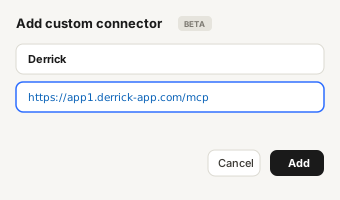
Also in Google Sheets, in Claude (MCP) and via the API
Derrick is a web app: nothing to install, no credit card, 100 free credits every month.
Web appnothing to install
Google Sheetssidebar
Claude · MCPjust ask
REST APIPOST /v1/enrich
Same engine, same credits
Open the Derrick web app
Sign up on the Derrick web app. Nothing to install, no credit card required: you start with 100 free credits per month.
+Add a column×
Enrich Leads
1 credit / profile
Full nameAName
Enrich Leadsmax 4
column B
Import your Clay list
Upload the CSV you exported from Clay, paste LinkedIn URLs, or import from LinkedIn Sales Navigator. The same actions also run in Google Sheets, in Claude (MCP) and via the API.
↑ Push to ▾
ANameEnrich Leads▶BJob title
1CamilleRunning✓ Done1 crRunningHead of Sales
2ThomasRunning✓ Done1 crRunningHead •• •••••
3SophieRunning✓ Done1 crRunningHe•• •• •••••
4InèsRunningNot found1 crRunning-
200 OK· or the same as JSON
Enrich your list with one click
Pick the column to enrich and the data you need: emails, phone numbers, LinkedIn data, company info, tech stack. Derrick fills the columns, and the email and phone finders only charge for what they find.
At minimum, a 5-person team should budget the Explorer plan ($3,768/year) plus LinkedIn Sales Navigator for each active user ($5,940/year) plus an outreach tool - totaling approximately $10,000–12,000/year before top-up overages. Clay Pro at $8,640/year includes CRM integration but the same Sales Navigator dependency applies.
Does Clay have a free plan?
+
Yes. The free plan includes 100 credits/month (1,200/year), unlimited users, and access to 100+ data provider integrations. It’s sufficient to test workflows and understand the interface, but not for any consistent professional use.
Do Clay credits expire?
+
Unused credits roll over to the next month, but only up to 2x your monthly allocation. Beyond that cap, excess credits are lost. This rollover policy can create waste for teams with variable monthly usage.
Does Clay charge for failed enrichment lookups?
+
Yes. Clay charges credits for every enrichment attempt regardless of whether data is found. If your workflow queries three providers for an email address and all return empty, you pay for all three attempts. On pipelines with stale data, this failure rate can consume 20–30% of your monthly allocation.
What is the difference between Clay and Derrick?
+
Clay is a standalone web platform combining 100+ data providers with workflow automation, targeting RevOps-heavy teams with $350–800+/month budgets. Derrick runs in its web app or inside Google Sheets, enriches LinkedIn profiles, finds emails and phones, and integrates with CRMs via Zapier/Make/n8n - starting at $9/month with credit rollover. Clay has an edge on workflow complexity and mobile phone data; Derrick has an edge on price, ease of use, and LinkedIn/email enrichment cost per action.
Can I use Clay without LinkedIn Sales Navigator?
+
Some workflows work without Sales Navigator, but many of Clay’s core LinkedIn enrichment features perform significantly better - or exclusively work - with an active Sales Navigator subscription. Budget for $99/month per user if LinkedIn is a primary source.
Part 8 / 908
Keep exploring
Other Email + Phone Finder pricing breakdowns
Comparing options? These are the other email + phone finder tools we've torn down at the same depth - real per-credit cost, hidden fees, plan calculators.