
 AI LinkedIn Email Finder + Multi-Source Enrichment
 LinkFinder Review: Is It Still Worth It in 2026?
LinkFinder AI is an AI-powered LinkedIn email finder that aggregates multiple data sources without relying on your LinkedIn account, best for solo SDRs who want LinkedIn emails without a Sales Navigator subscription. There is no free plan; Starter costs $49/month, or $39/mo billed annually. Skip it if you need established G2 reviews, a free tier to evaluate, or responsive support.
The LinkedIn-safe AI email finder. LinkFinder AI is a newer entrant ($23-29/mo entry) that uses its own private network instead of your LinkedIn account - eliminating the LinkedIn ban risk that plagues most LinkedIn-based contact tools. The pitch: credit-based pricing with full API + batch CSV upload across all tiers, 95% accuracy claim, no Sales Nav dependency. The catch: limited recent third-party validation, no free tier, no public G2/company-info transparency, and the 95% accuracy claim is unverified by independent benchmarks.
- You're a solo SDR wanting LinkedIn email finder without Sales Nav dependency
- You're risk-averse about LinkedIn account bans (private network architecture eliminates risk)
- You want feature-flat tiered pricing where only credit volume varies
- You need transparent G2/Capterra reviews to validate platform quality
- You need a free tier to evaluate before committing
- You need responsive customer support backed by public company info
Install the add-on and enrich your lists without leaving your spreadsheet.
Install in Google Sheets →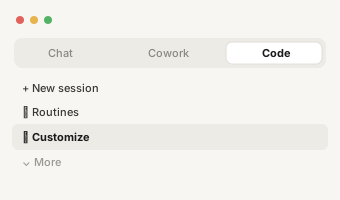
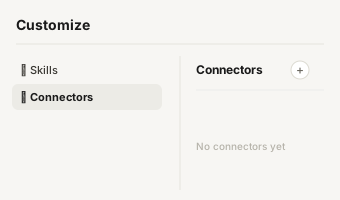
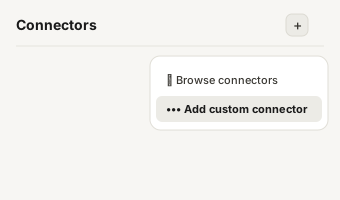
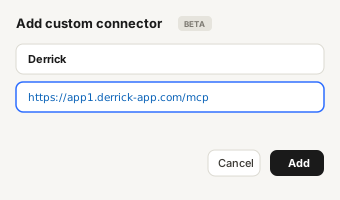
https://app1.derrick-app.com/mcp Call the same enrichment endpoints straight from your own stack or workflow.
Read the API docs →

Overview
What is LinkFinder?
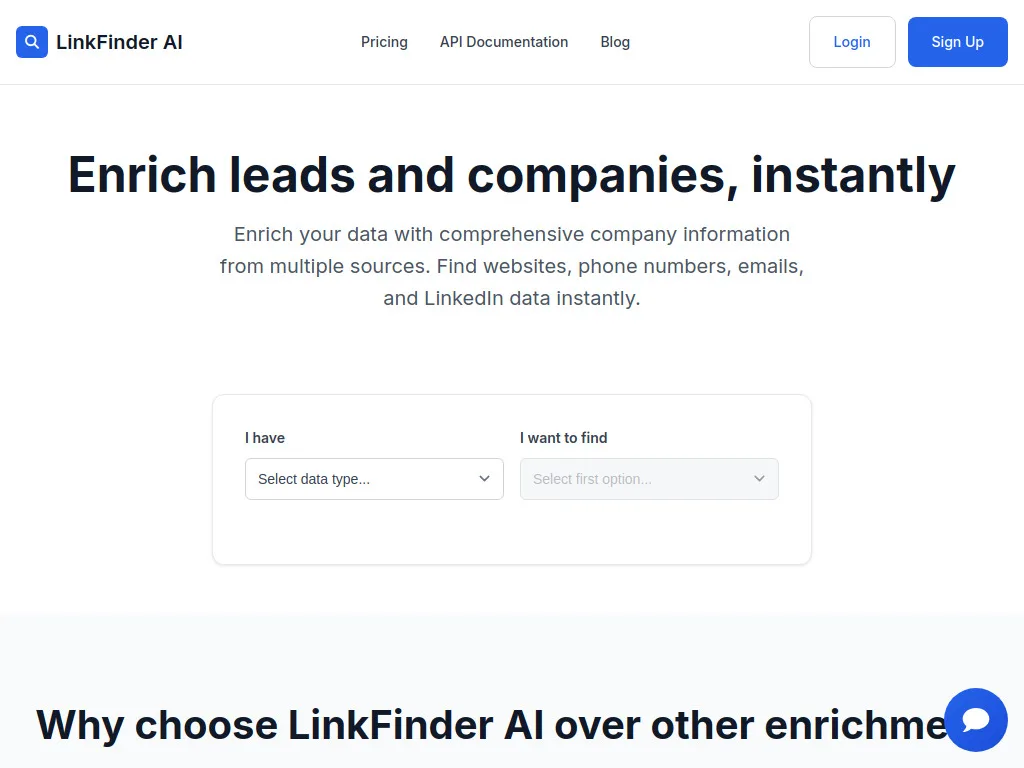
LinkFinder AI is the AI-powered LinkedIn email finder with multi-source data aggregation and zero LinkedIn account dependency. Built specifically to address LinkedIn account ban risk that plagues Chrome-extension-based competitors (GetProspect, Lusha, ContactOut, Surfe), LinkFinder AI uses its own private network instead of your LinkedIn account - meaning you can extract verified emails and LinkedIn data without risking account restrictions or bans.
The core architecture is a credit-based pricing model starting at $23/month, with all tiers including identical functionality (batch CSV enrichment, API access, multi-source data aggregation) - only monthly credit volume varies. The platform charges 1 credit per enrichment operation (finding an email, company URL, phone number, or LinkedIn data), with credits refreshing at each billing cycle. LinkFinder AI operates autonomously and doesn't require a LinkedIn Sales Navigator subscription, using its own data sources and APIs to perform enrichments. The platform positions on execution speed (enrichment in minutes) and claims a 95% accuracy rate.

Pricing
LinkFinder Plans & Pricing
Prices below from linkfinderai.com (May 2026) and Derrick App pricing breakdown. Credit-based pricing starts at $23/mo, with plans scaling based on monthly credit allocations rather than feature limitations - all tiers include identical functionality.
| Plan | Price | Typical use | Key limits |
|---|---|---|---|
| Free Trial | $0 | One-off testing | 25 credits one-time · no expiry · no card |
| Starter | $49/month ($39/mo annual, -20%) | Solo SDRs | 5,000 credits/mo |
| Professional | $89/month ($71/mo annual, -20%) | Active SDR teams | 20,000 credits/mo |
| Enterprise | $149/month ($119/mo annual, -20%) | High-volume teams | 50,000 credits/mo |
| HyperGrowth | $299/month ($239/mo annual, -20%) | Very high volume | 250,000 credits/mo |
Hidden costs to know about
No free tier or free trial publicly documented - you must commit to a paid plan to evaluate. Limited public company info - founded year, headquarters, and team size not publicly disclosed in standard sources. The 95% accuracy claim is unverified by independent benchmarks - limited third-party G2/Capterra validation makes accuracy hard to verify against marketed claims. Sales Navigator subscription not required (legitimate advantage), but the absence of public review activity creates evaluation friction.
Is LinkFinder AI fair value?
For solo SDRs specifically wanting LinkedIn email finder without LinkedIn account ban risk + without Sales Nav dependency, LinkFinder AI's $23/mo entry is competitively priced - eliminating the structural risk of Chrome-extension-based LinkedIn tools (GetProspect ~23% restriction risk, Dux-Soup similar) is genuinely valuable. For broader contact data needs or transparent third-party validation, Hunter (€34/mo + 50 credits/mo free + 540+ G2 reviews) or Findymail (sub-5% bounce guarantee) deliver more battle-tested alternatives. The narrow 'cheap LinkedIn email finder without ban risk' use case is genuinely LinkFinder AI's only sweet spot.

Verdict in detail
LinkFinder Pros & Cons - Summary That Actually Helps You Decide
Based on limited public review activity (LinkFinder AI is a newer entrant), Derrick App pricing analysis, and published 2026 hands-on testing.
Zero LinkedIn account ban risk (private network architecture)
LinkFinder AI stands out as the safest option in the market because it uses its own private network instead of your LinkedIn account. This means you can extract verified emails and LinkedIn data without risking account restrictions or bans. Vs Chrome-extension competitors (GetProspect ~23% restriction risk in 90 days, Dux-Soup ~23% restriction + 3% permanent bans), the safety architecture is genuinely differentiated.
No Sales Navigator dependency
LinkFinder AI operates autonomously and doesn't require a LinkedIn Sales Navigator subscription - using its own data sources and APIs to perform enrichments. Real entry cost stays at $23-29/mo without the $99/mo Sales Nav add-on that competitors like Wiza or Evaboot require ($122-128/mo combined). For solo SDRs without existing Sales Nav, this is meaningful cost reduction.
Feature-flat pricing across all tiers
All paid plans include exactly the same features - batch CSV enrichment, full API access, multi-source data aggregation. Only monthly credit volume differs across tiers. Pricing model is unusually transparent vs feature-gated tiered competitors. For solo SDRs unsure of monthly volume, the predictable per-operation cost (1 credit per enrichment) reduces evaluation friction.
95% accuracy claim + multi-source aggregation
LinkFinder AI claims a 95% accuracy rate via multi-source data aggregation - querying multiple data sources to maximize find rate. While the claim is unverified by independent benchmarks (limited third-party validation), the multi-source architecture is conceptually similar to BetterContact's waterfall approach at lower entry pricing.
Limited public company info + G2 validation
Founded year, headquarters, team size and public funding details not disclosed in standard sources. Limited recent G2/Capterra reviews makes accuracy claims hard to verify against marketed positioning. For trust-sensitive evaluation, the lack of public company transparency is a meaningful signal - competitors with active G2 presence (Hunter 540+ reviews, Findymail 56+, Apollo thousands) deliver more transparent product feedback.
No free tier or free trial publicly documented
LinkFinder AI doesn't appear to offer a free tier or free trial - buyers must commit to paid plans ($23/mo entry) to evaluate. The no-free-trial pattern is unusual for the email-finder category - Hunter (50 credits/mo free), GetProspect (50 emails/mo free), Skrapp (50 credits/mo free), Adapt.io (25 credits/mo free) all offer real free tiers for evaluation.
95% accuracy claim unverified by independent benchmarks
The 95% accuracy claim is marketed but unverified by independent benchmarks. Limited third-party validation makes it hard to compare LinkFinder AI's real-world accuracy against tools with established review bases. For deliverability-sensitive cold email at scale, the verified-accuracy advantage of Hunter (<3% bounce in independent testing) or Findymail (sub-5% bounce guarantee) is meaningful.
Limited integrations transparency
Beyond batch CSV upload + full API access, the depth of native CRM integrations (HubSpot, Salesforce, Pipedrive, etc.) is not transparently documented. For teams running existing CRM workflows expecting native integration depth, the documentation gap creates evaluation friction. Apollo, Hunter, GetProspect publish CRM integration scope clearly.

The honest comparison
LinkFinder vs Derrick - Side by Side
We're biased - Derrick is our product. So this table is the version we'd want our prospects to see before they sign elsewhere.
| LinkFinderAI LinkedIn Email Finder + Multi-Source Enrichment | DerrickWeb app · Sheets · Claude · API | |
|---|---|---|
| Pricing entry | $23-29/mo (no free tier) | Free forever |
| Tool category | AI LinkedIn email finder + multi-source | Contact data + enrichment (web app, Sheets, Claude, API) |
| Where it lives | Web app + API + batch CSV | Web app, plus Google Sheets, Claude (MCP) and API |
| LinkedIn account risk | Zero (private network architecture) | Zero - Derrick reads, no LinkedIn dependency |
| Sales Nav dependency | None (autonomous) | No Sales Nav required |
| Public company transparency | Limited (no founded year/HQ disclosed) | Open source-style transparency |
| Free tier | None | Free forever |

Decision tree
Should You Use LinkFinder?
A short, opinionated guide. We'll tell you when LinkFinder is the right pick - and when it isn't.

Alternatives
Top LinkFinder Alternatives
Tools we'd recommend instead, depending on your stack and budget. Derrick first because it's the only one that lives where you actually prospect.
| Tool | Typical use | Starting price | What it does differently | |
|---|---|---|---|---|
| D Derrick Recommended | Contact data + enrichment (web app, Sheets, Claude, API) | Free | Same zero-LinkedIn-risk safety + comparable accuracy + phones + LinkedIn data in the web app or Google Sheets, free | → |
 Hunter Hunter | Email-first with strong free tier + light sequencer | Free / €34-€299/mo | Better email accuracy (<3% bounce in independent testing) + transparent G2 validation + free tier; LinkedIn-safe | → |
 Findymail Findymail | Verified-only emails (sub-5% bounce) | $99/mo+ | Best-in-class deliverability + sub-5% bounce guarantee; more expensive entry; LinkedIn-safe | → |
 BetterContact BetterContact | Waterfall enrichment (20+ providers) | $15-799/mo | Multi-source aggregation similar to LinkFinder but with active community + 4.8 G2; LinkedIn-safe | → |
 Apollo Apollo | All-in-one contact data + outbound | $0-119/user/mo | Larger DB + bundled dialer + sequencer; transparent pricing; better support; free tier | → |
 GetProspect GetProspect | LinkedIn email finder + 200M DB | $0-399/mo | Direct LinkedIn email finder competitor; uses Chrome extension (carries LinkedIn ban risk LinkFinder eliminates) | → |
The verdict
Who should skip LinkFinder
LinkFinder AI is the right answer for solo SDRs and small teams specifically wanting LinkedIn email finder without LinkedIn account ban risk + without Sales Navigator dependency. The private network architecture is genuinely differentiated - eliminating the ~23% LinkedIn restriction risk that plagues Chrome-extension competitors (GetProspect, Dux-Soup) is meaningful for SDRs whose LinkedIn account reputation matters for inbound or partnership outreach. The no-Sales-Nav requirement keeps real entry cost at $23-29/mo where competitors like Wiza or Evaboot land at $122-148/mo combined. The feature-flat tiered pricing (only credit volume varies) is unusually transparent.
The trade-offs are concrete and meaningful for trust-sensitive evaluation. Limited public company info - founded year, headquarters, team size and funding details not publicly disclosed in standard sources. No free tier or free trial publicly documented - buyers must commit to paid plans to evaluate. The 95% accuracy claim is unverified by independent benchmarks. And limited recent G2/Capterra reviews make platform quality hard to validate against marketed positioning. For risk-averse evaluation, established competitors with active G2 presence (Hunter, Findymail) deliver more transparent product feedback.
For solo SDRs specifically risk-averse about LinkedIn account bans + wanting cheap LinkedIn-focused email finder without Sales Nav, LinkFinder AI's $23-29/mo entry is genuinely competitive within its narrow safety-focused sweet spot. For broader validation + free tier evaluation, Hunter (540+ G2 reviews, transparent pricing, 50 credits/mo free, also LinkedIn-safe). For deliverability obsession, Findymail. For waterfall multi-source aggregation, BetterContact (4.8/5 G2 + active community). And in all cases, Derrick starts free as the data layer that delivers the same zero-LinkedIn-risk safety + comparable accuracy + phones + LinkedIn data + multi-field enrichment without paid commitment or limited public validation concerns.
Score breakdown
- Ease of use4.0/5Works without Sales Navigator, and every tier includes the same features, from batch CSV to full API.
- Data quality3.0/5The 95% accuracy claim comes from multi-source aggregation but is unverified by independent benchmarks.
- Pricing value3.5/5Tiers differ only by credit volume, with 20% off on annual billing, but there is no free tier.
- Support & reliability2.5/5Founding year, headquarters and team size are not disclosed, and third-party validation is limited.
derrick •
Switch from LinkFinder to Derrick
- Web app: import a list or paste LinkedIn URLs, nothing to install
- Free plan: 100 credits every month, no credit card
- Also in Google Sheets, in Claude (MCP) and via the API
- Native LinkedIn and Sales Navigator import
Install the add-on and enrich your lists without leaving your spreadsheet.
Install in Google Sheets → https://app1.derrick-app.com/mcp Call the same enrichment endpoints straight from your own stack or workflow.
Read the API docs →No credit card · No contract
How we review
We read LinkFinder's public pricing page and documentation, analyse verified user reviews on G2 and Capterra, and compare it with Derrick on the same criteria. Derrick is our product, and we say so in every comparison.
Compare
Best LinkFinder alternatives, ranked
10 picks compared by use case - Google Sheets native, Sales Nav export, deliverability, enterprise compliance.
See the ranking → Curated stackAll B2B sales tools we reviewed in depth
Skip the noise - our hand-picked shortlist of email + phone finder tools and the rest of the sales stack.
See the full curation → Stack builderCompare any two tools side-by-side
Pick the right combo in 2 minutes - every multi-tool comparison in one hub.
Browse comparisons →Keep exploring
Other Email + Phone Finder tools reviewed
Comparing options? These are the other tools in the same category we've reviewed in depth.
Better email accuracy + transparent G2 validation + meaningful free tier; LinkedIn-safe.
Read review → Verified-only emails with sub-5% bounce guarantee; LinkedIn-safe; more expensive entry.
Read review → Waterfall enrichment from 20+ providers with active 4.8/5 G2 community; LinkedIn-safe.
Read review → Direct LinkedIn email finder competitor; uses Chrome extension (carries LinkedIn ban risk).
Read review →