The State of Manual Prospecting 2026: Where Sales Teams Actually Lose Their Hours
Manual prospecting report 2026: where the non-selling time goes, the context-switching tax across tools, its cost, and why research belongs in the sheet.


Last updated: 2026-06-18
Sales reps are hired to sell, and spend most of their week not selling. The gap is not laziness, it is manual prospecting: the research, the copy-paste, the data entry, and above all the constant switching between tools to assemble one usable view of one account. This report quantifies where the hours actually go, what that non-selling time costs, and why the fix is not another tool but doing the research where the work already happens, in the spreadsheet, instead of across nine browser tabs.
The thesis is that the bottleneck is fragmentation, not effort. A rep qualifying an account hops between a CRM, a LinkedIn tab, a company site, a data tool, a verification tool, and a spreadsheet to stitch together a contact, and that stitching is where the week disappears. Collapse the stitching into a single surface and you give the selling time back, which is the whole argument of this report.
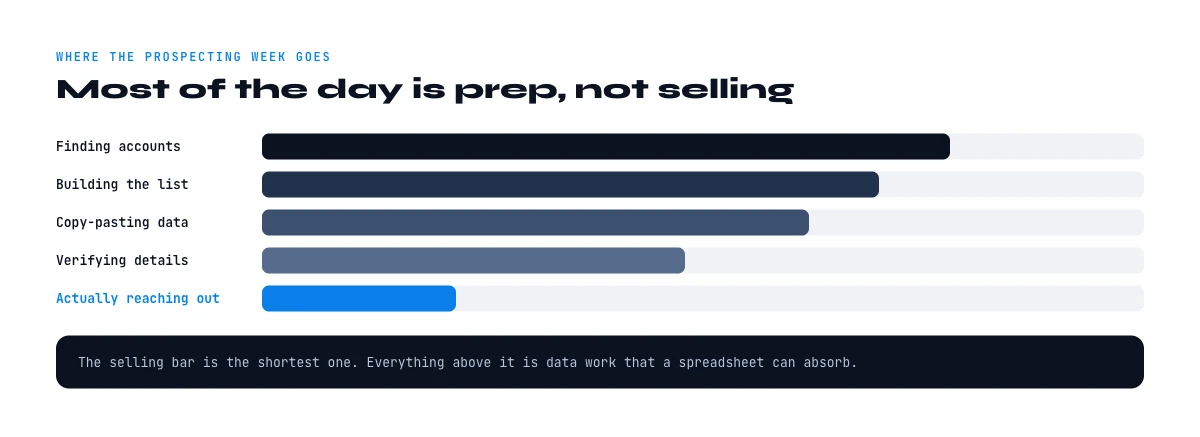
Where the week actually goes
Start with the headline split. Salesforce's State of Sales research consistently finds reps spend only a minority of their time actually selling, with the majority going to non-selling work: administration, data entry, manual research, and meetings. Within that non-selling block, a meaningful slice is pure data work, entering records and researching prospects, before any conversation happens. The person you pay to sell spends most of the week assembling the inputs to sell.
The deeper problem is what that data work runs on. Salesforce has also found that the vast majority of CRM data is incomplete, outdated, or duplicated, which means much of the manual research is not even net-new, it is reconstructing or correcting data the team should already have. The rep is not just researching; they are re-researching, because the stored version cannot be trusted.
So the non-selling time is doubly wasteful: it is non-selling, and a large part of it is redoing work because the data decayed or was never clean. This is the cost the rest of the report quantifies and the workflow at the end removes. The email-verification slice of this is detailed in the email verification guide.
It is worth distinguishing the two halves of non-selling time, because they call for different fixes. Some of it is irreducibly human, internal meetings, deal strategy, relationship work, and you would not automate it even if you could. The rest is mechanical, looking up a field, copying it, verifying it, pasting it, and that half is pure overhead that adds no judgment. The goal is not to shrink all non-selling time but to delete the mechanical half, which is exactly the part manual prospecting bloats.
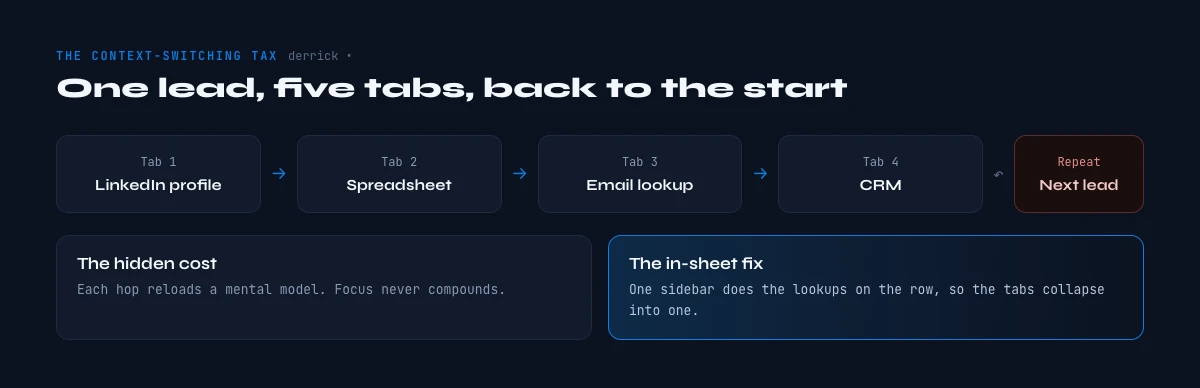
The context-switching tax
The least-measured cost in prospecting is context-switching. Qualifying a single account rarely happens in one place: the rep opens the CRM record, a LinkedIn profile, the company website, a tab to find an email, another to verify it, another to find a phone, and a spreadsheet to record it. Each switch carries a small cognitive reload, and across a day of dozens of accounts those reloads compound into hours of pure overhead that never appears on any dashboard.
This is the tax that tool sprawl imposes. Every additional tool in the prospecting stack promises to save time on its narrow task while adding a tab, a login, and a copy-paste hand-off to the chain. Past a point, the stack itself becomes the bottleneck: the rep spends more time moving data between tools than using any one of them, and the marginal tool makes the switching worse, not better.
The reframe is that consolidation beats addition. The win is not a better individual tool but fewer surfaces to move between, so the research that took nine tabs collapses toward one. This is the same fragmentation problem our spreadsheet-workbench report analyzes from the data side; here the focus is the rep's hours lost between the tabs. The website-research slice is covered in the website crawler use-case guide.
The hidden multiplier is volume. A few minutes of switching per account feels trivial in isolation, but a rep works hundreds of accounts a month, so a small per-account tax becomes days per quarter. This is why the loss is so easy to underestimate and so large in aggregate: nobody notices the individual switch, and everybody absorbs the cumulative total as just how prospecting feels.
In Google Sheets
The hours the report is counting
Most of the time lost in the report is spent building and completing the list. Describe the target in a sentence and Derrick imports the leads into Google Sheets with their profile fields, which removes that step rather than speeding it up.
- Feature
- Import Leads from a Prompt
- Credit cost
- 1 credit per lead imported
The first button opens Derrick, 100 free credits every month. Import Leads from a Prompt: 1 credit per lead imported. The second details the feature.
What the lost time costs
Put a number on it and the cost is large. Gartner estimates poor data quality costs organizations an average of 12.9 million dollars per year, and manual prospecting is where much of that surfaces operationally: time spent finding, fixing, and re-finding contact data that should have been ready. Every hour a rep spends researching is an hour not spent in a conversation, and conversations are the scarce input to pipeline.
The cost is also a capacity cost, not just an efficiency one. A team losing a large share of its week to manual research has, in effect, a fraction of the selling headcount it pays for. Recovering that time does not just make reps tidier; it adds selling capacity without adding people, which is why it shows up on the revenue line rather than the ops line. The cost of the missing or wrong data behind it compounds the loss.
This is why manual prospecting is a revenue problem disguised as a productivity one. The hours lost to research and tool-switching are hours of selling capacity removed from the team, quietly, every week. Naming and measuring that loss is the first step to reclaiming it, and the self-check at the end of this report is built to do exactly that. The signal-monitoring slice is covered in the buying-signal guide.
The capacity framing is what makes this a board-level number rather than an ops complaint. If a team of ten reps each loses the equivalent of a day a week to mechanical research, that is two full reps' worth of selling time evaporating with no line item attached. Hiring to cover that gap is the expensive answer; removing the mechanical work is the cheap one, and it scales with the team instead of adding to its cost.
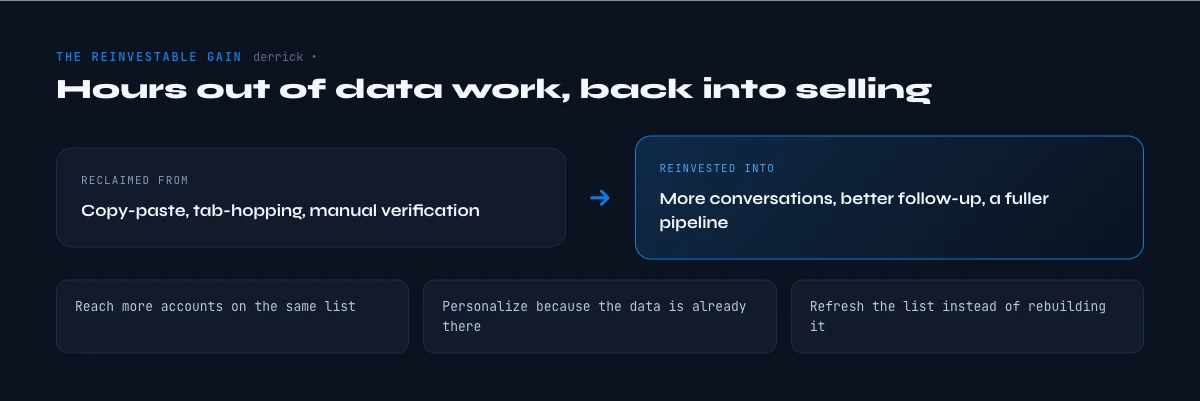
The reinvestable gain
The upside is concrete: the time is recoverable, and it compounds. McKinsey has estimated that automating the non-relational parts of selling can free up roughly 15 to 20 percent of sales capacity, capacity that converts directly into more conversations and more pipeline without adding headcount. The research consistently shows that teams which reclaim this time and reinvest it in selling outperform those that leave it locked in manual work.
The key word is reinvest. Automating manual research only pays if the recovered hours go back into selling rather than into more administration, so the goal is not just to do the data work faster but to remove it from the rep's plate entirely. A rep who gets back a day a week and spends it in conversations is the entire return on this; a rep who fills it with more admin is not.
This is also where automation either compounds or backfires. Automating research on a clean, current data source multiplies selling time; automating it on a stale source just generates wrong outreach faster, which loops back to the data-quality point. The gain is real only when speed and freshness move together, which is exactly what doing the research in-sheet, against verified data, delivers. The tech-stack-signal slice is covered in the tech-stack outreach guide.
There is a quality cost layered on the time cost, too. A rep three hours into tab-switching makes more mistakes, mistypes an email, grabs the wrong company, skips a verification step, so fragmentation does not just slow the work, it degrades it. Consolidating the research into one surface removes a source of error as well as a source of delay, which is why the gain shows up in reply rates and not only in hours.
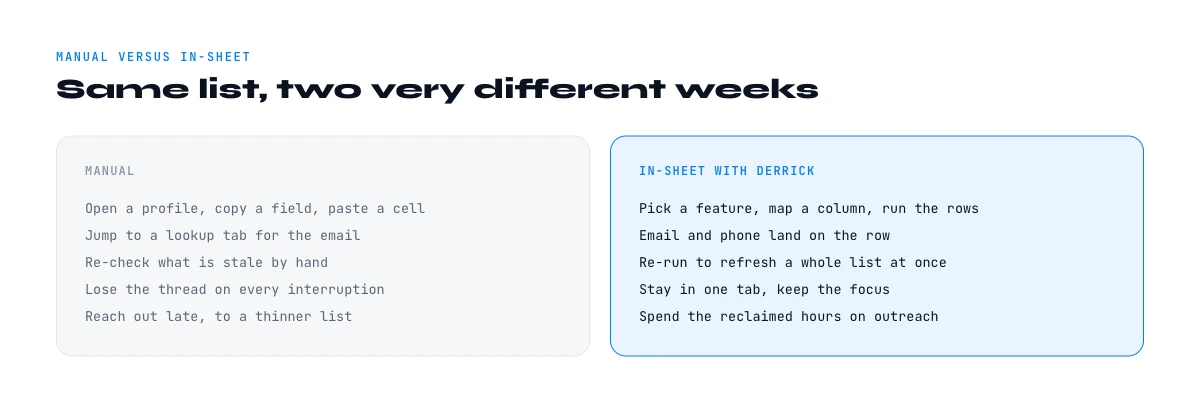
Manual versus in-sheet
Lay the two workflows side by side. Manual prospecting: open the CRM, open LinkedIn, open the company site, switch to a tool to find the email, switch to verify it, switch to find a phone, switch back to the sheet to paste it, repeat per contact, per account. In-sheet prospecting: stay in the spreadsheet and pull the same data into columns next to the record, on demand. The first is a chain of context switches; the second is a single surface. The difference, multiplied across a list, is the difference between a day of research and an hour.
This is exactly what Derrick is built to do. Derrick brings a multi-source lookup into its web app, with nothing to install, and into the Google Sheets sidebar, so finding and verifying emails, finding phone numbers, and enriching company and profile data happen in a column next to your data rather than across nine tabs. The research that fragmented across tools collapses into the one surface where the list already lives, which is how the non-selling tax this report measures actually gets removed, not reduced. We are not claiming research becomes effortless, but moving it in-sheet turns a chain of switches into a single step.
Do your prospecting research with Derrick, in the web app or inside Google Sheets, free for 100 credits per month. Move the find-and-verify work into a column, give the reclaimed hours back to selling, and measure the difference against your prior week. The bulk-phone slice is covered in the bulk phone finder guide.
It also changes how you read a flat or declining quota attainment. Before concluding that reps need more training or more pipeline, it is worth asking how much of their week even reaches selling, because a team at the median split is trying to hit quota on a fraction of a full-time selling week. Recovering the mechanical hours can move attainment without changing anything about the selling itself.
A self-check, methodology and sources
Use these six questions to estimate your own loss. How many hours a week does each rep spend on manual research and data entry? How many distinct tools does qualifying one account touch? What share of your CRM data do reps re-research because they do not trust it? How often does a switch between tools break the flow? How much of recovered time would actually go back to selling? And what is one account's research time, multiplied across your weekly volume? The answers usually surprise teams, and they point straight at the consolidation this report argues for.
This report draws on non-vendor, primary sources: Salesforce State of Sales for the split of selling versus non-selling time and the share of CRM data that is incomplete or outdated; Gartner for the cost of poor data quality; McKinsey for the share of capacity recoverable through automation; Validity for CRM data accuracy; and HBR and Statista for context on knowledge-work time and tool sprawl. Where a statistic could only be traced to a data or outreach vendor's marketing, we did not cite it, and figures that circulate without a clean primary source were left out rather than attributed loosely.
A closing thought. The instinct when prospecting feels slow is to add a tool. The data says the opposite is the cure: every added tool is another tab, another switch, another copy-paste, and past a point the stack is the bottleneck. The highest-leverage move in 2026 is consolidation, doing the research where the data lives instead of across nine surfaces, so the hours a rep loses to switching turn back into hours spent selling. Measure your loss, collapse the surfaces, and the week you were missing comes back. The math is unforgiving and the fix is mundane: stop counting tools and start counting tabs, because the tab is the unit of lost time, and the team that touches the fewest of them per account wins back the most of its week, every week, without hiring a single extra person to do it.
Frequently asked questions
How much time do reps lose to manual prospecting?
What is the context-switching tax?
Should I add a tool to go faster?
How much time does automation reclaim?
How does Derrick reduce manual prospecting?
Keep reading
Continue exploring this cluster


Email Verification: Clean Lists + Boost Deliverability
Read →

Website Crawling Magic: How to Supercharge Your Sales Intelligence
Read →

Signal by Derrick: Monitoring That Turns Lists Into Living Opportunities
Read →