



Add your LinkedIn profile URLs to your list.
Create a column with LinkedIn profile URLs (linkedin.com/in or linkedin.com/sales/people format).
Enrich profiles with follower & connections count
Start counting followers free →Install the add-on and enrich your lists without leaving your spreadsheet.
Install in Google Sheets →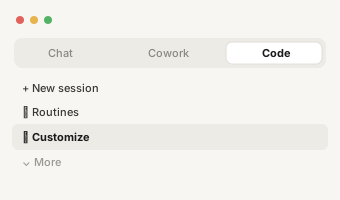
Reach + creator-mode signal.
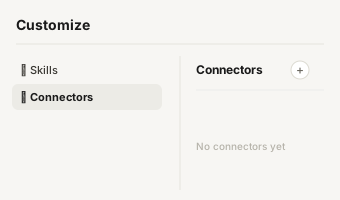
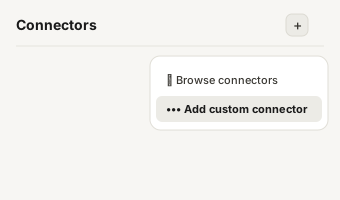
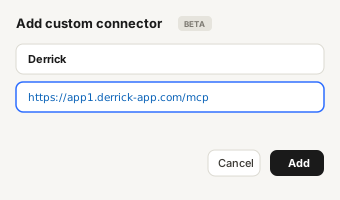
https://app1.derrick-app.com/mcp Call the same enrichment endpoints straight from your own stack or workflow.
Read the API docs →You give
LinkedIn profile URL
You get back
+6 isCreator, isVerified, isMemorialized, connectionDegree, isFollowing, mutualConnectionsCount
Demo finished
Import your list into the Derrick app and enrich your own leads. Free to start, no credit card.
Try the app free →Try it
The output
9 fields, with a real example of each. You pay when the answer comes back, and never when it does not.
| Field Name | Description | Example |
|---|---|---|
| publicIdentifier | LinkedIn unique identifier of the profile | john-doe |
| followerCount | Number of followers on LinkedIn | 1234 |
| connectionsCount | Number of LinkedIn connections | 500+ |
| isCreator | Whether the profile has LinkedIn Creator Mode enabled | FALSE |
| isVerified | Whether the LinkedIn profile is verified | FALSE |
| isMemorialized | Whether the account has been memorialized | FALSE |
| connectionDegree | Connection degree with the profile (1st, 2nd, 3rd) | 2 |
| isFollowing | Whether you are currently following this profile | FALSE |
| mutualConnectionsCount | Number of mutual connections with the profile | 12 |
Step by step
Get started in 3 simple steps.
Create a column with LinkedIn profile URLs (linkedin.com/in or linkedin.com/sales/people format).
In Derrick, choose LinkedIn Followers & Connections Count, and select the column to enrich.
Your list fills with follower count, connections count, creator status, and key engagement signals.
When to reach for it
Pull the follower count + connection count + creator-mode signal of any LinkedIn profile - useful for influencer scoring, champion-power ranking and creator-economy outreach. Free in Derrick.
Champion power-ranking
identify which contact in your buying committee has the largest internal LinkedIn audience (= internal pull).
Creator outreach
filter a list of prospects to the ones with 5K+ followers to prioritise for podcast / partnership pitches.
Sales Navigator validation
cross-check that the LinkedIn URL you scraped is the active profile (not a dormant one).
Account-research
sum the followers across the buying committee to estimate the account's external reach.
For your stack
LinkedIn Followers & Connections Count isn't tied to one surface. Every Derrick enrichment - this one included - runs in the web app and in Google Sheets, and is also exposed through the REST API and the MCP server, so you can run it from your CRM, your data pipeline, an AI assistant, or any no-code tool (Zapier, Make, n8n). Same credit cost everywhere, same data. API access is included from the PLUS plan up.
Customer stories
See what our customers say about Derrick.

"This app saved me so much time and effort. Great for anyone looking to build a contact list or network at scale quickly. As a start-up it's been invaluable."
Director | SaaS GTM Leader

"Working pretty nifty compared to Snov.Io. Price wise it does give a fair shake, and IMO better interface since it's google sheets."
Mortgage Broker at Zero Point Mortgage
"Derrick is a very simple and user-friendly app to enrich your contacts database. Best thing: you can test it for free. And then the price is so low, it's a no brainer."
CEO Form'actions

"I have been using other expensive apps or freemium like phantombuster, but Derrick has replaced them all. I love the simplicity of the Google sheet add-in, but what is best is the efficiency it delivers."
CEO & Co-founder @ Diffly | B2B Sales Advisor

"Super easy to enrich linkedin urls using this tool. Both personal and company url data can be easily enriched with a click of a button."
RevOps Professional
"Amazing Tool, I would like to advocate this to my colleagues. So that you can get more users. Keep it Up. 5 Stars!"
Lead Generation Specialist at IdeaPeel
"The LinkedIn scraping and email finder combo is incredibly powerful. I can build a complete prospect list with contact info in under an hour. Absolute must-have for outbound."
SDR Team Lead at CloudScale
"This app is fantastic. Brilliantly created to help small and mid sized businesses."
Founder/CEO, AlmanacIO
"Have tested over 10+ LI scraper apps, Derrick beats them all. Simple to use, accurate data, and affordable price."
Opportunity Prospector
LinkedIn follower count + connection count is the single most useful proxy for "is this profile a creator, influencer, or just a quiet account ?" - and the basis for every influencer-marketing scoring model + ABM-account-tier framework in 2026. Most enrichment tools don't return this field at all ; the dedicated influencer platforms (HypeAuditor, Modash) sit at a premium monthly minimum.
Derrick pulls follower count + connection count + creator-mode signal directly from any LinkedIn profile URL in your list, in the Derrick web app or in Google Sheets, free up to 100 lookups/month. The use cases that consistently win the ROI math : influencer outreach segmentation (deprioritising sub-1k-follower profiles), ABM tier-1 scoring, and SDR account-prioritisation for inbound replies. Full plan grid on the Derrick pricing page.
Related : enrich a LinkedIn headline from email, find an email from a LinkedIn URL. Wider category context : the B2B sales tools we reviewed in depth compares accuracy + price across every player.
LinkedIn Followers & Connections Count is completely free. Get 100 credits per month to enrich your leads.
Install the add-on and enrich your lists without leaving your spreadsheet.
Install in Google Sheets → https://app1.derrick-app.com/mcp Call the same enrichment endpoints straight from your own stack or workflow.
Read the API docs →No. Create a free account in the Derrick web app and LinkedIn Followers & Connections Count is there, nothing to install. Prefer Google Sheets? The add-on installs in one click and LinkedIn Followers & Connections Count appears in the Derrick sidebar. The same feature is also available via REST API and via the Derrick MCP server for Claude / ChatGPT.
Yes - LinkedIn Followers & Connections Count runs as a batch job in the web app or in Google Sheets, with progress tracking and per-row credit accounting. The workflow scales linearly: 10 rows or 10,000 rows, the steps are identical and you can step away while it runs.
Derrick aggregates 10+ public-data sources (LinkedIn graph, company websites, registry data, web crawl, third-party providers) and runs a multi-source lookup for LinkedIn Followers & Connections Count. The first source that returns a confident match wins; if no source is confident enough, the cell is left blank rather than guessed.
Yes. Derrick only enriches public data, doesn't store personal records beyond the duration of the lookup, and supports full deletion on request. The Sheets add-on runs inside Google's OAuth-protected environment so your data stays private to your account.
Yes - set up a Google Sheets onEdit trigger (Apps Script, takes 2 minutes) so a new row in column A automatically runs LinkedIn Followers & Connections Count into column B. Pair with Zapier / Make / n8n to push CRM contacts directly into the sheet for hands-free enrichment.