Free business description generator
Answer a few questions about your company once and get five descriptions at the same time: a one-liner, a spoken elevator pitch, a business plan paragraph, an About section for your website or LinkedIn page, and a short listing description. Word and character counts included, nothing to install.
Generate your business description in five formats
Answer the questions once. The generator writes a one-liner, an elevator pitch, a business plan paragraph, an About section and a short listing description from the same answers. It updates as you type.
Runs in your browser. Nothing you type is sent or stored. No AI: every sentence is built from your answers, so read it once and make it yours.

At scale
derrick •
When your description becomes a prospect list
In the Derrick web app, describe your ideal customer in one sentence, the same "who it is for" line you just wrote, and the app returns the list of matching companies or people. Enrich Companies then completes each company with the information from its LinkedIn page, such as its description, industry and size, at 1 credit per company; this step reads LinkedIn, so connect your LinkedIn account to Derrick first. The free plan gives 100 credits a month, no card needed.
- Web app: nothing to install, no credit card
- Free plan: 100 credits every month
- API and MCP from the Plus plan (€47.50/month)
Install the add-on and enrich your lists without leaving your spreadsheet.
Install in Google Sheets →
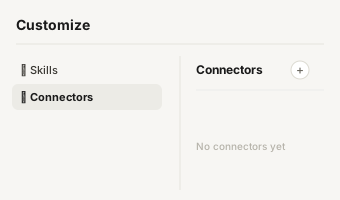
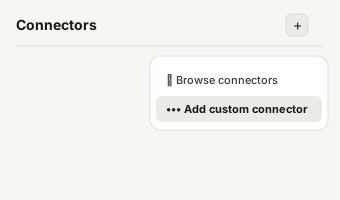
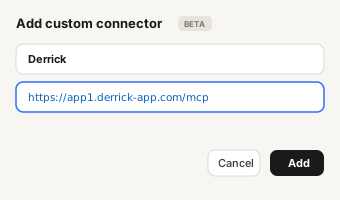
https://app1.derrick-app.com/mcp Call the same enrichment endpoints straight from your own stack or workflow.
Read the API docs →
How this business descriptio
How this business description generator works
Most people who need a business description need more than one. The business plan asks for a paragraph, the website asks for an About page, the LinkedIn company page asks for its own About section, and every networking event asks for two sentences out loud. This generator writes all five from one set of answers, so they say the same thing at different lengths.
- Answer the three required questions. Your company name, what you do (starting with a verb, such as "makes", "helps" or "sells"), and who it is for. These three answers make a complete one-liner on their own.
- Add what you have. The result for your customer, what makes you different, where you are based, the year you started, your legal structure, your mission, a call to action. Every field you fill adds a sentence to the formats that need it. Every field you leave empty is simply left out: no sentence is invented to fill the gap.
- Pick a tone, then copy. Direct, warm or formal changes the opening of the pitch and the end of the About section. "New wording" rotates the phrasing of every format if the first version does not sound like you.
Under each format you see its word and character count, the elements it includes and the ones that are missing. That checklist is the useful part: it shows at a glance that your pitch has no proof yet, or that your business plan paragraph does not say where you operate.
For the full method, with twelve annotated examples and fill-in-the-blank templates, read our guide on how to write a company description.

The five formats and where e
The five formats and where each one goes
- One-liner. Name, what you do, who it is for, in one sentence. It is the base of everything else: bio lines, email signatures, the cover of a pitch deck, the first line of an About page.
- Elevator pitch. Two or three sentences meant to be said, not read: who you are, what your customer gets, why you. Read it out loud once; if you run out of breath, cut a clause.
- Business plan paragraph. The company description section that follows the executive summary. It is the only format that carries the legal structure, the location and the founding year, because a lender or an investor reads it as a record.
- About section. Written for a visitor who wants to know if you are for them: what you do, what they get, what makes you different, where you are, and what to do next.
- Short listing description. The tight version for directories, marketplaces, local listings and event programs, where the space is short and the reader is comparing.

What a good company descript
What a good company description includes
Whatever the format, the same elements come back: who you are, what you sell, who buys it, what they get, why you rather than someone else, and where and since when you operate. The shorter the format, the fewer of these you keep, but the first three never go. A description that skips the target customer reads like it was written for everyone, which means it convinces no one in particular.
Two habits make the difference. Start small: write the one-liner first, then widen it, rather than cutting a long paragraph down. And stay concrete: "independent accounting firms" beats "businesses of all sizes", and a proof you can check beats an adjective.

Why a template generator ins
Why a template generator instead of AI
An AI writer will always return something, even from one vague line, by filling the gaps with plausible generic sentences. This generator does the opposite on purpose. It only uses what you typed, it shows which elements are missing instead of making them up, and it gives you five lengths from the same answers so your website, your plan and your pitch stay consistent. There is no account, no daily limit and nothing is sent anywhere: the text is assembled in your browser.
The limit is the same as with any template: the result is a structured first draft. Read it once, change the words that do not sound like you, and keep the facts.

From your description to you
From your description to your first customers
The line "who it is for" is more than a sentence for your About page. Written precisely, it is the description of your ideal customer, and it is exactly what you need to build a prospect list. The block below shows how to turn that line into a list of real companies.