Free LinkedIn headline generator
Type your role, who you help and what you help them do, and get six LinkedIn headlines at once: value first, role and specialties, helping statement, keyword stack, proof first, audience and outcome. Each one shows its character count against LinkedIn's 220-character limit. Nothing to install, nothing sent.
Generate your LinkedIn headline in six styles
Fill in your role and who you help. The generator writes six headlines from the same answers, counts the characters against LinkedIn's 220-character limit and updates as you type.
Runs in your browser. Nothing you type is sent or stored. No AI: every headline is built from your answers, so pick the one that sounds like you and edit it.

At scale
derrick •
When you need your prospects' headlines, not yours
In the Derrick web app, describe the people you want to reach in one sentence and the app returns the list of matching profiles. Enrich Leads then completes each LinkedIn profile with its headline, current job title and company, at 1 credit per profile; this step reads LinkedIn, so connect your LinkedIn account to Derrick first. The free plan gives 100 credits a month, no card needed.
- Web app: nothing to install, no credit card
- Free plan: 100 credits every month
- API and MCP from the Plus plan (€47.50/month)
Install the add-on and enrich your lists without leaving your spreadsheet.
Install in Google Sheets →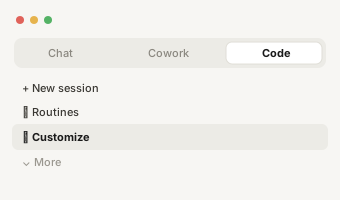
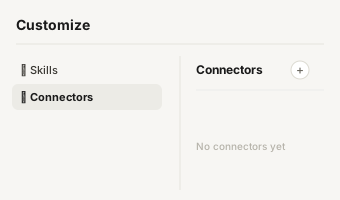
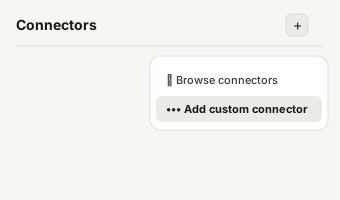
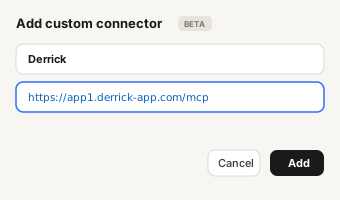
https://app1.derrick-app.com/mcp Call the same enrichment endpoints straight from your own stack or workflow.
Read the API docs →
How this LinkedIn headline g
How this LinkedIn headline generator works
Your LinkedIn headline is the line under your name. It shows up next to every comment, every post, every connection request and every search result, so most people read your headline long before they open your profile. This generator turns a few answers into six headlines built on the formats that work, so you can compare them side by side instead of staring at an empty field.
- Fill in the two required fields. Your role, and who you help. These two answers alone give you a usable headline in every style.
- Add what you have. Your company, what you help people do (start with a verb, such as "book", "hire" or "cut"), your specialties as comma-separated keywords, and one proof or credential. Every field you fill adds a segment to the styles that use it. Every field you leave empty is left out: nothing is invented to fill the gap.
- Pick a separator and a status, then copy. Pipe, dot or bullet changes how the segments are joined. "New wording" rotates the phrasing if the first version does not sound like you.
Under each headline you see its character count. LinkedIn caps the headline field at 220 characters; the generator warns you when a version goes over, so you know which segment to cut before you paste.
Want to see what finished headlines look like for your job? Our guide lists 50 LinkedIn headline examples by role, from SDRs to founders, recruiters and consultants, with the character limit and the formula behind them.

The six headline styles and
The six headline styles and when to use each one
- Value first. "I help [who] [result] | [role]". Leads with what you do for people. Use it when the people reading your headline are potential clients or buyers.
- Role and specialties. "[Role] at [company] | [specialties]". The classic format, and the easiest one for recruiters to scan.
- Helping statement. Puts your audience in the first words. Useful on mobile, where only the start of the headline shows in previews.
- Keyword stack. One keyword per segment. Built for people who find you through LinkedIn search, where the headline is one of the fields that gets matched.
- Proof first. Opens with your credential, then your role. Use it when the proof is your strongest argument: a former role, a certification, a known client type.
- Audience and outcome. "[Role] for [who] | [result]". A plain sentence anyone can repeat after reading it once.

What makes a good LinkedIn h
What makes a good LinkedIn headline
The headlines that get read share three things. They say what you do in words your audience uses, not internal job titles. They name who it is for, because "B2B SaaS teams" makes the right people stop and the wrong ones scroll on. And they carry one proof that makes the claim believable. Clever wordplay and a stack of emojis rarely beat those three.
Two habits help. Put the words that matter first, because the start of the headline is what survives truncation in comments and on mobile. And write for search: the job title and the two or three skills your audience would type into LinkedIn search belong in the headline, not only in your experience section.

Why a template generator ins
Why a template generator instead of AI
An AI headline writer will always return something, even from a one-word prompt, by filling the gaps with generic claims. This generator does the opposite on purpose. It only uses what you typed, it never adds a number or a credential you did not give, and it shows the six formats side by side so you can choose the structure, not just the words. There is no account, no daily limit and nothing is sent anywhere: the headlines are assembled in your browser.
The result is a strong first draft. Read the six versions, keep the one that sounds like you, and swap any word your audience would not use.

From your headline to your p
From your headline to your prospects' headlines
The headline works both ways. Yours tells people what you do; your prospects' headlines tell you who they are, what they own and whether they are worth a message. Read in bulk, headlines are a fast way to sort a list by seniority, function and focus before you write a single line. The block below shows how to build that list and pull each person's headline at scale.