X-Ray Search Tool
Find people on LinkedIn, GitHub or in CVs through Google. Type the job titles, the location and the keywords you need, tick what to leave out, and this free X-ray search tool writes the Google string for you, ready to copy or to open in a new tab.
X-ray search tool
Pick where to search, type the titles and the place: the Google X-ray string builds as you type. Nothing is sent.
Where to search
Job titles, one per line (combined with OR)
Location, separate options with commas (optional)
Must-have keywords, separated by commas (optional)
Leave out
Other words to leave out, separated by commas (optional)
The string is built in your browser. Nothing is sent and nothing is stored.

At scale
derrick •
From a list of profiles to people you can reach
Paste the profile URLs you found into the Derrick web app: Enrich Leads adds the current title, company and location (1 credit per profile, LinkedIn account connected through the Derrick Chrome extension), and Email Finder finds the work email (5 credits per email found, paid plans from Standard at €20 per month). The free plan includes 100 credits per month, no credit card needed.
- Web app: nothing to install, no credit card
- Free plan: 100 credits every month
- API and MCP from the Plus plan (€47.50/month)
Install the add-on and enrich your lists without leaving your spreadsheet.
Install in Google Sheets →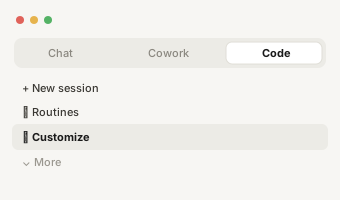
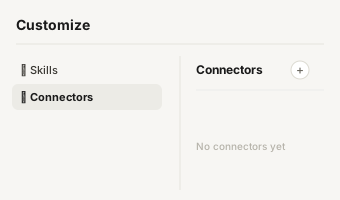
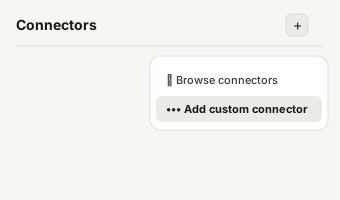
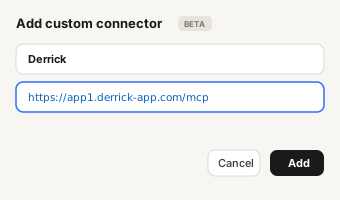
https://app1.derrick-app.com/mcp Call the same enrichment endpoints straight from your own stack or workflow.
Read the API docs →
How a Google X-ray search wo
How a Google X-ray search works
An X-ray search uses Google to look inside one website. Instead of searching LinkedIn with LinkedIn's own search bar, you ask Google to return only pages from linkedin.com/in that contain the words you need. Google has already read millions of public profiles, so a well-built string finds people that a free LinkedIn account would hide behind search limits, without logging in to anything.
Every string has the same four parts:
- The site:
site:linkedin.com/infor profiles,site:github.comfor developers, orfiletype:pdffor CVs. - The titles, in quotes and joined with
OR, because the same job has several names:("account executive" OR "sales executive"). - The context: a location, a skill, an industry. Each word you add narrows the results.
- The exclusions, with a minus sign:
-recruiter -internkeeps the people who post jobs about the role out of the list of people who do it.
The X-ray search tool above writes these four parts in the right order, puts the quotes and brackets where Google expects them, and warns you when the string gets too long for Google to read.

Search operators
Search operators: the cheat sheet
Six operators cover almost every search of this kind. Google supports more, but these are the ones that change results reliably.
| Operator | What it does | Example |
|---|---|---|
site: | Limits results to one site or one path | site:linkedin.com/in |
" " | Matches the exact phrase | "data engineer" |
OR | Matches either term (in capitals) | ("CTO" OR "VP Engineering") |
- | Removes pages containing the word | -recruiter |
( ) | Groups terms so OR applies to the right ones | ("Paris" OR "Lyon") |
filetype: | Limits results to one file type | filetype:pdf |
Two habits save most failed searches. Write OR in capitals, otherwise Google reads it as a word. And quote every multi-word title: without quotes, sales manager also returns a manager who once worked in sales.

Ready-made strings you can a
Ready-made strings you can adapt
Five strings that work as they are. Change the titles and the city, keep the structure.
- Sales:
site:linkedin.com/in ("account executive" OR "sales executive" OR "business development manager") ("London" OR "Manchester") saas -recruiter -intern - Engineering:
site:linkedin.com/in ("backend engineer" OR "software engineer") ("Berlin" OR "Munich") golang -recruiter -student - Data:
site:linkedin.com/in ("data engineer" OR "analytics engineer") "New York" dbt -recruiter - Developers on GitHub:
site:github.com "Toronto" rust, then open the profiles that list a company. - CVs:
filetype:pdf (cv OR resume) ("product designer" OR "UX designer") "Amsterdam" figma
If a string returns too many results, add one keyword at a time. If it returns too few, remove the location first: people write their city in many ways, and the location is the part of a profile that is most often missing.

Choosing job title synonyms
Choosing job title synonyms
The most common reason a search misses good people is the title list. Companies name the same job in different ways, and people describe themselves in their own words. A head of sales can be a "VP Sales", a "Sales Director" or a "Head of Revenue". Three habits help:
- Start from real profiles. Open three or four profiles of people you would hire and copy the exact titles they use. They are better synonyms than the ones you would guess.
- Cover seniority separately. "senior software engineer" and "software engineer" are different phrases for Google. If seniority matters, list both; if it does not, keep the shorter one, since it also matches the longer.
- Mind the language. In France, Germany or Spain many profiles mix English and local titles. A search for French sales leads needs "business developer" and "commercial" in the same OR group.
Keep the list short. Each title adds words to the query, and Google reads only the first 32: the tool counts them and warns you before you reach the limit.

Does X-ray search still work
Does X-ray search still work on LinkedIn?
Yes, with limits that have grown over time. LinkedIn lets each member decide whether their profile is visible outside LinkedIn, and only those public profiles can be indexed by Google. Logged-out visitors who open a result may also hit a sign-in page. The search still returns names, titles and profile URLs; what it no longer gives you is a complete or perfectly fresh view of the market. Use it to find and size a pool of candidates or prospects, then confirm the details on the profile itself.
X-ray search beyond LinkedIn
X-ray search beyond LinkedIn
LinkedIn is the default, but the same method works anywhere Google indexes public profiles. The tool offers the three that matter most for sourcing.
- GitHub (
site:github.com): developers list their languages, location and sometimes their employer on their profile. Add a language as a keyword (python,golang) and a city. - CVs and resumes (
filetype:pdfwith cv, resume or curriculum vitae): people publish their CV on personal sites and portfolios. Useful for niche roles, and the PDF usually carries an email address. - LinkedIn company pages (
site:linkedin.com/company): to build a list of target companies by industry and location before you look for people inside them.
What Google cannot find for
What Google cannot find for you
Google only sees what a profile shows to the public, and only as of the last time it crawled the page. Three consequences: private profiles never appear, a recent job change can take weeks to show, and some fields (contact details, full experience) are not indexed at all. You get names and profile URLs, not contact details.
Google also protects itself. Run many advanced searches in a row and it shows a CAPTCHA, then slows you down. That is a limit of the method, not of the tool: space your searches out. Our guide to LinkedIn X-ray search covers these limits in detail, with eight ready-made sourcing strings.
X-ray search vs Boolean sear
X-ray search vs Boolean search vs LinkedIn search
The three are often confused. Boolean search is the logic (AND, OR, NOT, quotes, brackets) and works in many tools, including LinkedIn Recruiter and Sales Navigator. An X-ray search is Boolean logic run in Google, with site: pointing at another website. LinkedIn's own search uses its live data and filters, but a free account sees a limited number of results. X-ray costs nothing and needs no account; LinkedIn's paid tools are fresher and more precise. Many recruiters use X-ray first to size a pool, then a paid tool to work it.
From profile URLs to people
From profile URLs to people you can contact
The search ends with a list of profile URLs. To reach those people you still need their current title, company and an email address. The recruitment sourcing guides cover the next steps, from building the list to the first message.