Contact Enrichment API: What You Send, What You Get Back, What You Pay
A contact enrichment API returns a person record from one input key. Which key wins, what a published match rate hides, and the real cost. Start free.


Every enrichment project starts with the same sentence: we have a list of people, and we don't know enough about them. A contact enrichment API is the machine you point at that problem. You send one identifier, it sends back a person record.
What decides whether the project works is almost never the endpoint. It's three questions that rarely get asked before integration: which input key you can actually supply for every row, what the vendor's match rate is measured against, and whether you are billed for the attempt or for the answer. Get those wrong and a technically clean integration still produces an expensive, half-empty table.
This guide covers what a contact enrichment API returns field by field, why a person record behaves nothing like a company record, how your input key changes the outcome more than the vendor choice does, what the two billing models cost on a real list of 1,000 people, and the four routes into the data: API, integrations, an AI assistant, or no code at all. For the organization side of the same pipeline, our company data API guide maps which input returns which field.
What a contact enrichment API is, and what it returns
A contact enrichment API is a service you call with a partial identifier for a person and that answers with a fuller record for that same person. Nothing about it is magic. It resolves your identifier to an individual, gathers what is known about that individual across the sources it maintains, and returns a structured object your code can store.
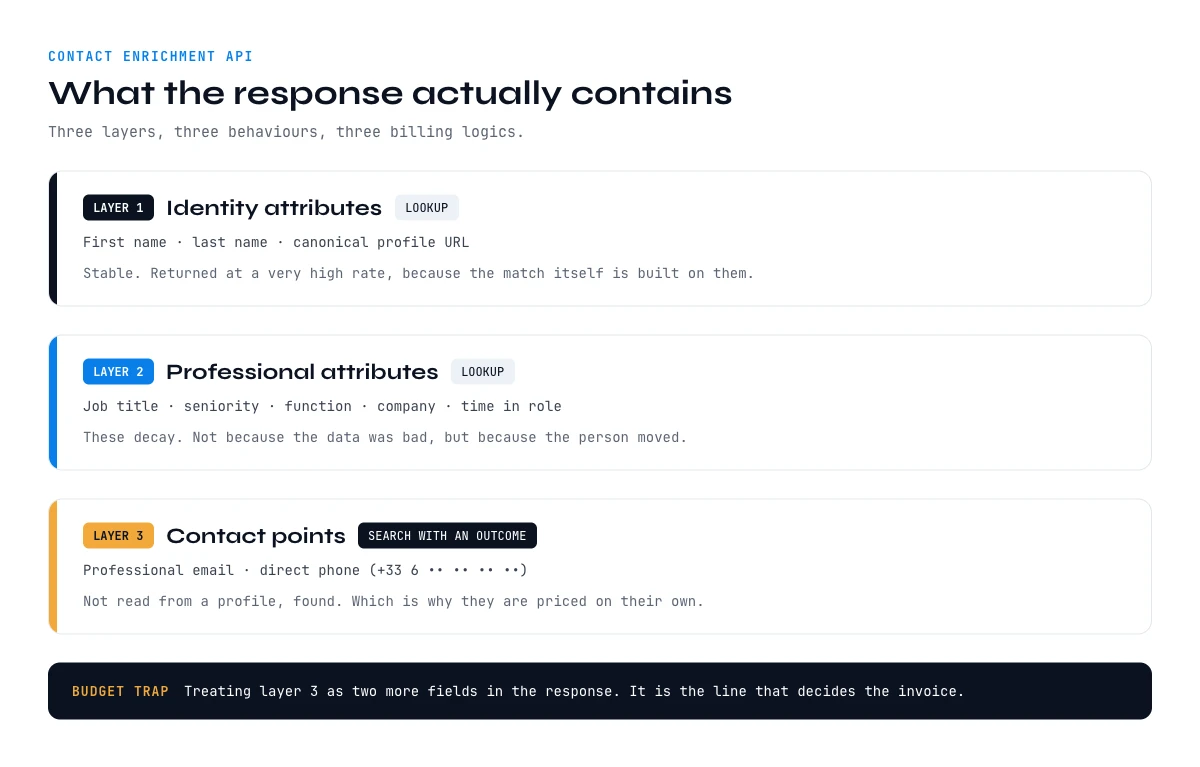
The response splits into three layers, and they don't behave the same way at all.
Identity attributes are the stable ones: first name, last name, the canonical profile URL. They change almost never, and a good service returns them at a very high rate because they are what the match itself is built on.
Professional attributes are the useful ones: job title, seniority, function, company, time in role. These are the fields your segmentation and your routing rules depend on, and they are also the ones that quietly rot. People change jobs. A record enriched fourteen months ago isn't wrong because the vendor was bad, it's wrong because the person moved.
Contact points are the expensive ones: professional email, direct phone. They are expensive because they aren't attributes sitting in a profile waiting to be read. They are found, and finding them either succeeds or doesn't. This is why they are almost always priced separately from the rest of the record, and why treating them as just two more fields in the response is the most common budgeting mistake of the whole category.
Understanding that split changes how you design the integration. The first two layers are a lookup. The third is a search with an outcome. If you haven't read how the request path is built underneath, the architecture of an enrichment API covers the request flow, caching and response shape in detail.
Person records versus company records: two different entities
Teams routinely bundle contact enrichment and company enrichment into one ticket. They aren't one problem. They differ on the identifier, on the stability of the data, and on the shape of the failure.
| Contact enrichment | Company enrichment | |
|---|---|---|
| Entity | An individual person | An organization |
| Natural key | Email, profile URL, or name plus company | Domain name |
| Key quality | Ambiguous, several people share a name | Near unique, one domain, one company |
| Decay driver | Job changes, which never stop | Funding, headcount, acquisitions |
| Typical failure | Wrong person returned confidently | Parent versus subsidiary confusion |
| Cost profile | Contact points priced per result | Flat per record |
The row that matters most is key quality. A company has a domain, and a domain resolves to exactly one company. A person has a name, and names aren't unique. Three people named David Miller work in sales at companies with similar names, and only one of them is yours. That single asymmetry explains why contact enrichment carries a real risk that company enrichment doesn't: a confident wrong match. A company API that fails usually returns nothing. A contact API that fails can return somebody, and somebody is far more expensive than nobody, because nothing downstream will flag it.
Practical consequence: never treat the two as interchangeable in your pipeline. Enrich the company from the domain, enrich the person from a person-level key, and keep the two calls and their confidence signals separate.
The input key decides your results, more than the vendor does
Here is the finding that reorders most integration projects. The variable with the largest effect on your output isn't which service you call. It's which identifier you can supply for every row.
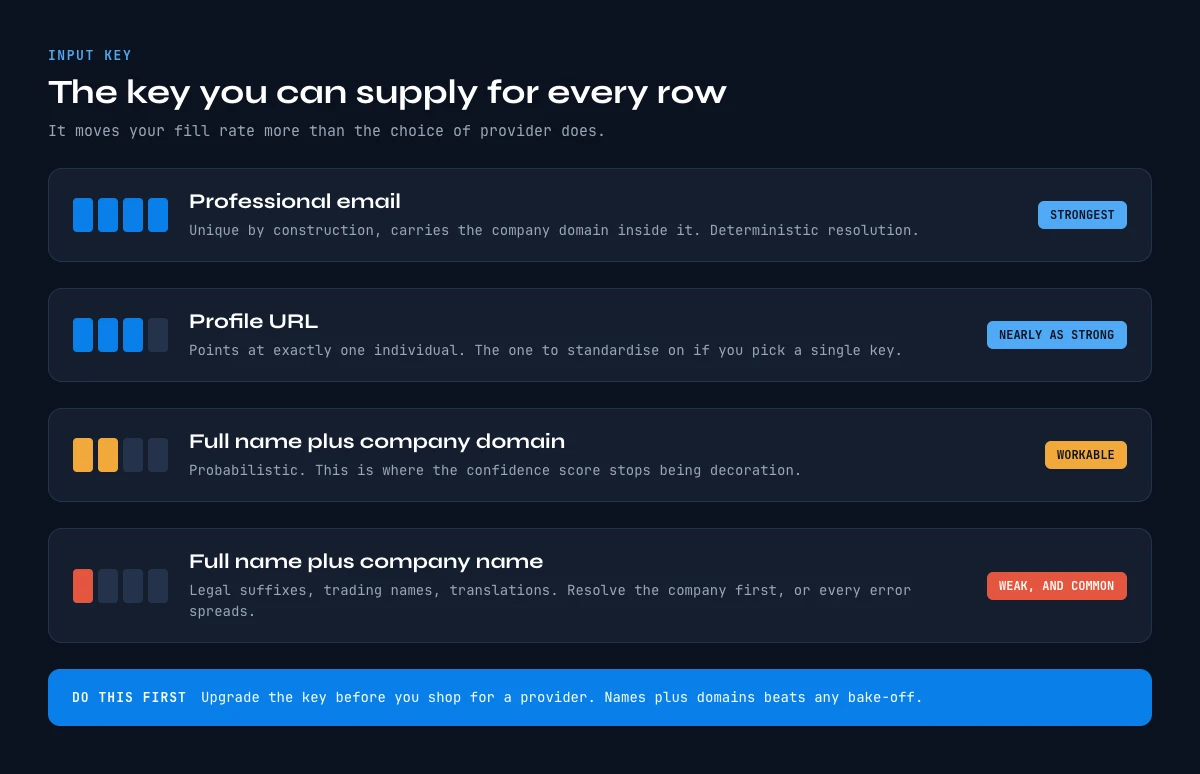
There are four realistic keys, and they aren't equivalent.
A professional email address is the strongest. It's unique by construction, it carries the company domain inside it, and resolving it is deterministic. If you already hold verified emails, you start from the easiest possible position.
A profile URL is nearly as strong. It points at exactly one individual with no ambiguity at all, which is why it's the preferred join key whenever a list comes out of a professional network. It's the key to prefer if you have to choose one to standardize on.
Full name plus company domain is workable and it's what most CRM exports actually give you. It's a probabilistic match rather than a deterministic one, so it's exactly here that confidence scores stop being decoration and start being the thing you branch on.
Full name plus company name is the weak one, and it's unfortunately the most common. Company names are messy in a way domains never are: legal suffixes, trading names, translations, spelling drift. Resolving the company correctly becomes a prerequisite step before you can even attempt the person, and every error there propagates.
The operational conclusion is blunt: upgrade your key before you shop for a vendor. Turning a list of names plus company names into a list of names plus domains, then into profile URLs, will do more for your fill rate than switching services will. Teams routinely run a vendor bake-off to chase a few points of coverage while feeding both candidates their weakest possible key.
Through the Derrick API
Test the fields and the match rate yourself
Field lists and match rates are claims until you run them. The Derrick API exposes the same contact enrichments your team can trial in the web app or in Google Sheets, so you can check the returned fields on your own records before wiring anything.
- Feature
- Derrick API
- Credit cost
- Included
The first button opens the web app, where your account and key live. API and MCP access starts on the PLUS plan. The second details the surface.
Match rate: the number everyone quotes and nobody defines
Every vendor publishes a coverage number. Almost none of them publish the denominator, and the denominator is the entire question.
Consider three ways to compute a match rate on the same 1,000 rows, with the same underlying data.
| Denominator used | What it counts | Reported figure |
|---|---|---|
| Rows you submitted | Every row, including the unusable ones | The honest one, and the lowest |
| Rows that resolved to a person | Excludes rows that never matched at all | Noticeably higher |
| Rows in the vendor's own sample | A curated benchmark list | The one on the website |
All three can be described as a match rate without anybody lying. This is why comparing two published percentages is close to meaningless, and why the only number worth trusting is the one you measure yourself.
The test is cheap and it takes an afternoon. Take 200 rows from your real list, not a clean sample, with all the messy ones left in. Run them. Then compute the only metric that matters to your business: rows that came back with the specific field your workflow needs, divided by rows you submitted. If your sequence cannot send without a verified email, then rows with a verified email over 200 is your match rate. Every other framing is marketing.
Run that test on your own data and you will usually find the real figure sits well below the published one. That's not a scandal, it's what happens when a curated benchmark meets a CRM export.
The app works through your list row by row. 100 free credits every month.
Partial matches and what to do with a half-filled row
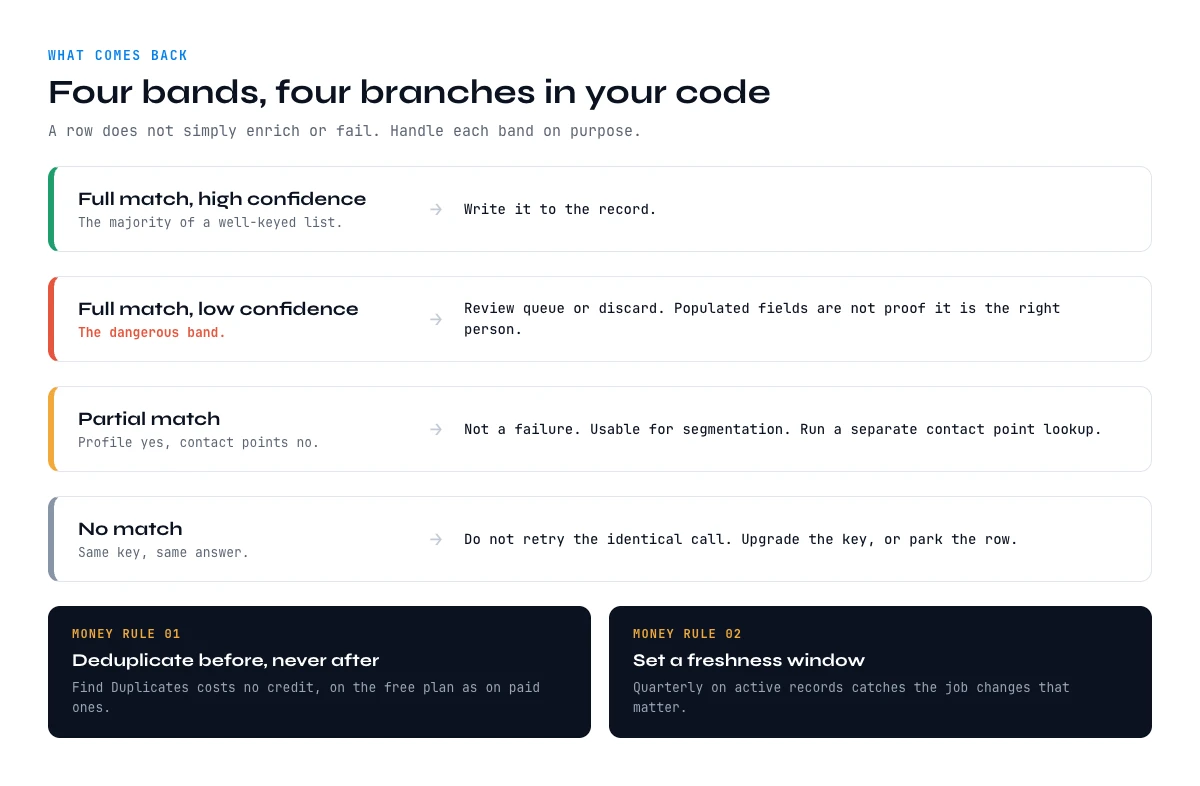
The binary mental model, either the row enriches or it doesn't, survives about a day in production. What you actually get back is a spectrum, and your code needs a branch for each band.
Full match, high confidence. Write it. This is the easy case and it is the majority of a well-keyed list.
Full match, low confidence. The dangerous band. The service found somebody plausible and is telling you it's not certain. Writing this straight into a CRM is how a competitor's employee ends up in your nurture sequence. Route it to a review queue, or discard it, but don't let it through silently because the fields happen to be populated.
Partial match. Identity and professional attributes came back, contact points did not. This is extremely common and it's not a failure. The record is genuinely useful for segmentation and account mapping, it just isn't sendable yet. Store it, mark it, and run a dedicated contact point lookup on it separately.
No match. Don't retry the same call with the same key and hope. Retrying an identical request against an unchanged dataset returns an identical answer, and on per-attempt pricing you pay for the privilege. Either upgrade the key and retry, or park the row.
Two rules save more money than any other tuning. Deduplicate before you enrich, never after. A list assembled from several sources always carries overlap, and paying twice to enrich the same person is pure waste. Set a freshness window. Re-enriching a record touched last week is spend with no information gain; a quarterly refresh on active records catches the job changes that actually matter. If you are calling in volume, rate limits and quota management covers how to pace those batches without hitting a wall.
What a contact enrichment API costs: per attempt or per result
This is the single most consequential line in any enrichment contract, and it's usually buried. Two billing models exist, and on a real list they don't produce remotely similar invoices.
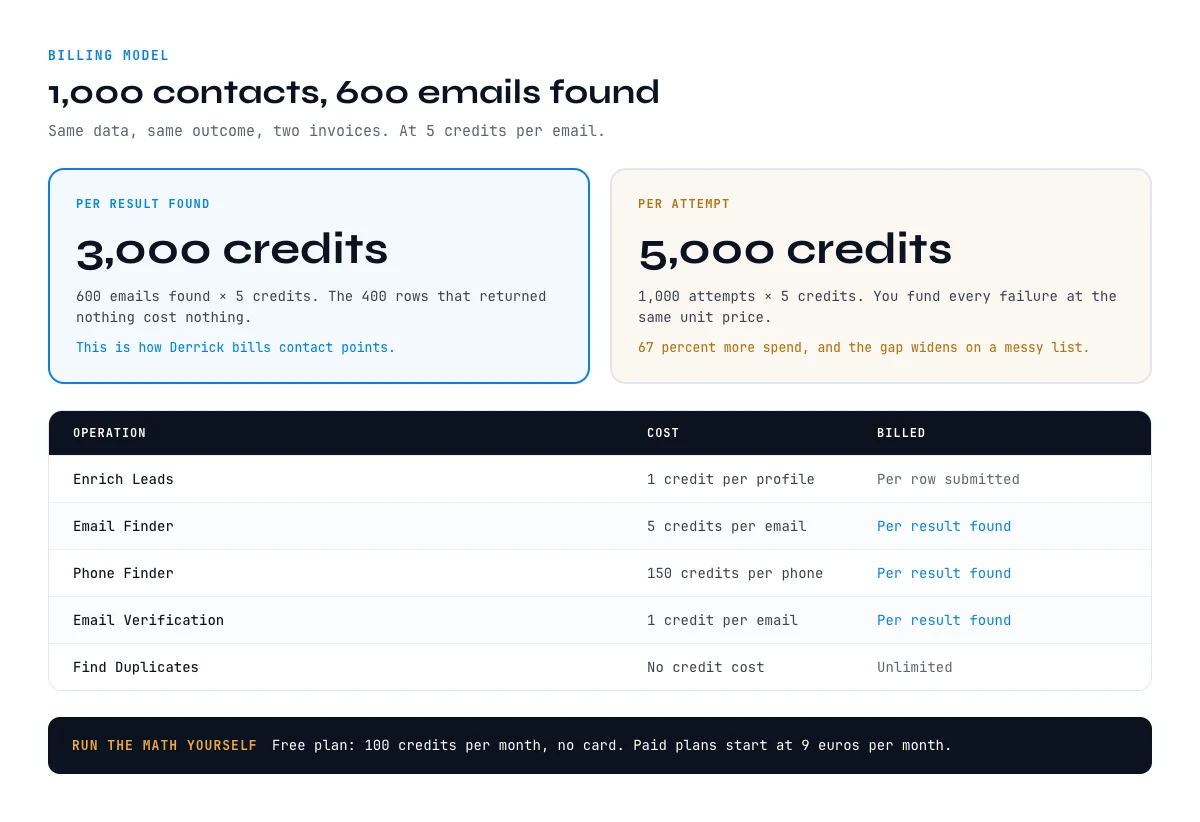
Per attempt means the call is billed whether or not it returns anything. Predictable to forecast, and it means you fund every failure.
Per result means you are billed only when the service actually returns the thing you asked for. The failures cost nothing.
Derrick prices the layers separately, and along exactly that line. Profile-level enrichment is billed per row submitted, because a lookup either reads the profile or the row was not usable. Contact points are billed per result found, because finding them is a search with an outcome.
| Operation | Cost | Billed | Plans |
|---|---|---|---|
| Enrich Leads | 1 credit per profile | Per row submitted | Free and paid |
| Email Finder | 5 credits per email | Per result found | Paid, from 20 euros per month |
| Phone Finder | 200 credits per phone | Per result found | Paid, from 20 euros per month |
| Email Verification | 1 credit per email | Per result found | Paid, from 20 euros per month |
| Find Duplicates | No credit cost | Unlimited | Free and paid |
Put a real list against those numbers. Take 1,000 contacts you want emails for, and assume 600 of them resolve. Under per-result billing you are charged for the 600 that worked: 3,000 credits. Under per-attempt billing you are charged for all 1,000 attempts at the same unit price: 5,000 credits. Same data, same outcome, 67 percent more spend, and the gap widens as your list gets harder, which is precisely when budgets are already under pressure.
That's also why the model deserves more scrutiny than the headline unit price. A lower price per call, billed on every attempt, is frequently the more expensive contract on a messy list. The free plan includes 100 credits per month, which is enough to run this arithmetic on your own data before committing to anything, and paid plans start at 20 euros per month.
Calling a contact enrichment API from your stack: API, integrations, MCP
Once the data questions are settled, the delivery question is just which surface fits the system you already run. There are three, and they suit different jobs.
The API. Derrick exposes its enrichment endpoints from the Plus plan at 47.50 euros per month, and your API key sits in the web app, on the API & MCP page (or in the Google Sheets add-on menu, under API). Your code keeps orchestration, retries and storage, and calls a documented, versioned interface for the enrichment itself. This is the right route when enrichment has to happen inside an application you own, on your own trigger and your own schedule. Worth reading alongside it: API authentication and encryption, because a contact enrichment integration handles personal data and the key management is not an afterthought.
Integrations. With 3000+ integrations through Zapier, Make and N8N, enrichment becomes a step in a workflow rather than a service you host. A new CRM record, a form submission or a scheduled job triggers the call, and nothing needs to be deployed. For event-driven pipelines specifically, triggering enrichment from webhooks walks through the full pattern.
MCP. Derrick MCP puts the same data behind an AI assistant. From Claude Desktop, ChatGPT or any MCP compatible client, an agent asks for the enrichment it needs and receives a structured answer in the conversation, with no integration to write at all. It is available from the Plus plan at 47.50 euros per month. For agentic workflows this is a materially better contract than wrapping an HTTP client in a tool definition and maintaining it yourself.
The no-code route: enrichment inside Google Sheets
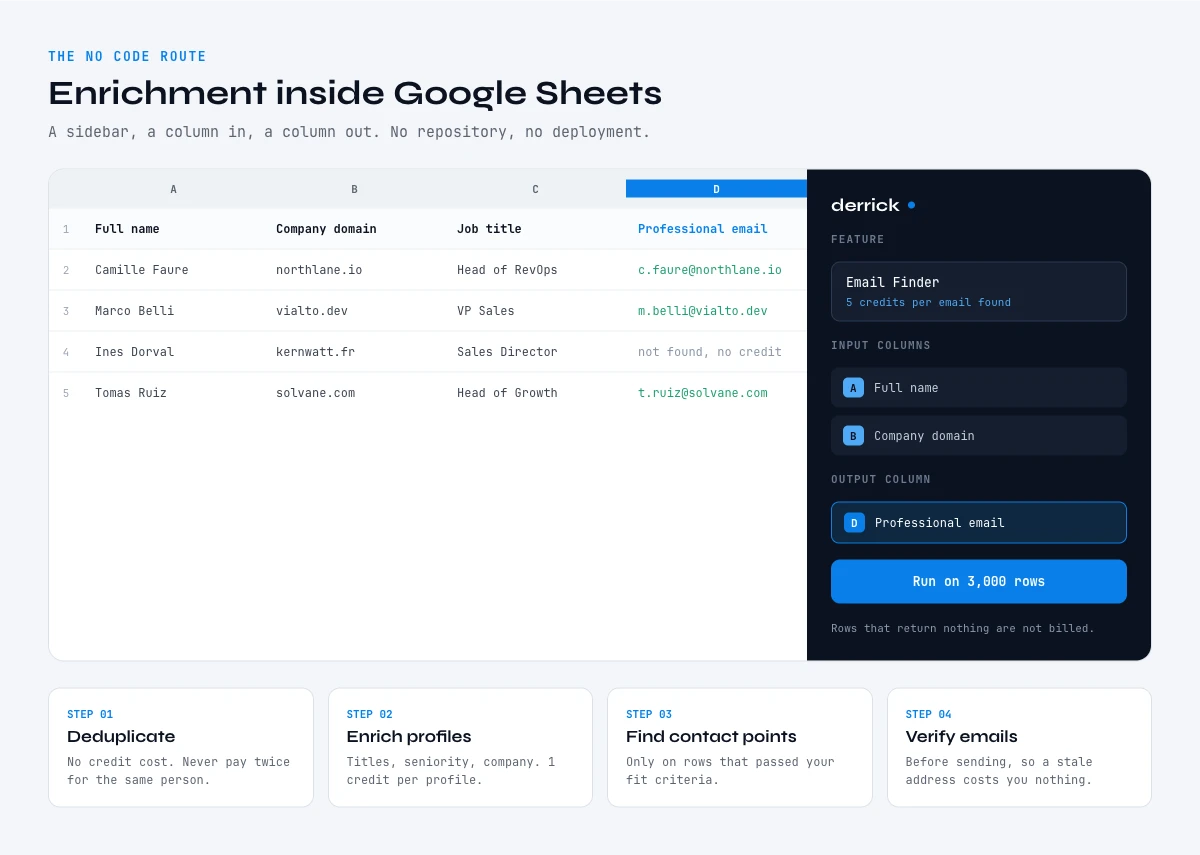
A large share of the teams that scope an API integration don't need one. The requirement, stated honestly, is often that a list of 3,000 people needs job titles and emails before a campaign goes out next week. That is a spreadsheet problem wearing an engineering costume.
Derrick runs in its web app, and also as a sidebar inside Google Sheets. You point it at a column, and it writes the enriched fields back into the rows next to it. Same data, same per result billing on contact points, no repository and no deployment. For a recurring prospecting list this isn't the lesser option, it's the correct one: there's nothing to maintain, and the same sidebar handles fifty rows or ten thousand without a second architecture.
The sequence that works, in this order. Deduplicate the file first, at no credit cost, so you never pay twice for the same person. Enrich the profiles to get titles, seniority and company. Then run contact point lookups only on the rows that passed your fit criteria, because that is where the credits actually go. Verify the emails before sending, so a stale address does not cost you domain reputation.
Doing it in that order on 3,000 rows takes an afternoon. The same job scoped as an integration takes a sprint and still needs someone to own it afterwards. That comparison, not a feature grid, is what usually settles the decision, and the complete developer guide to enrichment APIs covers where each route fits.
Contact enrichment API checklist before you integrate
Nine questions. Answer them before you sign anything, and the integration stops being a gamble.
1. What key can I supply for every row? Not for the best rows. For every row. This sets your ceiling before any vendor is involved.
2. Can I upgrade that key first? Names plus company names into names plus domains is usually the highest return work available.
3. Which single field does my workflow actually require? Measure coverage on that field alone, not on the record as a whole.
4. What is the match rate on my own 200 rows? Measured with rows submitted as the denominator, on real data, not a sample.
5. Am I billed per attempt or per result? On a 1,000 row list at 60 percent resolution, that choice moves the invoice by two thirds.
6. What happens on a low confidence match? If the answer is that it gets written anyway, fix that before launch, not after.
7. Do I deduplicate before enriching? Before. Always before.
8. How often do I refresh? Quarterly on active records catches job changes without paying for nothing.
9. Do I need an integration at all? Ask it honestly. A recurring list in a spreadsheet rarely does.
Answer those and the rest is implementation detail. The failure mode of this category is not a bad endpoint, it's a good endpoint fed a weak key, measured with the vendor's denominator, and billed on every attempt. None of those three is a technical problem, which is exactly why the technical review never catches them.
Frequently asked questions
What is a contact enrichment API?
What is the difference between contact enrichment and company enrichment?
Which input key gives the best match rate?
What is a good match rate for a contact enrichment API?
How much does contact enrichment cost per contact?
Should I be billed per attempt or per result?
Do I need an API to enrich contacts?
Can an AI agent call a contact enrichment API directly?
Keep reading
Continue exploring this cluster


The 2026 State of Data Enrichment APIs: Market, Architecture & Reliability Benchmark
Read →

Data Enrichment API: Architecture and How It Works
Read →

Webhooks and Data Enrichment: How to Trigger Enrichment from Events
Read →

API Rate Limits and Quota Management: Everything You Need to Know
Read →