Reverse Email Lookup
Paste a work email to see what it already tells you: the company domain, the type of address and the name read from its pattern. This free reverse email lookup also says plainly what it cannot give you without a real search: job title, LinkedIn profile and phone number.
Reverse email lookup
Paste one work email. The lookup runs in your browser: nothing is sent, nothing is stored.
Paste an email address, or try one of the examples.
Runs in your browser. No request is sent, nothing is stored. The name is read from the address pattern, not from a database.

At scale
derrick •
When you need the person, not only the company
In the Derrick web app, Find Names & Domains by Email Addresses returns the name and the company domain behind a list of addresses, unlimited on every plan including the free one. Enrich Leads then adds the job title and LinkedIn profile (1 credit per profile), and Enrich Companies adds the company details (1 credit per company); both need your LinkedIn account connected through the Derrick Chrome extension. The free plan includes 100 credits per month, no credit card needed.
- Web app: nothing to install, no credit card
- Free plan: 100 credits every month
- API and MCP from the Plus plan (€47.50/month)
Install the add-on and enrich your lists without leaving your spreadsheet.
Install in Google Sheets →
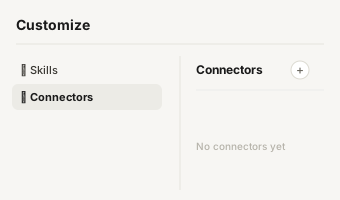
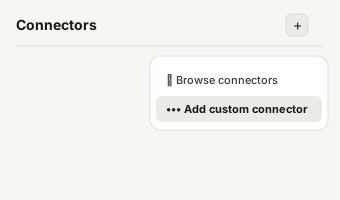
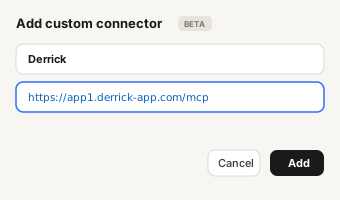
https://app1.derrick-app.com/mcp Call the same enrichment endpoints straight from your own stack or workflow.
Read the API docs →
What this reverse email look
What this reverse email lookup returns, and what it doesn't
A reverse email lookup starts from an address and works back to the company and the person behind it. Part of that answer is already written in the address itself. The rest needs a search against real data. This tool gives you the first part for free, instantly, and labels the second part honestly instead of guessing.
| Field | From this tool | How sure |
|---|---|---|
| Company domain | Yes, read from the address | Certain |
| Type of address (named, role, personal) | Yes | Certain |
| Company website | Yes, the domain points to it | Probable |
| Person's name | Yes, when the address follows a first.last pattern | Probable or partial |
| Legal company name | No | Needs a lookup |
| Job title, LinkedIn profile, phone | No | Needs a lookup |
Most reverse email lookup pages promise the full person profile in one click. In practice no address contains a job title or a phone number: those come from a database search, and the result depends on the data behind it. Knowing which half you already own tells you whether a paid search is worth it for that address at all.

How a reverse email search w
How a reverse email search works, step by step
Every reverse email search, manual or automated, follows the same four steps. This tool runs the first three in your browser.
- Split the address at the @ sign. The part after it is the domain, the part before it is the local part.
- Classify the domain. A free consumer provider (gmail.com, outlook.com, yahoo.com) carries no employer. Any other domain is almost always the company's own, and its website usually sits at the same address.
- Read the local part. Companies assign addresses with a convention: first.last, f.last, firstlast, first_last. When the local part follows one of them, the name can be read back. When it is info@ or sales@, there is no person to read.
- Search for what is left. The legal name, the job title, the LinkedIn profile and the phone number come from matching the name and the domain against business data. That is the only step that costs anything.

Named address
Named address, role address, personal mailbox: the three cases
The result of a reverse email lookup depends less on the tool than on the kind of address you start from.
- A named work address (jane.doe@acme.com) is the best case. The domain gives you the company, the pattern gives you a probable name, and a search can confirm the person and add the title and profile.
- A role address (contact@, info@, sales@, support@) is a shared inbox. The company is certain, but there is no person behind it, whatever tool you use. The useful move is to look for a named contact at the same domain.
- A personal mailbox (jdupont83@gmail.com) carries no company at all. A domain-based search has nothing to work with; only a search on the person can go further.

Check the address exists bef
Check the address exists before you look it up
An address can be perfectly readable and still bounce: the person left, the mailbox was closed, the domain stopped receiving mail. Before you spend a search on an old address from a CRM export, check that it still works. Our free email address checker catches typos and throwaway inboxes in the browser, and the guide on how to tell if an email is valid explains the server-side checks.

Who uses reverse email looku
Who uses reverse email lookup
- Sales teams qualifying inbound leads: a demo request from a named work address tells you the company before you open the CRM.
- Marketing and ops teams cleaning a CRM: sorting named addresses from role inboxes and personal mailboxes before a campaign.
- Recruiters placing a candidate's address in context before a first call.
- Anyone who receives an email from an unknown sender and wants to know which company is behind it.
From one email to 500
From one email to 500: reverse email lookup in bulk
This tool handles one address at a time. A form that collected 500 submissions needs the same steps run on every row: split, classify, read the name, then search only the rows where a search can return something. Skipping role addresses and personal mailboxes before the search is where most of the saving is. The full method, with the manual approach and the bulk workflow, is in our guide to finding the company behind an email address. To go from the address to the LinkedIn profile, see how to find a LinkedIn profile by email.