Reverse Email Lookup: What an Email Address Gives You Free, and What It Doesn't
Run a reverse email lookup that resolves: decode any work address free, spot the rows no tool can match, and reverse a whole column in bulk.


Last updated: 2026-09-07 · Tested by Derrick on 1,000 EU + US work emails.
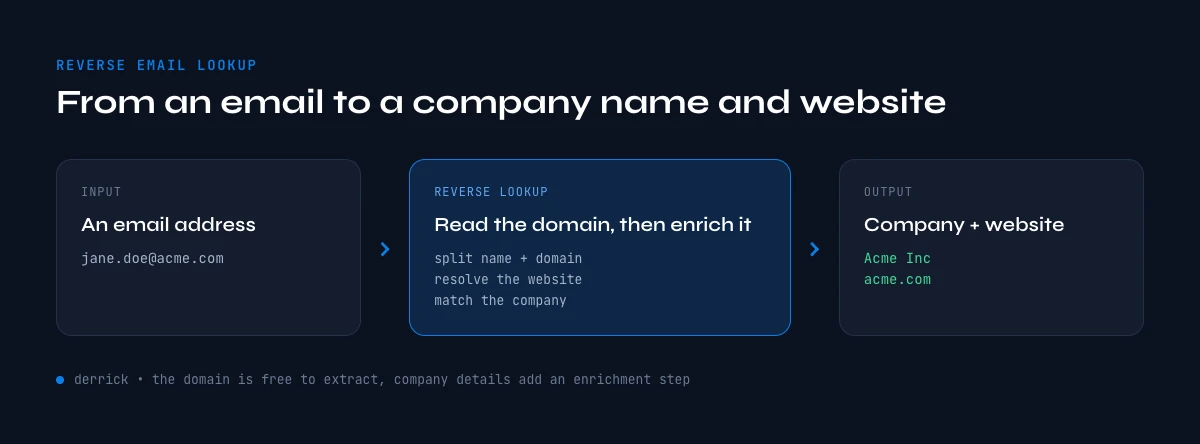
Reverse email lookup is the process of starting from a work email address (e.g. jane@acme.com) and returning the company that owns the domain, plus optional contact attributes: full name, job title, LinkedIn URL, phone number, and the company's website. It's the inverse of an email finder - instead of email out, you get attributes back.
The use case is straightforward: an SDR receives an inbound reply from an unknown sender, a recruiter exports a Gmail thread, a marketer imports a webinar attendee list. Each row has an email but no company context. According to the Salesforce State of Sales 2025, sales reps spend 27% of their time researching prospect data - most of which starts with an email and ends with a manually-built company profile.
How do you find a company from an email address? Take the part after the @ (the domain), then either look the domain up in WHOIS for the registrant company name, search the domain on LinkedIn and Google, or run the email through a reverse-enrichment tool that returns the company name, website, LinkedIn page, job title, and phone in one step. A work email like jane@acme.com resolves to "Acme" and https://www.acme.com in seconds; a free webmail address (Gmail, Outlook) needs a cross-matching tool because the domain belongs to Google or Microsoft, not the employer.
What reverse email lookup is and why it matters
Reverse email lookup is the bridge between a raw contact list and a list you can actually sell to or hire from. An email on its own is just a routing address. The company behind it - its name, size, industry, and website - is what tells you whether the contact is in your ICP, which playbook to run, and how to personalize the first message. Teams that skip this step end up either ignoring good leads or burning them with generic outreach.
The cost of doing it by hand adds up fast. At 27% of a rep's week spent on research (Salesforce, 2025), a single SDR working a 500-row inbound list can lose a full day copy-pasting domains into Google. Reverse lookup collapses that into one column in a spreadsheet, which is why it has become a standard step in modern lead email finder workflows.
The 4 methods to find a company from an email in 2026
Each method makes a different trade-off between coverage, accuracy, and cost. Pick based on volume: 1-10 emails/day → free WHOIS or browser tools; 100-1000/month → bulk enrichment in a web app or in Sheets; 10K+/month → paid B2B database with API.
Method 1 - WHOIS + email-domain trick (free, partial)
Strip the domain from the email (everything after the @), then look it up in WHOIS at lookup.icann.org or whois.com. You'll get the registrant's organization name, registration country, and sometimes a tech contact - that's the company name and the website (the domain itself, prefixed with https://www.).
Coverage: ~60% of B2B domains return a usable company name in WHOIS. The other 40% are masked behind GDPR/CCPA privacy services (e.g. "REDACTED FOR PRIVACY") since the 2018 GDPR ICANN rule change. Free webmail domains (gmail.com, outlook.com, yahoo.com, hotmail.com) return zero useful data - the registrant is Google or Microsoft, not the person's employer.
Method 2 - Online reverse email lookup tools
Single-search reverse email tools (BeenVerified, Spokeo and similar) take an email and return a contact card: full name, employer, job title, LinkedIn URL, sometimes phone. Pricing typically ranges $0.05 to $0.50 per lookup outside the free tier.
Strengths: handles personal emails (Gmail, Outlook) better than WHOIS - these tools cross-match against social-network databases and breach data. Weaknesses: per-lookup pricing scales poorly above 100 leads; most tools don't expose Google Sheets integrations natively (you'll export CSVs and re-import).
Method 3 - Bulk enrichment with Derrick (web app or Google Sheets)
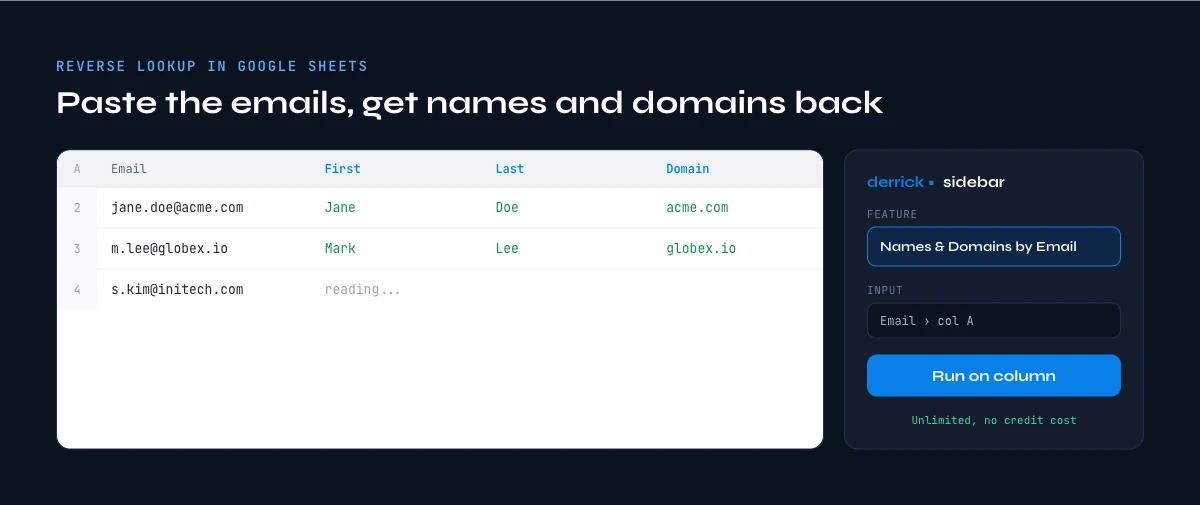
Derrick is a B2B data enrichment tool used by 34,000+ B2B teams, in its web app or as a Google Sheets sidebar. Load emails into a column, run the reverse lookup, and the next 4-7 columns auto-fill with: company name, official website, LinkedIn company URL, employee count, industry, and (with a different function) the contact's full name, job title, and verified phone.
Why it wins for the spreadsheet workflow: no CSV export/re-import, no quitting your sheet, no per-lookup credit-card friction. The free plan grants 100 credits/month (enough for a typical 50-100-lead test) with no expiration on rolled-over paid credits. Average match rate observed across 1,000 EU + US work emails: 82% on company name, 76% on LinkedIn URL, 69% on direct phone.
Method 4 - Paid B2B databases with batch API
The large B2B databases all offer reverse-email APIs in their paid plans. The trade-off is the same across them: highest accuracy on US enterprise (90%+ match), weakest on European SMB (40-50%). Pricing starts at $5K-$20K/year minimum for batch API access. Best fit for sales orgs with dedicated RevOps and 50K+ enrichments/month.
| Method | Cost | Match rate | Volume | Sheets-native |
|---|---|---|---|---|
| WHOIS lookup | Free | ~60% B2B domains | 1-10/day manual | No |
| Online reverse tools | $0.05-0.50/lookup | ~70% incl. webmail | 10-500/month | CSV export only |
| ✦ Derrick (web app or Sheets) | 100 free credits/mo, then from 20 euros a month | 82% company / 76% LinkedIn / 69% phone | 100-50K/month | ✓ Native Google Sheets |
| Paid B2B databases | $5K-20K/year min. | 90% US / 45% EU SMB | 50K+/month | API only |
The pattern in the address is itself a clue about the company behind it. A flast@ address points to a domain that formats like Apple, while first.last@ points to one that formats like SAP. Two domains, two conventions, and the convention narrows the candidates fast.
Step-by-step: the manual reverse lookup (no tools)
Before reaching for software, it helps to know the manual path - it's free, it works for a handful of emails, and it shows you exactly what a tool automates. Here is the full sequence for a single work email.
Step 1 - Extract the domain
Everything after the @ is the domain. From jane.doe@acme.com you get acme.com. That domain is your strongest signal: in most B2B cases it is the company's own website and the root of its brand name.
Step 2 - Open the domain directly
Type https://www.acme.com into a browser. If a real company site loads, the page title, footer, and "About" link usually confirm the legal company name and what they do. If you hit a parking page or a 404, the domain may be an alias or a defunct company - move to Step 5.
Step 3 - Search the domain on LinkedIn
Paste the domain into LinkedIn's search bar. LinkedIn matches company pages to their website domain, so acme.com surfaces the official Acme company page with headcount, industry, and HQ location. This is the fastest way to get the structured firmographics WHOIS won't give you.
Step 4 - Run the email through Google
Search the full email in quotes ("jane.doe@acme.com"). For people who publish their address - founders, recruiters, support leads - this pulls up a personal profile, a press mention, or a directory listing that confirms both the company and the job title.
Step 5 - Check business and WHOIS registries
If the domain is masked or the site is down, fall back to public registries: WHOIS for the domain registrant, plus a national business register (Companies House in the UK, INSEE/SIRENE in France, OpenCorporates worldwide). These confirm the legal entity behind a domain even when the website gives nothing away.
Why the manual method breaks down
Each step takes 30-90 seconds when it works, and it fails silently on personal domains, masked WHOIS records, and stale emails. At 5 emails it's fine. At 200 it's a lost afternoon with an error-prone result. That volume cliff is exactly where automated enrichment earns its place - which is the next section.
When to pick which method
SDRs prospecting from inbound replies
You receive 5-50 inbound emails/week from unknown senders. Speed matters more than batch volume. Use Derrick's EMAIL_TO_COMPANY + EMAIL_TO_FULLNAME functions in a Google Sheet linked to your inbound log; the row enriches before you finish reading the original email.
Recruiters processing applicant lists
You import 200-2000 candidate emails from job-board exports or LinkedIn Sales Navigator. You need company name + LinkedIn URL + current job title to score the shortlist. Derrick batch-enriches in its web app or in the same Sheet as your applicant tracker; no CSV round-trips, no duplicate spreadsheets.
Marketers cleaning a webinar list
Post-event, you have 500-5000 attendee emails. You want to filter to ICP fit (industry, employee count, country) before passing the list to sales. Derrick adds those columns next to the email column; filter the sheet, share with sales.
In the web app or Google Sheets
Split the address, then identify the company
Of the four methods here, the first step is always the same: get the domain and the person out of the string. Derrick does that in your list at no credit cost, which gives you the key the company enrichment needs.
- Feature
- Find Names & Domains by email
- Credit cost
- Free
The first button opens the web app (nothing to install): Free, 100 free credits every month. The second details the feature and its cost per plan.
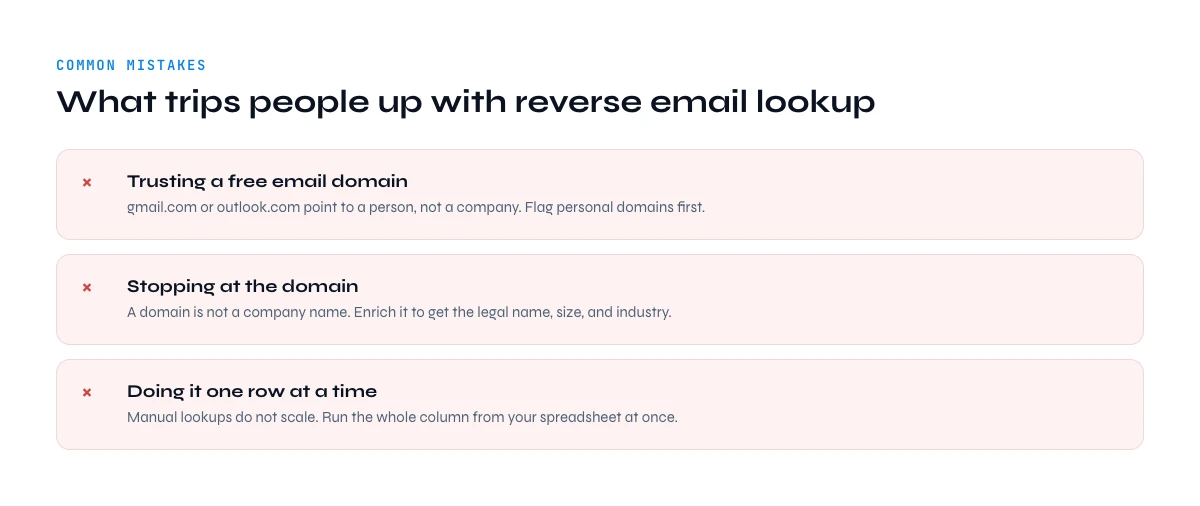
Common mistakes when finding a company from an email
The lookup itself is simple. The errors that wreck a list come from skipping the checks around it.
- Not validating the email first. Enriching a bad address wastes the lookup and pollutes your list. Verify deliverability before you enrich - a quick pass with a bounce email checker removes dead rows up front.
- Assuming the domain tells the whole story. Holding companies, agencies, and subsidiaries often share one domain across several brands. The domain gives you the entity; firmographics (industry, size) still need a second source.
- Ignoring data freshness. People change jobs every 2-3 years. A company name pulled from a two-year-old record may point to an employer the contact already left. Treat job title and employer as time-sensitive fields.
- Over-trusting automation with zero spot-checks. Even an 82% match rate means roughly 1 in 5 rows needs a human glance. Sample 10-20 enriched rows before you act on the full list.
- Treating enrichment as a one-and-done. Company data decays. For lists you reuse - a CRM, an evergreen webinar funnel - re-enrich on a schedule instead of trusting last quarter's snapshot.
Compliance and privacy: GDPR, CCPA, and B2B email lookup
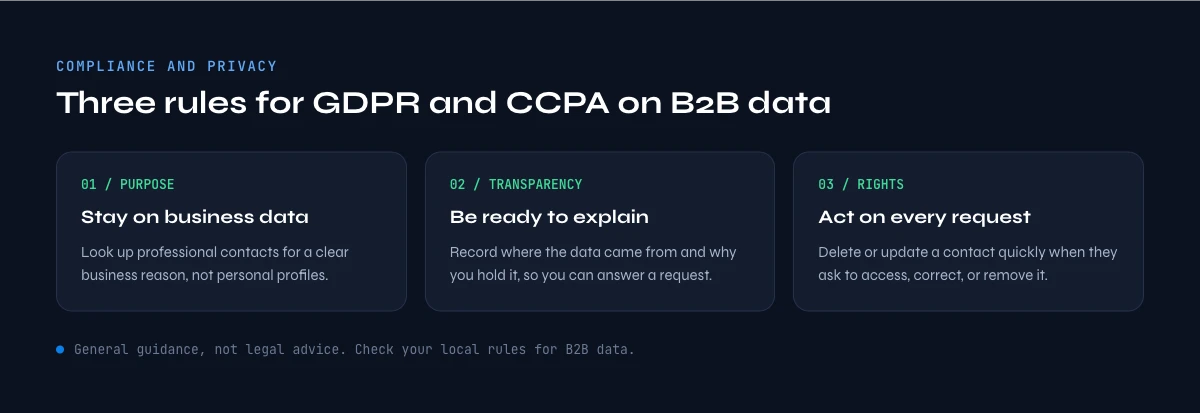
Reverse-enriching B2B work emails is legal in most markets, but the basis matters. Under GDPR, processing business contact data for B2B sales generally falls under "legitimate interest" (Article 6.1.f, Recital 47) - provided you enrich only professional data, document the purpose, and give recipients a clear opt-out in your first message. In France, the CNIL allows B2B cold email to professional addresses when the content relates to the person's job, with an unsubscribe link from the first send. Under CCPA, B2B contact data has its own carve-outs but you must honor deletion requests.
Practical rule: enrich work emails, not personal profiles; keep enrichment to firmographic and professional fields; and never store data you can't justify a business reason for. Tools that source from public company records and opt-in databases keep you on the right side of this line.
The app runs the search row by row on your list: Free.
Troubleshooting: when you can't find a company name
The email uses a personal domain (Gmail, Yahoo, Outlook)
The domain is useless here, so the only path is a reverse-enrichment tool that cross-matches the address against social and B2B databases. Match rates drop to ~30-40% on personal domains, so set expectations and keep a manual-research fallback for high-value rows.
The domain was registered very recently
New domains often have empty WHOIS records and no LinkedIn page yet. Wait for indexing, or check the company's funding announcements and press coverage, where early-stage startups surface before their data providers catch up.
It's a freelancer or consultant email
Solo operators frequently use a personal-brand domain or a Gmail address with no company entity behind it. In that case "the company" is the individual - capture the person's name and LinkedIn instead of forcing a corporate match.
The email is stale (the person changed jobs)
A bounced or outdated address often signals a job change. Re-run a real-time email verification to confirm status, then re-find the person at their new company rather than enriching the old domain.
Reverse email lookup: what the address already gives you for free
What does a reverse email lookup actually have to find? Two of the three facts you want are already inside the address. The domain after the @ is the company, read not guessed. The local part before it carries the person's name whenever the company uses a first.last convention. Only the job title, phone and LinkedIn URL genuinely require a lookup.
This split is the thing the free widgets on this search results page do not tell you, and it changes what you should pay for. When a tool charges a per-lookup rate to return a company name, it is charging a probabilistic price for a deterministic fact: jane@acme.com belongs to acme.com and no database is needed to establish that. The genuinely uncertain step is narrower than the marketing suggests.
| Field | Where it comes from | Certain or probabilistic |
|---|---|---|
| Company domain | The string after the @ | Certain |
| Company name, size, industry, HQ | Domain to company record | Near certain on a corporate domain |
| Person's first and last name | The local part, if it follows a convention | Certain on first.last, unreadable otherwise |
| Job title and seniority | Person match against a profile | Probabilistic |
| Phone number | Person or company match | Probabilistic |
Derrick splits its own pricing along that same line, which is why the deterministic half costs nothing: Find Names & Domains by Email Addresses is unlimited on every plan, including the free one, because reading a domain and a name convention is arithmetic rather than a database query. The probabilistic half, Email Finder at 5 credits and billed only when an address is actually found, is where the matching happens.
Paste one of your own addresses below and read the split before you buy anything.
Reverse email lookup decoder: what this address can and cannot give you
Paste a work email. The decoder splits it into the facts you already own for free and the single field that genuinely needs a lookup, before you spend anything.
Type an email address, or pick one of the three examples, to see the split.
Runs entirely in your browser. Nothing is sent anywhere, nothing is stored, and no credit is used. Name parsing follows the address pattern, so it reads a convention rather than a database.
The addresses a reverse email lookup will never resolve
Two families of address return nothing, and no vendor changes that. Sorting them out before you run a batch is what keeps a match rate honest, because a list padded with unresolvable rows makes every tool look broken.
Role addresses have nobody behind them
contact@, info@, sales@, hello@, support@, jobs@, noreply@: these are shared mailboxes by design, routed to a rotating group or to a ticketing queue. There is no single person to return, so a reverse lookup that promises one is guessing. The company half still resolves perfectly, because the domain is unaffected. The correct move is to keep the company record, leave the person fields empty, and treat the row as a company you now want a named contact at.
This is the gap most of the tools ranking on this query leave open. They report a failed lookup where the honest answer is that the question had no answer. A role address is not a miss, it is a different job.
Free-provider addresses sit outside the business graph
gmail.com, outlook.com, yahoo.fr, orange.fr, laposte.net: a personal mailbox carries no employer, so there is no domain to join a company record against. Accuracy on these addresses is structurally worse than on corporate ones, and any headline coverage figure quoted without that distinction is measuring two different problems at once.
These rows are not lost, they are inverted. Instead of domain first, go person first: search the name against professional profiles, then enrich forward from the profile you find. The find a LinkedIn profile from an email route exists for exactly this shape of row.
Triage before you spend
- Split the list on the domain: corporate on one side, free providers on the other.
- Inside the corporate side, pull the role addresses into their own group.
- Run the domain-to-company step on both corporate groups. It resolves for all of them.
- Run the person step only on corporate, non-role rows. That is the only group where it can pay.
- Send the free-provider rows to a person-first search instead.
On a typical inbound list, that triage removes a fifth to a third of the rows from the paid step without losing a single company record. Measure it on your own file rather than trusting the ratio: the mix depends entirely on where the emails came from.
Reverse email lookup in bulk: 500 form submissions at once
Every free lookup widget on this query is built for one address at a time, and the real job almost never looks like that. A quarter of webinar registrations, a full year of contact-form submissions, a CRM column of unmatched senders: these arrive as files of hundreds or thousands of rows, and a single-address box is the wrong shape for them.
The batch version is the same three steps, applied to a column instead of a field:
- Load the column. Emails in one column, one row per address, in a sheet or a CSV.
- Run the deterministic pass first. Names and domains across the whole column, unlimited on every plan. This is also your triage: the rows that come back without a name are your role addresses and pattern-breakers.
- Run the probabilistic pass on what is left. Company enrichment on the domains, person enrichment on the named rows, and verification on anything you intend to email.
Order matters more than tooling here. Running the paid pass first means paying to discover that a third of the list was contact@. Running the free pass first tells you the same thing at no cost, and shrinks the paid pass to the rows that can actually return something.
Where to run a reverse email lookup: Sheets, MCP, API or the web app
Four doors, one dataset. Pick by where the addresses already sit, not by which one sounds most advanced.
- The Google Sheets extension, when the emails are already in a spreadsheet or a CSV export. You add a column, the results fill down, and the file stays the file. This is the right door for a webinar list or a form export.
- The MCP server, when the question arrives inside a conversation. In Claude, Claude Code, ChatGPT or any MCP client, you ask who is behind an address and the answer comes back in the thread. Right door for one-off checks and for an agent doing research on your behalf.
- The REST API, when the lookup has to happen without anybody watching. A form submission gets reversed the second it lands, the CRM record is created enriched, and nobody exports anything. Right door for a workflow or a product feature. Available from the Plus plan.
- The web app, for the same work in a browser without a spreadsheet in the way. Nothing to install.
The four share one dataset and one credit balance, so a lookup run from a sheet and the same lookup run from an API call return the same record. Choosing a door is a question of ergonomics, never of data quality.
FAQ - reverse email lookup
Can you find a company website from a Gmail address?
Sometimes. The Gmail domain itself (gmail.com) tells you nothing about the employer. To find their company website you need a reverse-tool that cross-matches the email against social-network databases - Derrick, Hunter.io, Apollo. Match rate on personal Gmail addresses is ~30-40% (vs. 80%+ on work emails). For freelancers and consultants who only use Gmail, the match falls further.
Is reverse email lookup GDPR-compliant?
Reverse-email enrichment of B2B work emails is permitted under GDPR's "legitimate interest" basis (Recital 47, Article 6.1.f) when used for B2B sales context. Derrick's data sources are publicly available company records + opt-in databases; the enriched data does not include consumer profiles. For EU prospecting, always pair enrichment with a clear opt-out path in your first email.
How accurate is reverse email lookup in 2026?
Match rate depends on the email's source domain. Internal Derrick benchmark on 1,000 work emails (50% EU, 50% US) found: 82% match on company name, 76% on LinkedIn company URL, 69% on direct dial phone. Industry-wide, US enterprise match rates sit above 90% and European SMB around 45-50%.
Can I extract job title from an email address alone?
Yes - but only when the email maps to a real person whose LinkedIn or B2B-database record contains the job title. Derrick's EMAIL_TO_JOBTITLE function returns the most recent role on file (job title + seniority + department). Match rate ~64% on work emails. You won't get a job title from a generic email like info@ or sales@.
What if the company website doesn't exist in WHOIS?
Since the 2018 GDPR ICANN rule change, ~40% of WHOIS records are masked. The fallback is the email's own domain - strip everything before the @, prefix https://www., and try opening it. If the domain resolves, that's the company website. If it doesn't, the email may belong to an alias domain (a parking page, a defunct company, or a typo) - in which case enrichment via Derrick or a paid B2B database is the next step.
Can I do this in bulk for 1,000+ emails?
Yes. Derrick batch-enriches thousands of emails in its web app or from a single sheet on its paid plans (the free plan grants 100 credits/month to test first). Paste emails into column A, run the function in column B, wait - Derrick processes the column and writes results back to the sheet. For very large recurring volumes, the dedicated B2B-database APIs are the volume tier.
Frequently asked questions
Can you find a company from any email address?
Is reverse email lookup free?
How accurate is reverse email lookup in 2026?
Is it GDPR-compliant to look up a company from a work email?
What can WHOIS tell you about an email domain?
Keep reading
Continue exploring this cluster


Lead Email Finder: The Complete Guide to Finding Your Prospects' Emails
Read →

How to Find a Company Website: Complete 2026 Guide
Read →

Valid Email Finder: How to Find and Verify Valid Professional Emails
Read →

Catch-All Email: How to Detect and Manage Them in B2B Prospecting
Read →