Email Scraper: What It Actually Returns, and Why the List Bounces
Email scraper explained: what it returns, why scraped lists bounce, the cleanup that fixes them, and a free email extractor for any text you paste.


Last updated: 2026-10-13
An email scraper is a tool that walks through web pages and pulls out every string that looks like an email address. Point it at a website, a list of URLs, or a directory, and it hands you back a column of addresses. It is fast, it is cheap per row, and it is the single most common way people end up with a list that bounces.
The confusion that costs the most is between an email scraper and an email finder. They sound interchangeable and they solve different problems. This guide covers what each one actually returns, where a scraper pulls from, why so much of its output is unusable for outbound, and how to turn a raw scrape into a list you can send to.
If the text is already in front of you (a page you copied, an HTML source, an export), you do not need an email scraper at all: you need an email extractor. The free one below reads what you paste or drop, keeps every address, removes duplicates and sorts them into named, generic, webmail and disposable. It runs in your browser and sends nothing.
Use it as the first step of the method in this guide: the sorting it does is the role split of the cleanup pass, done for you on one block of text. When the addresses are spread across a list of websites, read on: that is the job of a real email scraper, and the rest of this page is about doing email scraping without ending up with a list that bounces.
What an email scraper actually does
A scraper reads the visible and the underlying source of a page and matches anything with the shape of an address. It does not know who the person is, whether the mailbox is still open, or whether the address belongs to a human at all. It knows the pattern.
That matters because most addresses published on the open web are deliberately generic. Contact pages carry contact@, info@, hello@, sales@, support@. Legal pages carry privacy@ and dpo@. Those are real, they receive mail, and they are routed to a shared inbox that a decision maker does not read. A scrape of a thousand company websites will return a large pile of addresses and a small number of people.
So the honest description is: an email scraper answers which addresses are published on this page. It does not answer how do I reach the head of sales at this company. Those are different questions and they need different tools.
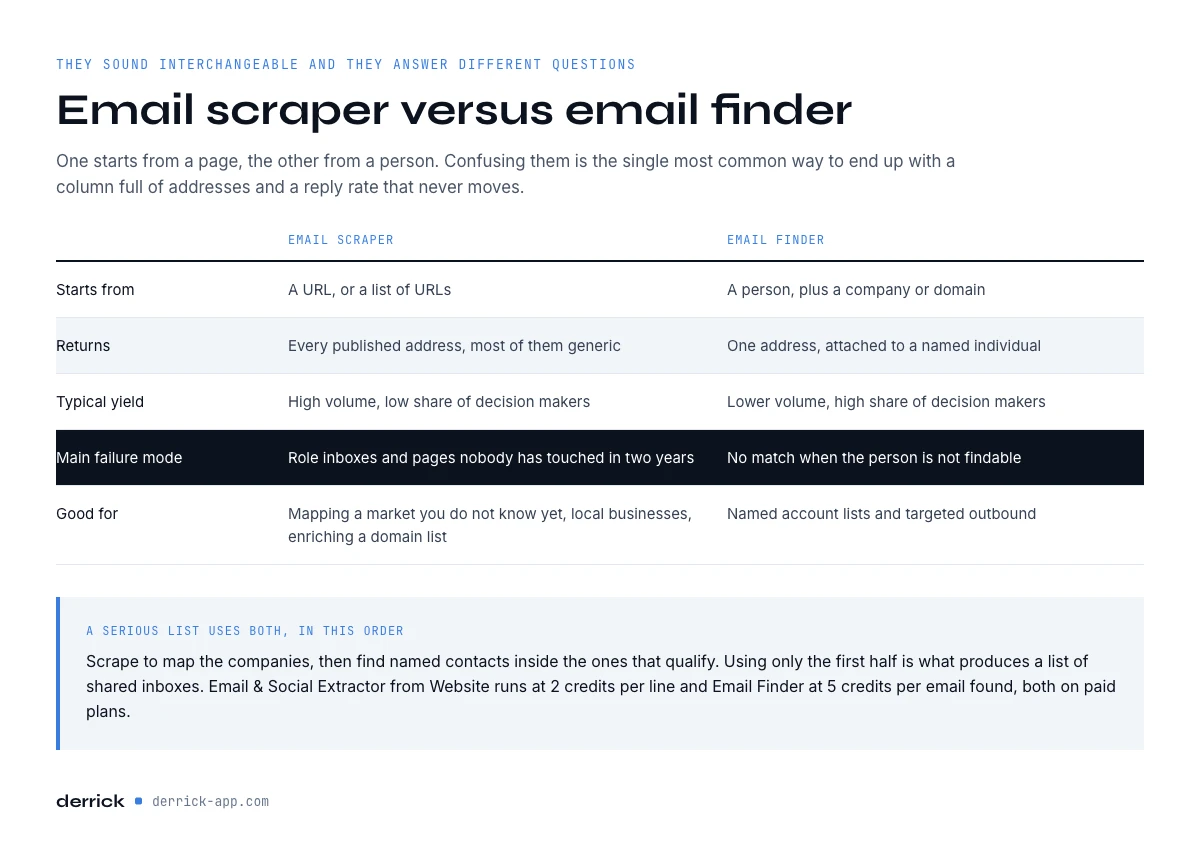
Email scraper versus email finder
An email finder starts from a person. You give it a name and a company or domain, and it returns the professional address for that individual. It is the right tool when you already know who you want to talk to.
A scraper starts from a page. You give it a URL and it returns whatever is published there. It is the right tool when you want everything a site exposes, including phone numbers and social profiles, and you do not have named targets yet.
| Email scraper | Email finder | |
|---|---|---|
| Starts from | A URL or a list of URLs | A person plus a company or domain |
| Returns | Every published address, often generic | One address, attached to a named individual |
| Typical yield | High volume, low share of decision makers | Lower volume, high share of decision makers |
| Main failure mode | Role inboxes and stale pages | No match when the person is not findable |
| Good for | Mapping a market, local businesses, enrichment of a domain list | Named account lists and targeted outbound |
In practice a serious list uses both, in sequence: scrape to map the companies, then find named contacts inside the ones that qualify. Using only the first half is what produces a list of role inboxes and a reply rate that never moves. If you want the finder half in detail, the lead email lookup guide covers it.
Types of email scraping tools, and what each one returns
Email scraping tools come in four shapes. They all match the same pattern, a string shaped like an address, so the difference is not in what they recognise. It is in where they read, how many pages they can cover, and what they do with the result.
| Type | How it works | What it returns | Main limit | Use it when |
|---|---|---|---|---|
| Browser extension | Reads the page open in your browser, sometimes the next pages of a search | Addresses visible on the pages you visit | One page at a time, as fast as you browse | You research a handful of sites by hand |
| Script or code | A crawler you run yourself, often adapted from a public code repository | Everything it can fetch, raw, in a file | You maintain it: blocked requests, JavaScript pages, duplicates and parsing are on you | You have a developer and an unusual source |
| Online email extractor | You paste text, a file or a few URLs into a web page | A deduplicated list, sometimes with a type label | Short lists, no mailbox verification, a cap on URLs per run | You need a one-off list from text you already have |
| App that scrapes and verifies | Takes a column of domains, reads each site, then checks the addresses | Addresses and social profiles per company, with a verification status | Paid per line and per check | You build a prospect list on dozens to thousands of companies |
The first three stop at extraction. That is fine when the list is short and you clean it by hand. Past a few dozen domains, the work that costs time is not finding the strings, it is everything after: deduplication, the role split, verification and the catch-all flag. That is why the fourth category exists, and why this guide spends more time on cleanup than on extraction.
Two quick tests before you pick one of these email scraping tools. Run it on five sites you know, where you can check by hand what it should find: what it misses tells you more than what it finds. Then open the export: an email scraper that keeps the source URL of each address saves you an afternoon when you measure bounces per source later.
In the web app or Google Sheets
Collect what is published, and know that is what you got
Scraped lists bounce because everything found gets kept. Derrick returns the addresses actually published on the website, in a column of your list, which you can then pass through verification before anything is sent.
- Feature
- Email & Social Extractor from website
- Credit cost
- 2 credits per call
The first button opens the web app (nothing to install): 2 credits per call, available from the STANDARD plan. The second details the feature and its cost per plan.
The four sources it pulls from
Not all scraped addresses are worth the same. Sorting the output by where it came from is the fastest quality gain available.
Company websites. Contact, about, team and legal pages. Reliable in the sense that the domain is right, weak in the sense that the addresses are usually generic. This is the highest volume source and the lowest share of named people.
Directories and marketplaces. Local listings, association registers, review sites. The address is often a shared business inbox, and it can be years old because nobody maintains a listing they created once. Google Maps and other local business listings belong in this group: the listing usually links to the company's website, which is where the address actually lives. In the Derrick web app, the Google Maps Scraper imports local businesses at 1 credit per place, website included, so the extraction can run on the result.
Documents. Slide decks, price lists and PDFs indexed on a site. These frequently contain named addresses, and they are frequently obsolete because a PDF from three years ago still sits at the same URL.
Aggregated dumps. Bulk files of addresses collected elsewhere and resold. Cheapest per row and the worst on every quality axis. If you are considering one, the honest arithmetic is in how to buy an email list and what it really costs.
A practical rule: keep the first three, tag them by source, and measure bounce per source after the first send. The differences are usually large enough to change how you spend the next month.
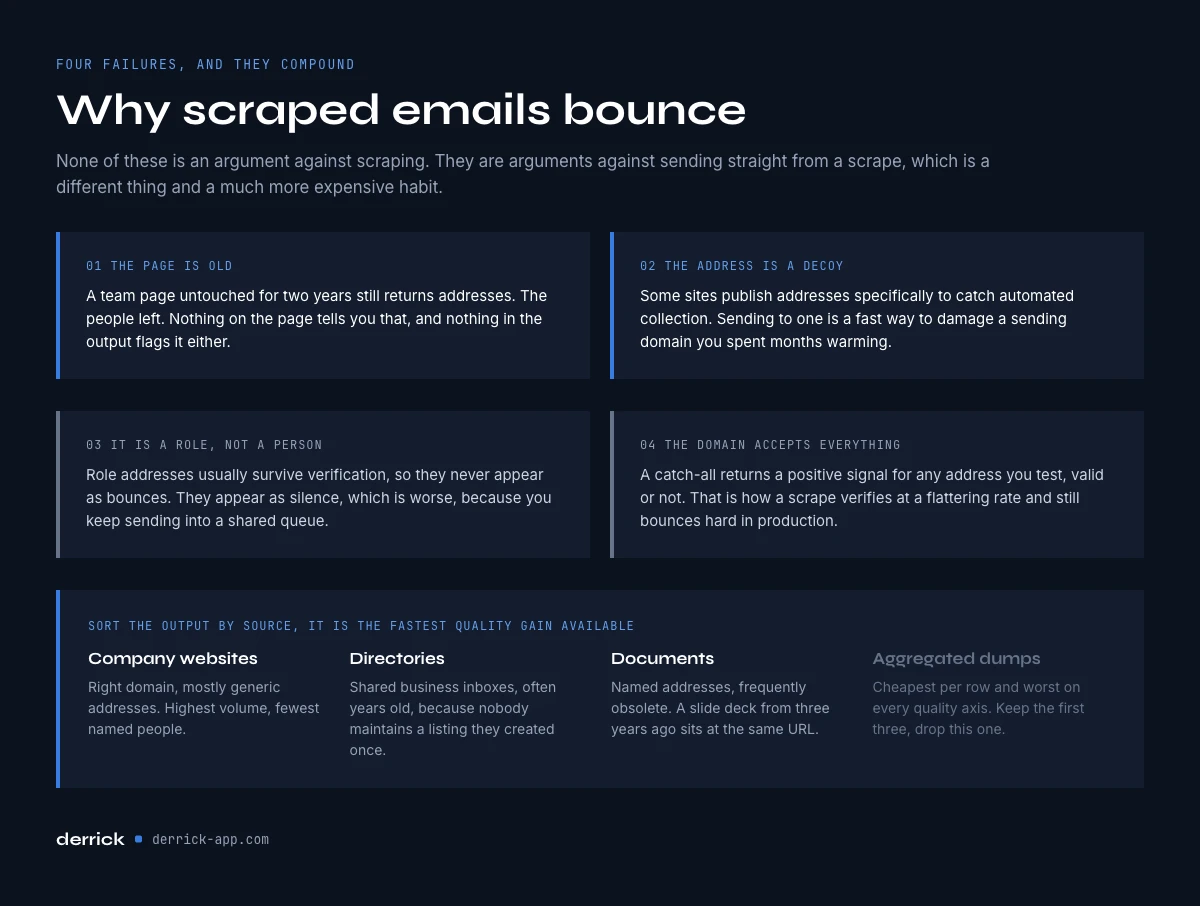
Why scraped emails bounce
Four things go wrong, and they compound.
The page is old. A team page that has not been touched in two years still returns addresses. The people left. Nothing on the page tells you that.
The address is a trap or a decoy. Some sites publish addresses specifically to catch automated collection. Sending to one is a fast way to damage a sending domain.
The mailbox is a role, not a person. Role addresses often survive verification, so they do not show up as bounces at all. They show up as silence, which is worse, because you keep sending.
The domain accepts everything. A catch-all domain returns a positive signal for any address you test, valid or not. That is why a scrape can verify at a flattering rate and still bounce hard in production. The mechanics are in the catch-all guide, and the practical handling in the bounce checker guide.
None of these are arguments against email scraping. They are arguments against sending straight from a scrape.
The app runs the search row by row on your list: 2 credits per call.
Limits: volume, JavaScript pages and emails behind a login
An email scraper misses addresses that are plainly visible on a page more often than people expect. Five causes cover almost every case.
- The address is an image. Some sites publish their contact address as a picture so that it cannot be collected. No text, nothing to match.
- The page is built by JavaScript. The address appears in your browser once scripts have run, but the raw HTML the scraper downloads holds only fragments. Tools that render the page catch more, and run slower.
- The address sits behind a form or a login. A contact form exposes no address at all, and member directories show addresses only to signed-in users. That part of the web is not something to automate.
- The address is disguised. name [at] company [dot] com, HTML entities, or an address split across two tags. A good extraction tool decodes the common forms; a sentence written for humans stays unreadable to a pattern.
- The crawl never reached the page. Most scrapers stop at a set depth or number of pages per site. A team page four clicks deep, or a PDF linked from an old news post, sits outside the crawl.
Volume brings its own limits. Online email scraping tools usually cap the number of URLs per run, extensions go as fast as you browse, and websites slow down or block a client that requests too many pages too quickly. Once the list runs to hundreds of domains, the question is less "which email scraper" than "who runs the crawl, and does each address keep its source".
The practical consequence: an empty result on a site does not mean the company has no published address. Check two or three misses by hand before you conclude anything about a segment.
Running an email scraper in the web app or a spreadsheet
The version of this that survives contact with a real list keeps every step in one place, so you can see the drop at each stage rather than discovering it in your campaign stats.
Start in the Derrick web app: import your domains as a list, or keep them in a Google Sheet and run the same step from the Derrick sidebar if that is where your team works. Email & Social Extractor from Website pulls the published addresses and social profiles for each row at 2 credits per line, straight into your list. You now have raw output with the source attached.
Next, separate role inboxes from named addresses. Anything before the @ that reads contact, info, hello, sales, support, admin, or a department name goes in a different bucket. Do not delete it, because a role inbox is sometimes the only route into a very small company, but do not count it as a contact either.
Then verify what is left. Email Verification runs at 1 credit per email and marks the catch-all domains separately, which is the flag that matters most here. It is worth deciding early whether you verify at import or at send, because the two produce different waste.
Finally, fill the gaps. For the companies that qualified but exposed nothing useful, switch tools: identify the person you want and use Email Finder at 5 credits per email, billed per result found. That last step is what turns a market map into a target list.
Run the scrape, the verification and the finder in one place with Derrick, in the web app or in Google Sheets. The free plan gives you 100 credits a month to discover the app; the extractor, the verification and the finder are paid features, available from the Standard plan at €20 a month, which is enough to run the whole sequence on a first batch before you commit a bigger budget. Derrick also runs through an MCP server for AI clients and through a REST API, so the same steps fit into an automated workflow at any volume.
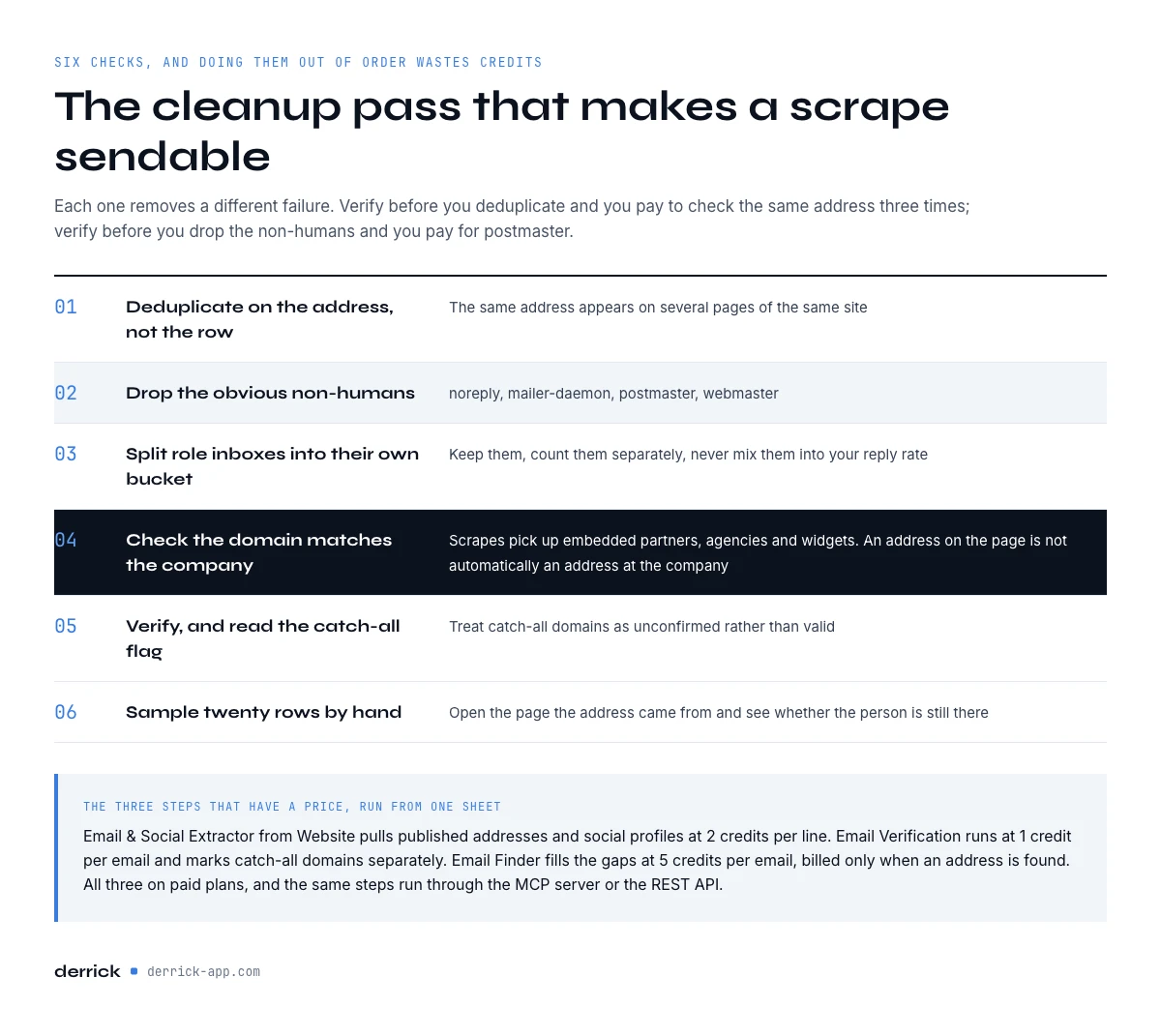
The cleanup pass that makes a scrape sendable
Six checks, in this order. Each one removes a different failure, and doing them out of order wastes credits.
- Deduplicate on the address, not the row. The same address appears on several pages of the same site. In Google Sheets, Find Duplicates in the Derrick sidebar does it for free.
- Drop obvious non-humans. noreply, no-reply, mailer-daemon, postmaster, webmaster.
- Split role inboxes into their own bucket. Keep them, count them separately, never mix them into your reply rate.
- Check the domain matches the company. Scrapes pick up addresses from embedded partners, agencies and widgets. An address on the page is not automatically an address at the company.
- Verify, and read the catch-all flag. Treat catch-all domains as unconfirmed rather than valid. For a single doubtful address, the free email address checker catches typos, disposable domains and role addresses before you pay for a mailbox check.
- Sample twenty rows by hand. Open the profile, confirm the person is still there. Twenty rows is enough to tell a fresh list from a stale one.
What survives all six is a smaller number than the scrape suggested, and it is the only number worth planning a campaign around. If you want the reference points for what happens after the send, measure reply and bounce per source over the first two sends.
When an email scraper is the wrong tool
Three situations where email scraping will cost you more than it returns.
You already know the accounts. If you have a list of two hundred target companies and named roles, a scraper adds noise. Go straight to a finder against named people; our guide to finding business email addresses starts there.
Your buyer is senior. Executives are almost never the published address on a contact page. Scraping an enterprise site returns the press inbox and the careers inbox. The executive email guide covers what does work.
The segment is dense and local. For local businesses the useful record is often the phone number and the opening hours, not an address that goes to a shared mailbox. Scraping the site is the wrong first move when a business listing already holds better structured data.
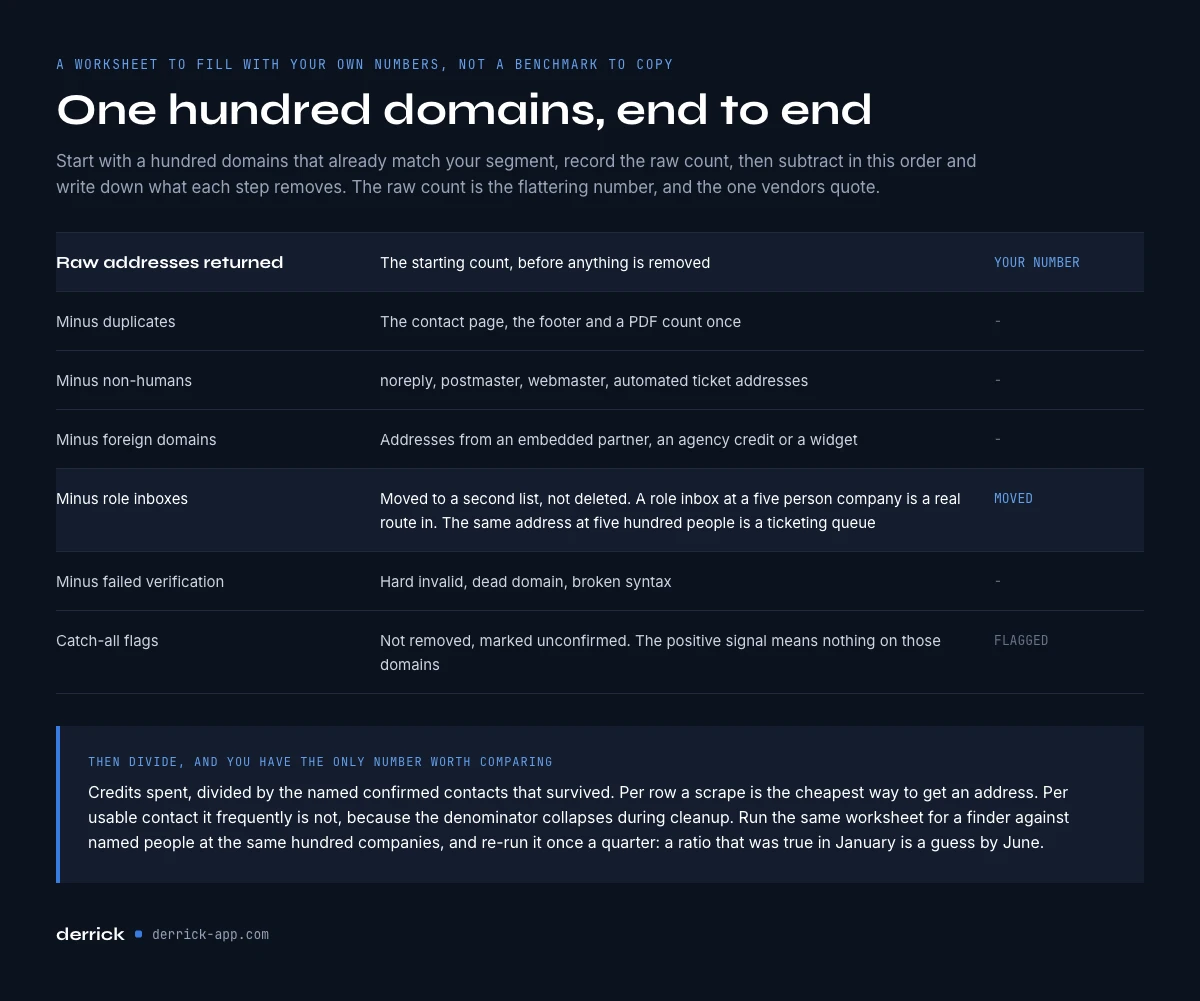
A worked example: one hundred domains, end to end
The abstract version of this is easy to nod at and hard to act on. Here is the shape of the funnel, written as a worksheet you fill with your own measurements rather than a benchmark to copy.
Start with one hundred company domains that already match your segment. Run the extraction and record the raw count of addresses returned. That first number is always the flattering one, and it is the one vendors quote.
Now subtract, in this order, and write down what each step removes:
- Duplicates. The same address published on the contact page, the footer and a PDF counts once.
- Non-humans. noreply, postmaster, webmaster, automated ticket addresses.
- Foreign domains. Addresses that came from an embedded partner, an agency credit or a widget, and do not belong to the company you were scraping.
- Role inboxes. Kept, but moved to a second list with its own expectations. A role inbox at a five person company is a real route in. The same address at a five hundred person company is a ticketing queue.
- Failed verification. Hard invalid, dead domain, syntax broken.
- Catch-all flags. Not removed, but marked unconfirmed, because the positive signal means nothing on those domains.
What remains is your named, confirmed contacts from one hundred domains. Divide the credits you spent by that count and you have a real cost per usable contact, on your segment, not on a generic case study.
Then run the second half. For the companies that qualified but yielded nothing named, identify the role you want and search for that person directly. Record the same two numbers: contacts obtained and credits spent. You now have the only comparison that matters, measured on your own market, and it will tell you whether your next thousand rows should start from pages or from people.
Keep the worksheet. Re-run it once a quarter on a fresh sample. The ratios move as the segment moves, and a number that was true in January is a guess by June.
Cost per usable contact
Per row, a scrape is the cheapest way to get an address. Per usable contact it is frequently not, because the denominator collapses during cleanup.
Work it out on your own numbers rather than on a vendor's. Take a hundred domains. Note how many rows the scrape returned, how many survived the role split, how many verified without a catch-all flag, and how many matched your ideal customer profile. Divide the total credits spent by that final count. Then do the same for a finder run against named people at the same hundred companies.
The answer is not always the same, which is the point. Scraping wins on breadth when you do not yet know the market. Finding wins on depth when you do. Running both in the same sheet, with the cost visible at each step, is how you stop guessing which one you are actually paying for.
If you want this as a repeatable job rather than a manual one, the same sequence runs from your own stack through the REST API.
Frequently asked questions
What is an email scraper?
What is the difference between an email scraper and an email finder?
Why do scraped emails bounce?
How do I clean a scraped email list?
Can I scrape emails directly into Google Sheets?
Is an email scraper cheaper than an email finder?
When should I not use an email scraper?
Is there a free email scraper?
Keep reading
Continue exploring this cluster


Lead Email Finder: The Complete Guide to Finding Your Prospects' Emails
Read →

How to Find a Company Website: Complete 2026 Guide
Read →

Find Company Name & Website from Email: 4 Methods (2026, Tested)
Read →

Valid Email Finder: How to Find and Verify Valid Professional Emails
Read →