Bulk email finder: what decides your match rate
A bulk email finder is only as good as the file you feed it. The four steps, the input shapes that fail, and a free list of companies with domains.


What a bulk email finder actually does, step by step
A bulk email finder takes a list of people and returns their professional email addresses, in one pass instead of one lookup at a time. Every tool in the category runs the same four steps, and knowing which one is failing is the difference between changing vendors and fixing your file.
- It resolves the company to a domain. Given a company name, it has to decide which domain that name belongs to. This step is invisible and it is where most silent errors are born.
- It works out the pattern. Most companies use one address format across the organization, and the tool infers it from addresses it has already seen on that domain.
- It builds the candidate and tests it. First name, last name and pattern produce a candidate address, which is then checked against the receiving mail server.
- It returns a verdict per row. Found and verified, found but unverifiable, or nothing. That third bucket is the one nobody plans for.
Almost every comparison in this category ranks vendors on step four. This page is about steps one and two, because that is where your match rate is decided, and because it is the only part you control. Lower down this page you can download a real Derrick export: 70 US B2B software companies with company name, domain, website, LinkedIn page, industry, city, state, headcount range and founding year, and no email addresses or phone numbers in it. It is a real export rather than a cleaned-up illustration, rough edges included, which is the point: this is what the step actually returns. For the single-prospect version of this job, our guide on the lead email finder covers looking someone up one at a time; this page is about the batch. Both sit in the wider email finder cluster.
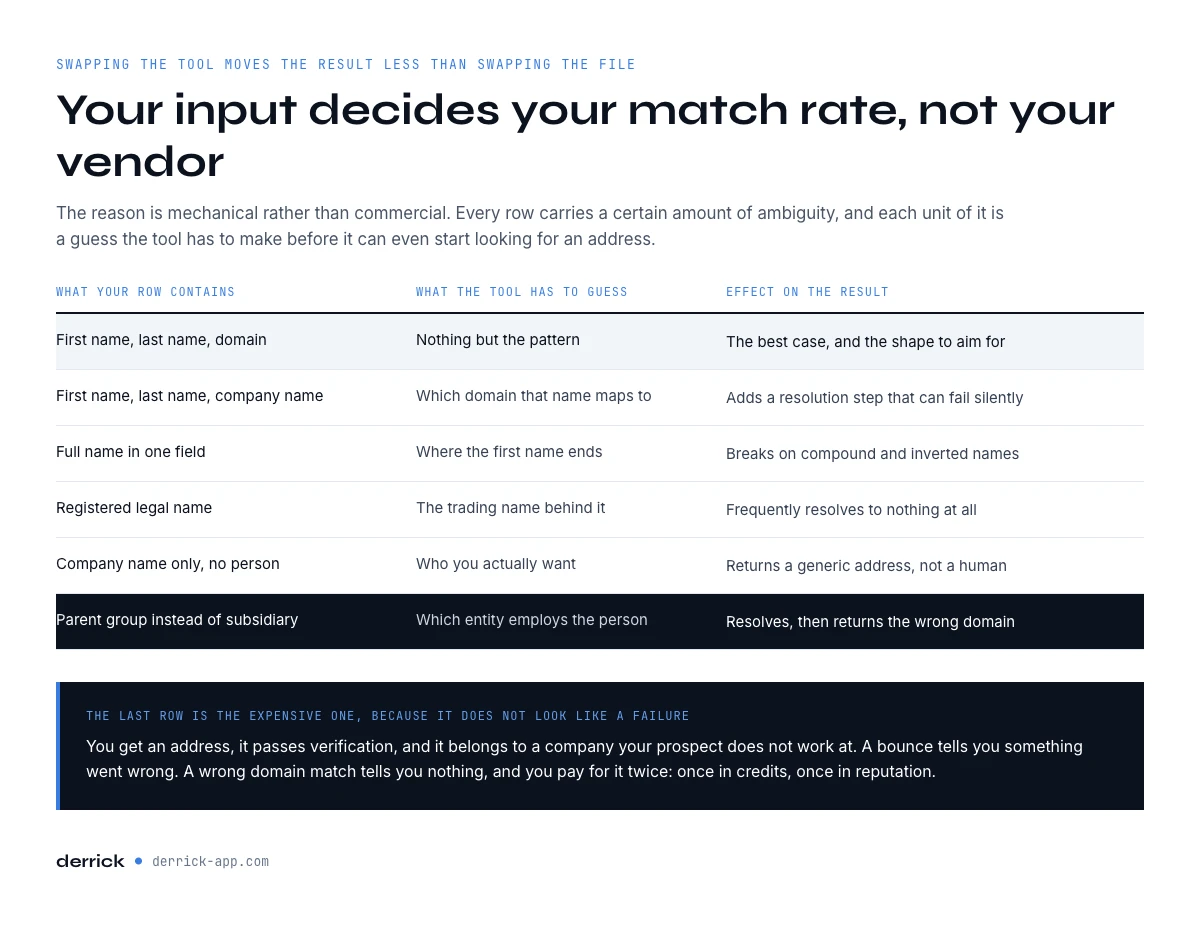
Your input decides your match rate, not your vendor
Run your own comparison and you will see the pattern: swapping the tool moves the result less than swapping the shape of the file. The reason is mechanical rather than commercial. Every row you hand over carries a certain amount of ambiguity, and each unit of ambiguity is a guess the tool has to make before it can even start looking for an address.
| What your row contains | What the tool has to guess | Effect on the result |
|---|---|---|
| First name, last name, domain | Nothing but the pattern | The best case, and the shape to aim for |
| First name, last name, company name | Which domain that name maps to | Adds a resolution step that can fail silently |
| Full name in one field | Where the first name ends | Breaks on compound and inverted names |
| Registered legal name | The trading name behind it | Frequently resolves to nothing at all |
| Company name only, no person | Who you actually want | Returns a generic address, not a human |
| Parent group instead of subsidiary | Which entity employs the person | Resolves, then returns the wrong domain |
The last row is the expensive one, because it does not look like a failure. You get an address, it passes verification, and it belongs to a company your prospect does not work at. A bounce tells you something went wrong. A wrong-domain match tells you nothing, and you pay for it twice: once in credits, once in reputation.
Resolve the domain before you run anything
If your list holds company names rather than domains, treat resolution as a separate job with its own quality check, not as something bundled invisibly into the email step. Run it, then look at what came back before you spend anything on addresses.
Three checks catch most of the damage, and they take minutes on a sample.
- Sort by domain and look for repeats. Two unrelated companies resolving to the same domain means the matcher fell back on a similar name. It happens most with short names and with anything containing a common word.
- Compare the domain to the company name by eye on 30 rows. You will spot the group-versus-subsidiary cases immediately, and they are usually clustered in one segment of your list rather than spread evenly.
- Check the country. A French subsidiary of a US group often has its own domain and its own address pattern. Resolving to the parent gets you a valid address at the wrong office.
The downloadable list on this page is the output of exactly that step: each company sits next to its resolved domain, so the pairs that look obviously right and the ones that would need a second look are visible at a glance. Our guide on finding a company from an email covers the same problem in the opposite direction, and what an email scraper returns covers what happens when the list is harvested rather than built.
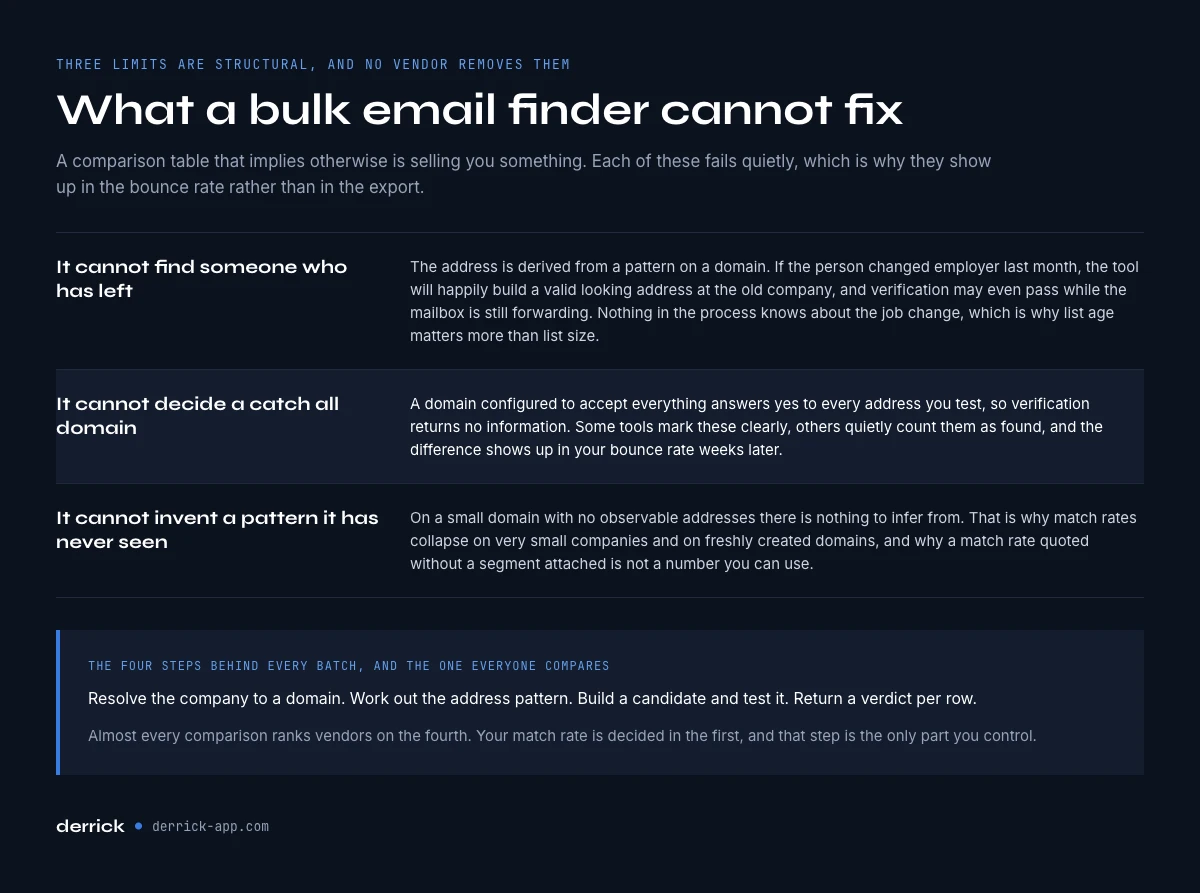
What a bulk email finder cannot fix
Three limits are structural. No vendor removes them, and a comparison table that implies otherwise is selling you something.
It cannot find someone who has left. The address is derived from a pattern on a domain. If the person changed employer last month, the tool will happily build a valid-looking address at the old company, and verification may even pass while the mailbox is still being forwarded. Nothing in the process knows about the job change. This is why list age matters more than list size.
It cannot decide a catch-all domain. A domain configured to accept everything answers yes to every address you test, so verification returns no information. Some tools mark these clearly, others quietly count them as found, and the difference shows up in your bounce rate weeks later rather than in the export.
It cannot invent a pattern it has never seen. On a small domain with no observable addresses, there is nothing to infer from. That is why match rates collapse on very small companies and on freshly created domains, and why a match rate quoted without a segment attached is not a number you can use.

Per row or per result: the billing difference that decides your real cost
Two tools can advertise the same unit price and cost you twice as much for the same file, because they charge at different moments.
| Billing model | What you pay for | What it means on a 1000 row file at 60% match |
|---|---|---|
| Per result found | Only the rows that returned an address | You pay for 600 |
| Per row processed | Every row, found or not | You pay for 1000 |
On that file, per-row billing costs 67 percent more than per-result for an identical outcome. The gap widens as your match rate falls, which is the opposite of what you want: the worse your list performs, the more the per-row model charges you for the failure. Derrick bills Email Finder at 5 credits per email found, and nothing at all on a row that comes back empty. Work out what your own file would cost.
Two things to check before you compare any two prices. Ask whether a verification pass is billed separately from the find, because on many stacks it is, and it doubles the line. And ask what happens to a catch-all: some tools charge it as a find, some as nothing, and since catch-all domains are common in mid-market companies, that single rule can move the bill on such a list without changing a single address you receive.
What to do with the rows that came back empty
Every batch returns a set of rows with no address, and most teams delete it. That is a mistake for two reasons. The set is not random, so it carries information about your file. And it is where your named accounts end up, because a large company with an unusual address pattern fails for the same reason a small one does.
Sort the empties before you decide anything. They split into four groups that call for four different moves.
- Bad input. The name was in one field, the company name was the legal entity, the domain resolved wrong. Fix the row and re-run it. This group is often the largest and it is free to diagnose.
- Genuinely small domain. Nothing to infer from, and re-running next month changes nothing. Route these to another channel rather than another attempt.
- Person is not there any more. The company resolves, the pattern is known, the individual is gone. Re-run the person, not the row: find where they work now, then find the address there.
- High-value account, no address. A named target you cannot reach by email is not a failed row, it is a phone call or a LinkedIn message. Our guide on finding executive email addresses covers the manual routes worth the time on this group.
The discipline that matters: never re-run an unchanged file expecting a different answer. If nothing about the input changed, nothing about the output will, and on per-row billing you pay full price to learn that twice.
Where the batch runs, and why that decides more than it looks
Almost every tool in this category assumes the same shape: you export a CSV, you upload it to a web app, you wait, you download a different CSV, you merge it back into wherever the list actually lives. That round trip is invisible in a feature comparison and it is where the operational cost hides.
Each pass through it creates a copy of your list. The copies drift, someone works from the wrong one, and the merge back is manual every time. Run the same list weekly and you are not doing one workflow, you are maintaining four files.
The alternative is to leave the list where it is and bring the lookup to it. Derrick runs the same enrichment on four surfaces, on the same credits: the web app, where you import the list with nothing to install; the Google Sheets sidebar, where the addresses fill in beside the rows they belong to; an AI assistant over MCP, where you ask in plain language and get the batch back in the conversation; and the REST API, when the list lives in a CRM or a pipeline rather than in a file. The demo block on this page runs the same lookup on three of those surfaces, so the difference you are choosing between is visible rather than described.

How to test a bulk email finder on 200 rows
A trial that produces a decision fits in one afternoon and one sample. The mistake is testing on your best segment, because an easy list makes every tool look competent.
- Take 200 rows from your hardest segment. Small companies, a market you sell into badly, or the accounts your last campaign bounced on.
- Freeze the file. Same 200 rows, same columns, same order, for every tool you trial. Changing the list and the tool at once teaches you nothing.
- Split it in two. One hundred rows with the domain resolved, one hundred with the company name only. The gap between the two is your input problem, and it is usually larger than the gap between vendors.
- Count three buckets, not one. Found and verified, found but catch-all, and empty. A tool reporting a high match rate by counting catch-alls as found is not lying, it is answering a different question.
- Send to 50 of them. The only number that settles the argument is the bounce rate on a real send. Everything upstream is a prediction.
Then divide what you paid by the addresses that survived the send. That figure, not the headline unit price, is what the file actually cost you. Our bounce checker guide covers the verification pass that goes between step four and step five.
Bulk email finder: key takeaways
- Four steps run behind every batch, and only the last one gets compared. The match rate is decided in the first.
- Name plus domain is the input shape to aim for. Name plus company name adds a resolution step that fails quietly.
- A wrong-domain match is more expensive than a bounce, because nothing tells you it happened.
- Per-row billing costs more than per-result, and the gap grows as your match rate falls.
- The empty rows are four different problems. Sort them before you re-run anything, and never re-run an unchanged file.
- Export, upload, download and merge is a hidden cost. Enriching where the list already lives removes it.
- Test on your hardest 200 rows, count catch-alls separately, and judge on the bounce rate of a real send.
Derrick finds and verifies addresses on the list where it already lives, with Email Finder at 5 credits per email found and Email Verification at 1 credit per email, both billed only when a result comes back. Both sit on the paid plans, which start at 20 euros a month for 10,000 credits, and unused credits roll over. The REST API and the MCP server come with the higher plans, and the pricing page carries the current thresholds. See what a batch of your size costs, or read the rest of the email finder cluster on finding and verifying addresses.
We also publish one email every 2 weeks with what we are measuring on prospecting data quality. Subscribe from the homepage.
Frequently asked questions
What is a bulk email finder?
What is a good match rate for a bulk email finder?
Why does my bulk email finder return so few results?
Is it cheaper to be billed per row or per result?
What should I do with rows that return no email?
Can a bulk email finder find someone who changed jobs?
Does Derrick run bulk email finding without an upload?
Keep reading
Continue exploring this cluster


Lead Email Finder: The Complete Guide to Finding Your Prospects' Emails
Read →

Find Company Name & Website from Email: 4 Methods (2026, Tested)
Read →

Catch-All Email: How to Detect and Manage Them in B2B Prospecting
Read →

Bounce Email Checker: Hit 99% Inbox Rate (2026 Methods)
Read →