Executive Email Addresses
Find executive email addresses without buying a list: the three corporate naming patterns, five sourcing methods, and the real cost per contact found.


Every prospecting team eventually hits the same wall. The account fits, the timing looks right, and the only person who can say yes is a name on a leadership page with no contact details anywhere. So somebody suggests buying a CEO list, and three weeks later the bounce rate has damaged a sending domain that took a year to warm up.
There is a duller path that works better than buying a list. An executive email address is the corporate mailbox of a C-level or senior leadership role, generated by the same IT naming convention as every other employee at that company, which means it can be derived rather than purchased. What changes at the top of the org chart is not the address, it is the filtering around the inbox, how often the role changes hands, and how badly a wrong guess costs you. This guide covers the three patterns, five ways to source the address, what to do with addresses that came from somewhere else, and what the whole thing costs per contact at scale.

Why executive email addresses are harder to find
The difficulty is structural, not technical. Four things stack up at the top of an org chart.
- The inbox is filtered by a person, not just a spam engine. Executive assistants triage on behalf of the seat, and the criteria are stricter than any filter you can reverse-engineer.
- The seat turns over faster than the directory. A CxO changing company invalidates the address instantly, and leadership pages are updated on a marketing cycle rather than a data cycle.
- Executives are over-represented in purchased lists. They are the tier every list vendor advertises, which means the same stale rows have been resold many times over.
- A bounce at this tier is expensive twice. It costs the opportunity and it costs sender reputation on the domain you use for everything else.
None of that changes the underlying address. It changes the order of operations: derive the pattern, confirm the person is still in the seat, then send. An address you derived by hand needs a deliverability check before it goes anywhere; one returned by Email Finder does not, because it comes back already verified.
The three patterns behind most executive email addresses
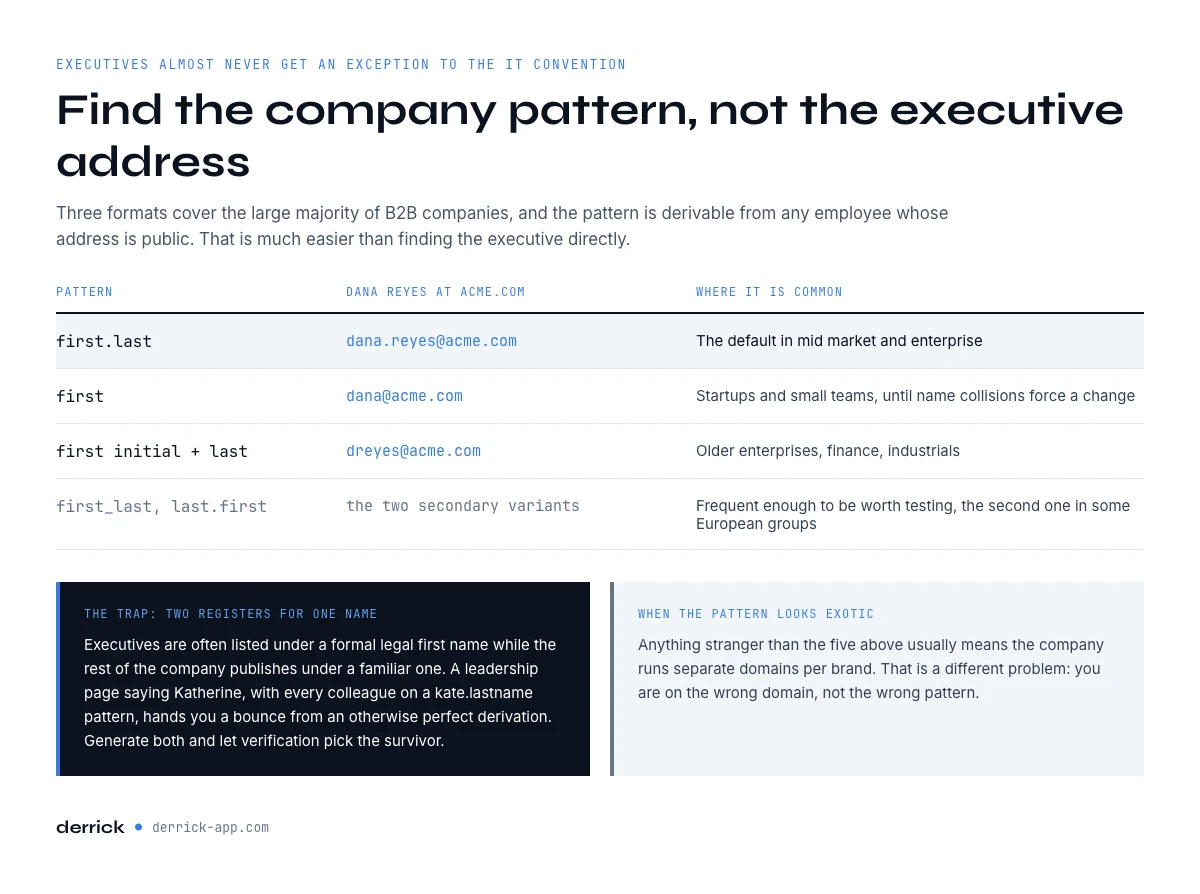
Corporate email is generated by an IT convention applied to everyone, and executives almost never get an exception. Three formats cover the large majority of B2B companies.
| Pattern | Example for Dana Reyes at acme.com | Where it is common |
|---|---|---|
| first.last | dana.reyes@acme.com | The default in mid-market and enterprise |
| first | dana@acme.com | Startups and small teams, until name collisions force a change |
| first initial + last | dreyes@acme.com | Older enterprises, finance, industrials |
Two secondary variants show up often enough to be worth testing: first_last with an underscore, and last.first in some European groups. Anything more exotic than that is usually a sign that the company runs separate domains per brand, which is a different problem: you are on the wrong domain, not the wrong pattern.
One nuance is worth building into the process: the executive is often listed under a formal legal first name while the rest of the company publishes under a familiar one. A leadership page saying Katherine while every colleague is on a kate.lastname pattern will hand you a bounce from an otherwise perfect derivation. When the two disagree, generate both candidates and let verification pick the survivor rather than guessing which register the IT team used.
The practical consequence is that you rarely need to find the executive's address directly. You need to find the company's pattern, which is much easier because you can derive it from any employee whose address is public.
Method 1: derive the pattern from a known colleague
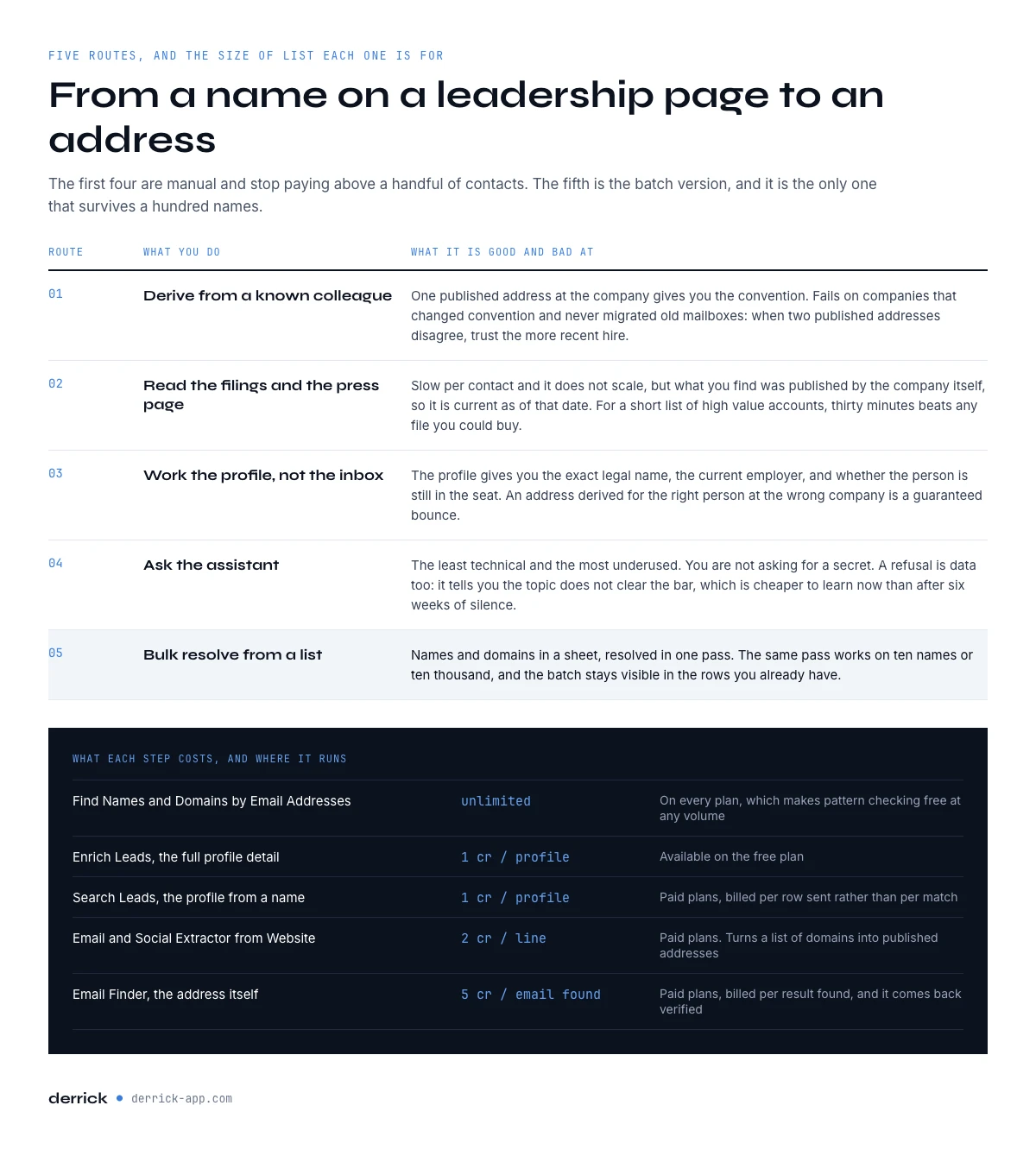
Find one published address at the company, from a press release, a support page, a conference listing or a public repository, and you have the convention. Apply it to the executive's first and last name and you have a candidate address. That only works when you already hold the executive's exact name and current title, which is what a leadership page gives you: the IBM executive roster lists the seats and who holds them today.
To go the other way, from an address you already hold to the name and domain behind it, Find Names & Domains by Email Addresses splits an address into its parts and is unlimited on every plan, which makes pattern-checking free at any volume. Once you know the shape, the candidate for the executive writes itself.
This method fails in exactly one situation worth knowing: companies that changed convention mid-life and never migrated old mailboxes. A ten-year employee is on the old pattern and the executive hired last year is on the new one. When two published addresses at the same company disagree, trust the more recent hire.
In the web app or Google Sheets
Executive addresses, without the pattern guessing
Guessing a pattern works until the company uses two. Derrick runs a multi-source lookup from the name and the domain in your list and writes back the address it could confirm, billing only when there is one.
- Feature
- Lead Email Finder
- Credit cost
- 5 credits per email found
The first button opens the web app (nothing to install): 5 credits per email found, available from the STANDARD plan. The second details the feature and its cost per plan.
Method 2: read the filings and the press page
Public companies publish investor relations contacts, and those pages routinely expose the corporate pattern even when they do not list the executive directly. Press pages, regulatory filings, prospectuses and conference speaker bios are all written by people who are not thinking about email harvesting.
This is slower per contact and it does not scale, but it has one property nothing else has: what you find is published by the company itself, so it is current as of the publication date. For a short list of high-value accounts, thirty minutes here beats any list you could buy.
If you would rather have a machine read the site for you, Email & Social Extractor from Website pulls emails and social profiles from any URL at 2 credits per line on paid plans, which turns a list of company domains into a list of published addresses without opening a browser.
Method 3: work the profile, not the inbox
The executive's public professional profile gives you the two inputs the pattern needs, the exact legal first and last name and the current employer, and it also tells you whether the person is still in the seat. That second point matters more than it sounds: an address derived for the right person at the wrong company is a guaranteed bounce.
Start from the profile rather than the name when you can. Search Leads finds the profile from a first and last name at 1 credit per profile, on paid plans. Unlike Email Finder, it is billed per row sent rather than per match, so budget it on the size of your input list. Enrich Leads then pulls the full profile detail at 1 credit per profile, and that one is available on the free plan. From there the derivation is mechanical.
Our step-by-step version of this route is in the guide to finding an email from a LinkedIn profile, which applies to any seniority and is the same workflow you would run for a whole team.
Method 4: ask the assistant
The least technical method is also the most underused. Call the main line and ask the assistant how to reach the executive about a specific subject. Say what it is about in one sentence, ask what the right channel is, and accept the answer you get.
Two things make this work. First, you are not asking for a secret; corporate addresses are derivable and the assistant knows it. Second, when the answer is that the right route goes through someone else, you have learned something a database would never have told you, which is that you were aiming at the wrong person.
Time the call to the switchboard rather than the seat. Early morning and the last hour of the day are when assistants are least buried, and a thirty-second question asked politely at 8:30 gets a straight answer far more often than the same question at 2pm between two meetings. If you get voicemail on the main line, that is itself a signal about how the company handles inbound, and it usually means the published channels are the only ones that will work.
Treat a refusal as data too. An assistant who declines to route you is telling you the topic does not clear the bar, which is a cheaper way to find that out than a sequence that gets ignored for six weeks.
Method 5: bulk-resolve from a list
When the target is a hundred executives rather than five, the manual routes stop paying. The batch version is: put the names and company domains in a spreadsheet, resolve the addresses in one pass, and load what comes back into the sequence. Building that spreadsheet starts with the names, and for large accounts they are already published: Oracle's senior leadership is a column of names and titles you can paste straight into the sheet.
Email Finder runs from the web app or the Google Sheets sidebar at 5 credits per email, billed per result found rather than per attempt, which means a hard-to-find executive does not cost you anything when nothing is returned. Addresses returned by Email Finder come back already verified, so there is no second checking step and no bounce to absorb on that part of the list. If you do not have the names yet, only the companies, Find a company's people lists a company's staff at 1 credit per person on paid plans and can be filtered by job function, so you can build the executive layer of an account list before you resolve anything.
Derrick runs in its web app, and also as a Google Sheets sidebar rather than as spreadsheet formulas, so the whole batch stays visible and reviewable in the rows you already have. The same pass works on ten names or ten thousand.
How to verify executive email addresses that came from somewhere else
Two kinds of address end up in an outbound list, and they do not need the same treatment. An address returned by Email Finder is already verified, so it goes straight into the sequence. An address you derived by hand from a naming pattern, inherited from an old CRM, or received in a purchased file is a candidate, and sending to a candidate is how domains get burned.
For that second group, Email Verification checks deliverability at 1 credit per email on paid plans. Run it on the whole imported batch rather than a sample, because the executive rows in a bought file are the oldest and most heavily resold part of it.
Two results need judgement rather than automation. A catch-all domain accepts everything at the server level, so a valid result proves nothing; our guide to catch-all addresses covers what to do with those. And a role address like exec@ or office@ may deliver perfectly while never reaching a human decision maker. For the general rules on what makes an address usable, see what counts as a valid email address.
What executive email addresses cost to find at scale
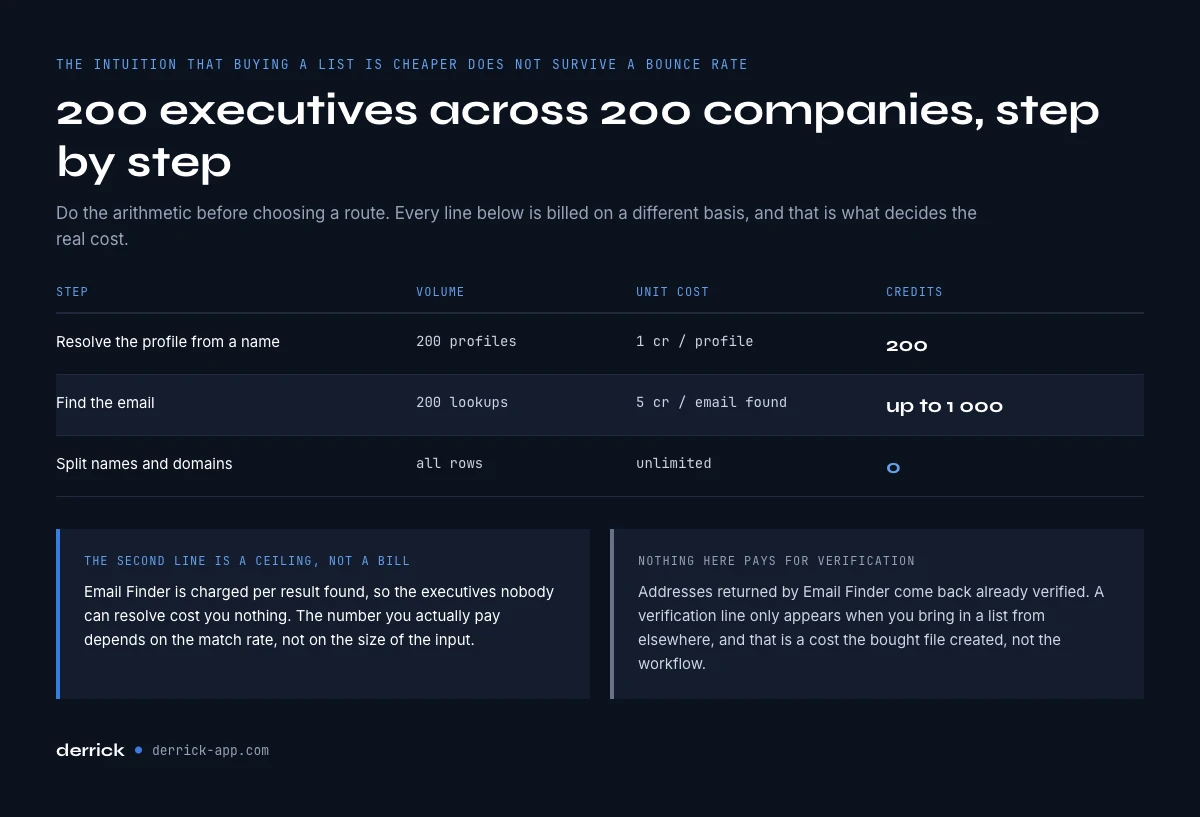
It is worth doing the arithmetic before choosing a route, because the intuition that buying a list is cheaper does not survive contact with a bounce rate. Take a target list of 200 executives across 200 companies.
| Step | Volume | Unit cost | Credits |
|---|---|---|---|
| Resolve the profile from a name | 200 profiles | 1 credit / profile | 200 |
| Find the email | 200 lookups | 5 credits / email found | Up to 1,000 |
| Split names and domains | All rows | Unlimited | 0 |
The Email Finder line is a ceiling, not a bill: it is charged per result found, so the executives nobody can resolve cost nothing. Nothing in that table pays for verification. The only place a verification line appears is when you bring in a list from elsewhere, and that is a cost the bought file created, not the workflow.
When the CEO is the wrong target
A large share of executive prospecting fails for a reason that has nothing to do with the address: the executive was never the buyer. In companies past a certain size, the CEO does not evaluate tools, they ratify a decision made two levels down. Reaching them perfectly still gets you forwarded, at best.
The useful test is whether your ask is a decision the seat actually makes. Founder-led companies are the clear case where the top of the org is also the buyer, and our guide to finding a founder's email covers that path specifically. Above roughly a few hundred employees, the person who owns the problem is usually a director or a VP, and the executive is the escalation you keep in reserve.
Treat the executive address as a second-order asset: worth having, worth verifying, rarely the first message you send.
Mistakes that get you blocked
- Buying a C-suite list and sending to it unverified. This is the single most common cause of a damaged sending domain in B2B outbound.
- Guessing several patterns and mailing all of them. Sending to three variants of the same person multiplies the bounce risk and looks exactly like an attack to a mail server.
- Skipping the current-employer check. A correct pattern applied to someone who left eight months ago is still a bounce.
- Treating a catch-all valid result as a confirmation. It confirms the server, not the mailbox.
- Opening with a pitch. The address was the easy part. The reason for the message is what determines whether the assistant forwards it.
Get the order right and the tier stops being special: derive the pattern, confirm the person is still in the seat, check any address you derived by hand, then earn the reply.
Frequently asked questions
How do you find executive email addresses?
Why are executive email addresses harder to find than other contacts?
Is it legal to email an executive you found this way?
Should you buy a CEO or executive email list?
Do you need to verify an email address found with Email Finder?
What does it cost to find 200 executive email addresses?
Is the CEO always the right person to email?
What if the executive's company uses several domains?
Keep reading
Continue exploring this cluster


Lead Email Finder: The Complete Guide to Finding Your Prospects' Emails
Read →

How to Find a Company Website: Complete 2026 Guide
Read →

Find Company Name & Website from Email: 4 Methods (2026, Tested)
Read →

Valid Email Finder: How to Find and Verify Valid Professional Emails
Read →