Local Business Email Addresses: The Three-Tier Method
Find local business email addresses by geography and category: the three exposure tiers, what to do when there is no website, and the cost per usable row.


Local business email addresses: the short answer
Local business email addresses are found by starting from a geography and a category, not from a company name. You pull the listing set for "dentists in Lyon" or "HVAC contractors in Austin", then you sort the businesses by what each one actually exposes: a website, a social page only, or nothing but a phone number. Each of those three tiers has a different method and a different hit rate, and treating them as one list is why most local prospecting stalls at forty percent coverage.
The part every guide skips is the second tier. A meaningful share of local businesses run no website at all, and no amount of domain-based email finding will reach them. They are not a data failure, they are a different job, and they usually convert better because nobody else bothered.
This guide walks the pipeline in order: define the set, split it by exposure tier, apply the right method to each branch, verify before sending, and price the whole thing per usable address. If your starting point is a company name rather than a map, our guide on how to find a company website covers the step before this one.
Why local business email addresses behave differently
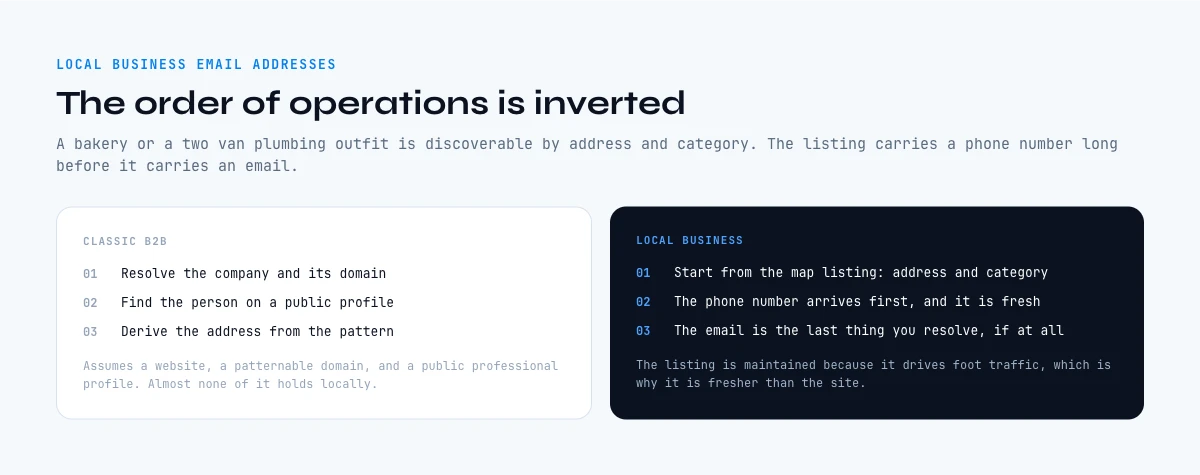
A standard B2B prospecting list assumes three things: the company has a website, the website has a domain you can pattern against, and the person you want has a public professional profile. All three hold for software companies and almost none of them hold reliably for a bakery, an independent physiotherapist or a two-van plumbing outfit.
What replaces them is a map listing. A local business is discoverable because it has an address and a category, and its listing carries a phone number long before it carries an email. That inverts the usual order of operations. In classic B2B you resolve the company, then the person, then the address. In local prospecting you resolve the place, then whether it has a web presence at all, and only then whether an inbox exists behind it.
| Exposure tier | What the listing gives you | Where the email lives | Realistic reach |
|---|---|---|---|
| Tier 1: full web presence | Name, address, phone, website | Contact page, footer, legal notice | High |
| Tier 2: social or listing only | Name, address, phone, social page | Social profile "about" block, booking tools | Medium |
| Tier 3: phone only | Name, address, phone | Usually nowhere public | Low, and often not worth chasing |
Read the last column as a budget instruction rather than a verdict. Tier 3 is where teams burn the most time for the least return, and the honest answer is often to work those accounts by phone instead of forcing an email into existence.
Define the local set before you collect anything
The single biggest quality lever on a local list is written down before any tool runs: the category, the geography and the size filter. "Restaurants in Paris" is not a set, it is a mood. "Independent restaurants in the 11th arrondissement, excluding chains, excluding anything with fewer than fifty reviews" is a set, because every row can be tested against it.
Three filters do almost all the work:
- Category, in the platform's own vocabulary. Map platforms classify businesses with their own labels. Searching your industry jargon returns a different set from searching the label the platform actually assigns, and the second one is complete where the first is scattered.
- Geography at the right grain. A city-wide pull mixes a dense centre with suburbs that behave nothing alike. Splitting by district or postcode gives you a set you can compare against itself, and it keeps each pull under the ceiling that map tools impose per search.
- A proxy for size. Local listings rarely publish headcount. Review count, opening hours, number of listed locations and whether a booking system is wired in all correlate with the size of the business better than anything else you can see for free.
Write the three filters in a cell at the top of the sheet. When the list underperforms two weeks later, that cell is the only thing that lets you tell a bad list from a bad message.
Pull the listings: where local business email addresses start
For local businesses, the map platform is the closest thing to a registry. Businesses maintain their listing because it drives foot traffic, which means the phone number and the opening hours are usually fresher than anything on their own website. That freshness is the reason to start there rather than from a directory scrape.
What a listing pull should return, per row, before you enrich anything: business name, full address, phone, website URL when there is one, category label, rating and review count. Those seven columns are enough to run the tier split in the next section without touching a second tool.
Two practical limits shape how you plan the pull. Map searches are capped per query, so a large area has to be split into several narrower searches rather than one wide one. And the same business can appear twice under slightly different names when it has moved or rebranded, so deduplication on address plus phone, not on name, has to happen before enrichment. Deduplicating after you have paid to enrich is the most common way to waste a third of a local budget.
Tier one: the business has a website
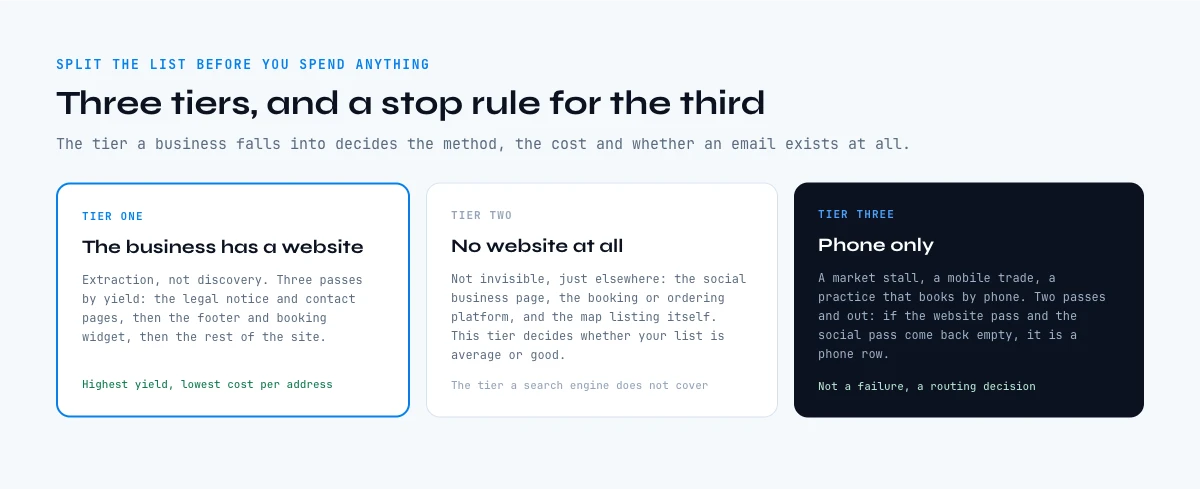
When a website exists, the address is almost always published somewhere on it, because local businesses want to be contacted. The work is extraction, not discovery, and it runs in three passes ordered by yield.
Pass one, the obvious pages. Contact, about, legal notice, imprint. In several European countries a legal notice page is mandatory and it carries a real, monitored address rather than a form. That single page is the highest-yield target on a local site and most scrapers walk past it because they only read the homepage.
Pass two, the footer and the booking widget. Footers carry a generic inbox on a large share of small business sites. Booking and quote widgets often expose a second address that routes to a human faster than the main one.
Pass three, obfuscation. Some sites publish the address as an image, or split it across elements to defeat scrapers. If a site resists two passes, mark the row and move on. One unreachable address is never worth ten minutes when the next row costs seconds.
At list scale this is a column, not a browsing session. Our guide on what an email scraper actually returns covers why raw extraction produces so many role inboxes and dead addresses, and what to do with the output before it reaches a sequence.
Tier two: the local business with no website
This is the tier that decides whether your local list is average or good, and it is the one the SERP does not cover. A business with no website is not invisible. It maintains a map listing, it often runs a social business page, and it frequently uses a third-party booking or ordering platform. Each of those surfaces can carry a contact address.
Three places to look, in order of yield:
- The social business page. Business pages carry an "about" or "contact" block, and on many of them the owner has filled in an email because the platform prompts for one at setup.
- The booking or ordering platform. Restaurants, salons and clinics that skip a website usually still have a profile on a booking service, and those profiles frequently expose an address for reservations.
- The professional register. In France, a business registered with an activity code appears in the public registry with its legal identity and directors. That does not hand you an email, but it hands you the owner's real name, which converts a "hello there" into a named message. Our guide on the NAF activity code and how to read it explains what the register does and does not contain.
The honest expectation here is a partial fill, not a full one. What makes tier two worth the effort is not the hit rate, it is the competition: almost nobody works these accounts by email, so the ones you do reach are not receiving four similar messages the same week.
The app runs the search row by row on your list. 100 free credits every month.
Tier three: phone only, and when to stop
Some businesses genuinely have no public email. A market stall, a mobile trades business, an older practice that takes bookings by phone. You can spend an afternoon on twenty of them and come away with three addresses, two of which are personal webmail nobody reads.
Set the stop rule before you start. A workable one: two passes and out. If the website pass and the social pass both come back empty, the row is a phone row, and it moves to a call list rather than a sequence. That is not a failure, it is routing. A listing pull already gave you the number, and for a local business the phone is frequently the channel with the highest answer rate anyway.
The failure mode to avoid is inventing an address. Guessing contact@ against a domain that has no mail server attached produces a hard bounce, and a run of hard bounces damages the sending domain you will need for the rest of the list. Guessing is not free, it is borrowed from your deliverability.
Generic inbox or named owner: what each is worth
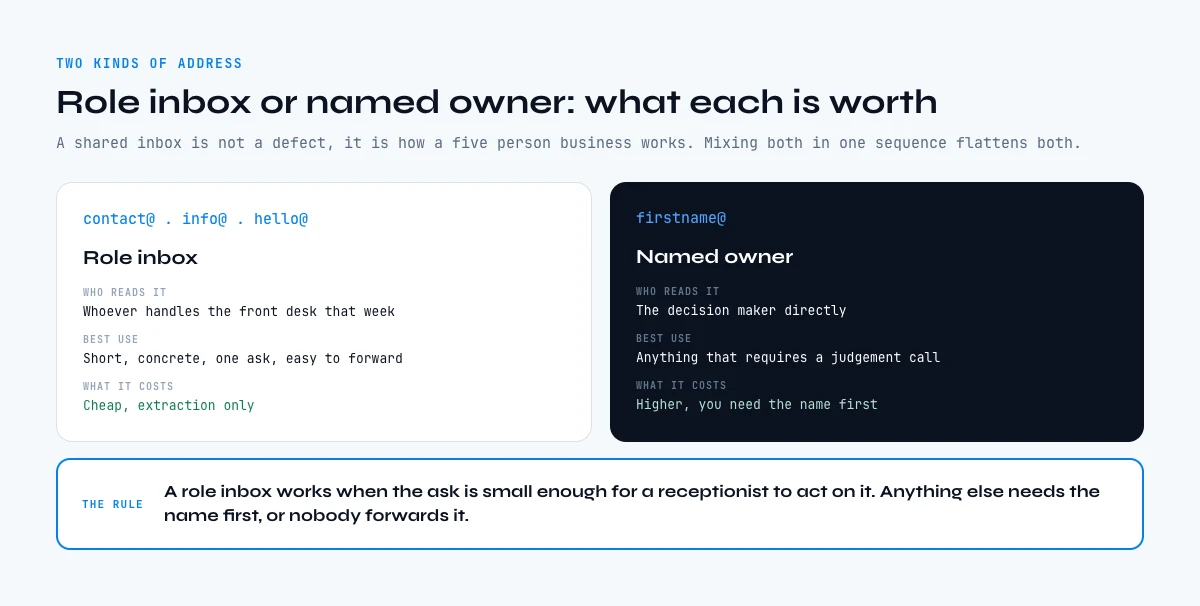
Most local business emails you collect will be a role inbox: contact, info, hello, bonjour. That is not a defect, it is how a five-person business works. But the two kinds behave differently enough that mixing them in one sequence flattens both.
| Address type | Who reads it | Best use | What it costs to get |
|---|---|---|---|
| Role inbox (contact@, info@) | Whoever handles the front desk that week | Short, concrete, one ask, easy to forward | Cheap, extraction only |
| Named owner (firstname@) | The decision maker directly | Anything that requires a judgement call | Higher, needs a name first |
The practical rule: a role inbox is fine when the ask is small enough that a receptionist can forward it in one click. It fails when the message needs the owner to weigh something, because nobody forwards a message they cannot evaluate. If your offer needs the owner, get the name first, then the address. Our guide on generic versus named company email addresses goes through both routes and the reply rate gap between them.
Finding the name is a separate step with its own cost. For a business that is registered, the register carries the director. For a business with a social presence, the page owner is often named. Once you have first name, last name and the domain, an email finder resolves and verifies the address in one pass instead of you guessing at patterns.
Verify local business email addresses before you send
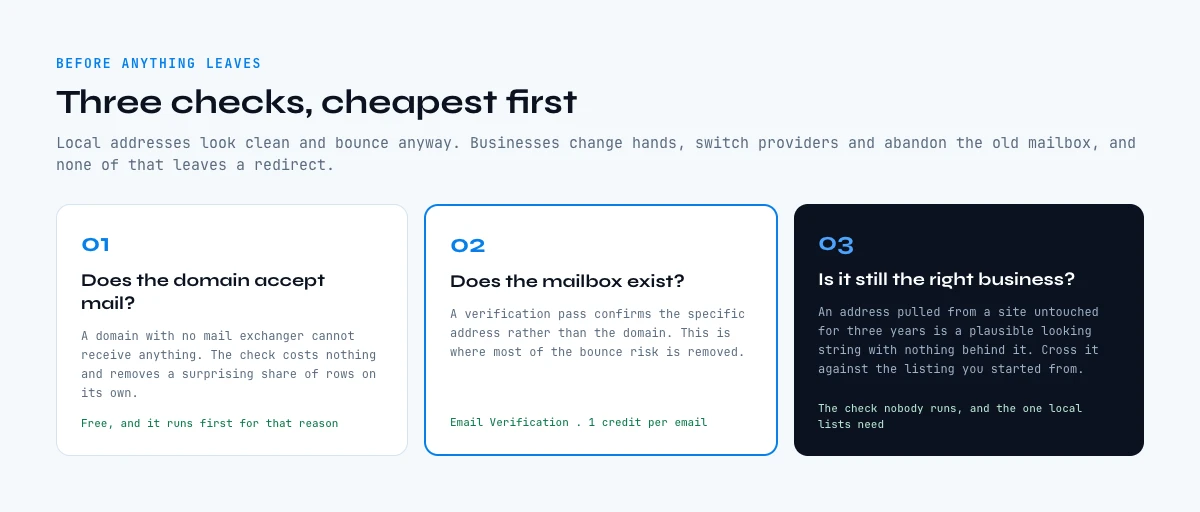
Local lists carry a specific kind of decay. Small businesses change hands, switch providers and abandon the free mailbox that came with an old hosting plan, and none of that produces a redirect. An address extracted from a site that has not been updated in three years is a plausible-looking string with nothing behind it.
Three checks, cheapest first:
- Does the domain accept mail at all? A domain with no mail exchanger cannot receive anything. This check costs nothing and removes a surprising share of tier-one rows on its own.
- Does the mailbox exist? A verification pass confirms the specific address rather than the domain. This is where most invented
contact@rows die, which is the point. - Is the domain catch-all? A catch-all accepts every address, so it cannot be verified the normal way. It is not automatically bad, it just needs to be flagged and sent to in smaller batches. Our guide on catch-all domains and how to handle them covers when to send anyway.
Run the three in that order and the bounce rate on a local list falls into the same range as a curated B2B one. Skip them and you will find out at scale, on the send, which is the expensive way to learn it. The mechanics of the whole pre-send pass are in our bounce checker guide.
The arithmetic of a 500-business local list
The number that matters is not the price of a lookup, it is the cost per address you can actually send to. Here is the shape of the calculation on a 500-row local pull, using Derrick's published per-unit costs so you can substitute your own tier split.
| Step | Rows treated | Unit cost | Credits |
|---|---|---|---|
| Pull the listing set | 500 places | 1 credit per place | 500 |
| Extract from websites (tier 1 only) | 300 sites | 2 credits per line | 600 |
| Resolve a named owner where needed | 80 people | 5 credits per email found | 400 |
| Verify everything before sending | 250 addresses | 1 credit per email | 250 |
Two things to read out of that table. First, the listing pull is the cheapest line and the one that determines everything downstream, which is the opposite of how most local prospecting gets budgeted. Second, the extraction line is charged per row attempted while the finder line is charged only when a result comes back, so the tier split changes your bill directly: the more tier-one rows you have, the more predictable the total.
The plans that these credits sit on: the free plan is 100 credits a month at zero euros, Standard is 20 euros a month, and the volume tiers go up from there to 0.0016 euros per credit at the top. A first real local list is a paid exercise because the map pull is a paid feature, but it is a twenty-euro exercise rather than a subscription to a data platform.
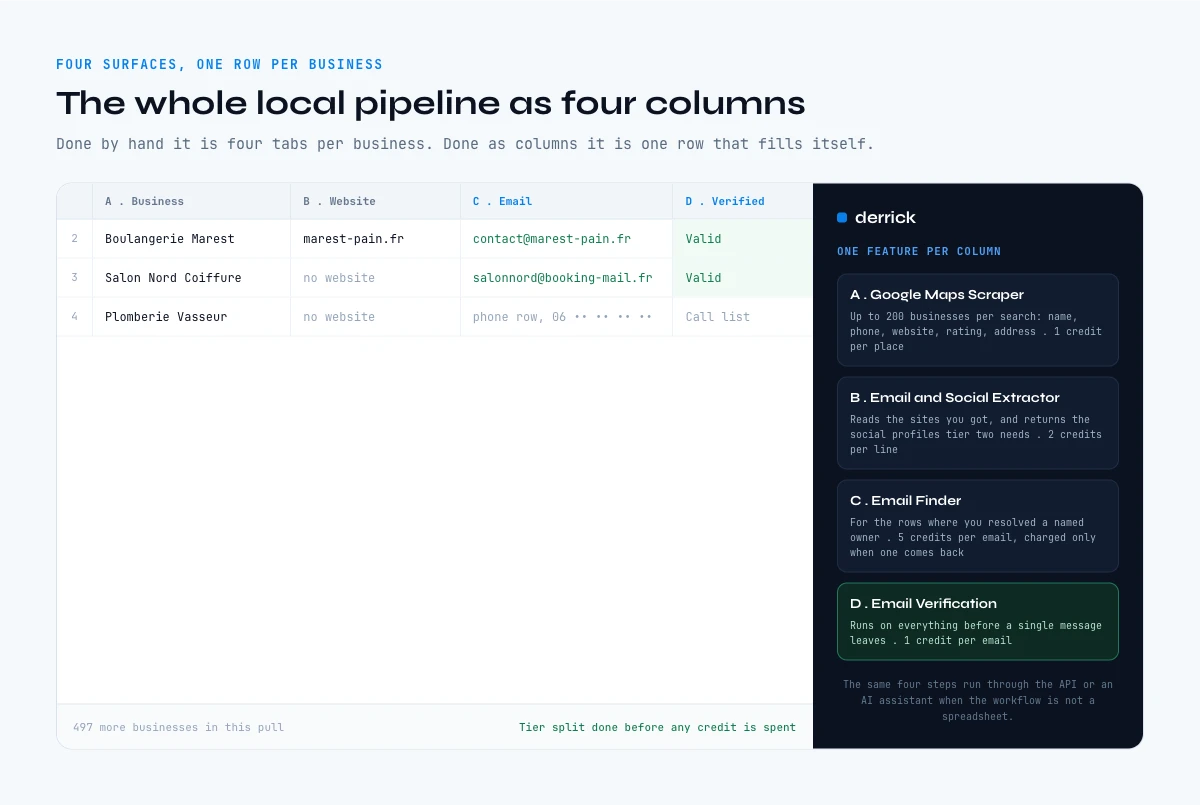
Running the whole pipeline in one sheet
The reason local prospecting feels heavy is that the pipeline crosses four surfaces: a map, a website, a register and a verification service. Doing it by hand means four tabs per business. Doing it as columns means one row per business and four columns that fill themselves.
In the Derrick web app or the Google Sheets sidebar, the sequence is literal. Column A comes from Google Maps Scraper, which takes what you are looking for and where, and returns up to 200 businesses per search at 1 credit per place with name, phone, website, rating, address and attributes. Column B runs Email & Social Extractor from Website on the websites you got, at 2 credits per line, which also gives you the social profiles you need for tier two. Column C uses Email Finder at 5 credits per email, charged only when an address comes back, for the rows where you resolved a named owner. Column D runs Email Verification at 1 credit per email before anything leaves.
The same four steps run outside the spreadsheet when the workflow is not a spreadsheet. Through the Derrick API and its 3000+ integrations with Zapier, Make and N8N, the pipeline writes straight into a CRM as the rows resolve. Through Derrick MCP, you ask for the same data from Claude, ChatGPT or any MCP-compatible assistant and get it back in the conversation, which suits a one-off "find me the twelve dental practices in this postcode and their contact addresses" better than a spreadsheet does. Pick the surface by the use case rather than by habit: a list to enrich belongs in the web app or in Sheets, a question in a chat belongs in MCP, a recurring workflow belongs in the API.
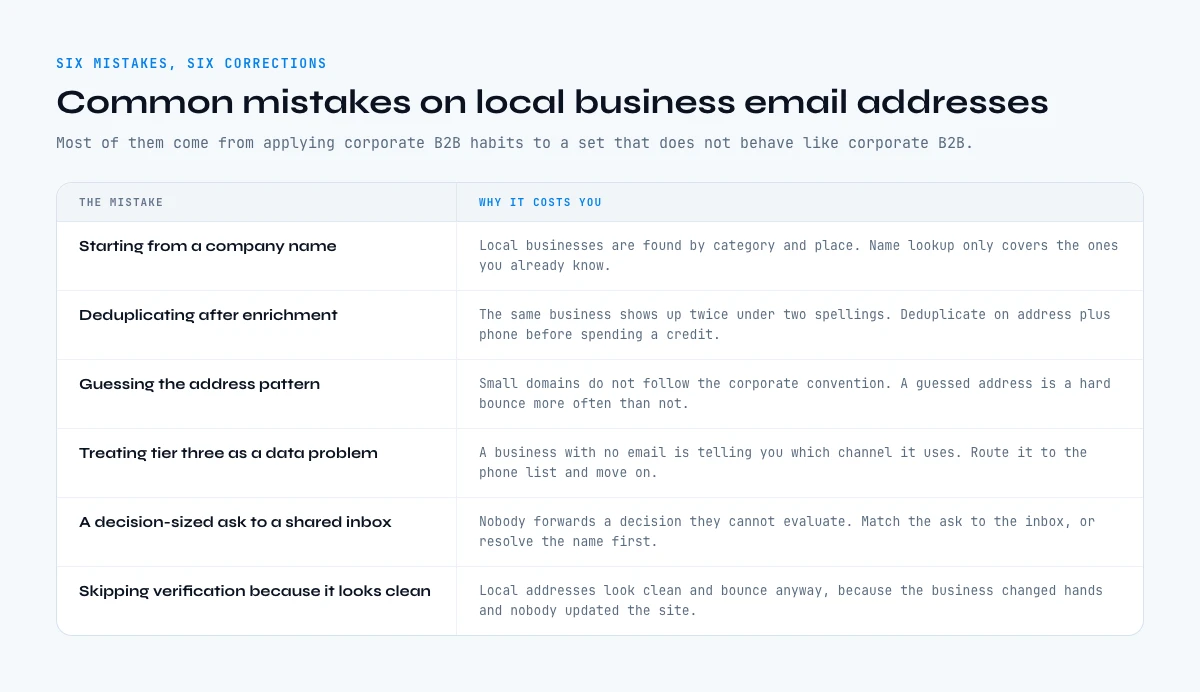
Common mistakes with local business email addresses
Starting from a company name. Local businesses are found by category and place. Name-based lookup works for the ones you already know, which is the smallest and least useful part of the set.
Deduplicating after enrichment. The same business appears twice under two spellings often enough to matter. Deduplicate on address plus phone before you spend a credit on any row.
Guessing the address pattern. Local domains do not follow the firstname.lastname convention that makes pattern-guessing viable in corporate B2B. A guessed address on a small domain is a hard bounce more often than not.
Treating tier three as a data problem. A business with no email is telling you which channel it uses. Route it to the phone list and move on.
Sending to role inboxes with a message that needs the owner. Nobody forwards a decision they cannot evaluate. Match the ask to the inbox, or get the name.
Skipping verification because the addresses look clean. Local addresses look clean and bounce anyway, because the business changed hands and nobody updated the footer. Our guide on what makes an email valid covers what each check actually proves.
Key takeaways
- Local business email addresses start from a geography and a category, never from a company name.
- Split the set into three exposure tiers before enriching: website, social only, phone only.
- Tier two, the businesses with no website, is where the competition disappears and most guides stop.
- Role inbox and named owner are different products: match the address type to the size of the ask.
- Verify domain, mailbox and catch-all status before the send, in that order.
- The listing pull is the cheapest line in the budget and the one that decides the quality of everything after it.
Frequently asked questions
How do you find local business email addresses?
What do you do when a local business has no website?
Is a contact@ or info@ address worth using?
Can you guess a local business email from its domain?
What does it cost to build a list of local business emails?
How many local businesses actually have a reachable email?
Should you buy a local business email list instead?
Keep reading
Continue exploring this cluster


Lead Email Finder: The Complete Guide to Finding Your Prospects' Emails
Read →

How to Find a Company Website: Complete 2026 Guide
Read →

Find Company Name & Website from Email: 4 Methods (2026, Tested)
Read →

Valid Email Finder: How to Find and Verify Valid Professional Emails
Read →