Email Finder API: find and verify professional emails at scale
Email finder API that returns verified professional emails over REST and MCP. Pay only for results found, run at scale, or enrich straight from Sheets.


Building email discovery into your own product, CRM sync, or outreach automation means you need contacts appended programmatically, not copied by hand from a web app. An email finder API does exactly that: you send a name and a company, and it returns a verified professional email your code can act on. This guide explains what an email finder API is, how Derrick exposes one over REST and over an MCP server for Claude, what it costs, and how to run the same lookup at scale without writing a line of code when you would rather not.
What is an email finder API?
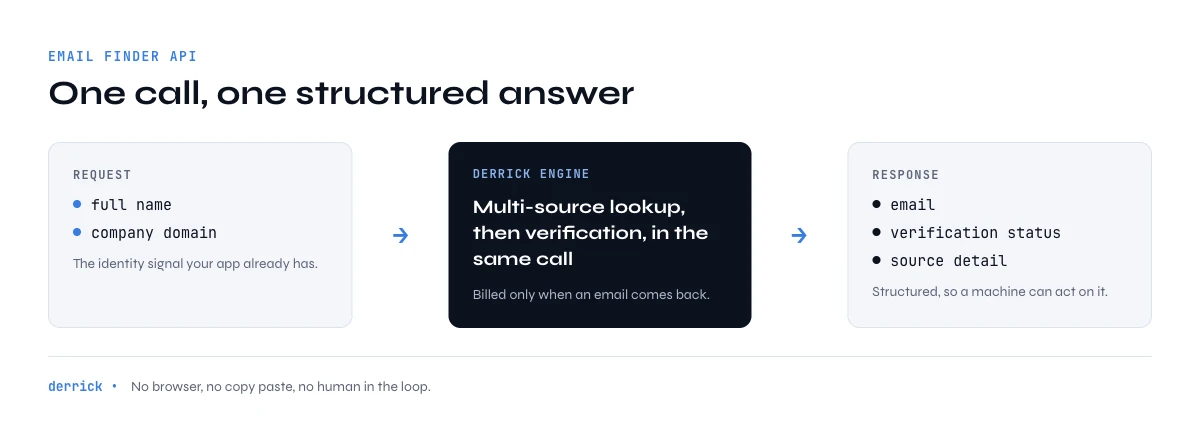
An email finder API is an HTTP endpoint that takes an identity signal, usually a full name plus a company domain, and returns the matching professional email address. Instead of opening a browser, searching a profile, and pasting the result into a sheet, your application makes a request and receives a structured response: the email, a status telling you whether it was verified, and the source detail your workflow needs. It turns email discovery from a manual task into a function you can call from a script, a backend job, or a no-code automation.
The reason teams reach for an API rather than a UI is repeatability. A one-off list can be built by hand, but a signup flow that enriches every new lead, a nightly job that fills gaps in the CRM, or a product feature that resolves a contact on demand all need the lookup to happen without a human in the loop. That is the gap an email finder API fills, and it is why the endpoint matters as much as the data behind it. If you only need a handful of contacts occasionally, the same engine is reachable straight from the web app or a spreadsheet, which we cover further down.
How the Derrick email finder API works
Derrick exposes its enrichment engine through a documented REST API, available from the Email Finder feature. You authenticate with your API key, send the person and company you are looking for, and get back a single verified email when one is found. The full request and response schema, including the exact endpoints and field names, lives in the interactive API reference, which is the source of truth you should build against.
Two things make the Derrick email finder API practical for production. First, finding and verifying happen in the same call: the address you get back has already passed a deliverability check, so you are not stitching a finder and a separate verifier together yourself. Second, the reverse direction is covered too. If you start from an address and need the person and company behind it, the Find Names and Domains by Email feature resolves that, and it is unlimited on paid plans. Between the two, most contact-resolution problems in an outbound or CRM workflow are a single request away.
Authenticate and make your first call
API access is included from the Plus plan upward, alongside the MCP server. Once you are on a plan that includes it, you generate an API key in your account and pass it on every request. The base URL is https://app1.derrick-app.com/api/v1/, and the reference documents the header your key goes in and the payload each endpoint expects.
A find request is conceptually simple: you post the contact you are looking for and read the verified email back off the response. The shape of a successful response looks like this:
{
  "email": "jane.doe@acme.com",
  "status": "verified",
  "first_name": "Jane",
  "last_name": "Doe",
  "domain": "acme.com"
}
Because billing is tied to results, a request that finds nothing does not spend a find credit, so you can throw a whole list at the endpoint and only pay for the rows that come back with an address. Build against the reference for the precise route and parameters rather than hardcoding assumptions, and you have a lookup you can wire into any language that can make an HTTP request.
A few habits keep an integration healthy in production. Read the status field on every response rather than assuming a returned string is safe to send to; a verified status is the signal you act on. Batch your lookups and handle the found and not-found cases separately, so unresolved rows route to a fallback instead of silently dropping. And keep your API key server-side, never in client code, since it authorizes spend against your account. None of this is Derrick-specific, it is simply what separates an integration that survives real production traffic from a quick demo that happens to work once.
Through the Derrick API
The finder as an endpoint
If the lookup has to happen inside your product or your workflow, a list worked by hand is the wrong surface. The Derrick API exposes the email finder as a call: send the person and the domain, receive the address when there is one.
- Feature
- Derrick API
- Credit cost
- Included
The first button opens the web app, where your account and key live. API and MCP access starts on the PLUS plan. The second details the surface.
Where an email finder API fits your stack
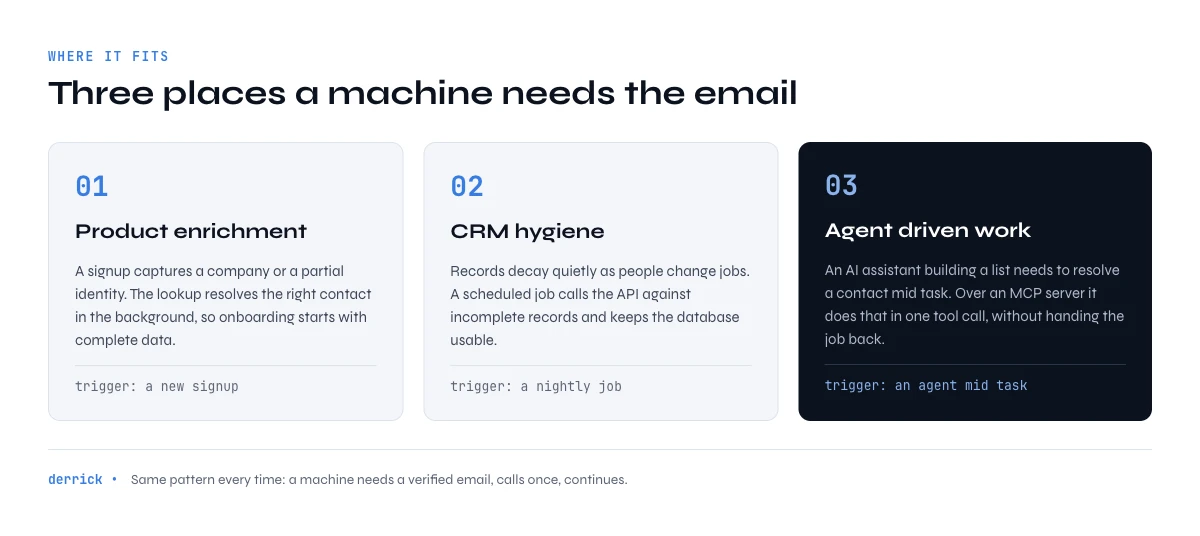
The value of a programmatic lookup shows up in specific places, and it helps to name them before you build. The first is product enrichment: if your app captures a company or a partial identity at signup, an email finder API can resolve the right contact in the background so onboarding starts with complete data instead of a form the user has to finish. The second is CRM hygiene, where records decay quietly. People change jobs, addresses go stale, and fields sit empty; a scheduled job that calls the API against incomplete records keeps the database usable without anyone maintaining it by hand.
The third, and the fastest growing, is agent-driven work. When an AI assistant is doing research or building a list as part of a larger task, it needs to resolve a contact mid-flow rather than hand the job back to a person. An email finder reachable over an MCP server lets the agent do that as one tool call, which is why the same engine is worth exposing through more than one surface. In each case the pattern is identical: a machine needs a verified email, calls once, and continues. The lookup is a small component, but getting it wrong, with unverified data or a rate-limited scraper, poisons everything built on top of it.
A worked example: from name to verified email
Picture a signup flow where a new user enters their work email but you also want the direct address of the decision-maker at their company. Your backend takes the company domain you already have and the name you captured, calls the email finder endpoint, and receives a verified address with a status field. If the status says verified, you write it to the record and move on. If nothing comes back, you fall back to a broader enrichment step or flag the row for review. No tab-switching, no copy-paste, no stale data sitting in a spreadsheet.
The same pattern powers a nightly enrichment job. You query your CRM for records missing an email, send each name and domain to the API, and update the ones that resolve. Since unfound lookups cost nothing, the job is cheap to run repeatedly, and the verification built into each response means you are not pouring unverified guesses into a system your reps trust. When you need to go the other way and identify who owns an inbound address, the reverse endpoint slots into the same job.
Pricing: pay only for emails you find
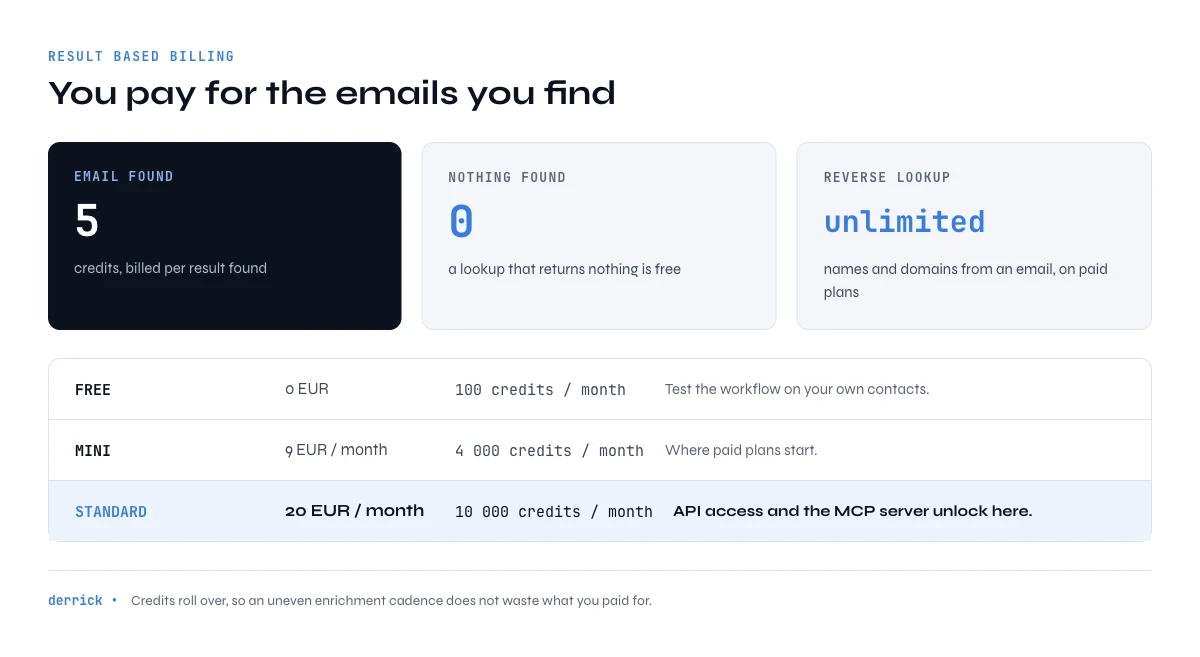
Derrick's Email Finder costs 5 credits per email, billed per result found, so a lookup that returns nothing is free. That result-based model is what makes API enrichment predictable: your spend tracks the value you get, not the number of attempts you make. The reverse lookup, Find Names and Domains by Email, is unlimited on paid plans, so resolving identities from addresses does not eat into your budget at all.
You can test the whole workflow before committing. The Free plan includes 100 credits per month at no cost, enough to validate that the API returns what you expect for your own contacts. Paid plans start at 20 EUR per month, and API access specifically is available from the Plus plan at 47.50 EUR per month, which also unlocks the MCP server. Credits roll over rather than expiring at the end of the month, so an uneven enrichment cadence does not waste what you paid for. For teams verifying at volume, our guide to real-time email verification shows how to keep bounce rates near zero as you scale.
Finding emails at scale without writing code
An API is the right tool when a machine drives the lookup, but plenty of the work does not need one. Derrick runs in its web app, and also as a Google Sheets sidebar, not as a wall of formulas, so building and enriching a list of thousands of contacts is a spreadsheet task rather than an engineering one. You paste your accounts, pull the right people, and append verified emails across the whole column without touching an endpoint. The lead email finding workflow walks through that end to end.
For AI-driven work, Derrick also ships an MCP server for Claude, available from the Plus plan. Connect it and Claude can call the find-email and verify-email tools directly inside a conversation or an agent, which means an assistant can resolve a contact as one step in a larger task without you dropping to code. Beyond that, because Derrick has a REST API, it connects to Zapier, Make, and n8n, so you can drop email finding into an automation alongside three thousand other apps. The same engine, in other words, meets you at whichever altitude your workflow lives: raw API, spreadsheet, AI agent, or no-code automation. Derrick scales the identical lookup from a single row to tens of thousands, so your first test and a full production pipeline run on the same foundation.
Verification is built into every lookup
The single most common way email enrichment goes wrong is treating a guessed address as a real one. Pattern-matching a name against a domain produces plausible strings, but sending to them spikes your bounce rate and quietly damages the sending reputation of every future campaign. Derrick's email finder verifies before it returns, so the status field on each response tells you whether the address actually accepts mail. You act on verified results and route the rest, rather than discovering the truth when a campaign bounces.
That verification is the same engine you can call on its own when you already have addresses to check. If a list came from a form, an import, or an older system, run it through validation first so you are not paying to send to dead inboxes. Our pages on checking whether an email is valid and on identifying the company behind an address cover the checks worth running before any send. Clean input is what makes every downstream number, from reply rate to meetings booked, trustworthy.
Email finder API vs scraping by hand
It is worth being clear about what an API buys you over the manual alternative, because the difference is not cosmetic.
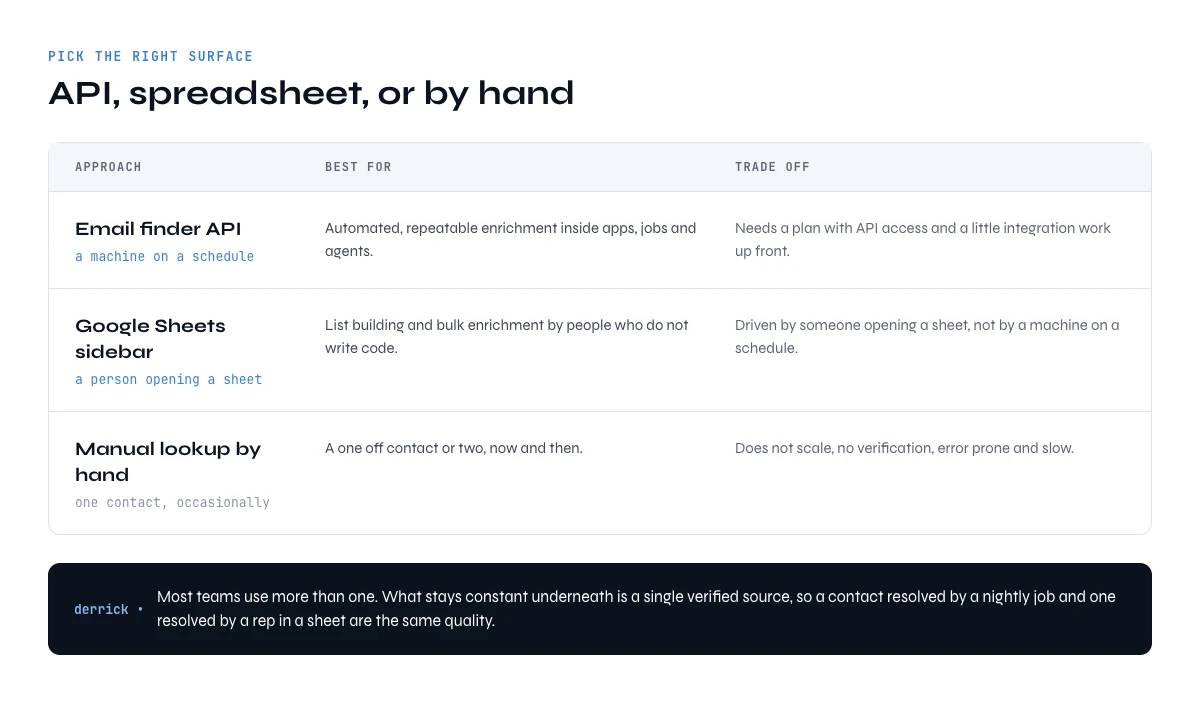
| Approach | Best for | Trade-off |
|---|---|---|
| Email finder API | Automated, repeatable enrichment inside apps, jobs, and agents | Needs a plan with API access and a little integration work up front |
| Google Sheets sidebar | List building and bulk enrichment by non-engineers | Driven by a person opening a sheet, not a machine on a schedule |
| Manual lookup by hand | A one-off contact or two, occasionally | Does not scale, no verification, error-prone and slow |
The honest answer is that most teams use more than one. You wire the API into the flows a machine should own, hand the spreadsheet to the people building lists, and let an AI agent call the MCP tools for ad hoc questions. What stays constant underneath is a single verified data source, so a contact resolved in a nightly job and a contact resolved by a rep in a sheet are the same quality. That consistency, more than any single feature, is what separates a real enrichment layer from a pile of disconnected lookups. Try Derrick free with 100 credits per month and make your first verified find request today.
Frequently asked questions
What is an email finder API?
Does Derrick have an email finder API?
How much does the email finder API cost?
Which plan includes API access?
Are the emails from the API verified?
Can I find emails at scale without using the API?
Keep reading
Continue exploring this cluster


Lead Email Finder: The Complete Guide to Finding Your Prospects' Emails
Read →

How to Find a Company Website: Complete 2026 Guide
Read →

Find Company Name & Website from Email: 4 Methods (2026, Tested)
Read →

Valid Email Finder: How to Find and Verify Valid Professional Emails
Read →