Sales email sequence: how to structure one that gets replies
How to build a sales email sequence: how many emails, what cadence, what each message does, and the data step that decides your reply rate before the copy.


Last updated: 2026-07-29
A sales email sequence looks like a copywriting exercise and behaves like a logistics problem. You are deciding how many times to appear in someone's inbox, how far apart, and what each appearance is allowed to ask for. Get that architecture wrong and no amount of rewriting saves it.
This guide covers the structure that survives contact with a real pipeline: how many emails, how to space them, what each message should say, with example lines you can adapt, and where the ceiling on your reply rate is actually set. That last part is the one most teams skip, and it is the one that costs the most.
What a sales email sequence actually is
A sales email sequence is a planned series of emails sent to the same prospect over a defined window, where each message is written in advance and the timing is set before the campaign starts. It is not a newsletter, and it is not automation for its own sake. The defining feature is that the sequence stops on a reply: the moment a prospect answers, the remaining messages are cancelled and a human takes over.
That single behaviour separates a sequence from a drip campaign. A drip keeps sending on schedule regardless of what the recipient does. A sequence is built to be interrupted, and the whole point of writing five emails is that most prospects will never see all five.
It is worth being precise about the goal too. The primary objective of a sales sequence is a reply, not an open and not a click. Open rates became an unreliable measure once mail privacy features started auto-opening messages on the recipient's behalf, which inflates the number without anyone reading anything. If you optimise a sequence against open rate, you optimise it against a metric a mail client is generating for you. Judge it on replies and booked conversations.
Two things are being designed at once, and it helps to keep them separate in your head. The sequence is the container: count, spacing, stop conditions. The message is what goes inside each slot. Teams that conflate the two end up rewriting email three when the real problem was that email three arrived nine days too late.
Sales email sequence length and cadence: how many emails, how far apart
The count is the first decision. Across published cold email studies the pattern is consistent: sequences of four to seven emails reply at roughly three times the rate of sequences of one to three. The reason is unglamorous. Most people who eventually answer do not answer the first email. They answer the third or the fourth, on a day when the timing happens to work.
Below four touches you are relying on the prospect being available on exactly one morning. Above seven, you are past the point where persistence reads as diligence and into the territory where it reads as a machine. Four to six is the range that fits almost every B2B motion.
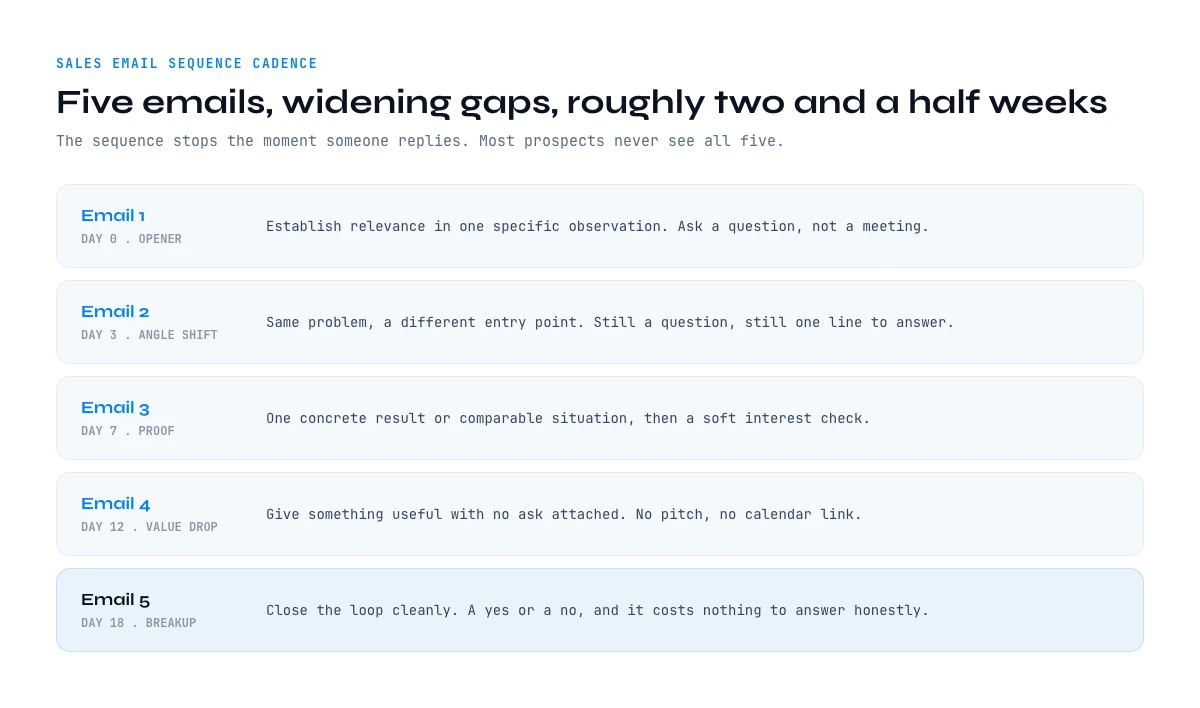
Spacing is the second decision, and the shape matters more than the raw number of days. Use a widening gap: short intervals at the start, longer ones as the sequence runs. It mirrors how a person actually follows up. You nudge someone two days later, then four days later, then a week later. A fixed three-day interval repeated five times reads as a calendar, because that is exactly what it is.
A cadence that works across most B2B sequences over roughly two and a half weeks:
| Day | Job of the message | Ask | |
|---|---|---|---|
| 1. Opener | Day 0 | Establish relevance in one specific observation | A question, not a meeting |
| 2. Angle shift | Day 3 | Same problem, different entry point | A question |
| 3. Proof | Day 7 | One concrete result or comparable situation | Soft interest check |
| 4. Value drop | Day 12 | Give something useful with no strings | None |
| 5. Breakup | Day 18 | Close the loop cleanly | A yes or a no |
Adjust the calendar to your sales cycle rather than copying it literally. A sequence aimed at a founder in a twenty person company can run tighter than one aimed at a procurement lead in an enterprise, where the same five messages might stretch across five weeks.
In the web app or Google Sheets
The fields each step of the cadence reads
A sequence is only as specific as the columns behind it. Derrick fills current title, company and location on the list in the web app or in Google Sheets, so every step of the cadence has a real variable to use instead of a generic opener.
- Feature
- LinkedIn Leads Profile Enrichment
- Credit cost
- 1 credit per lead enriched
The first button opens the web app (nothing to install): 1 credit per lead enriched, 100 free credits every month. The second details the feature and its cost per plan.
The opener carries most of the risk
The first email decides whether the other four get read at all, because a prospect who classifies message one as noise will not open message two. It is the only message in the sequence where you have no context and no permission, so it should ask for the least.
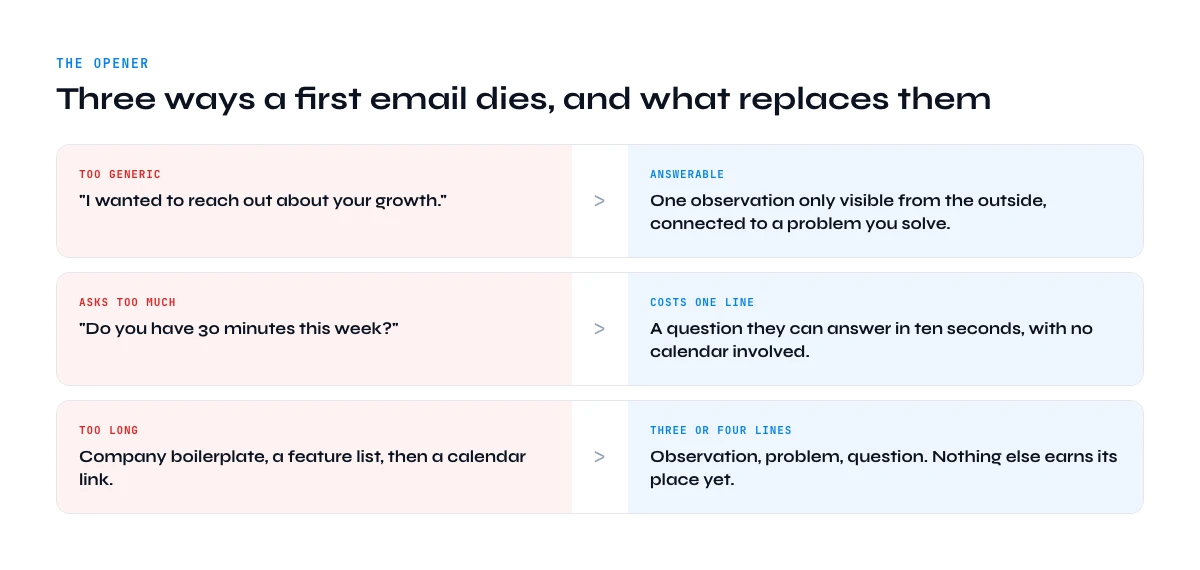
Keep it to three or four lines. Open on something specific to them rather than to you: a change in their team, a role they are hiring for, a product decision that is visible from the outside. Then connect that observation to a problem you actually solve, and end on a question that costs one line to answer. Asking for thirty minutes in the first email is asking a stranger to spend their time proving you were worth it.
What an opener looks like in practice
Subject lines that read like internal mail outperform anything that reads like marketing. Short, lowercase, and specific: question about your SDR ramp, or your careers page. The body then earns the question:
Saw you opened two SDR roles in Manchester this month.
Most teams that scale outbound headcount that fast hit the same wall: the list stops being clean before the reps stop sending.
How are you handling contact data at that pace right now?
Three lines, one observation, one question that takes ten seconds to answer. Notice what is absent: no company boilerplate, no feature list, no calendar link.
The most common opener failure is not being too pushy. It is being too generic to be answerable. "I wanted to reach out about your growth" gives the recipient nothing to reply to, which means the polite response and the ignore response look identical. A question that names something real about their situation converts far better, because answering it is easier than deleting it.
This is also where personalisation stops being a copywriting decision and becomes a data one. You cannot write a specific opener for four hundred prospects unless you have a specific fact about each of them sitting in a column somewhere. Which is the theme of the last third of this guide.
Follow-ups that do not say "just checking in"
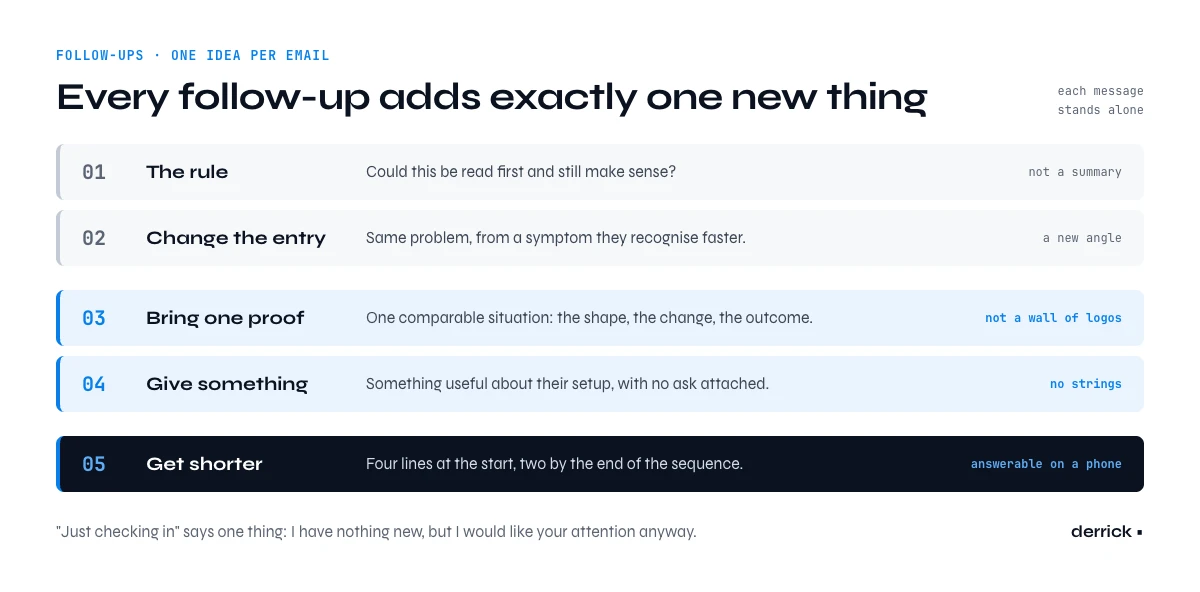
Follow-ups are where sequences go to die, usually because each one restates the first email in slightly more apologetic language. "Just checking in", "bumping this to the top of your inbox" and "following up on my note below" all carry the same message: I have nothing new to say, but I would like your attention anyway.
The rule that fixes this is one idea per email. Each follow-up should introduce exactly one new thing, and it should be able to stand alone if the prospect never read the previous message. Not a summary of what you already sent, a new angle on the same problem.
Message 2: change the entry point
Same underlying problem, approached from a symptom the prospect is more likely to recognise.
Different angle on my last note.
When reps build their own lists, the usual tell is a bounce rate that creeps up quietly over a quarter rather than spiking.
Do you track that per rep or per campaign?
Message 3: bring one piece of proof
One comparable situation described concretely beats a wall of logos. Name the shape of the problem, the change, and the outcome, in that order.
A team about your size was sending to a list they had rebuilt by hand from a naming pattern.
Cleaning it before the next campaign took an afternoon and cut their bounce rate to under one percent.
Worth a look at your numbers?
Message 4: give something away
No ask attached. A short teardown of something public about their setup, or a number that is genuinely useful to them, whether or not they ever reply.
No ask here. I pulled the mail records for your domain and your SPF is fine, but there is no DMARC policy published, which is the usual reason a clean list still lands in spam.
Details below if useful.
Length should fall as the sequence runs. If your opener is four lines, your fourth follow-up can be two. A short message late in a sequence signals that you are not trying to re-sell from scratch, and it is easier to answer from a phone, which is where most of these replies are actually written.
The breakup email, and when to stop
The last message in a sequence should close the loop rather than beg for one more chance. A breakup email states that you are stopping, gives a one line reason to answer if the timing was simply wrong, and ends. It is often the highest replying message in the whole sequence, because it is the only one that costs the recipient nothing to answer honestly.
Closing the file on this one so I stop landing in your inbox.
If the timing was just wrong, say the word and I will come back in the new quarter.
Keep it free of guilt. Anything that performs disappointment does not work, because it converts a neutral non-answer into an awkward one and makes a future conversation less likely, not more.
Stopping properly also matters for the health of the channel. Sequences that keep running after a clear non-response are the ones that generate complaints, and complaints are the fastest way to damage the sending reputation that every future campaign depends on. A clean stop protects the next sequence as much as this one. If your inbox placement is drifting, the fix usually sits upstream of the writing entirely: see our guide to checking bounces before you send.
One thing worth building in from the start: log the reason each prospect exited. Four buckets are enough, and they tell you very different things:
- Replied. The sequence worked. Note which message triggered it.
- Bounced. A data problem, not a message problem. The prospect never read anything.
- Unsubscribed. A targeting or tone problem. Something reached the wrong person, or reached them badly.
- Completed in silence. The only bucket that is genuinely about your writing.
A team that tracks a single "reply rate" cannot tell the difference between a bad sequence and a bad list. A team that tracks these four can.
The part nobody sequences: the data underneath
Here is the uncomfortable arithmetic. A five email sequence sent to a list where twelve percent of the addresses are invalid is not a five email sequence. For twelve percent of your prospects it is zero emails, and those contacts are counted in the denominator of every metric you report. Your reply rate looks like a writing problem. It is a list problem wearing a writing problem's clothes.
Our own 2026 cold email benchmarks, aggregated across published industry data, put the average reply rate around 3.1%, with top performers between 8 and 12%, and verified lists replying roughly twice as often as unverified ones. That gap is larger than any realistic gain from rewriting a subject line, and it is the only variable in the whole sequence you can fix deterministically before you send anything.
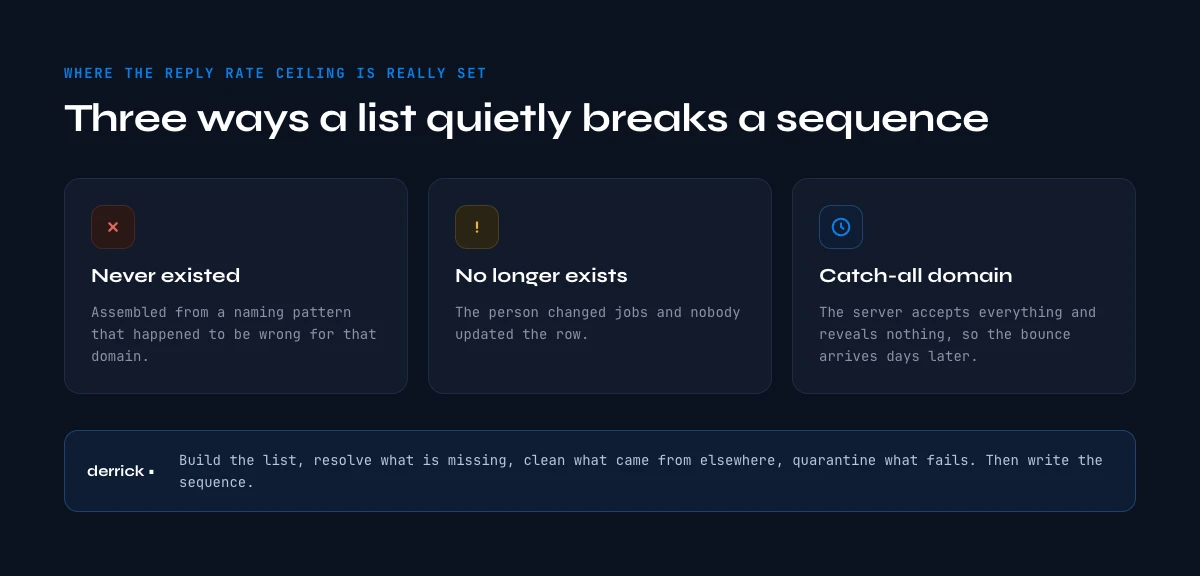
Three failure modes account for most of it:
- Addresses that never existed. Usually assembled from a naming pattern that happened to be wrong for that domain.
- Addresses that existed and no longer do. The person changed jobs and nobody updated the row.
- Catch-all domains. The server accepts everything and reveals nothing, so a naive check marks the address valid and the bounce arrives days later.
The practical order of operations is boring and effective. Build the list. Resolve the addresses you are missing. Clean the ones that arrived from somewhere else, because an address exported from an old CRM or rebuilt from a naming pattern is a guess until something checks it. Remove or quarantine what fails. Only then write the sequence. Doing it in that order means the reply rate you measure at the end is actually telling you something about your messages, which is the entire reason you are measuring it. For the mechanics of that check, our page on real time verification covers what each layer can and cannot prove.
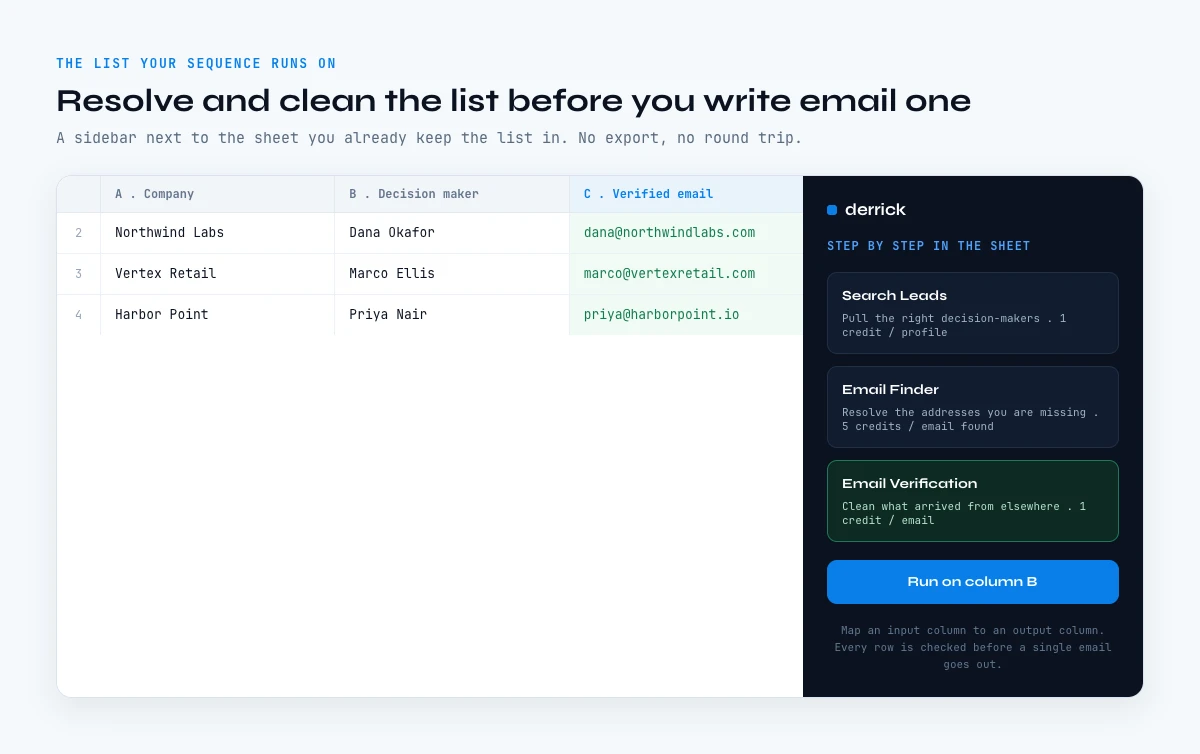
Building the list your sales email sequence runs on
Most teams already keep their prospect list in a spreadsheet, then export it, enrich it somewhere else, re-import it, and discover the mismatch two campaigns later. Derrick removes that round trip by working in its web app or as a Google Sheets sidebar, next to the list you already maintain. You select the rows, run the operation, and the results land in the columns beside them. The rest of the email finder guides covers each of these steps in more depth.
Two operations cover the data layer of a sequence, and they answer two different situations. Email Finder resolves the professional address from a name and a company, at 5 credits per email, billed only when a result is actually found. What it returns is already verified, so those rows go straight into the sequence with no second step and no bounce to plan for. Email Verification, at 1 credit per email, is for the addresses that did not come from it: a list exported from an old CRM, a file someone handed you, or addresses you rebuilt yourself from a naming pattern. That is the part of a list you cannot vouch for, and it is the part worth checking.
From there the list feeds whatever you send with. Push to La Growth Machine moves the finished rows into your audience without a manual export, and Push to lemlist does the same if that is where your sequence lives. Both are free on every plan. The Email Finder API covers the same ground for teams who would rather trigger this from their own stack.
On pricing, be aware of what sits where. The free plan carries 100 credits per month with no credit card, which covers the company and contact lookups you use to assemble a list. Email Finder and Email Verification are paid features, available from the Standard plan at 20 euros per month, and paid plans run up to 320 euros per month. The model works the same whether you are sequencing forty prospects or forty thousand. Start with one segment, build it end to end, then compare its reply rate against the list you were running before. That comparison usually settles the debate faster than any argument about subject lines.
Frequently asked questions
How many emails should a sales email sequence have?
How far apart should the emails be spaced?
What is the difference between a sales sequence and a drip campaign?
Does the breakup email actually work?
Why is my reply rate low even though the copy is good?
What does it cost to build the list a sequence runs on?
Which addresses actually need verifying?
Keep reading
Continue exploring this cluster


Lead Email Finder: The Complete Guide to Finding Your Prospects' Emails
Read →

How to Find a Company Website: Complete 2026 Guide
Read →

Find Company Name & Website from Email: 4 Methods (2026, Tested)
Read →

Valid Email Finder: How to Find and Verify Valid Professional Emails
Read →