Email verification API: check every address before you send
Validate every address with our email verification API: copy the curl quick start, read each status, cut bounces. 1 credit per email checked.


You cannot check a mailing list by eye, and you should never check it by sending to it. An email verification API turns that check into part of your software: one request per address, one structured answer, no person in the loop. This guide covers what the check actually inspects, how to read every status it hands back, when to call it live at a form versus in bulk before a campaign, what it should cost you per address, and how to run the exact same check from a spreadsheet or an AI assistant when writing code is beside the point. Some vendors sell the same service as an email validation API; either way, the guide opens with a quick start you can paste straight into a terminal.
What is an email verification API?
An email verification API is an HTTP endpoint that takes an email address and returns a structured verdict on whether that address can actually receive mail. You send jane.doe@acme.com, and you get back a status, a reason, and the supporting signals your code needs to decide what happens next. Nothing is sent to the person. The check happens against the receiving infrastructure, not through a test message that would land in someone's inbox and burn your reputation to learn a fact you could have looked up.
The reason teams reach for the endpoint rather than a dashboard is that verification is rarely a one-off. A signup form needs the check to run in the second between a user typing an address and the form submitting. A CRM needs it to run on a schedule, because contact data goes stale on its own: people change jobs, companies get acquired, and mailboxes are decommissioned without telling anyone. A campaign needs it to run right before send, not three months earlier. Each of those is a machine calling a function, which is exactly what an endpoint is for. Derrick's Email Verification feature costs 1 credit per email, charged per address checked, whatever the verdict (an error is free), and the same engine is reachable in the web app, from a Google Sheets sidebar, over MCP (Claude, ChatGPT, any MCP client), and over REST.
The stake is deliverability. Mailbox providers judge a sender largely on how often they try to deliver to addresses that do not exist, and the operational threshold most teams work to is a bounce rate under 2 percent. Google publishes the neighbouring number in its own bulk sender guidelines: keep the spam complaint rate below 0.3 percent. The two move together, because a list full of dead addresses is usually a list nobody asked to be on. Cross it repeatedly and inbox placement degrades for every message you send afterwards, including the ones going to perfectly valid contacts. Verification is the cheapest insurance available against that outcome: at 1 credit per address, checking ten thousand contacts costs less than the price of one badly damaged sending domain.
Email validation API or email verification API?
Same service, two names. Some providers say email validation API, others say email verification API, and both run the syntax, domain and mailbox checks described below, so compare them on what each status tells you to do, not on the label.
Quick start: your first email verification API call
You need two things: an API key and one address to test. The key sits on the API & MCP page of the Derrick web app, and programmatic access opens on the Plus plan at 47.50 EUR per month. Then send one POST to the verify endpoint, with the key in the header and the address in the body.
With curl. Paste this into a terminal and swap in your key.
curl -X POST "https://app1.derrick-app.com/api/v1/verify_email" \
  -H "x-api-key: YOUR_API_KEY" \
  -H "Content-Type: application/json" \
  -d '{
        "data": {
          "email": "contact@derrick-app.com"
        }
      }'
The response. This is a real call, made on 7 September 2026, not a mock-up.
{
  "success": true,
  "data": {
    "certainty": "valid"
  }
}
With Node.js. The same call from your own code, using the built-in fetch (Node 18 or later, in an ES module). There is no SDK to install.
const res = await fetch("https://app1.derrick-app.com/api/v1/verify_email", {
  method: "POST",
  headers: {
    "x-api-key": process.env.DERRICK_API_KEY,
    "Content-Type": "application/json",
  },
  body: JSON.stringify({ data: { email: "contact@derrick-app.com" } }),
});

const { success, data } = await res.json();
if (!success) throw new Error("Call failed: retry later, this is not a verdict");
console.log(data.certainty); // "valid", "risky", "invalid"...
That is the whole integration surface: one endpoint, one key, one field to branch on. Each call costs 1 credit, whatever the verdict. The next sections explain what happens behind that answer and how to route every value of certainty.
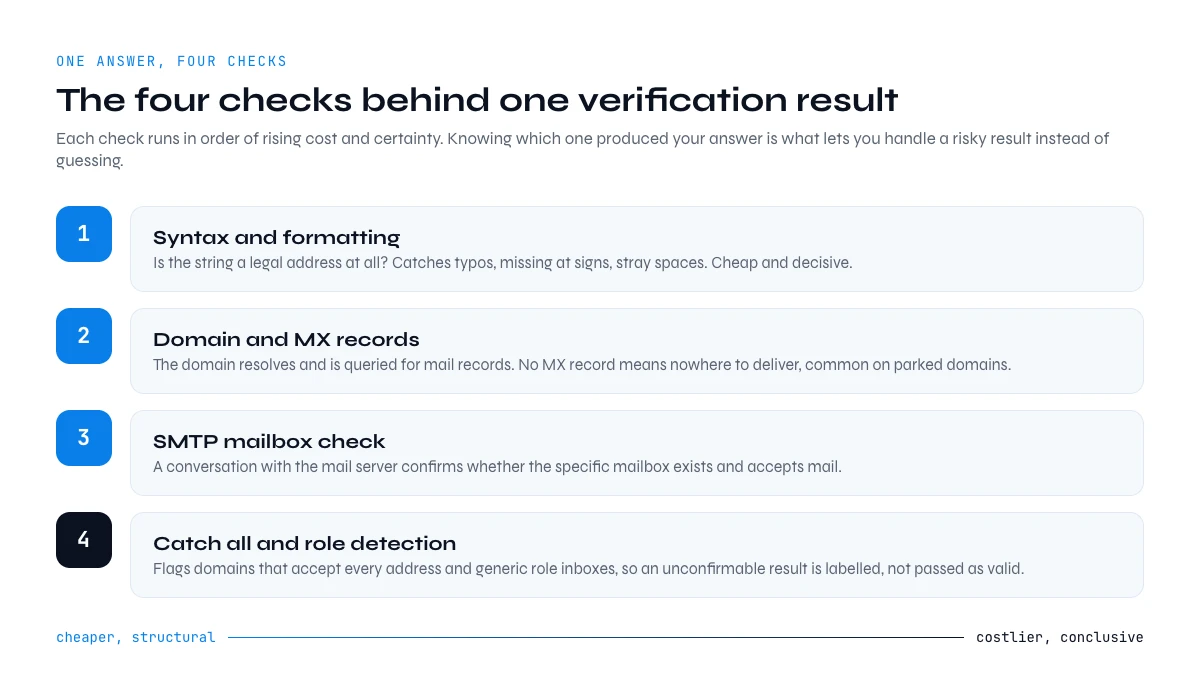
How an email verification API works: the four checks behind one answer
A single call looks instant. Behind it, four distinct checks run in increasing order of cost and certainty, and knowing which one produced your answer is what lets you handle an ambiguous result instead of treating every response as a yes or a no.
Syntax and formatting
The first pass is structural: is the string a legal address at all? This catches the typos that dominate form submissions, missing at-signs, trailing spaces pasted from a CRM export, double dots, and characters that are not permitted before the domain. It is cheap and it is decisive. An address that fails here can never receive mail, so no further check is needed.
Domain and MX records
Next, the domain itself is resolved and queried for mail exchange records. A domain with no MX record has nowhere to deliver mail, which is common with parked domains, expired registrations, and the near-miss typos of real companies. This step also flags disposable domains, the throwaway inboxes people use to get past a signup gate, which are technically deliverable but worthless to a sales pipeline.
The mailbox probe
The third check opens a conversation with the receiving mail server and asks whether that specific mailbox exists, without ever completing a delivery. This is the step that separates a real verification service from a syntax checker, and it is also the step that fails in interesting ways: some servers answer honestly, some accept everything, and some deliberately delay unknown senders. That variability is why a good response carries more than a yes or a no.
Risk classification
Finally, the address is classified beyond deliverability. Is it a role account like contact@ or billing@ that reaches a shared inbox rather than a person? Is it on a domain that accepts all mail regardless of the local part? Is it a known spam trap? These flags do not make an address undeliverable, but they change whether you should include it in an outbound sequence, and no amount of raw SMTP scripting will produce them for you.
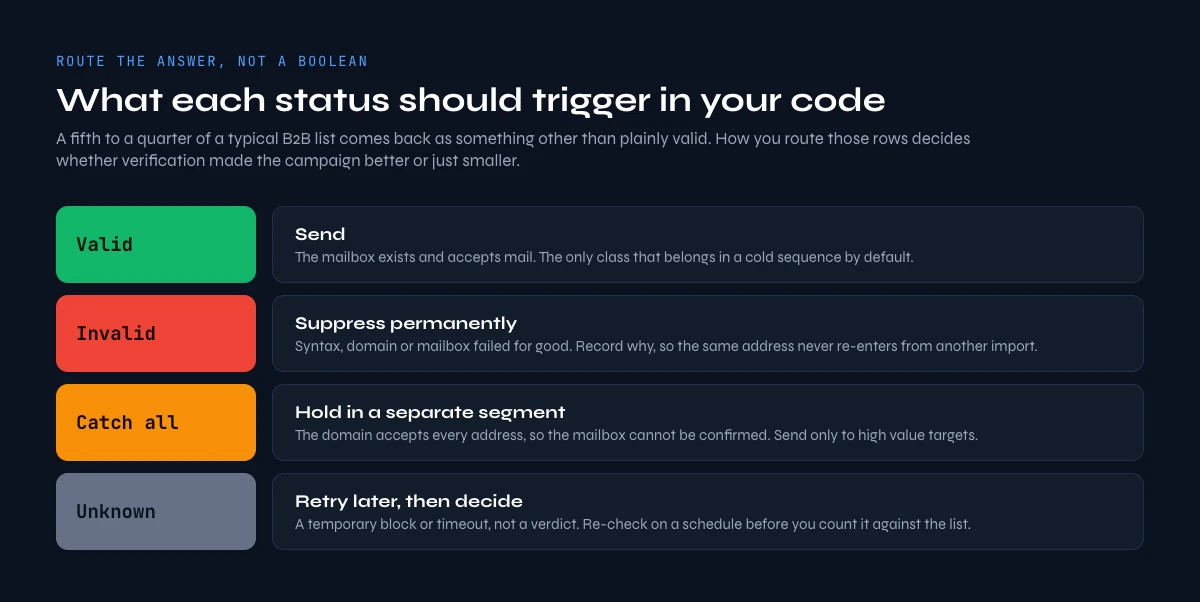
Reading the response: what each status should trigger
The mistake that wastes most verification budgets is treating the response as a boolean and discarding everything that is not a clean pass. Roughly a fifth to a quarter of a typical B2B list comes back as something other than plainly valid, and how you route those rows decides whether verification made your campaign better or just smaller. Each class of answer, and what it should trigger in your code:
| Status | What it means | What your code should do |
|---|---|---|
| Valid | The mailbox exists and accepts mail | Send. This is the only class that belongs in a cold sequence by default. |
| Invalid | Syntax, domain, or mailbox check failed definitively | Suppress permanently and record why, so the same address never re-enters from another import. |
| Catch-all | The domain accepts every address, so the mailbox cannot be confirmed | Hold in a separate segment. Send only to high-value contacts, and watch bounces closely. |
| Risky | Role account, disposable domain, or trap-like pattern | Exclude from outbound. Role accounts are fine for support replies, not for prospecting. |
| Unknown | The server refused to answer, often greylisting or rate limiting | Re-queue and retry later rather than deleting. A large share resolve on a second pass. |
Catch-all domains deserve their own policy because they are so common in mid-market and enterprise B2B, where a security appliance sits in front of the mail server and accepts everything by design. Deleting them removes a meaningful slice of your best accounts; sending to them blindly inflates your bounce rate. The workable middle is a separate segment with a lower send volume and tighter monitoring, which we break down in our guide to detecting and managing catch-all addresses. The unknown bucket deserves patience for a different reason: it is usually a temporary refusal, not a verdict, and throwing those rows away silently shrinks your reachable market.
Through the Derrick API
Verification as a call in your stack
When verification has to happen inside a signup flow or a CRM job, it belongs in code. The Derrick API exposes the same verification your team runs in the web app or in Google Sheets, so both sides return the same status on the same address.
- Feature
- Derrick API
- Credit cost
- Included
The first button opens the web app, where your account and key live. API and MCP access starts on the PLUS plan. The second details the surface.
Read the response: the JSON your code parses
Everything above describes the answer in words. The quick start showed the payload itself, and its shape is what your integration actually has to handle: one address in, one verdict out, over a single POST.
Two fields, and only one of them carries a decision. success tells you the call itself went through, which is a transport question: a network failure or a bad key is not a verdict about the address. certainty is the value your code branches on. Derrick documents the levels the endpoint can return as ultra_sure, sure, risky, invalid and not_found; a confirmed mailbox comes back as valid, as in the quick start call.
| certainty | How to read it | What your code should do |
|---|---|---|
valid / ultra_sure | The mailbox was confirmed | Send. Write the value and the date next to the address so you never re-verify it inside its freshness window. |
sure | Confirmed with slightly less signal | Send, and keep it in the same bucket as valid for reporting so you can compare bounce rates between the two later. |
risky | Role account, disposable domain, or a catch-all that cannot be proven | Do not put it in a cold sequence. Route it to a separate segment with lower volume. |
invalid | The address failed definitively | Suppress permanently and record why, so the same address cannot re-enter from another import. |
not_found | No answer could be established | Re-queue rather than delete. Note that this level is still billed 1 credit, so cap your retries. |
The billing detail in that last row is the one people discover late: verification is charged per call, including when the call cannot conclude. At 1 credit per email checked, a 10 000-address list costs 10 000 credits whatever the mix of verdicts, which is why a retry loop without a ceiling is the most common way to burn a balance on this endpoint. The full Email Verification page carries the current cost and availability, and the same endpoint is documented in the REST API reference.
Real time at the form, or bulk before the campaign
There are two moments worth spending a verification call on, and they answer different questions. Real time means the check runs at the point of capture, while the user is still on the page, so a typo gets corrected before it ever enters your database. That is the cheapest possible intervention: one call, one address, and a data quality problem that never happens. The tradeoff is that the call sits inside a user-facing request, so it has to be fast and it has to fail open, letting the signup complete rather than blocking a real customer because a mail server was slow.
Bulk means the check runs across a list you already hold, before you use it. This is the pass that matters for outbound, because an address verified four months ago is not verified today. Data decay is continuous, not an event, and the practical rule most teams land on is to re-verify any list older than about ninety days before a send, plus every list that arrived from outside your own capture flow. Our deep dive on real-time versus scheduled verification covers how to sequence the two so you are not paying twice for the same address.
The two are complements, not alternatives. Real time protects the front door; bulk protects the campaign. Teams that only do the first end up sending to contacts who were valid at signup and have since left the company. Teams that only do the second keep letting bad data in and pay to clean it later, which is strictly more expensive.
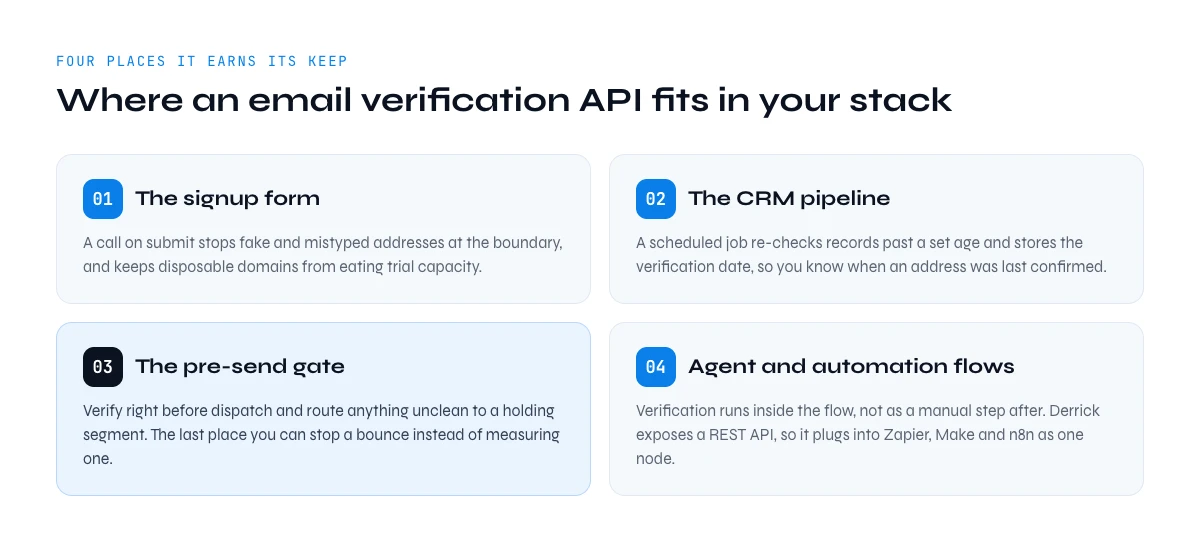
Where an email verification API fits in your stack
An email verification API earns its keep in four specific places. Naming them turns "we should verify our data" into something you can actually put on a sprint board.
The signup form. A call on submit stops fake and mistyped addresses at the boundary. It also stops disposable domains from consuming trial capacity, which for a self-serve product is a direct cost line and not just a data hygiene concern.
The CRM pipeline. A scheduled job that walks records older than a set age and re-checks their addresses keeps the database honest without anyone remembering to do it. Pair it with a field that stores the verification date, because the useful question is never just whether an address was valid, it is when you last confirmed it.
The pre-send gate. A step in your outbound workflow that verifies immediately before dispatch, and routes anything that is not clean to a holding segment. This is the one that pays for itself fastest. It is the last place you can stop a bounce rather than measure one.
Agent and automation workflows. When an AI assistant or a no-code automation is building a list as part of a larger task, verification has to happen inside that flow, not as a manual step afterwards. Because Derrick exposes a REST API, it plugs into Zapier, Make, and n8n alongside three thousand other apps, so verification becomes one node in a pipeline you already run. If you also need to discover addresses rather than only check them, the companion email finder API resolves a name and a domain into a verified address in the same call.

What verification should cost, and how to budget it
Verification pricing is easy to reason about once you convert everything to a cost per address, which is the only number that matters when you are sizing a list. Derrick bills verification at 1 credit per email, charged per address checked, whatever the verdict (an error is free), and every plan bundles a credit balance that rolls over when you do not spend it. That makes the arithmetic direct: your cost per verified address is simply the plan's price divided by the credits it carries.
| Plan | Price | Credit balance | Cost per address verified |
|---|---|---|---|
| Free | 0 EUR | 100 credits per month | Verification is not on this tier. Free credits cover the LinkedIn and data-cleaning features. |
| Standard | 20 EUR | 10,000 credits | 0.002 EUR, the entry paid plan |
| Plus | 47.50 EUR | 25,000 credits | About 0.0019 EUR |
| Pro | 175 EUR | 100,000 credits | About 0.00175 EUR |
Two details change how you should plan. First, verification itself is available from the Standard plan upward, while the REST API and the MCP server unlock at Plus. If you only need bulk checking from the web app or a spreadsheet, you do not need to pay for programmatic access; if you are wiring verification into a product, Plus is the entry point. Second, credits roll over on paid plans, which means a list-building month and a quiet month average out rather than forcing you to over-provision for your peak.
Set against that, a single bounce-driven deliverability incident costs weeks of degraded inbox placement across every campaign. At these unit prices, verifying a hundred thousand addresses costs less than most teams spend on a single month of sending tooling, which is why the decision is usually about integration effort rather than budget.
Verification API, Sheets or MCP: which surface for which job
The same verification runs on three surfaces, and picking the wrong one is how teams end up writing code they did not need or pasting rows they should have automated. The endpoint is identical underneath; what changes is who triggers it and where the result lands.
| Job | REST API | Google Sheets sidebar | MCP (Claude and other clients) |
|---|---|---|---|
| Who triggers it | Your application, on an event | A person, on a selected column | An AI agent, from a sentence |
| Best fit | Signup forms, CRM hooks, nightly jobs | A list you already have in a spreadsheet | Ad hoc checks inside a wider research task |
| What you have to build | An HTTP call plus your own retry and storage logic | Nothing. Paste, select, run | Nothing. Connect the server once |
| Where the result lands | In your database, in whatever field you map | In the column next to the address | In the conversation, then wherever you send it |
| Latency that matters | Yes, it sits inside a user request | No, it runs in the background of a sheet | No, the agent waits for you |
| Cost | Identical: 1 credit per email checked, whichever surface fires the call | ||
The decision rule is short. If a machine decides when to verify, use the API. If a person decides, use the web app or the sheet. If a sentence decides, use MCP. The web app is a fourth surface, on the same endpoint and the same balance. Most teams end up using two: the API at the signup form so a typo never enters the database, and the sidebar for the lists that arrive by email from a colleague. Both draw on the same credit balance, so there is nothing to reconcile between them, and the free plan gives 100 credits a month to test whichever one fits.
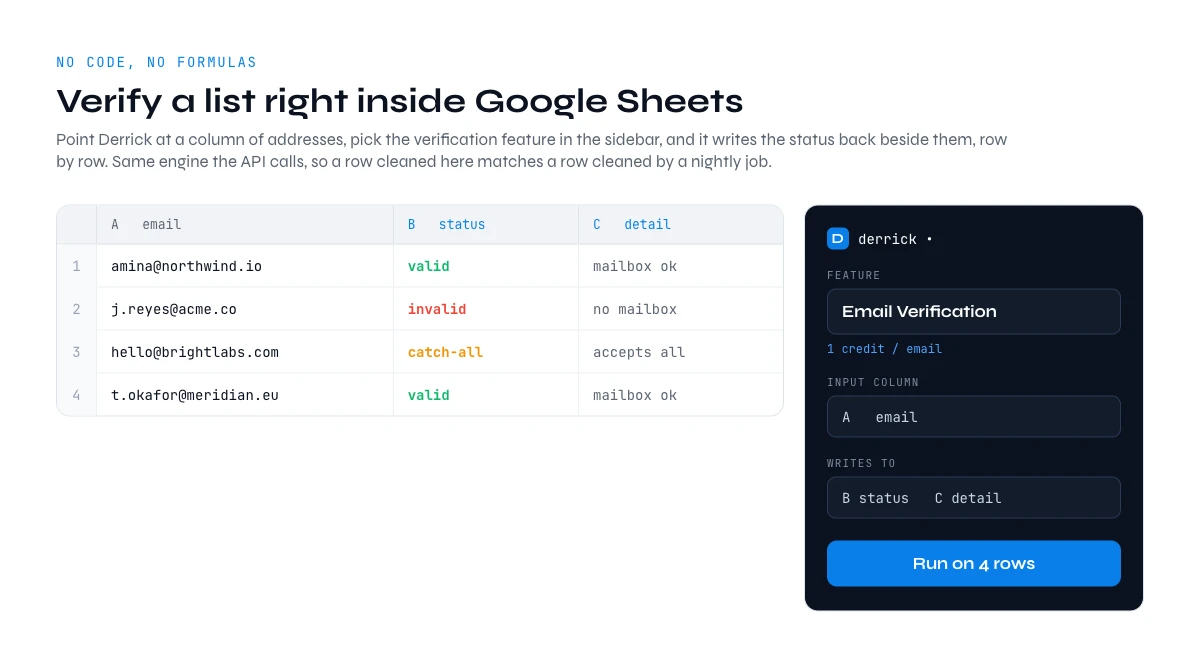
Verify without writing code: the Google Sheets route
Plenty of verification work never justifies an integration. A list came out of an event, a partner sent a spreadsheet, a rep exported a segment and wants to know what is safe to touch. For all of that, Derrick runs in its web app, and also as a Google Sheets sidebar: you point it at a column of addresses, pick the verification feature, and it writes the status back into the columns beside them, row by row, across the whole sheet. There are no spreadsheet formulas to learn and nothing to deploy.
This matters more than it sounds, because it decouples verification from engineering availability. The person who owns the list can check it themselves, on the same data, with the same engine that the API calls. A row cleaned in a sheet and a row cleaned by a nightly job come out identical, so you are not maintaining two definitions of what "verified" means. And it scales in both directions: a hundred rows and a hundred thousand rows run through the same sidebar, so a quick sanity check and a full database pass are the same workflow at different sizes. Our walkthrough of finding and confirming valid professional emails shows the sheet-side flow end to end.
Verification from an AI agent: the MCP route
The newest place verification needs to live is inside an AI conversation. When an assistant is researching accounts, assembling a contact list, or drafting outreach, it needs to confirm an address mid-task rather than handing the job back to a person. Derrick MCP exposes the enrichment engine over the Model Context Protocol, so Claude, ChatGPT, or any MCP-compatible tool can call verification as a tool step and act on the result in the same turn. It is available from 47.50 EUR per month (Plus plan), the same tier that unlocks the REST API.
The practical effect is that verification stops being a stage in a pipeline and becomes something an agent simply knows how to do. Ask for a list of contacts at a set of target accounts and the assistant can return addresses already checked, with the risky ones flagged, instead of a plausible-looking list you then have to clean. For teams building agentic workflows, that is the difference between an assistant that produces work and one that produces work you have to audit.
Email verification API vs a homemade SMTP script
Any engineer can write a script that opens an SMTP connection and asks whether a mailbox exists. The question is what happens after the first hundred addresses, and this is where a purpose-built email verification API separates from a weekend project.
| Dimension | Homemade SMTP script | Verification API |
|---|---|---|
| IP reputation | Probes come from your own IP, which gets rate limited and blocklisted | Runs on infrastructure built and maintained for probing |
| Catch-all handling | Reads as valid, silently poisoning your list | Flagged as its own status you can route separately |
| Risk signals | None. Role accounts, disposables, and traps look like anyone else | Classified in the same response |
| Greylisting | Reads as a failure, so good contacts get deleted | Returned as unknown and retried |
| Maintenance | Ongoing, and it breaks quietly when providers change behaviour | None on your side |
The failure mode of the homemade version is not that it does not work. It is that it appears to work while quietly producing wrong answers, deleting valid contacts that were merely greylisted and passing through catch-all addresses that will bounce. You discover the damage in the campaign metrics, after the send, which is exactly the moment it stops being fixable.
Mistakes that make verification useless
Verification is easy to run and easy to run pointlessly. Five patterns account for most of the wasted spend.
Verifying once and treating it as permanent. A verification result is a timestamped observation, not a property of the address. Store the date alongside the status and treat anything past ninety days as unconfirmed.
Deleting the ambiguous rows. Unknown and catch-all are instructions to handle differently, not to discard. Teams that delete them quietly shrink their addressable market by a double-digit percentage.
Verifying after the send. Cleaning a list in response to a bad campaign is measuring the damage, not preventing it. The check belongs before dispatch, as a gate.
Trusting a guessed address because it looks plausible. Pattern matching a name against a domain produces strings that read correctly and bounce anyway. If you are generating addresses rather than finding them, verification is not optional, it is the only thing standing between you and your sender reputation. Derrick's Email Finder verifies as part of the same lookup at 5 credits per email found, so a discovered address arrives already checked.
Ignoring the classification fields. Sending outbound to info@ and support@ addresses is a reliable way to look like a bulk sender to the people whose job is to spot bulk senders. The risk flags are there so you can act on them.
Get those five right and verification stops being a chore you run before campaigns and becomes a property of your data. The check itself is a single call; the discipline is in when you make it and what you do with the answer. Start with the pre-send gate, add the signup check, then schedule the CRM pass. Try Derrick free with 100 credits per month, then switch verification on from the Standard plan and clean your first list, in a spreadsheet or over the API, whichever fits how you work.
Frequently asked questions
What is an email verification API?
Does Derrick have an email verification API?
How much does email verification cost per address?
Is there a free tier for email verification?
What should I do with a catch-all result?
Can an email verification API guarantee zero bounces?
How often should I re-verify a list?
Do I need to write code to verify emails with Derrick?
Keep reading
Continue exploring this cluster


Lead Email Finder: The Complete Guide to Finding Your Prospects' Emails
Read →

How to Find a Company Website: Complete 2026 Guide
Read →

Find Company Name & Website from Email: 4 Methods (2026, Tested)
Read →

Valid Email Finder: How to Find and Verify Valid Professional Emails
Read →