Email Bounce Checker: Verify Every Address Before You Hit Send
Use this free email bounce checker on one address, then verify a whole list before you send. Read every status and keep your bounce rate under 2%.


Check one address now with this free email bounce checker. It tests the format, catches typos on common domains, and tells you whether the address is disposable or generic. It does not confirm that the mailbox exists, which is what causes a hard bounce, and every result says so.
The check runs in your browser: nothing is sent, nothing is stored.
Checking a whole list
To confirm the mailbox itself across a list, use Email Verification in Derrick. Import a CSV into the web app, or add a column from the Google Sheets sidebar, or call the API from the Plus plan. It costs 1 credit per address checked, whatever the verdict (an error is not billed), from the STANDARD plan at 20 EUR per month for 10,000 credits.
Or read on: an email bounce checker tests every address on your list against the receiving mail server before you press send, so undeliverable addresses get removed instead of being counted against your domain. This guide covers how the check runs, what each result status means, the bounce thresholds that trigger spam filtering, the SMTP codes behind a bounce message, and a playbook you can run in the web app or in Google Sheets.
You've carefully crafted your email campaign, but 5% of your messages bounce. The result? Your sender reputation tanks, legitimate emails land in spam, and future campaigns are compromised. The solution: verify your emails BEFORE sending with a bounce email checker.
This guide explains how email verification works, why it's essential for deliverability, and how to implement an effective validation workflow that keeps your bounce rate below 2%.
What is a bounce email checker and why you need one
A bounce email checker is an email verification tool that analyzes an address's validity before you send your campaign. It verifies that the address actually exists, that the mailbox can receive messages, and that the mail server accepts the connection.
For an SDR prospecting 500 leads per week, a bounce email checker is non-negotiable. Addresses in a CRM go stale without warning. If only 10% of those 500 are dead, that's 50 bounces every week, eroding your sender reputation campaign after campaign.
The real impact on your prospecting
Gmail and Outlook watch how your mail is received, and a high bounce rate is one of the signals they read. When it climbs, legitimate emails land in spam, even for engaged prospects.
Take Sarah, Head of Sales at a SaaS startup. She sends 2,000 emails per month with no upfront verification. With an 8% bounce rate, she loses 160 opportunities monthly. Over the following months, her sends start landing in spam, even those going to engaged prospects. With a bounce email checker, Sarah would have stripped the invalid addresses before sending.
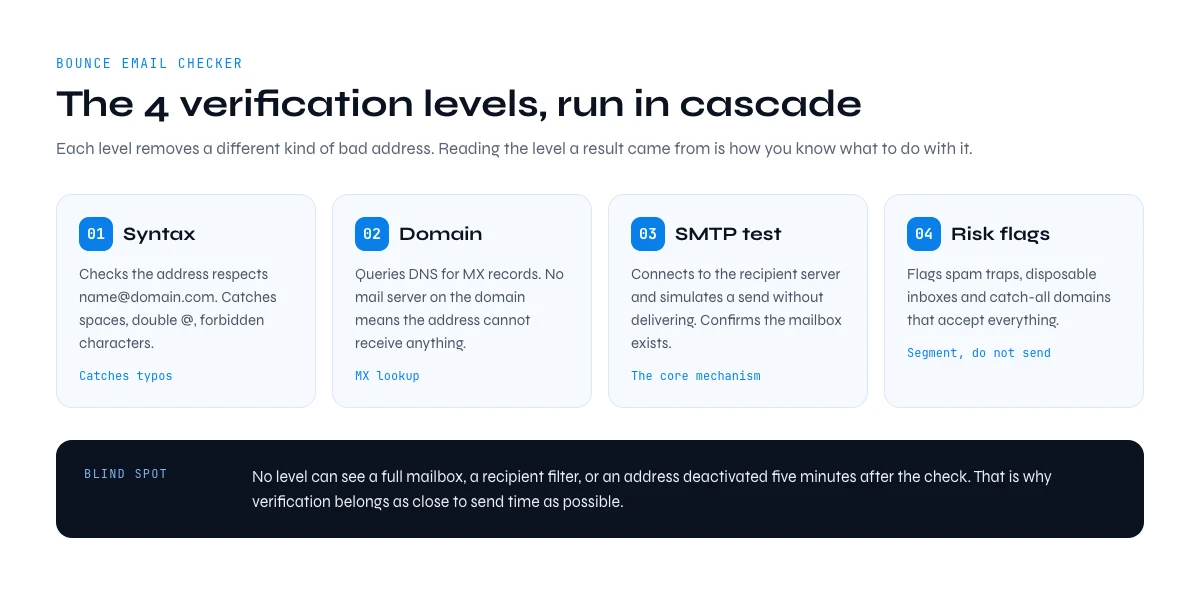
How an email bounce check works
A solid checker runs the same sequence every time. Understanding it helps you read results correctly and explains why some answers are certain and others are not.
Does an email bounce checker send a test email?
No. It opens a conversation with the mail server and stops before delivery, so nothing lands in the recipient inbox and nothing is logged as a message.
- Syntax check: the address is tested against RFC 5321 formatting. Free, instant, and catches typos like a missing top level domain.
- Domain and MX lookup: DNS is queried for mail exchange records. No MX record means no mailbox can exist on that domain, whatever the address says.
- SMTP connection: the checker connects to the mail server on port 25 and identifies itself.
- Recipient probe: the checker announces the recipient and reads the server answer. Accepted means the mailbox exists, rejected means it does not.
- Catch-all detection: a random address on the same domain is probed. If the server accepts that one too, the domain accepts everything and no individual answer can be trusted.
- Reputation flags: the address is matched against disposable domain lists and known trap patterns.
The free check at the top of this page covers the first step and part of the last one. The steps in between need a server, which is what Email Verification does.
What no bounce checker can detect
Even the best tool has blind spots: a mailbox that is technically alive but abandoned, a strict corporate firewall that rejects unknown senders at delivery, a recipient's filter, or a full inbox that fills up between the check and the send. Verification removes the certain failures, it does not guarantee a read, so it belongs as close to send time as possible. For continuous checks inside a product or a CRM, the same logic runs through an email verification API instead of a manual pass.
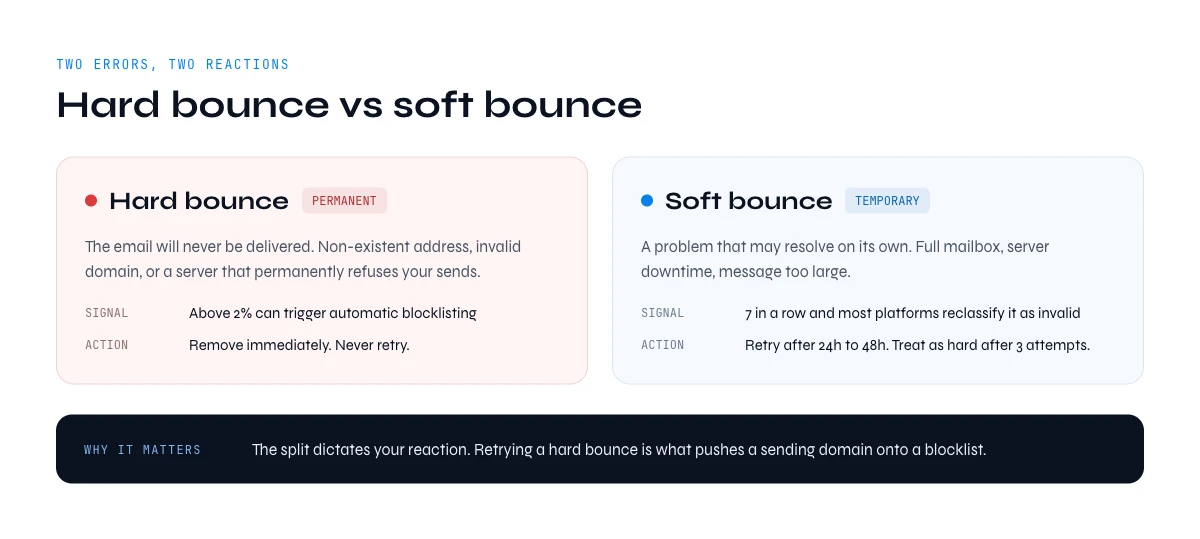
Hard bounce vs soft bounce: the critical difference
The split between hard and soft bounce dictates how you react and how much damage is done to your sender reputation.
Hard bounce: the permanent error
A hard bounce means the email will NEVER be delivered. Causes: non-existent address, invalid domain, mail server permanently rejecting your sends. Each hard bounce is a red flag, and a high rate can get your domain blocklisted. Action: remove these addresses immediately. Never retry.
Soft bounce: the temporary error
A soft bounce is a temporary issue that may resolve: full mailbox, server downtime, message too large. Less damaging - but if an address generates 7 consecutive soft bounces, most platforms reclassify it as invalid. Action: retry after 24-48h, treat as a hard bounce after 3 attempts.
What to compare in a bounce checker
Most checkers run the same technical sequence, so compare them on what happens around it. Here are the five questions to ask of any tool, and our answers for Derrick.
| Criterion | What to check | Derrick Email Verification |
|---|---|---|
| Statuses returned | Whether you get a usable verdict on each row, or a bare yes or no | Valid, risky or invalid |
| What an "unknown" costs | Whether a result with no clear answer is billed | 1 credit per address checked, whatever the verdict. An error is not billed. |
| Bulk path | How a real list gets in and out | CSV import in the web app, a column in the Google Sheets sidebar, or the API |
| Where it runs | Whether you have to leave your working tool | Web app, Google Sheets, MCP (Claude, ChatGPT), REST API. API and MCP from the Plus plan. |
| Credit expiry | What happens to credits you did not use this month | Unused credits never expire while you stay on a paid plan |
How to verify your emails: 6-step playbook in the web app or Google Sheets
Use Email Verification wherever your list already lives. It starts on the STANDARD plan, at 1 credit per address checked.
Step 1: Prepare your email list
Put your addresses in one column, one per row, with no empty rows. In the web app, that is a CSV you will import. In Google Sheets, it is a column in your sheet.
Step 2: Open Derrick
The web app has nothing to install. In Google Sheets, install the Derrick module and open its sidebar, then authorize access to your spreadsheets on first launch.
Step 3: Launch email verification
Choose Email Verification, and map the column that holds the addresses. Derrick checks each row and writes the result next to it.
Step 4: Read the results
Each row comes back with a status: valid, risky or invalid. Sort by status. invalid means a certain hard bounce. risky needs a decision.
Step 5: Clean the list
Delete all invalid. For risky: delete if doing cold email, keep if they're existing customers, or send to a small test segment first and delete what bounces.
Step 6: Export or send
Export to CSV for your sending tool, or connect it through the API, Zapier or Make. Pro tip: log the verification date in a separate column. If you don't use the list within 30 days, reverify before sending.
In the web app or Google Sheets
Check the list, not the bounce report
A bounce report tells you what already happened. Derrick verifies each address in your list before the send and returns a status per row, so the risky addresses are removed while the campaign is still a column.
- Feature
- Email Verification
- Credit cost
- 1 credit per verified
The first button opens the web app (nothing to install): 1 credit per verified, available from the STANDARD plan. The second details the feature and its cost per plan.
Common email verification mistakes (and how to fix them)
Mistake 1: Verifying an old list once and never again. Symptom: you verified six months ago, your bounce rate is back up. Why: people change jobs and domains expire, so a six-month-old list holds invalids that weren't there at last check. Fix: reverify every 3 months for active lists.
Mistake 2: Auto-deleting all catch-all addresses. Symptom: you deleted 30% of your list because they were catch-alls. Why: catch-alls (like contact@company.com) are often valid in SMBs where everything lands in a central inbox. Fix: isolate catch-alls in their own segment and test with a small volume.
Mistake 3: Sending 10K emails the same day you verified them, with no warm-up. Symptom: all addresses verified, but deliverability is poor. Why: Gmail and Outlook detect a sudden volume spike from your domain and filter preemptively. Fix: warm up over 14 days. Day 1: 50 emails. Day 2: 100. Increase gradually.
Best practices from high-performing sales teams
Teams holding bounce rate under 1% systematically apply these principles.
1. Verify at the source. Plug a verifier into contact forms, landing pages, and prospecting tools. Auto-validate every new contact via API.
2. Clean imported lists before they touch the CRM. Bought a list at a conference? Scraped from Sales Nav? NEVER add directly. Workflow: web app or Sheets, then Derrick, then delete invalids, then import only the valid addresses.
3. Monitor deliverability weekly. Track overall bounce rate (target < 2%), hard bounces and spam complaints. Use Google Postmaster Tools for Gmail visibility.
4. Configure SPF, DKIM, DMARC before you scale. Gmail and Outlook require all three for senders above 5,000/day. Even 100% valid addresses land in spam without authentication. Check your SPF record with our free tool; minimum DMARC policy = quarantine.
5. Test with small volumes first. Even with a fully verified list, send 100-200 emails as a test before the full campaign. Spam-classified content or temporarily blocked servers are caught here, before they hit your reputation.
6. Automate monthly cleaning. Make / Zapier workflow: trigger 1st of each month, export new contacts, send to the Derrick API (from the Plus plan), tag invalids in CRM, email summary to the sales team. Two hours of setup saves four hours/month.
Why Derrick Email Verification fits list workflows
A list usually lives in a table or a sheet, so verification should happen there. Derrick has a web app with nothing to install, a Google Sheets sidebar with no export and import dance, an MCP server for Claude and ChatGPT, and a REST API, the last two from the Plus plan. Unused credits never expire while you stay on a paid plan.
Derrick has 34,000+ users. The free check at the top of this page needs no account at all; mailbox verification starts on the STANDARD plan.
The app runs the search row by row on your list: 1 credit per verified.
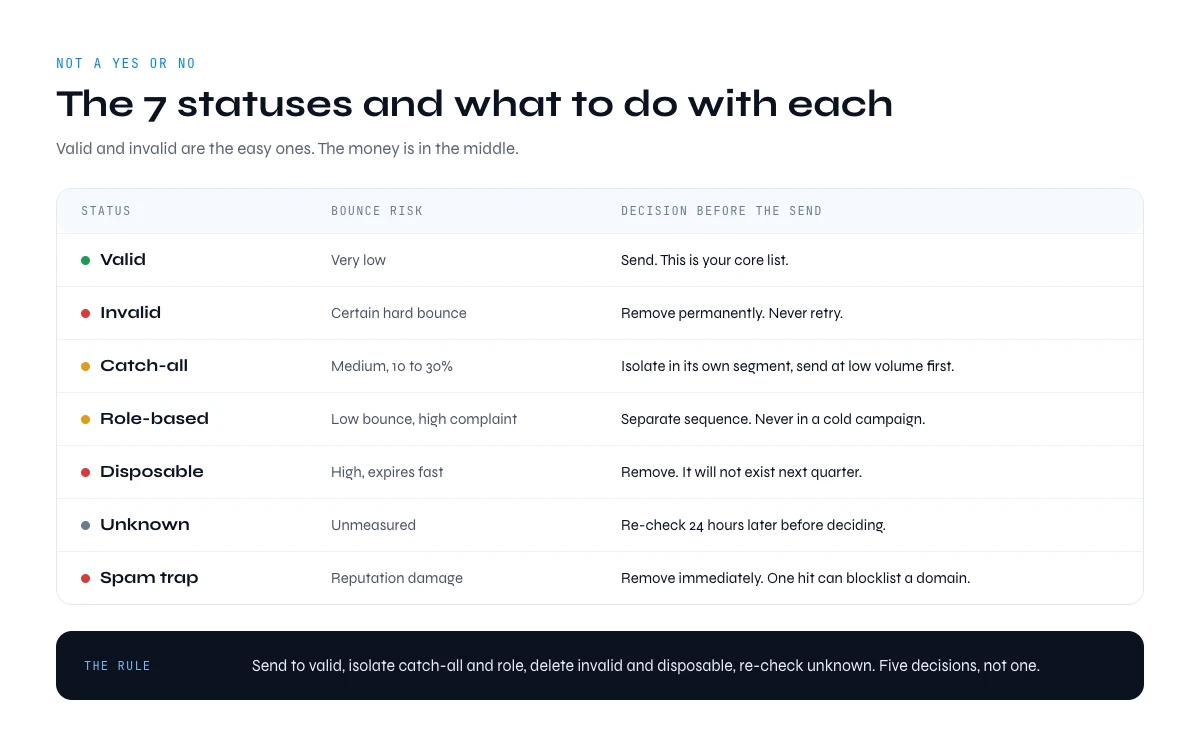
Email bounce checker results: the 7 statuses and what to do with each
Derrick Email Verification returns three statuses: valid, risky and invalid. The table below is the wider typology you will meet across tools, because every email bounce checker returns a status, not a yes or no. Valid and invalid are the easy ones. The money is in the middle: catch-all, role, disposable and unknown addresses each carry a different risk, and each deserves a different decision before your campaign goes out.
| Status | What the server told the checker | Bounce risk | What to do |
|---|---|---|---|
| Valid | The mailbox exists and accepts mail | Very low | Send. This is your core list. |
| Invalid | The mailbox or the domain does not exist | Certain hard bounce | Remove permanently. Never retry. |
| Catch-all (accept-all) | The domain accepts every address, so nothing can be confirmed | Medium | Isolate in a separate segment and send at low volume first. See how catch-all domains work. |
| Role-based | Generic inbox: contact@, sales@, info@, support@ | Low bounce, high complaint | Route to a separate sequence. Never in a cold campaign. |
| Disposable | Temporary or burner domain | High, expires fast | Remove. It will not exist next quarter. |
| Unknown | The server timed out, greylisted or refused to answer | Unmeasured | Re-check 24 hours later before deciding. |
| Spam trap suspicion | Address matches recycled or honeypot patterns | Reputation damage | Remove immediately. One hit can blocklist a domain. |
The practical rule: send to valid, isolate catch-all and role, delete invalid and disposable, and re-check unknown. A list that goes out with those five decisions applied behaves very differently from a list that only had the invalid addresses stripped out.
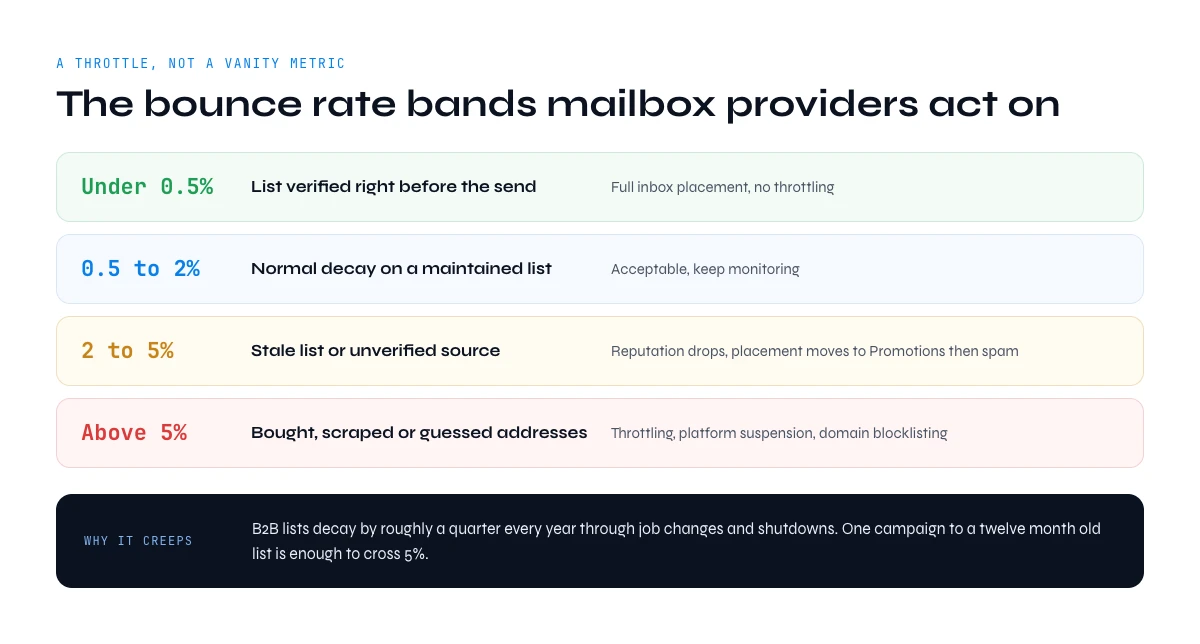
Bounce rate thresholds an email bounce checker keeps you inside
A bounce rate is not a vanity metric, it is a throttle. Mailbox providers read it as a signal that you do not know your own audience, and they act on it long before they tell you. These are the operational bands used by senders who never get filtered.
| Bounce rate | What it signals | Consequence |
|---|---|---|
| Under 0.5% | List verified right before the send | Full inbox placement, no throttling |
| 0.5% to 2% | Normal decay on a maintained list | Acceptable, keep monitoring |
| 2% to 5% | Stale list or unverified source | Reputation drops, placement moves to Promotions then spam |
| Above 5% | Bought, scraped or guessed addresses | Throttling, sending platform suspension, domain blocklisting |
This creeps up on people. B2B lists decay through job changes and company shutdowns, and a single campaign to a twelve month old list can be enough to cross 5%. That is the entire argument for running an email bounce checker as a step in the workflow rather than as a rescue operation.
How to read a bounce message: the SMTP codes an email bounce checker predicts
When a message fails, the receiving server answers with a numeric code. Codes starting with 5 are permanent, codes starting with 4 are temporary. Reading them tells you whether an address is dead or simply unavailable, which is exactly the call an email bounce checker makes for you before the send.
| Code | Meaning | Bounce type | Action |
|---|---|---|---|
| 550 5.1.1 | Mailbox unavailable, user unknown | Hard | Suppress permanently |
| 550 5.4.1 | Recipient address rejected by policy | Hard | Suppress permanently |
| 553 | Address syntactically invalid or relaying denied | Hard | Fix or suppress |
| 552 | Mailbox full, quota exceeded | Soft | Retry, suppress after 3 attempts |
| 451 4.7.1 | Greylisting, try again later | Soft | Automatic retry, no action needed |
| 421 | Service unavailable, connection throttled | Soft | Slow your sending rate |
| 554 | Transaction failed, often reputation or content | Policy | Check authentication and content, not the address |
A 554 is the one people misread. It is not the recipient telling you the address is wrong, it is the receiving server telling you it does not trust the sender. No amount of list cleaning fixes that one: check SPF, DKIM and DMARC first.
Email bounce checker estimator: your bounce risk and what verification costs
Before you clean anything, it helps to see the size of the problem. Pick the age and the origin of your list, enter how many addresses it holds, and the estimator returns the bounce band you should expect, how many addresses are likely to be dead, and what a full verification pass costs in Derrick credits.
Bounce risk and verification cost
A rough estimate of ours based on list age and origin, not a measurement. Verification itself returns the real answer, address by address.
Answer the three questions to see your estimated bounce band.
Two things usually surprise people running this for the first time. The undeliverable count on a year-old list is far higher than expected, and the cost of checking it is far lower than the cost of one throttled domain. Verification is the cheapest line in the entire outbound budget.
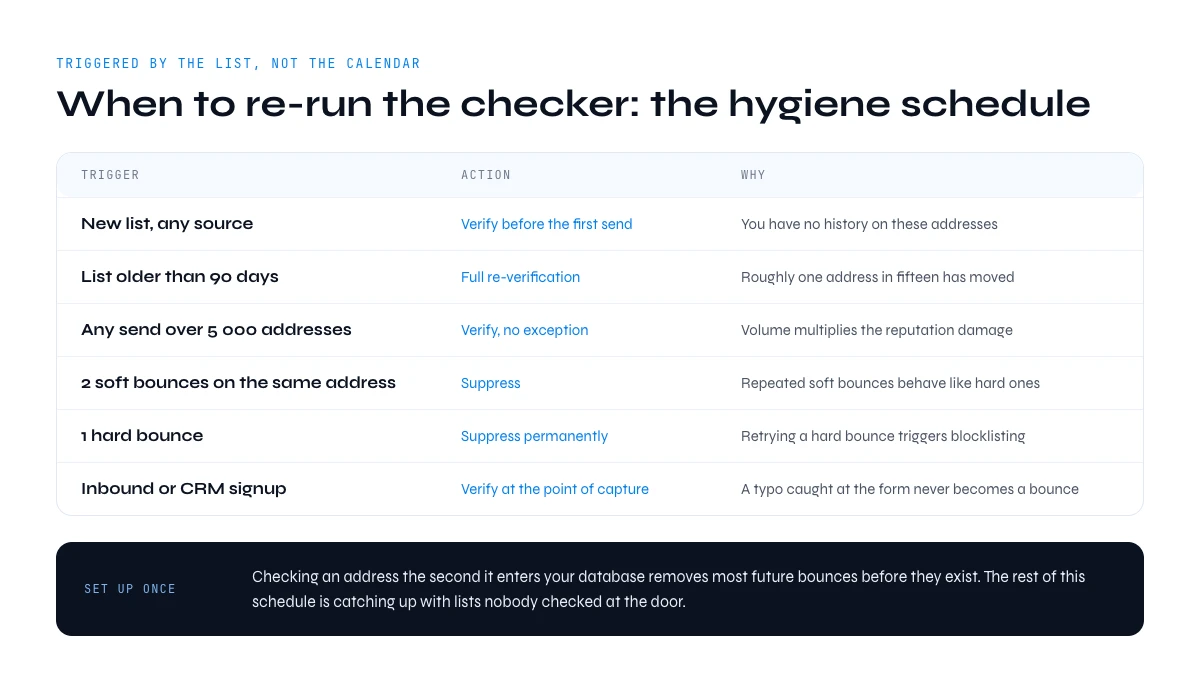
When to re-run your email bounce checker: the list hygiene schedule
Verification is not a one-off cleanup, it is a recurring step with a predictable cadence. This is the schedule used by teams that never see a bounce spike, mapped to the moment the list changes rather than to a calendar reminder.
| Trigger | Action | Why |
|---|---|---|
| New list, any source | Verify before the first send | You have no history on these addresses |
| List older than 90 days | Full re-verification | People and domains have moved since the last check |
| Before any send over 5 000 addresses | Verify, no exception | Volume multiplies the reputation damage |
| After 2 soft bounces on the same address | Suppress | Repeated soft bounces behave like hard ones |
| After 1 hard bounce | Suppress permanently | Retrying a hard bounce is what triggers blocklisting |
| Continuous inbound or CRM signup | Verify at the point of capture | A typo caught at the form never becomes a bounce |
The capture-time case is worth setting up once. Checking an address the second it enters your database, through real-time email verification, removes the majority of future bounces before they exist. Everything else in this schedule is catching up with lists that were never checked at the door.
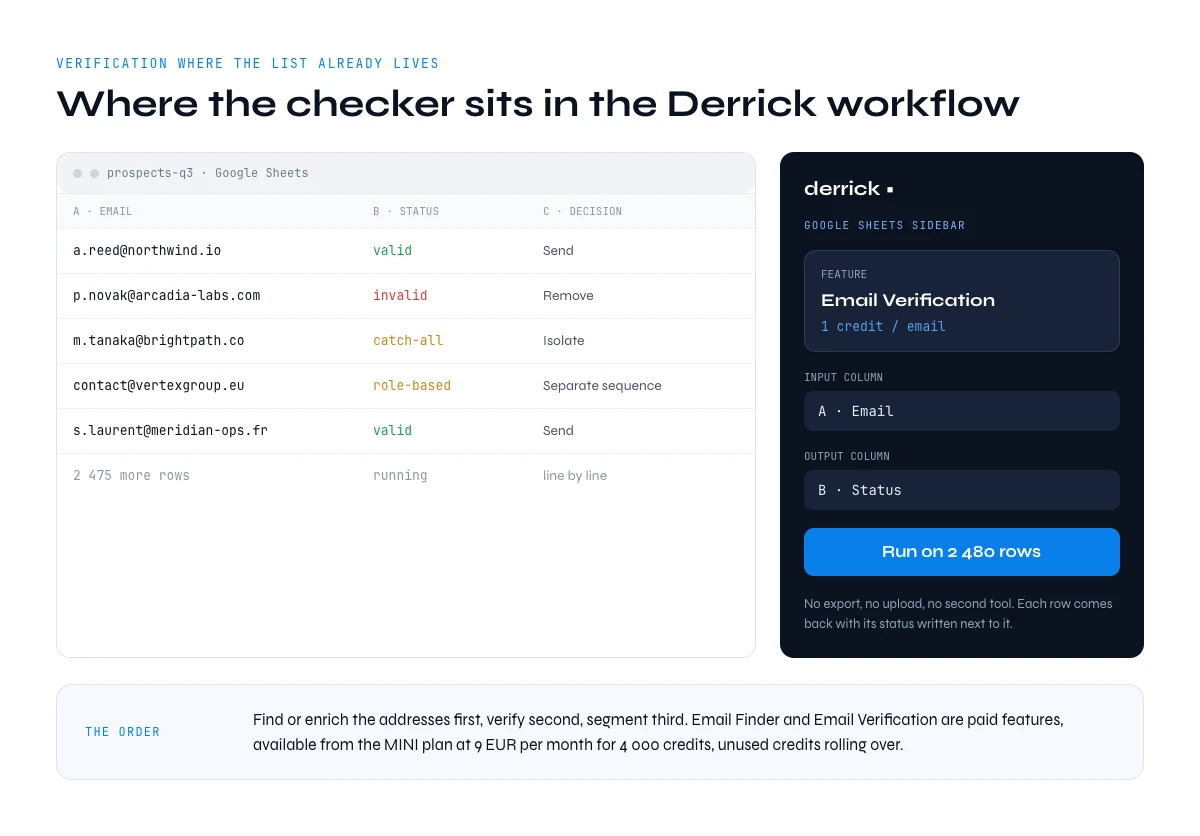
Where an email bounce checker sits in the Derrick workflow
Derrick runs in its web app, and also as a Google Sheets sidebar, so verification happens on the sheet your list already lives in. You map the column that holds the addresses, run Email Verification at 1 credit per address checked, and each row comes back with its status written next to it.
Email Verification is for lists that did not come out of Email Finder: an import, an old CRM, a trade show, an export from elsewhere. Addresses found by Email Finder are already verified, so they do not need a second pass. If you are still building the list, the valid email address workflow covers the finding step. Email Finder and Email Verification are both paid features, available from the STANDARD plan at 20 EUR per month for 10,000 credits, and unused credits never expire while you stay on a paid plan.
Key takeaways
- A bounce email checker verifies validity BEFORE you hit send, protecting your sender reputation with Gmail, Outlook, and the rest.
- Hard bounces (invalid addresses) get deleted immediately. Soft bounces (temporary errors) get retried after 24-48h.
- Bounce rate above 2% is problematic. Above 5%, blacklisting risk. High performers stay below 1%.
- Verify before any new list import, before important campaigns, and at minimum every 3 months for active lists.
- The free check at the top of this page catches bad formats, typos, disposable and generic addresses. Derrick Email Verification confirms the mailbox on a whole list, in the web app or in Google Sheets, from the STANDARD plan.
Conclusion: protect your reputation before it's too late
Every bouncing email erodes your sender reputation. Left alone, a high bounce rate today pushes more of your sends into spam in the following months. Preventive verification with a bounce email checker isn't optional - it's the price of admission for any team that depends on email.
Frequently asked questions
Can I check if an email will bounce for free?
How can I check if an email will bounce before sending it?
What is an acceptable bounce rate for an email campaign?
What's the difference between a hard bounce and a soft bounce?
How much does email verification cost?
How many emails can I verify at once?
Is it safe to use a free email bounce checker?
What does a catch-all result from an email bounce checker mean?
Keep reading
Continue exploring this cluster


Lead Email Finder: The Complete Guide to Finding Your Prospects' Emails
Read →

How to Find a Company Website: Complete 2026 Guide
Read →

Find Company Name & Website from Email: 4 Methods (2026, Tested)
Read →

Valid Email Finder: How to Find and Verify Valid Professional Emails
Read →