SPF Record Lookup
Enter a domain to run an SPF lookup: the tool reads the SPF record the domain actually publishes, lists each mechanism, counts the DNS lookups against the limit of 10 and flags what breaks the record. You can also paste a record to check it before you publish it.
SPF record lookup
Enter a domain to read the SPF record it publishes, or paste a record to analyse it offline.
Enter a domain, or paste a record, then press the button.
The domain lookup queries Cloudflare's public DNS resolver from your browser. Nothing is sent to Derrick and nothing is stored. A pasted record is analysed offline.

At scale
derrick •
SPF is ready: now check the addresses you send to
A clean SPF record protects your domain, but bounces from bad addresses still hurt it. In the Derrick web app, Email Verification checks a whole list before you send, at 1 credit per verified email. It is available on paid plans, from the Standard plan at €20 per month.
- Web app: nothing to install, no credit card
- Free plan: 100 credits every month
- API and MCP from the Plus plan (€47.50/month)
Install the add-on and enrich your lists without leaving your spreadsheet.
Install in Google Sheets →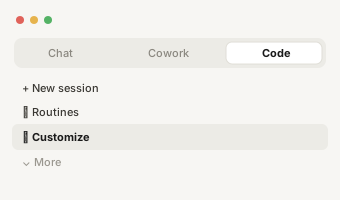
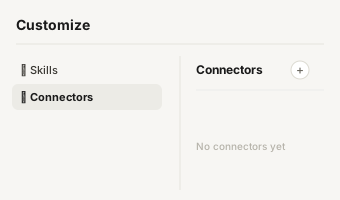
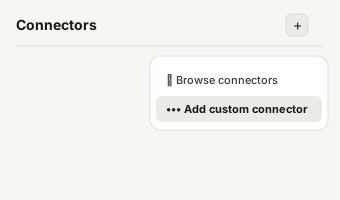
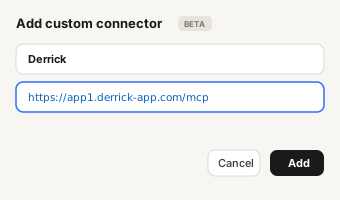
https://app1.derrick-app.com/mcp Call the same enrichment endpoints straight from your own stack or workflow.
Read the API docs →
What is an SPF record lookup
What is an SPF record lookup?
An SPF record lookup (or SPF lookup) is a DNS query for the TXT record that starts with v=spf1 on a domain. That record is the list of servers allowed to send email for the domain. When a message arrives, the receiving server runs the same SPF record lookup, compares the sending server with the list, and applies the policy at the end of the record if the sender is not on it.
The word "lookup" has a second meaning in SPF, and it matters just as much. Some mechanisms in the record (include, a, mx, ptr, exists, redirect) force the receiver to run another DNS query to evaluate them. RFC 7208 caps those queries at 10 per check. Past 10, the receiver stops and returns a permanent error, and your SPF counts as absent. This SPF checker counts them for you.

Two ways to use this SPF rec
Two ways to use this SPF record lookup
- Look up a domain. Type the domain (example.com, without https or www) and the tool reads the record published right now, from your browser, through a public DNS resolver. Use it to audit your own domain, or to see what a sending service publishes before you add it.
- Paste a record. Paste the value you are about to publish, with or without quotes. Nothing leaves your browser. Use it to check a record before it goes live, since a bad SPF record is invisible until mail starts landing in spam.
Tip: you can run the lookup on an include value too. Type _spf.google.com to see the record Google publishes behind its include, and how many lookups it adds.

Reading your SPF record look
Reading your SPF record lookup result
The result comes in four blocks, in the order a receiving server would care about them.
- Problems to fix. Only structural issues: more than 10 lookups, a
+allpolicy, no policy at all, a deprecatedptr, the same mechanism twice, mechanisms written afterall(they are never read), or a pasted value longer than 255 characters that is not split into several strings. - DNS lookups written in the record. The count at the first level. Each
includepoints to another record that can contain more includes, so the real total can be higher: treat this number as a floor, and look up each include to see its own cost. - Policy. What happens to mail from a server that is not listed:
-allrejects it,~allaccepts it but marks it,?alldecides nothing,+alllets anyone send as you. - Mechanisms, in order. Each mechanism with the lookup it costs.
ip4andip6cost nothing, which is why moving a stable sender from an include to its IP ranges is the usual first fix.
If the tool finds two records starting with v=spf1 on the same domain, it stops there: two SPF records invalidate each other, and the only fix is to merge them into one.

Common include values and wh
Common include values and what they cost
Most records are built from the include values that mail providers document. Here are the two most common, with what they cost in DNS lookups when we read them on October 19, 2026.
| Mail provider | Include to add | Lookups (Oct. 2026) |
|---|---|---|
| Google Workspace | include:_spf.google.com | 1 (the record behind it lists IP ranges only) |
| Microsoft 365 | include:spf.protection.outlook.com | 1 (the record behind it lists IP ranges only) |
Providers change these records without notice. Before you rely on a number, run the lookup on the include itself: the tool shows what it costs today. Every sending tool you add (a cold email platform, a CRM, a support desk) usually brings its own include, and that is how outreach setups hit the limit of 10 faster than a single mailbox does.
When a record is over the limit, flattening (replacing includes with the IP ranges behind them) looks like the easy fix, but the ranges change and a flattened record goes stale silently. The SPF record check guide explains when to flatten, and the other ways to get back under 10.

Need a new record rather tha
Need a new record rather than a check?
To write a record from scratch, use our SPF record generator: pick your senders and copy a record that counts its own lookups. This page reads and checks a record. To understand each mechanism in depth, the ten lookup limit and the fixes, read the SPF record check guide. SPF is one of three authentication layers with DKIM and DMARC; the cold email guide shows how they fit together before a campaign.