SPF Record Generator
This free SPF record generator builds the TXT record that lists who may send email for your domain. Tick your mail provider, add the services and IP addresses that send for you, choose a policy, and copy a record that counts its own DNS lookups against the limit of 10.
SPF record generator
Tick what sends mail for your domain, add your services, pick a policy: the record builds as you type. Nothing is sent.
Your domain (optional)
Common mail providers
Other includes, one per line
IP addresses or ranges, one per line (IPv4 or IPv6)
Redirect to another domain's record (optional)
Policy for everything else
Built in your browser from what you enter. Nothing is sent and nothing is stored.

At scale
derrick •
SPF is set: now check the addresses you send to
A clean SPF record protects your domain, but bounces from bad addresses still hurt it. In the Derrick web app, Email Verification checks a whole list before you send, at 1 credit per verified email. It is available on paid plans, from the Standard plan at €20 per month.
- Web app: nothing to install, no credit card
- Free plan: 100 credits every month
- API and MCP from the Plus plan (€47.50/month)
Install the add-on and enrich your lists without leaving your spreadsheet.
Install in Google Sheets →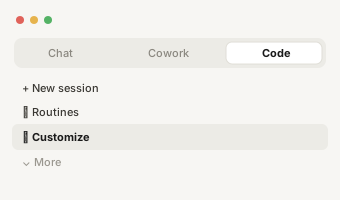
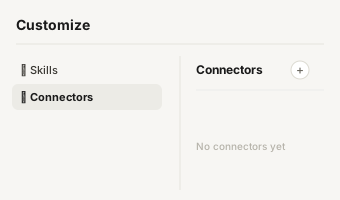
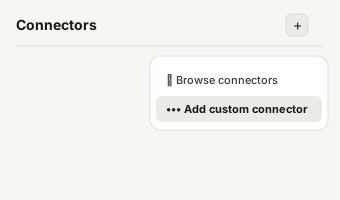
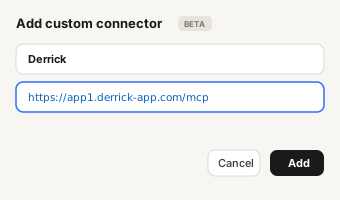
https://app1.derrick-app.com/mcp Call the same enrichment endpoints straight from your own stack or workflow.
Read the API docs →
How to use the SPF record ge
How to use the SPF record generator
- List who sends for you. Your mail provider (Google Workspace or Microsoft 365), then every service that sends email with your domain in the From address: cold email platform, CRM, newsletter tool, support desk, invoicing. Each one documents the include value or the IP addresses to add.
- Pick a policy.
~allwhile you test, then-allonce you are sure every legitimate sender is listed. - Read the lookup count before you copy. Under 10 at the first level is the minimum; each include can add more once its own record is read.
The generator runs in your browser and never queries DNS, which is why it counts lookups at the first level only and says so.

After the SPF record generat
After the SPF record generator: publish your record
An SPF record does nothing until it is published in your DNS zone. Three steps, whatever your DNS provider:
- Create a TXT record, or edit the existing one that starts with
v=spf1. - Set the host (or name) to
@, which means the domain itself. - Paste the generated record as the value, save, and allow up to 48 hours for the change to reach every resolver.
Then check what is actually live with our SPF record lookup: it reads the published record and counts its lookups. One rule matters more than any other here: a domain can have only one SPF record. If one already exists, replace it; two records starting with v=spf1 invalidate each other.

How to create an SPF record
How to create an SPF record: what each part costs
Every SPF record is the prefix v=spf1, a list of mechanisms, and a final policy. Some mechanisms force the receiving server to run an extra DNS query, and RFC 7208 caps those queries at 10 per check.
| Mechanism | What it authorises | DNS lookups |
|---|---|---|
include: | The senders listed in another domain's SPF record (a provider or a tool) | 1, plus what that record contains |
a | The servers the domain's A record points to | 1 |
mx | The domain's mail servers | 1 |
ip4: / ip6: | An address or a range, written out | 0 |
redirect= | Another domain's whole record, including its policy | 1 |
~all / -all | The policy for everyone else | 0 |
Google Workspace and Microsoft 365 each cost 1 lookup today, because the records behind their includes list IP ranges only (read on October 19, 2026). Outreach stacks are where the count climbs: every sending tool brings its own include, and some of them chain several more.

When the SPF record generato
When the SPF record generator shows more than 10 lookups
A record over the limit makes receivers return a permanent error, and your SPF then counts as absent: no bounce tells you. Four ways back under 10, from the safest:
- Remove senders you no longer use. Old tools often stay in the record for years.
- Move a sender to a subdomain (for example
mail.example.com) with its own SPF record, so its include stops counting against the main domain. - Replace an include with the IP ranges it lists, only for a sender whose ranges rarely change:
ip4andip6cost no lookup. - Drop
aormxif those servers do not send mail.
The SPF record check guide covers each mechanism in depth and when flattening a record is worth the risk.

~all or -all
~all or -all: which policy to choose
~all (softfail) tells receivers that mail from an unlisted server is suspicious but should not be refused outright. -all (fail) asks them to reject it. Start with ~all, watch your DMARC reports or your delivery for a few weeks to be sure no legitimate sender is missing, then move to -all. A domain that never sends mail should publish v=spf1 -all on its own: the generator gives you that record when no sender is selected.