
SPF record check: how to read yours, and the ceiling that breaks it
Check and generate an SPF record: run an SPF record check in your browser, count DNS lookups against the limit of ten, and fix what receivers ignore.


SPF record check: what the result actually tells you
An SPF record check reads the TXT record published on your domain and tells you which servers you have authorised to send email as you. It answers one question, narrowly: is this sender on the list. It does not tell you whether your email reaches an inbox, and the gap between those two things is where most outreach setups quietly fail.
Most checkers hand you a green tick and stop. The three things that actually break a sending domain are further down: the ten DNS lookup ceiling, a policy that authorises everyone, and a record that was correct until you added a third sending tool. This page covers the check, then those three, from the position of someone running cold outreach rather than administering a corporate mail server. It sits in our wider cold email cluster.
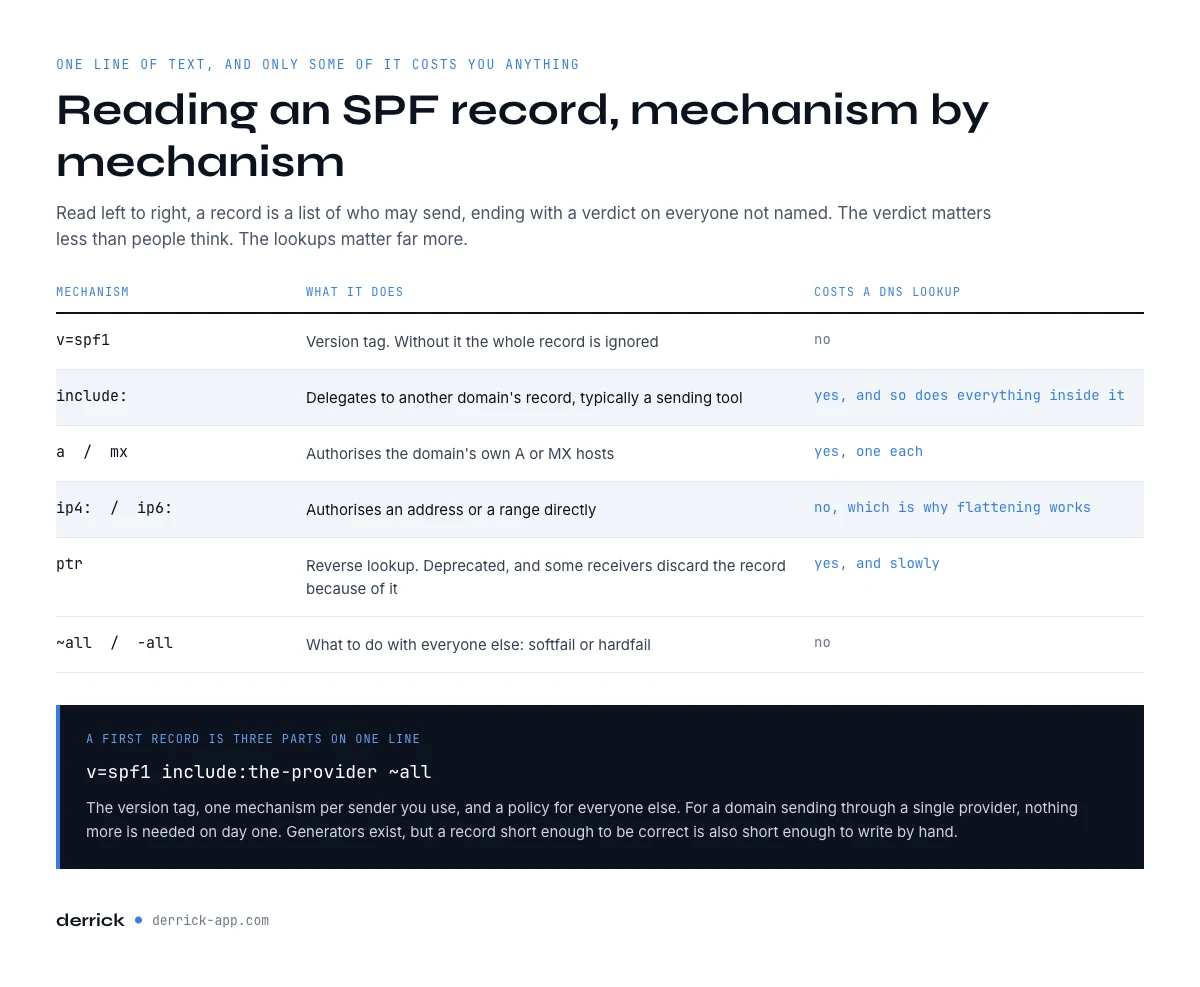
How to read an SPF record, mechanism by mechanism
A record is one line of text. Every element is a mechanism, and the ones that force the receiving server to make another DNS query are the ones that carry a cost.
| Mechanism | What it does | Costs a DNS lookup |
|---|---|---|
v=spf1 | Version tag. Without it the whole record is ignored | No |
include: | Delegates to another domain's record, typically a sending tool | Yes, and so does everything inside it |
a / mx | Authorises the domain's own A or MX hosts | Yes, one each |
ip4: / ip6: | Authorises an address or range directly | No, which is why flattening works |
ptr | Reverse lookup. Deprecated, some receivers discard the record | Yes, and slowly |
~all / -all | What to do with everyone else: softfail or hardfail | No |
If you are setting this up from scratch rather than repairing it, the once per domain controls cover the order to do it in. Read left to right, the record is a list of who may send, ending with a verdict on everyone not named. The verdict matters less than people think and the lookups matter far more.
SPF record check: paste your record and count the lookups
The tools that do this are called an SPF checker, an SPF lookup or an SPF record checker, and they all read the same TXT record. Our free SPF record lookup below does both jobs of an SPF record check: enter a domain to read the SPF record it publishes today, or paste a draft record you have not published yet. It runs in your browser, counts the mechanisms that cost a DNS lookup, and flags the structural faults that make receivers ignore the SPF record.
SPF checker and record analyser
Paste the record published on your domain. Nothing leaves your browser.
If it flagged a problem, the two sections that follow explain what breaks and how to repair it, in the order that costs least. One honest limit first, and it is the important one: this counts the mechanisms written in your record. An include: resolves to another record that carries its own, so eight written mechanisms can be fifteen in practice. Treat the number as a floor.
Writing an SPF record from scratch
A first record is three parts on one line: the version tag, one mechanism per sender you use, and a policy for everyone else. For a domain sending through a single provider that is v=spf1 include:the-provider ~all, and nothing more is needed on day one.
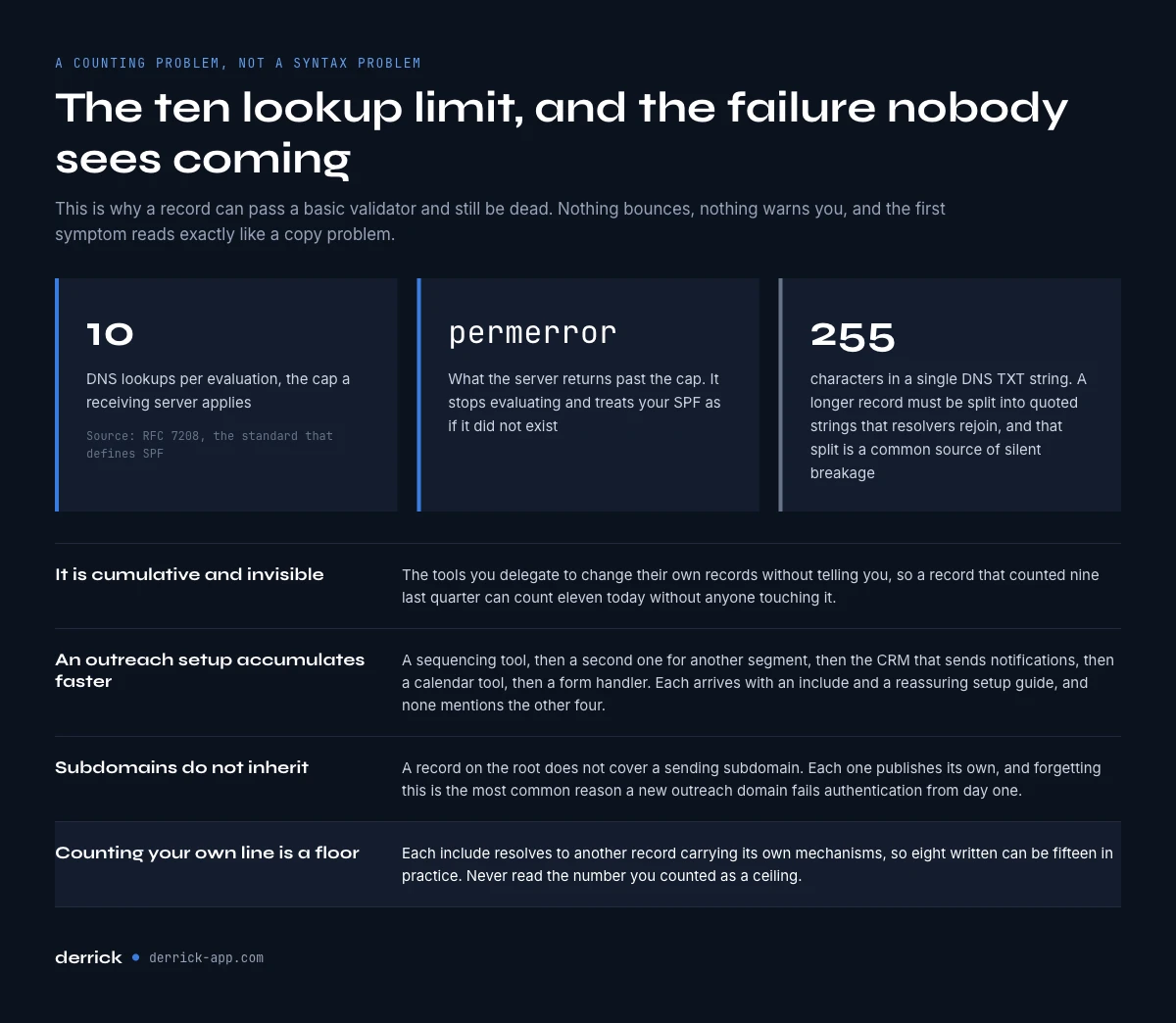
Two constraints govern what comes after. The record must fit in one DNS TXT string of 255 characters, and a longer one has to be split into several quoted strings that resolvers rejoin, which is a common source of records that break silently. And every sender you add later spends part of your lookup budget, so add them one at a time and re-check in between. A record short enough to be correct is also short enough to write by hand, but the SPF record generator below saves the syntax errors: tick your providers, add your senders, and copy an SPF record that counts its own lookups.
The ten DNS lookup limit, the failure nobody sees coming
The standard that defines SPF, RFC 7208, caps a receiving server at ten DNS lookups per evaluation. Go past it and the server returns permerror, which means it stops evaluating and treats your SPF as if it did not exist. Nothing bounces. Nothing warns you. Your authentication simply stops counting, and if you publish DMARC on top, the alignment it depends on quietly disappears.
This is a counting problem, not a syntax problem, which is why a record can pass a basic validator and still be dead. It is also cumulative and invisible: the tools you delegate to change their own records without telling you, so a record that counted nine last quarter can count eleven today without anyone touching it.
RFC 7208 sets a second, smaller limit that catches records nobody has cleaned in years: void lookups. A void lookup is a DNS query that returns nothing, typically an include: pointing to a tool you stopped paying for, whose domain no longer publishes an SPF record. Past two void lookups in one evaluation, receivers may return permerror as well. Removing dead includes fixes both limits at once.
Why an outreach setup breaks SPF faster than a corporate one
A company mail server usually resolves to one or two includes and stays there for years. An outreach setup accumulates. The sequencing tool, then a second one for a different segment, then the CRM that sends notifications, then a calendar tool, then a form handler. Each arrives with an include: and a reassuring setup guide, and none of them mentions the other four.
Three consequences worth planning for.
- The ceiling arrives without an event. No tool tells you that adding it took you from nine to eleven. The first symptom is a slow decline in placement, which reads exactly like a copy problem.
- A separate sending domain is the structural answer. Running outreach on its own domain keeps the primary record small, and gives each domain a lookup budget of its own. It also isolates reputation, which is the reason most teams do it anyway.
- Subdomains do not inherit. A record on the root does not cover
mail.example.com. Each sending subdomain publishes its own, and forgetting this is the most common reason a new outreach domain fails authentication from day one.
What an SPF record check does not tell you
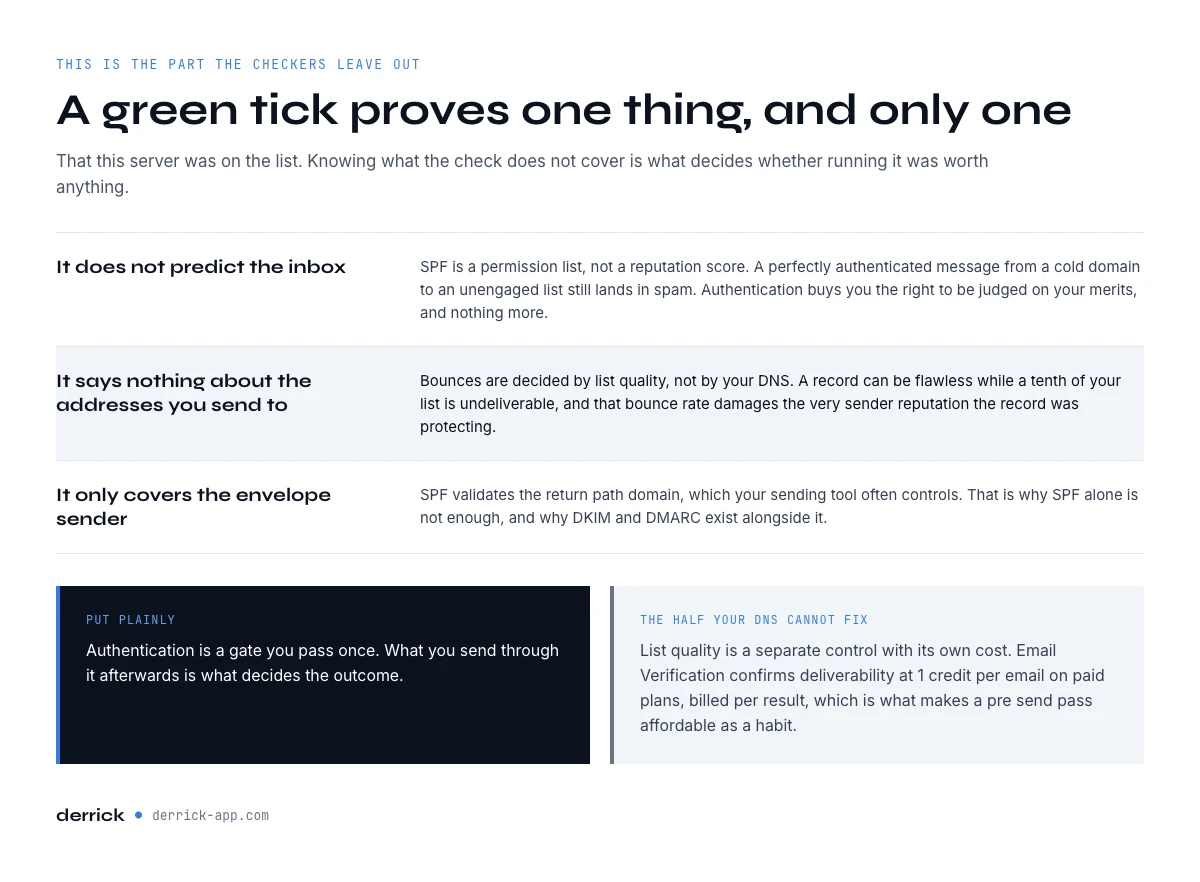
A passing SPF check proves one thing only: this server was on the list. It predicts nothing about the inbox, says nothing about the addresses you send to, and covers only the envelope sender. This is the part the tools leave out, and it decides whether the exercise was worth anything.
It does not predict the inbox. SPF is a permission list, not a reputation score. A perfectly authenticated message from a cold domain to an unengaged list still lands in spam. Authentication buys you the right to be judged on your merits, and nothing more.
It says nothing about the addresses you send to. Bounces are decided by list quality, not by your DNS. A record can be flawless while a tenth of your list is undeliverable, and that bounce rate damages the sender reputation your record was protecting.
It only covers the envelope sender. SPF validates the return-path domain, which your sending tool often controls. That is why SPF alone is not enough, and why DKIM and DMARC exist.
Put plainly, authentication is a gate you pass once. What you send to it afterwards is what decides the outcome, and that is the part covered in our guides on subject line formats and send timing.
Fixing a record that exceeds the limit
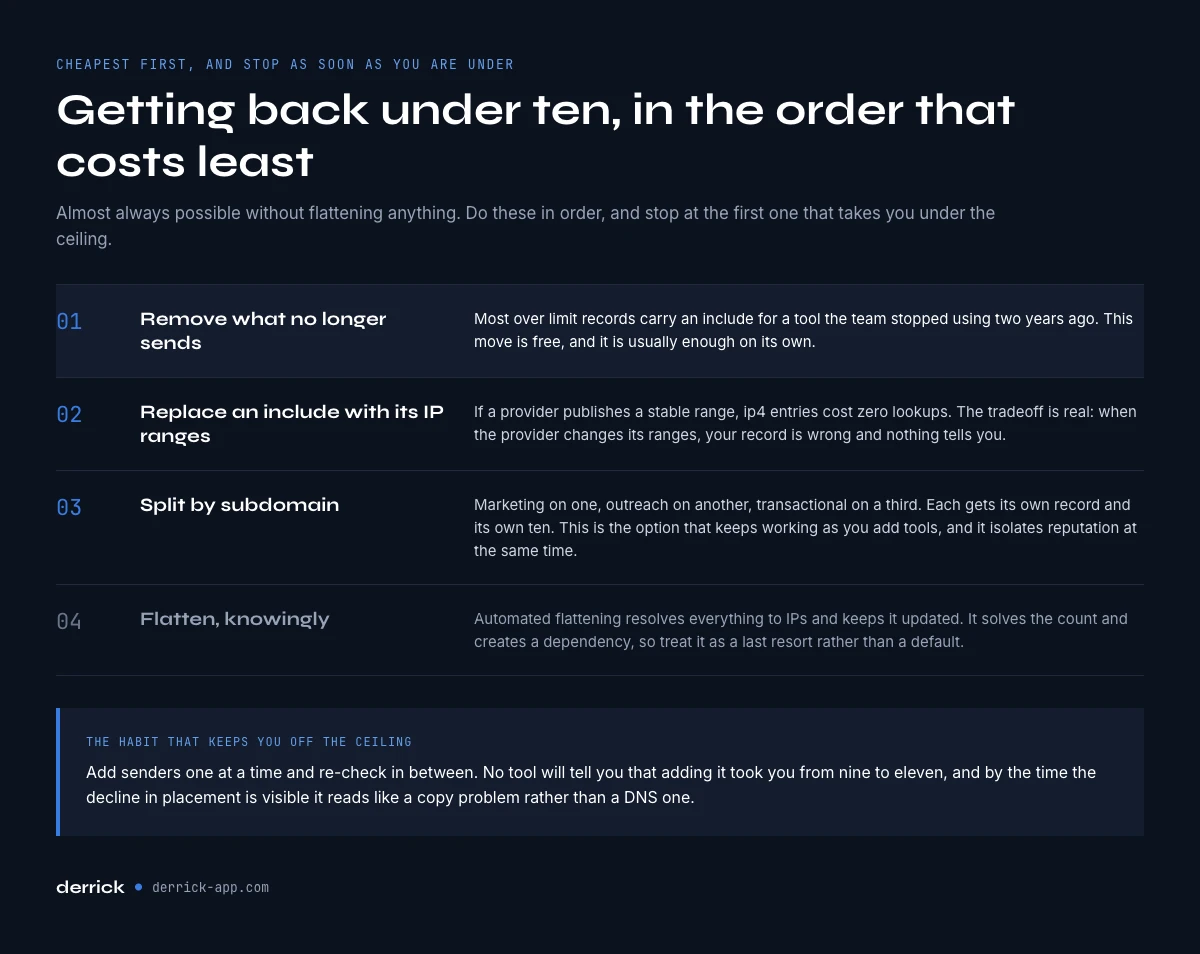
Getting back under ten is almost always possible without flattening anything. Four moves, cheapest first: do them in order and stop as soon as you are under the ceiling.
- Remove what no longer sends. Most over-limit records carry an include for a tool the team stopped using two years ago. This is free and it is usually enough.
- Replace an include with its IP ranges. If a provider publishes a stable range,
ip4:entries cost zero lookups. The tradeoff is real: when the provider changes its ranges, your record is wrong and nothing tells you. - Split by subdomain. Marketing on one subdomain, outreach on another, transactional on a third. Each gets its own record and its own ten. This is the option that keeps working as you add tools.
- Flatten, knowingly. Automated flattening resolves everything to IPs and keeps it updated. It solves the count and creates a dependency, so treat it as a last resort rather than a default.
Re-run the check after each move rather than at the end, so you know which one bought you the headroom. And if you have just moved outreach onto its own domain, the copy side starts again from scratch too: our six template formats assume a domain that already authenticates.
SPF, DKIM and DMARC: which one your check should cover
SPF alone is the most common half-finished setup in outreach. The three records do different jobs and only work as a set.
| Record | What it proves | What breaks without it |
|---|---|---|
| SPF | This server was allowed to send for this domain | Forwarding and unknown senders are indistinguishable |
| DKIM | The message was not altered and comes from the domain | SPF alone breaks on forwarded mail |
| DMARC | What receivers should do when the other two fail, plus reporting | You never find out that anything failed |
Start DMARC on the monitoring policy so the reports arrive before you enforce anything. The reports are also where a permerror surfaces on its own, without anyone thinking to go and look for it.
The SPF record check mistakes specific to outreach setups
- Publishing two SPF records. Two TXT records starting with
v=spf1invalidate each other. Merge them into one, always. - Leaving
+allafter a debugging session. It authorises the entire internet to send as you, which is worse than publishing nothing. - Jumping straight to
-all. Hardfail before your sender list is complete blocks your own legitimate mail. Sit on~alluntil the reports are clean. - Checking the root and assuming the subdomain. They are separate records. Check the exact domain in your return-path.
- Treating a green tick as a deliverability verdict. It is a permission check. The list you send to decides the rest.
Key takeaways
- An SPF record check tells you who may send as you, not whether you reach the inbox.
- The ten DNS lookup ceiling is the failure that arrives silently, and includes nest, so count conservatively.
- Outreach setups hit that ceiling faster because tools accumulate one include at a time.
- A separate sending domain, with its own record per subdomain, is the fix that keeps working.
~allwhile you are still adding senders,-allonce the list is stable, never+all.- SPF, DKIM and DMARC are one set. DMARC on monitoring is how a permerror becomes visible.
Once authentication is in order, the variable that still decides your bounce rate is the list itself, and that one is not a DNS problem. Derrick finds and verifies addresses from the web app, the Google Sheet, the AI assistant or the API where your list already lives, with Email Verification at 1 credit per email, billed only when a result comes back. Email Verification and Email Finder are on the paid plans, from the Standard plan at 20 EUR per month; the free plan and its 100 credits per month cover features such as Enrich Companies and Enrich Leads (both need your LinkedIn account connected through the Derrick Chrome extension), to try the enrichment side on a real batch first. Start with the free plan, or read the rest of the cold email cluster.
We also publish one email every 2 weeks with what we are measuring on cold outreach and data quality. Subscribe from the homepage.
Frequently asked questions
How do I check my SPF record?
What is the SPF 10 DNS lookup limit?
Why does my SPF record pass a validator but still fail?
Should I use ~all or -all?
Does a valid SPF record mean my emails reach the inbox?
What is the difference between an SPF checker, an SPF lookup and an SPF record generator?
How do I fix an SPF record that exceeds the lookup limit?
Do I need DKIM and DMARC as well as SPF?
Keep reading
Continue exploring this cluster


Cold Email Template: 6 B2B Formats and the Data Each One Needs
Read →

Cold Email Subject Lines: 20 Formats and the Data Each Needs
Read →

Email Deliverability Checklist: 15 Controls, Sorted by Cadence
Read →

Best Time to Send Cold Emails: What the Data Says (2026)
Read →

Cold Email Software: The 4 Layers Behind the Seat Price
Read → Cold Email All guides · 10 The complete Cold Email guide, and every article in it. →



Newsletter
New Cold Email guides, one email every 2 weeks.
Leaving? Drop your email and the next guides land straight in your inbox. No spam, no resale.
One email every 2 weeks. One-click unsubscribe.