Cold email generator: three emails from one real signal
Generate a cold email from a real signal with this free cold email generator: three variants, a subject line and one clear ask. No account needed.


This cold email generator starts from a signal: say what is happening at the prospect's company and get three short emails, free and without an account.
Write a cold email from a real signal
Pick what is happening at the prospect's company, fill the fields, get three variants with a subject line. It runs in your browser: nothing is sent or stored.
What is happening at their company?
What do you ask for?
Tone
Fill the fields and click generate.
How this cold email generator works
A cold email generator takes a handful of inputs and turns them into a message you can send. Most ask you to describe your product first. This one starts by asking what is going on at the account, because that fact decides which structure the email should follow and what the first line says.
There are four kinds of signal in the generator, and each one maps to a format:
| Signal you pick | Format the generator uses | What the opener says | Where the fact comes from |
|---|---|---|---|
| They are hiring | Hiring signal | The roles and where they are based | Careers page, job boards, LinkedIn jobs |
| They use a tool | Tech stack trigger | The tool the company runs | The company website's code and scripts |
| They were in the news | Funding or expansion event | The announcement itself | Press releases, news search |
| No signal | Direct ask | Who you are writing to and why, in one line | Their role and company only |
Those formats are the ones explained in the six B2B cold email templates, where each one is taken apart with the data it needs. The generator does not re-teach them. Here you give it the variables and it assembles the email.
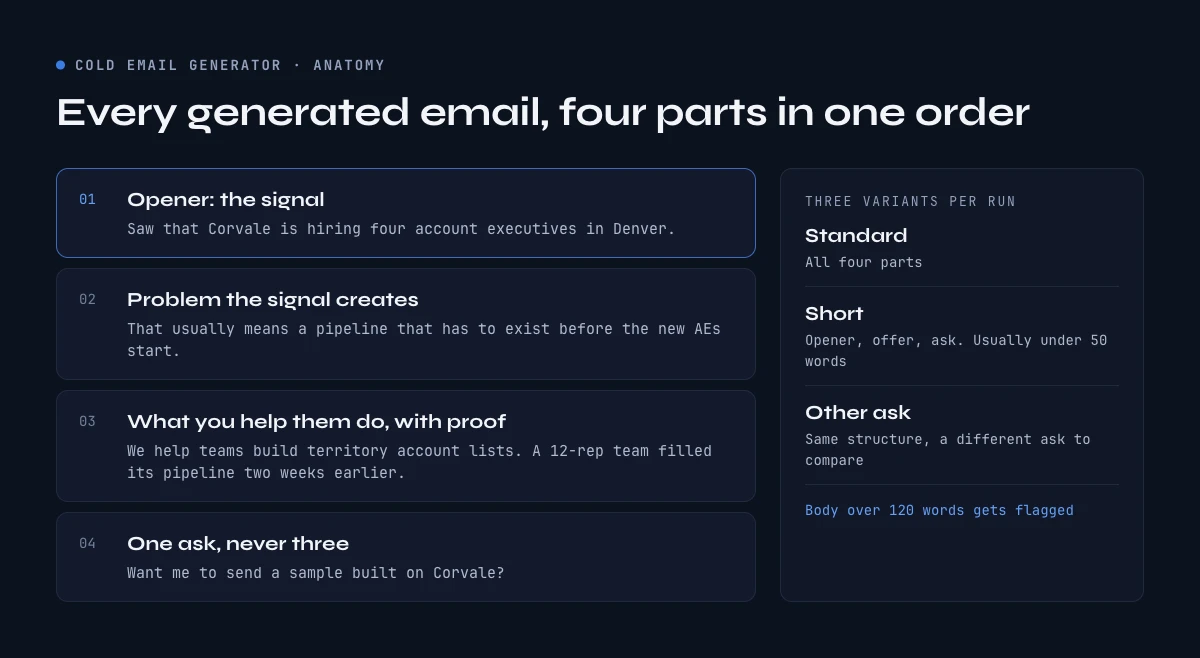
Every email it writes has the same four parts. An opener with the signal. A second sentence that names the problem the signal usually creates (yours, if you fill the problem field, or a neutral line if you do not). What you help them do, with a proof if you have one. Then one ask: a short call, a sample, or a question to find the right person. The tone switch changes the greeting and the sign-off; the warm version adds a line that takes the pressure off, the formal one a line of thanks.
You always get three variants, each with a label. Standard has all four parts. Short keeps the opener, the offer and the ask, usually under 50 words, for senior readers or a follow-up. Other ask keeps the full structure but swaps the ask for a different one, so you can compare "a call" with "who owns this". Each part has three wordings, and "Three new variants" moves through 27 combinations before any of them repeats. The word count sits above each variant and anything over 120 words gets flagged: the body of a first cold email reads best between 50 and 125 words, for the reasons laid out in the guide on how long a cold email should be.
Where the personalized line comes from: finding a real signal
Most cold email generators do not tell you where the personalization is supposed to come from. They ask for "details about the recipient" and leave it there. Yet that is the line the reader cares about most. So here is how to find each signal by hand for one account, and how to get it for a whole list.
1. The hiring signal: who they are recruiting and where
A company that is hiring tells you three things at once: it has budget, it has a plan, and some team is about to change the way it works. For most B2B offers, that is the best reason to write.
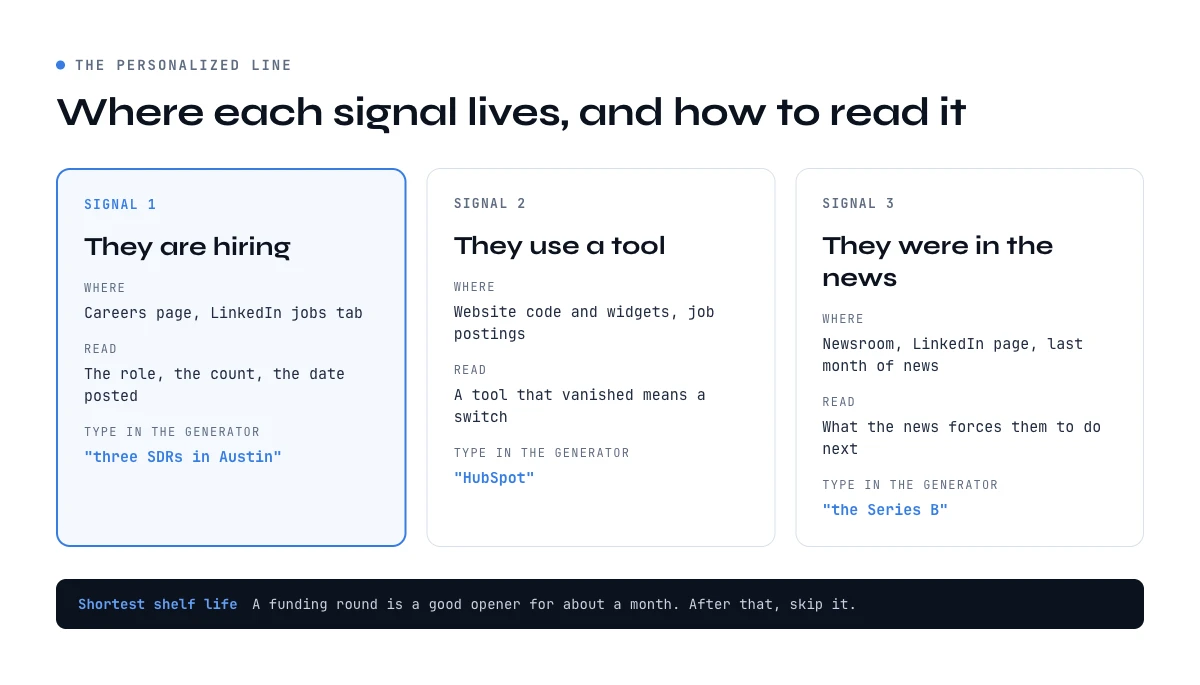
Where to see it. Start with the careers page, usually at /careers or /jobs on the company domain, or linked in the footer. Then check the jobs tab of the company's LinkedIn page, which often lists roles that the careers page does not.
How to read it. One opening means little. Three openings for the same role in the same city means a team is being built. Look at three things:
- The role. Sales reps, SDRs or account executives mean new pipeline targets. Data engineers mean a data project. A first RevOps hire means the tooling is about to be reviewed.
- The count. "Hiring four account executives in Denver" is a fact your opener can state. "Hiring" alone is not.
- The date. A job posted this week is a live signal. One posted five months ago and still open says something else: the role is hard to fill.
What to write in the generator. Put the role and the count in the detail field, as you would say it out loud: "three SDRs in Austin", "a first RevOps manager". The generator slots it into sentences like "Saw that Northwind is hiring three SDRs in Austin", so the phrase has to read naturally after "hiring".
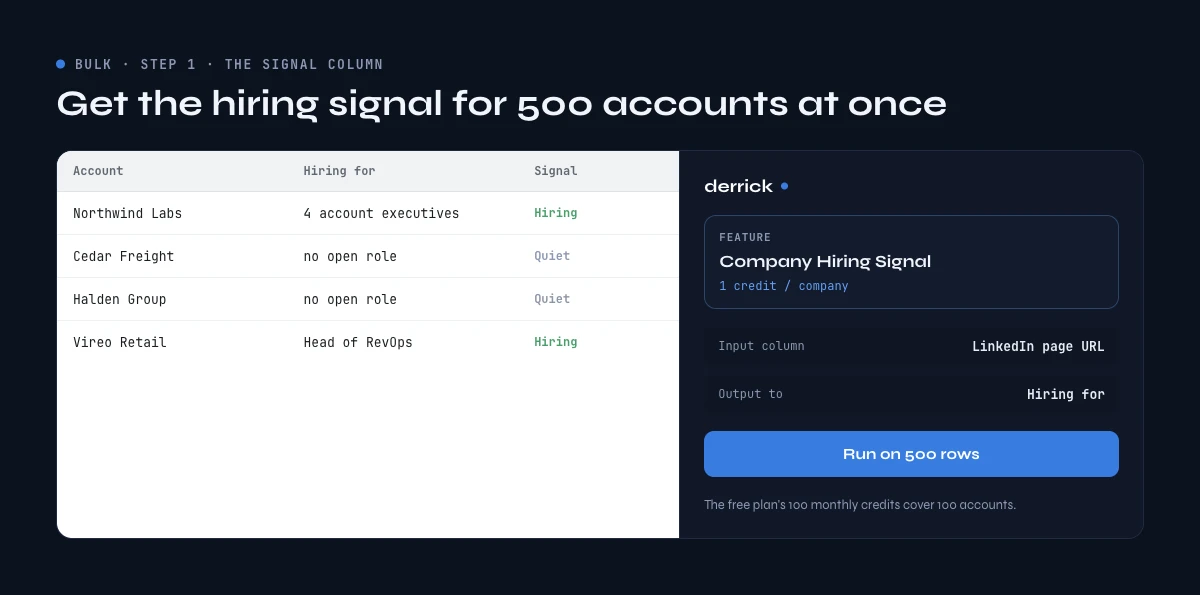
For a whole list. Checking careers pages one by one takes a few minutes per account, which is fine for ten accounts and impossible for five hundred. Company Hiring Signal in Derrick runs the check for every company in a list, from its LinkedIn company page URL and the LinkedIn job listings: a yes or no, the number of open roles and the job titles, at 1 credit per company, with no LinkedIn account needed. It is available on the free plan, so the 100 credits you get each month cover 100 accounts in the web app or the Google Sheets sidebar, as long as each row has the company's LinkedIn page URL.
2. The tech stack: what tool the company runs
The stack signal matters most when your offer plugs into, replaces or feeds a specific tool.
Where to see it. A company's website gives away a lot of its stack: the chat widget in the corner, the form that loads on the demo page, the analytics and tag scripts in the page code, the "powered by" line on the help center. Job postings are the other source. A posting that asks for "3 years of experience with a given CRM" tells you what the team uses every day.
How to read it. A tool on the website is a fact. A tool in a job posting is a fact plus a hint: the company is hiring people to run it, so it is not about to drop it. A tool that disappeared from the site since last quarter is the most interesting of all, because it means a switch happened.
What to write in the generator. The tool name alone works: "HubSpot", "a headless CMS". The generator writes "Saw that the company runs on HubSpot" or "Noticed HubSpot in their stack". Be careful with the second sentence here: without a problem written in the field, the stack format falls back on a neutral line, which is the weakest line the generator produces. Fill the problem field with the limit your offer fixes.
For a whole list. Website Technologies reads the technologies each website in your sheet runs, from its URL, at 2 credits per website. It is part of the paid plans, which start at 20 euros a month with 10,000 credits.
3. The news: funding, expansion, launch
News is the signal with the shortest shelf life. A funding round is a good opener for about a month. After that, everyone has written about it, including the other vendors in the same inbox.
Where to see it. The company's own newsroom or blog, its LinkedIn page, and a news search on the company name restricted to the last month. Look for a funding round, a new office or country, an acquisition, a product launch, a new executive.
How to read it. Ask what the news forces the company to do next. A Series B usually means hiring and bigger targets. A new country means sales and data to build on the ground, plus compliance questions. A launch means marketing wants pipeline for it. Your second sentence should name that consequence, not repeat the headline.
What to write in the generator. Phrase the news as a noun group that can follow "Congrats on": "the Series B", "the opening of the Madrid office".
For a whole list. Google News Scraper reads the company names in your sheet and adds the most relevant recent article for each one (title, link, publisher and date), for the period and language you choose, at 1 credit per news item found (a company with no news costs nothing), on the paid plans. Keep the period short: a stale headline is worse than none.
No signal? Use the direct ask, and say why you picked them
Sometimes there is nothing to find, or the account is in your target list for a structural reason: right size, right industry, right market. The generator then switches to the direct ask format, which opens on who you are writing to and why, in one sentence. It works, but it gives the reader less reason to answer than an email built on a fact, and the generator tells you so under the variants. If you do not have a clear picture of which accounts deserve an email at all, start with your ideal customer profile before you write anything.
Three emails from the cold email generator, annotated
These three emails were produced by the generator above, with invented companies and inputs, and copied as they came out (the Standard variant each time). The comments say what each line does and what you would change before sending.
Example 1: hiring signal, direct tone, sample as the ask
Inputs: Dana, Head of Sales at Corvale, hiring four account executives in Denver. Problem: a pipeline that has to exist before the new AEs start. Offer: build territory account lists with a named contact and a verified email. Proof: a 12-rep team filled its first-quarter pipeline two weeks earlier.
Subject: four account executives in Denver
Hi Dana,
Saw that Corvale is hiring four account executives in Denver. That usually means a pipeline that has to exist before the new AEs start.
We help teams build territory account lists with a named contact and a verified email. For example, a 12-rep team filled its first-quarter pipeline two weeks earlier.
Want me to send a sample built on Corvale?
Thanks,
[Your name]
- Subject line. The signal itself, in lowercase. It reads like an internal note, and Dana knows what it is about before opening. More formats are listed in the guide to cold email subject lines.
- Opener. A fact Dana can check in five seconds. No compliment, no "hope you are well".
- Second sentence. This is the line that earns the reply, because it names what Dana is probably thinking about. It came from the problem field.
- Offer and proof. One sentence each. The proof is a number from a similar team, which is what makes the offer believable.
- The ask. A sample is easy to accept: Dana gets something useful without committing to a call. If you are not sure Dana owns pipeline for the new hires, the Other ask variant closes on "Who owns this at Corvale?" instead.
Example 2: stack signal, warm tone, no problem and no proof
Inputs: Marc, RevOps Manager at Keelson Labs, runs HubSpot. Offer: keep CRM company records complete and current. Problem and proof left empty.
Subject: HubSpot at Keelson Labs
Hey Marc,
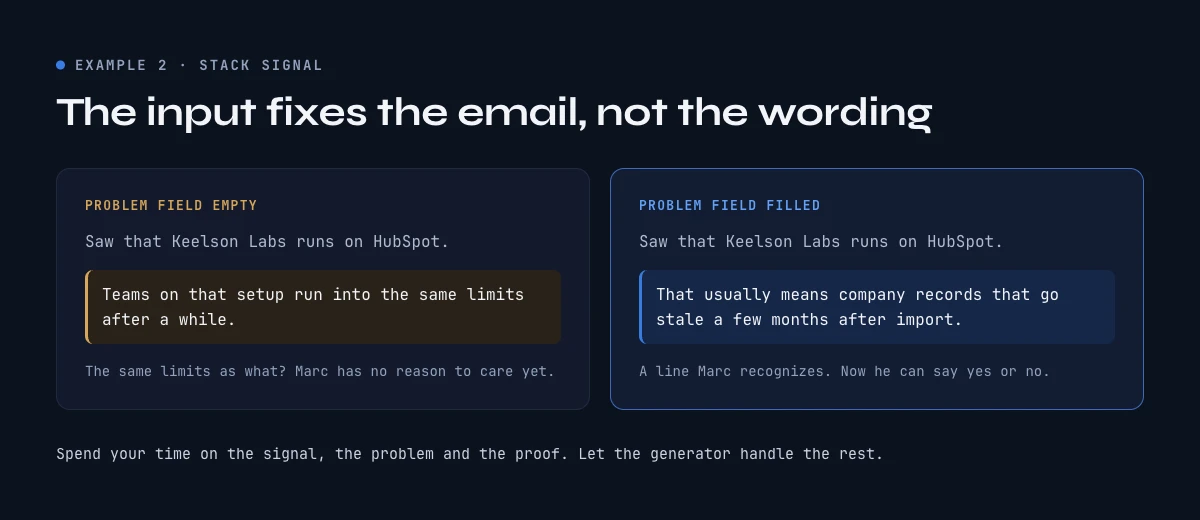
Saw that Keelson Labs runs on HubSpot. Teams on that setup run into the same limits after a while.
We help teams keep CRM company records complete and current.
Worth a 15-minute call next week? No worries if the timing is off.
Cheers,
[Your name]
- What works. Short (42 words), friendly, one ask, and the warm closing line lowers the stakes of saying no.
- What does not. The second sentence is filler. "The same limits" as what? With the problem field empty, the generator can only write a neutral line, and it warns you about it under the variants. Marc has no reason to care yet.
- The fix. Add a problem such as "company records that go stale a few months after import" and a proof. The same email then reads something like: "Saw that Keelson Labs runs on HubSpot. That usually means company records that go stale a few months after import." That is an email Marc can say yes or no to.
This example is here on purpose: a generator makes a weak email look finished, and only the input fixes it.
Example 3: no signal, formal tone, asking for the right person
Inputs: Priya, founder of Talvio. No signal. Offer: book first meetings while the founder still does the selling. Proof: two seed-stage teams booked 11 meetings each in their first month.
Subject: idea for Talvio
Hello Priya,
I'll keep this short. In your role, finding the right accounts often takes longer than writing to them.
We help teams book first meetings while the founder still does the selling. For example, two seed-stage teams booked 11 meetings each in their first month.
Are you the right person for this, or should I reach out to someone else? Thank you for your time.
Best regards,
[Your name]
- The ask. A question a founder can answer in one line, even if the answer is "me". That makes it a good first ask for a small company where roles overlap.
- The opener. Honest about being short, but it says nothing about Talvio. Any fact would beat it: a recent hire, a launch, a post from the founder.
- The proof. Carries the whole email. Without it, this would be a pitch to a stranger with no reason to read it.
Put the three side by side and the pattern is clear: the email with a real signal and a named problem is the only one that reads as if it was written for the person receiving it.
What a cold email generator does well, and what it cannot judge
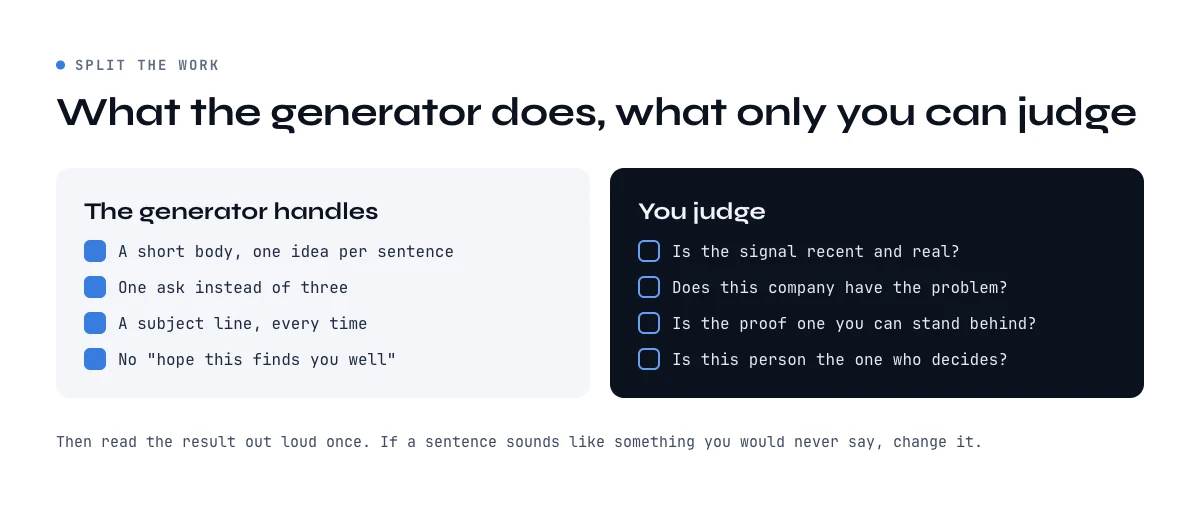
A cold email generator is good at the parts of writing that are mechanical. It keeps the email short. It puts one idea per sentence. It ends on one ask instead of three. It never opens with "I hope this email finds you well", and it never forgets the subject line.
What it cannot do is judge the input. It will happily write a perfect email around a signal that means nothing: a job posting from last year, a tool the company dropped, a funding round every competitor already congratulated them on. It does not know if the problem you typed is one this company actually has. And it cannot tell whether the person you are writing to is the one who decides.
That split gives a simple way to use it. Spend your time on the three inputs that need judgment: the signal, the problem, the proof. Let the generator handle the wording, then read the result out loud once. If a sentence sounds like something you would never say, change it.
One more thing it does not do: send. A good email to an address that does not exist is a bounce, and bounces hurt the domain that sends the next email. The email deliverability checklist covers what to check on the sending side before the first campaign goes out.
AI cold email generator or rule-based: why this one is not AI
Most tools ranking for this search call themselves an AI cold email generator. This one is rule-based, on purpose.
It is rule-based: each sentence comes from a set of written wordings, filled with your inputs and combined in a fixed order. That has four consequences.
- It never invents a fact. A language model asked to "personalize" an email with little input will fill the gap, sometimes with a congratulation on news that never happened. The generator only uses what you typed. If a field is empty, the sentence that needs it is left out, replaced by a neutral line or marked with a placeholder such as [Company], and a note tells you.
- It is predictable. The same inputs give the same three variants.
- It is free and private. No account, no API key, no limit. What you type stays in your browser tab.
- It does not scale by itself. One account at a time. That is the real limit, and the next section deals with it.
AI writing becomes the better tool when you have the signal for hundreds of accounts in a spreadsheet and want a first draft of the opener on every row. At that point the model is not guessing: it is rewriting facts that sit in the next column.
Generating cold emails in bulk: from one signal to 500 accounts
The generator above handles one account. For a list, the order of work stays the same (signal first, email second), but both steps run on every row at once. Here is how that looks with Derrick, on each of its three surfaces.
Step 1: get the signal in a column. Put your target companies in a list (pasted or imported into the Derrick web app, or in a Google Sheet), one per row, with their LinkedIn company page URL (Company Hiring Signal reads it from there) and their website (for Website Technologies). In the Derrick web app or its Google Sheets sidebar, run Company Hiring Signal (1 credit per company, free plan included), Website Technologies (2 credits per website) or Google News Scraper, which works from the company name (1 credit per news item found, a company with no news costs nothing). Each one writes its result in a new column next to the company.
Step 2: write the opener on every row. In the web app (Ask AI) or in Google Sheets, run Ask Claude on the same rows with a prompt that points at the signal column, for example "Write a one-line cold email opener for @Company based on @Hiring signal. State the fact, no compliment." Claude writes one opener per row of your list, at 2 credits per line. Ask Claude, like Website Technologies and Google News Scraper, is part of the paid plans (from 20 euros a month for 10,000 credits): the free plan's 100 credits cover the hiring check, not the AI writing.
From a chat, through the MCP. If you work in Claude, ChatGPT or another MCP client connected to Derrick, ask in plain words: check whether these companies are hiring (give it their LinkedIn page URLs), then write an opener for each from what you find. The hiring check is Derrick; the writing is done by the assistant you are talking to, on the result it just received. There is no Ask Claude step in this flow, and MCP access starts on the PLUS plan.
In a workflow, through the API. Through the REST API (also from the PLUS plan), your workflow calls the signal enrichment for each company and passes the result to the writing step it already has. With Zapier, Make or n8n in between, that can run every time a new account lands in your CRM.
Step 3: check before you send. Read a sample of the lines. Delete the rows where the signal is empty or too old rather than letting a vague opener through. If you want the full variable set in the sheet (first name, role, email, company fact), the cold email template guide shows how to fill it for a whole list.
Before you send what the generator wrote
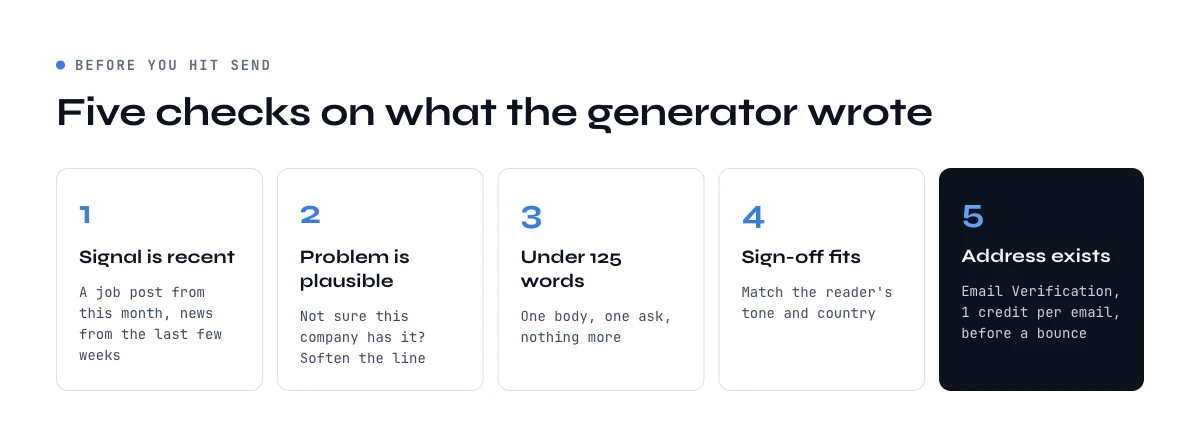
Run five checks. The signal is recent: a job posting from this month, news from the last few weeks, a tool that is on the site today. The problem in the second sentence is one this company could plausibly have; if you are not sure, soften it. The body stays under 125 words with one ask. The sign-off fits the reader, and the email sign-offs guide sorts them by tone and country. And the address exists: Email Verification checks each one before you send, at 1 credit per email, on the paid plans, which costs less than a bounce.
Where to go next
The generator is free and stays free. When you want the signal for more accounts than you can check by hand, Derrick does it from the web app, the Google Sheets sidebar, from Claude or ChatGPT through the MCP, or from your own workflows through the API, at every volume from ten rows to tens of thousands. Start with the free plan and its 100 credits a month, enough to run the hiring check on 100 accounts that have a LinkedIn company page URL.
The rest of the cold email guides cover deliverability, timing and copy. We also publish one edition every 2 weeks on what we measure in outreach and data quality: subscribe with the form in the middle of this page, or from the cold email guides page.
Frequently asked questions
Is this cold email generator free?
Is it an AI cold email generator?
What if I have no signal on the prospect?
Can I generate cold emails in bulk?
How long should a generated cold email be?
What makes a generated cold email get replies?
Does the generator send the email?
Keep reading
Continue exploring this cluster


Cold Email Template: 6 B2B Formats and the Data Each One Needs
Read →

Cold Email Subject Lines: 20 Formats and the Data Each Needs
Read →
Email Deliverability Checklist: 15 Controls, Sorted by Cadence
Read →

Best Time to Send Cold Emails: What the Data Says (2026)
Read →