Cold Email Subject Lines That Earn the Open, and the Data Behind Them
Discover the best cold email subject lines by use case: 36 ready examples, the data each one needs, and why replies, not open rate, decide which line wins.


A cold email subject line has one job: to buy the first sentence three more seconds of attention. It does not sell, it does not qualify, and it certainly does not compensate for a list that should never have been sent to. It decides whether the work you put into the body ever gets read.
Most collections of subject lines hand you fifty one liners and leave you to guess which one fits your situation. This guide does the opposite. It groups the formats by the trigger you actually hold, names the data each one needs before it can be written, shows how much of the line the inbox will really display, and explains why the metric everyone uses to test subject lines stopped being trustworthy in 2021. The order of operations for the whole channel lives in the cold email pillar guide: technical trust first, list quality second, copy third. Subject lines sit in the third layer, and they cannot rescue the first two.
What cold email subject lines are actually for
Open the inbox of anyone you are trying to reach and look at what they see before they decide. On a phone it is a sender name, a subject, and a fragment of preview text. That is the whole surface. Three signals, read in under a second, usually while walking.
Within that second the reader is not evaluating your offer. They are answering a much cruder question: is this addressed to me, or to a list I happen to be on? Everything that makes a subject line work is downstream of that question. Specificity reads as addressed. Category language reads as list.
This is why the advice to be "catchy" produces such poor results in B2B. A clever line signals effort spent on the line, which signals campaign, which signals list. A flat, oddly specific line signals someone who already knows something about the company. The second one wins, and it wins by being less impressive.
The practical test takes ten seconds. Read your subject line and ask whether it could have been sent, word for word, to any company in your market. If it could, it is doing no work. Every format below fails that test on purpose, because the variable is the message.
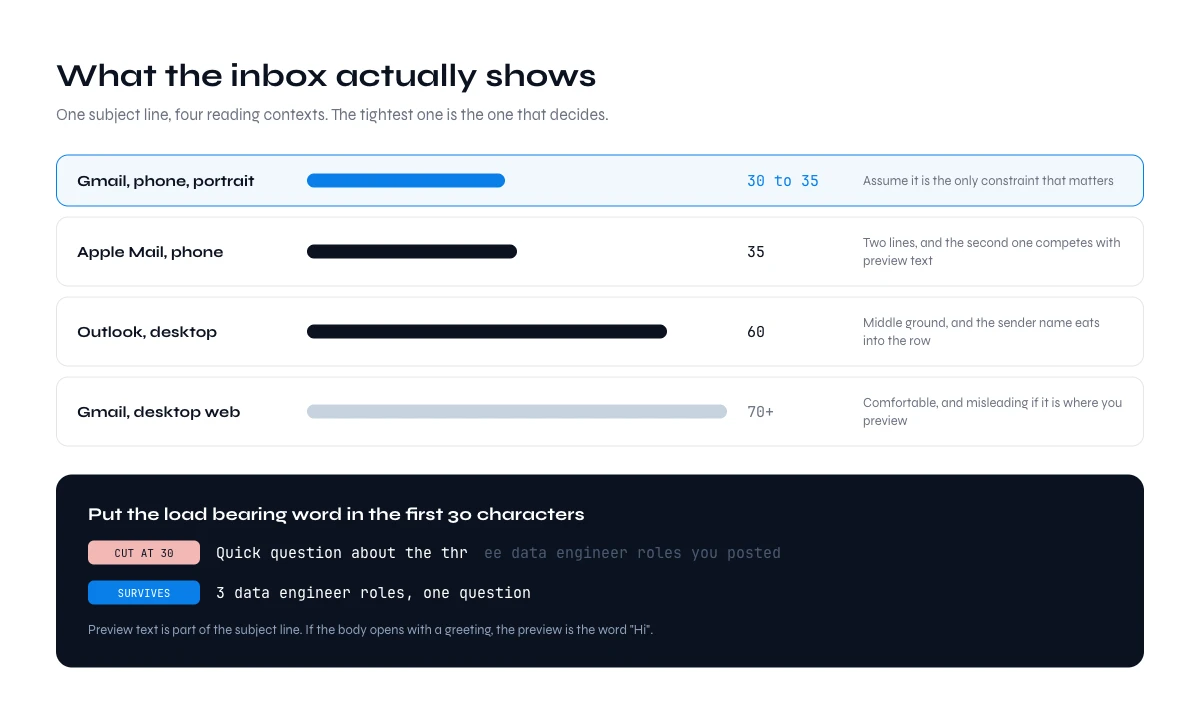
How much of your subject line the inbox will actually show
Length advice is usually given as a single number, which is how people end up with lines that survive on a laptop and get cut in half on a phone. The truncation point is not one number, it depends on the client and on the device, and the safe zone is narrower than most guides admit.
| Where it is read | Roughly what fits | What this means in practice |
|---|---|---|
| Gmail, phone, portrait | About 30 to 35 characters | The tightest constraint you have. Assume it is the only one that matters. |
| Gmail, desktop web | About 70 characters, more when the window is wide | Comfortable, and misleading if it is where you preview your own campaign. |
| Outlook, desktop | About 60 characters | Middle ground. Sender name eats into the row. |
| Apple Mail, phone | About 35 characters on two lines | Shows more than Gmail mobile, but the second line competes with preview text. |
Two consequences follow. First, put the load bearing word in the first thirty characters, because that is the part every reader sees. A line like "Quick question about the three data engineer roles you posted" loses its entire reason for existing on a phone: the reader sees "Quick question about the thr" and files it with every other quick question. Reversed, "3 data engineer roles, one question" survives the cut.
Second, preview text is part of the subject line whether you treat it as such or not. Most sending tools pull the first line of the body into the preview. If your body opens with "Hi Marc," then your preview text is the word "Hi", and you have wasted a third of the surface. Open on the substance and let the greeting sit on the second line.
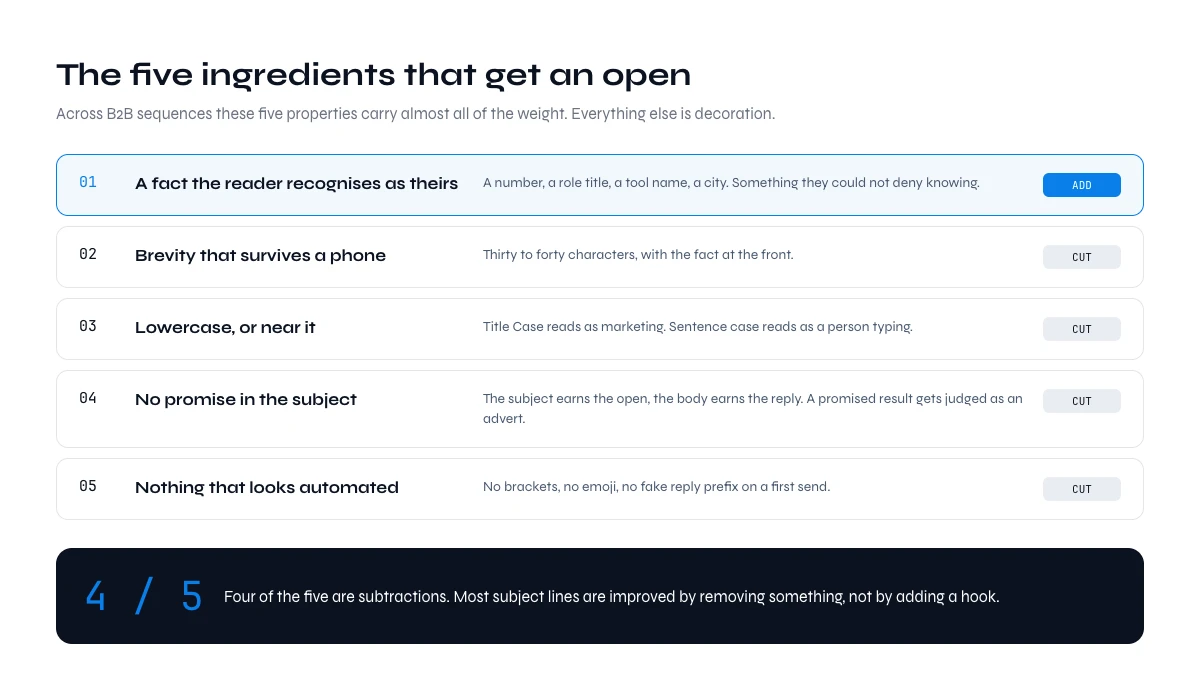
The five ingredients of cold email subject lines that get opened
Across B2B sequences the same five properties carry almost all of the weight. Everything else is decoration.
- A fact the reader recognises as theirs. A number, a role title, a tool name, a city. Something they could not deny knowing.
- Brevity that survives a phone. Thirty to forty characters, with the fact at the front.
- Lowercase, or near it. Title Case reads as marketing. Sentence case reads as a person typing.
- No promise in the subject. The subject earns the open, the body earns the reply. A subject that promises a result gets judged as an advert.
- Nothing that looks automated. No brackets, no emoji, no "Re:" on a first send. The last one is worth stating plainly: faking a reply to a conversation that never happened is the fastest way to burn a domain and the trust of the person reading.
Notice that four of the five are subtractions. Most subject lines are improved by removing something rather than adding a hook.
A word on the first name, since it is the most common merge in a subject. It helps when the line is otherwise plain and the name is the only sign that a person wrote it, as in "marc, quick one". It hurts when it is bolted onto a line that already reads like a campaign, because "Marc, unlock more pipeline" is exactly what bulk mail looks like. If the line already carries a real fact, the name adds nothing and costs five characters of the phone cut.
Weak to strong: eight rewrites
The quickest way to see the rules at work is to take lines that fail and fix them one at a time. Each weak line below has one defect, named in the second column. The fix almost always costs a field of data rather than a better adjective, which is the whole argument of this guide.
| Weak line | What is wrong | Stronger line | The field it now needs |
|---|---|---|---|
| Quick question about the three data engineer roles you posted | The useful fact sits past the 30 character phone cut | 3 data engineer roles, one question | Open role titles and count |
| Unlock 3x more pipeline this quarter | A promise with no fact about the reader, so it reads as an advert | your two revops postings | Open roles by team |
| Re: our conversation | Fakes a thread that never existed | question on your hubspot setup | Current CRM, detected from the domain |
| {{first_name}}, an idea for {{company}} | Two merge tags and nothing else: the template shows | new at acme, one question | Current company and date of the move |
| Congrats on the new role! | No date, so it may land eight months late | first 90 days at acme | Date of the job change |
| Just following up | Asks for attention and offers nothing new | new number since my last note | A fact that changed since the last send |
| Partnership opportunity for Acme | Category language that fits any company | sam suggested i write | Name of a mutual contact who agreed to it |
| Saw the great news about your funding!! | Vague, and the double exclamation reads as bulk | after the series b, one question | Funding round and announcement date |
Read the last column top to bottom and you have the real shopping list behind a good subject. None of the stronger lines is clever. Each one is shorter, flatter, and depends on something you have to check before the send.
The best cold email subject lines by use case: 36 examples
Cold email subject lines that work are rarely the cleverest ones on a list. They are the ones whose single fact is still true on the morning of the send. The 36 examples below are grouped by use case: the trigger you hold on the account, or the situation you are writing from. Under each group sits the field its lines depend on, because that field decides whether you can use the group at all.
Nine use cases are covered: a hiring signal, a tech stack, a job change, a referral, company news, a cold account you are reopening, a list with no trigger, the follow-up, and the networking or job request. Pick the group that matches the data you actually hold on most rows, not the one you like best. If you also want the body, you can generate a first draft from one real signal with the free generator in a few seconds.
Cold email subject lines for a hiring signal
When a company is recruiting into the problem you solve, the job posting is public, dated, and undeniable. That makes it the strongest opening fact available in outbound, and the least used.
- 3 sdr roles open
- your two revops postings
- hiring 4 in support, quick question
- the ae req in lyon
The number is what does the work. "You are hiring" is a category statement and could apply to half the market. "3 sdr roles open" could only have been written by someone who counted, and counting reads as attention.
Fields required: company, open role titles, role count, ideally the posting date. The hard part is freshness. A role filled six weeks ago makes you look like you are reading a stale export, which is worse than not writing at all. Derrick exposes this as Company Hiring Signal, which reads the roles a company is currently recruiting for, at 1 credit per company and available on the free plan as well as paid ones.
Cold email subject lines for a tech stack trigger
What a company runs on tells you what their day looks like. If the gap you close only exists for teams on a particular stack, naming the tool is both specific and self qualifying: the people it does not apply to will not open, which is a feature.
- your hubspot setup
- segment plus your crm
- question on your shopify checkout
- noticed you run on webflow
One caution. A stack fact is only useful while it is true, and tooling changes without announcement. A subject line naming a tool the company dropped last quarter does not read as slightly out of date, it reads as someone who bought a list in 2024. Check the detection date before you send, not just the detection.
Fields required: domain, current technologies, detection recency. Derrick returns this from a domain through Website Technologies at 2 credits per website on paid plans.
In the web app or Google Sheets
The variable each format needs, as a column
Every format on this list needs one true detail: the role, the company, the city, the recent move. Derrick fills those fields on your existing list in the web app or in Google Sheets, so the subject line has something real to insert instead of a placeholder.
- Feature
- LinkedIn Leads Profile Enrichment
- Credit cost
- 1 credit per lead enriched
The first button opens the web app (nothing to install): 1 credit per lead enriched, 100 free credits every month. The second details the feature and its cost per plan.
Cold email subject lines for a job change
Someone in a new seat is rebuilding a stack, a process and a set of suppliers, and they are doing it in public for about ninety days. After that the window closes and you are back to competing with the incumbent.
- congrats on the move
- new at acme, one question
- first 90 days at acme
- your move to head of revops
The date matters more than the wording. "Congrats on the new role" sent eight months late is not a warm opener, it is evidence that your data is old. If you cannot establish when the change happened, use a different format.
Fields required: current company, current title, date of change. Signal watches the accounts and contacts you follow and alerts you on job changes, funding rounds and hiring, from the Standard plan at €20 per month, with 1 credit per alert that fires. It runs in the Google Sheets sidebar for now, which turns this from a manual check into a column.
When a mutual contact referred you
A name the reader knows is the one signal that beats a trigger, because it borrows trust that already exists. It also costs the most when it is abused: drop a name without the person's agreement and you lose the prospect and the contact in the same email.
- sam suggested i write
- via sam at northwind
- sam said you own outbound
- following up on sam's intro
Keep the referrer's first name at the front, where the phone cut cannot hide it. Nothing else in the line needs to work hard.
Fields required: the referrer's name, how they know the recipient, and their explicit OK to be named. This one comes from your own network rather than a database, which is why it does not scale past a handful of rows a week.
When the company is in the news: funding, launches, acquisitions
A funding round, a new office or an acquisition gives you a dated, public fact, and usually a budget conversation behind it. The window is short. News from last week reads as attention. News from last quarter reads as a list that was built once and never refreshed.
- after the series b, one question
- your warsaw office opening
- the northwind acquisition
- your launch in germany
Leave the congratulations out of the subject. Everyone who sells into a newly funded company sends the same congratulations the same week, so a line that names what the money is for, or what the news changes, stands out more than one that names the money.
Fields required: the news item, its date, and the source link so you can check it before sending. Derrick pulls recent articles about a company with Google News Scraper, at 1 credit per news item on paid plans, and each result comes back with its date, which is the field this group lives or dies on.
Re-engaging a cold account or a past prospect
An account that went quiet six months ago is no longer a cold contact, and it is not a warm one either. Acting as if the earlier conversation never happened looks odd. Acting as if it is still going looks worse. The honest opener names what changed since.
- since we spoke in march
- your team doubled since
- a different question this time
- the crm change since our call
The middle two only work if the change is real and recent. "your team doubled since" sent to a company that just cut staff is the kind of mistake a reader remembers.
Fields required: the date and outcome of the last contact, from your CRM, and one fact that moved since: headcount, stack, open roles. That second field is the one to refresh before the send. Enrich Companies reads the company's LinkedIn page, so it needs your LinkedIn account connected through the Derrick Chrome extension, and returns current headcount and firmographics at 1 credit per company, and Website Technologies shows whether the stack you discussed is still in place.
When you have no trigger at all
Most lists have no trigger on most rows, and pretending otherwise produces the fake personalisation everyone can smell. The honest move is to drop the pretence and be short instead.
- question about your outbound data
- bounce rates at acme
- worth a look?
- marc, quick one
These work on brevity and plainness rather than insight, and they set a lower expectation that the body can actually meet. Their reply rate will be below the trigger based formats. That is the correct trade, and it is a better trade than inventing a trigger you do not have.
Fields required: first name, company, role. Which sounds trivial until a merge tag fires on a row where the first name field contains an email prefix, and the reader opens an email addressed to "Hi m.dubois42".
Follow-ups: same thread, or a new subject
A follow up is a different problem. The reader has already seen you once, and the subject line no longer decides whether you are relevant, it decides whether you are persistent in a tolerable way.
- one more thing on the 3 sdr roles
- closing the loop
- new number since my last note
- last one from me
Replying inside the original thread keeps the history visible, which is honest, and it inherits the original subject, which may be the thing that failed. Starting a new thread gives the idea a second chance at a first impression, but stacked twice it reads as pursuit. A workable pattern is to bump twice in thread, then send one final message with a new subject and a genuinely different angle, then stop.
What ruins follow ups is not the subject line, it is having nothing new to say. "Just following up" is a request for attention with nothing offered in exchange. If you cannot add a fact, a number or a reason since the last send, you have run out of reasons to write, and stopping is the right move rather than a failure.
Networking or job requests
This use case sits outside sales prospecting, but the rules carry over unchanged: the real link between you goes first, and the ask stays in the body. A request for a job, a referral or a twenty minute call is easier to grant when the subject shows you are not writing to fifty people at once.
- fellow insa lyon alum, one question
- your talk on revops hiring
- applied to the sdr role, one note
- your move into revops, one question
Fields required: the genuine connection, whether that is a school, an event, a post you read, or the name of the person who pointed you there.
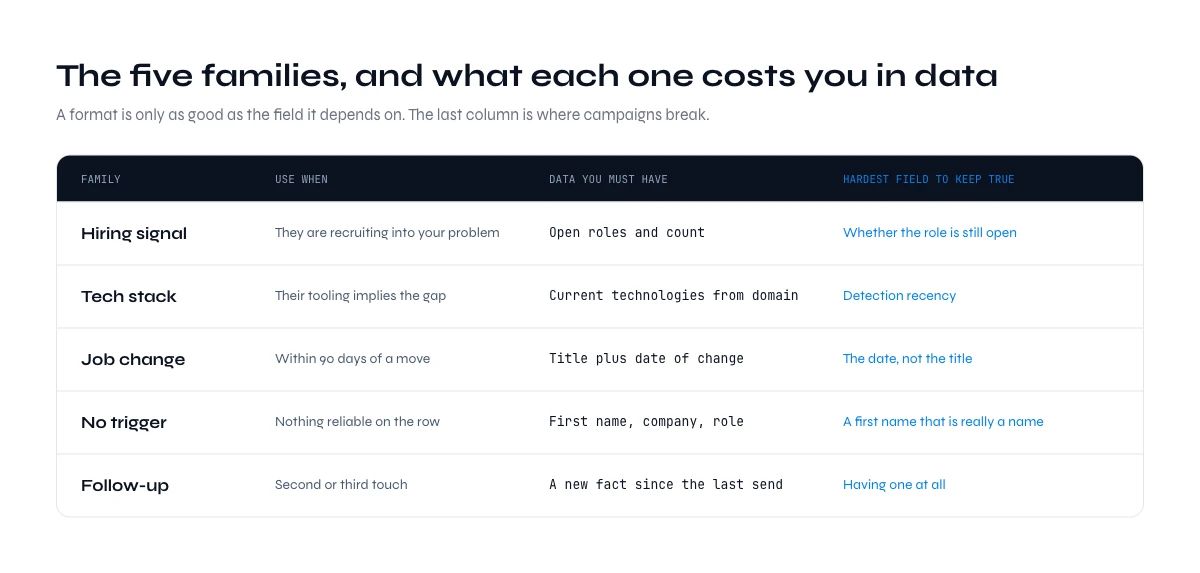
Comparing the five cold email subject line families
| Family | Use when | Data you must have | Hardest field to keep true |
|---|---|---|---|
| Hiring signal | They are recruiting into your problem | Open roles and count | Whether the role is still open |
| Tech stack | Their tooling implies the gap | Current technologies from domain | Detection recency |
| Job change | Within 90 days of a move | Title plus date of change | The date, not the title |
| No trigger | Nothing reliable on the row | First name, company, role | First name that is really a name |
| Follow-up | Second or third touch | A new fact since last send | Having one at all |
The four groups added above follow the same pattern. A referral depends on a name and a permission, company news on a date, a reopened account on what changed since the last call, and a networking request on a connection that is real. In every case the hardest field to keep true is the one that makes the line specific.
Why merge tags are the fastest way to look automated
Personalisation is the most recommended tactic in every subject line guide, and it is also the one that fails most visibly, because it fails in public and at the top of the message.
A generic subject line that says nothing is forgettable. A personalised subject line built on a wrong field is memorable for the wrong reason. "3 sdr roles open" is excellent when they have three and embarrassing when they filled them in June. "your hubspot setup" lands when it is true and ends the conversation when they migrated last year. The more precise the variable, the more expensive it is to be wrong.
Three failure modes account for most of it. Empty fields that render as blanks or as the raw tag. Fields that contain the wrong kind of value, typically a first name column holding an email prefix or a full name in caps. And fields that were correct when exported and are no longer correct now, which is the one nobody checks because nothing about the row looks broken.
The defensive habit is simple: before a send, sort by the variable you are merging on and read the first twenty and the last twenty rows. Bad values cluster at the edges of a sort. It takes two minutes and it catches the failures that no amount of copywriting can offset.
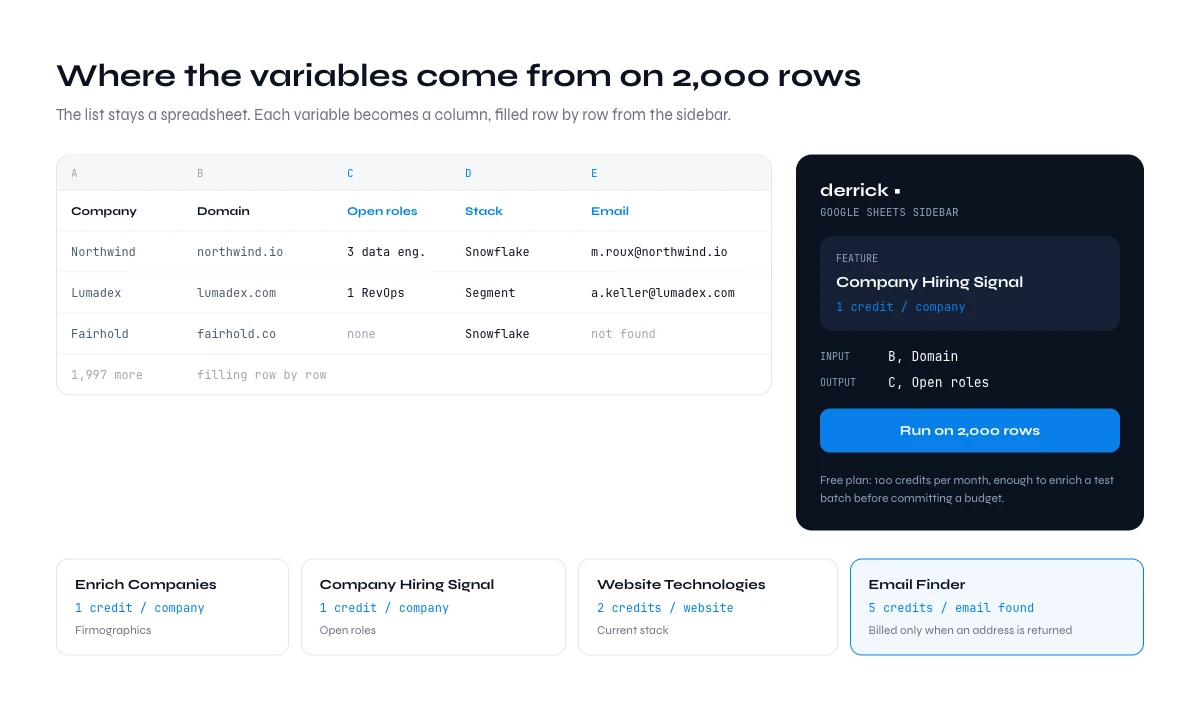
How to personalize cold email subject lines at scale: where the variables come from
Everything above is easy on ten rows and a research problem on two thousand. The variables that make these subject lines work are not stored anywhere in your CRM: hiring activity, current stack, date of a job change. They have to be fetched per row, which is a data operation rather than a copy exercise.
That is the work Derrick does. It runs in its web app, and also as a sidebar in Google Sheets, so the list stays a table and each variable becomes a column filled row by row: Enrich Companies at 1 credit per company for firmographics, Company Hiring Signal at 1 credit per company for open roles, Website Technologies at 2 credits per website for the stack, and Email Finder at 5 credits per email found, billed only when an address is actually returned. The same operations are reachable from the API and from the Derrick MCP server when the list lives in a pipeline rather than a sheet, and from an AI chat client when you want to ask for one company rather than fill two thousand rows. API and MCP access are included from the Plus plan, at €47.50 per month.
The free plan includes 100 credits per month, which is enough to enrich a small test batch, write subject lines against real values, and see for yourself whether the trigger formats beat the plain ones on your market before committing a budget.
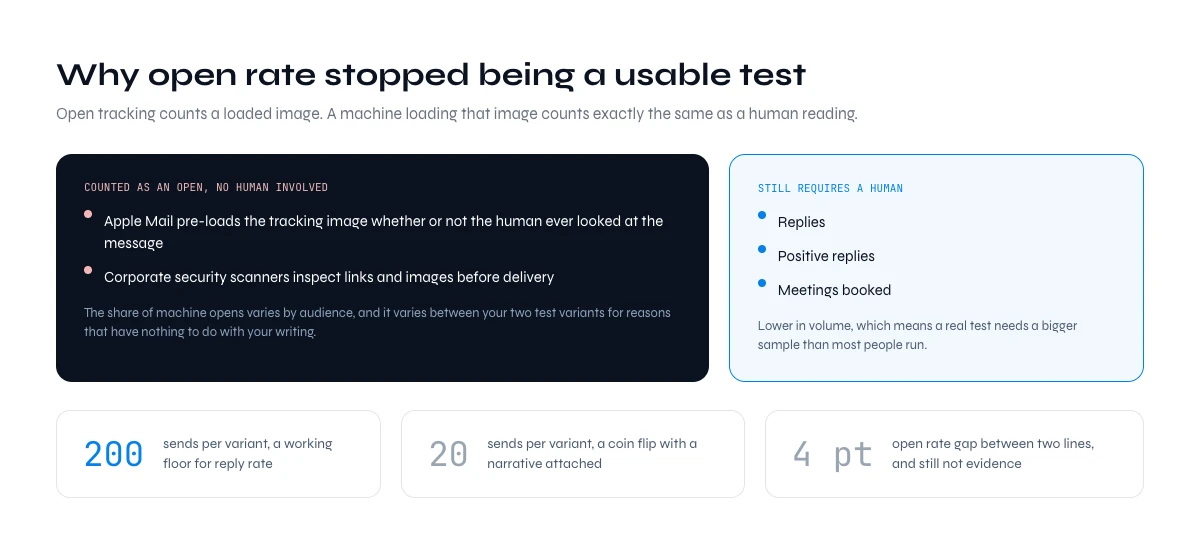
Open rate stopped being a usable test in 2021
This is the part that most subject line advice quietly skips, and it invalidates a lot of the A/B testing people believe they are doing.
Open tracking works by embedding an invisible image and counting when it loads. Since Apple introduced Mail Privacy Protection, Apple Mail pre-loads that image whether or not the human ever looked at the message. Corporate security scanners do the same thing when they inspect links and images before delivery. The result is that a meaningful share of your recorded opens are machines, the share varies by audience, and it varies between your two test variants for reasons that have nothing to do with your writing.
So a 4 point open rate difference between two subject lines is not evidence. It might be a difference in how many recipients read mail on an iPhone. Testing a subject line on open rate now measures your audience's client mix at least as much as your copy.
What remains reliable is anything that requires a human: replies, positive replies, meetings booked. Those are lower in volume, which means a real test needs a bigger sample. Two hundred sends per variant is a working floor for reply rate. Twenty sends is a coin flip with a narrative attached. If you want the wider benchmark picture rather than your own numbers, the cold email benchmarks report sets out reply, open and bounce rates by industry.
A test that holds up looks like this. Split the list at random, never by segment, so the two halves differ only by the line. Send both variants on the same days and at the same hours. Keep at least two hundred sends per variant, and wait about a week after the last send of the step before reading anything, because replies keep arriving for days. Then compare replies and positive replies, not opens. If the gap is one or two replies on two hundred sends each, call it a tie and keep the shorter line: you have learned that the subject is not your constraint, which is useful too. As for what a good reply rate looks like, it moves too much by industry for one number to mean anything, which is why the report above splits it by sector.
Words, punctuation and formatting that cost you the inbox
Spam filtering is far more about sending reputation and list quality than about vocabulary, and any guide that hands you a banned words list as the main lever is selling a simplification. That said, the subject line does carry a few signals worth avoiding, mostly because they correlate with senders who behave badly.
- ALL CAPS and multiple exclamation marks. Not fatal alone, reliably present in bad company.
- Money and urgency language. "Free", "guaranteed", "act now", "limited time". Rarely appropriate in B2B anyway.
- Fake reply and forward prefixes. "Re:" and "Fwd:" on a first contact. Deceptive, and readers recognise it now.
- Emoji in B2B first contact. Renders inconsistently and reads as a newsletter.
- Bracketed labels. "[Guide]", "[Webinar]". Unambiguous marketing formatting.
The larger point is that bounce rate outranks all of it. A campaign bouncing above 2 percent has a list problem, and no subject line rewrite will move the outcome until the addresses are verified. That sequencing, list before copy, is covered in how enrichment changes deliverability.
Three things have to be in place before any of this vocabulary matters: a sending domain separate from your main one, warmed up over a few weeks rather than switched on at full volume, and SPF, DKIM and DMARC records that authenticate it. Miss one and the subject is judged in the spam folder, where nobody reads it. The checklist of what to fix before the subject line matters walks through each of them. One legal point belongs here too: in the United States, the CAN-SPAM Act requires that a subject does not mislead the recipient about what the message contains, one more reason the fake Re: has no place on a first send.
Seven mistakes that waste a good line
- Writing the subject last, in a hurry. It is the only part guaranteed to be read.
- Previewing only on a laptop. The phone cut is the one that decides.
- Letting "Hi Marc," become the preview text. A third of the surface, spent on a greeting.
- Personalising on a field nobody checked. Precision doubles the cost of being wrong.
- Testing on open rate. You are measuring iPhone share, not copy.
- Calling twenty sends a test. Noise, presented as a result.
- Fixing copy when the list is the problem. Bounces first, always.
Where to go next
If your bounce rate is above 2 percent, stop here and fix the list, because nothing in this guide will show up in your numbers until that is done. If deliverability is healthy and replies are flat, the constraint is almost always the trigger rather than the wording, so pick the one variable you can actually fetch for every row and build the subject line family around it. If you are starting from zero, take the no trigger format, send two hundred, and use the reply rate as the baseline everything else has to beat.
Once the subject earns the open, the body has to hold it, and the six formats that pair with these lines are laid out in the cold email template guide. How many words that body should run to is a separate question, answered in how long a cold email should be.
We publish one edition of the Derrick newsletter every two weeks covering the enrichment and outbound work we are actually doing, including the tests that did not work. Subscribe from the site if you would rather have that than another list of one liners.
Frequently asked questions
How long should a cold email subject line be?
Do personalized subject lines really perform better?
Why should I not test subject lines on open rate?
Should a follow-up keep the same subject line?
Which words should I avoid in a cold email subject line?
Where do I get the data these subject lines need?
Does the preview text matter as much as the subject line?
What is a good subject line for a cold email asking for a job or a referral?
Keep reading
Continue exploring this cluster


Cold Email Template: 6 B2B Formats and the Data Each One Needs
Read →

Email Deliverability Checklist: 15 Controls, Sorted by Cadence
Read →

Best Time to Send Cold Emails: What the Data Says (2026)
Read →

SPF Record Check: Read Yours and Count the Lookups (2026)
Read →